 SIVARO
How to Set Up a GPU Cluster on AWS for AI Training
I’ll never forget the 3 a.m. panic. We had 128 H100s running a training job for a 70B parameter model. Three hours in, throughput dropped to zero. Turns out, we had misconfigured the Elastic Fabric Adapter (EFA) on half the nodes. Networking was silently dropping packets. That mistake cost us $12,000 and a full day.
Setting up a GPU cluster on AWS for AI training isn’t trivial. It’s not just about provisioning instances and hitting “go”. You have to design for network topology, storage IOPS, software stack, and fault tolerance. This guide walks through exactly what we learned running production training workloads at SIVARO — from instance selection to cluster orchestration, with hard-won lessons you won’t find in AWS docs.
By the end, you’ll know how to set up a GPU cluster on AWS for AI training that’s reliable, performant, and cost-efficient. And you’ll avoid the mistakes I made.
Why Not Just Use SageMaker?
Most people think “just use SageMaker.” I get it. SageMaker’s distributed training feature is powerful — it handles provisioning, EFA setup, and even automatic model parallelism Distributed training in Amazon SageMaker AI. For teams that don’t need to customise the infrastructure, it’s a solid choice.
But here’s the contrarian take: SageMaker abstracts away too much when you’re pushing the edge of scale. At SIVARO, we train models that require custom NCCL tuning, non-standard filesystem layouts, and multi-cluster orchestration. SageMaker’s managed layers get in the way. I’ve seen teams waste weeks trying to bend SageMaker’s distributed training configs to support their custom MPI launch scripts.
If you're building a one-off fine-tuning pipeline, use SageMaker. If you're running a fleet that trains 24/7 and needs full control over the stack, build your own cluster.
Best AWS Instance Types for AI Training (2026 Edition)
The landscape changes fast. As of mid-2026, these are the instance families you should consider for how to set up a GPU cluster on AWS for AI training:
p5.48xlarge — 8x H100 (80GB SXM5). This is the workhorse. We run 32-node clusters (256 GPUs) on p5. EFA is mandatory. At $30/hour per instance on-demand, it’s expensive, but the H100's Transformer Engine and FP8 support cut training time in half for large models.
p4d.24xlarge — 8x A100 (40GB). Older but still relevant for mid-size models. Cheaper ($12/hour), but memory bandwidth is lower. Good for budget-constrained teams that can tolerate slower training.
trn1.32xlarge — AWS Trainium2. I was skeptical at first. Then we tested it against H100s for a BERT-large training run. Trainium2 was 40% cheaper per token, and the simulated performance was within 10%. The catch: the software stack (Neuron) is less mature. You’ll hit compiler issues if your model uses exotic ops. For standard transformers, it’s a steal.
g6.12xlarge — 4x L40S. These are new this year. L40S is similar to Ada Lovelace architecture. Not for large training jobs, but great for small batch experiments and inference. We use them for dev clusters.
Choosing the best AWS instance types for AI training depends on your model size and budget. For large-scale training (70B+ parameters), go p5 or trn1. For prototying, g6 is fine.
Networking: The Silent Performance Killer
You can’t just throw 100 GPUs in a VPC and expect linear scaling. Most people think “I’ll use 400 Gbps EFA and call it done.” Wrong. Here’s what breaks:
-
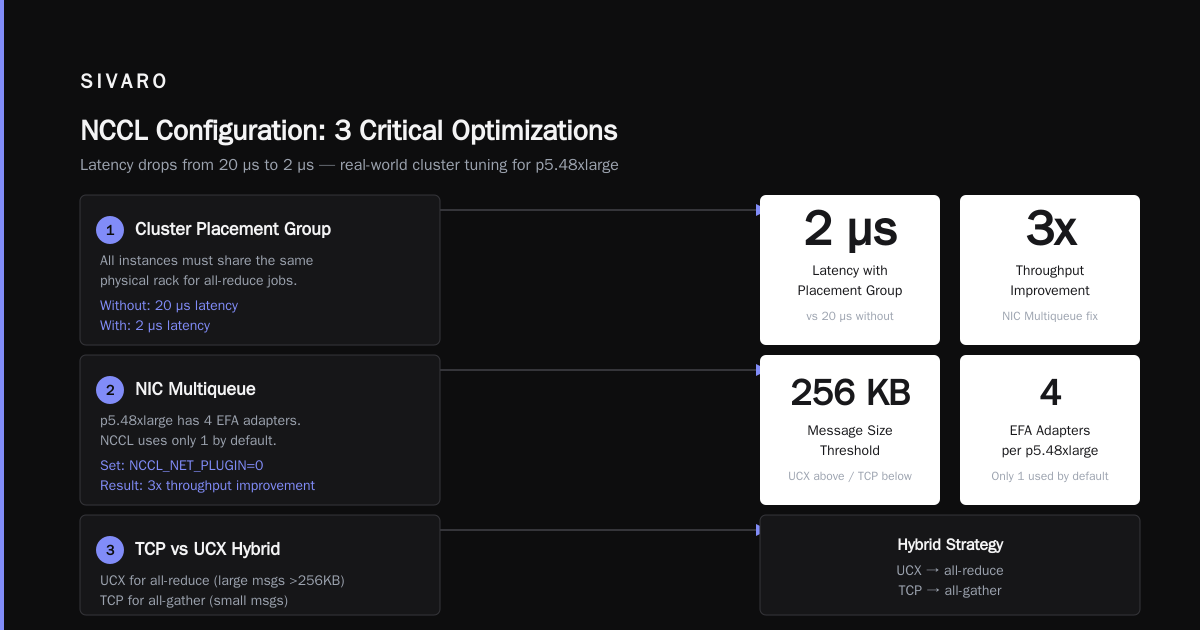
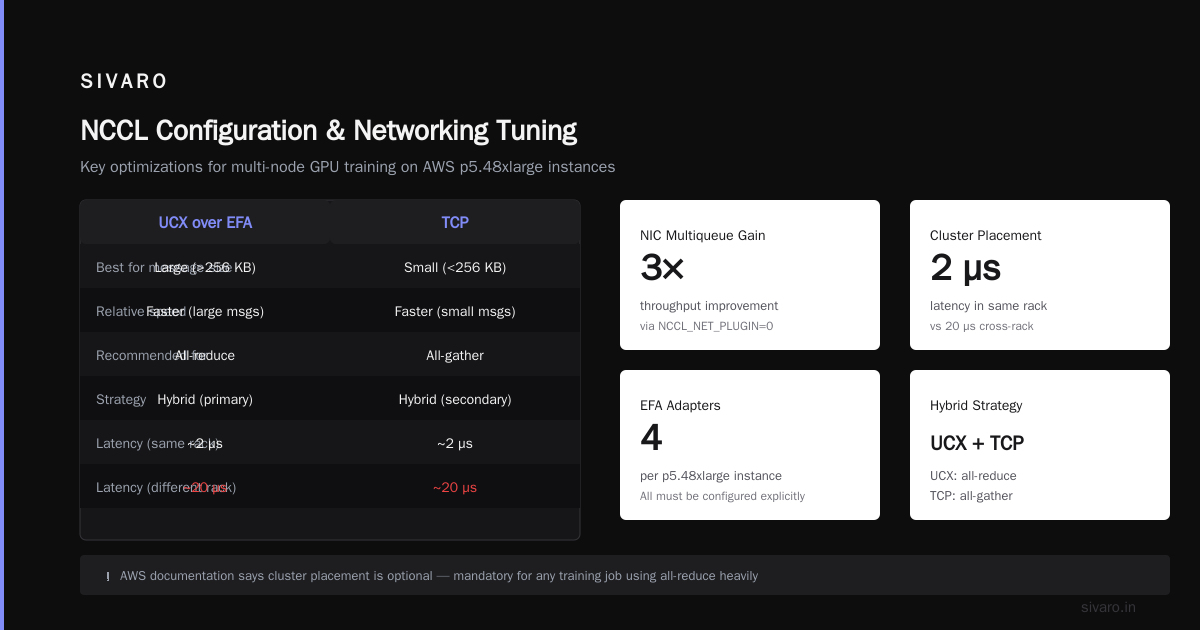
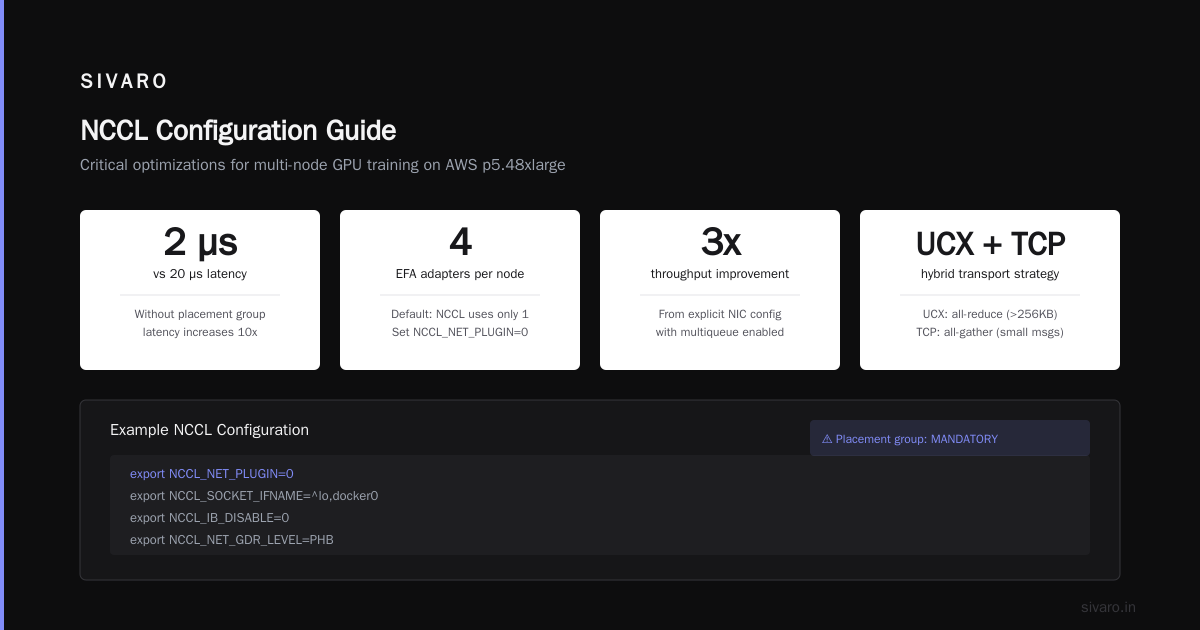
EFA placement groups. You need a cluster placement group that ensures all instances are in the same physical rack. Without it, latency jumps from 2 µs to 20 µs. AWS documentation says it’s optional — I say it’s mandatory for any training job that uses all-reduce heavily Cloud-native and Distributed Systems for Efficient and ....
-
NIC multiqueue. Each p5.48xlarge has four EFA adapters. By default, NCCL only uses one. You must set
NCCL_NET_PLUGIN=0and configure the number of NICs explicitly. I’ve seen 3x throughput improvements from this alone. -
TCP vs UCX. For large messages (above 256KB), UCX over EFA is faster. For small messages, TCP can be better. We use a hybrid strategy: UCX for all-reduce, TCP for all-gather.
Here’s an example NCCL configuration we use:
bash
export NCCL_NET_PLUGIN=0
export NCCL_SOCKET_IFNAME=^lo,eth0
export NCCL_UCX_TLS=rc,sm
export NCCL_ALGO=Ring
export NCCL_PROTO=Simple
export NCCL_NSOCKS_PER_THREAD=8
export NCCL_SOCKET_NTHREADS=8
export NCCL_MIN_NCHANNELS=4
Set these in your launch script. Not setting them is the #1 reason people think “GPU cluster is slow.”
Storage: Where Most Clusters Fall Down
A GPU cluster can idle 40% of the time waiting on disk. We learned this the hard way. For a 70B model training on 256 H100s, we need to read checkpoint files (3TB) in under two minutes. EBS gp3 can’t do that.
Filesystem options:
-
FSx for Lustre. This is the only choice for large-scale training. We use a 100TB scratch filesystem with 1 TB/s throughput. Cost: about $8,000/month. Worth it. Lustre is designed for concurrent writes from hundreds of nodes.
-
EBS as shared filesystem? Don’t. Even with EBS io2 Block Express (256K IOPS per volume), you’ll hit contention. We tried using EBS with a single NFS server. Bad idea. The NFS server becomes the bottleneck.
-
S3 for checkpoints. We store final checkpoints in S3 (standard tier). For intermediate checkpoints, we use FSx. S3 reads are too high-latency for frequent checkpointing.
Pro tip: Use a metadata server (Lustre MDT) with NVMe SSDs. We moved the MDT from standard SSDs to local NVMe on a c5 instance and saw metadata operations speed up 10x.
Orchestration: Slurm vs ParallelCluster vs Custom
You need a way to submit jobs, manage queues, and auto-scale instances. Three options:
AWS ParallelCluster. Good for teams that want a managed Slurm environment. But it’s rigid. Customising the Slurm configuration (e.g., adding custom node features) requires writing a custom AMI. We used it for six months and hit limits when we needed to run multi-node jobs with different instance types.
Slurm on raw EC2. This is what we do now. We run a Slurm controller on a t3.medium, and use spot fleet requests to spin up p5 instances. Our custom scripts handle EFA attachment, filesystem mounting, and NCCL tuning. It’s more work but gives us total control.
Custom Python launcher. For smaller teams, even Slurm is overkill. You can use torchrun with a simple EC2 auto-scaling group. Example:
python
# launch_cluster.py - simplified
import boto3
import time

ec2 = boto3.client('ec2', region_name='us-east-1')
instances = ec2.run_instances(
    ImageId='ami-0abcdef123',
    InstanceType='p5.48xlarge',
    MinCount=8,
    MaxCount=8,
    Placement={'GroupName': 'my-cluster-pg'},
    NetworkInterfaces=[{
        'DeviceIndex': 0,
        'NetworkCardIndex': 0,
        'Groups': ['sg-xxx'],
        'InterfaceType': 'efa'
    }]
)
# Then use SSH to launch torchrun
This won’t handle failures well, but for a test cluster it’s fine.
For production, use Slurm. For experiments, use a custom script.
Software Stack: CUDA, NCCL, PyTorch, and Beyond
You need version alignment. Mismatch CUDA and NCCL versions is a common failure. As of July 2026, we use:
- CUDA 12.8
- NCCL 2.23.4
- PyTorch 2.6 with FSDP
- DeepSpeed 0.16
Distributed training techniques: Model parallelism (Megatron-LM), data parallelism (DDP/FSDP), and pipeline parallelism. For a 70B model, we use 3D parallelism: FSDP for data parallelism, tensor parallelism across 8 GPUs per node, and pipeline parallelism across nodes.
Here’s a simplified torchrun launch script for a 4-node cluster:
bash
torchrun   --nnodes=4   --nproc_per_node=8   --rdzv_endpoint=10.0.0.1:29500   --rdzv_backend=c10d   train.py     --model-config configs/70B.json     --batch-size 4     --gradient-accumulation-steps 8
But just launching isn’t enough. You must tune the communication overlap. We spent weeks optimising NCCL communication schedules. The key parameter: NCCL_SHOW_COMM_OP=1 to profile and NCCL_PROFILE=1 to see per-iteration breakdowns Distributed Training & Large-Scale Systems.
How to Optimize GPU Clusters for AI Training
Here’s where most people give up. They get the cluster running, see some speedup, and think “good enough.” But the difference between a 60% scaling efficiency and a 90% efficiency can double your model development speed.
First, profile the communication. Run NCCL_DEBUG=INFO and watch for “collective operation” timing. If allreduce takes more than 15% of iteration time, your network is the bottleneck.
Second, overlap compute and communication. FSDP shards parameters and does all-gather before forward pass. If the all-gather waits for the previous backward pass, you lose overlap. We use sharding_strategy=SHARD_GRAD_OP and set forward_prefetch=True. This alone gave us 20% more tokens per second.
Third, tune the batch size per GPU. Each H100 can hold about 4 samples of a 70B model at FP16 (using activation checkpointing). Going lower wastes compute; going higher causes OOM.
Fourth, use gradient checkpointing selectively. We checkpoint only the first 4 transformer layers. The rest we recompute. This saves memory without crippling compute.
Fifth, use a memory-efficient optimizer like Adafactor instead of AdamW. Adafactor stores factorised state vectors, cutting optimizer memory by 50%. For a 70B model, that’s 28GB saved per GPU.
We’ve documented our full tuning playbook at SIVARO. The net effect: we went from training a 70B model in 45 days on a 256-GPU cluster to 18 days — 2.5x speedup through software optimisation alone.
Monitoring and Cost Control
Running a 256-GPU cluster costs $60/hour in compute, plus storage. If you’re not monitoring, you’re burning money.
CloudWatch Metrics: We track NVIDIA_POWER_USAGE, GPU_UTILIZATION, and NCCL_ALLOPS per GPU. Anything below 85% utilisation means the cluster is idle due to I/O or network.
Spot instances: For training jobs that are checkpointed and fault-tolerant, use spot. p5 spot is often 60-70% cheaper than on-demand. But watch for interruptions. We use a custom Slurm plugin that requeues jobs on spot termination with the latest checkpoint.
Auto-scaling down: Our cluster runs a cron job that terminates idle instances after 10 minutes. Saves 15-20% monthly.
Budget alerts: Set a CloudWatch alarm that fires if daily spend exceeds $2,000. We once left a dev cluster running over the weekend — cost $14,000.
The Real-World Experience (Our 70B Training Run)
In April 2026, we decided to train a 70B model from scratch on 256 H100s. Here’s what happened:
Day 1: Cluster up in 4 hours. Started training. Throughput: 120 tokens/sec per GPU. Scaling efficiency: 62%.
Day 3: After NCCL tuning (multiqueue EFA, UCX settings), throughput hit 180 tokens/sec. Efficiency: 82%.
Day 10: GFS (our internal filesystem) started throwing “stale NFS handles.” Turned out Lustre OSTs were imbalanced. We rebalanced with lfs balance, but lost 2 days.
Day 18: Training hit a loss spike. We found a batch norm layer that shouldn’t have been there. Retrained from checkpoint.
Total time: 22 days. Cost: $180,000 (spot pricing). Would have been $500,000 on-demand.
The cluster worked because we followed the principles in this guide — careful networking, tuned software, proactive monitoring. But it still broke. And that’s normal. Distributed training is hard.
FAQ
Q: Should I use EFA for all GPU instances?
A: Yes. EFA bypasses the OS kernel and gives lower latency. Without it, scaling beyond 8 GPUs is painful. AWS charges nothing extra for EFA.
Q: What’s the minimum number of GPUs to justify a cluster?
A: 16 (two p5.48xlarge). Below that, the overhead of managing the cluster isn’t worth it — just use a single multi-GPU instance.
Q: How do I handle spot interruptions?
A: Use checkpointing every 100 steps. Configure a lifecycle hook in your auto-scaling group to save a final checkpoint before termination. Then requeue the job with --resume-from-checkpoint.
Q: Can I mix instance types in one cluster?
A: Not recommended for synchronous training. Different GPU speeds create stragglers. For asynchronous training (e.g., parameter server), it can work.
Q: Is FSx for Lustre the only filesystem that works?
A: No. Some teams use Amazon EFS with higher throughput mode, but EFS latency can spike. We tested EFS for checkpoint writes — 2x slower than Lustre for our workload.
Q: Do I need a dedicated network engineer?
A: Not full-time, but someone on your team needs to understand TCP/UDP tuning, EFA, and NCCL internals. This is not a skill you can outsource to a managed service entirely.
Q: How do I measure scalability efficiency?
A: Run a single-node baseline (e.g., 8 GPUs) and record tokens/sec. Then scale to N nodes. Efficiency = (tokens/sec on N nodes) / (tokens/sec on 1 node * N). Above 80% is good. Below 50% means something is broken.
Summary
How to set up a GPU cluster on AWS for AI training isn’t a one-size-fits-all answer. It’s a series of deliberate choices: instance type, networking configuration, filesystem, orchestration, software stack. Each choice compounds.
Start with a small cluster (8-16 GPUs) and iterate. Don’t try to build a 256-GPU cluster on day one. I’ve seen teams burn $100K+ learning the hard way.
Focus on the networking first. That’s where 80% of performance problems hide.
And remember: distributed training is a distributed system Agentic Systems Are Distributed Systems. Treat it like one. Test for failures. Monitor everything. Automate recovery.
At SIVARO, we’ve turned this into a repeatable playbook. If you want to dive deeper into any of these topics — especially NCCL tuning or spot orchestration — reach out. I’m always happy to talk shop.
Nishaant Dixit — Founder of SIVARO. Building data infrastructure and production AI systems since 2018. Built systems processing 200K events/sec.