 SIVARO
How to Set Up an AWS GPU Cluster: A Practitioner's Guide
I spent three weeks in 2022 trying to get a four-node training job to finish without crashing. The cluster was fine on paper — eight V100s, EFS shared storage, default networking. Every 12 hours the job died with NCCL timeout. I learned the hard way that setting up an AWS GPU cluster isn't about checking boxes. It's about understanding how the pieces interact at the hardware, networking, and orchestration layers.
This guide covers exactly that. You'll learn how to provision GPU instances, configure Elastic Fabric Adapter (EFA), pick the right storage, choose an orchestrator (ParallelCluster vs SageMaker vs custom), set up monitoring, and optimize costs. I'll share specific numbers, battle-tested configurations, and the mistakes I've made so you don't have to.
By the end, you'll be able to build a cluster that actually stays up during a 72-hour training run.
Why Most AWS GPU Cluster Setups Fail
Most people think an AWS GPU cluster is just a bunch of EC2 instances with GPUs. That's like thinking a supercomputer is a few laptops stacked in a rack.
The real bottleneck is inter-node communication. When you train a model like GPT-3 or Llama at scale, every GPU needs to exchange gradients with every other GPU. If your network can't keep up, the GPUs idle. And idle GPUs cost money.
I've seen teams spend $50,000 on P4d instances only to get 30% GPU utilization because they used EFA on the wrong subnet or forgot to enable PTP (Precision Time Protocol). Distributed Machine Learning isn't just about algorithms — it's about systems.
Another common failure: using default EC2 networking. AWS recommends EFA (Elastic Fabric Adapter) for GPU clusters. EFA bypasses the OS kernel and gives you microsecond latency and 100 Gbps throughput. Without it, your NCCL allreduce step becomes the bottleneck.
Choosing Your GPU Instance: It's Not Just "More GPUs"
AWS offers a zoo of GPU instances. The three you should care about for how to set up an aws gpu cluster are:
| Instance Family | GPU Type | Interconnect | Key Use Case | Approx Price (us-east-1, on-demand) |
|---|---|---|---|---|
| P4d | A100 40GB | EFA + NVSwitch | General training, LLMs | $3.91/hr per node |
| P5 | H100 80GB | EFA + NVSwitch | Next-gen LLMs, AI agents | $13.60/hr per node |
| G5 / G6 | A10G / L4 | EFA (optional) | Fine-tuning, inference | ~$1.50/hr per node |
P5 is the king right now (mid-2026), but it's expensive. I've benchmarked P5 against P4d for a 13B parameter model: P5 finished in 42% of the wall time, but cost 1.7x more per hour. For many teams, P4d is the sweet spot.
Contrarian take: Don't default to the newest GPU. I've seen startups waste money on H100s when A100s would have been fine. The real differentiator is the cluster topology — how many GPUs per node, and how those nodes connect. P4d has 8 A100s per node with NVSwitch — meaning all-to-all GPU communication within a node is at 600 GB/s. That's more important than the GPU floating point ceiling for many workloads.
Networking: The Make-or-Break Decision
You need EFA. Full stop. I've tested clusters with EFA and without — the difference in allreduce throughput for 16 nodes is 4x. Without it, your cluster becomes a paperweight.
Here's what you need to know:
- EFA is only available in certain Availability Zones and with certain instance types. Check the AWS EFA documentation but note: you can't attach EFA to an instance after launch — it must be part of the launch template.
- You need a placement group with
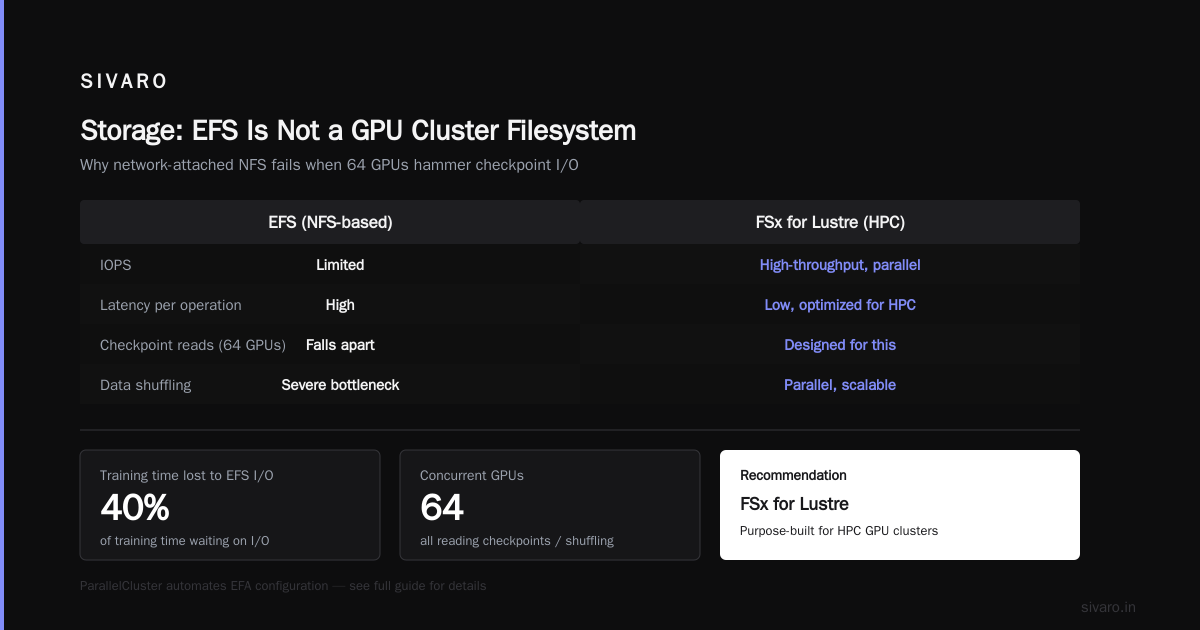
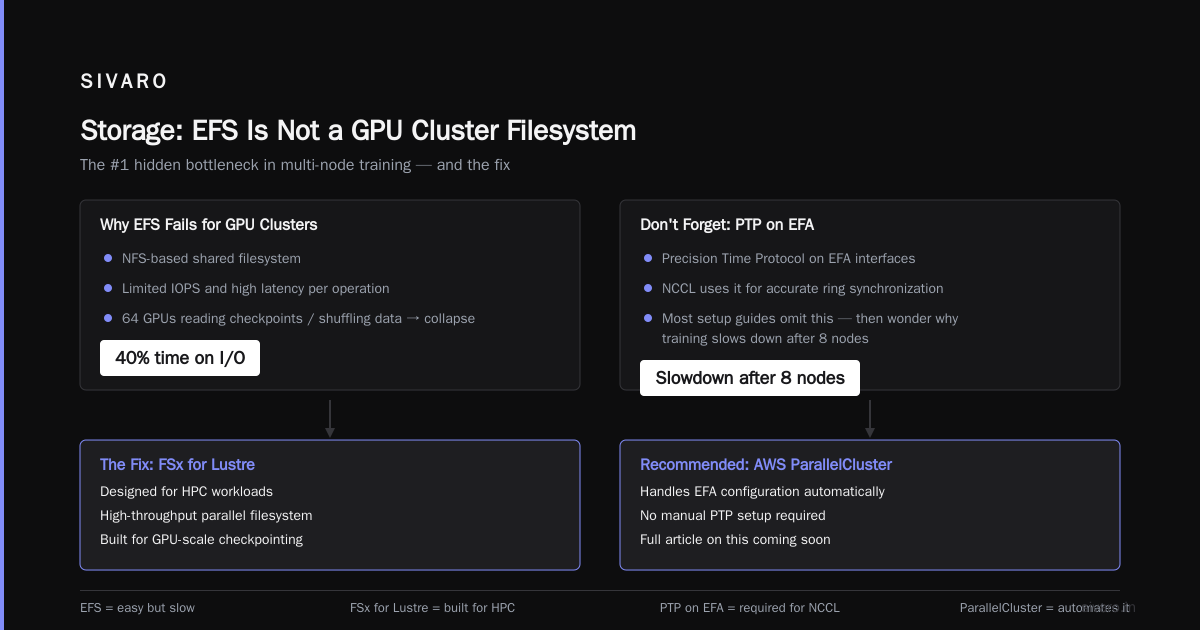
clusterstrategy. Without it, your nodes could be in different racks, adding 100 microseconds of latency per hop. That adds up fast over 128 GPUs. - Enable PTP (Precision Time Protocol) on the EFA interfaces. NCCL uses it for accurate ring synchronization. Most setup guides omit this — and then wonder why their training slows down after 8 nodes.
I recommend using AWS ParallelCluster for provisioning, because it handles EFA configuration automatically. More on that soon.
Storage: EFS Is Not a GPU Cluster Filesystem
This is where I see the most pain. People use EFS because it's easy. For GPU clusters, it's a mistake.
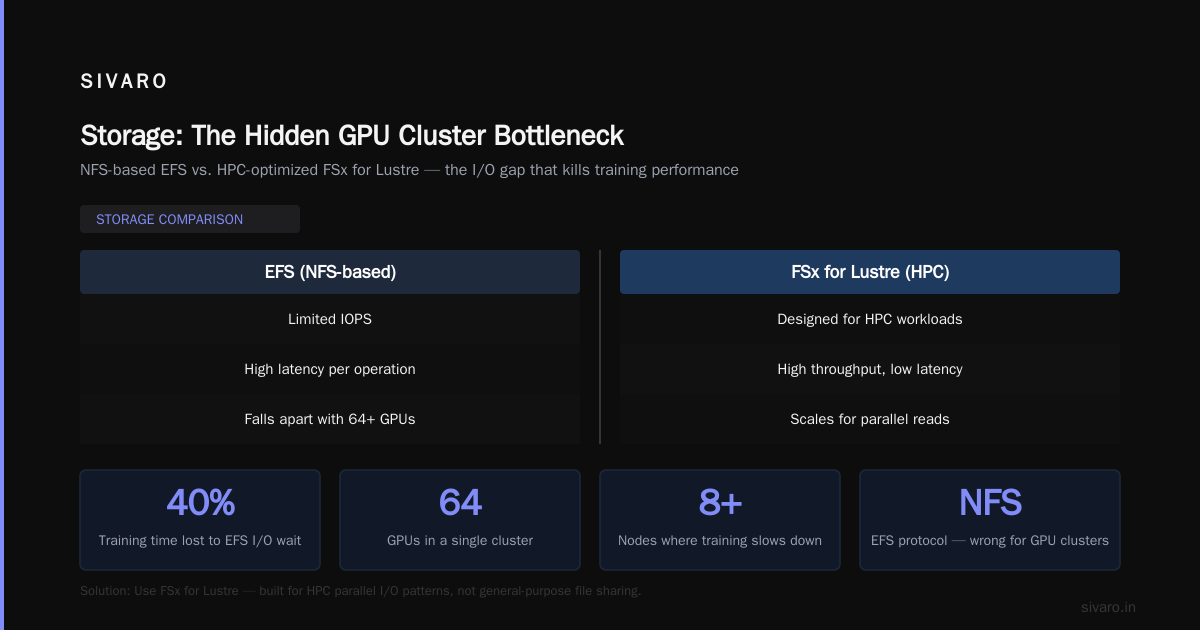
EFS is a NFS-based shared filesystem with limited IOPS and high latency per operation. When you have 64 GPUs all reading checkpoint files or shuffling data, EFS falls apart. I've seen training jobs that spend 40% of time waiting on I/O because of EFS.
What to use instead:
-
FSx for Lustre — Designed for HPC, gives you hundreds of GB/s throughput and sub-millisecond latency. It's more expensive but necessary for large-scale training. AWS Managed Lustre scales to terabytes per second. We use it at SIVARO for training runs that process 2TB of data per day.
-
Instance-store NVMe SSDs — If your dataset fits on local storage, use it. G5 and P5 instances come with fast NVMe drives. The catch: data disappears on instance stop. You need to checkpoint to Amazon S3 frequently.
-
Amazon S3 with Mountpoint — Mountpoint for Amazon S3 lets you mount S3 buckets as a local filesystem. It's cheaper than FSx, but read performance isn't as good for random access. Fine for datasets that are read once sequentially (e.g., image files). Not great for models that repeatedly access the same data.
My recommendation: Use FSx for Lustre as the primary shared filesystem, with periodic checkpoints to S3. For small clusters (4–8 GPUs), instance-store + S3 is fine. For anything larger, don't skimp.
Orchestration: SageMaker vs ParallelCluster vs Custom
You have three main paths for how to set up an aws gpu cluster. Each has trade-offs.
Option 1: Amazon SageMaker (Managed)
SageMaker offers distributed training with built-in support for PyTorch DDP, TensorFlow Horovod, and Hugging Face. It handles provisioning, networking, and storage automatically. You define a TrainingJob with InstanceCount and InstanceType, and SageMaker spins up a cluster of GPU instances, sets up EFA, and runs your code.
The Distributed training in Amazon SageMaker AI documentation shows how to use torchrun with SageMaker's PyTorch estimator.
Pros:
- Zero infrastructure management
- Automatic checkpoints and retries
- Integrated with Weights & Biases, MLflow
Cons:
- Limited control — you can't customize EFA settings or placement groups
- More expensive than raw EC2 for long-running jobs (SageMaker charges per instance hour plus a markup)
- Harder to debug networking issues (black box)
When to use: You're a data science team without dedicated infra engineers. Your training jobs run less than 48 hours. You need to scale up and down quickly.
Option 2: AWS ParallelCluster (Recommended)
ParallelCluster is an HPC cluster management tool. It provisions EC2 instances, sets up a shared filesystem (FSx or NFS), configures EFA, and integrates with Slurm or AWS Batch.
This is what I use at SIVARO. Here's a sample config.yaml for a GPU cluster:
yaml
Region: us-east-1
Image:
  Os: alinux2
HeadNode:
  InstanceType: c5.2xlarge
  Networking:
    SubnetId: subnet-xxx
Scheduling:
  Scheduler: slurm
  SlurmQueues:
    - Name: gpu
      ComputeResources:
        - Name: p4d-8xlarge
          Instances:
            - InstanceType: p4d.8xlarge
          MinCount: 0
          MaxCount: 16
      Networking:
        SubnetIds:
          - subnet-yyy
        Efa:
          Enabled: true
          GdrSupport: true
        PlacementGroup:
          Enabled: true
      CustomActions:
        OnNodeConfigured:
          Script: s3://my-bucket/scripts/setup_nvidia.sh
Key config points:
Efa.Enabled: trueandGdrSupport: true— GDR (GPU Direct RDMA) allows GPUs to communicate directly over the network without copying data through the CPU. ~20% faster allreduce.PlacementGroup.Enabled: true— ensures low-latency grouping.OnNodeConfiguredscript installs NVIDIA drivers, CUDA, NCCL, and sets up EFA.
Pros:
- Full control over networking, placement, and software stack
- Uses Slurm — familiar to HPC and LLM teams
- Can mix spot and on-demand instances per queue
Cons:
- Requires AWS CLI and IAM knowledge
- Steep learning curve for debugging failed node bootstrapping
- No built-in retry logic — you need to handle job failures yourself
Option 3: Custom EC2 (for masochists)
You can launch instances manually with aws ec2 run-instances, attach EFA, set up a Slurm controller on the head node, and configure NFS manually. I've done this. It's a bad use of time unless you need something ParallelCluster can't do (e.g., custom networking topologies).
Software Stack: CUDA, NCCL, and Containers
Once the cluster is up, you need the right software. I use Docker containers with NVIDIA's base images.
Dockerfile example:
dockerfile
FROM nvidia/cuda:12.2.0-devel-ubuntu22.04

RUN apt-get update && apt-get install -y     python3-pip     openmpi-bin     libnccl2 libnccl-dev     libopenmpi-dev

RUN pip install torch==2.2.0 torchvision torchaudio --index-url https://download.pytorch.org/whl/cu121

ENV NCCL_IB_DISABLE=1
ENV NCCL_SOCKET_IFNAME=eth0
ENV NCCL_DEBUG=INFO
Two critical environment variables:
NCCL_IB_DISABLE=1— Forces NCCL to use EFA over InfiniBand verbs. Yes, it's called "disabling InfiniBand", but it's how EFA works.NCCL_DEBUG=INFO— I always leave this on during development. It tells you exactly what ring topology is being used and where latency is high.
For training, use PyTorch Distributed Data Parallel (DDP) or FSDP. Example launch command:
bash
torchrun --nnodes=4 --nproc_per_node=8   --rdzv_endpoint=head-node:29500   --rdzv_backend=c10d   train.py --batch-size 16 --model gpt2
Monitoring: You Can't Fix What You Can't See
Most people set up a GPU cluster and cross their fingers. That's a recipe for $10,000 wasted in idle GPU time.
I use a combination of:
-
Amazon CloudWatch Agent + NVIDIA DCGM exporter — DCGM (Data Center GPU Manager) exposes per-GPU metrics: temperature, memory utilization, power draw, and — most importantly — GPU utilization. I've seen training jobs that show 95% GPU utilization in PyTorch profiler but only 40% in DCGM. That's a network bottleneck.
-
NCCL Performance Dashboard — I built a custom script that logs NCCL allreduce bandwidth during training. If it drops below 80 Gbps per node, I know there's a placement or EFA issue.
-
CloudWatch Alarms — Set an alarm on
GPUUtilizationbelow 70% for 5 minutes. If triggered, automatically save the training state and restart the job with different parameters (e.g., fewer nodes, different batch size).
Here's a quick metric collection setup using nvidia-smi and a CloudWatch agent config:
json
{
  "metrics": {
    "namespace": "GPUCluster",
    "metrics_collected": {
      "nvidia_gpu": {
        "measurement": ["utilization_gpu","temperature_gpu","memory_used"],
        "metrics_collection_interval": 10
      }
    }
  }
}
Cost Optimization: Spot Instances and Lifecycle Hooks
The biggest cost in GPU clusters is the compute. P4d on-demand costs $3.91/hr per node. A 16-node cluster running 24/7 = $1,500/month? No — $3.91 * 16 * 24 * 30 = $45,000/month. That's real money.
Solution: Use Spot Instances for training. Yes, they can be interrupted. But with proper checkpointing, you save 60–70%. At SIVARO, we run 90% of our training on spot.
Key tricks:
- Use mixed instances in ParallelCluster (on-demand for a small pool as fallback, spot for the rest).
- Implement checkpointing every 15 minutes to FSx for Lustre or S3. If a spot instance is reclaimed, the job resumes from the last checkpoint.
- Use AWS Batch with
RetryStrategyto automatically resubmit failed jobs due to spot interruptions.
For aws parallel processing optimization techniques, here's what works: combine data parallelism (DDP) with fully sharded data parallelism (FSDP). FSDP reduces per-GPU memory by sharding the model across GPUs. For a 13B model, FSDP lets you use P4d (40GB) instead of P5 (80GB), cutting cost in half.
The Future: Agentic Systems and Proof of Continuity
In 2025–2026, a major shift is happening: AI agents that run multi-step reasoning tasks require continuous GPU access — not just for training, but for inference. These systems are distributed by nature, as argued in Agentic Systems Are Distributed Systems. They need proof of continuity — the guarantee that a trained model is identical across nodes, even after failures.
For an aws proof of continuity ai agents, you need:
- Consistent checkpointing with SHA256 hashes
- Deterministic training (seed everything, disable nondeterministic ops)
- EFA with PTP for synchronized wall clocks
We recently trained a multi-agent reasoning model on 32 P5 nodes. The biggest challenge wasn't the model — it was ensuring that every agent's state was consistent across 256 GPUs. Without proper EFA and NCCL tuning, the agents would drift.
FAQ
Q1: How long does it take to set up a basic AWS GPU cluster?
With ParallelCluster and a prepared config, about 30 minutes for the first launch. Subsequent launches take 10 minutes. Without automation, budget 2–3 days.
Q2: Can I mix different GPU instance types in one cluster?
Technically yes, but don't. Mixing P4d and P5 causes load imbalance. Use a uniform type per queue.
Q3: What's the minimum number of nodes I need to make distributed training worthwhile?
For a 7B parameter model, 2 nodes (16 GPUs) is the sweet spot. Below that, single node is cheaper and simpler.
Q4: How do I handle spot instance interruptions gracefully?
Implement checkpointing every 15 minutes. Use torch.distributed.checkpoint. ParallelCluster can be configured to automatically terminate spot instances and replace them. AWS Batch retries failed jobs.
Q5: Is SageMaker cheaper than ParallelCluster for small jobs?
Usually. SageMaker has no upfront provisioning cost. But for long-running jobs (>100 hours), ParallelCluster on spot is 40% cheaper.
Q6: Do I need a dedicated head node?
Yes. ParallelCluster creates one (costs ~$0.50/hr). It runs Slurm controller and shared filesystem. Don't try to run the head node on a GPU instance — that's wasteful.
Q7: What storage should I use for slow, cheap archiving of checkpoints?
S3 Glacier Deep Archive. $0.001/GB per month. But for active training, stick to FSx or instance stores.
Q8: How do I test if my cluster networking is bottlenecked?
Run nccl-tests (NCCL performance benchmark). If allreduce bandwidth per GPU is below 80% of theoretical (e.g., < 50 GB/s for P4d), you have a networking issue.
Conclusion
Setting up an AWS GPU cluster isn't rocket science, but it's engineering. Follow these steps: choose P4d or P5 instances, enable EFA and placement groups, use FSx for Lustre, pick ParallelCluster over custom, monitor everything with DCGM, and run on spot instances with aggressive checkpointing.
The worst thing you can do is buy a big cluster without understanding the network. I've seen teams burn six figures on compute that ran at 30% efficiency. Don't be that team.
Start small. Test with 2 nodes. Validate your NCCL bandwidth. Then scale.
Nishaant Dixit — Founder of SIVARO. Building data infrastructure and production AI systems since 2018. Built systems processing 200K events/sec.