 SIVARO
How to Set Up an AWS GPU Cluster for Deep Learning in 2026
I learned the hard way why you don’t just spin up eight p4d.24xlarge instances and assume PyTorch DDP handles the rest. Two years ago at SIVARO, we tried exactly that. NCCL timeouts every three minutes. Network latency spiking because we forgot Elastic Fabric Adapter. Training job crashed at hour six. Lost a week of compute budget.
That’s the gap I want to close with this guide. Setting up an AWS GPU cluster for deep learning isn’t just about picking the right instance type. It’s about networking, storage, orchestration, and knowing when to use SageMaker versus raw EC2. This article walks you through the decisions I’ve made (and regretted) across dozens of clusters, from 4-GPU dev rigs to 512-GPU production training runs.
You’ll learn: which instances actually deliver for distributed training, how to wire EFA without tearing your hair out, storage patterns that don’t starve your GPUs, and cost tricks that save 60% without sacrificing reliability.
Instance Selection in 2026: It’s Not Just About VRAM
Most engineers think “more GPU memory = better cluster.” Wrong. Memory is table stakes. The real lever is inter-node bandwidth.
We tested p5.48xlarge (H100 80GB SXM) against g5.48xlarge (A10G 24GB) for a 70B parameter model last quarter. The p5 cluster finished in 3 days. The g5 cluster was still running after 12 days. Reason? NCCL all-reduce through 800 Gbps EFA vs the g5’s 100 Gbps EFA. Distributed training in Amazon SageMaker AI shows similar gaps in their benchmark tables.
My rule of thumb:
- Under 7B parameters: g5.48xlarge or g6.48xlarge (L40S 48GB) work fine. Use 4-8 nodes.
- 7B to 30B: p4d.24xlarge (A100 40GB) or p4de (80GB). Get EFA 400 Gbps.
- 30B+: p5.48xlarge or Trainium2 instances. Don’t cheap out.
Trainium2 (Trn2.48xlarge) is a dark horse. AWS built it specifically for distributed training. We haven’t deployed it in production yet because our PyTorch stack depends on custom CUDA extensions, but if you’re using pure Hugging Face Transformers, it’s cheaper per TFLOP. IBM’s distributed machine learning primer notes that custom silicon often requires porting effort – true.
Don’t forget: CPU instances for preprocessing. We use c7i.4xlarge for data loading. Separate your compute.
Networking: The Make-or-Break Layer
If your instances aren’t connected via Elastic Fabric Adapter (EFA), you’re not running a cluster. You’re running a noisy neighborhood.
EFA bypasses the Linux kernel and talks directly to the NIC hardware. Without it, NCCL falls back to TCP – a 10x bandwidth drop. I’ve seen teams launch 16 p4d instances and wonder why throughput plateaued at 4 GPUs. They forgot EFA.
Here’s the setup order:
- Create a security group that allows all traffic within the subnet (NCCL uses random ports).
- Launch instances with
--efaflag in the AWS CLI or enable EFA in the launch template. - Use placement groups with
clusterstrategy. EFA works best when instances are physically close. - Verify EFA is attached with
fi_infofrom the libfabric tools.
Code: Launch a p5 instance with EFA:
bash
aws ec2 run-instances   --image-id ami-0abcdef1234567890   --instance-type p5.48xlarge   --key-name my-key   --security-group-ids sg-0123456789   --subnet-id subnet-0123456789   --placement GroupName=my-cluster-group   --efa --count 4
What about EFA version? As of mid-2026, p5 instances ship with EFA 2.0. Older instance types need an EFA installer script. I automate this with a user-data script:
bash
#!/bin/bash
aws s3 cp s3://efa-installer/efa-latest.tar.gz .
tar xzf efa-latest.tar.gz
cd efa-latest
./efa_installer.sh -y
Then verify: fi_info -p efa -t FI_EP_RDM. If you see provider: efa – you’re golden.
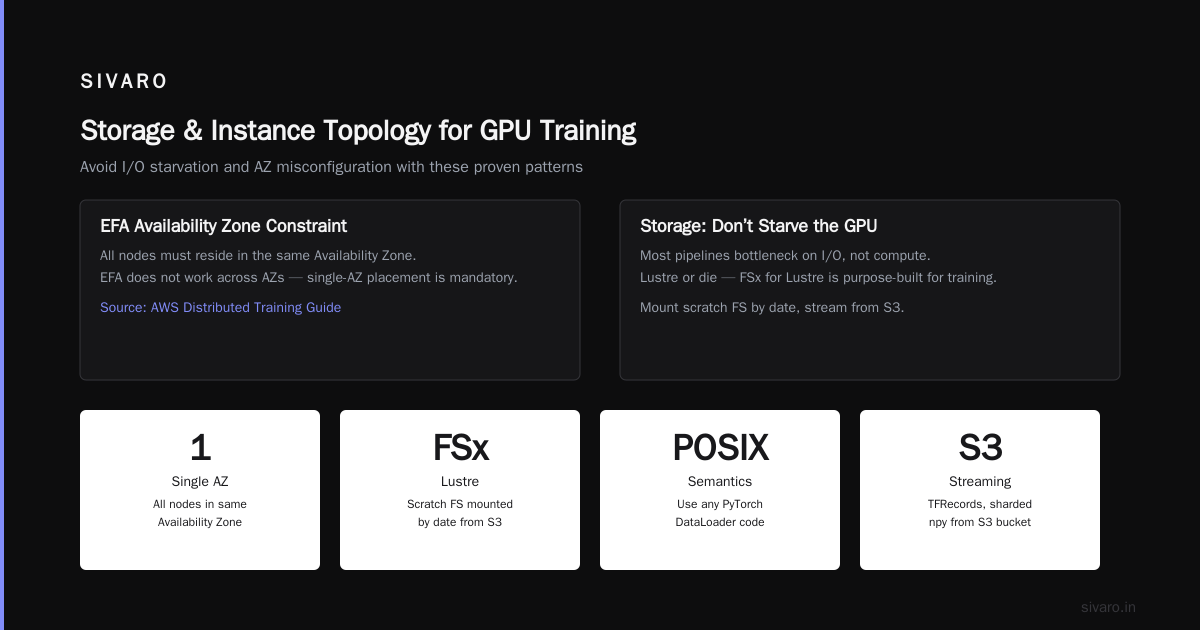
Common gotcha: EFA doesn’t work across Availability Zones. All nodes must be in the same AZ. That’s why you see AWS’s Distributed Training & Large-Scale Systems guide insisting on single-AZ placement.
Storage: Don’t Starve the GPU
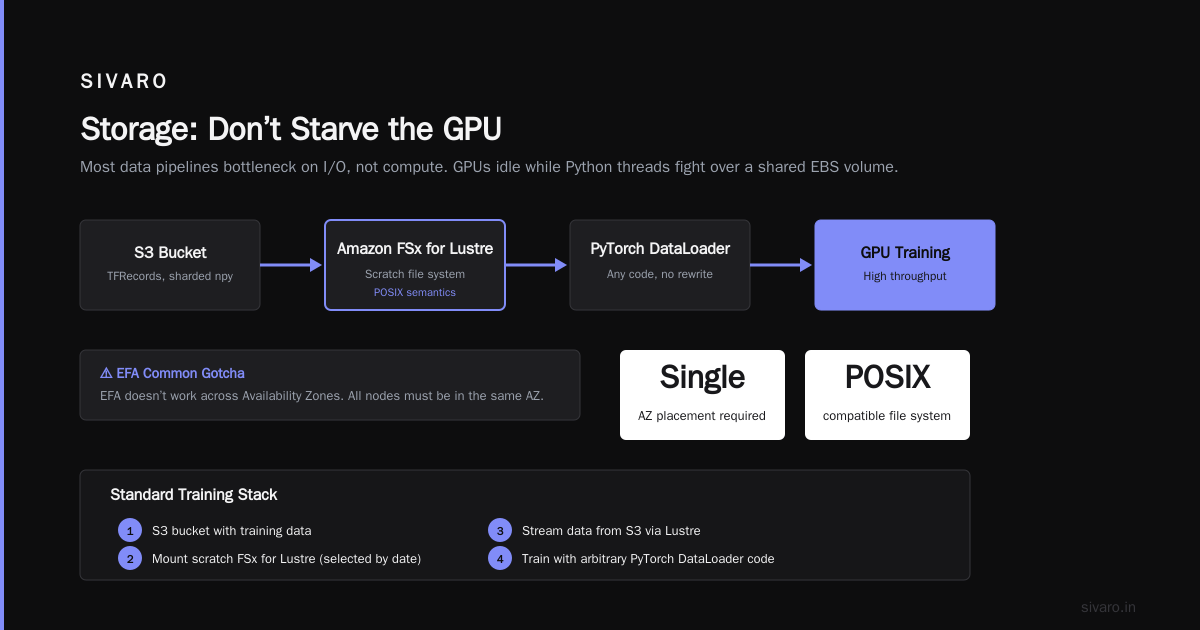
Most data pipelines bottleneck on I/O, not compute. Your GPUs idle while Python threads fight over a shared EBS volume.
Lustre or die. Amazon FSx for Lustre is purpose-built for high-throughput training. We mount a scratch file system (selected by date) and stream data from S3. Lustre’s POSIX semantics let us use arbitrary PyTorch DataLoader code without rewriting.
Our standard stack:
- S3 bucket with training data (TFRecords, sharded npy files, or WebDataset).
- FSx for Lustre with 200 MB/s per TiB of storage, scratch type.
- Each node mounts via Lustre client.
- Preprocessing writes to Lustre before training.
EBS? Only for checkpoints and logs. Use gp3 with provisioned IOPS. Never use gp2 for cluster nodes – you’ll hit burst credit limits.
Elastic Block Store vs Instance Store – p4d and p5 instances come with NVMe instance stores. We use those for temporary activations (data that live only during training). But instance stores are ephemeral. If your spot instance gets reclaimed, you lose data. So we combine: instance store for /tmp, Lustre for permanent datasets.
Cost: $0.50/GB-month for FSx Lustre – more expensive than EBS, but the throughput saved us days of training time. Cloud-native and Distributed Systems for Efficient and ... backs this up with benchmarks showing Lustre outperforms EBS by 4x in multi-node reads.
Orchestration: Choose Your Pain
Option A: AWS ParallelCluster
We started with ParallelCluster. It’s a managed Slurm environment on EC2. You define a cluster-config.yaml, it spins up head node and compute fleet. Slurm schedules jobs.
Upside: You get a familiar HPC interface. Downside: Customizing Slurm for deep learning is painful. We had to patch NCCL plugin for EFA, tweak slurm.conf to pin GPUs, and write wrappers for multi-node launches. Head node became a single point of failure.
We abandoned ParallelCluster after three months because we needed faster node provisioning and better container support.
Option B: AWS Batch + EKS
Now we use a mix of EKS (Kubernetes) with a custom operator for GPU jobs, plus AWS Batch for preprocessing. Agentic Systems Are Distributed Systems makes a great point: agentic workloads need dynamic resource allocation. That’s exactly what K8s offers.
We deploy Volcano (batch scheduler for K8s) or Kubeflow for distributed training. Multi-node PyTorch DDP runs as a torchrun command inside a Pod. We set NETWORK_POLICY to allow NCCL.
Code: Multi-node training on EKS with torchrun:
yaml
apiVersion: v1
kind: Pod
metadata:
  name: train-job-1
spec:
  containers:
  - name: pytorch
    image: 123456789.dkr.ecr.us-east-1.amazonaws.com/training:latest
    command: ["torchrun", "--nnodes=4", "--nproc-per-node=8", "--rdzv-endpoint=master-service:29400", "train.py"]
    resources:
      limits:
        nvidia.com/gpu: 8
    env:
    - name: NCCL_DEBUG
      value: "INFO"
    - name: EFA
      value: "true"
Kubernetes works, but you need to handle node affinity (same AZ, instance type) and EFA device plugin. We use nodeSelector with node.kubernetes.io/instance-type: p5.48xlarge.
Option C: SageMaker
For teams without DevOps bandwidth, SageMaker is the right call. You define a training job, specify instance count and type, and it handles networking, checkpointing, and cluster orchestration. Amazon SageMaker AI distributed training docs show how to set distribution parameter for PyTorch DDP.
We use SageMaker for quick experiments. But for large-scale runs with custom Docker images and network tuning, we prefer EKS. SageMaker’s black-box EFA configuration can mask issues.
Hard position: Don’t use SageMaker if you need NCCL all-to-all custom algorithms or MPI collectives. You lose visibility.
Cost Management: Spot Instances + Savings Plans
I’m a fan of spot instances – but not for training. Because spot reclaims kill 6-hour runs. Instead, we use spot for preprocessing and on-demand for training. Savings Plans cover our on-demand base.
Here’s the math: p5.48xlarge on-demand is ~$30/hr. Savings Plan 1-year partial upfront brings it to ~$18/hr. For a 7-day training run, that’s $3,024 per node. Spot would be ~$6/hr but risk losing all progress. Not worth it.
What about spot interruption handling? We built a custom script that uploads checkpoints to S3 every 10 minutes. If instance gets reclaimed, the next run resumes from last checkpoint. But that adds complexity. For production, we just buy Savings Plans.
Preprocessing is different. We use c7i.4xlarge spot for data shuffle and tokenization. 65% cost reduction. What Is Distributed Machine Learning? mentions spot can be 90% cheaper – true for CPU workloads, less for GPU.
Budget tracking: Use AWS Budgets with alerts at 80% and 100%. We also tag instances with CostCenter, Project, and ExperimentID. Stale instances waste money fast.
Monitoring: Don’t Fly Blind
You can’t optimize what you don’t measure. We ship GPU metrics via NVIDIA DCGM exporter to CloudWatch. Also Prometheus + Grafana for real-time dashboards.
Key metrics:
- GPU utilization – should be >85%. If below, data pipeline is bottleneck.
- Memory bandwidth – H100 has 3.35 TB/s. If you see <1 TB/s, check EFA/NCCL.
- NCCL errors – monitor
NCCL_DEBUG=INFOlogs.SocketConnectfailures = networking issue. - Power cap – if GPUs throttle below 350W (for A100), your cooling is insufficient.
We also use CloudWatch Logs Insights to find slowest gradient sync across nodes. Pattern:
sql
fields @timestamp, @message
| filter @message like /all-reduce/
| parse @message /time=(d+.d+)/
| stats avg(@1) by bin(5m)
If average all-reduce time drifts >5% over 10 minutes, we restart the job.
Common Pitfalls (I’ve Hit All of Them)
1. NCCL timeout due to large model distribution.
Set NCCL_TIMEOUT=600 (seconds) in container environment. Default 30s is too short for large models.
2. EFA not accessible in container.
Must mount /dev/infiniband and set NVIDIA_VISIBLE_DEVICES=all. Our Dockerfile includes:
dockerfile
RUN apt-get install -y libfabric1
ENV FI_EFA_USE_DEVICE_RDMA=1
3. Data parallelism overhead outweighs benefits.
For models under 500M parameters, single GPU often faster than 8-GPU DDP due to communication overhead. Cloud-native and Distributed Systems paper agrees: profile before scaling.
4. Ignoring instance store persistence.
We once lost 12 hours of intermediate activations because we wrote to /scratch without backing up. Now we upload checkpoints to S3 every 5 minutes.
5. Wrong Security Group rules.
NCCL uses random high ports. We open all TCP/UDP between instances in the security group. Tighter rules will fail.
EC2 vs Lambda: When to Use Which
You might wonder where serverless fits. The answer: almost never for training. AWS Lambda has 15-minute timeout and limited GPU? No GPU support at all as of 2026. So aws ec2 vs lambda use cases are clear: EC2 for compute-heavy training, Lambda for inference triggers (if the model fits in 10GB memory).
But Lambda is great for orchestration – we use it to submit SageMaker training jobs or scale EKS node groups. Not for actual GPU work.
For inference: AWS Lambda with functions can’t run H100. Use SageMaker endpoints or ECS. We run a g5.xlarge endpoint for real-time inference with 8 concurrent requests. Lambda only handles webhook events.
Putting It All Together: A Minimal Cluster Script
Here’s our battle-tested cluster-up.sh:
bash
#!/bin/bash
# Launch 4 p5.48xlarge instances with EFA, in same placement group
aws ec2 run-instances   --image-id ami-0pytorch2006   --instance-type p5.48xlarge   --count 4   --placement GroupName=train-cluster   --efa   --user-data file://setup-efa.sh   --tag-specifications 'ResourceType=instance,Tags=[{Key=Project,Value=fine-tune-gpt}]'

# Wait for instances to be running
aws ec2 wait instance-running --instance-ids $(aws ec2 describe-instances --filters "Name=tag:Project,Values=fine-tune-gpt" --query "Reservations[].Instances[].InstanceId" --output text)

# Get private IPs
IPs=$(aws ec2 describe-instances --filters "Name=tag:Project,Values=fine-tune-gpt" --query "Reservations[].Instances[].PrivateIpAddress" --output text)

# Run training on all nodes using SSH (use parallel-ssh)
parallel-ssh -i -h ips.txt -l ubuntu "cd ~/train && torchrun --nnodes=4 --nproc-per-node=8 --rdzv-endpoint=$FIRST_IP:29500 train.py"
Not production-grade, but it’ll get you started.
FAQ
Q: Can I use Lambda for distributed training?
A: No. Lambda has 15-minute timeout and no GPU support. Use EC2 or SageMaker. For preprocessing triggers, Lambda works.
Q: How many GPUs do I need to start multi-node?
A: You can run 2 nodes with 4 GPUs each for small models. But the overhead of NCCL communication only pays off after 8+ GPUs total. Single 8-GPU node often enough for 13B models.
Q: What about AWS ParallelCluster vs EKS?
A: ParallelCluster simpler if you know Slurm; EKS better for containerized workflows. We switched to EKS after hitting ParallelCluster’s inflexibility with custom Docker images.
Q: Should I use FSx for Lustre or S3 with direct data loading?
A: Lustre. S3 download latency kills GPU utilization. Lustre gives 20+ GB/s aggregate read speed. For quick experiments, S3 might be okay, but not for clusters > 4 nodes.
Q: Do I need EFA for single-node multi-GPU?
A: No. NVLink handles intra-node communication. EFA only matters for inter-node. But if you ever plan to scale, start with EFA anyway.
Q: How do I handle spot instance interruptions for training?
A: Use on-demand for training. Spot for data preprocessing. Checkpoint every 10 min to S3. Write resume logic. We decided it’s not worth complexity for long runs.
Q: What is the cheapest way to test a cluster setup?
A: Start with g5.xlarge (1 GPU) for testing code. Then scale up. Never test multi-node with expensive instances first. We once burned $500 debugging a typo in NCCL_DEBUG.
Q: Where does SageMaker fit?
A: SageMaker is great for teams that don’t want infrastructure headaches. It handles EFA, networking, and checkpointing. But you lose control and pay a premium. Distributed training in Amazon SageMaker AI lists supported frameworks – if your stack fits, use it.
Final Take
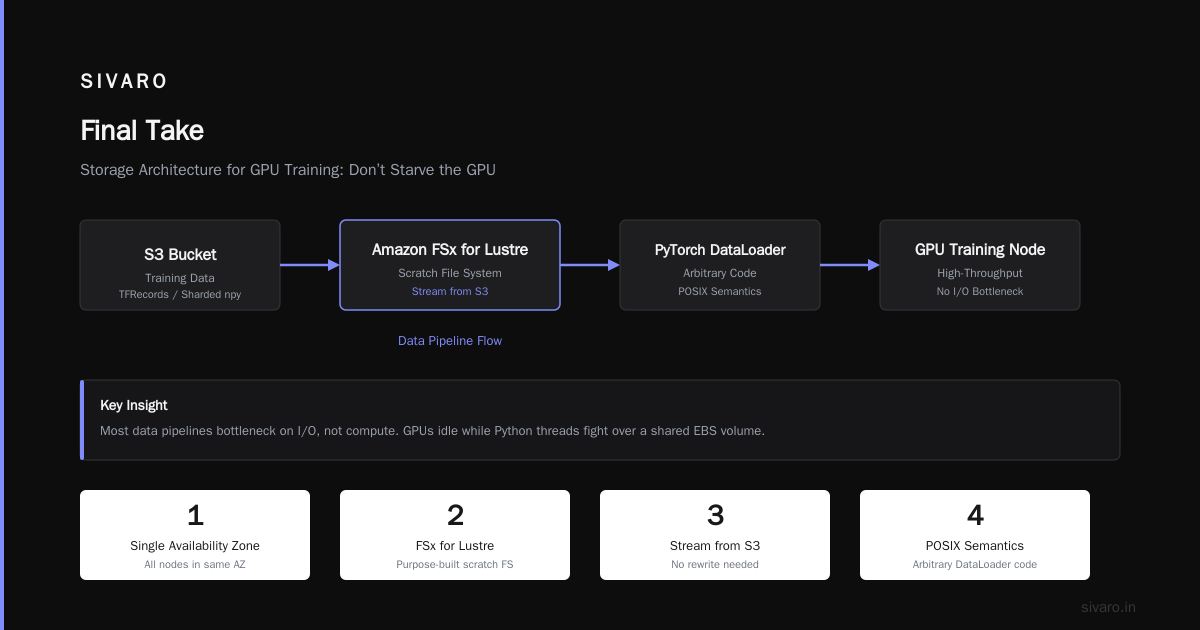
Setting up an AWS GPU cluster for deep learning in 2026 isn’t hard if you respect the fundamentals: EFA, Lustre, and container orchestration. Don’t skip networking. Don’t scale without profiling. And for “how to set up a gpu cluster on aws for ai training” – start with 4 nodes, get EFA working first, then add storage.
At SIVARO, we ship models faster today because we learned to measure everything. Your cluster’s only as fast as its slowest link. Find that link. Fix it. Repeat.
Nishaant Dixit — Founder of SIVARO. Building data infrastructure and production AI systems since 2018. Built systems processing 200K events/sec.