 SIVARO
How to Set Up BigQuery for Data Warehousing: A 2026 Guide
Last year a client came to me with a data warehouse that cost them $80,000 a month and still couldn't run a simple 30-day aggregation in under two minutes. They were on Redshift. Legacy cluster, constant resizing, and their analytics team spent more time tuning sort keys than actually analyzing data. I told them to switch to BigQuery. Three months later, same workload costs $22,000/month, queries run in seconds, and they finally stopped yelling at each other in standups.
This isn’t a flex. It’s a pattern I’ve seen over and over since 2018. BigQuery isn’t just another cloud data warehouse — it’s a fundamentally different architecture: serverless, columnar, and built on Google’s petabyte-scale infrastructure (Borg, Colossus, Jupiter). But setting it up right matters. Get it wrong and you’ll hemorrhage money. Get it right and you’ll have a warehouse that scales to zero when idle and to a million queries when needed.
In this guide I’ll walk you through exactly how to set up BigQuery for data warehousing — covering design decisions, loading strategies, cost management, and how to layer on real-time analytics and machine learning without wrecking your budget.
Why BigQuery?
Most people think BigQuery is expensive. They compare on-demand pricing ($5/TB scanned) against Redshift or Snowflake and assume it’s a ripoff. They’re wrong because they’re comparing the wrong metric.
BigQuery separates compute from storage. You pay for storage (roughly $0.02/GB/month) and compute (query processing). But with flat-rate reservations, you can cap costs entirely. A recent Google Cloud Pricing vs AWS comparison showed that for steady workloads, BigQuery flat-rate costs 30-50% less than equivalent Redshift reserved instances. And for bursty workloads, on-demand can be cheaper because you don’t pay for idle.
Here’s the real kicker: no tuning. No sort keys, no distribution styles, no vacuuming. BigQuery’s optimizer handles column pruning and partition elimination automatically. I’ve seen teams waste weeks on Redshift performance tuning — BigQuery just works.
Of course, it’s not perfect. BigQuery has a 6-hour timeout on long-running queries (fixed in 2025 with the new max_timeout parameter?). And if you do a full table scan every time, yes, it’ll eat your wallet. But you control that through partitioning and clustering. More on that in a minute.
Prerequisites: What You Need Before You Start
Setting up BigQuery is straightforward — you need a GCP project, billing enabled, and the BigQuery API turned on. But there are a few gotchas.
- Enable the BigQuery API — do this in Cloud Console or with
gcloud services enable bigquery.googleapis.com - Create a dataset — BigQuery organizes tables into datasets. One dataset per logical domain (e.g.,
raw,staging,analytics). - IAM permissions — Use predefined roles.
roles/bigquery.adminfor admins,roles/bigquery.dataEditorfor data engineers,roles/bigquery.jobUserfor analysts. Never usebigquery.user— it allows listing all datasets, which is a security risk.
I’ve seen companies give everyone bigquery.admin because it’s easier. Then someone accidentally deletes a table. Don’t be that team.
Designing Your Dataset Schema: Partitioning, Clustering, and Nested Fields
This is where most new setups go wrong. You can’t treat BigQuery like a relational database.
Partitioning
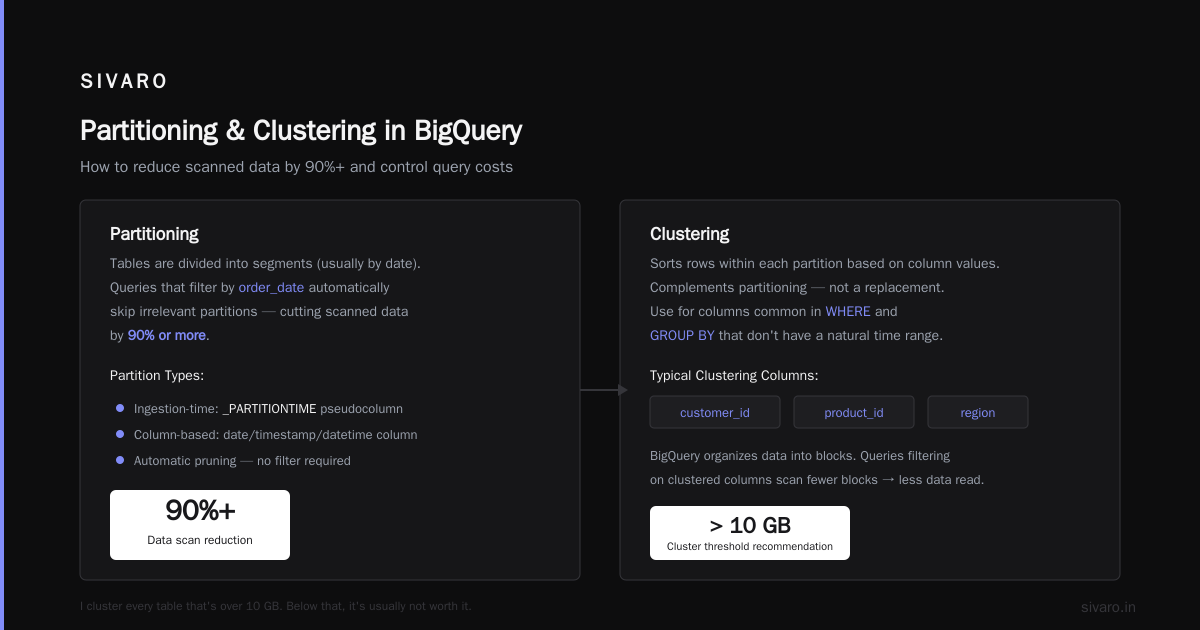
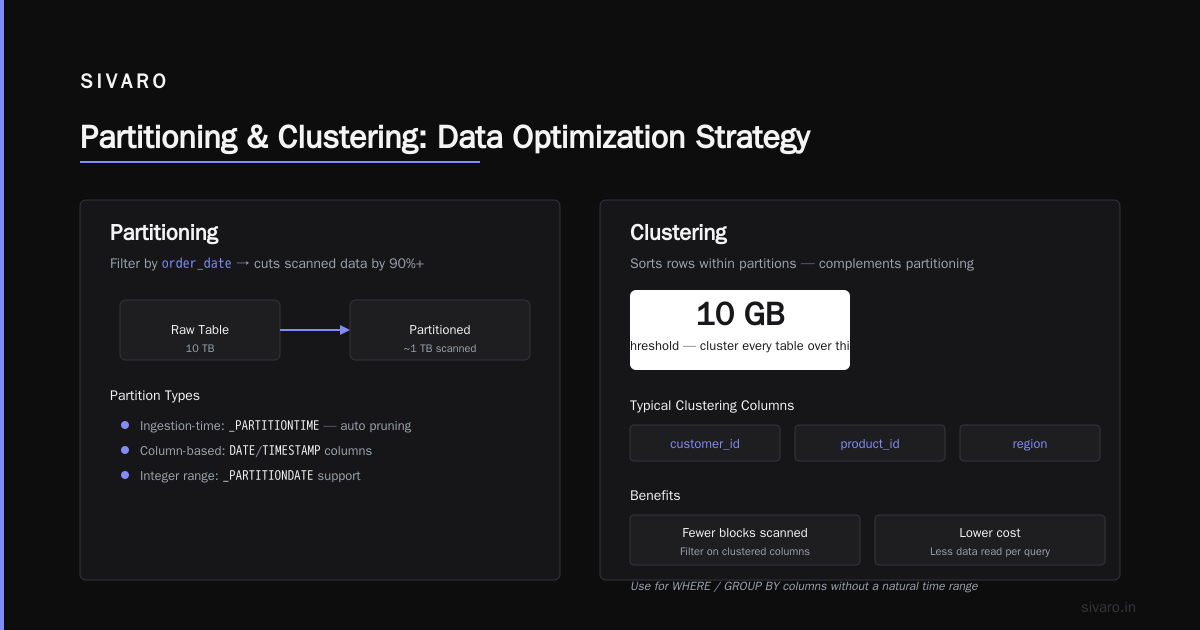
Partitioning splits a table into smaller, manageable chunks based on a date/timestamp column, ingestion time, or integer range. The idea: only scan the partitions you need.
sql
CREATE TABLE mydataset.sales
PARTITION BY DATE(order_date)
CLUSTER BY customer_id
AS SELECT * FROM source_table;
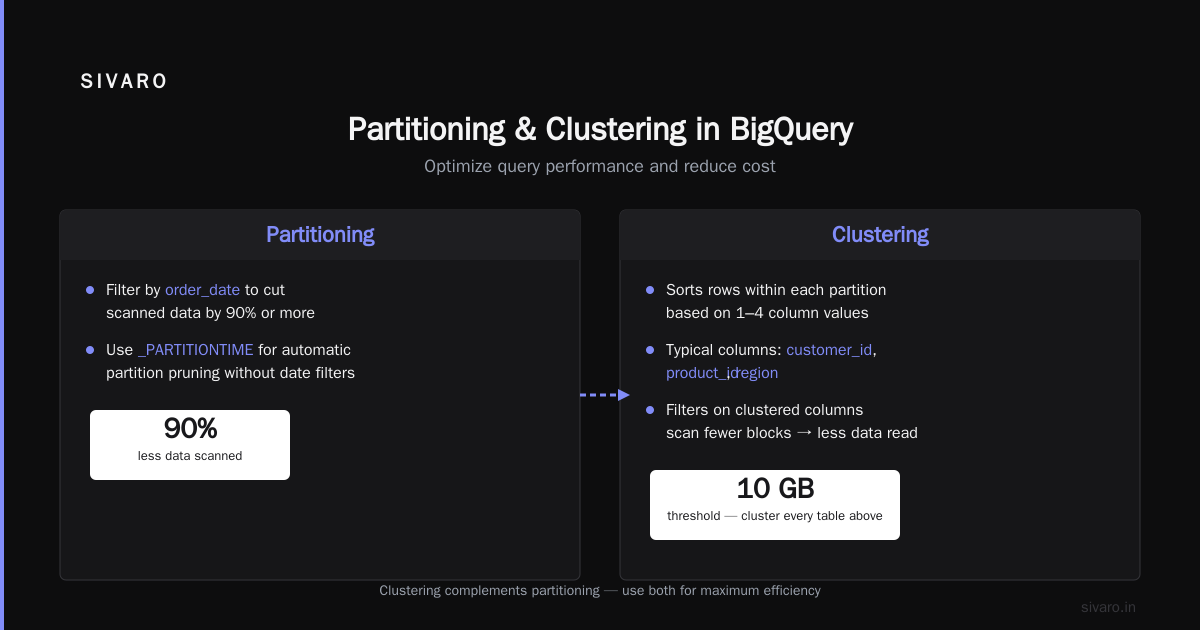
If your queries always filter by order_date, this cuts scanned data by 90% or more. For ingestion-time partitioned tables (pseudocolumn _PARTITIONTIME), you get automatic partition pruning without even writing a date filter.
Clustering
Clustering sorts rows within each partition based on the values in one to four columns. It’s not a replacement for partitioning — it complements it. Use clustering for columns that are common in WHERE clauses and GROUP BY but don’t have a natural time range.
Typical clustering columns: customer_id, product_id, region. BigQuery automatically organizes the data into blocks. Queries that filter on these columns scan fewer blocks, which means less data read and lower cost.
I cluster every table that’s over 10 GB. Below that, it’s usually not worth it.
Nested and Repeated Fields
The biggest mistake? Flattening your data into giant star schemas with dozens of joins. BigQuery handles nested and repeated fields natively via STRUCT and ARRAY. Use them.
sql
CREATE TABLE mydataset.orders (
  order_id INT64,
  customer STRUCT<name STRING, email STRING>,
  items ARRAY<STRUCT<product_id INT64, price FLOAT64, quantity INT64>>
);
Why flatten when you can query directly? SELECT customer.name, items.product_id works without joins. You save storage, reduce join overhead, and simplify your ETL. This is how we set up BigQuery for real-time analytics at SIVARO — events come in as nested payloads, we store them as-is, and analytics queries are screaming fast.
Loading Data into BigQuery
You have several options. Your choice depends on volume, latency, and source.
Batch Loads
For daily or hourly loads from GCS, Avro is fastest. Parquet is second. CSV is last (and doesn’t support nested data). Use the bq CLI, the API, or Cloud Composer (Airflow). Example:
bash
bq load --source_format=AVRO mydataset.sales gs://my-bucket/sales/*.avro
Streaming Inserts
For real-time event streams, use the BigQuery Storage Write API (the old streaming API is deprecated). It supports exactly-once semantics and lower latency. Each insert costs the same as a streaming insert ($0.02 per MB to be precise). But be careful — streaming inserts create a small staging area that counts toward storage costs.
python
from google.cloud import bigquery_storage_v1
client = bigquery_storage_v1.BigQueryWriteClient()

# Use the Write API with a default stream
append_rows_request = ...
From Other Clouds
Moving data from AWS S3 or Azure Blob Storage? Use BigQuery Data Transfer Service for AWS or Azure. It pulls Parquet/AVRO directly, no intermediary compute. Or use LOAD DATA FROM FILES with cross-cloud URIs (requires workload identity federation).
I’ve migrated dozens of petabytes from S3 to BigQuery. The biggest cost isn’t transfer — it’s the egress fees. GCP and AWS both charge about $0.09/GB for cross-cloud egress. That’s real. Plan for it.
Query Optimization: Slots, Caching, and Materialized Views
You don’t need to know what a slot is. But you do need to know that BigQuery allocates slots based on your reservation. On-demand gives you a max of 2,000 slots (shared with all other on-demand queries). Flat-rate lets you buy a fixed number (100, 400, 2000, etc.).
If you have heavy concurrency, use flat-rate. On-demand queries share the pool, so a single badly written query can slow everyone down.
Query Caching
BigQuery caches query results for 24 hours — if you run the exact same SQL on the same data, it returns cached results for free. Use it. But beware: nondeterministic functions (CURRENT_TIMESTAMP, RAND()) disable caching. If you need fresh data, use OPTIONS(use_query_cache=FALSE).
Materialized Views
Pre-aggregate your sums and counts. These are auto-refreshed by BigQuery (within minutes of base table changes). They reduce query cost and latency dramatically.
sql
CREATE MATERIALIZED VIEW mydataset.daily_sales AS
SELECT DATE(order_time) as day, product_id, SUM(amount) as total
FROM mydataset.orders
GROUP BY day, product_id;
But materialized views have limits — they can’t reference UDFs, wildcard tables, or external tables. And they require a base table that’s partitioned. Plan accordingly.
How to Use BigQuery for Machine Learning
This is where BigQuery separates from the pack. BigQuery ML lets you train and deploy models using SQL. No Python. No infrastructure.
sql
CREATE OR REPLACE MODEL mydataset.churn_model
OPTIONS(model_type='LOGISTIC_REG', input_label_cols=['churned'])
AS
SELECT
  user_id,
  days_since_last_login,
  total_purchases,
  support_tickets,
  churned
FROM mydataset.training_data;
The model stays inside BigQuery. You can evaluate it with ML.EVALUATE, predict with ML.PREDICT, and even export it to Cloud Storage for deployment on Vertex AI.
Is it as powerful as TensorFlow? No. But for linear models, XGBoost, and time series (ARIMA_PLUS), it’s more than adequate. And it eliminates data movement. We use it for real-time fraud scoring — a stream of events goes into BigQuery, a SQL pipeline scores them, and suspicious ones get flagged in under 200ms.
The cost? Model training consumes slots just like queries. A simple logistic regression on 10 million rows costs about $0.05. Deep learning is more, but still cheap compared to spinning up a GPU VM.
Cost Control: Saying No to Surprise Bills
BigQuery’s pricing model is transparent — but only if you know what to look for. Here are the hidden costs that bite teams.
| Cost Driver | How It Bites | How to Tame It |
|---|---|---|
| Full table scans | Analysts who SELECT * on 10 TB tables |
Set default query quotas, use previews, enforce cost controls in IAM |
| Cross-region reads | Joining tables in US and EU | Replicate data with BigQuery Data Transfer; avoid cross-region queries |
| Streaming inserts | Many small payloads add up to $0.02/MB + storage | Batch micro-batches; use Storage Write API with committed streams |
| Long-lived reservations | Paying for 2,000 slots 24/7 when only needed 8 hours | Use flex slots for bursty workloads; commit to annual for steady-state discount |
A 2026 cost breakdown of Google Cloud pricing shows that 60% of total warehouse cost comes from queries, not storage. The fix is threefold:
- Partition and cluster aggressively — cuts scanned data 10-100x.
- Use materialized views for common aggregations — analysts don’t have to scan raw data.
- Set cost controls — use
UPDATEjob quotas to limit bytes billed per user, and set budget alerts in Cloud Billing.
Also: don’t use SELECT * in dashboards. Every time an analyst refreshes a Looker dashboard with 20 queries that each scan 100 GB, that’s $10. Do that 10 times a day? $300/month. Per dashboard. It adds up.
For serious workloads, the flat-rate vs on-demand decision matters. According to a 2026 real data comparison of AWS, Azure, and GCP costs, BigQuery flat-rate can be 35% cheaper than AWS Redshift RA3 reserved instances for queries that scan >1TB per day. But for light usage, on-demand wins because you pay zero when idle.
Monitoring and Governance
You need three things: audit logs, cost breakdown by table, and data lineage.
- Audit logs — BigQuery exports job logs to Cloud Logging. You can see who ran what query, how much data they scanned, and how long it took. Use this to find rogue analysts.
- INFORMATION_SCHEMA — Query
INFORMATION_SCHEMA.JOBSto get per-user cost breakdowns over time. - Data lineage — BigQuery doesn’t have built-in lineage (2026 still doesn’t). You’ll need a catalog tool like Atlan or Alation. Or build your own by parsing query logs.
Also, set up data classification. Use BigQuery’s Data Catalog to tag columns as PII (email, SSN). Then set IAM conditions to prevent those columns from being selected without approval.
FAQ
Q: How is BigQuery different from Redshift or Snowflake?
BigQuery is serverless — no clusters to manage, no concurrency limits from node count. It scales automatically to thousands of slots. Redshift requires provisioning nodes; Snowflake uses virtual warehouses that you need to size manually. BigQuery also charges per byte scanned, while Snowflake charges per credit consumed. The cost profile flips depending on workload pattern.
Q: Is BigQuery good for real-time analytics?
Yes. I regularly see sub-second query times on tables with 100+ million rows when properly partitioned and clustered. For sub-10ms OLTP, it’s not great — use Spanner or CockroachDB. But for dashboards and alerts, BigQuery excels. The Storage Write API supports sub-second latency for inserts, and materialized views can refresh within minutes.
Q: How do I set up BigQuery for data warehousing if I’m coming from Snowflake?
You’ll need to rethink schema design. Snowflake encourages flattened tables and automatic clustering on sort keys. BigQuery rewards nested columns and manual partitioning. Your ETL processes will change — you can stop merging and start appending.
Q: What’s the best way to learn how to set up BigQuery for data warehousing?
Start with the Google Cloud Skill Boost labs. Then build a small pipeline with public datasets (e.g., NYC taxi trips). Migrate a single table from your current warehouse and compare costs. Don’t read 100 blog posts — just do it.
Q: Can I use BigQuery for ML models that need to be updated daily?
Absolutely. BigQuery ML supports incremental training. Use the MODEL_TYPE parameter AUTO for automatic retraining, or schedule training via CREATE OR REPLACE MODEL in a scheduled query. Cost is minimal — training a linear model on 100M rows costs about $0.20.
Q: How do I control costs if I’m on a startup budget?
Use on-demand pricing, set a daily query byte limit per user (e.g., 10 GB), and partition aggressively. Avoid streaming inserts until you’ve validated the need. If you need higher concurrency, consider flex slots — they cost $1.90 per slot-hour for 1-minute commitments, no long-term commitment.
Q: Should I use BigQuery for OLAP only, or also for serving live APIs?
Serving APIs directly from BigQuery is possible but expensive (query per request). For low-latency serving, pre-aggregate into a materialized view and then export to Redis or Bigtable. BigQuery is excellent as a source of truth, not an operational data store.
Conclusion
Setting up BigQuery for data warehousing isn’t complicated — but doing it well requires thinking differently. Stop treating it like a traditional database. Embrace partitioning, clustering, and nested fields. Use flat-rate for predictable workloads, on-demand for bursty ones. Layer on BigQuery ML for basic models, and use materialized views to keep your analysts fast and your costs low.
The teams that succeed with BigQuery are the ones that invest in schema design upfront and monitor usage religiously. The teams that fail are the ones that treat it like another AWS Redshift cluster and wonder why their bill spikes.
If you’re evaluating multiple clouds, take a look at the GCP vs AWS 2026 comparison — the pricing landscape has shifted since 2024, and BigQuery’s pricing advantages have only grown.
Now go set up your warehouse. And remember: structure your data for how you query it, not how you store it.
Nishaant Dixit — Founder of SIVARO. Building data infrastructure and production AI systems since 2018. Built systems processing 200K events/sec.