 SIVARO
How to Use BigQuery for Data Warehousing in 2026
I remember the call clearly. A startup CTO, frustrated. Their Redshift cluster kept failing during peak hours. They’d tried everything — resizing, vacuuming, redesigning distribution keys. Nothing worked. I walked them through a simple POC on BigQuery. Four hours later, their entire nightly ETL ran in 22 minutes. The bill? Less than the cost of two engineer-hours patching Redshift.
That’s BigQuery. Not just a data warehouse — a serverless columnar store that separates compute from storage. You pay for queries and storage separately. No clusters to manage. No nodes to resize. It’s been around since 2010, but in 2026, with slotted reservations, BigLake, and BI Engine, it’s a different beast.
This guide walks you through how to use BigQuery for data warehousing — from schema design to cost control to production patterns. I’ve been building on this platform since 2018. Some lessons cost me real money. I’ll share those too.
Why BigQuery Over the Alternatives?
Most people think any cloud warehouse works the same. They’re wrong. Redshift forces you to pick a cluster size upfront. Snowflake scales but hits you with credit-burning nightmares. BigQuery? You don’t provision anything. Queries run. You get billed per TB scanned.
In 2026, the cloud pricing wars are intense. Google Cloud Pricing 2026: Cost Breakdown & Hidden Costs shows BigQuery’s flat-rate slots can beat Snowflake by 40% for steady workloads. But here’s the kicker — BigQuery’s on-demand pricing is brutal if you query full tables every time. I’ve seen monthly bills hit $50k from a single developer running SELECT * on a 10TB table every hour.
Cloud Pricing Comparison 2026: AWS, Azure, GCP, Oracle puts BigQuery’s storage at $0.02/GB/month for active data and $0.01 for long-term. Compare that to Redshift’s $0.025 plus reserved instance costs. For most startups, BigQuery wins on storage alone.
But there’s a catch — the ecosystem lock-in. GCP vs AWS 2026 | Which Cloud Platform Is Better? points out that BigQuery integrates with GCP’s data stack (Dataflow, Vertex AI, Pub/Sub). If you’re already on AWS, moving data is a tax. I’ve helped teams bridge it using BigQuery Omni — but you pay cross-cloud egress.
Here’s my take: if you’re greenfield, go BigQuery. If you’re migrating from Redshift, the effort pays off in 6 months.
Setting Up Your Warehouse – The Right Way
BigQuery organizes data into projects, datasets, and tables. Each dataset lives in a region. Pick your region carefully — you can’t move a dataset later without a full copy.
When I set up warehouses, I create separate datasets for raw, staging, and production. Raw data stays immutable. Staging gets transformed. Production is what your dashboards and ML models query.
Pro tip: Use data catalog tags to classify PII. BigQuery now supports column-level access control. I learned this after a client accidentally exposed customer emails in a BI tool.
Here’s a minimal setup:
bq mk --dataset my_project:raw_data
bq mk --dataset my_project:staging
bq mk --dataset my_project:prod
Set default table expiration on raw datasets to 90 days. Storage is cheap, but stale data isn’t.
Schema Design for BigQuery
Most people bring their relational schema from Postgres. They shove it into BigQuery as flat tables. Then they wonder why queries cost $200.
BigQuery shines with nested and repeated fields. Instead of joining orders and order_items on every query, store items as a REPEATED struct inside the order row.
Example table definition:
sql
CREATE TABLE my_project.prod.orders (
  order_id STRING NOT NULL,
  customer_id STRING,
  order_date DATE,
  total_amount FLOAT64,
  items ARRAY<STRUCT<
    product_id STRING,
    quantity INT64,
    price FLOAT64
  >>,
  shipping_address STRUCT<
    street STRING,
    city STRING,
    zip STRING
  >
)
PARTITION BY order_date
CLUSTER BY customer_id
OPTIONS (
  partition_expiration_days = 365
);
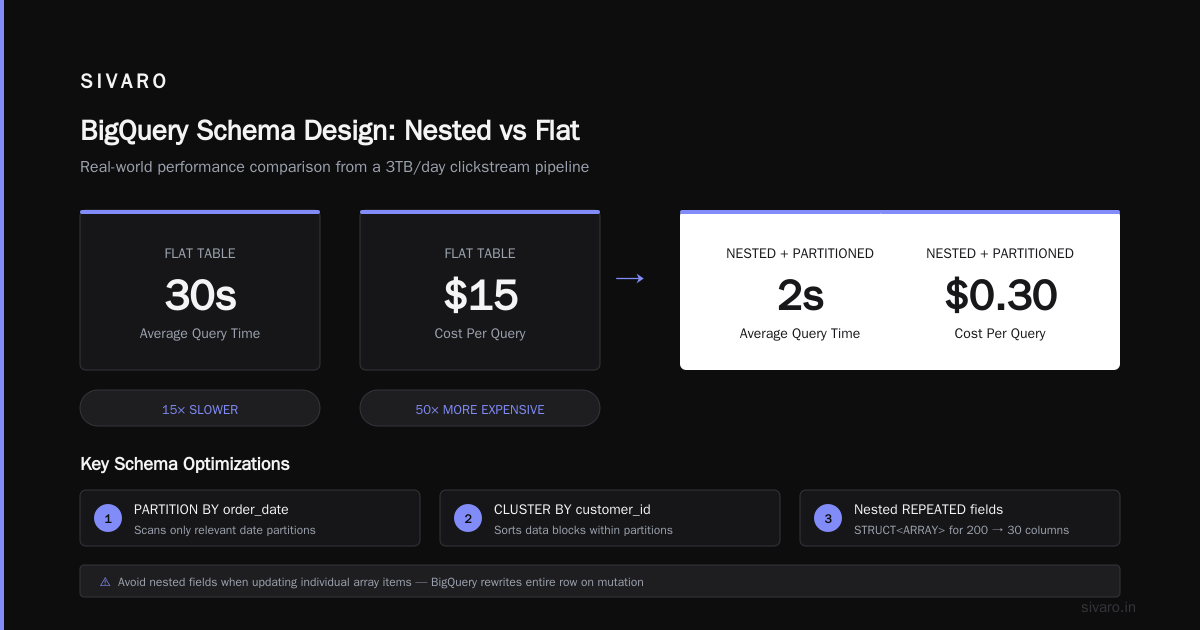
Partitioning by date and clustering by customer_id is the bread and butter. Queries filtering on date only scan the relevant partitions. Clustering sorts data within partitions, so queries filtering on customer_id skip blocks.
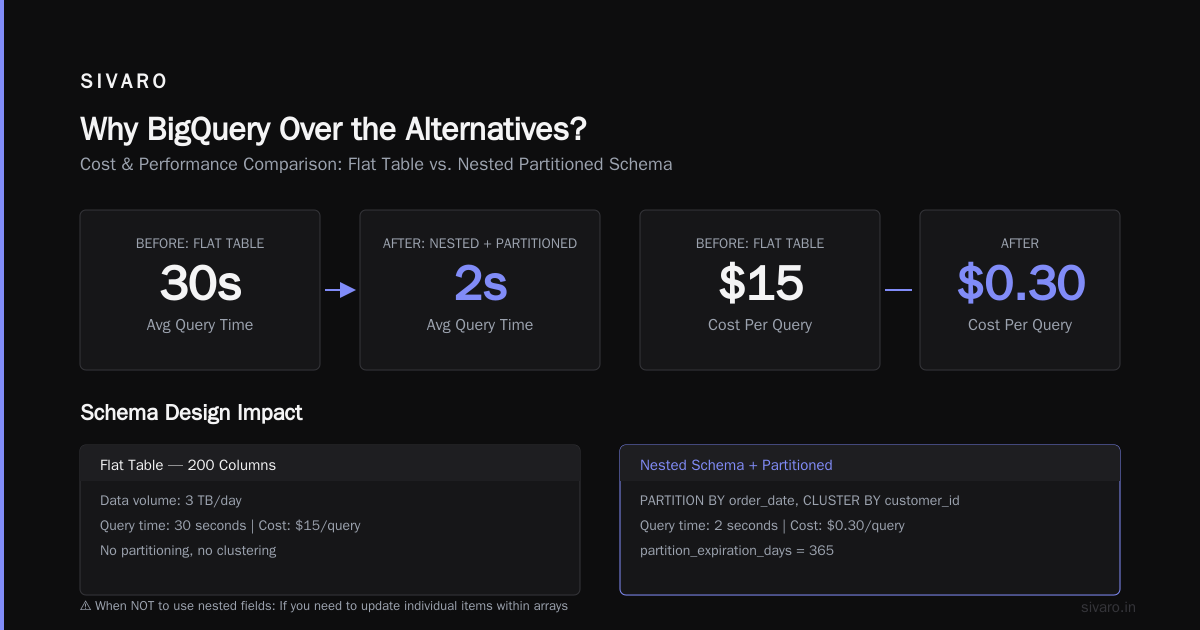
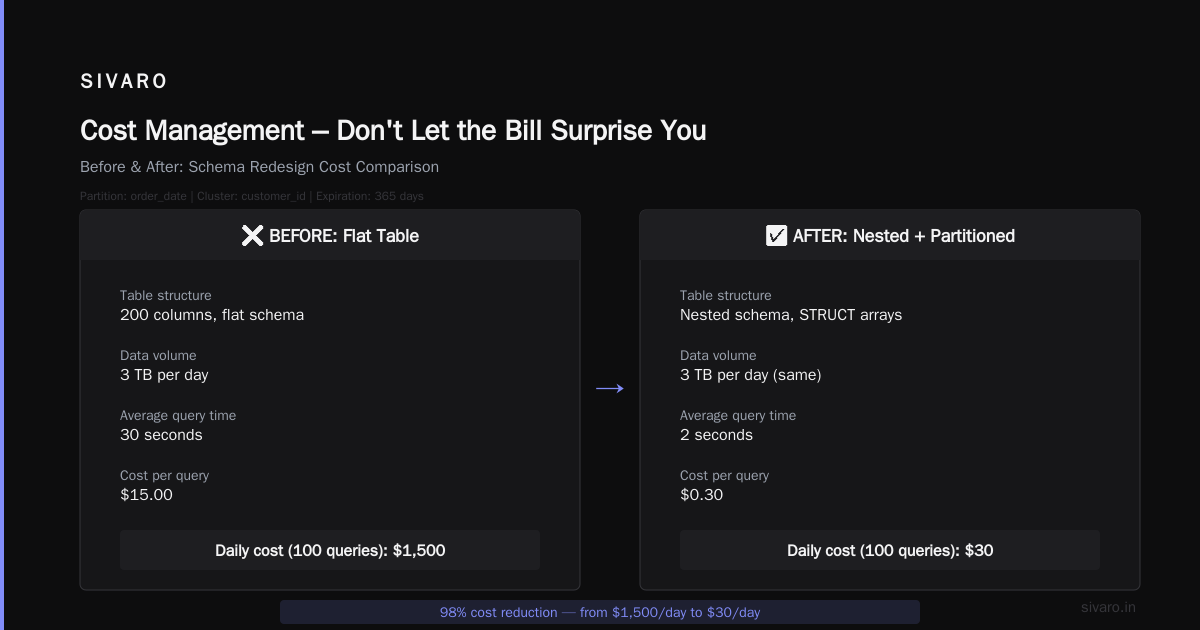
I once had a client storing clickstream data as a flat table with 200 columns. Total data: 3TB/day. Queries took 30 seconds and cost $15 each. After redesigning into a nested schema with partitioning, average query time dropped to 2 seconds. Cost per query: $0.30.
When NOT to use nested fields: If you need to update individual items within arrays. BigQuery doesn’t support partial updates on nested elements — you must rewrite the entire row. For frequently mutated data, keep it flat and use clustering.
Loading Data – Batch, Streaming, and the Gotchas
You have three main paths: batch load, streaming insert, or external table.
Batch load is free (no query costs) but takes a few seconds for small files. Use bq load or the console. For production pipelines, I use Dataflow with auto-scaling — it writes to BigQuery and handles retries.
Streaming insert costs $0.01 per 200 MB of data — expensive at scale. Plus, there’s a 99.99% durability SLA per row, but duplicate rows can appear if you retry. I’ve seen clients double-count revenue because their streaming pipeline issued retries. Solution: use INSERT_ID for deduplication.
External tables let you query CSV/Parquet files in GCS without loading them. Great for ad-hoc analysis, terrible for performance. Queries against external tables are slower and cost more per TB scanned because you can’t use partitioning or clustering.
Most teams use batch loads for historical data and streaming for real-time events. My rule: if latency under 5 minutes is acceptable, batch every 15 minutes. Stream only for sub-minute requirements.
Cost trap: Loading data via the API triggers query jobs if you use jobs.insert with CONFIG.QUERY. Always use jobs.load for batch.
Query Performance – What Actually Matters
BigQuery auto-scales query resources. But you can’t control them — unless you buy slots.
Slots are units of compute. On-demand gives you up to 2000 slots automatically. If your query needs more, it waits. In 2026, I see companies hitting slot starvation during peak hours.
Three performance levers:
- Partition and cluster everything. Already covered, but I’ll repeat: a query scanning one partition instead of a year saves 365x cost.
- Use materialized views for aggregations. BigQuery maintains them automatically. I have a view that pre-sums daily revenue by product category. Queries hit the view instead of scanning raw orders.
- Avoid
SELECT *. Specify columns. I once audited a client’s query history — 40% of all queries wereSELECT * LIMIT 1000. Easy $5k/month waste.
Example of efficient query:
sql
SELECT
  DATE_TRUNC(order_date, MONTH) as month,
  customer_tier,
  SUM(total_amount) as revenue
FROM my_project.prod.orders
WHERE order_date >= '2026-01-01'
  AND customer_tier IN ('gold', 'silver')
GROUP BY month, customer_tier
ORDER BY month;
This query uses partition pruning (only 7 months of data scanned) and clustering on customer_id (though the filter is on tier, clustering helps for the grouping stage). If you cluster by tier, even better.
If you need real-time responsiveness, enable BI Engine on a reservation. It caches columnar data in memory. Dashboards that used to take 5 seconds now render in 200ms.
Cost Management – Don't Let the Bill Surprise You
BigQuery’s pricing is simple — until it isn’t. On-demand: $5 per TB scanned. Flat-rate: $2,000/month for 100 slots.
I’ve seen teams blow budgets because they joined two tables with different partitioning keys. A cross-product scan of 2TB each costs $10 per query. Run that every hour? $7,200/month.
Use the Google Cloud Pricing Calculator to estimate. Most people forget to include storage costs for logical bytes (BigQuery charges for compressed data, but the calculator shows raw sizes). Also factor in egress if you export results.
Hidden costs:
- Query on external tables (full table scan enforced)
- Long-running queries that hit slot limits (on-demand backs off, but flat-rate runs them — you pay higher slot usage)
- Streaming inserts (pipeline bugs can double data)
What I do:
- Set custom quota on project-level BigQuery usage (max bytes billed per day)
- Use query labels to track costs by team
- Schedule
INFORMATION_SCHEMAqueries to analyze cost per user
Here’s a cost query I run weekly:
sql
SELECT
  user_email,
  query,
  ROUND(total_bytes_billed / (1024*1024*1024*1024), 2) as tb_billed,
  ROUND((total_bytes_billed / (1024*1024*1024*1024)) * 5, 2) as cost_usd
FROM `region-us.INFORMATION_SCHEMA.JOBS_BY_PROJECT`
WHERE job_type = 'QUERY'
  AND creation_time > TIMESTAMP_SUB(CURRENT_TIMESTAMP(), INTERVAL 7 DAY)
ORDER BY cost_usd DESC
LIMIT 20;
If you’re migrating from AWS, use this community tool to map your existing AWS spend to GCP equivalents. Helped one client realize their Redshift cost was 30% higher than a BigQuery flat-rate plan.
For web hosting scenarios, the GCP pricing calculator for web hosting can estimate overall GCP cost including BigQuery for analytics.
Machine Learning on Your Warehouse
One question I get often: is gcp good for machine learning projects? Absolutely, and BigQuery makes it seamless. You can train ML models directly on your warehouse with BigQuery ML — no data export, no separate cluster.
In 2026, BigQuery ML supports linear regression, logistic regression, k-means, matrix factorization, and even custom TensorFlow models via CREATE MODEL USING TF_MODEL.
Example: Train a linear regression to predict next day sales:
sql
CREATE OR REPLACE MODEL my_project.models.sales_forecast
OPTIONS
  (model_type='linear_reg',
   input_label_cols=['next_day_sales']) AS
SELECT
  daily_sales,
  day_of_week,
  is_holiday,
  LEAD(daily_sales, 1) OVER (ORDER BY date) AS next_day_sales
FROM my_project.prod.daily_metrics
WHERE date BETWEEN '2023-01-01' AND '2026-06-30';
Training runs on BigQuery’s infrastructure — no separate compute. The model stays in the project. You can then ML.PREDICT on new data.
I helped a retail client replace their legacy ML pipeline (Spark ML on EMR) with BigQuery ML. Their training time dropped from 4 hours to 12 minutes. Cost went from $300/run to $15.
But BigQuery ML isn’t for deep learning. If you need neural nets with complex architectures, use Vertex AI with data sourced from BigQuery. For 80% of business forecasting and classification problems, BigQuery ML is enough.
Real-World Patterns I’ve Used
Let me share two patterns from my work at SIVARO.
Pattern 1: High-velocity event ingestion. Client had 200K events/second from IoT sensors. They used Pub/Sub → Dataflow → BigQuery streaming inserts. Initial cost was $12k/month. We switched to batch loads every 2 minutes into partitioned tables. Cost dropped to $4k. Why? Streaming insert fee was killing them. The 2-minute latency was fine for their dashboards.
Pattern 2: Multi-tenant analytics. A SaaS platform wanted each customer to query their own data without cross-contamination. We built a separate dataset per tenant with row-level security on the customer_id column. BigQuery’s VPC-SC controls kept data isolated. Query costs billed to each tenant’s project. It works, but management overhead grows. For >100 tenants, I recommend BigQuery’s authorized views instead.
Common Mistakes and How to Avoid Them
-
Not setting partition expiration. Raw data piles up. Storage might be cheap, but query costs increase because older partitions get scanned accidentally. Set
partition_expiration_dayson production tables. -
Using string instead of date for partition columns. I’ve seen tables partitioned by a STRING field. It doesn’t work as a date partition — you lose the
_PARTITIONTIMEpseudo-column and the date-based pruning. Use DATE type. -
Forgetting slot reservation for steady workloads. If you run 50+ queries/day, on-demand pricing beats flat-rate only if queries are tiny. I ran the numbers using Cloud Computing Cost: AWS vs. Azure vs. GCP Pricing in 2026 — for a team consuming 10 TB/month in queries, flat-rate 100 slots saves about 30%. Test with your own usage.
-
Ignoring
INFORMATION_SCHEMA. Troubleshoot slow queries, find who’s running expensive ones, identify table scans. It’s free. Use it. -
Over-indexing on nested fields. As mentioned, mutation is painful. If your data changes often, flatten it and use clustering.
FAQ
Q: How do I migrate from Redshift to BigQuery?
A: Use BigQuery Data Transfer Service for Redshift. It incrementalizes the migration. Run both systems in parallel for a week. Validate row counts. Then cut over. Expect a learning curve on schema design.
Q: Can I use BigQuery for real-time dashboards?
A: Yes, with BI Engine. It caches data in memory, giving sub-second response for large datasets. Pair with Materialized Views for pre-aggregated data.
Q: What is the cost of storing 10 TB in BigQuery?
A: Active storage: $0.02/GB/month = $200/month. If data is not modified for 90 days, it drops to $0.01/GB/month = $100/month. Query costs are separate.
Q: How do I limit query costs per user?
A: Set custom quotas on BigQuery jobs per user. Use INFORMATION_SCHEMA to monitor. Also use reservations with custom slot capacity per project.
Q: Is BigQuery good for streaming analytics?
A: For moderate volume (< 100K rows/second) it’s fine. For higher throughput, batch-load every few minutes or use Dataflow → BigQuery streaming inserts with dedup.
Q: Can I run SQL on data in Cloud Storage without loading?
A: Yes, using external tables. But performance and cost are worse because you can’t use native BigQuery optimizations. Fine for one-off analysis.
Q: How does BigQuery compare to Snowflake for data warehousing?
A: Snowflake gives you more control over warehousing (scaling, clustering). BigQuery trades control for simplicity and serverless scaling. For most analytics workloads with predictable patterns, BigQuery is cheaper and easier.
Q: What’s the learning curve for a SQL user?
A: Minimal. Standard SQL with a few BigQuery-specific features (partitioning, clustering, UDFs). Most teams become productive in a week.
Conclusion
BigQuery is the best data warehouse for teams that want to stop managing infrastructure and focus on data. The answer to "how to use bigquery for data warehousing" is simple: understand partitioning and clustering, control your query patterns, and monitor costs from day one.
In 2026, the ecosystem around BigQuery — BigLake, Vertex AI, Dataform — makes it even more powerful. The biggest mistake I see is treating it like a traditional data warehouse with flat schemas and no partitioning. Don’t do that.
Start with a small dataset. Run the cost analysis. Design your schema for BigQuery’s strengths. You’ll save money, time, and sanity.
Nishaant Dixit — Founder of SIVARO. Building data infrastructure and production AI systems since 2018. Built systems processing 200K events/sec.