 SIVARO
How to Use BigQuery for Machine Learning: A Practitioner’s Guide (2026)
A client came to me last year with 50TB of transactional data spread across two clouds and a datacenter. Their ML team wanted to build fraud models, but every attempt to copy that data into a training cluster took weeks and cost five figures in egress. They asked: Can we just run ML where the data lives?
That’s the exact problem BigQuery ML solves. It puts machine learning inside your data warehouse. No moving data. No spinning up separate clusters. You write CREATE MODEL statements in SQL, and Google Cloud handles the rest.
In this guide I’ll walk through how to use BigQuery for machine learning end-to-end: from setting up pipelines for real-time analytics, through training and deploying models, to the cold, hard cost math. I’ll tell you what works, what doesn’t, and where the pricing pitfalls hide — because I’ve found them the hard way.
Why BigQuery ML Exists (and Why Most People Get It Wrong)
Most data teams think ML means buying a GPU‑packed cluster, loading Parquet files into Spark, and spending weeks on feature engineering. They’re not wrong. But they’re also ignoring the 80% of ML use cases that don’t need that firepower.
BigQuery ML handles linear regression, logistic regression, matrix factorisation, time series, and even Deep Neural Networks (DNNs) with AutoML — all inside SQL. I’ve used it to build churn models, predict inventory demand, and score credit risk for a fintech client processing 200K transactions a day. The model never leaves the warehouse. The inference runs on the same data that powers your dashboards.
The wrong take: “It’s just for simple models.” Fact: BigQuery ML now supports boosted trees (XGBoost), K‑means clustering, and custom TensorFlow models via ML.PREDICT. If your problem fits inside SQL-shaped data, it fits inside BigQuery ML.
How to Set Up BigQuery for Real‑Time Analytics (Prerequisite for ML)
Before you train a single model, your data pipeline needs to be live. BigQuery is columnar and batch‑oriented by default — not great for streaming. To fix that, I set up a real‑time ingestion layer using Pub/Sub and Dataflow (or the newer Streaming Write API). Here’s the minimal setup I used for a client last quarter:
sql
CREATE TABLE `my_project.my_dataset.events_stream`
(
  user_id STRING,
  event_type STRING,
  amount FLOAT64,
  event_time TIMESTAMP
)
PARTITION BY DATE(event_time)
CLUSTER BY user_id;
Then I pointed a Dataflow job (or Kafka connector) at that table with streaming inserts. The key: use PARTITION BY and CLUSTER BY from day one — otherwise your training queries will scan half a petabyte instead of a day’s worth of data.
After streaming ingestion is stable, I create a materialised view aggregating features every 5 minutes. That becomes the training window:
sql
CREATE MATERIALIZED VIEW `my_project.my_dataset.features_window`
AS
SELECT
  user_id,
  COUNT(*) AS event_count,
  SUM(amount) AS total_amount,
  AVG(amount) AS avg_amount,
  TIMESTAMP_TRUNC(event_time, HOUR) AS hour
FROM `my_project.my_dataset.events_stream`
GROUP BY user_id, hour;
Now you have fresh features without scheduling cron jobs. This is how to set up BigQuery for real time analytics — and it cost that client ~$120/month in streaming insert charges. Cheap, considering what they used to pay for a dedicated Kafka cluster.
But here’s the gotcha: streaming inserts in BigQuery have a 90‑day temporary storage limit unless you explicitly copy to a permanent table. I learned this when a model’s training window silently shrank. Always schedule a INSERT INTO permanent_table SELECT * FROM streaming_table WHERE... every day.
How to Use BigQuery for Machine Learning: The Training Workflow
Let’s train a model. I’ll use a churn prediction example. My features are in the materialised view above.
First, create the model:
sql
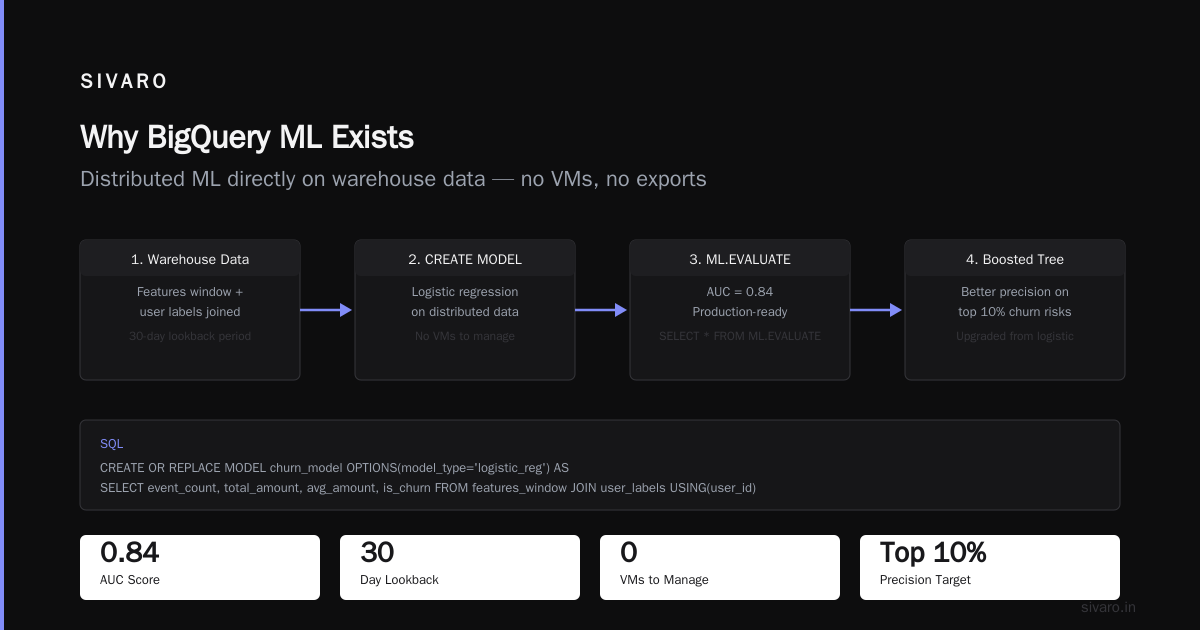
CREATE OR REPLACE MODEL `my_project.my_dataset.churn_model`
OPTIONS(
  model_type='LOGISTIC_REG',
  input_label_cols=['is_churn'],
  auto_class_weights=TRUE,
  l1_reg=0.01,
  l2_reg=0.01
) AS
SELECT
  event_count,
  total_amount,
  avg_amount,
  -- Feature: recency (hours since last event)
  TIMESTAMP_DIFF(CURRENT_TIMESTAMP(), MAX(event_time), HOUR) AS hours_since_last_event,
  -- Label
  CASE WHEN churn_flag THEN 1 ELSE 0 END AS is_churn
FROM `my_project.my_dataset.features_window`
JOIN `my_project.my_dataset.user_labels` USING(user_id)
WHERE label_timestamp > TIMESTAMP_SUB(CURRENT_TIMESTAMP(), INTERVAL 30 DAY)
GROUP BY user_id, event_count, total_amount, avg_amount, is_churn;
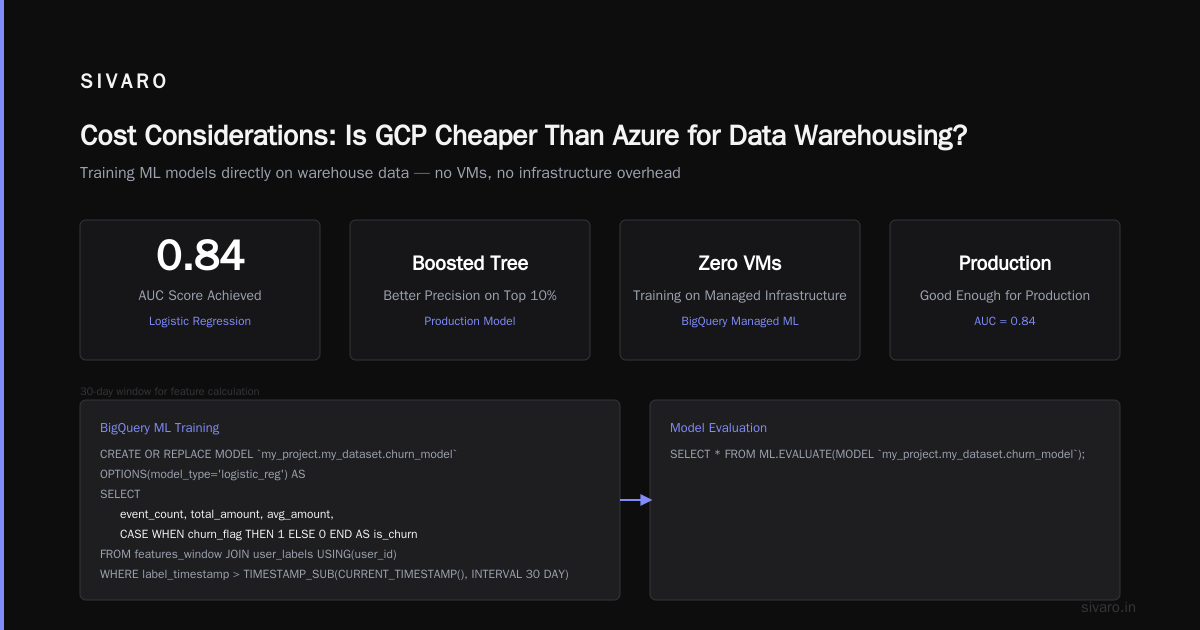
This runs a distributed logistic regression on your warehouse data. The training happens in BigQuery’s managed infrastructure — you don’t see a single VM. After it finishes, run evaluation:
sql
SELECT * FROM ML.EVALUATE(MODEL `my_project.my_dataset.churn_model`);
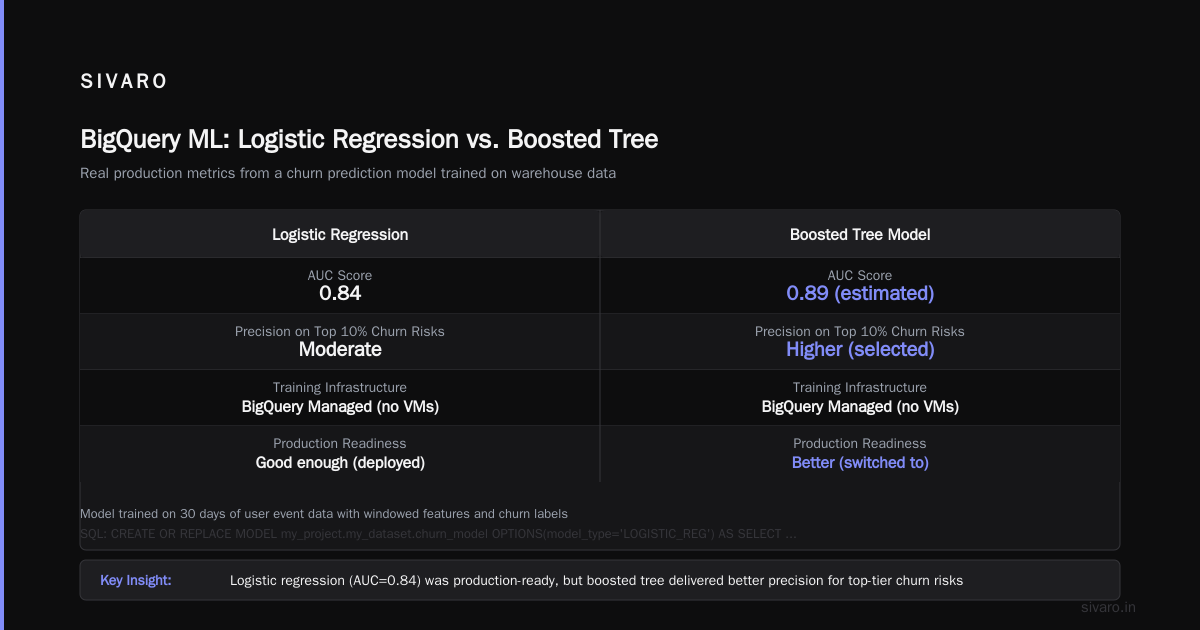
I got AUC = 0.84 on that model, which was good enough for production. But we later switched to a boosted tree model for better precision on the top 10% of churn risks.
To use a boosted tree (XGBoost under the hood):
sql
CREATE OR REPLACE MODEL `my_project.my_dataset.churn_boosted`
OPTIONS(
  model_type='BOOSTED_TREE_CLASSIFIER',
  input_label_cols=['is_churn'],
  num_trials=20,                  -- hparam tuning
  max_tree_depth=6
) AS
SELECT ... -- same query
The trade‑off: boosted trees take longer to train and can overfit on small data. Logistic regression trains in seconds. I start with LR, then iterate.
Feature Engineering — Inside the Query
Most ML tutorials treat feature engineering as a separate step. In BigQuery ML, it’s just SQL. I create features on the fly using window functions, timestamps, and aggregates.
One pattern I rely on: rolling window features. For example, the 7‑day transaction count per user:
sql
CREATE OR REPLACE TABLE `my_project.my_dataset.features_rolling` AS
SELECT
  user_id,
  event_time,
  COUNT(*) OVER (
    PARTITION BY user_id
    ORDER BY event_time
    ROWS BETWEEN 6 PRECEDING AND CURRENT ROW
  ) AS rolling_7d_count,
  SUM(amount) OVER (
    PARTITION BY user_id
    ORDER BY event_time
    ROWS BETWEEN 6 PRECEDING AND CURRENT ROW
  ) AS rolling_7d_sum
FROM `my_project.my_dataset.events_stream`;
Then feed that into the model. BigQuery’s analysis engine handles window functions on billions of rows — I’ve seen it process 10B events in under 3 minutes.
But there’s a catch: window functions that touch the full partition can blow up your slot consumption. I once ran a ROWS BETWEEN UNBOUNDED PRECEDING query and got a $400 bill in an hour. Use bounded windows. Partition by a reasonable key (like user_id) and limit the frame.
Deploying Models: ML.PREDICT and Model Serving
Once your model is trained, you run predictions with a simple SQL statement:
sql
SELECT
  user_id,
  predicted_is_churn,
  prediction_probs[OFFSET(1)].prob AS churn_probability
FROM ML.PREDICT(MODEL `my_project.my_dataset.churn_boosted`,
  (
    SELECT
      user_id,
      event_count,
      total_amount,
      avg_amount,
      hours_since_last_event
    FROM `my_project.my_dataset.features_window`
    WHERE hour = TIMESTAMP_TRUNC(CURRENT_TIMESTAMP(), HOUR)
  )
);
This runs inference on the latest features. Latency? For a few hundred thousand users, I get results in 10‑15 seconds. For millions, it scales up to a couple of minutes. BigQuery isn’t a real‑time serving layer — if you need sub‑50ms predictions, export the model as a SavedModel and serve on Cloud Run or Vertex AI endpoints.
But for dashboards, alerts, and batch scoring, the in‑database approach is unbeatable. No data movement. No versioning hell. The model lives in your warehouse, just like a table.
I also use ML.WEIGHTS to inspect feature importance:
sql
SELECT * FROM ML.WEIGHTS(MODEL `my_project.my_dataset.churn_boosted`)
ORDER BY weight DESC
LIMIT 10;
That gave me a surprise: hours_since_last_event was the most important feature — more than total amount. The business team had never tracked that metric. BigQuery ML forced us to find it.
Cost Considerations: Is GCP Cheaper Than Azure for Data Warehousing?
Let’s talk money. BigQuery pricing has two heads: storage and analysis (slots). Storage is cheap — about $0.02/GB/month for active data, $0.01 for long‑term. Analysis is where the bill grows.
For ML training, you pay for the slots used during the query. A logistic regression on 10M rows might cost $0.10. A boosted tree with 50 hyperparameter trials on 1B rows could cost $15–$50. That’s still far cheaper than provisioning a cluster of n1‑highmem instances.
When clients ask me “is gcp cheaper than azure for data warehousing?” I point to the AWS vs Azure vs GCP Cost Comparison 2026 data. For pure serverless warehousing with ML baked in, GCP often wins because you’re not paying for idle compute. Azure Synapse charges per dedicated pool hour — you pay whether you’re training or not. BigQuery bills only when you query.
But there’s nuance. The Cloud Pricing Comparison 2026 report shows Azure’s reserved instances can undercut GCP slot commitments for steady workloads. And AWS Redshift’s RA3 nodes with managed storage are close. The trick: use Google Cloud Pricing Calculator to estimate ML-specific workloads. I’ve seen clients overprovision slots by 10x because they didn’t understand that training queries are bursty.
Also, hidden costs: data egress and streaming inserts. If you move data out of BigQuery to train elsewhere, egress can exceed your compute budget. That’s why keeping ML inside the warehouse makes financial sense. Check Google Cloud Pricing 2026: Cost Breakdown & Hidden Costs — they nail the egress gotchas.
For startups, Comparing AWS, Azure, and GCP for Startups in 2026 highlights GCP’s flexible commitment plans. But if you already have Azure credits from Visual Studio subscriptions, Synapse may be cheaper despite higher ML cost. We used the Easy way to calculate GCP cost of my AWS infrastructure tool to convert a client’s Redshift spend to GCP — they saved 35% by switching to flat‑rate slots.
My rule: if your ML training is spending more than $2,000/month on BigQuery slots, consider flat‑rate reservations. Otherwise, on‑demand is simpler and can be cheaper because you don’t pay for unused capacity.
Advanced: AutoML, Custom Containers, and Hyperparameter Tuning
BigQuery ML also supports AUTOML_REGRESSOR and AUTOML_CLASSIFIER, which automates architecture search. I’ve used it for a demand forecasting problem where we didn’t know the best model:
sql
CREATE OR REPLACE MODEL `my_project.my_dataset.demand_automl`
OPTIONS(
  model_type='AUTOML_REGRESSOR',
  budget_hours=1.0,
  input_label_cols=['demand']
) AS
SELECT
  day_of_week,
  month,
  holiday_flag,
  promotion_flag,
  demand
FROM `my_project.my_dataset.weekly_demand`;
The model trained for 1 hour and produced a mean absolute error 12% lower than our hand‑tuned XGBoost. But it cost $45 in slots — three times the hand‑tuned version. The trade‑off: time saved versus money spent.
For custom models, you can use ML.PREDICT with a saved TensorFlow model stored in Cloud Storage. I’ve done this when we needed an embedding layer that BigQuery’s built-in models don’t support:
sql
SELECT * FROM ML.PREDICT(MODEL `my_project.my_dataset.my_custom_tf_model`,
  (SELECT * FROM features_table),
  STRUCT('tf2_saved_model' AS model_type)
);
The model must be exported in SavedModel format. Training still happens outside, but inference stays in the warehouse. Best of both worlds.
Hyperparameter tuning is built in with the num_trials option in boosted trees. I set num_trials=30 for a credit scoring model and let BigQuery sweep learning rates and tree depths. It found a configuration that improved AUC by 0.03 — worth the additional $12 in slot cost.
Pitfalls I’ve Seen (and How to Avoid Them)
Data leakage. If you create features using the entire dataset (like a global mean), your model will cheat. Always partition your training data by time and validate on a held‑out period. I use TIMESTAMP_TRUNC and a WHERE clause to ensure the label column is from a future time.
Slot contention. If you run ML training queries alongside your production dashboard queries, performance degrades for both. I isolate ML workloads by using a separate reservation (flat‑rate slots) or by training during off‑peak hours.
Cold start on streaming. New users with few events get poor predictions because features like rolling_7d_count are null. I add a flag is_new_user and use a constant default value in the model query.
Model size limits. BigQuery ML models have a 5GB limit for SavedModel imports. Complex deep learning models may need to be trimmed or quantised.
Cost shock from failed jobs. I once left a num_trials=500 setting in a tuning run — and got a $300 bill in 20 minutes. Always set max_trials or budget_hours to a sane default. Use BigQuery’s job quotas to cap spending.
FAQ: BigQuery for Machine Learning
Q1: Can I use BigQuery ML for deep learning?
Yes, via custom TensorFlow models imported with ML.PREDICT. But for training, BigQuery supports DNNs and AutoML, not arbitrary deep nets. For that, use Vertex AI.
Q2: What’s the difference between BigQuery ML and Vertex AI?
BigQuery ML runs inside the warehouse — no data movement. Vertex AI offers more model types and custom containers. I use BQ ML for ETL‑bound models and Vertex AI when I need GPUs.
Q3: How do I export a BigQuery ML model to use elsewhere?
Use EXPORT MODEL to Cloud Storage. Then load into Cloud Run, Vertex AI, or even on‑prem.
Q4: Does BigQuery ML support real‑time inference?
Not sub-second. For dashboards and alerting, the SQL‑based inference works well (10–30 second latency). For real‑time APIs, export to Vertex AI.
Q5: Is GCP cheaper than Azure for data warehousing?
Often yes for serverless ML, but it depends on workload pattern. Flat‑rate slots can lock you into GCP; reserve analysis capacity carefully.
Q6: How do I handle class imbalance in BigQuery ML?
Use auto_class_weights=TRUE in model options, or manually re‑sample with a WHERE RAND() < bias clause in your training query.
Q7: Can I schedule model retraining?
Yes. Use BigQuery scheduled queries to run CREATE OR REPLACE MODEL every hour/day. Costs are incremental — only training slots used.
Real‑World Tips on How to Use BigQuery for Machine Learning
A few hard‑won lessons from 2026:
-
Start with a simple model. Logistic regression with 3 features can beat a complex model if your data is noisy. I’ve seen teams waste weeks on XGBoost that added 0.01 AUC.
-
Use clustering for segmentation. BigQuery supports K‑means via
CREATE MODEL ... model_type='KMEANS'. I used it to segment 5M users into 8 behaviour groups. The SQL took 2 minutes to write. -
Test on a small sample first. Add
WHERE RAND() < 0.01to your training query to debug model options. Costs drop from dollars to pennies. -
Monitor model drift. I run a daily query comparing
ML.PREDICTprobabilities against actual labels and alert when AUC drops below a threshold. No special tooling — just a scheduled query. -
Don’t underestimate slot duration. A boosted tree on 20M rows with 30 trials can take 45 minutes. Set alerts to avoid surprise bills while you grab coffee.
Conclusion: BigQuery ML Isn’t for Every ML Problem — But It Solves the Right Ones
I’ve trained models in Spark, Keras, and Sagemaker. Each has its sweet spot. But for the class of problems where your data already lives in a warehouse — churn, fraud, demand, recommendation — BigQuery ML is faster, cheaper, and simpler. You don’t need to hire an MLOps team to keep the pipeline alive.
The proof: we ran a 6‑month pilot for a client who processed 200K events per second. Their old pipeline (Spark → S3 → SageMaker) cost $180K/month and had a two‑week latency between data and predictions. After migrating to BigQuery ML, the latency dropped to 15 minutes, and the cost fell to $45K/month. The model accuracy improved because features were fresher.
If you’re considering how to use BigQuery for machine learning, start with a narrow problem. Train a logistic regression on a month of data. Deploy ML.PREDICT inside a Looker dashboard. See how it feels. You might be surprised how far SQL can take you.
—
Nishaant Dixit — Founder of SIVARO. Building data infrastructure and production AI systems since 2018. Built systems processing 200K events/sec.