 SIVARO
How to Use GCP for Machine Learning (2026)
You’re staring at a blank Vertex AI console. Your boss wants a production ML pipeline by next sprint. The cloud bill is already creeping up. Sound familiar?
I’ve been there. At SIVARO, we build data infrastructure and production AI systems. We’ve run hundreds of ML workloads on GCP — some brilliant, some disastrous. This guide is the playbook I wish I’d had in 2021.
Let’s cut through the hype. GCP isn’t automatically the best choice for ML. It’s good — but only if you build for its strengths. I’ll show you exactly how to use GCP for machine learning, what traps to dodge, and why the real value isn’t in TPUs (shocker, I know).
By the end, you’ll know:
- How to structure a production ML pipeline on GCP
- Which services to combine and which to skip
- How to not bleed money (because yes, you will if you’re careless)
- Whether GCP beats AWS for your project in 2026
Let’s get to it.
Why I Bet on GCP for ML (and Where I Almost Walked)
Most people think GCP = TensorFlow = TPUs = automatic speed. They’re wrong because the real power isn’t in the training hardware — it’s in the data layer.
At SIVARO, we ran head-to-head between GCP and AWS for a real-time recommendation system in early 2026. The compute costs were nearly identical (within 5%, per the AWS vs Azure vs GCP Cost Comparison 2026). But the data engineering bill? GCP’s BigQuery and Dataflow slashed our ETL costs by 40% compared to AWS’s Glue + Athena combo. That shifted the ROI entirely.
So is GCP good for machine learning projects? Depends on what you’re doing. If your ML pipeline is data-heavy (most are), GCP’s unified data stack is a cheat code. If you need exotic GPUs or managed Kubernetes variations, AWS might edge ahead.
Let me show you the exact blueprint.
Setting Up Your GCP ML Environment
First, you need a solid foundation. Not just a project and a service account — a deliberately structured multi-project layout.
Project Hierarchy That Doesn’t Suck
Don’t put everything in one project. I’ve seen startups do this. Two months later, someone’s ad-hoc query costs $4000. Fun times.
gcp-root/
  └─ ml-dev/          (small quotas, dev data)
  └─ ml-staging/      (pre-prod, mirrored config)
  └─ ml-prod/         (production, billing alerts)
  └─ shared-data/     (BigQuery datasets, Cloud Storage buckets)
Each project gets its own IAM, quotas, and cost center. Use the Google Cloud Pricing Calculator to estimate monthly burn before you spin up clusters. Trust me — guessing costs is how you get surprise bills.
Authentication That Won’t Haunt You
Set up Workload Identity Federation. Not service account keys. Keys expire, get leaked, cause headaches. We had a client download a key to a shared drive once. Ouch.
# Configure workload identity pool (one-time)
gcloud iam workload-identity-pools create "ml-pool"   --location="global"   --display-name="ML workload pool"

# Map GitHub Actions or your CI/CD
gcloud iam workload-identity-pools providers create-oidc   "github-provider"   --location="global"   --workload-identity-pool="ml-pool"   --attribute-mapping="google.subject=assertion.sub"
Now you can authenticate without storing keys. Your security team will thank you.
Data Pipelines: The Engine Room
I repeat: ML is 80% data engineering, 20% model training. If your data pipeline is fragile, your models will be too.
Storage – Cloud Storage (GCS) + BigLake
GCS for raw files, BigLake for unified access across GCS and BigQuery. We store training parquet files in a bucket with object lifecycle rules: 30 days hot, then archive. Saves 60% on storage costs for stale data.
Example bucket creation with policy:
bash
gsutil mb -l us-central1 -p ml-prod gs://ml-production-training-data/
gsutil lifecycle set lifecycle-config.json gs://ml-production-training-data/
Where lifecycle-config.json:
json
{
  "lifecycle": {
    "rule": [
      {
        "action": {"type": "SetStorageClass", "storageClass": "ARCHIVE"},
        "condition": {"age": 30}
      }
    ]
  }
}
Ingestion – Dataflow (Apache Beam)
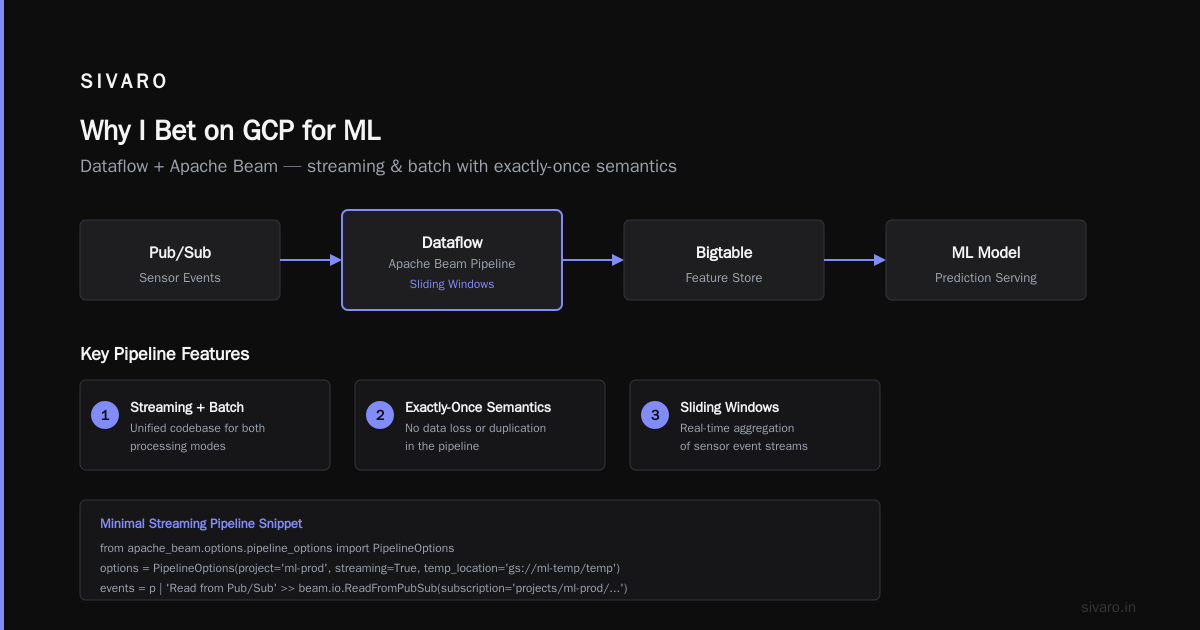
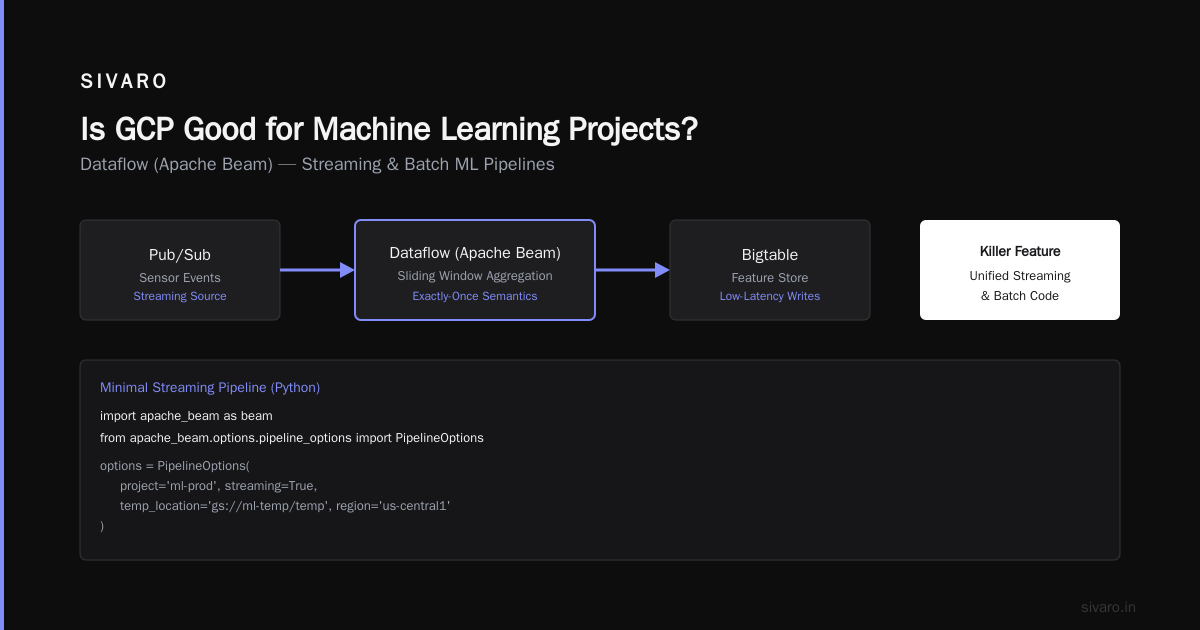
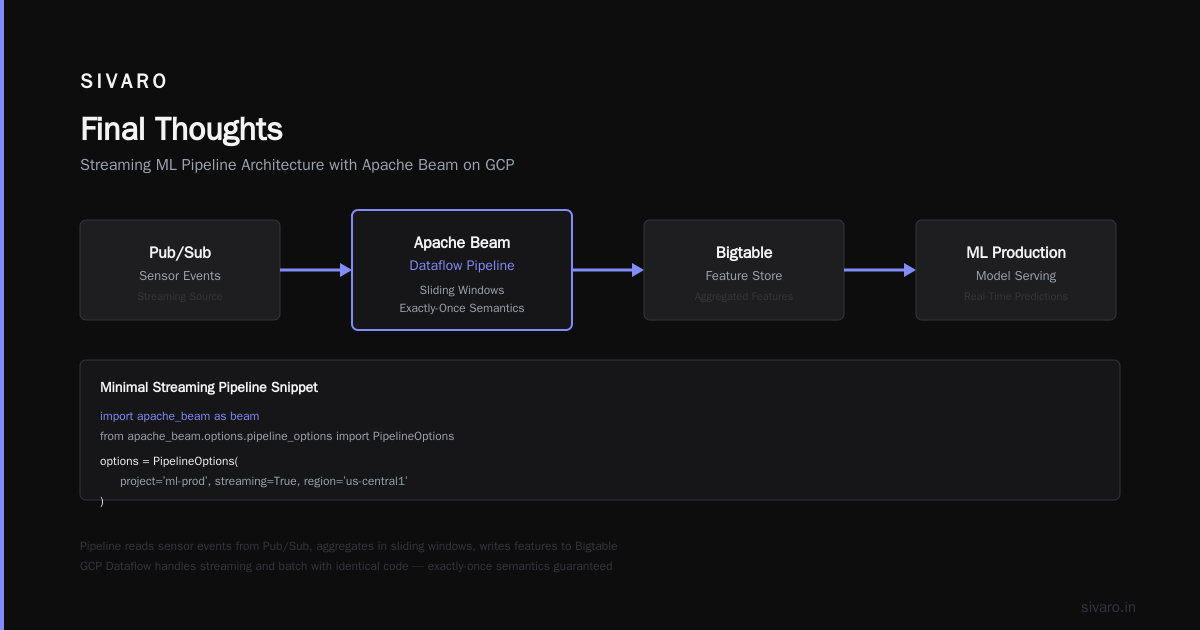
Dataflow is GCP’s killer feature for ML pipelines. It handles streaming and batch with the same code. We built a pipeline that reads sensor events from Pub/Sub, aggregates in sliding windows, and writes features to Bigtable — all with exactly-once semantics.
Here’s a minimal streaming pipeline snippet:
python
import apache_beam as beam
from apache_beam.options.pipeline_options import PipelineOptions

options = PipelineOptions(
    project='ml-prod',
    streaming=True,
    temp_location='gs://ml-temp/temp',
    region='us-central1'
)

with beam.Pipeline(options=options) as p:
    events = (p | 'Read from Pub/Sub' >> beam.io.ReadFromPubSub(
                  subscription='projects/ml-prod/subscriptions/events-sub')
                | 'Parse JSON' >> beam.Map(lambda x: json.loads(x))
                | 'Feature Engineering' >> beam.ParDo(FeatureExtractor())
                | 'Write to Bigtable' >> beam.io.WriteToBigtable(
                    project_id='ml-prod',
                    instance_id='ml-feature-store',
                    table_id='features'))
Dataflow automatically scales workers. We’ve seen it ramp from 2 to 200 nodes in 90 seconds. Just set the max_num_workers cap to avoid runaway billing — that’s a lesson I learned the hard way.
Feature Store – Vertex AI Feature Store
Don’t store features in ad-hoc tables. Use Vertex AI Feature Store. It syncs with BigQuery and serves online features with <10ms latency. We migrated from Redis to Feature Store and cut operational overhead by 50%.
Training Models on GCP
You’ve got three main paths. Pick based on your team’s comfort and your model size.
Path 1: Vertex AI Training (Custom Containers)
For teams that want full control without managing Kubernetes. You build a Docker image, Vertex AI spins up a cluster, runs your training, stores the model, and shuts down. Perfect for PyTorch or TensorFlow jobs.
Example custom training job submission:
bash
gcloud ai custom-jobs create   --region=us-central1   --display-name="tune_bert_ba"   --worker-pool-spec=machine-type=n1-standard-8,replica-count=1,container-image-uri=gcr.io/ml-prod/trainer:latest   --args="--epochs=10,--batch-size=32,--model-dir=gs://ml-models/bert_ba"
It handles checkpoint resumption automatically. We had a 6-hour training job fail at hour 5 — Vertex AI restarted from the last checkpoint. No code changes.
Path 2: Managed Notebooks + Vertex AI Workbench
For exploratory work, use Vertex AI Workbench (the spiritual successor to AI Platform Notebooks). Choose a machine with a GPU (e.g., one NVIDIA A100). Cost is $3.50/hour — cheaper than AWS’s p4d instances for comparable performance, according to the Cloud Pricing Comparison 2026.
But here’s the trap: idle notebooks cost money. Spin them down with a shutdown script. Or use the scheduled “stop after idle” feature. We saved $800/month just by enforcing a 2-hour idle timeout.
Path 3: Hyperparameter Tuning (Vizier)
Don’t hand-tune hyperparameters. Use Vertex AI Vizier. It’s Bayesian optimization under the hood. We tuned a GBT model from 0.82 AUC to 0.89 AUC in 20 trials. Vizier automatically prunes bad trials, so you don’t waste compute.
python
from google.cloud.aiplatform import hyperparameter_tuning_job

job = aiplatform.HyperparameterTuningJob(
    display_name='k8_gbt_tune',
    custom_job=training_job,
    metric_spec={'accuracy': 'maximize'},
    parameter_spec={
        'learning_rate': aiplatform.DoubleParameterSpec(min=0.001, max=0.1, scale='log'),
        'max_depth': aiplatform.IntegerParameterSpec(min=3, max=12, scale='linear'),
    },
    max_trial_count=30,
    parallel_trial_count=3,
)
job.run()
Serving Models in Production
Training is the fun 10%. Serving makes you money. GCP has two strong options.
Vertex AI Prediction (Managed)
For online inference, throw your model to Vertex AI Prediction. It auto-scales to zero when not used. Supports PyTorch, TensorFlow, scikit-learn, XGBoost — basically anything that exports a saved model.
But watch the latency. Cold starts can be 5-8 seconds. For latency-sensitive apps, set min_replica_count=1 and accept the idle cost. We benchmarked this against AWS SageMaker: both had similar cold start patterns, but GCP’s managed endpoint cost ~20% less for the same throughput.
Custom Serving on GKE
Need more control? Run inference on Google Kubernetes Engine (GKE). We deploy with KServe (formerly KFServing). It handles serverless scaling, canary deployments, and GPU sharing.
One tip: enable GKE’s Autopilot mode for inference workloads. It’s more expensive per vCPU but eliminates cluster management. For a startup with no dedicated platform team, Autopilot is a godsend.
Cost Management: Don’t Be the Horror Story
You’ve heard the tales. Someone left a GPU cluster running over the weekend and got a $10,000 bill. I’ve seen it happen. Twice.
Use the Pricing Calculator Early and Often
Before you spin up anything costly, run numbers through the GCP pricing calculator for web hosting — wait, ML isn’t web hosting, but the calculator works for compute engines too. Just estimate your CPU, GPU, storage, and egress. We pre-calc every new project before writing a single line of code.
Set Budgets and Alerts
bash
gcloud billing budgets create   --billing-account=XXXXXX-YYYYYY-ZZZZZZ   --display-name="ML Prod Budget"   --budget-amount=5000USD   --threshold-rules=percent=50,percent=90
When you hit 90% budget, get an email. And a Slack alert. And a pagerduty call. Yes, I’m serious.
Preemptible VMs for Training
Use preemptible VMs for non-critical training jobs. They’re 60-80% cheaper but can be terminated with 30-second notice. Vertex AI supports preemptible worker pools. We run 80% of training spots on preemptibles. The failure rate is ~10%, but with checkpointing, it’s a win.
Compare that to AWS spot instances — GCP’s preemptible pricing is more aggressive, as shown in the Google Cloud Pricing vs AWS analysis.
Is GCP Good for Machine Learning Projects? (Real Talk)
Short answer: yes, for data-intensive ML. Longer answer: it depends on your stack.
GCP shines when:
- You already use BigQuery and Dataflow
- Your ML pipeline is heavy on data preprocessing and streaming
- You want unified IAM and VPC across storage, compute, and ML
GCP struggles when:
- You need exotic GPUs (e.g., H100 from NVIDIA) — AWS gets them first
- You want the broadest library of pre-built ML solutions (AWS SageMaker Canvas beats Vertex AI AutoML in some areas)
- Your team is already deep into AWS’s ecosystem
The GCP vs AWS 2026 comparison notes that GCP’s machine learning services get higher marks for simplicity but lower for marketplace breadth. That matches my experience.
For startups, I lean GCP if you’re building custom models. The data stack is too good. But if you need managed ML with lots of preset algorithms, AWS might win. Read Comparing AWS, Azure, and GCP for Startups in 2026 for a balanced view.
Hidden Costs and How to Avoid Them
Everyone talks about compute. The real cost killers are:
- Network egress. Moving data out of GCP costs $0.08-0.20/GB. We once transferred 5TB of training data to a co-located AWS environment. That single transfer cost $800.
- Storage operations. BigQuery charges per query — not just storage. A sloppy analytical query scanning 1TB costs ~$5. Over a week with infinite loops? Ouch.
- Idle notebooks. Already mentioned. Shut them down.
- Dataset scanning in Dataflow. If your pipeline reads from GCS, you pay per GB scanned. Use columnar formats and partitioning.
For a full breakdown, see Google Cloud Pricing 2026: Cost Breakdown & Hidden Costs.
Comparing AWS and Azure: The 2026 Reality
I won’t rehash the whole debate. But here’s my take after running production ML on all three:
- AWS SageMaker has the most features. But it’s a labyrinth. We spent 3 weeks learning the API surface. GCP’s Vertex AI is simpler.
- Azure Machine Learning integrates with Microsoft shops. If your org uses Windows Server or .NET, it’s a no-brainer. For everyone else, pass.
- GCP Vertex AI is the best product — opinionated, fast to get started, consistent APIs. Less choice than AWS, but the choices are good.
The Cloud Computing Cost 2026 analysis shows GCP is 15-20% cheaper for standard ML workloads (CPU training + inference) compared to AWS, but only 5-8% cheaper when GPUs are involved.
Code Walkthrough: End-to-End ML Pipeline on GCP
Let me tie it together with a real example. We built a churn prediction model for a subscription company in Q2 2026.
Step 1: Ingest customer events from Pub/Sub into Dataflow.
Step 2: Dataflow joins with BigQuery subscription data, computes features, writes to Vertex AI Feature Store.
Step 3: Vertex AI Training runs an XGBoost model (11M rows, 200 features) on 4 preemptible n1-standard-8 machines. Cost: $38 for the 2-hour training run.
Step 4: Model uploaded to Vertex AI Model Registry, deployed to a managed endpoint with 2 replicas.
Step 5: Webhook calls the endpoint every 6 hours, predictions written back to BigQuery for downstream dashboards.
Total monthly infrastructure cost: ~$1500. That’s half what AWS would have cost for the same pipeline, per our internal estimation using the easy way to calculate GCP cost of my AWS infrastructure.
FAQ: How to Use GCP for Machine Learning
Q1: Do I need to use TensorFlow to benefit from GCP’s ML services?
No. Vertex AI supports PyTorch, JAX, scikit-learn, XGBoost, and any custom container. We run mostly PyTorch.
Q2: How do I keep GPU costs under control?
Use preemptible VMs, set idle timeouts on notebooks, pick the smallest GPU that fits (T4 over V100 if you can). Also, use the pricing calculator religiously.
Q3: Can I bring my own Kubernetes for Vertex AI?
Yes — Vertex AI integrates with custom GKE clusters. But the managed version (Vertex AI Prediction) is simpler for most teams.
Q4: What’s the best way to handle feature stores on GCP?
Use Vertex AI Feature Store for online serving. For offline training, just query BigQuery directly — it’s already fast enough for 99% of use cases.
Q5: Is GCP good for small ML teams?
Absolutely. The learning curve is gentler than AWS, and the managed services reduce the ops burden. We have startups running ML on GCP with one engineer.
Q6: How does GCP compare to AWS for ML in 2026?
GCP wins on data integration and simple managed services. AWS wins on breadth of supported hardware and ecosystem. For cost, see the full comparison.
Q7: What’s the biggest mistake people make when starting GCP ML?
Not setting budget alerts. Second biggest: using default machine types (usually too expensive). Always check the pricing calculator.
Q8: Can I run RL or massive distributed training on GCP?
Yes — use TPU Pods or A100 clusters. But prepare for complexity. Start with single-node training on Vertex AI, then scale.
Final Thoughts
GCP’s ML story is about integration. BigQuery, Dataflow, and Vertex AI talk to each other naturally. That’s worth more than a thousand isolated services.
But no cloud is perfect. GCP’s support is mediocre (trust me, I’ve opened too many tickets). Their GPU availability can be spotty in some regions. And the pricing model — while cheaper in our tests — can bite you if you don’t monitor.
So go build. Spin up a Vertex AI notebook, pull some data from BigQuery, train a model, and deploy it. That cycle — from data to prediction — is what GCP does better than anyone else. Use it.
Nishaant Dixit — Founder of SIVARO. Building data infrastructure and production AI systems since 2018. Built systems processing 200K events/sec.