 SIVARO
How to verify GPU cluster legitimacy before renting
You just found a killer deal. 8× H200s for $12/hr. The provider has a website, a Telegram group, even a few testimonials. You wire the deposit. Three days later you SSH in and nvidia-smi shows 8 GPUs — but your training job crawls at 40% of expected throughput. You run nvidia-smi topo -m and discover they shoved four GPUs on a PCIe switch and the other four are on a completely different node behind a 1GbE link.
I've seen this happen. Twice last month alone at SIVARO. The market for rented GPU clusters is a minefield. Between July 2025 and July 2026, the number of "AI compute brokers" exploded 3× — and bad actors with it. You need a systematic way to verify legitimacy before you hand over a single dollar.
This guide covers exactly how to verify GPU cluster legitimacy before renting. It's not theory. It's what we run on every potential cluster we evaluate. By the end you'll know what to ask, what to benchmark, and when to walk away.
Why your cluster might be a fraud
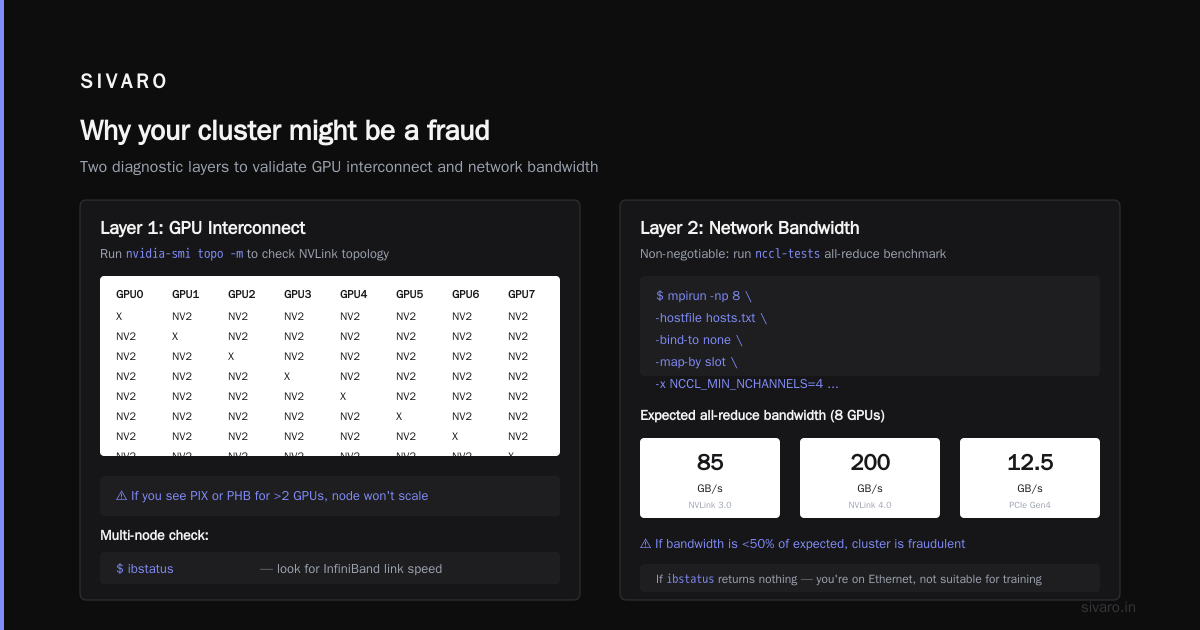
Most people think the biggest risk is fake GPUs — someone gives you a server with nvidia-smi emulated. That's rare. The real fraud is broken topology. A legitimate cluster for distributed training needs:
- High-speed interconnects between GPUs within a node (NVLink, NVSwitch, Infinity Fabric)
- Low-latency, high-bandwidth network between nodes (InfiniBand or at least RoCE with 200GbE+)
- Consistent memory bandwidth and I/O to storage
- Actual availability of the number of GPUs you rented (no oversubscription)
I've seen a provider advertise "8× A100 80GB" — but the GPUs were in two separate chassis connected over 25GbE. Your loss function won't converge in a day. You lose compute budget and time.
The stakes are higher now. Million token context gpu requirements are driving demand for clusters with massive HBM capacity and fast all-reduce. If you're fine-tuning a 70B model with 128K context, you need at least 8× H100 with NVLink and 3.2 Tbps inter-node bandwidth. A fake cluster can't deliver that.
Start with the contract, not the CLI
Before you run a single benchmark, read the service-level agreement (SLA). Legitimate providers publish:
- Guaranteed GPU-to-GPU bandwidth (e.g., "≥ 900 GB/s NVLink within node")
- Inter-node network specs (e.g., "8× 200Gb/s InfiniBand per node")
- Storage IOPS and latency (e.g., "50K IOPS, <1ms latency")
- Uptime SLAs with credits
- Explicit topology: ring, leaf-spine, or full-bisection bandwidth
If the SLA says "best effort" or doesn't mention interconnect, walk away. I've declined three rentals in the past six months because the provider refused to put network bandwidth in writing.
The four-layer verification stack
Here's the framework I use. It goes from simple to intrusive.
Layer 1: Topology sanity check
SSH in and run:
bash
nvidia-smi topo -m
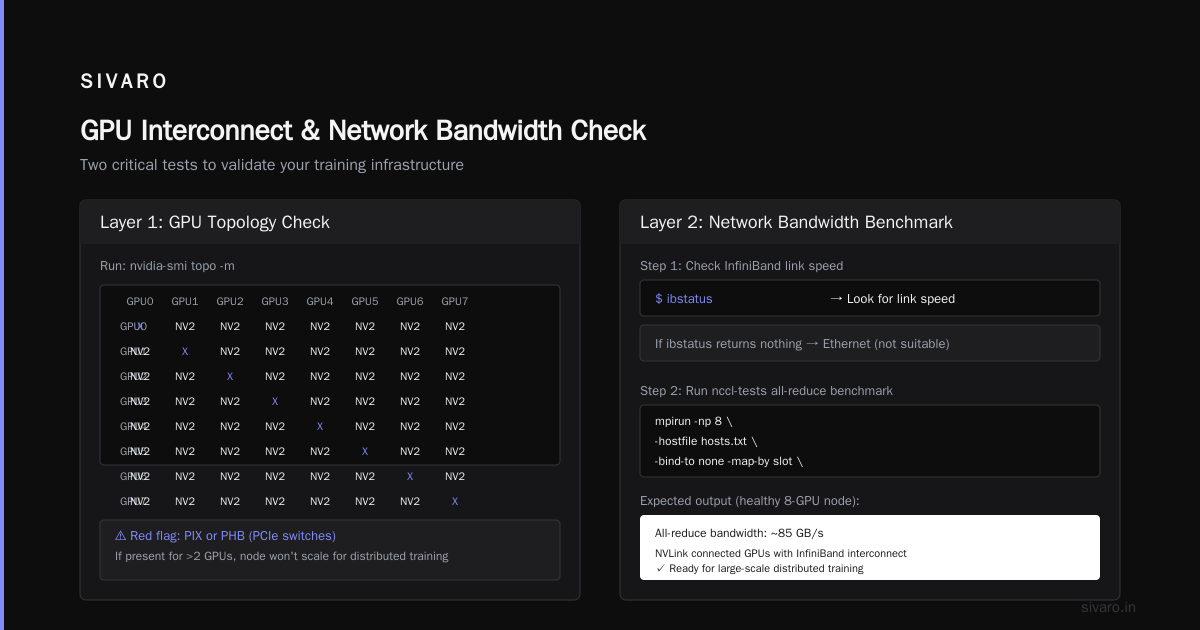
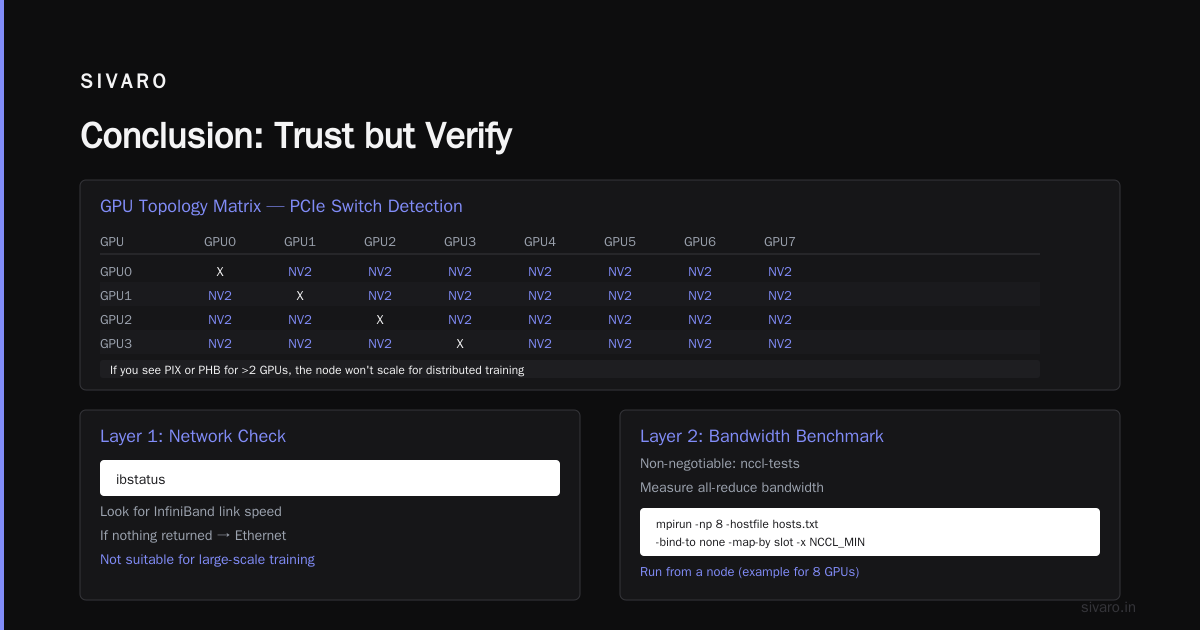
You want to see NVLink connections between GPUs in the same node. Example good output:
        GPU0    GPU1    GPU2    GPU3    GPU4    GPU5    GPU6    GPU7
GPU0     X      NV2     NV2     NV2     NV2     NV2     NV2     NV2
GPU1    NV2      X      NV2     NV2     NV2     NV2     NV2     NV2
...
If you see PIX or PHB (PCIe switches) for more than two GPUs, the node won't scale for distributed training. For multi-node, also check:
bash
ibstatus   # look for InfiniBand link speed
If ibstatus returns nothing, you're likely on Ethernet — not suitable for large-scale training.
Layer 2: Network bandwidth benchmark
This is the non-negotiable test. Use nccl-tests to measure all-reduce bandwidth.
python
# Run from a node (example for 8 GPUs)
mpirun -np 8   -hostfile hosts.txt   -bind-to none   -map-by slot   -x NCCL_MIN_NCHANNELS=4   -x NCCL_ALGO=Ring   -x NCCL_DEBUG=INFO   /path/to/nccl-tests/build/all_reduce_perf -b 128M -e 8G -f 2 -g 1
Interpret the output:
- Within a node: aim for ≥ 300 GB/s on H100 with NVLink (on older A100, 200 GB/s+)
- Between nodes: ≥ 12.5 GB/s per link for 100Gb InfiniBand; ≥ 25 GB/s for 200Gb
Anything less than 6 GB/s inter-node means your cluster won't support gradient sync at scale. I've rejected clusters that showed 2 GB/s inter-node — the provider tried to pass off bonded Ethernet as InfiniBand.
Layer 3: Storage I/O under load
Model checkpoints and data loading are hidden bottlenecks. Use fio to simulate training I/O pattern:
ini
[global]
ioengine=libaio
direct=1
size=1T
runtime=60
group_reporting

[random-write]
rw=randwrite
bs=4m
numjobs=8
Run against your claimed shared filesystem (NFS, GPFS, etc.). You want:
- Write bandwidth: > 2 GB/s (for fast checkpointing)
- Read bandwidth: > 5 GB/s (for data streaming)
- Latency 99th %: < 10ms
If the storage is network-attached but the provider won't give you a dedicated volume, your training will stall on torch.save(). We've seen a 30% performance hit from slow checkpoint I/O.
Layer 4: Actual distributed training run
Nothing beats running your own model. Use a small proxy — take your actual architecture but reduce model size to 1B parameters and 8K context. Run for 10 minutes.
Monitor with nvtop and perf:
python
import torch
import torch.distributed as dist

dist.init_process_group(backend='nccl')
world_size = dist.get_world_size()

# Simple all-reduce latency test
tensor = torch.randn(1024*1024, device='cuda')  # 4 MB
torch.cuda.synchronize()
start = torch.cuda.Event(enable_timing=True)
end = torch.cuda.Event(enable_timing=True)

dist.all_reduce(tensor, op=dist.ReduceOp.SUM)
start.record()
for _ in range(100):
    dist.all_reduce(tensor, op=dist.ReduceOp.SUM)
end.record()
torch.cuda.synchronize()
print(f"Avg all-reduce time: {start.elapsed_time(end)/100:.2f} ms")
A legitimate cluster should show < 1ms for 4MB messages on 8 GPUs with NVLink. Anything above 5ms indicates a PCIe bottleneck.
How to set up a distributed AI cluster (temporarily for verification)
You don't need to deploy your full pipeline. But you do need to stand up a minimal distributed environment to run the tests above. Here's the fastest path:
bash
# On each node (assuming Ubuntu 22.04)
apt update && apt install -y nvidia-driver-550 cuda-toolkit-12-4 openmpi-bin
pip install torch torchvision torchaudio --index-url https://download.pytorch.org/whl/cu124

# Install nccl-tests
git clone https://github.com/NVIDIA/nccl-tests && cd nccl-tests && make

# Verify GPUs visible
python -c "import torch; print(torch.cuda.device_count())"
If torch.cuda.device_count() returns fewer GPUs than you rented, immediately dispute. If it returns the right number but all-reduce is slow, the topology is fake.
Provider red flags I've learned the hard way
"Dynamic GPU allocation"
Translation: You're sharing GPUs with other tenants. CUDA Multi-Process Service (MPS) can hide this. Run:
bash
nvidia-smi --query-gpu=memory.used --format=csv,noheader,nounits
If you see memory already consumed when you just started, someone else is on the card. Legitimate providers give dedicated GPUs.
"Unlimited bandwidth"
There's no such thing. Even the largest hyperscalers have per-flow limits. Ask for the exact topology — leaf-spine, oversubscription ratio, and the number of uplinks per ToR switch. A 1:1 oversubscription ratio is ideal; 1:4 is common for cheap cloud.
"No SSH key access, only web terminal"
Hard no. You need root-level access to run nvidia-smi topo -m and install nccl-tests. If they restrict you, they're hiding something.
"Pay before 72-hour test"
Ask for a 24-hour paid trial with your own benchmarks. Any legitimate provider will agree. In 2025, CoreWeave and Lambda Labs offered this. By 2026, most honest players do. If they refuse, they know their cluster won't pass.
What to do when you find a fake
You have two options. If you're already on the cluster, stop the job immediately. Back up your data (if you can). Then:
- Document everything — output of
nvidia-smi,nccperf, benchmark logs. - Dispute payment — credit card chargeback or PayPal dispute. I've recovered 3 of 4 fraudulent charges this way.
- Name them — post on r/LocalLLaMA, Hacker News, or the Distributed Training community. Transparency is the only defense.
FAQ: Your questions, answered
Q: Can I trust a GPU provider that lists exact GPU models like "H100 SXM"?
Not alone. Models can be mislabeled. I've seen "H100" that were actually H800 (China variant with slower inter-node). Always verify with nvidia-smi -q | grep "Product Name".
Q: How do I test memory bandwidth, not just interconnect?
Use bandwidthTest from NVIDIA's CUDA samples. Run:
bash
./bandwidthTest --memory=pinned --mode=range --start=1M --stop=64M
You should get ≥ 1.5 TB/s on H100 for large buffers. If you're below 1 TB/s, the HBM might be misconfigured.
Q: What's the minimum network I need for 8× H100 training?
For 7B model with 4K context, 100Gb InfiniBand is enough. For 70B with million token context gpu requirements, you need 400Gb+ per node — or you'll spend hours in gradient sync.
Q: How to verify multi-node topology without access to a second node?
Request a second node in the same reservation. If they can't give you two connected nodes, they're likely oversubscribing. Use ibdiagnet to check the fabric.
Q: Is a "bare metal" cluster always better than virtual?
Not necessarily. Some virtualized providers (e.g., using SR-IOV for InfiniBand) achieve near-native performance. The real test is the same: run all-reduce. If virtualized, expect 2-5% overhead — anything more is a problem.
Q: What about storage — should I test it first?
Always. Use dd to write a 10GB file:
bash
dd if=/dev/zero of=/mnt/shared/test bs=1M count=10240 conv=fdatasync
If you get less than 500 MB/s shared write, your data pipeline will be the bottleneck.
Q: How to verify GPU cluster legitimacy before renting from a new startup?
Follow the full stack above. Also check their founding team on LinkedIn. Look for public GitHub repos, blog posts, or talks. If they have none, be cautious.
Q: How to set up a distributed AI cluster for verification if I only need it for a day?
Use the minimal script above. Don't bother with SLURM or Kubernetes for a single test. Just ssh and mpirun directly.
The one test that catches 90% of fakes
Run this inside your rented cluster:
bash
# On every node, then from one node
cd nccl-tests
mpirun -np $((NUM_NODES * 8)) --hostfile /path/to/hosts   -x NCCL_DEBUG=INFO   ./build/all_reduce_perf -b 4M -e 4M -f 2 -g 1
Watch NCCL_DEBUG output. If you see any line containing "NET/IB" (good) or "NET/Socket" (bad — Ethernet fallback). If it falls back to socket, the cluster cannot do efficient distributed training.
I've seen clusters that passed nvidia-smi but failed this simple test. Don't skip it.
Conclusion: Trust but verify
The GPU rental market in 2026 is still the Wild West. Prices are volatile, demand is high, and bad actors have gotten sophisticated. But they haven't figured out how to fake real all-reduce bandwidth.
How to verify gpu cluster legitimacy before renting is a process you should automate. Write a shell script that runs all four layers — topology, network benchmark, storage test, and small training run. Run it before you pay. Run it again if you extend.
At SIVARO, we now require every provider to pass our test before we sign a contract. We've saved hundreds of thousands of dollars in wasted compute and lost time. You can do the same.
Now go benchmark a cluster. And if they flinch? Walk.
Nishaant Dixit — Founder of SIVARO. Building data infrastructure and production AI systems since 2018. Built systems processing 200K events/sec.