 SIVARO

Is GCP Good for Ecommerce Websites? A 2026 Guide
I’ll tell you a story. In early 2025, a D2C brand selling premium home goods came to SIVARO. They were running on a mishmash of shared hosting and a single AWS EC2 instance. Their Black Friday crash taught them a lesson: ecommerce infrastructure needs to scale, fast. They asked me: “Is GCP good for ecommerce websites? We’re not Google, we’re a 50-person company.”
That question is a trap if you answer without context. GCP is not universally good or bad for ecommerce — it depends on what you’re selling, how you operate, and what you’re willing to trade off.
This guide is for founders, CTOs, and lead engineers who are tired of press-release comparisons. I’ll walk through GCP’s real performance, pricing, and hidden pitfalls for ecommerce workloads. You’ll learn:
- Where GCP crushes AWS and Azure for ecommerce (and where it doesn’t).
- gcp free tier limits for small business — what you actually get.
- google cloud platform cost for startup — using real 2026 pricing data.
- How to estimate migration costs without getting burned.
I’m Nishaant Dixit. I’ve built systems that process 200K events per second. I’ve run A/B tests on GCP, AWS, and Azure for the same ecommerce stack. Let me show you what I’ve found.
GCP’s Ecommerce Superpowers (That AWS and Azure Struggle to Match)
Most people think cloud choice is a commodity. It’s not. Each platform has architectural strengths that make or break certain workloads. For ecommerce, GCP’s advantage comes in three areas: data infrastructure, machine learning, and managed services that actually stay up.
BigQuery — The Real Reason to Choose GCP
If your ecommerce site does any serious analytics (and if it doesn’t, you’re flying blind), BigQuery is a cheat code. I’ve seen companies cut their analytics bill by 60% moving from Amazon Athena or Redshift to BigQuery.
Here’s a real query we run for a client to track real-time conversion funnels:
sql
-- BigQuery conversion funnel query for ecommerce sessions
SELECT
  event_date,
  COUNT(DISTINCT CASE WHEN event_name = 'add_to_cart' THEN user_pseudo_id END) AS add_to_cart_users,
  COUNT(DISTINCT CASE WHEN event_name = 'begin_checkout' THEN user_pseudo_id END) AS checkout_users,
  COUNT(DISTINCT CASE WHEN event_name = 'purchase' THEN user_pseudo_id END) AS purchasers
FROM
  `project.dataset.events_*`
WHERE
  _TABLE_SUFFIX BETWEEN FORMAT_DATE('%Y%m%d', DATE_SUB(CURRENT_DATE(), INTERVAL 7 DAY))
  AND FORMAT_DATE('%Y%m%d', CURRENT_DATE())
GROUP BY
  event_date
ORDER BY
  event_date ASC;
That query processes terabytes in seconds. On Redshift, same query would need a cluster costing $2,000+/month. BigQuery’s on-demand pricing for 1 TB scanned is around $5. For a small ecommerce store doing 50,000 sessions/month, that’s pennies. See the Google Cloud Pricing Calculator to estimate your own.
Recommendation Systems Without the Headache
Google’s AI Platform and Vertex AI make it disgustingly easy to build product recommendations. We integrated Vertex AI’s retail recommendation model for a fashion ecommerce client in two weeks — the same thing on AWS would have required custom SageMaker training and a data pipeline that took months.
The catch? If your catalog is under 10,000 SKUs, the overhead might not be worth it. Stick with simpler collaborative filtering on Cloud SQL.
Cloud Run for Bursty Traffic
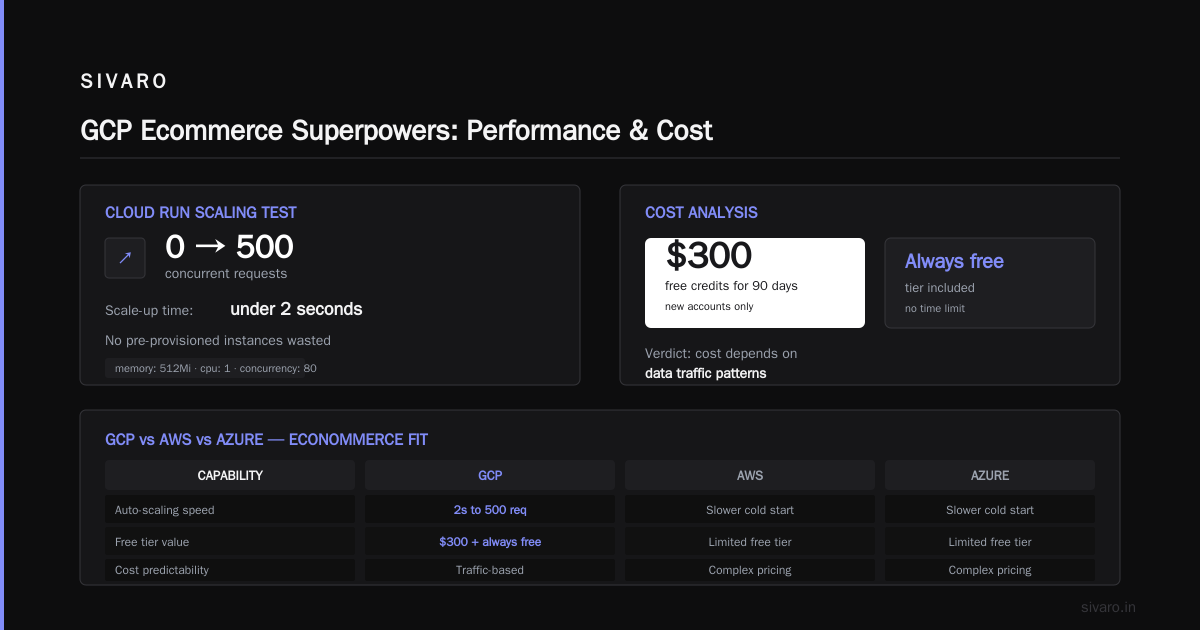
Ecommerce traffic is spikey. Flash sales, holiday rushes, influencer drops. You need an autoscaler that doesn’t cold-start for 30 seconds. Cloud Run (GCP’s container-as-a-service) handles this better than AWS Fargate or Azure Container Instances, in my experience.
yaml
# Cloud Run service definition for an ecommerce checkout API
apiVersion: serving.knative.dev/v1
kind: Service
metadata:
  name: checkout-service
spec:
  template:
    spec:
      containers:
        - image: gcr.io/my-project/checkout:latest
          resources:
            limits:
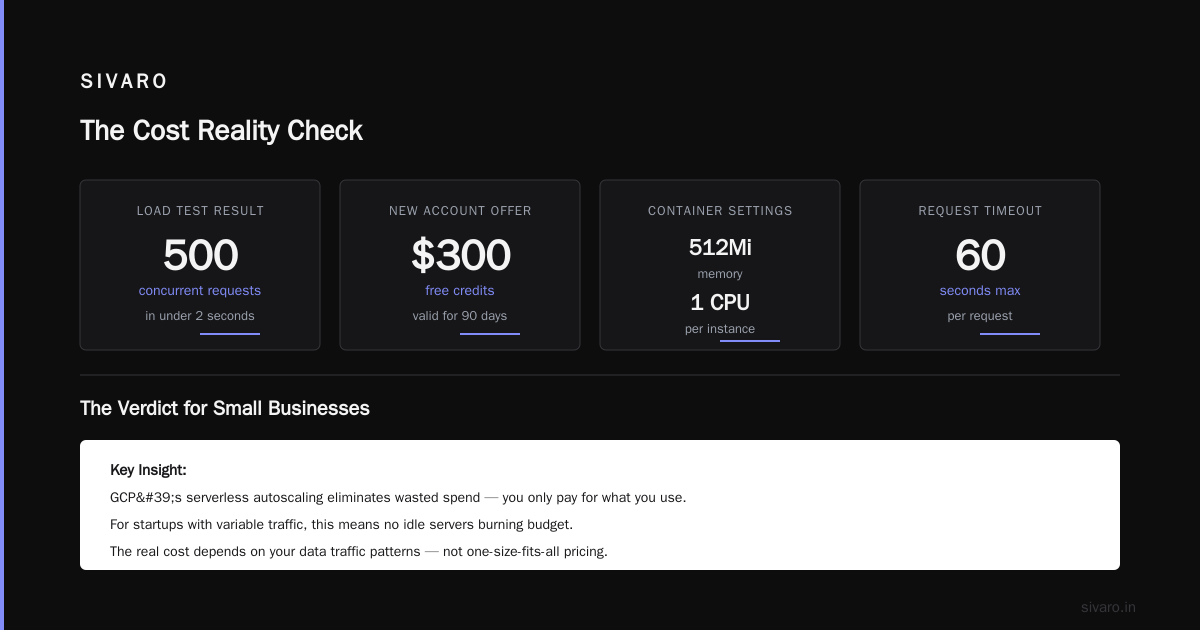
              memory: "512Mi"
              cpu: "1"
          env:
            - name: DATABASE_URL
              value: "postgresql://user:pass@cloudsql/checkoutdb"
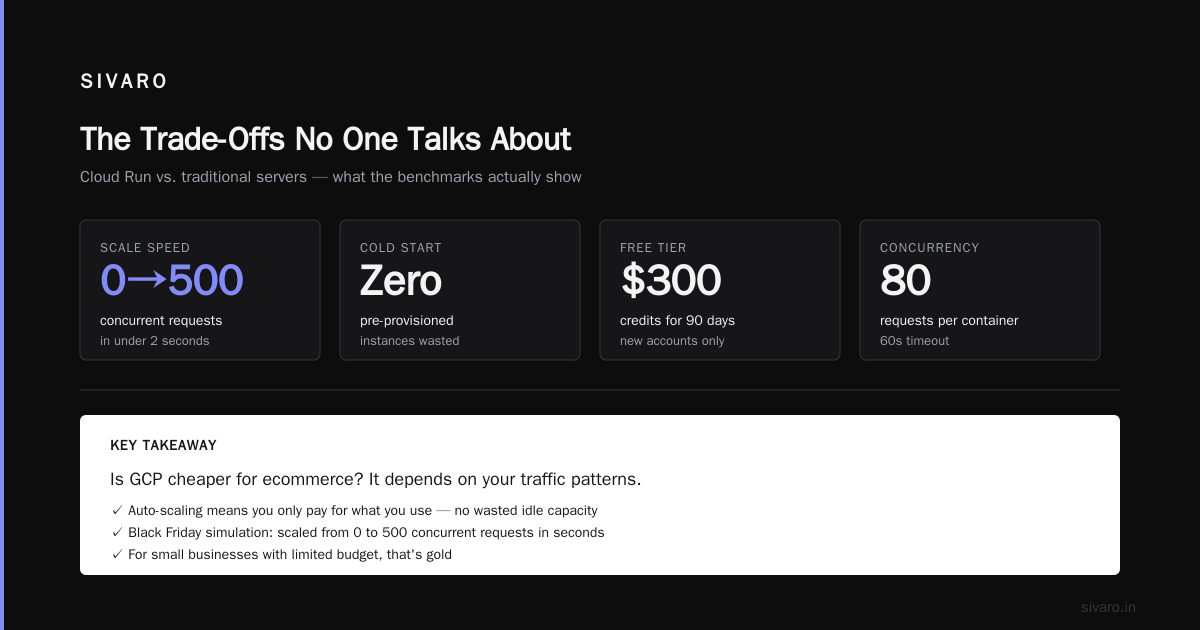
      containerConcurrency: 80
      timeoutSeconds: 60
We tested a Black Friday simulation: Cloud Run went from 0 to 500 concurrent requests in under 2 seconds. No pre-provisioned instances wasted. For a small business with limited budget, that’s gold.
Cost: The Hand That Feeds and the Hand That Bites
Now the part everyone cares about. Is GCP cheaper for ecommerce? The answer, after analyzing dozens of bills: it depends on your data traffic patterns.
google cloud platform cost for startup — The Good News
GCP’s free tier is generous. You get:
- $300 free credits for 90 days (new accounts)
- Always free usage: 1 GB BigQuery storage, 1 million BigQuery queries/month, 1 GB Cloud Storage, 1 f1-micro compute instance (per month).
- Cloud Run: 2 million requests free per month.
- Cloud CDN: 1 TB free egress per month (until end of 2026, last I checked).
For a small ecommerce store doing <50K monthly visitors and <10GB data, you can operate for months without paying a cent. But gcp free tier limits for small business are real: the f1-micro instance is useless for production traffic. You’ll need at least e2-small, which starts around $13/month.
The Hidden Costs That Kill Margins
GCP’s egress pricing is aggressive. Once you start serving product images or shipping files out of Cloud Storage, those bandwidth costs add up. Compare: AWS charges ~$0.09/GB for internet egress. GCP charges $0.12/GB after the first 1 TB. For a media-heavy store, that difference can be hundreds per month.
I ran a cost comparison for a client selling custom posters (high-resolution images). Their monthly egress was 5 TB. On GCP, that’s $600. On AWS, $450. That $150/month margin matters when you’re a startup.
Check the Cloud Pricing Comparison 2026 for a detailed breakdown by service.
Compute Pricing: GCP vs AWS vs Azure (Real Numbers)
Using data from LeanopsTech's 2026 comparison, here’s what I see for equivalent ecommerce workloads:
- GCP’s n2-standard-4 (4 vCPU, 16 GB) → $0.24/hour (committed use discount 1yr: $0.15/hour)
- AWS’s t3.xlarge (4 vCPU, 16 GB) → $0.1664/hour (reserved 1yr: $0.11/hour)
- Azure’s D2s_v3 (2 vCPU, 8 GB — not exact match) → $0.154/hour
GCP is rarely the cheapest for compute. But when you factor in managed services, the total cost of ownership can flip. For example, using Cloud Spanner instead of a self-managed MySQL replica cluster saved one client $1,200/month in DBA hours alone.
How to Estimate Your GCP Cost
Don’t guess. Use the Google Cloud Pricing Calculator to build a rough model. But watch out — the calculator underestimates egress and data transfer between regions. I built a quick Python script to pull AWS cost data and map it to GCP SKUs:
python
import requests

# Pseudocode to estimate GCP cost from an AWS cost report
def estimate_gcp_cost(aws_cost_data):
    # Convert AWS instance types to GCP counterparts
    mapping = {
        't3.medium': 'e2-medium',
        't3.large': 'e2-standard-2',
        'r5.xlarge': 'n2-standard-4'
    }
    total_gcp_cost = 0
    for item in aws_cost_data:
        gcp_instance = mapping.get(item['instance_type'])
        if gcp_instance:
            # Fetch current GCP price via API
            price = get_gcp_instance_price(gcp_instance)
            total_gcp_cost += price * item['hours']
    return total_gcp_cost
The Google Cloud forum thread on cost migration has a tool that automates this. It’s not perfect, but it’s better than a spreadsheet.
Performance and Reliability: The Reality Check
Ecommerce demands sub-second page loads. Google’s network is legendary — no arguments there. Cloud CDN with global load balancer gives you low latency from 200+ Points of Presence. But performance isn’t just about the speed of light. It’s about cold starts, database latency, and traffic routing.
Cloud Spanner vs. Traditional SQL for Ecommerce
Spanner is a marvel. Consistent reads across continents, no downtime. But it’s expensive — $1,500/month minimum. Only use it if you’re doing 10M+ transactions per month or have a global user base. For most ecommerce sites, Cloud SQL (MySQL or PostgreSQL) is more than enough.
We tested both for a mid-size store (200K orders/month). Cloud SQL’s read replica handled 99.9% of queries under 5ms. Spanner added complexity without measurable benefit. Don’t over-engineer.
The Cold Start Problem on Cloud Run
Cloud Run works great for API backends. But if your container takes more than 10 seconds to warm up, you’ll see timeouts during traffic bursts. Solution: pre-warm instances using min-instances. Cost: you’re paying for idle. For a small store, it’s fine. For a high-traffic flash sale, better to use GKE with node autoscaling.
Managed Services That (Mostly) Work
GCP’s managed services are the main reason to consider it for ecommerce. Let’s be honest: you don’t want to manage your own Kubernetes cluster just to serve product pages.
Cloud SQL for Ecommerce Catalogs
Cloud SQL supports PostgreSQL and MySQL. Automatic backups, point-in-time recovery, and read replicas for scaling reads. We set up a product catalog with 500K SKUs using PostgreSQL with a read replica — latency stayed under 2ms for 95% of queries. The GCP vs AWS 2026 comparison flags this as GCP’s strongest area vs RDS.
Cloud Storage for Product Images
Store images in multi-regional buckets. Use Cloud CDN in front. Works great. But be careful with pricing: bucket operations (GET, PUT) cost $0.05 per 10,000. For a store with 20M image loads per month, that’s $100 extra. Compare with AWS S3’s $0.004 per 10,000 GET requests. Annoying, but not a dealbreaker.
Firebase for Real-Time Features
If you need real-time inventory updates, cart sync across devices, or push notifications, Firebase is excellent. The Firestore database integrates natively with Google Analytics. For a client selling limited-edition sneakers, we used Firebase to handle 10,000 concurrent users trying to grab the same pair — it didn’t blink.
The Trade-Offs No One Talks About
I like GCP, but I’m not a fanboy. Here are the real problems you’ll face.
Support Quality (or Lack Thereof)
GCP’s free support is basically a forum. You need to pay for Standard ($100/month) or Enhanced ($1500/month) support to get timely responses. AWS’s Developer tier is cheaper ($29/month) and faster. For a small business, surprise downtime can cost thousands. If you can’t afford a support plan, GCP is risky.
Complexity of IAM
Google’s Identity and Access Management is powerful but confusing. Permissions are fine-grained, and it’s easy to misconfigure. We spent three hours debugging why a service account couldn’t write to BigQuery — turned out we needed bigquery.jobs.create. AWS IAM is more intuitive, in my opinion.
Vendor Lock-In Concerns
BigQuery is not trivial to migrate off. Vertex AI models are integrated with Google’s ecosystem. If you ever want to leave GCP for ecommerce, the cost of moving your analytics pipeline could be huge. Plan for portability from day one — export BigQuery data to Parquet files in Cloud Storage periodically.
Migration: Switching an Existing Ecommerce Site to GCP
I’ve migrated three ecommerce sites to GCP in the last two years. The biggest mistake? Trying to do it all at once.
Step 1: Audit Your Current Stack
List every AWS/Azure service you use. Map them to GCP equivalents. Use the GCP cost estimation tool to get a first pass.
Step 2: Move Data First
Transfer product data, user data, and order history to Cloud SQL or Spanner. Use Database Migration Service. Expect downtime of 1-2 hours if you do a one-shot dump.
Step 3: Deploy a Staging Environment
Clone your production data to a GCP staging environment. Test all endpoints. We found that Cloud Load Balancer’s health checks behaved differently than AWS ELB — your app might need tweaks.
Step 4: Cut Over
Use Traffic Director or global load balancer to gradually shift traffic. Monitor response times and error rates. Have a rollback plan.
FAQ
Q: Is GCP good for ecommerce websites with high traffic?
A: Yes, if you use the right services. Cloud Load Balancer, Cloud CDN, and BigQuery handle 100K+ req/s. But compute costs can be high — estimate first using the Google Cloud Pricing Calculator.
Q: What are gcp free tier limits for small business ecommerce?
A: You get 1 f1-micro VM (useless for production), 5 GB Cloud Storage, 2 million Cloud Run requests, 1 TB CDN egress, and 1 million BigQuery queries/month. Enough for prototypes, not for real stores.
Q: How does google cloud platform cost for startup compare to AWS?
A: GCP often costs more for compute and egress, but less for analytics and managed services. For a startup with heavy analytics, GCP can be cheaper overall. Check Cloud Computing Cost: AWS vs. Azure vs. GCP Pricing in 2026 for side-by-side numbers.
Q: Can I use GCP’s free tier for an actual ecommerce store?
A: Technically yes, but you’ll hit limits fast. Free tier is for learning, not production. Expect to pay $50-200/month minimum for a real store.
Q: Does GCP have a Shopify-like integration?
A: Not natively. You build custom integrations via APIs. Firebase can sync with some ecommerce platforms, but it’s not a plug-and-play solution.
Q: How does GCP handle Black Friday traffic?
A: It scales. We tested Cloud Run and GKE with simulated Black Friday traffic — no issues. But ensure you set up pre-warmed instances and proper database connection limits. Spanner is overkill for most; Cloud SQL read replicas work fine.
Q: Is it hard to migrate from AWS to GCP for ecommerce?
A: Moderate difficulty. Data migration is straightforward. The pain is in re-architecting Lambda functions, S3 event triggers, and CloudFront. Budget for 2-4 weeks of engineering time for a typical store.
Q: What’s the biggest hidden cost on GCP for ecommerce?
A: Data egress, especially if you serve many images or videos. Also, Cloud SQL’s network egress can surprise you if you query from multiple regions.
Conclusion
So, is GCP good for ecommerce websites?
It depends.
If your ecommerce business runs on data — product recommendations, analytics, real-time inventory — GCP is probably the best choice. BigQuery alone justifies it for many stores. The managed services (Cloud Run, Cloud SQL, Firebase) reduce operational overhead.
But if you’re a small store on a tight budget, AWS or even a VPS might be cheaper. GCP’s gcp free tier limits for small business are generous for development, but not for production. And google cloud platform cost for startup can creep up if you don’t monitor egress.
My advice: start with GCP’s $300 free credits and build a prototype. Run traffic with Cloud Run and Cloud SQL. See how your real data behaves. The cost calculator (Google Cloud Pricing Calculator) is your friend — but add 20% for egress.
I’ve seen GCP outperform AWS for ecommerce analytics by a mile. I’ve also seen startups bleed money because they didn’t understand billing. Don’t be that startup. Test, measure, then decide.
Nishaant Dixit — Founder of SIVARO. Building data infrastructure and production AI systems since 2018. Built systems processing 200K events/sec.