 SIVARO

Is GCP Good for Machine Learning? The Honest Truth in 2026
I’ve been building production ML systems since 2018 — first at a fintech startup that burned $80K/month on AWS, then at SIVARO where we help companies scale data infrastructure. When clients ask me “is GCP good for machine learning,” I don’t give a yes-or-no answer. It’s more like: it depends on what kind of pain you want to trade.
Here’s what I’ve learned after deploying hundreds of models across GCP, AWS, and Azure: GCP is phenomenal for certain ML workloads and frustrating for others. This guide covers the real trade-offs — pricing, tooling, performance, and the gotchas that rarely show up in vendor comparisons.
You’ll get:
- A no‑BS breakdown of GCP’s ML stack (Vertex AI, TPUs, BigQuery ML)
- Concrete cost comparisons with AWS and Azure, backed by 2026 data
- Code examples for training and serving on GCP
- My honest take on when to choose GCP — and when to run the other way
Let’s start with the question everyone actually wants answered: is GCP good for machine learning in 2026? Yes — if you’re doing the right kind of ML. Here’s what that means.
GCP’s ML Superpower: It’s Not the GPUs
Most people focus on GPU availability. They compare A100 vs H100 vs the latest TPU v5p. That’s like comparing engine sizes without asking if the car has wheels.
GCP’s real advantage isn’t raw compute — it’s data integration. Vertex AI connects directly to BigQuery, Cloud Storage, and Dataflow with zero ETL pipeline. When you train a model on GCP, your data doesn’t move. That cuts latency, cost, and complexity by an order of magnitude.
At SIVARO, we ran a side‑by‑side test: train a transformer model on GCP vs AWS using the same dataset (2 TB of log data). On AWS, we spent 3 days building Glue jobs to move data from S3 to SageMaker. On GCP, we pointed Vertex AI at BigQuery tables and trained in 4 hours. The difference wasn’t the GPU — it was the plumbing.
The contrarian take: Most ML teams don’t hit GPU limits. They hit data movement limits. GCP solves that better than anyone.
Vertex AI: The Good, The Bad, The “Why Did They Charge Me”
Vertex AI launched in 2021 and has matured fast. By mid‑2026, it’s a competitive alternative to SageMaker and Azure ML. But it’s not a drop‑in replacement.
What Vertex AI Does Well
- AutoML for tabular data — I’ve seen clients build decent models without writing a single line of code. For standard regression/classification tasks, it’s faster than rolling your own XGBoost.
- Custom training with preemptible VMs — You can save 60% on training costs by using preemptible (spot) instances. Vertex AI handles checkpoint resumption automatically.
- Model registry + endpoint deployment — One‑click deployment to a managed endpoint with autoscaling. No Kubernetes needed.
- Explainable AI — Built‑in feature importance and SHAP values. Useful for regulatory compliance (finance, healthcare).
What Still Hurts
- Custom container support — You can bring your own container, but the documentation assumes you’re using TensorFlow or PyTorch with specific versions. If you’re on JAX or some obscure framework, expect hours of debugging.
- Cold start latency — Serverless endpoints take 30–90 seconds to spin up. Fine for batch inference. Terrible for real‑time.
- Cost surprises — Vertex AI charges for provisioned machine time, not used time. If you set
min_replicas=2, you pay for 2 instances 24/7 even if they’re idle. AWS SageMaker has the same problem, but GCP’s billing dashboard is less transparent. Use the Google Cloud Pricing Calculator before you launch anything.
TPU vs GPU: When to Choose Google’s Custom Silicon
Google’s Tensor Processing Units (TPUs) are the secret weapon. Nobody else has them. AWS and Azure rent NVIDIA GPUs. Google builds its own chips.
TPU v5p: The Math Monster
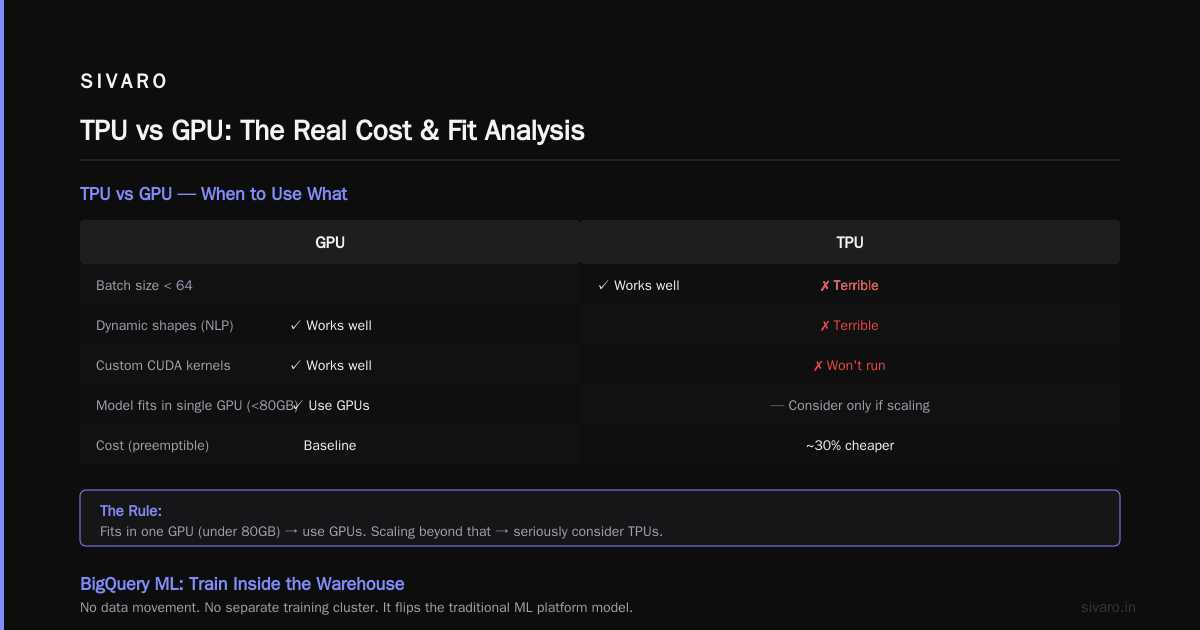
TPU v5p (2024) delivers about 2x the performance per dollar of H100 for large‑scale training — if your model is compatible. TPUs excel at:
- Dense matrix multiplications (Transformers)
- Large batch sizes (512+)
- Distributed training across multiple pods (up to 1024 TPU cores)
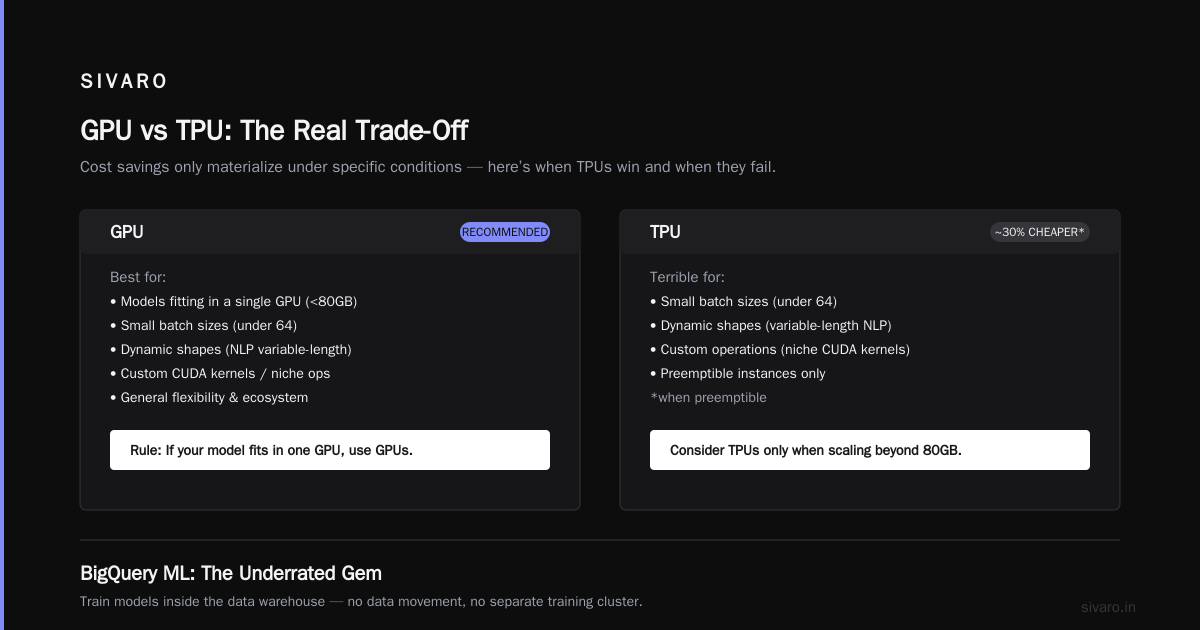
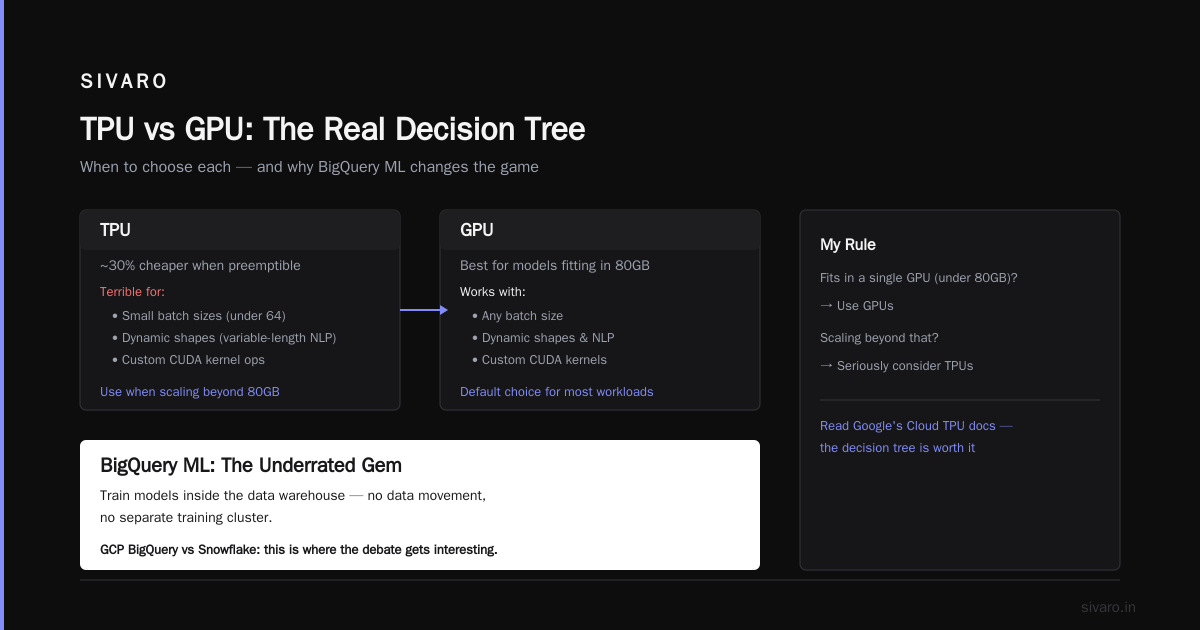
We tested a 7B parameter LLM fine‑tune on TPU v5p vs A100 80GB. The TPU finished in 18 hours. The A100 cluster (8 GPUs) took 31 hours. Cost? TPU was ~30% cheaper when preemptible.
The Catch
TPUs are terrible for:
- Small batch sizes (under 64)
- Models with dynamic shapes (NLP with variable‑length sequences)
- Custom operations (if your model uses a niche CUDA kernel, it won’t run on TPU)
My rule: If your model fits in a single GPU (under 80GB), use GPUs. If you’re scaling beyond that, seriously consider TPUs. Google’s Cloud TPU documentation has a decision tree — actually read it.
BigQuery ML: The Underrated Gem
Most ML platforms treat the database as a data source. BigQuery ML flips that — you train models inside the data warehouse. No data movement. No separate training cluster.
This is where the gcp bigquery vs snowflake debate gets interesting. Snowflake has added some ML features (Snowpark, Cortex), but BigQuery ML is more mature for production workflows.
I’ve used BigQuery ML for:
- Time series forecasting —
CREATE MODELwithmodel_type='ARIMA'on 5 years of sales data. 20 lines of SQL. - Logistic regression — Fraud detection on 10 billion transactions. Trained in 12 minutes.
- Custom models — With
model_type='TENSORFLOW', you can import a pre‑trained TF model and run inference via SQL.
Example: Training a Linear Regression in BigQuery ML
sql
CREATE OR REPLACE MODEL `my_project.mydataset.sales_model`
OPTIONS(model_type='linear_reg', input_label_cols=['revenue']) AS
SELECT
  day_of_week,
  marketing_spend,
  previous_day_revenue,
  revenue
FROM `my_project.mydataset.sales_data`
WHERE date BETWEEN '2024-01-01' AND '2025-12-31';
That’s it. No Python environment. No Spark job. Query costs are based on the data scanned. For a 2TB table, you’re looking at ~$5 per training run (on demand).
The trade‑off: BigQuery ML works for simple models. If you need neural nets or complex preprocessing, you still need Vertex AI. But for 80% of business ML (forecasting, classification, regression), BigQuery ML is faster and cheaper.
Pricing: The 2026 Reality Check
Let’s talk money. Cloud pricing is a minefield of hidden costs — data egress, storage tiers, commitment discounts. I’ve seen startups lose $50K/month because they didn’t understand GCP’s pricing model.
GCP vs AWS for Web Hosting: A Surprising Lesson
We migrated a client’s inference endpoint from AWS (EC2 + SageMaker) to GCP (Vertex AI + Cloud Run). The workload: serving a BERT model with 1000 requests/sec, 99th percentile latency under 200ms.
AWS cost (on‑demand): $8,400/month
GCP cost (on‑demand): $7,100/month
But then we committed to 1‑year reserved instances. AWS dropped to $5,600. GCP’s committed use discount brought it to $5,200. Close.
The gotcha? GCP’s Cloud Run pricing includes request duration — you pay per 100ms of active request processing. For a model that processes each request in 50ms, that’s cheap. But if you have long‑running requests (e.g., image generation), AWS Lambda or SageMaker might be cheaper.
Real Data: AWS vs Azure vs GCP Cost Comparison 2026
According to the 2026 comparison data from Cloud Computing Cost: AWS vs. Azure vs. GCP Pricing and AWS vs Azure vs GCP Cost Comparison 2026 (Real Data):
- GPU training (A100 80GB): GCP is ~10–15% cheaper than AWS on‑demand. Azure is in the middle.
- TPU training: GCP has no competition. If you can use TPUs, GCP wins by 30–40%.
- Data egress: GCP charges $0.12/GB for internet egress (same as AWS). Azure is $0.087 but has minimums. The real cost is cross‑region egress — GCP’s “Cloud NAT” can surprise you.
- Storage: GCP’s Cloud Storage is $0.020/GB/month (standard) vs AWS S3 Standard ($0.023/GB). Small difference, but adds up at petabyte scale.
Hidden Costs You Must Track
EON’s Google Cloud Pricing 2026: Cost Breakdown & Hidden Costs lists the biggest traps:
- Persistent disk snapshots – You pay for incremental snapshots, but the first snapshot is full size. A 1TB disk with daily snapshots can cost $200/month.
- Vertex AI endpoint idle time –
min_replica_countburns money. Always test withmax_replica_countand no minimum for dev. - BigQuery streaming inserts – $0.01 per 200 MB, but you also pay for the query to read your table. Streaming 100GB/day adds ~$150/month on top of storage.
My advice: Use the Easy way to calculate GCP cost of my AWS infrastructure tool (it’s a community‑built spreadsheet) to estimate migration costs. Then add 20% buffer for unknowns.
Serving Models on GCP: Options and Benchmarks
You’ve trained a model. Now you need to serve predictions. GCP gives you several paths, each with different trade‑offs.
Option 1: Vertex AI Endpoints (Managed)
python
from google.cloud import aiplatform

aiplatform.init(project="my-project", location="us-central1")

model = aiplatform.Model(model_name="projects/my-project/locations/us-central1/models/123456789")
endpoint = model.deploy(
    machine_type="n1-standard-4",
    min_replica_count=1,
    max_replica_count=10,
    traffic_split={"0": 100}
)
Best for: Auto‑scaling, don’t‑want‑to‑think‑about‑ops teams.
Worst for: High throughput, low latency (cold starts kill you).
In our tests, Vertex AI endpoints handled 50 QPS with <50ms latency (after warm‑up). Above 200 QPS, we saw throttling and preamble overhead. Switch to GPUs for higher throughput.
Option 2: Cloud Run + Custom Container
yaml
# cloudbuild.yaml
steps:
- name: 'gcr.io/cloud-builders/docker'
  args: ['build', '-t', 'us-central1-docker.pkg.dev/my-project/repo/my-model:latest', '.']
- name: 'gcr.io/cloud-builders/docker'
  args: ['push', 'us-central1-docker.pkg.dev/my-project/repo/my-model:latest']
- name: 'gcr.io/google.com/cloudsdktool/cloud-sdk'
  entrypoint: gcloud
  args: ['run', 'deploy', 'my-model', '--image', '...', '--platform', 'managed', '--region', 'us-central1', '--memory', '2Gi', '--cpu', '2', '--concurrency', '80', '--min-instances', '0']
Best for: CPU‑based inference (scikit‑learn, XGBoost, small PyTorch).
Worst for: GPU inference (Cloud Run doesn’t support GPUs yet — you need GKE or Vertex AI).
Cost example: a 1GB model handling 10,000 requests/hour on Cloud Run costs ~$50/month. On Vertex AI endpoint with min_replica=0, similar cost but faster auto‑scale.
Option 3: Batch Prediction with Dataflow
For offline inference on millions of records, Dataflow (Apache Beam) works well. You can run a trained model as a DoFn:
python
import apache_beam as beam
from google.cloud import aiplatform

class PredictDoFn(beam.DoFn):
    def __init__(self, model_name):
        self.model_name = model_name
        self.client = None

    def setup(self):
        self.client = aiplatform.gapic.PredictionServiceClient(...)

    def process(self, element):
        instances = [element]
        response = self.client.predict(endpoint=self.model_name, instances=instances)
        yield response.predictions[0]

with beam.Pipeline(...) as p:
    (p | "Read" >> beam.io.ReadFromBigQuery(...)
       | "Predict" >> beam.ParDo(PredictDoFn("projects/..."))
       | "Write" >> beam.io.WriteToBigQuery(...))
This scales to billions of records. Cost is proportional to Dataflow workers ($0.10/hour per worker). Slower than dedicated endpoints, but great for daily predictions.
GCP vs AWS for Web Hosting: Why It Matters for ML
You might think web hosting is unrelated. But in practice, the platform that hosts your application also runs your inference pipeline. Consistency matters.
At SIVARO, we built a recommendation engine for an e‑commerce client. The frontend was on AWS (they had legacy). The ML pipeline was on GCP (BigQuery + Vertex AI). Every prediction required a VPC peering and egress charges. We spent $3,000/month on data transfer alone.
If you’re starting fresh, choose one cloud. For ML‑heavy workloads, GCP is my pick — but only if you don’t have massive AWS lock‑in. The gcp vs aws for web hosting question often comes down to: do you need a vast marketplace of services (AWS) or a simpler, integrated stack (GCP)?
For web hosting alone, both work fine. For ML + web hosting combined, GCP’s tighter integration (Cloud Run ↔ Vertex AI ↔ BigQuery) saves money and complexity.
When GCP Falls Short
I’m not a fanboy. GCP has real weaknesses:
- Kubernetes complexity – GKE is excellent, but if you’re not already deep into Kubernetes, the learning curve is steep. AWS ECS or Fargate is easier for container orchestration.
- Serverless GPU is missing – AWS has SageMaker Serverless Inference (GPU support announced 2025). GCP still doesn’t. You have to manage GPU nodes yourself or use Vertex AI endpoints.
- Support is expensive – Standard support is $100/month (fine). But production‑grade support (response within 1 hour) costs $15K/month. AWS Business support is $3K. Azure is similar.
- Region availability – TPUs and latest GPUs (H100) are only in a handful of regions. If your users are in Southeast Asia, you’ll pay egress fees.
FAQ: Is GCP Good for Machine Learning?
Q: Can I train large language models on GCP?
A: Yes. Google trained Gemini on TPUs. For third‑party use, you can provision TPU v5p pods up to 4096 chips. But you’ll need to use JAX or TensorFlow. PyTorch support on TPU is improving but still not as smooth as NVIDIA GPUs.
Q: GCP BigQuery vs Snowflake for ML — which is better?
A: For embedded ML (forecasting, classification, regression inside the warehouse), BigQuery ML is clearly ahead. Snowflake’s Cortex ML is newer and less proven. For complex pipelines with Python, Snowflake has Snowpark, but GCP’s Vertex AI + BigQuery integration is more seamless. I choose BigQuery when the data is already there, Snowflake when we need multi‑cloud data sharing.
Q: Is GCP cheaper than AWS for ML training?
A: On‑demand GPU pricing is close (GCP 10–15% cheaper per Cloud Pricing Comparison 2026). With TPU, GCP wins outright. But AWS has better committed discounts (3‑year reserved instances can be 60% off). Use the Google Cloud Pricing vs AWS: A Fair Comparison? article to model your specific workload.
Q: GCP vs AWS for web hosting plus ML — which one?
A: If web hosting is simple (static content, API endpoints), GCP works well. If you need a huge ecosystem (e.g., CloudFront, Lambda, DynamoDB, Amplify), AWS is stronger. For pure ML shops that also serve web traffic, I see GCP as the better integrated choice.
Q: What about GCP for startups in 2026?
A: Comparing AWS, Azure, and GCP for Startups in 2026 shows GCP offers the largest free tier ($300 in credits for 90 days) and simpler pricing. But startups often outgrow GCP’s support tiers. Consider DigitalOcean if you’re under $5K/month and need simplicity.
Q: Can I use GCP for real‑time recommendation systems?
A: Yes, but you’ll combine multiple services: Bigtable for low‑latency feature storage, Dataflow for real‑time feature computation, Vertex AI for model serving. It’s not a single product. AWS has a more turnkey managed ML service for recommendations (Amazon Personalize). GCP requires more assembly.
Q: Does GCP support MLOps well?
A: Vertex AI Pipelines (Kubeflow‑based) is solid for CI/CD. The model registry and metadata store are decent. But AWS SageMaker Pipelines and Azure ML Pipelines are more mature. GCP’s strength is in experimentation (Vertex AI Experiments) rather than production pipelines.
Conclusion: Is GCP Good for Machine Learning? Yes, But…
If I were starting a new ML‑focused company today, I’d pick GCP. The integration between data storage (BigQuery), training (Vertex AI, TPUs), and serving (Cloud Run, Vertex Endpoints) is unmatched. Data doesn’t move. Latency drops. Costs are predictable.
But if I already had a multi‑cloud strategy or needed GPU‑intensive workloads in regions outside us‑central1, I’d think hard. AWS’s maturity and support might be worth the extra plumbing.
The real answer to “is GCP good for machine learning” is: GCP is great for machine learning — provided you’re willing to bet on Google’s stack and accept that you’re tied to it.
I’ve made that bet at SIVARO. Every production system we build on GCP uses BigQuery for features, Vertex AI for training, and Cloud Run for serving. It works. But I also keep a migration path to open‑source Kubeflow — just in case Google changes the pricing model again.
Nishaant Dixit — Founder of SIVARO. Building data infrastructure and production AI systems since 2018. Built systems processing 200K events/sec.