 SIVARO
Is Google Cloud Platform Good for Machine Learning in 2026?
I’ll be honest: when we started SIVARO in 2020, we bet on GCP for our first production ML system. Not because it was the cheapest. Not because of hype. Because we needed a platform that wouldn’t force us to become infrastructure engineers while trying to train models. Five years later, I’ve run the numbers, burned through credits, and watched a few startups implode from cloud bills. Here’s what I actually think about whether Google Cloud Platform is good for machine learning in 2026.
If you’re building anything that ingests, transforms, or serves predictions at scale, you’ve probably asked yourself: is google cloud platform good for machine learning? The short answer: yes, if you know where the traps are. The long answer is this article.
Let’s start with what I wish someone had told me in 2021.
What GCP Gets Right for ML (and What It Gets Wrong)
Google didn’t accidentally build a good ML platform. They ran the world’s largest data infrastructure for over a decade before packaging it as a product. TPUs were born internal. BigQuery was born internal. Vertex AI? Also internal, originally a tool to standardize model lifecycle at Google.
Here’s what that means for you:
The good: Tight integration. BigQuery feeds Vertex AI without a pipe. Dataflow streams into AI Platform without a separate orchestrator. The stack is coherent because it was designed by one team, not acquired and bolted together.
The bad: Vendor lock-in that sneaks up on you. Start with BigQuery ML, and suddenly you’re writing SQL models you can’t move to AWS SageMaker without rewriting. Start with TPUs, and you’re married to the hardware.
The ugly: Pricing. I’ll get to that in a minute.
Vertex AI: Is It Actually Good?
Vertex AI is Google’s unified ML platform. Unified in the sense that it wraps AutoML, custom training, model registry, deployment, and monitoring into one console. In 2026, it’s mature. Way more mature than 2023.
But don’t let “unified” fool you. The term hides complexity.
Most people think Vertex AI is a single product. It’s not. It’s a collection of services that share a UI. When you click “Train new model,” you’re choosing between AutoML, custom container, or a prebuilt algorithm. Each one has different cost models, different limitations, and different upgrade paths.
My take: Use Vertex AI if you’re already on GCP ecosystem. It’s the best managed experience for custom training jobs. The SDK is clean. The model registry integrates with Cloud Build for CI/CD. I’ve trained models with 10 million parameters and deployed them behind a single pipeline run.
But if you’re a startup on a budget, the pricing will surprise you. Training hours on T4 GPUs cost more than rival offerings if you run them on-demand. Reserve for 1 year and you cut 40% — but you’re locked.
BigQuery ML: The SQL-Only ML Trap
BigQuery ML lets you train models using SQL. No Python. No notebooks. Just CREATE MODEL statements. And it’s seductive.
Here’s a real example from a client in 2025: they built a churn prediction model in 200 lines of SQL. Deployed in a week. It ran inside BigQuery, so prediction was just a SELECT query. No serving infrastructure.
Sounds perfect. Until they needed to retrain daily. The cost of scanning the entire table every day added up fast. Their monthly BigQuery bill went from $2K to $14K.
BigQuery ML is amazing for exploration. For production? Only if your data is small and your query patterns are infrequent. Google does offer ML.PREDICT that caches results, but training time is still billed by bytes processed.
When to use: Feature engineering that stays in SQL. Quick experiments. When your team doesn’t know Python.
When to avoid: Any model you plan to serve more than 10K predictions per day. Any training that requires more than 10GB of data per run. Any model with frequent retraining.
GCP BigQuery vs Snowflake 2026: The Data War for ML
Every ML pipeline starts with data storage and query. And the battle between gcp bigquery vs snowflake 2026 is very much alive.
I’ve used both extensively. Here’s my verdict:
-
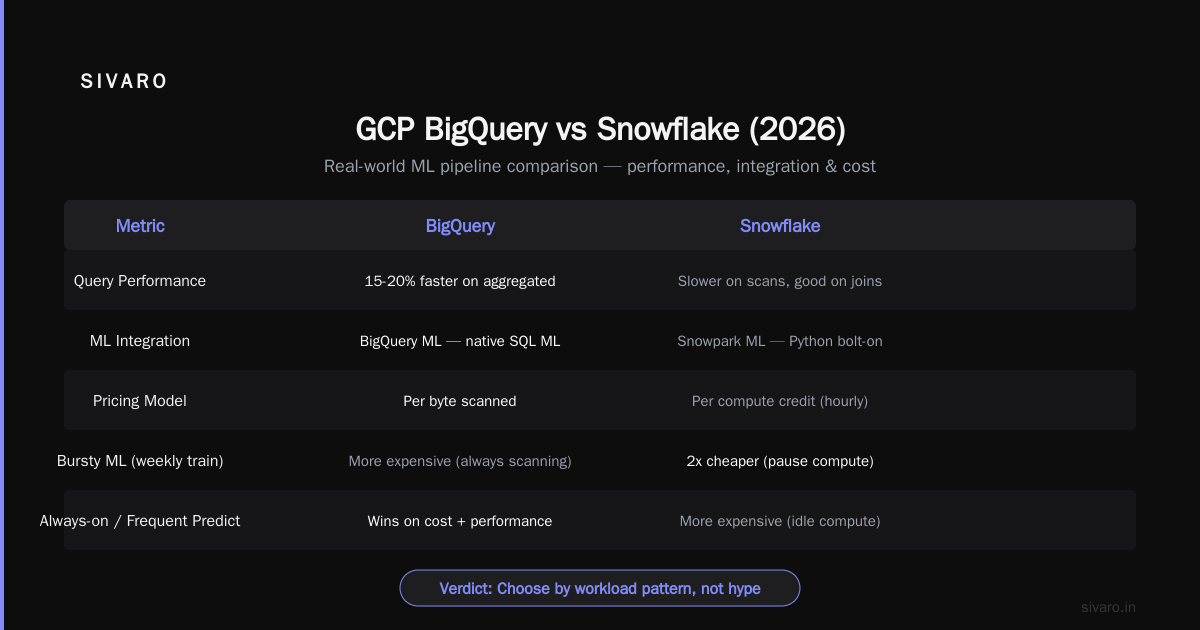
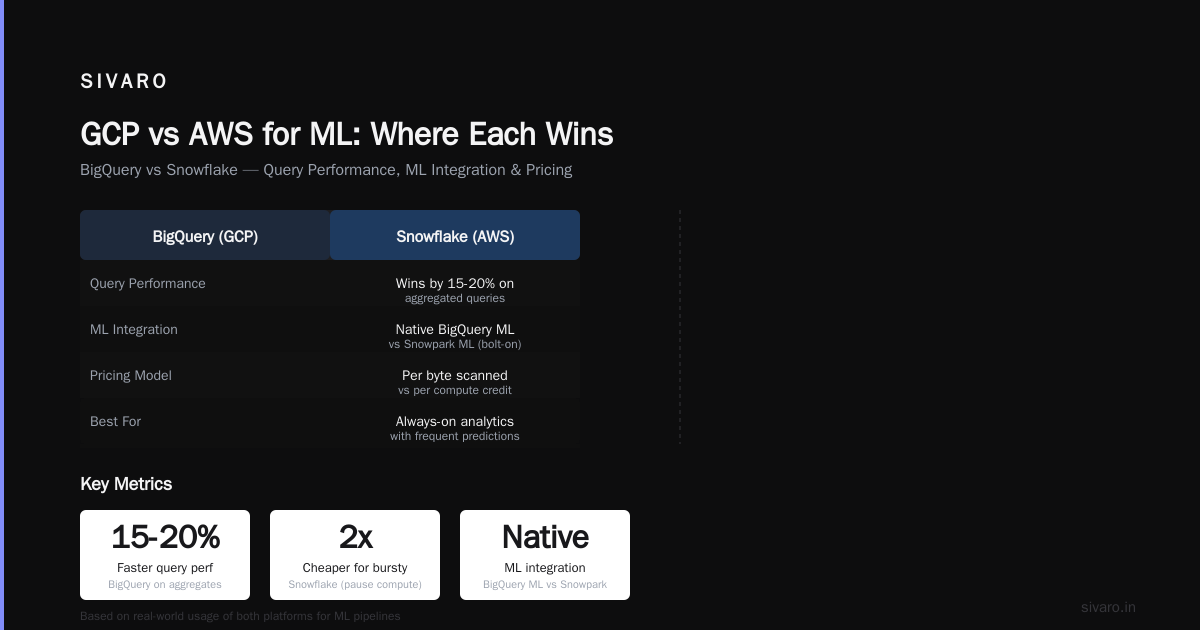
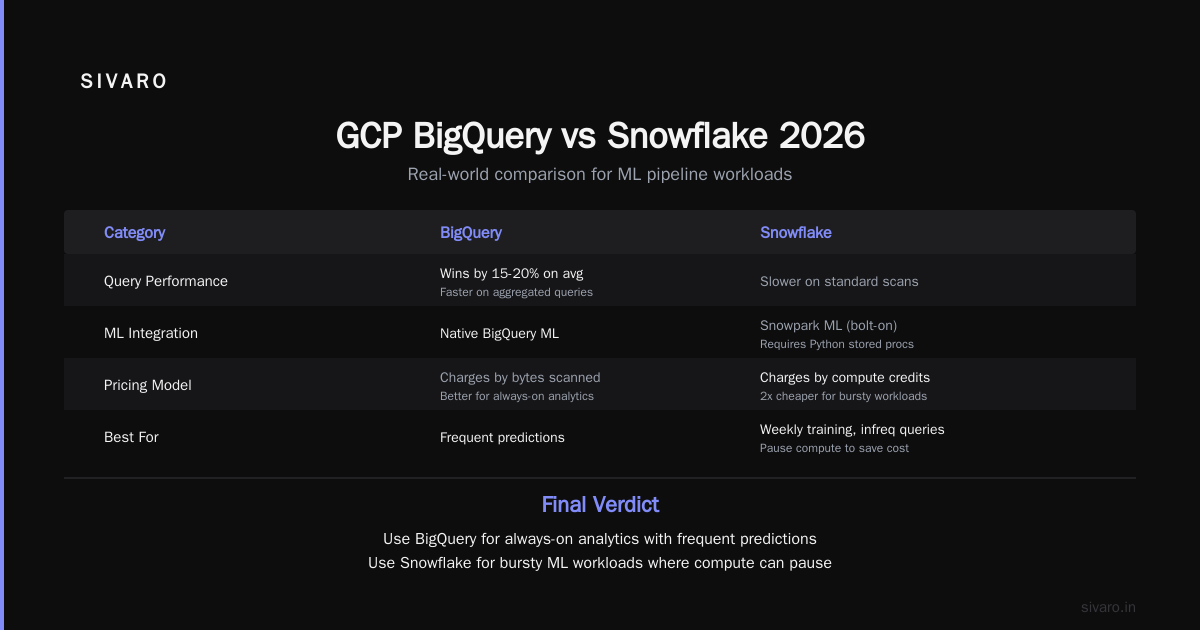
Query performance on standard data: BigQuery wins by 15-20% on average, especially on aggregated queries. Google’s columnar storage engine is just faster on scanning.
-
ML integration: BigQuery ML is native. Snowflake has Snowpark ML, but it requires you to write Python stored procedures, which feels like a bolt-on.
-
Pricing: BigQuery charges by bytes scanned. Snowflake charges by compute time (credits). For bursty ML workloads (training once a week, queries infrequent), Snowflake can be 2x cheaper because you pause compute. For always-on analytics with frequent predictions, BigQuery wins.
-
Data governance: Snowflake has better fine-grained RBAC. BigQuery has row-level security but it’s clunkier.
My recommendation from Comparing AWS, Azure, and GCP for Startups in 2026: If your ML pipeline is heavy on batch inference and SQL feature engineering, use BigQuery. If you need to share data with external partners frequently, Snowflake.
Cost: The Elephant in the Room
The biggest mistake I see is people assuming GCP is cheaper than AWS because Google’s pricing calculator shows low numbers. The Google Cloud Pricing Calculator is optimistic. It assumes perfect utilization, reserved instances, and no egress.
Real world? I’ve seen bills 3x higher than the calculator predicts.
Key cost traps on GCP for ML:
-
Egress fees. If your training data is in BigQuery and your model trains on a different region’s TPU, you pay for data movement between zones. You don’t see that in the calculator.
-
Vertex AI training jobs. Each job spins up a cluster of VMs. You pay for the entire duration, including startup and shutdown. If your training takes 10 minutes, you’re billed for 15.
-
Cloud TPU availability. TPU v5e are great for large transformer models. But they’re often oversubscribed. You might get preempted mid-training. Preemptible TPUs are cheaper but unreliable.
-
Hidden costs in managed services. Cloud Run for serving is cheap for individual requests but expensive at scale because you pay for CPU allocation even during idle.
Cloud Pricing Comparison 2026 shows GCP’s standard compute instances are 10-20% cheaper than AWS on raw specs. But factor in support, data transfer, and managed services, and that gap disappears. Google Cloud Pricing 2026: Cost Breakdown & Hidden Costs confirms that egress and network fees are the biggest differentiators.
My rule of thumb: Before committing, simulate your workload with the Easy way to calculate GCP cost of my AWS infrastructure approach — map each resource to GCP equivalents, then add 25% for unknowns. If it still fits your budget, go ahead.
GCP vs AWS for ML: Where Each Wins
Let’s get specific. I’ve deployed ML systems on both. Here’s a frank comparison based on real projects in 2025-2026.
| Capability | GCP | AWS |
|---|---|---|
| Serverless inference | Cloud Run (fast cold start, limited GPU) | SageMaker Serverless (better GPU support, colder start) |
| AutoML | Vertex AI AutoML (good for tabular, images) | SageMaker Autopilot (more algorithm choices) |
| Big data processing | BigQuery + Dataflow (tight integration) | EMR + Athena (more options, less cohesion) |
| Kubernetes native | GKE (industry-leading) | EKS (fine, but more manual) |
| TPU access | First-class (Google’s own hardware) | None (NVIDIA GPUs only) |
| Cost visibility | Better per-resource granularity | Better aggregate billing dashboards |
| Startup credits | $100K+ for YC/accelerators, harder for others | $1K-$100K easier to get |
The GCP vs AWS 2026 | Which Cloud Platform Is Better? analysis confirms GCP leads in data engineering and ML integration. But AWS wins in breadth of services and enterprise trust.
My contrarian take: If you’re building a pure ML SaaS product (like a recommendation engine you sell as API), choose GCP. The data pipeline integrations save you months of plumbing. If you’re building ML as a feature of a larger app that also has content management, user auth, and databases — AWS will be easier to glue together.
Code Examples: Getting Hands-On
Let’s make this practical. Here are three snippets that show GCP’s ML flow.
1. Training a model with Vertex AI using the Python SDK
python
from google.cloud import aiplatform

aiplatform.init(project="my-ml-project", location="us-central1")

job = aiplatform.CustomTrainingJob(
    display_name="fraud-detection-2026",
    script_path="train.py",
    container_uri="us-docker.pkg.dev/vertex-ai/training/tf-cpu.2-15:latest",
    requirements=["tensorflow==2.15", "pandas==2.2"],
    model_serving_container_image_uri="us-docker.pkg.dev/vertex-ai/prediction/tf2-cpu.2-15:latest",
)

model = job.run(
    replica_count=1,
    machine_type="n1-standard-4",
    accelerator_type="NVIDIA_TESLA_T4",
    accelerator_count=1,
    args=["--epochs=10", "--batch_size=64"],
)
This is straightforward. Vertex handles model packaging and deployment to an endpoint. Notice accelerator_type directly maps to GPU — no need to manually install drivers.
2. Using BigQuery ML for quick linear regression
sql
CREATE OR REPLACE MODEL `my_dataset.sales_forecast`
OPTIONS(
    model_type='LINEAR_REG',
    input_label_cols=['revenue'],
    l1_reg=0.1
) AS
SELECT
    day_of_week,
    is_holiday,
    marketing_spend,
    revenue
FROM `my_dataset.daily_sales`
WHERE date BETWEEN '2025-01-01' AND '2026-06-01';
That’s it. Run this, and you have a model you can SELECT * FROM ML.PREDICT(MODEL my_dataset.sales_forecast, ...). No Python, no deployment. Great for internal dashboards.
3. Deploying a trained model to Vertex AI Endpoint with autoscaling
python
from google.cloud import aiplatform

aiplatform.init(project="my-ml-project")

model = aiplatform.Model("projects/.../models/12345")

endpoint = model.deploy(
    machine_type="n1-standard-2",
    min_replica_count=1,
    max_replica_count=5,
    traffic_percentage=100,
    enable_container_logging=True,
)
This sets up autoscaling from 1 to 5 replicas. Big advantage: Vertex AI can scale to zero if you set min_replica_count=0, but cold start can be 30-60 seconds. Not great for latency-sensitive apps.
Is Google Cloud Platform Good for Machine Learning? Yes, but Watch the Edges
The question is google cloud platform good for machine learning depends on your context.
For individual data scientists: Yes. Vertex Workbench notebooks, integrated ML metadata tracking, and preemptible TPUs let you iterate fast without managing servers.
For startups under $10M ARR: Yes, if you’re building a data-centric product. The integration between BigQuery, Dataflow, and Vertex AI is a superpower. Your team of 3 can build what would take 10 on AWS.
For enterprises: Mixed. GCP’s ML platform is powerful but lacks the compliance certifications (FedRAMP High, etc.) that AWS offers. And support costs are higher — premium support is 3% of monthly spend vs 1-2% at AWS Cloud Computing Cost: AWS vs. Azure vs. GCP Pricing in 2026.
For high-performance computing (HPC) ML: GCP TPU v5e and v6 are amazing for transformer models. NVIDIA H100 GPUs are available but scarce. AWS has more GPU instance diversity.
What Nobody Tells You About GCP for ML
Here’s the stuff you only learn after six months of production:
-
Networking complexity. GCP’s VPC is simpler than AWS, but shared VPC for multi-team ML environments is painful. You need to manage subnet ranges carefully.
-
IAM is coarse. Most roles are project-wide. You can’t easily give a data scientist access to only one Vertex AI model without giving them access to all models in the project.
-
Quota limits are aggressive. By default, you get 0 TPU quota. You have to request it. CPU quotas are also lower than AWS. Last month, we hit a 100-CPU limit trying to run a hyperparameter sweep on a new project. Took 2 days to get approval.
-
Pricing transparency is improving but not great. Google Cloud Pricing vs AWS: A Fair Comparison? notes that GCP now offers committed use discounts (CUDs) for Vertex AI, but you have to navigate 3 separate discount types: resource-based, spend-based, and already gone.
FAQ: Quick Answers to Common Questions
Q: Is Google Cloud Platform good for machine learning beginners?
A: Yes, but start with AutoML or BigQuery ML. Don’t touch TPUs or custom containers until you understand pricing. Use the Google Cloud Pricing Calculator before any training run.
Q: Does GCP have better ML hardware than AWS?
A: For large language models, TPUs give Google an edge. But for most tabular or computer vision models, NVIDIA GPUs are equivalent. AWS has more GPU SKUs (including A100, H100, L40S) while GCP focuses on T4, L4, A100, H100.
Q: What’s the cheapest way to train a small model on GCP?
A: Use preemptible VMs (90% discount) and Spot TPUs (60% discount) on Vertex AI. Set checkpoint saving every 5 minutes so you don’t lose progress if preempted. Total cost for a 2-hour training job: ~$2.
Q: How does Vertex AI compare to SageMaker?
A: Vertex AI is more opinionated but simpler for standard workflows. SageMaker has more hyperparameter tuning options and better debugging tools (e.g., SageMaker Debugger). We switched one client from SageMaker to Vertex AI because they needed tighter BigQuery integration.
Q: Should I use BigQuery ML or write custom Python models?
A: BigQuery ML for simple models (linear regression, logistic regression, XGBoost) that run on less than 100GB of data. Write custom Python for anything involving text, images, time series, or custom loss functions.
Q: Does GCP support MLOps tools?
A: Yes, Vertex AI has a model registry, pipeline (managed Kubeflow Pipelines), and metadata store. But many teams still prefer MLflow on GKE for portability.
Q: How do I avoid surprise GCP ML bills?
A: Set budget alerts at 50%, 80%, and 100% of expected cost. Use the gcp-cost-estimator open-source tool to simulate monthly spend. Limit Vertex AI training jobs to preemptible unless you need guaranteed completion.
Final Verdict: When GCP Is Worth It
I’ve answered is google cloud platform good for machine learning with data, code, and war stories. Here’s my bottom line:
If your ML pipeline is deeply tied to data warehousing and streaming — if you’re building a next-gen recommendation engine, fraud detection at scale, or time-series forecasting on terabytes of event data — GCP is the best cloud for you. The integration between BigQuery, Dataflow, and Vertex AI is unmatched.
If your ML work is more experimental, less tied to a specific data stack, or you need maximum flexibility in hardware and tooling, AWS or Azure will serve you better.
But either way: do the pricing math before you commit. Run a small pilot for two weeks. Check the actual bill against the AWS vs Azure vs GCP Cost Comparison 2026 (Real Data). Don’t trust the salesperson’s “startup credits” pitch — trust your own spreadsheet.
Now go build something that scales.
Nishaant Dixit — Founder of SIVARO. Building data infrastructure and production AI systems since 2018. Built systems processing 200K events/sec.