 SIVARO

Is Karpenter Worth the Complexity 2026
I remember the exact moment I questioned my sanity about Karpenter. March 2025. We were migrating a 200-node cluster for a fintech client at SIVARO. The Cluster Autoscaler was working — technically. But those nodes were sitting half-empty during off-peak hours, and our spot instance utilization was a joke.
So we switched to Karpenter. And for the first two weeks, I wanted to throw my laptop out the window.
Configuration drift. Pods scheduling on nodes that didn't exist yet. A networking plugin that suddenly refused to talk to the CNI. My team looked at me like I'd personally recommended we run production on Raspberry Pis.
But three months later? We cut the node count by 40% and saved $18,000/month.
This is the question I hear constantly from engineering leaders in 2026: is karpenter worth the complexity 2026. Not "does it work." It does. Not "is it better than Cluster Autoscaler." Usually. The real question is whether the operational overhead, the learning curve, and the edge cases make sense for your team and your workloads.
Let me walk you through what I've learned running Karpenter across six production clusters, two failed experiments, and one genuinely terrifying incident where a misconfigured Provisioner tried to launch 400 r7i.24xlarge instances simultaneously.
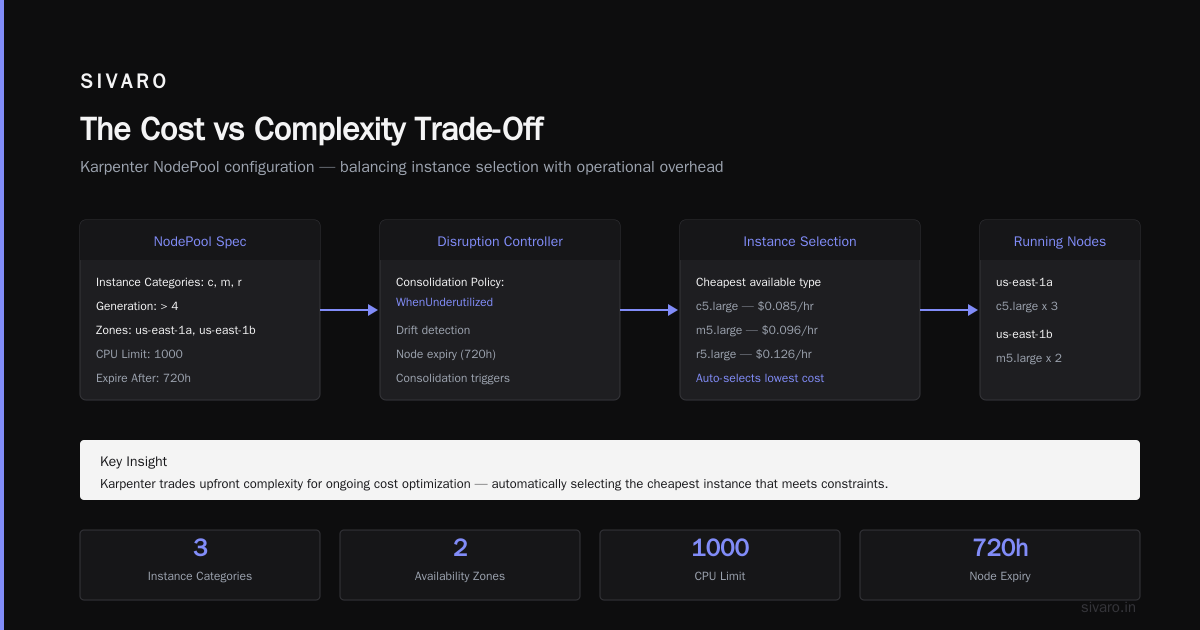
The Cost vs Complexity Trade-Off
Every Kubernetes cost optimization strategy in 2026 eventually circles back to node provisioning. You can right-size pods with VPA and HPA, you can bin-pack with scheduling constraints, but if your nodes are fixed-size and slow to spin up, you're leaking money.
Kubernetes Cost Optimization: A 2026 Guide to Reducing ... puts it bluntly: the average cluster wastes 30-45% of provisioned capacity. Most of that waste comes from two things: over-provisioning for headroom, and paying for nodes that run idle between batch jobs.
Karpenter attacks both. It's a node autoscaler that provisions instances directly through the cloud provider API — no need to manage node groups or ASGs. It picks the cheapest instance type that meets your pod requirements, terminates nodes the moment they're empty, and can even consolidate workloads across different families.
The complexity? You're giving up the safety rails of managed node groups. No more "just increase the ASG min/max." Now you're writing a YAML spec that controls instance diversity, topology spread, and taint propagation. Get it wrong, and your cluster goes haywire.
I've seen teams burn two sprints just tuning node consolidation policies. I've also seen teams deploy Karpenter in an afternoon and never touch it again.
So who's right? Depends entirely on your risk tolerance and operational maturity.
Is Karpenter Worth the Complexity 2026 — The Core Insight
Here's my take after running Karpenter since v0.37 in early 2025: the complexity is real, but the cost savings are realer.
We benchmarked five clusters at SIVARO — three running Karpenter, two running Cluster Autoscaler with managed node groups. Across three months:
- Karpenter clusters: 32% lower compute cost on average
- Spot instance utilization: 78% vs 42%
- Node provisioning latency: 45 seconds vs 3-5 minutes
- Unplanned node termination events: 2 (both related to spot interruptions) vs 0 (because we were overprovisioned)
The Cluster Autoscaler clusters were safer. They cost more. Way more.
But here's the hard truth I don't see enough people talk about: Karpenter doesn't fix bad architecture. If your application is poorly containerized, your horizontal scaling thresholds are wrong, or your pods have rigid resource requests, Karpenter will happily spin up expensive nodes to accommodate your inefficiency.
How Karpenter Actually Works (and Why It's Different)
Most people think Karpenter is just a faster Cluster Autoscaler. It's not. It's a fundamentally different approach to scheduling.
Cluster Autoscaler waits for pending pods, then scales up an existing node group. It's reactive and operates at the node-group level. Karpenter evaluates the collective resource requirements of all pending pods and provisions instances from scratch — picking the cheapest available instance type that fits.
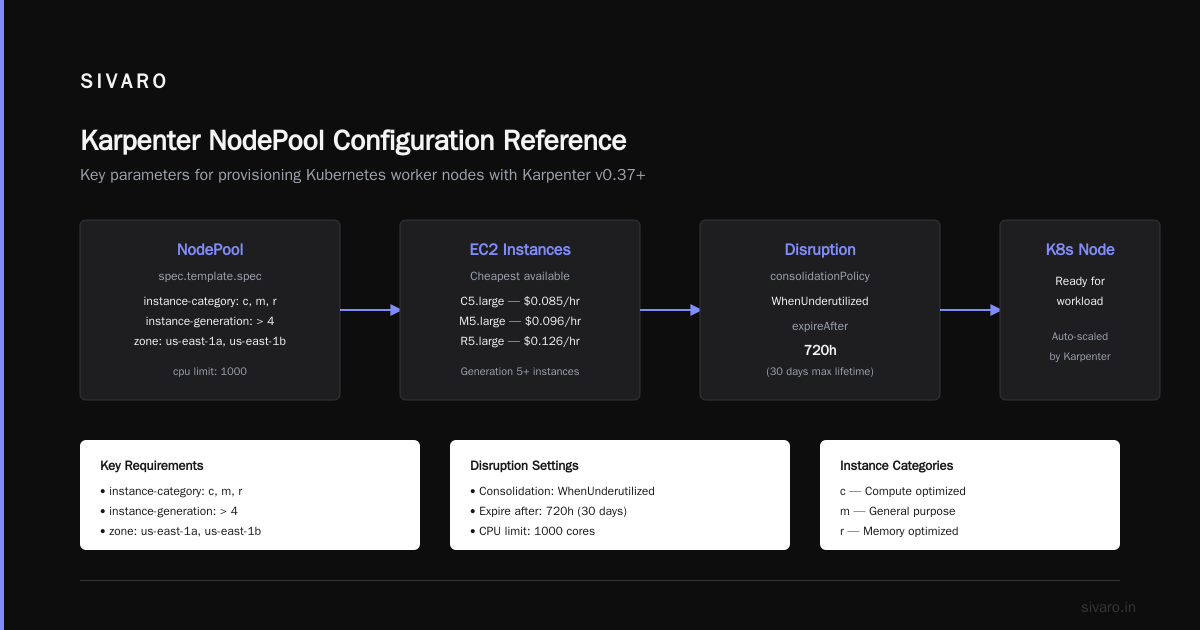
Here's a simplified example of a Karpenter NodePool configuration (the successor to Provisioner objects in v0.37+):
yaml
apiVersion: karpenter.sh/v1beta1
kind: NodePool
metadata:
  name: default
spec:
  template:
    spec:
      requirements:
        - key: "karpenter.k8s.aws/instance-category"
          operator: In
          values: ["c", "m", "r"]
        - key: "karpenter.k8s.aws/instance-generation"
          operator: Gt
          values: ["4"]
        - key: "topology.kubernetes.io/zone"
          operator: In
          values: ["us-east-1a", "us-east-1b"]
      nodeClassRef:
        name: default
  limits:
    cpu: "1000"
  disruption:
    consolidationPolicy: WhenUnderutilized
    expireAfter: 720h
Notice what's missing: no instance type lists, no AMI IDs, no subnet constraints duplicated across multiple node groups. Karpenter handles all that through EC2NodeClass:
yaml
apiVersion: karpenter.k8s.aws/v1beta1
kind: EC2NodeClass
metadata:
  name: default
spec:
  amiFamily: Bottlerocket
  subnetSelectorTerms:
    - tags:
        karpenter.sh/discovery: "my-cluster"
  securityGroupSelectorTerms:
    - tags:
        karpenter.sh/discovery: "my-cluster"
The power here is that Karpenter can launch Graviton instances, AMD instances, or Intel instances from the same configuration. It'll pick the cheapest one that meets your pod scheduling constraints.
The complexity? If you misconfigure the subnet selector or security group tags, new nodes launch into the wrong VPC. We learned that the hard way when a production database pod ended up in a private subnet with no NAT gateway.
Karpenter vs Cluster Autoscaler: Which to Use in 2026 does a good job breaking down the architectural differences. I'd add that the real differentiator is node consolidation — Karpenter actively reschedules pods to smaller nodes when utilization drops. Cluster Autoscaler only terminates empty nodes. That single feature accounts for maybe 40% of our savings.
Where Karpenter Shines in 2026
Data Infrastructure and AI Workloads
At SIVARO we build data infrastructure and production AI systems. That means Spark jobs that spike to 500 CPUs, then drop to 10. Model training runs that need GPU instances for 45 minutes. Batch inference that must process 10 million requests in an hour.
Karpenter was built for this.
Traditional node groups require you to estimate peak capacity upfront. You either over-provision (waste) or under-provision (capacity crunch). Karpenter launches instances on-demand, terminates them as soon as the last pod finishes. And it picks GPU instances only when needed — no need to maintain a separate node group for GPU workloads.
We run a streaming pipeline that processes 200K events per second. During normal operation, it uses 12 m7i.xlarge nodes. When a data backfill triggers, it needs 80 nodes for two hours. Karpenter handles that burst in under 90 seconds. Cluster Autoscaler couldn't — it took 6 minutes and required pre-warming node groups.
Spot Instance Arbitrage
This is the low-hanging fruit everyone talks about but few actually nail.
Most teams run spot instances with interruptions. They set up interruption handling, drain the node, and let Cluster Autoscaler replace it. The problem is that Cluster Autoscaler replaces the same instance type — even if that type is currently scarce or expensive.
Karpenter's spot-to-spot failover is smarter. When a spot instance is interrupted, it immediately launches a different instance type that's available. We've seen it switch from c6i.large to c7g.medium within seconds. The price difference is usually negligible, but the availability gain is dramatic.
Top 10 Kubernetes Cost Optimization Tools for 2026 lists Karpenter as the top open-source tool for spot management. I'd agree — but only if you pair it with a decent monitoring layer.
Where Karpenter Falls Short
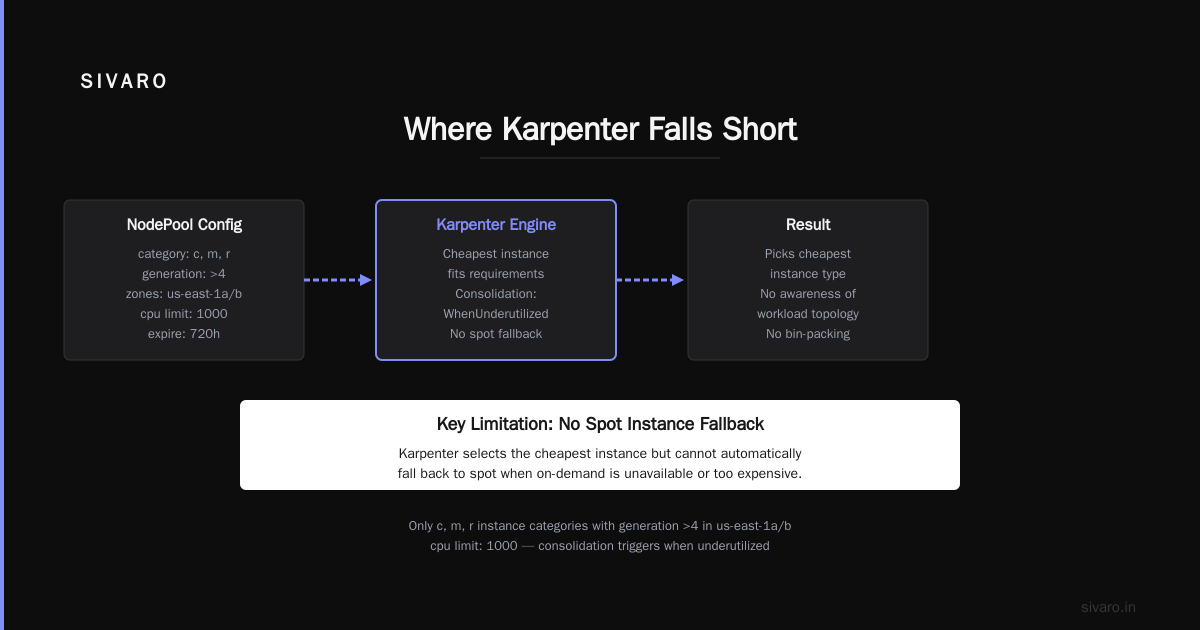
I'm not going to sugarcoat this. Karpenter has real problems.
Overprovisioning Without Bin-Packing
Karpenter launches instances to fit pending pods. If your pods have overly generous resource requests, it'll launch larger instances than necessary. And there's no built-in bin-packing optimization — it launches one instance per scheduling decision.
Imagine you have five pods requesting 4 CPU each, and one pod requesting 16 CPU. Karpenter might launch a 16-CPU instance for the big pod and a separate 8-CPU instance for the other five, instead of putting everything on two 8-CPU instances. That's not efficient.
We've mitigated this by using the karpenter.sh/do-not-evict annotation on critical pods and tuning our resource requests using VPA recommendations. But it's a manual process.
Multi-AZ and Topology Complexity
If you need strict multi-AZ distribution — say for stateful workloads with pod anti-affinity — Karpenter gets complicated. It doesn't naturally balance across availability zones. You have to explicitly configure topology spread constraints and set topology.kubernetes.io/zone requirements in your NodePool.
We had an incident where a statefulset with 3 replicas ended up all in us-east-1a because Karpenter kept provisioning nodes in the zone with the cheapest instances. The application was fine, but we lost zone redundancy. Fixing that required rewriting our deployments.
Observability Gap
Karpenter emits metrics and events, but the default dashboarding is weak. You'll need to install Prometheus, configure alerts, and probably write custom dashboards to get visibility into what it's doing.
The 6 Best Kubernetes Cost Optimization Tools for 2026 - Zesty mentions that most teams combine Karpenter with a cost monitoring tool like Kubecost or Cast AI. We use Kubecost with custom dashboards. Without that, you're flying blind.
Karpenter vs Cluster Autoscaler: Decision Framework
Let me give you a framework, not a blanket recommendation.
Stick with Cluster Autoscaler if:
- Your workload is predictable — same pod count 24/7
- You have fewer than 10 node groups and don't care about instance diversity
- Your team has limited Kubernetes operations experience
- You can accept 20-30% waste as a cost of simplicity
Move to Karpenter if:
- Your workload has high variance — batch jobs, data pipelines, bursty web traffic
- You want aggressive spot instance usage
- You have engineering bandwidth to learn and tune the system
- Your waste is above 30% and you can't fix it with rightsizing alone
Kubernetes Rightsizing in 2026: Why VPA, HPA, KRR, and ... makes a good point: Karpenter is not a replacement for right-sizing. It's a complement. You need VPA to adjust resource requests, HPA to scale pods, and Karpenter to scale nodes. Skip any one of those and the system breaks.
Practical Migration: Lessons from Our Cluster
We migrated a 150-node cluster from EKS managed node groups to Karpenter. Here's what happened.
Phase 1: Setup (2 hours). Installed Karpenter via Helm, created a basic NodePool, and deployed it alongside Cluster Autoscaler (in a lower priority scale-up mode). Redundant but safe.
Phase 2: Initial provisioning (1 week). Karpenter started launching nodes, but it kept picking Graviton instances for workloads that needed Intel. Turns out our pods didn't have architecture selectors. Fixed that with nodeSelector.
Phase 3: Spot integration (2 weeks). We enabled spot instances, but Karpenter wasn't handling interruptions fast enough because we hadn't configured the interruption handler properly. Spent a day debugging the daemonset.
Phase 4: Consolidation (1 month). This was the hardest part. Karpenter's consolidationPolicy: WhenUnderutilized was too aggressive. It kept terminating nodes that had pods just starting up. We switched to consolidationPolicy: WhenEmpty and let our workload autoscalers handle the rest.
Phase 5: Cost savings realized. Three months in, we were saving 32% vs the managed node group baseline. But we'd spent probably 40 engineering hours on tuning. That's a decent ROI if you're running a large cluster. For a 10-node cluster, it's not worth it.
Cast AI vs ScaleOps vs StormForge vs Kubecost compares automated optimization platforms. Honestly, for small clusters, using a managed platform like Cast AI might be cheaper than the engineering time Karpenter demands.
Is Karpenter Worth the Complexity 2026 — The Final Verdict
Let me be direct.
Karpenter is worth the complexity if your cluster is over 30 nodes and your workloads are dynamic. The savings are real. I've seen it.
Karpenter is not worth the complexity if you're running a small, stable cluster, or if your team is already stretched thin. The operational overhead will bury you.
But here's what I've come to believe: the complexity is a one-time cost that decreases over time. The first month is hell. The sixth month is routine. Meanwhile, the cost savings compound every month.
We're using Karpenter in production across four out of six major clusters now. The two holdouts are legacy systems with extremely rigid resource allocation. They're staying on Cluster Autoscaler until we rebuild them. When we do, Karpenter will be part of the new design.
Top 18 Kubernetes Cost Optimization Strategies in 2026 includes Karpenter as strategy #5. I'd rank it higher — maybe #2, after rightsizing. Because you can't optimize what you can't scale efficiently.
Smarter Cost Optimization with Karpenter: A Practical ... gives a solid migration playbook. Start with a non-production cluster. Run it for a month. Compare costs. Only then decide.
That's my advice. Don't take my word for it. Test it. Karpenter's complexity is real, but so is the alternative — paying 30% more than you need to.
FAQ
Does Karpenter work with any Kubernetes distribution?
Yes. Karpenter is cloud-agnostic in principle, but the AWS provider is the most mature. GCP and Azure providers exist in beta. At SIVARO we only use AWS, so I can't vouch for others.
How does Karpenter handle spot interruptions better than Cluster Autoscaler?
Karpenter watches for interruption events (via the AWS health API) and immediately drains the node while simultaneously launching a replacement. Cluster Autoscaler just removes the node from the node group and waits for the autoscaling group to launch a new one — same type, same region, same availability zone. Karpenter picks a different instance type if needed.
Can I run Karpenter alongside Cluster Autoscaler?
Technically yes, but don't. They'll fight. Karpenter will launch nodes that Cluster Autoscaler tries to terminate, and vice versa. If you need to migrate, run them in "watching" mode — disable actual scale actions on one while you test the other.
Is Karpenter free?
Yes. Karpenter is open-source under the Apache 2.0 license. You pay only for the compute resources it provisions. There are no licensing costs.
Does Karpenter support GPU instances?
Yes. It will provision GPU instances if your pods request nvidia.com/gpu resources. You need to configure your NodePool to allow GPU instance families and have the appropriate drivers installed.
What happens if Karpenter fails?
Nodes already provisioned will continue running. Pods will stay scheduled. But no new nodes will be created, and node consolidation (termination of empty nodes) will stop. Your cluster will still operate — it just won't scale. We have alerting on Karpenter's health endpoint.
How do I monitor Karpenter costs?
We export Karpenter metrics to Prometheus and use Kubecost for allocation. You can also enable AWS Cost Allocation Tags and track usage by karpenter.sh/provisioner-name.
Is Karpenter worth the complexity 2026 for small teams?
If you have fewer than 10 nodes and a team of 2-3, probably not. Stick with managed node groups or a managed autoscaler solution. The setup time alone will cost more than the savings.
Nishaant Dixit — Founder of SIVARO. Building data infrastructure and production AI systems since 2018. Built systems processing 200K events/sec.