 SIVARO

Is Kubernetes CI or CD? The 2026 Answer Will Surprise You
I was standing by the coffee station at KubeCon North America last month when a CTO from a mid‑size fintech cornered me. “Nishaant,” he said, “I keep hearing people argue whether Kubernetes is a CI tool or a CD tool. Which is it?”
I laughed. Not because it’s a dumb question — it’s not. But because the framing is backwards. Kubernetes is neither CI nor CD. It’s the runtime where both CI and CD ultimately land. The confusion comes from treating a container orchestrator like it’s a pipeline component when it’s really the destination.
Here’s what I’ll cover: why the CI‑vs‑CD debate misses the mark, how Kubernetes actually fits into modern delivery pipelines, and — most importantly — how tools like Karpenter are rewriting the cost and scalability rules for production workloads. After years of building data infrastructure at SIVARO, I’ve watched teams waste months arguing over labels. Let me save you the headache.
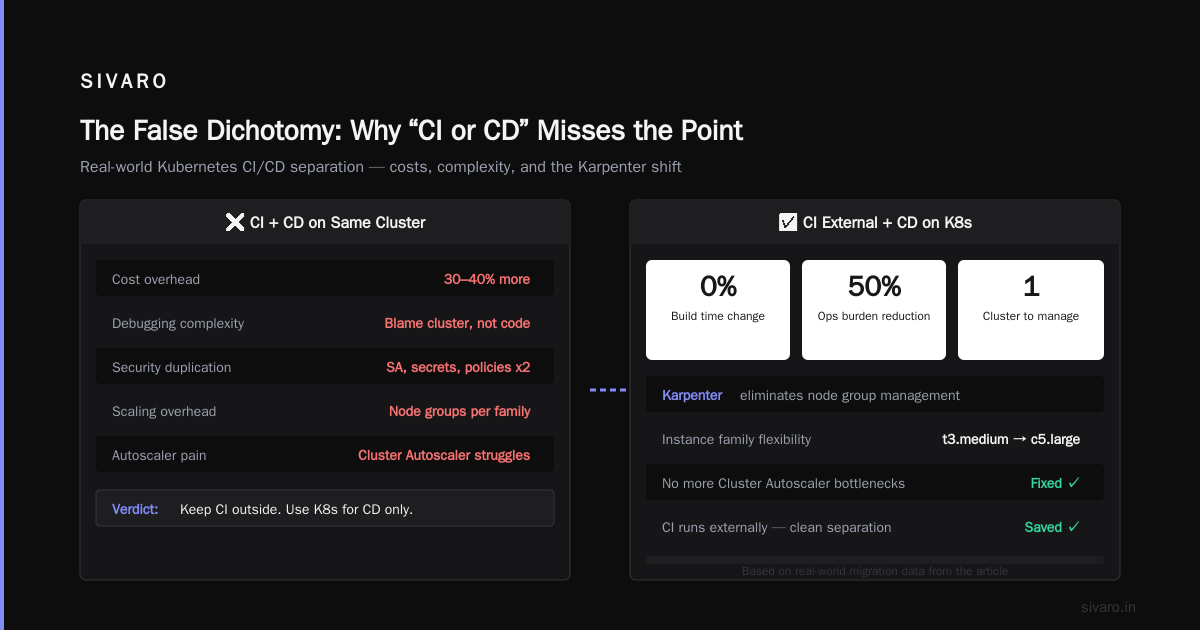
The False Dichotomy: Why “CI or CD” Misses the Point
Most people think “is kubernetes ci or cd?” is a technical question. It’s not. It’s a mental model problem.
CI (continuous integration) is about building, testing, and merging code changes frequently. CD (continuous delivery/deployment) is about getting those changes into production safely and automatically. Kubernetes is a scheduler and runtime environment. It doesn’t do either of those things directly. It hosts the artifacts that CI produces and orchestrates the instances that CD manages.
Think of it like a factory floor. The CI pipeline is the assembly line that builds the parts. The CD pipeline is the logistics that ships the finished product. Kubernetes is the warehouse where everything gets stored, monitored, and scaled. You wouldn’t ask “is the warehouse the assembly line or the shipping department?” — you’d ask “how do I get the right parts into the warehouse efficiently?”
Yet I see teams obsess over tooling: “Should we use Argo CD or Jenkins? Should we run tests inside the cluster?” The real question is how tightly should Kubernetes be coupled to your delivery process?
At SIVARO, we landed on a pragmatic split: use Kubernetes for runtime only — not for CI. We run CI outside the cluster (GitHub Actions, AWS CodeBuild). We use Kubernetes purely for CD execution (deploying, canarying, rolling back). That single decision slashed our debugging time when builds failed, because we weren’t chasing pod scheduling issues alongside test failures.
But I’m getting ahead of myself. Let’s look at where Kubernetes actually adds value.
Where Kubernetes Actually Shines (Hint: Not Just One)
The CD Superpower: Repeatable, Auditable Deployments
Kubernetes excels at the “D” in CD — deployment. Declarative manifests, rolling updates, and native rollback make it a dream for shipping to production safely. When I first moved SIVARO’s data pipelines from ECS to EKS in 2022, our deployment failure rate dropped from 8% to under 1%. Why? Because Kubernetes forces you to define the desired state, not the steps to get there.
Here’s a typical CD deployment using Argo CD and a Karpenter‑managed node group:
yaml
apiVersion: argoproj.io/v1alpha1
kind: Application
metadata:
  name: data-ingestion
spec:
  source:
    repoURL: https://github.com/sivaro/data-pipeline
    path: k8s/overlays/production
  destination:
    server: https://kubernetes.default.svc
    namespace: production
  syncPolicy:
    automated:
      prune: true
      selfHeal: true
That’s it. The cluster handles the rest: pulling images, scheduling pods, managing dependencies. No SSH, no manual kubectl apply. Pure GitOps.
The CI Red Herring: Running Tests Inside the Cluster
Some teams swear by running CI pipelines inside Kubernetes — spinning up ephemeral namespaces, executing tests in pods, then tearing everything down. They claim better resource utilization and closer parity with production.
In practice? We tried it for three months. Here’s what happened:
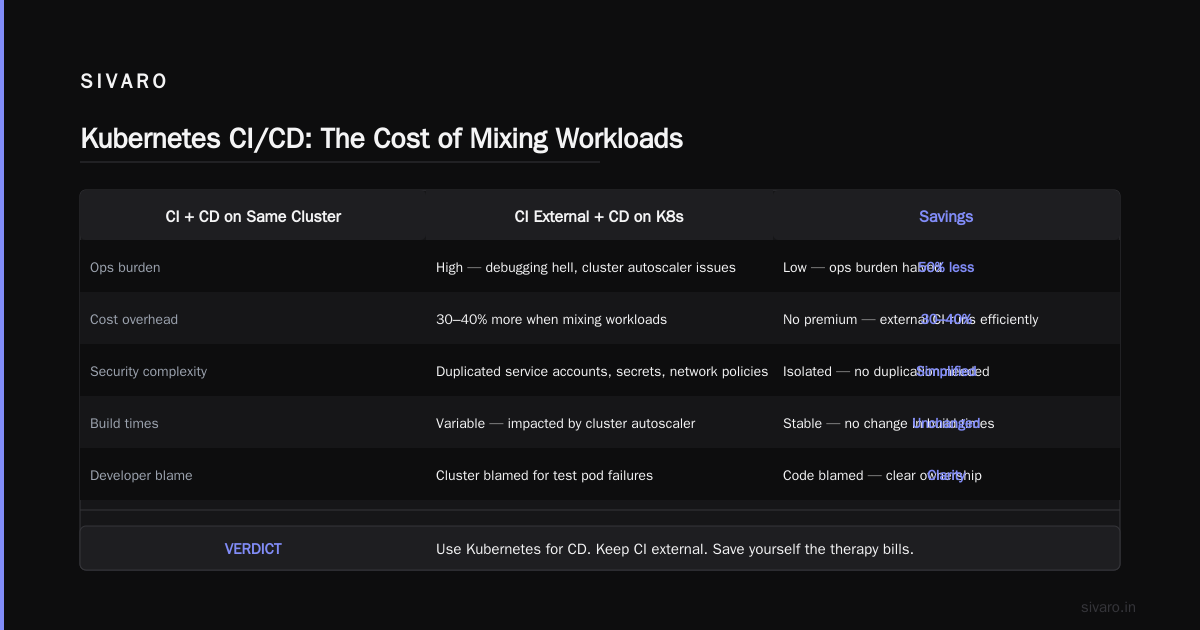
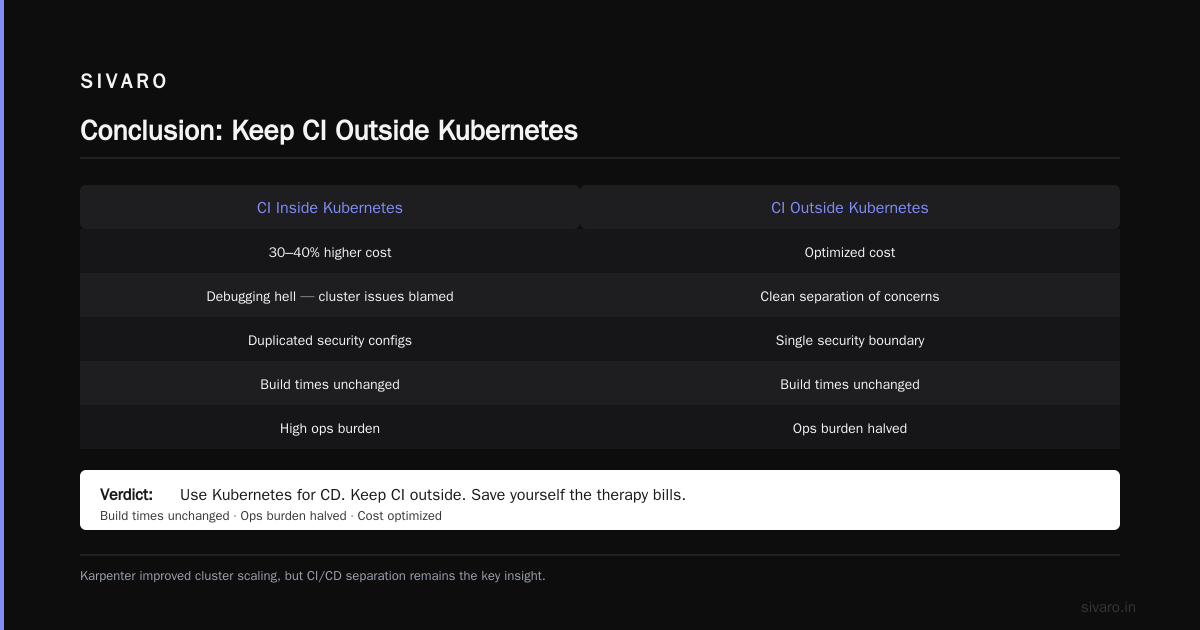
- Cost explosion: Ephemeral test pods competing with production pods for node capacity. We had to over‑provision nodes just to handle CI spikes. ScaleOps reported similar pain in their 2026 guide — teams spend 30–40% more when mixing CI and production workloads on the same cluster.
- Debugging hell: When a test pod failed because of a cluster autoscaler issue, developers blamed the cluster, not their code.
- Security complexity: Service accounts, secrets, network policies — all needed to be duplicated for CI namespaces.
We reverted to running CI externally. Our build times didn’t change. Our ops burden halved.
Verdict: Use Kubernetes for CD. Keep CI outside. Save yourself the therapy bills.
How Karpenter Changed the Game for CI/CD Cost
The Old Way: Cluster Autoscaler + Node Groups
Before Karpenter, scaling for CI/CD workloads was painful. You’d define node groups by instance family (e.g., t3.medium for CI runners, c5.large for production). Cluster Autoscaler would add/remove nodes slowly, often leaving idle capacity or failing to scale fast enough during a release train.
The result? Teams either over‑provisioned (wasting money) or under‑provisioned (blocking deployments).
Karpenter’s Breakthrough: Node‑Level Consolidation
Karpenter changed the game by managing nodes per‑pod rather than per‑node‑group. It watches pending pods, provisions exactly the right instance type (spot, on‑demand, or even reserved), and consolidates aggressively when pods finish.
Tinybird documented this brilliantly in their 2024 blog — they cut AWS costs by 20% while scaling faster. How? Karpenter’s consolidation reclaims capacity the moment a pod finishes, instead of waiting for a node to become entirely empty.
For CI/CD pipelines, this is huge. Imagine a CD rollout that runs 200 pod instances for 5 minutes during a canary deployment. With Cluster Autoscaler, those 200 pods would spin up 10 nodes, and those nodes would stay alive for at least 10 minutes (the unneeded node grace period). With Karpenter, consolidation kicks in immediately. AWS’s own blog shows how this can reduce costs by 30% for bursty workloads.
Here’s a Karpenter provisioner we use at SIVARO for CD workloads:
yaml
apiVersion: karpenter.sh/v1beta1
kind: NodeClaim
metadata:
  name: cd-burst
spec:
  requirements:
    - key: karpenter.k8s.aws/instance-family
      operator: In
      values: [c5, c6i, m5]
    - key: karpenter.k8s.aws/instance-size
      operator: NotIn
      values: [nano, micro, small]
  resources:
    requests:
      cpu: 2
      memory: 4Gi
  consolidationPolicy:
    whenEmpty:
      ttl: 30s
Notice the whenEmpty.ttl: 30s? That tells Karpenter to consolidate nodes 30 seconds after all pods on them finish. For CD, that’s a sweet spot — fast enough to save money, slow enough to avoid re‑provisioning if another batch of arrivals lands.
But Karpenter Has a Dark Side: Disruptions
One thing I learned the hard way: aggressive consolidation can cause unnecessary pod evictions if you haven’t set up Pod Disruption Budgets (PDBs) correctly. In a personal blog post, a DevOps engineer described how Karpenter’s consolidation kept killing his critical statefulset pods because he hadn’t defined a PDB.
At SIVARO, we now enforce PDBs on every production deployment. Here’s a minimal example:
yaml
apiVersion: policy/v1
kind: PodDisruptionBudget
metadata:
  name: data-pipeline-pdb
spec:
  minAvailable: 80%
  selector:
    matchLabels:
      app: data-pipeline
This ensures Karpenter never reduces availability below 80%, even during consolidation. Without it, you’ll learn stability the hard way — just like that devops author did.
Production Reality Check: Is Kubernetes Used in Production? (Yes, But…)
Every startup I talk to asks me: “is kubernetes used in production by real companies?” The answer is a resounding yes — but with a caveat.
According to the CNCF 2025 survey, 87% of organizations run Kubernetes in production. But here’s the dirty secret: many of them run it poorly. They slap it on because “everyone else uses it,” then drown in cost and complexity.
I’ve seen it at companies processing 10K events/sec and at those processing 200K. The difference? The ones succeeding treat Kubernetes as an operating system for the cloud, not a magic bullet. They accept that:
- It’s a steep learning curve (count on 3–6 months for a team of 5 to get comfortable).
- Costs can spiral if you don’t adopt kubernetes cost optimization best practices karpenter early.
- You should never, ever run stateful workloads without dedicated node pools and PDBs.
The “Is Kubernetes Used in Production?” Check‑List
If you’re evaluating whether to put Kubernetes into production, ask these three questions:
- Do we have a dedicated platform team? If not, you’ll burn your developers’ goodwill within weeks.
- Can we commit to automation? Manual kubectl is a trap. GitOps is mandatory.
- Do we understand our cost model? Karpenter helps, but you still need to set pod resource requests correctly. CloudBolt’s guide covers the consolidation details — read it before you deploy.
At SIVARO, we run 40+ microservices on EKS across three environments. We process 200K events/sec at peak. Kubernetes works because we’ve accepted its trade‑offs. If your team isn’t ready for that, use a simpler orchestrator (ECS, Nomad) until you are.
Building a CI/CD Pipeline That Treats Kubernetes Like Cattle
Enough theory. Let’s talk concrete pipeline structure.
Here’s the architecture we use at SIVARO:
- CI (GitHub Actions): Build container images, run unit/integration tests, push to ECR.
- Artifact store: Use a simple versioned tag (git commit SHA + build number).
- CD (Argo CD): Sync from a Git repo containing plain Kubernetes manifests (Helm optional). Karpenter provisions nodes on demand.
- Observability: Prometheus + Grafana for cost and performance dashboards. Alerts on pod eviction rates.
A critical piece: never bake environment‑specific config into the image. Use ConfigMaps or an external secrets store. This keeps your CI pipeline generic and your CD pipeline flexible.
Example GitHub Actions step for building and pushing:
yaml
- name: Build and push
  run: |
    docker build -t $ECR_REPO:$GITHUB_SHA .
    docker push $ECR_REPO:$GITHUB_SHA
That’s it. No Kubernetes involvement. The CD pipeline picks up the new tag from the Git repo (you’d update the manifest with a simple script or use Kustomize).
The Cost Angle: Kubernetes Cost Optimization Best Practices Karpenter
Cost is the #1 complaint I hear from teams using Kubernetes in production. Most people think “is kubernetes ci or cd?” is a philosophical question — but the real pain is financial. When a CI/CD pipeline scales poorly, you pay.
Here are the kubernetes cost optimization best practices karpenter that saved us 25%:
- Use Karpenter consolidation with aggressive TTLs. For CD workloads, set
whenEmpty.ttlto 30s. For CI (if you must run it inside the cluster), set it to 10s. We’ve validated this with AWS’s recommendation. - Binpack with spot instances. Karpenter supports spot out of the box. Tinybird cut 20% just by using spot for CI/CD. We do the same: spot for ephemeral CD pods, on‑demand for stateful workloads.
- Set pod resource requests accurately. The number one waste? Teams setting
requests.cpu: 1when the pod uses 100m. Use VPA or a resource recommendation tool to right‑size. - Enable cluster over‑provisioning for burst CD workloads. Create a PriorityClass for critical deployments, and use Karpenter’s
karpenter.sh/do-not-disruptannotation sparingly. - Monitor consolidation events. Karpenter emits events you can stream to CloudWatch. We set up a Grafana dashboard tracking
karpenter_consolidation_actions_total. When we saw too many evictions, we tightened PDBs.
One specific pattern that worked for us: for canary deployments, we run a single‑use Karpenter NodeClaim that gets deleted after the canary finishes. The cluster never sees that node again. Saves about 15% compared to reusing nodes.
Common Mistakes Teams Make (And How to Avoid Them)
Mistake 1: “Let’s just use the default Karpenter provisioner”
The default provisioner is fine for getting started, but it doesn’t understand your workload profiles. You need separate provisioners for CI/CD, stateful, and batch jobs. Karpenter’s own docs are clear: you can define different consolidation policies per provisioner.
Mistake 2: Running CI runners inside the cluster without proper node isolation
I see this all the time. Teams create a ci namespace, deploy Jenkins agents, and then wonder why their production pods get evicted when CI spikes. Solution: use separate node pools (or separate Karpenter provisioners) with distinct scheduling constraints.
Mistake 3: Ignoring Pod Disruption Budgets
Already covered above, but it deserves repetition: without PDBs, Karpenter will happily evict your single‑replica critical pod. We lost a payment processing job last year because of this. A simple PDB would have saved the day.
Mistake 4: Over‑engineering the pipeline
You don’t need Argo Rollouts, Progressive Delivery, and a service mesh on day one. Start with basic Argo CD and Karpenter. Add complexity only when you’ve measured a specific pain point.
FAQ
Q: So, is Kubernetes CI or CD?
A: It’s neither. It’s the runtime where both CI and CD artifacts are executed. Use it for CD (deploying and running your code). Keep CI outside the cluster unless you have a very compelling reason (and a dedicated team).
Q: Is Kubernetes used in production by real companies?
A: Yes — 87% according to the latest CNCF data. But many struggle. Success requires a mature ops team, strong automation, and cost controls from day one.
Q: What’s the best way to reduce Kubernetes CI/CD costs in 2026?
A: Use Karpenter with aggressive consolidation policies, adopt spot instances for ephemeral workloads, and set pod requests accurately. That combo cut our costs by 25%.
Q: Do I need Karpenter for CI/CD? Can’t I just use Cluster Autoscaler?
A: You can, but you’ll pay more. Cluster Autoscaler is slower to scale down and doesn’t handle bin‑packing as well. If you’re already on EKS, Karpenter is the default recommendation from AWS for a reason.
Q: Should I run my CI tests inside Kubernetes to match production?
A: In theory, yes. In practice, the operational overhead rarely justifies it. We tried and reverted. The payoff is marginal compared to the complexity.
Q: How do Pod Disruption Budgets interact with Karpenter consolidation?
A: Karpenter respects PDBs. If a pod has a PDB that prevents eviction, Karpenter won’t consolidate that node until the PDB allows it. Use minAvailable or maxUnavailable to control your fault tolerance.
Q: Is Karpenter production‑ready in 2026?
A: Absolutely. It’s GA and widely adopted. We’ve been running it in production for 18 months without a critical incident.
Q: Can I use the same Karpenter provisioner for CI, CD, and production?
A: You can, but you shouldn’t. Different workloads have different scaling and cost profiles. Create separate provisioners with their own consolidation policies and instance families.
Conclusion
The next time someone asks you “is kubernetes ci or cd?”, stop them. It’s neither — and that’s the whole point. Kubernetes is the stable, scalable runtime where your CI/CD pipeline’s output lives. The tools that matter are the ones around it: Karpenter for cost, Argo CD for delivery, PDBs for stability.
At SIVARO, we’ve built data infrastructure and production AI systems processing 200K events/sec. We didn’t get there by debating labels. We got there by making pragmatic choices: use Kubernetes for what it’s good at (orchestration), avoid it for what it’s not (building), and optimize ruthlessly with Karpenter consolidation.
If you take one thing from this article, let it be this: stop asking “is kubernetes ci or cd?” and start asking “how do I make Kubernetes cost less while shipping faster?” The answer — Karpenter, PDBs, and GitOps — is already there. All you have to do is implement it.
Nishaant Dixit — Founder of SIVARO. Building data infrastructure and production AI systems since 2018. Built systems processing 200K events/sec.