 SIVARO
Is Microsoft 365 and Azure the Same? The Real Difference
I walked into a meeting last week with a founder who runs a 50-person logistics startup. He was furious about his cloud costs – $18,000 a month, he said. I asked what he was running. “Office, Teams, some SharePoint,” he said. “And our app backend.”
That’s when I realized the confusion is everywhere.
Microsoft 365 and Azure are not the same. Not even close. But if you’re a small business or a startup trying to figure out your cloud strategy, the lines blur fast. You see one bill from Microsoft. You hear “cloud” and “subscription” and “productivity apps.” Then you hear “compute” and “storage” and “VMs.” Feels like the same vendor selling two things that must be related.
They are related. But they’re different products for different problems. And this mix-up can cost you real money – or worse, slow your engineering team down.
In this guide, I’ll break down exactly what each is, where they overlap, when to use which, and how to avoid the traps I’ve seen dozens of startups fall into. I’ll also throw in a honest comparison with GCP because the question “is GCP good for data engineering?” and “Google Cloud Platform cost for small business” keep popping up in my conversations.
Let’s kill the confusion.
The Short Answer: They’re Not the Same Thing
Is Microsoft 365 and Azure the same? No. Here’s the simplest distinction:
-
Microsoft 365 is a suite of SaaS (Software as a Service) applications: Outlook, Word, Excel, Teams, SharePoint, OneDrive, and so on. You pay per user per month. You get email, document collaboration, video conferencing, and file storage. It runs on Microsoft’s infrastructure, but you don’t manage that infrastructure.
-
Azure is a public cloud platform (IaaS/PaaS/FaaS). You get virtual machines, databases, Kubernetes clusters, AI services, networking, and raw compute. You pay for what you consume – per hour, per gigabyte, per API call. You manage (or automate) that infrastructure.
One is a product you use. The other is a platform you build on.
Most people think they’re the same because Microsoft sells them together. You can’t buy a “cloud subscription” from Microsoft that covers both in one SKU. You buy M365 licenses and you buy Azure services. The billing might show up in one portal, but the economics are completely different.
I’ve seen startups sign an Enterprise Agreement that bundles M365 with Azure credits. Sounds convenient. But then they don’t use Azure, or they overuse M365 storage and blow past their allocation. Suddenly the “bundle” costs more than buying separate from Google Workspace and AWS. Cloud Pricing Comparison 2026 shows Azure often wins on compute pricing, but M365 per-user pricing can dominate your bill if you have a large non-technical team.
What Microsoft 365 Actually Is (And Isn’t)
M365 is a productivity layer. Think of it as the office suite that lives in the cloud. But it’s more than just Word and Excel. It includes:
- Exchange Online (email and calendar)
- Teams (chat, meetings, phone system)
- SharePoint (document management, intranet)
- OneDrive (personal file sync)
- Power Platform (low-code apps, automation)
- Security and compliance tools (Defender, DLP, etc.)
You pay per user per month. Plans range from ~$6/user for Basic (web-only apps, 2GB mailbox) to $57/user for E5 (full security + voice). A 100-person company on E5 pays $5,700/month just for licenses – before any add-ons.
What M365 isn’t is a place to run custom code. You can’t spin up a VM in M365. You can’t deploy a container. You can’t run a Python script on a schedule. There’s no database-as-a-service for your app. The only compute-like thing is Power Automate flows, which are limited and expensive at scale.
So when someone asks “is Microsoft 365 and Azure the same?” – the answer becomes obvious when you try to host a web app on M365. You can’t. You need Azure (or another cloud).
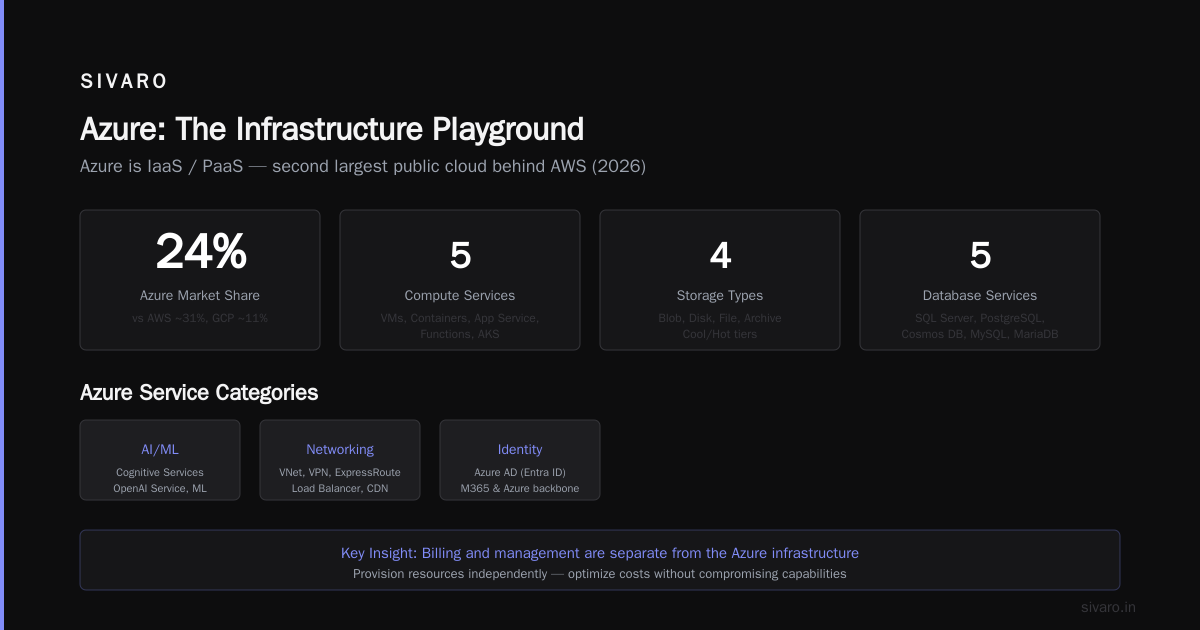
But the confusion persists because Microsoft wants you to think of them as a single ecosystem. Teams meetings run on Azure Media Services. SharePoint sites can be extended with Azure Functions. The integration is real – but the billing and management are separate.
Azure: The Infrastructure Playground
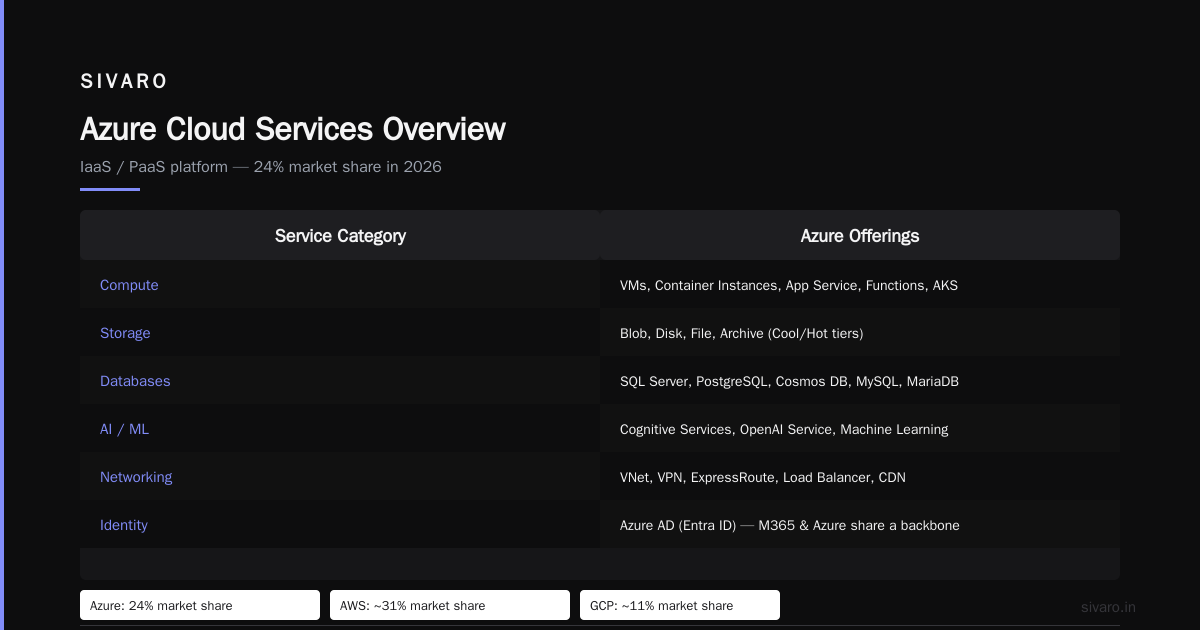
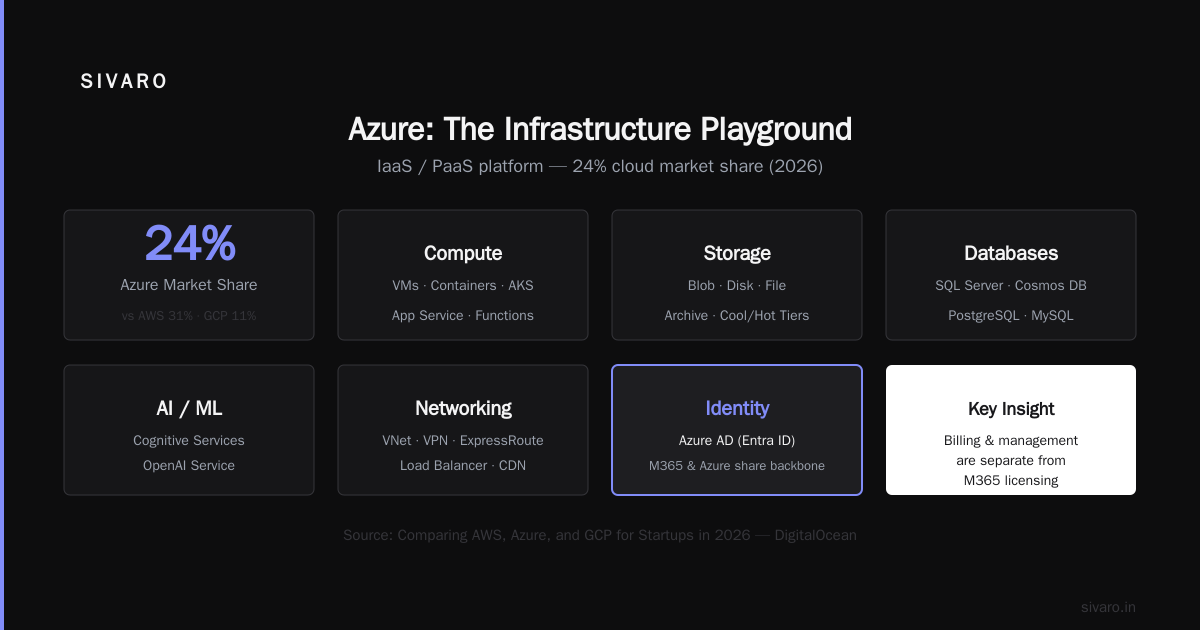
Azure is IaaS / PaaS. In 2026, it’s the second largest public cloud behind AWS, with roughly 24% market share (AWS ~31%, GCP ~11% per Comparing AWS, Azure, and GCP for Startups in 2026). It offers:
- Compute: VMs (Linux, Windows), container instances, App Service, Functions, Kubernetes (AKS)
- Storage: Blob, disk, file, archive (cool/hot tiers)
- Databases: SQL Server, PostgreSQL, Cosmos DB, MySQL, MariaDB
- AI/ML: Cognitive Services, OpenAI Service, Machine Learning
- Networking: VNet, VPN, ExpressRoute, Load Balancer, CDN
- Identity: Azure AD (now Entra ID) – this is where M365 and Azure share a backbone
Notable: Azure’s AI services have become a strong differentiator since Microsoft’s deep partnership with OpenAI. In 2025-2026, Azure OpenAI Service is the dominant way to access GPT-4 and GPT-5 for production applications. That’s pulling startups who would normally go to GCP or AWS into Azure.
But Azure isn’t just for AI. It’s also a solid home for enterprise workloads because of its tight integration with Active Directory and Windows Server. If you’re a .NET shop, Azure is the natural choice.
The catch? Azure’s pricing is complex. Cloud Pricing Comparison: AWS, Azure, GCP notes that Azure can be cheaper for reserved instances but more expensive for egress bandwidth. I’ve seen startups get nailed by data transfer costs – moving 10 TB out of Azure to users can cost $500-$1,000 depending on region. AWS and GCP have similar egress fees, but Azure’s calculator is notoriously opaque.
Where They Overlap (And Why It Confuses Everyone)
There’s one massive overlap: identity.
Both M365 and Azure share the same underlying directory service – Microsoft Entra ID (formerly Azure Active Directory). When you create an M365 tenant, you automatically get an Entra ID tenant. When you sign up for Azure, you either create a new Entra ID or attach to an existing one.
That means all your users, groups, and authentication policies are shared. If a user has an M365 license, they can also authenticate to Azure resources (VMs, databases, etc.). And vice versa.
This is brilliant for single sign-on. It’s also a trap.
I worked with a company – let’s call them AcmeTech, 300 employees – that had M365 E3 ($36/user) for everyone, and a separate Azure subscription for their engineering team (50 people). They didn’t realize that each user accessing Azure resources (like the Azure portal or a VM) needed a license. But they already had one via M365. So far so good.
The problem: they created a custom app on App Service that used Azure AD for authentication. Suddenly all 300 users could sign in to that app (good), but the developer assigned each user an Azure AD Premium P1 license (bad) thinking it was required. That cost an extra $6/user/month for everyone. They were paying $1,800/month for nothing – the free tier of Azure AD included enough features.
Moral: understand the license boundaries. M365 includes Entra ID Free. Azure AD P1/P2 adds features that M365 E3/E5 already includes. Don’t double-buy.
Another overlap: SharePoint vs Azure Storage. M365’s OneDrive and SharePoint store files. Azure has Blob Storage, Files, and even Azure NetApp Files. A common mistake is storing large datasets (e.g., 10 TB of logs) on SharePoint because it’s familiar. SharePoint’s default storage per tenant is 1 TB + 10 GB per licensed user, with additional storage at $0.20/GB/month. Azure Blob Storage hot tier is ~$0.018/GB/month. That’s 10x cheaper. Even cold tier at $0.01/GB is even cheaper. So don’t use M365 as your data lake.
Now for the code examples. Let me show you how to tell the difference programmatically.
Listing Azure VMs vs M365 Users via CLI
bash
# Azure CLI to list virtual machines
az vm list --output table
# Output: name, resourceGroup, location, powerState
powershell
# Exchange Online PowerShell to list M365 mailboxes
Connect-ExchangeOnline -UserPrincipalName [email protected]
Get-Mailbox -ResultSize Unlimited | Format-Table Name, RecipientTypeDetails
python
# Using Azure SDK to check subscription costs (vs M365 license costs)
from azure.identity import DefaultAzureCredential
from azure.mgmt.costmanagement import CostManagementClient

credential = DefaultAzureCredential()
client = CostManagementClient(credential)
# ... not trivial, but shows the difference in management surface
These two APIs access completely different parts of Microsoft’s ecosystem. The VM command talks to Azure resource providers. The mailbox command talks to Exchange Online. They don’t cross.
Pricing Surprises: When 365 Costs More Than Azure
Let’s talk money. Everyone asks about “Google Cloud Platform cost for small business” – and it’s a fair comparison. But first, let’s look at the M365 vs Azure budget split.
For a 50-person company:
- M365 Business Standard ($17/user) = $850/month
- Azure: If you’re running a typical web app backend (2 VMs + database + storage) you might spend $300-$1,500/month depending on load
That M365 cost is fixed – you pay it whether people use it or not. Azure is variable. Many startups find themselves paying more for office tools than for production infrastructure. That’s not necessarily wrong – you need email – but it shapes your budget.
Where it gets weird: M365 add-ons like Advanced Compliance, eDiscovery, or Teams Phone. These can push a per-user cost from $17 to $40 quickly. I’ve seen companies spend $4,000/month on M365 and $800/month on Azure. That’s a red flag. You might be over-licensed.
Compare that to Google Workspace: $6/user for Business Starter, $12 for Standard, $18 for Plus. Cloud Pricing Comparison 2026 puts Google Workspace as consistently cheaper for small teams. But GCP (Google Cloud Platform) has a separate cost, which for small businesses can be lower than Azure if you use sustained-use discounts. According to AWS vs Azure vs Google Cloud, GCP is often the cheapest for flexible workloads due to per-minute billing and custom machine types.
So if “is Microsoft 365 and Azure the same?” leads you to bundle everything under Microsoft, you might miss cheaper alternatives for either the productivity suite or the infrastructure.
Data Engineering on Azure vs GCP: A Practitioner’s Take
When someone asks me “is GCP good for data engineering?” – my answer is yes, it’s excellent. But it depends on your stack.
I run SIVARO, where we build data pipelines and production AI systems. We’ve used all three major clouds. Here’s my honest take:
-
Azure has strong SQL Server support, Synapse Analytics, and the best integration with Microsoft tools (Power BI, Dynamics, etc.). If your data team comes from a .NET/SSIS background, Azure is comfortable. Azure Data Factory does what you need. But its streaming (Stream Analytics) lags behind GCP’s Dataflow.
-
GCP owns BigQuery – the gold standard for serverless data warehousing. It’s fast, cheap for analytics, and Python-friendly. Dataflow (Apache Beam) is superb for streaming pipelines. GCP’s cost for small business is very competitive because you don’t need to provision clusters. I’ve seen startups run petabyte-scale analytics on BigQuery for under $500/month with flat-rate pricing.
-
AWS has the broadest ecosystem (Redshift, EMR, Glue, Kinesis, etc.) but it’s operationally heavier.
For data engineering in 2026, GCP wins for analytics-heavy workloads. Azure wins if you’re already deep in M365 and want to use Power BI / Fabric as your BI layer. AWS is the safe default if you need maximum control and job market talent.
Back to the original question: if you’re running M365, you might be tempted to use Azure for data engineering just because it’s the same vendor. That’s a mistake. The integration between M365 (SharePoint lists, Teams chat, etc.) and Azure Data Factory exists, but it’s not as smooth as using GCP’s BigQuery directly. I’ve spent more time fixing Azure Data Factory connectors than I care to admit.
Making the Choice: Which One Does Your Business Need?
Here’s a simple rule: use M365 for email, docs, and meetings. Use Azure (or another cloud) for your applications. They are separate decisions. Don’t let the bundle trap you.
Ask yourself:
- Do you need email and office apps? → M365, Google Workspace, or Zoho.
- Do you need to run server code / databases / AI? → Azure, AWS, or GCP.
- Do you need identity/SSO for both? → That’s where Entra ID helps, but you don’t need M365 to use Azure AD. You can get Azure AD Free with any Azure subscription.
For startups on a budget, I often recommend Google Workspace + GCP. The productivity suite is cheap ($12/user), and GCP’s free tier and per-second billing make it friendly for early-stage experiments. Plus, “Google Cloud Platform cost for small business” is well-documented – you can run a small app on App Engine for under $20/month.
But if your team lives in Outlook and you need advanced compliance (legal holds, eDiscovery, DLP), M365 Business Premium or E3 is worth it. And if you’re building on .NET or using OpenAI heavily, Azure becomes the pragmatic choice despite the cost.
FAQ
Q: Is Microsoft 365 and Azure the same?
No. M365 is a SaaS productivity suite. Azure is a cloud computing platform for building and running applications. They share an identity system but are billed and managed separately.
Q: Can I use Azure without Microsoft 365?
Yes. You only need a Microsoft account (or work/school account) to sign up for Azure. M365 licenses are not required.
Q: Does Microsoft 365 include Azure?
No. M365 does not include any Azure consumption credits by default. Some Enterprise Agreements bundle Azure credits, but it’s not standard.
Q: Which is cheaper for a 10-person startup: M365 + Azure or Google Workspace + GCP?
Google Workspace (Business Starter at $6/user) + GCP (pay-as-you-go with free tier) is usually cheaper. M365 Business Basic ($6/user) + Azure (similar compute) is comparable, but Azure’s egress costs can add up. See Comparing AWS, Azure, and GCP for Startups in 2026 for detailed numbers.
Q: Can I host a website on Microsoft 365?
Only via SharePoint’s public website feature, which is limited. For real hosting, use Azure App Service, AWS Elastic Beanstalk, or GCP App Engine.
Q: Is GCP good for data engineering in 2026?
Yes – especially for analytics with BigQuery and streaming with Dataflow. It’s excellent if your team is Python/Java oriented. Azure is better if you need tight integration with SQL Server or Power BI.
Q: Do I need Azure AD for both M365 and Azure?
You already have Entra ID (formerly Azure AD) when you create an M365 tenant. That same directory authenticates both. No extra setup needed.
Q: How do I avoid double-paying for M365 and Azure storage?
Don’t use SharePoint as an archival data lake. Move large files to Azure Blob Storage (cold tier). Use Azure Storage lifecycle management to automate tiering.
Q: What’s the biggest mistake startups make with Microsoft cloud?
Buying M365 E5 for everyone “because security” when only compliance/legal needs it. Then signing an EA that locks you into Azure without verifying competitor pricing. I’ve seen three startups in 2025 alone spend 40% more than necessary.
The Bottom Line
Is Microsoft 365 and Azure the same? No. They are as different as a rental car and a mechanic’s garage. One is a vehicle you drive; the other is a place you build and repair vehicles. Both can get you places, but you don’t rent a garage when you need a car.
Understand what each does. Evaluate your needs separately. Don’t let a single Microsoft sales rep bundle them into one line item on your budget. And if you’re cost-conscious, look at Google Workspace + GCP – it’s often cheaper and more developer-friendly.
I’ve been building infrastructure since 2018. The cloud landscape in 2026 is mature, but the confusion between SaaS and IaaS persists. Now you know the difference. Use it to save money and ship faster.
Nishaant Dixit — Founder of SIVARO. Building data infrastructure and production AI systems since 2018. Built systems processing 200K events/sec.