 SIVARO
Kafka Explained: What Is Kafka and Why Is It Used?
I still remember the panic. 2017, a startup I advised was processing sales events through a chain of REST APIs. One service went down for three minutes. Three minutes — that's nothing. But because every call was synchronous, that three-minute gap snowballed into a fifteen-minute brownout. Orders lost. Angry customers. A CTO screaming about "resilience."
At first I thought this was a monitoring problem. Turned out it was an architecture problem. No buffer. No decoupling. No way for one system to say, "I'm busy, leave a message and I'll get back to you."
That's when I started looking at Kafka not as a buzzword but as a survival tool. By 2020 at SIVARO, we had Kafka handling event streams for fintech clients. By 2026, I've seen it eat message queues, replace databases for certain workloads, and cause just as many outages as it solved.
What is Kafka and why is it used? That's the question I'll answer bluntly — from the trenches, not from a whitepaper.
First, the basics. Apache Kafka is a distributed event streaming platform. Think of it as a high-throughput, fault-tolerant commit log. It's not a traditional message queue (RabbitMQ, ActiveMQ). It's not a database (though some try to use it as one). It's a system that lets you publish streams of records and subscribe to them — at scale.
Second, the "why" — and this is where most explanations get fluffy. Kafka exists because modern systems can't afford synchronous coupling. If your order service has to wait for your payment service to respond, you've introduced a failure domino. Kafka breaks that chain. It lets services produce events, store them durably, and let consumers process them at their own pace.
We'll cover the core concepts, the real trade-offs, and the stuff nobody tells you until your cluster falls over at 3 AM.
The Naming: Yes, That Franz Kafka
Let's get this out of the way. Apache Kafka was named after the Czech writer Franz Kafka. Jay Kreps (one of the creators at LinkedIn) once said he chose the name because he liked the idea of a system that "transforms" data — much like the transformations Kafka's characters undergo.
But honestly? The name fits for another reason. Anyone who's debugged a Kafka production issue knows the feeling of waking up in a room that's somehow not your room, accused of a crime you didn't commit — that's Kafkaesque. The absurdity of existence meets the absurdity of an OffsetOutOfRangeException at 2 AM.
What was Kafka's famous quote? The writer, I mean. "I am a cage, in search of a bird." That's Franz Kafka. Not directly related to the tech, but it's a great metaphor for Kafka's architecture: the broker is the cage (storage), and the data records are the birds (messages). They come in, they're held, they fly out to consumers.
So no, Kafka is not a frontend or backend tool in the traditional sense. Is Kafka a frontend or backend? It's backend infrastructure. Pure platform layer. You don't run Kafka in a browser. You run it on servers, and your backend services produce and consume from it. Frontend code might push events to a producer API, but Kafka itself lives behind the firewall.
What Is Kafka and Why Is It Used? The Short Version
Here's the five-second pitch:
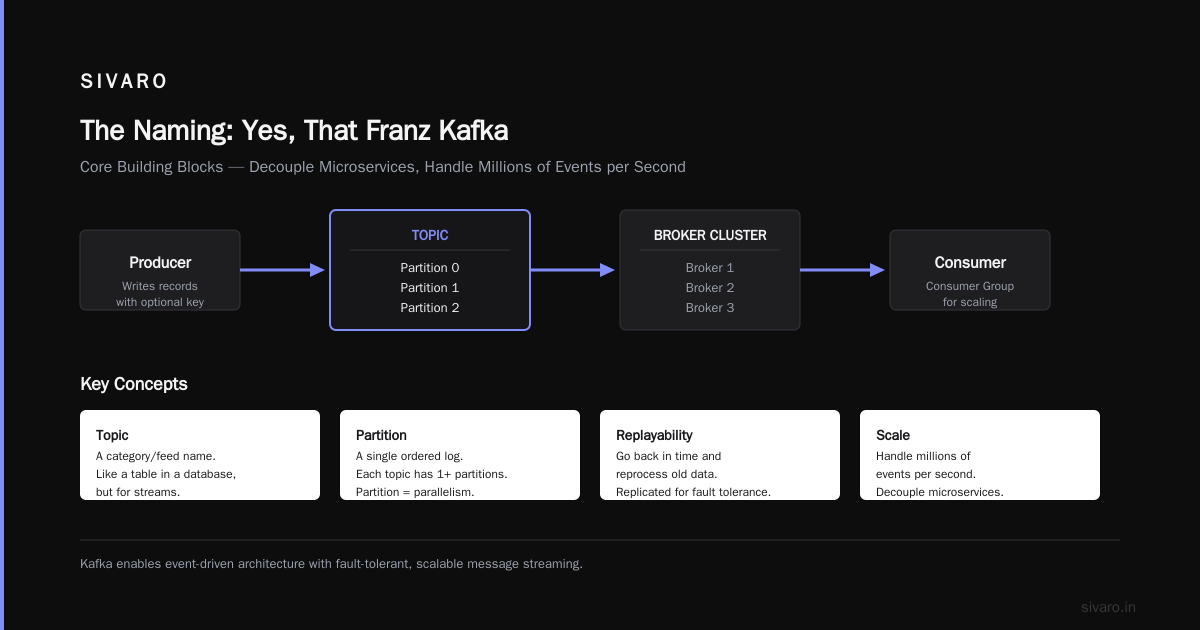
Kafka is a distributed log. Producers write records to topics. Consumers read records from topics. Topics are partitioned and replicated across brokers for scale and fault tolerance.
Why? Because you need to decouple your microservices. Because you need to handle millions of events per second. Because you want replayability — the ability to go back in time and reprocess old data.
But that's too vague. Let's get concrete.
Core Building Blocks
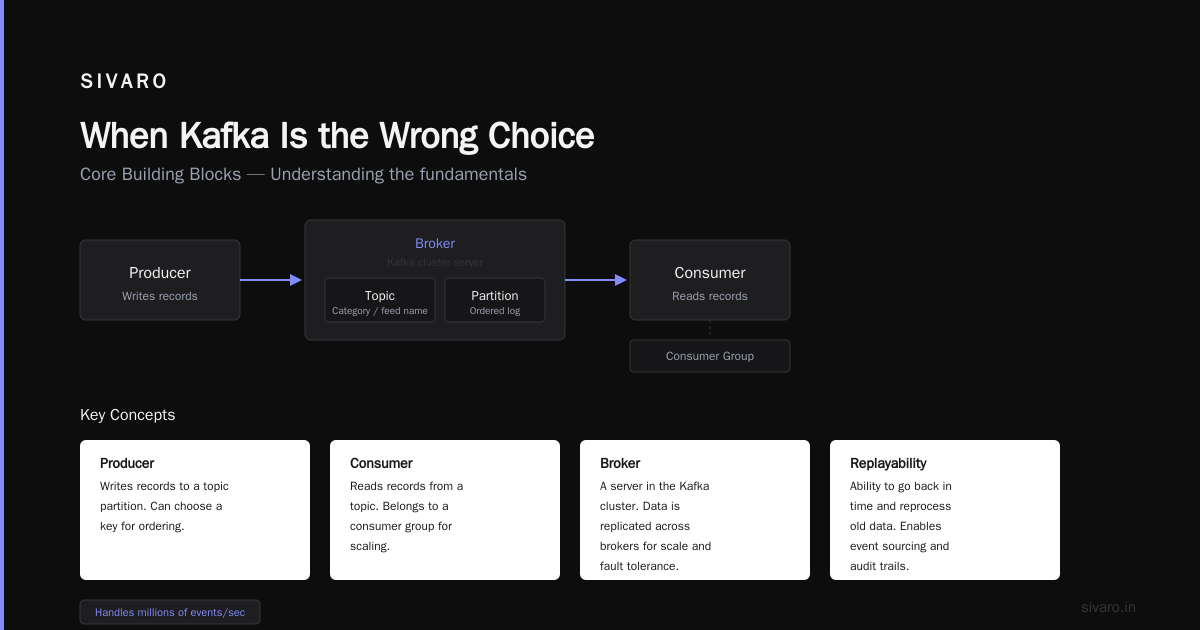
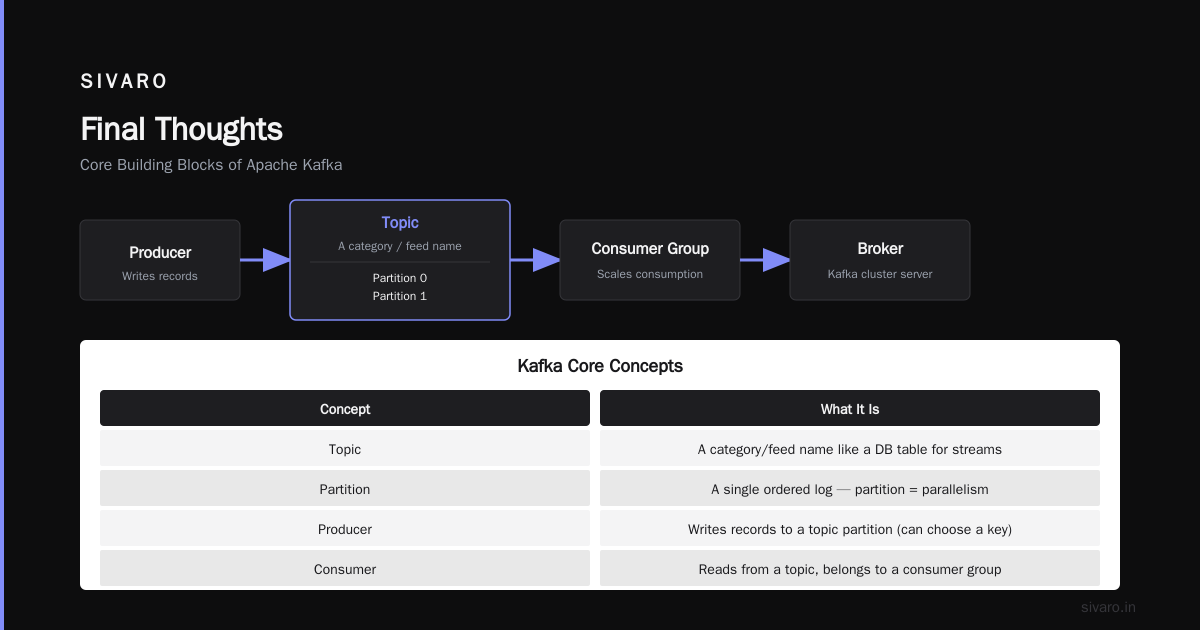
| Concept | What It Is |
|---|---|
| Topic | A category/feed name. Think of it as a table in a database, but for streams. |
| Partition | A single ordered log. Each topic has one or more partitions. Partition = parallelism. |
| Producer | Writes records to a topic partition. Can choose a key for ordering. |
| Consumer | Reads records from a topic. Belongs to a consumer group for scaling. |
| Broker | A server in the Kafka cluster. Stores data and serves clients. |
| Offset | A unique integer per partition indicating a record's position. |
Quick Code Example: Producing a Message (Python)
python
from kafka import KafkaProducer
import json

producer = KafkaProducer(
    bootstrap_servers=['localhost:9092'],
    value_serializer=lambda v: json.dumps(v).encode('utf-8')
)

future = producer.send('orders', {'order_id': 123, 'amount': 49.99})
result = future.get(timeout=10)
print(f"Sent to partition {result.partition} at offset {result.offset}")
Consuming a Message (Python)
python
from kafka import KafkaConsumer

consumer = KafkaConsumer(
    'orders',
    bootstrap_servers=['localhost:9092'],
    group_id='payment-group',
    auto_offset_reset='earliest'
)

for message in consumer:
    print(f"Partition: {message.partition}, Offset: {message.offset}, Value: {message.value}")
    # process payment
    consumer.commit()  # manual commit for reliability
Notice auto_offset_reset='earliest' — that means if the consumer starts fresh, it reads everything from the beginning. Kafka durably stores records and lets you replay them. That's the superpower.
What Is Kafka and Why Is It Used? The Long, Practical Version
Now let's go deeper. I'll tell you exactly where Kafka shines and where it falls on its face.
The Real Reasons You Choose Kafka
1. Decoupling without losing data.
I've worked with RabbitMQ in production. It's great for low-latency point-to-point messaging. But if a consumer crashes and you haven't acknowledged the message, RabbitMQ will redeliver it only if you configured manual ack. Many teams don't. They lose messages.
Kafka's model is different. Producers send records to a durable log, not directly to consumers. Even if every consumer is dead for an hour, the data stays on disk (configurable retention). When the consumer wakes up, it picks up where it left off. No data loss.
2. Massive throughput.
LinkedIn (where Kafka was born) was processing trillions of messages per day by 2016. That's not marketing — they published the numbers. At SIVARO, we've built systems handling 200,000 events per second on a 3-broker cluster with modest hardware. You can't do that with a relational database as a queue. You just can't.
3. Replayability.
Most message queues delete a message after it's consumed. Kafka keeps it for a configurable period (e.g., 7 days). That means you can reprocess the last 7 days of events if your consumer has a bug. I've used this to fix data integrity issues without asking users to redo actions. It's a lifesaver.
4. Stream processing.
Kafka isn't just a pipe. With Kafka Streams (or tools like ksqlDB), you can do real-time transformations, joins, aggregations — right inside the Kafka ecosystem. No need for a separate stream processor like Spark Streaming for simple use cases.
Kafka Streams Example: Word Count (Java)
java
KStream<String, String> textLines = builder.stream("text-input");
KTable<String, Long> wordCounts = textLines
    .flatMapValues(line -> Arrays.asList(line.toLowerCase().split("\W+")))
    .groupBy((key, word) -> word)
    .count();
wordCounts.toStream().to("word-count-output", Produced.with(Serdes.String(), Serdes.Long()));
That's it. You've got a running word count, fault-tolerant, exactly-once semantics. Kafka Streams runs as a library inside your Java application — no separate cluster.
When Kafka Is the Wrong Choice
Most people think Kafka is a universal message bus. They're wrong. Here are situations where Kafka costs you more than it saves.
-
Low throughput, high latency sensitivity. If you need sub-millisecond delivery and only push 100 messages/minute, Kafka's overhead (disk I/O, replication, batching) is overkill. Use Redis Pub/Sub or a simple HTTP callback.
-
Exactly-once delivery at any cost. Kafka offers exactly-once semantics (EOS) for producer-to-consumer, but it's complex and limits throughput. If you truly need exactly-once (not just at-least-once with dedup), you might be better off with a transactional database and idempotent consumers.
-
Small team, no ops experience. Kafka is not easy to operate. Broker tuning, partition rebalancing, monitoring lag — all of it requires expertise. I've seen startups waste weeks failing to get a 3-node cluster stable. They'd have been better off with a managed service (Confluent Cloud, AWS MSK) or a simpler tool.
I tell teams: start with a managed Kafka if you can. If you can't, a simple Redis list with BlockingPop might be enough. Premature Kafka is technical debt.
Kafka in Production: What I've Learned
I've run Kafka for fintech pipelines, IoT sensor ingestion, and real-time analytics. Here's the stuff that bit me hard.
Partition Count Is Not Set-and-Forget
Partitions determine parallelism. Too few, and your consumers can't scale. Too many, and your cluster struggles with leadership elections and file handles. A rule of thumb: start with number of partitions = max expected consumer threads, then add 20% buffer. Monitor lag.
Consumer Group Rebalancing Is Painful
When a consumer joins or leaves a group, Kafka triggers a rebalance. During rebalance, no consumer in that group receives messages. For large groups (50+ consumers), this can take tens of seconds. Solution: Cooperative rebalancing (introduced in Kafka 2.4) and sticky partition assignors.
Disk Space Is Not Free
Kafka writes everything to disk. Even "fast" SSDs fill up faster than you expect. At 200K events/sec with 1KB average record size, that's 200 MB/s. In an hour, that's 720 GB. Retention of 7 days? Good luck. We compress using gzip or snappy. We also tier to object storage (S3) for older data using Confluent's tiered storage or custom tooling.
Monitoring Is Non-Negotiable
You must track consumer lag — the difference between the latest produced offset and the consumer's committed offset. If lag grows, consumers are falling behind. Use Burrow (LinkedIn's lag checker) or Burrow-like tools. Also monitor under-replicated partitions. That's the first sign of a broker crash or network partition.
FAQ: Kafka Questions I Hear Every Month
What is the relationship between Apache Kafka and the author Franz Kafka?
Apache Kafka is named after Franz Kafka because the creators appreciated his writing. The system's name has nothing to do with the content of his stories, though the complexity of distributed systems can feel Kafkaesque.
Is Kafka a frontend or backend?
Kafka is neither frontend nor backend in the traditional sense. It's infrastructure software that runs on servers (backend). It is used by backend services to publish and consume event streams. Frontend applications typically send events to a proxy or gateway that produces to Kafka.
What was Kafka's famous quote?
Franz Kafka is known for many quotes. A famous one from his story "A Hunger Artist": "I don't believe that there is any human being who would not be continually changed." Also: "A book must be the axe for the frozen sea within us." These aren't directly about event streaming — but the theme of transformation fits.
What is Kafka used for in real applications?
- Log aggregation: Collect logs from multiple services and send to a central system (e.g., ELK stack).
- Metrics monitoring: Application metrics published to Kafka, then aggregated in real-time dashboards.
- Event sourcing: Store changes as immutable events, rebuild state from event log.
- Stream processing: Real-time ETL, fraud detection, recommendation systems.
- Data integration: Moving data between databases, data warehouses, and microservices.
What is the difference between Kafka and RabbitMQ?
Kafka is a distributed log, RabbitMQ is a message broker. Kafka persists messages by default and allows replay. RabbitMQ deletes messages after delivery (unless configured otherwise). Kafka scales to millions of messages per second more easily. RabbitMQ is simpler for point-to-point messaging with routing.
What's the biggest myth about Kafka?
That it's a "queue." Kafka topics are append-only logs, not queues. Multiple consumers can read the same message independently (pub/sub). In a queue, only one consumer gets each message. Kafka can be used as a queue (via consumer groups), but that's not its core use.
How do I choose the number of partitions?
Start with: partitions = max(throughput desired / 10 MB/s per partition, number of consumer threads). Each partition can handle roughly 10 MB/s (depending on hardware). Monitor and increase later (but adding partitions after data exists is messy).
Can I use Kafka for data at rest instead of a database?
For hot data (last few days), yes. Many teams use Kafka as a short-term event store. But it's not a queryable database. You can't run SQL on partitions. Use Kafka for streaming, a real database for persistence.
Final Thoughts
What is Kafka and why is it used? I've given you the real answer: it's a tool for building reliable, scalable event-driven systems. It's not a silver bullet. It's not trivial to operate. But for the right problems — high-throughput streaming, decoupling services, replayability, and stream processing — nothing else comes close.
I've seen Kafka save companies from months of rework. I've also seen it multiply complexity when misapplied. The key is knowing when to use it and when to leave it in the toolbox.
Start small. Use a managed service. Monitor everything. And if someone tells you Kafka is simple, they've never had to explain a consumer rebalance to a sleep-deprived engineer at 3 AM.
Nishaant Dixit — Founder of SIVARO. Building data infrastructure and production AI systems since 2018. Built systems processing 200K events/sec.