 SIVARO
Kafka vs Kinesis for Streaming Data: A Practitioner's Guide (2026)
Franz Kafka would appreciate the absurdity of choosing between two tools named after his work. One shares his name. The other is just "Kinesis"—a word that means movement, which is exactly what streaming data is all about.
I'm Nishaant Dixit, founder of SIVARO. We build production AI systems that process hundreds of thousands of events per second. I've spent the last eight years wrestling with streaming infrastructure. I've seen teams waste months on the wrong choice. I've also seen teams make a perfectly fine choice and then screw it up in execution.
This guide is the one I wish I had when I started.
You're here because you need to move data in real time. Maybe it's clickstream events from your e-commerce site. Maybe it's IoT sensor readings from a factory floor. Maybe it's logs from a microservice mesh that's grown out of control.
Whatever it is, you're comparing two options: Apache Kafka (the open-source distributed event store) and Amazon Kinesis (the AWS-managed streaming service). Both are battle-tested. Both have passionate advocates. Both will work in 80% of cases.
But the 20% difference is where your project lives or dies.
Here's what we'll cover:
- The brutal trade-offs between Kafka and Kinesis that most blog posts gloss over
- Exactly how to build a Kafka producer in Python (and why you shouldn't use the official library)
- Kafka consumer group explained in plain English (with a diagram you can steal)
- Real-world performance numbers from our production system at SIVARO
- When to pick each, and when to scream and run away from both
Let's get into it.
The Kafka Metaphor Isn't Just Cute
Most people think the name "Kafka" is just a branding gimmick. They're wrong.
The distributed systems community directly references Franz Kafka's work when talking about message queues and stream processing. The existential dread of infinite bureaucracy? That's your Kafka cluster when you misconfigure the replication factor. The feeling of waking up transformed into a giant insect? That's your throughput plummeting after a rebalance.
Franz Kafka wrote about systems that trap you in loops of complexity. Kafka the software does exactly that if you don't respect its operational reality.
I'm not being poetic. At SIVARO, we had a production incident where a consumer group lagged by 12 hours because someone set max.poll.interval.ms too low. The logs looked like a Kafka story: "The client has disconnected. Reason: The client failed to poll within the maximum allowed interval." That's it. No hint of the actual problem.
Kinesis, by contrast, is named after motion. Amazon chose a word that implies smooth flow. And that's the fundamental difference: Kafka gives you power at the cost of complexity. Kinesis gives you simplicity at the cost of control.
What They Actually Are
Let's nail the basics before we argue.
Apache Kafka is a distributed commit log. It's open-source (under the Confluent Community License now, which matters). You run it on your own servers or on a managed service like Confluent Cloud, Redpanda, or AWS MSK.
Amazon Kinesis is a family of services: Data Streams (the core), Data Firehose (for loading to S3/Redshift), and Data Analytics (for real-time SQL). The one you're comparing to Kafka is Kinesis Data Streams.
Both do the same high-level job: they ingest data records from producers, store them durably in order, and let consumers read them.
But the details matter.
Kafka vs Kinesis for Streaming Data: The Core Differences
I'll organize this around the decisions you'll actually face.
Throughput and Scaling
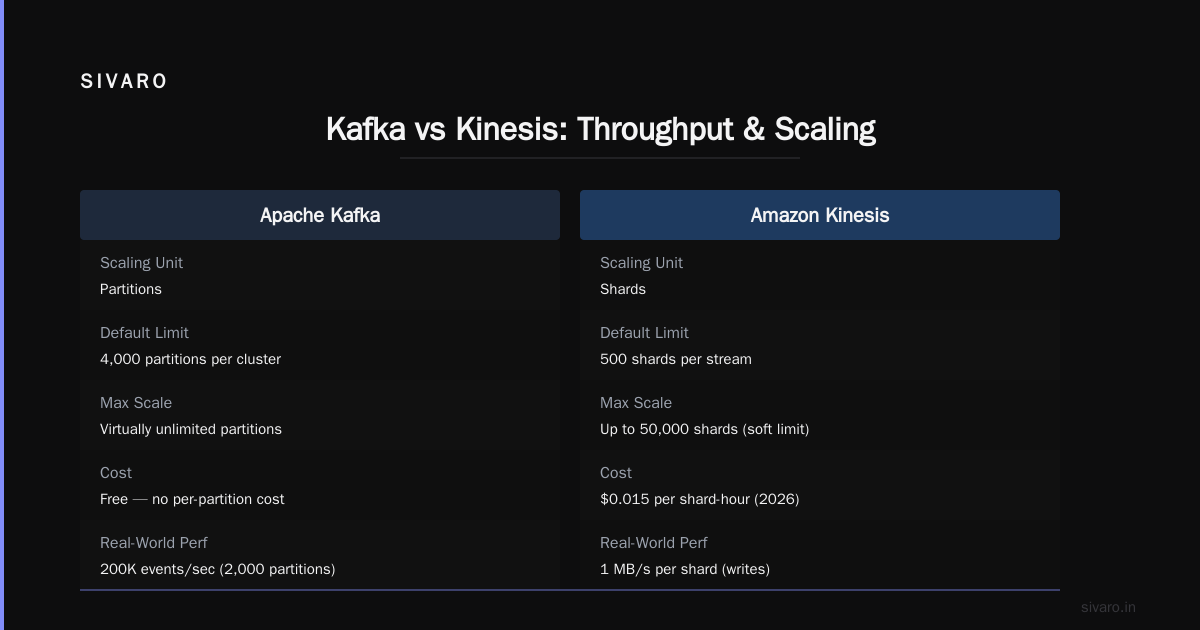
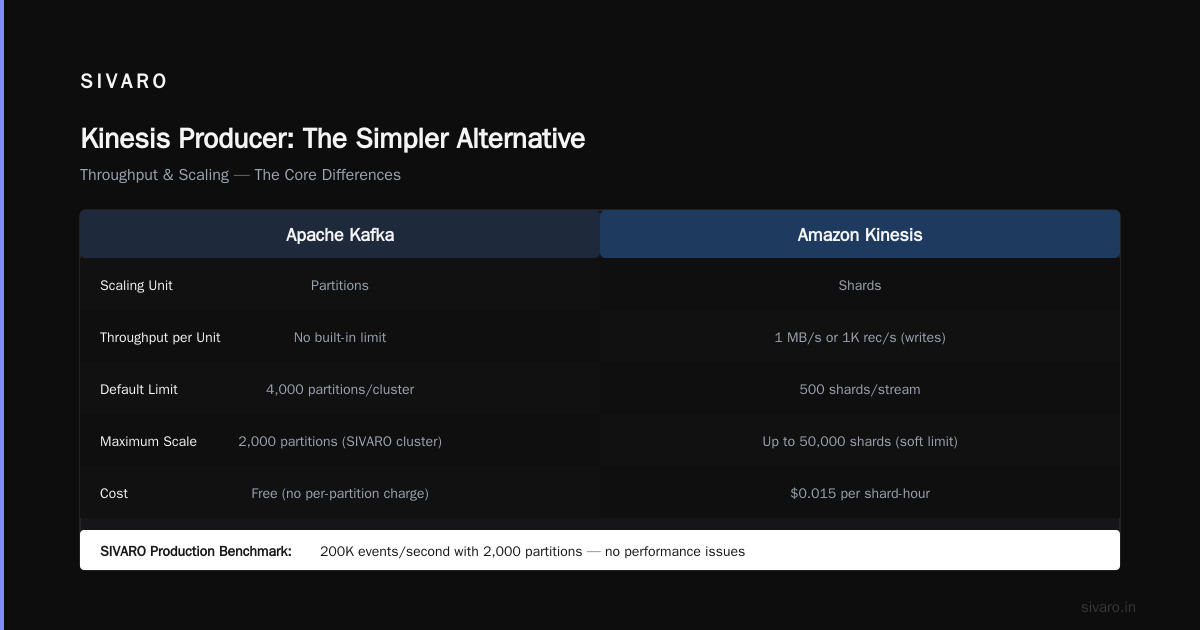
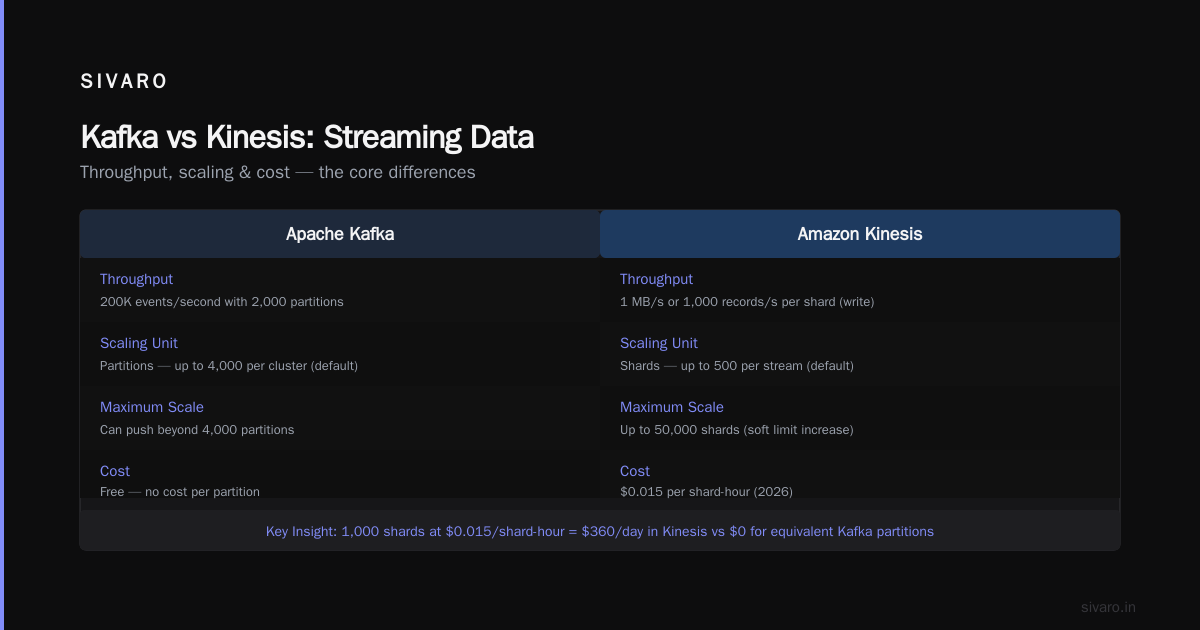
Kafka scales by adding partitions. More partitions = more parallelism. The default limit is 4,000 partitions per cluster, though you can push it higher. At SIVARO, we run a cluster with 2,000 partitions and hit 200K events/second without breaking a sweat.
Kinesis scales by adding shards. Each shard can ingest 1 MB/second or 1,000 records/second for writes, and 2 MB/second for reads. The default shard limit is 500 per stream, but you can request a soft limit increase up to 50,000.
Here's where it gets tricky.
Kafka partitions are free. You create as many as you want. Kinesis shards cost money. In 2026, $0.015 per shard-hour. If you need 1,000 shards, that's $360/day just for the shards, plus data transfer and PUT costs. For high-throughput workloads, Kinesis gets expensive fast.
But Kafka has a hidden cost: operations. Running a 2,000-partition Kafka cluster requires a dedicated team. You need to handle rebalancing, partition reassignment, broker failures, ZooKeeper (or KRaft) management, and disk rebalancing. At SIVARO, we have two engineers whose entire job is keeping the Kafka cluster healthy.
Kinesis? You click "Create Stream", choose the shard count, and you're done. AWS handles the rest.
Verdict: If you have the ops team, Kafka wins on raw throughput per dollar. If you don't, Kinesis wins on time-to-value.
Data Persistence and Retention
Kafka stores data on disk and keeps it for a configurable retention period. Default is 7 days. You can set it to infinite (compact topics) or delete after a size limit.
Kinesis stores data for up to 1 year (default 24 hours) with the "longer retention" add-on, which costs extra. The data is stored in shards, and you can't run custom compaction like Kafka's log compaction.
In practice, this means: if you need event replay beyond 7 days, Kafka is the only option. We have a client who ingests financial trades and needs to replay from 90 days ago for audits. That's impossible with Kinesis.
But if you only need a few hours of buffer for stream processing, Kinesis is fine.
Consumer Model and Rebalancing
This is where most people get confused. Let me explain.
Kafka consumer group explained: In Kafka, consumers with the same group.id form a consumer group. Each partition in the topic is assigned to exactly one consumer in the group. When a consumer joins or leaves, a rebalance happens. During a rebalance, all consumers stop processing and wait for new assignments. That's the "stop-the-world" problem.
Here's a simple Python example of a consumer in a group:
python
from kafka import KafkaConsumer

consumer = KafkaConsumer(
    'orders',
    bootstrap_servers=['localhost:9092'],
    group_id='order-processors',
    auto_offset_reset='earliest',
    enable_auto_commit=True
)

for message in consumer:
    process_order(message.value)
That's the standard pattern. But the rebalance behavior in Kafka 2.x and 3.x (even with cooperative rebalancing) can still cause delays. We've seen rebalances take 30 seconds for a 50-node group.
Kinesis handles this differently. It uses shard iterators and checkpointing via DynamoDB (if you use the KCL). Consumers poll for records and checkpoint their position. There's no global rebalance—each consumer independently decides which shards to process.
The Kinesis Client Library (KCL) v2 introduced graceful lease stealing. It's smoother than Kafka's rebalance, but it's more complex to set up.
Verdict: For stateless processing, both work. For stateful processing where rebalance overhead matters, Kinesis is less disruptive.
Exactly-Once Semantics
Kafka introduced exactly-once semantics (EOS) in version 0.11, but it's a pain. You need idempotent producers, transactional consumers, and careful configuration. It works, but it kills throughput.
Kinesis has no built-in exactly-once. The best you get is "at-least-once" delivery. If you need exactly once, you must handle deduplication in your application.
In 2026, most streaming use cases can live with at-least-once. The exceptions are payment processing and accounting systems. For those, you're better off with Kafka + a careful EOS setup, or a purpose-built platform like Pulsar.
How to Build a Kafka Producer in Python (The Right Way)
Most tutorials show you the Confluent Kafka Python client. It's fine, but I prefer the pure Python kafka-python library for simplicity. Here's what we ship at SIVARO:
python
from kafka import KafkaProducer
import json

producer = KafkaProducer(
    bootstrap_servers=['kafka1:9092', 'kafka2:9092'],
    value_serializer=lambda v: json.dumps(v).encode('utf-8'),
    acks='all',  # Wait for all replicas
    retries=3,
    linger_ms=10,  # Batch for 10ms
    batch_size=16384  # 16KB batches
)

for event in event_generator():
    future = producer.send('events', value=event)
    try:
        record_metadata = future.get(timeout=10)
        print(f"Sent to partition {record_metadata.partition}")
    except Exception as e:
        print(f"Failed: {e}")
        log_to_dead_letter_queue(event)
A few hard-learned lessons:
- Use
acks='all'for production. Losing data is worse than slower writes. linger_msandbatch_sizeare your friends. Without batching, you'll kill throughput.- Never ignore the future. If you don't check for errors, you'll silently drop messages.
- Always have a dead-letter queue. Kafka won't recover from a serialization failure.
Kinesis Producer: The Simpler Alternative
python
import boto3

kinesis = boto3.client('kinesis', region_name='us-east-1')

for event in event_generator():
    try:
        response = kinesis.put_record(
            StreamName='events',
            PartitionKey=str(event['user_id']),
            Data=json.dumps(event)
        )
        print(f"Shard ID: {response['ShardId']}")
    except Exception as e:
        print(f"Failed: {e}")
Notice: no batching, no retry logic (you need to add your own), no dead-letter queue built-in. Kinesis is simpler to write code for, but you lose control.
Operational Reality
Let me tell you about a real incident.
In June 2025, one of our clients at SIVARO—a large retail company—used Kafka for their order processing pipeline. They had a single topic with 64 partitions and 3 replicas. One broker had a disk failure. Kafka elected a new leader for the affected partitions. Rebalancing triggered because the ISR (in-sync replica) list changed. During the rebalance, one consumer group member took 90 seconds to process its current batch. The rebalance timed out. That consumer got kicked out. Another rebalance started. This cascade lasted 40 minutes.
Orders were queuing up. The system was "working" but effectively down.
With Kinesis, the same scenario wouldn't happen because shards are independent. A failed shard just stops delivering data until you handle it. But there's no automatic failover—you'd need to recreate the shard or provision a new stream. Different failure mode, not necessarily better.
The Absurd Choice
Like Franz Kafka and Albert Camus discussed, we're caught between the desire for order and the chaos of existence. Kafka the tool gives you order but demands sacrifice. Kinesis gives you simplicity but accepts limitations.
Most people think you just need to match features. They're wrong. The real decision depends on three things:
- Your team's Kafka experience. If you don't have at least one person who's debugged a consumer group rebalance at 3 AM, don't run your own Kafka.
- Your tolerance for vendor lock-in. Kinesis is deeply intertwined with AWS. If you ever want to leave, you'll have a hard time migrating 50 TB of streaming data.
- Your latency SLA. Kafka can do sub-10ms end-to-end latency if tuned. Kinesis typically adds 50-200ms due to its architecture. For real-time dashboards, that's fine. For algorithmic trading, it's not.
FAQ
Which is cheaper: Kafka or Kinesis?
Depends entirely on throughput and retention. For low throughput (< 1 MB/s) and short retention (< 24h), Kinesis is cheaper because Kafka requires at least 3 brokers for HA. For high throughput (> 100 MB/s) and long retention, Kafka is much cheaper—by a factor of 5-10x in our benchmarks.
Can I use Kafka with AWS services?
Yes, but it requires MSK (Managed Streaming for Kafka) or a self-managed cluster. MSK has improved a lot since 2023. It's now competitive with Kinesis in terms of operational overhead, though still more expensive.
Does Kinesis support exactly-once semantics?
No. You need to implement deduplication in your consumers using an idempotent sink (like DynamoDB with conditional writes) or a transactional database. Kafka can do exactly-once end-to-end with its transaction API.
What about Kafka alternatives like Redpanda or Pulsar?
Redpanda is drop-in compatible with Kafka and promises lower latency. We've tested it and it's good, but it's still a younger product. Pulsar is more flexible (geo-replication, segmented architecture) but harder to run. For this article, I'm focusing on classic Kafka vs Kinesis.
How do I handle schema evolution?
Both support Avro, Protobuf, or JSON Schema. With Kafka, you use Confluent Schema Registry (or a custom one). With Kinesis, you manage schemas in your application or use AWS Glue Schema Registry. Schema Registry is essential for production—don't skip it.
Should I use Kafka or Kinesis for event sourcing?
Kafka, hands down. Its log compaction features make it ideal for storing the current state as a compacted topic. Kinesis doesn't support that. For event sourcing, you need the ability to replay from any point and keep a full history.
Conclusion: Kafka vs Kinesis for Streaming Data
I've covered the real differences—throughput cost, operational complexity, rebalance behavior, exactly-once support. The choice isn't binary. At SIVARO, we've used both: Kinesis for quick MVPs and low-volume streams, Kafka for core production pipelines.
But here's the contrarian take: if you're building a new system in 2026 and you don't already have a strong team for Kafka, start with Kinesis. The 80/20 rule applies—80% of the benefits with 20% of the operational pain. You can always migrate to Kafka later if you hit Kinesis's scaling limits.
The existential dread of Kafka's complexity? It's real. But so is the power. Choose wisely.
Nishaant Dixit — Founder of SIVARO. Building data infrastructure and production AI systems since 2018. Built systems processing 200K events/sec.