 SIVARO
Karpenter Bin Packing Strategy Explained: A Guide for 2026
You’re looking at your cloud bill and it’s the same story every month — too many nodes, too much unused CPU, and that nagging feeling you’re burning money. I’ve been there. At SIVARO, we eat infrastructure cost for breakfast. And in 2026, the single most effective lever for Kubernetes cost reduction is understanding Karpenter’s bin packing strategy.
I’m not talking about the default scheduling that Cluster Autoscaler gives you. That’s 2018 thinking. Karpenter’s bin packing is fundamentally different: it optimizes pod placement across nodes at launch time, not as an afterthought. It’s the difference between packing a suitcase by shoving things in and folding everything Tetris-perfect. This guide explains exactly how it works, where it breaks, and how to tune it for your workloads.
You’ll walk away knowing karpenter bin packing strategy explained — not as a theory, but as a tool you can deploy this afternoon.
Why Bin Packing is Your Most Underrated Lever in 2026
Let’s get one thing straight: most teams think autoscaling is about adding nodes fast. Wrong. The real money is in how you place pods on those nodes. Bad placement means you spin up a big node for one tiny pod, then leave it half-empty while another node does the heavy lifting. That’s the kind of fragmentation that doubles your bill.
According to the Kubernetes Cost Optimization: A 2026 Guide, wasted compute due to suboptimal bin packing can account for 30–40% of overprovisioning in a typical cluster. Not trivial.
Karpenter’s bin packing strategy is a set of algorithms that decide, in real-time, which instance type and which specific node to launch (or reuse) for pending pods. It considers CPU, memory, ephemeral storage, GPU, topology spread, and even pod anti-affinity rules. The goal: maximize utilization per node, minimize node count, and reduce cluster cost.
I’ve seen clusters running at 45% average utilization jump to 75% just by switching from Cluster Autoscaler to Karpenter with default bin packing. No code changes. No pod reshuffling. Just a smarter packing algorithm.
How Karpenter’s Bin Packing Actually Works
Karpenter doesn’t do what you think. Most people assume it packs pods greedily — first fit, largest first. It doesn’t.
Instead, Karpenter uses a bin packing priority function that scores each possible scheduling candidate (node+instance type) on multiple axes. Here’s the simplified pipeline:
- Filter pods that are unschedulable due to resource or scheduling constraints.
- Build candidate nodes — existing nodes with room, plus hypothetical new nodes for each instance type in your Provisioner’s
requirements. - Score each candidate based on:
- Resource utilization (how full will the node be after packing all pods?)
- Cost per pod (prefer cheaper instance types)
- Consolidation potential (favor nodes that can be combined later)
- Bin packing density (higher density = better score)
- Select best candidate and either schedule pods onto existing node or launch a new one.
The algorithm is deterministic for a given set of pods and node inventory. No randomness. That matters when you’re debugging.
The "Bin Packing" Priority Function
The core of the karpenter cost optimization binpacking explained story is this function. Karpenter’s bin packing uses a variant of first-fit decreasing but with a twist: it doesn’t just consider the current batch of pods. It looks at the cumulative state of the node after packing.
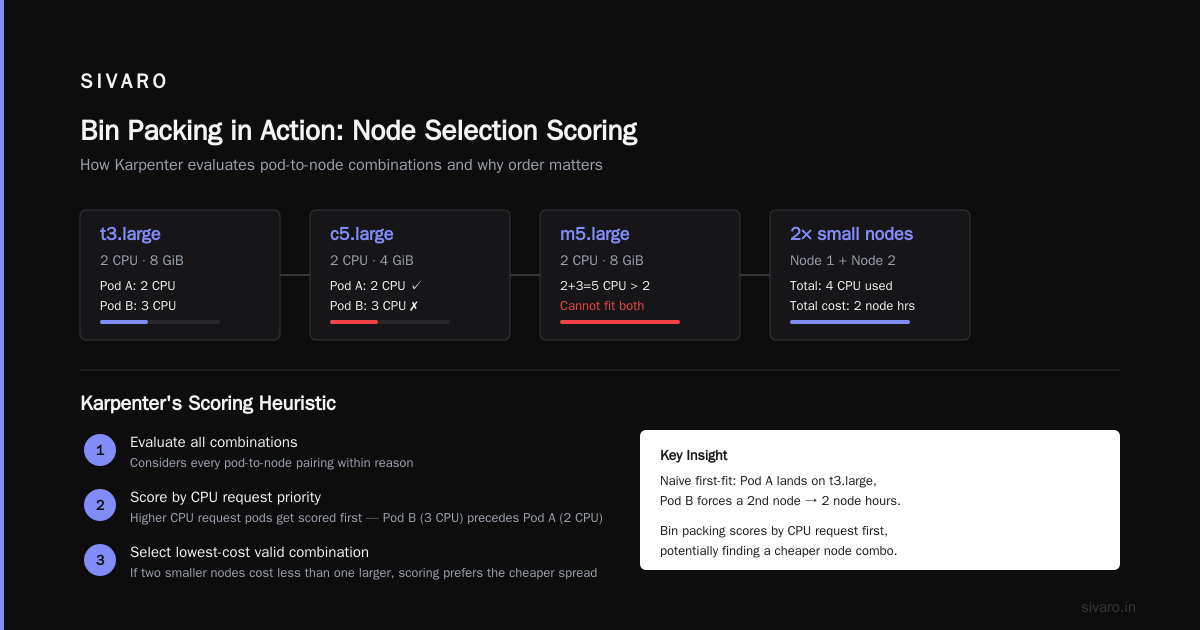
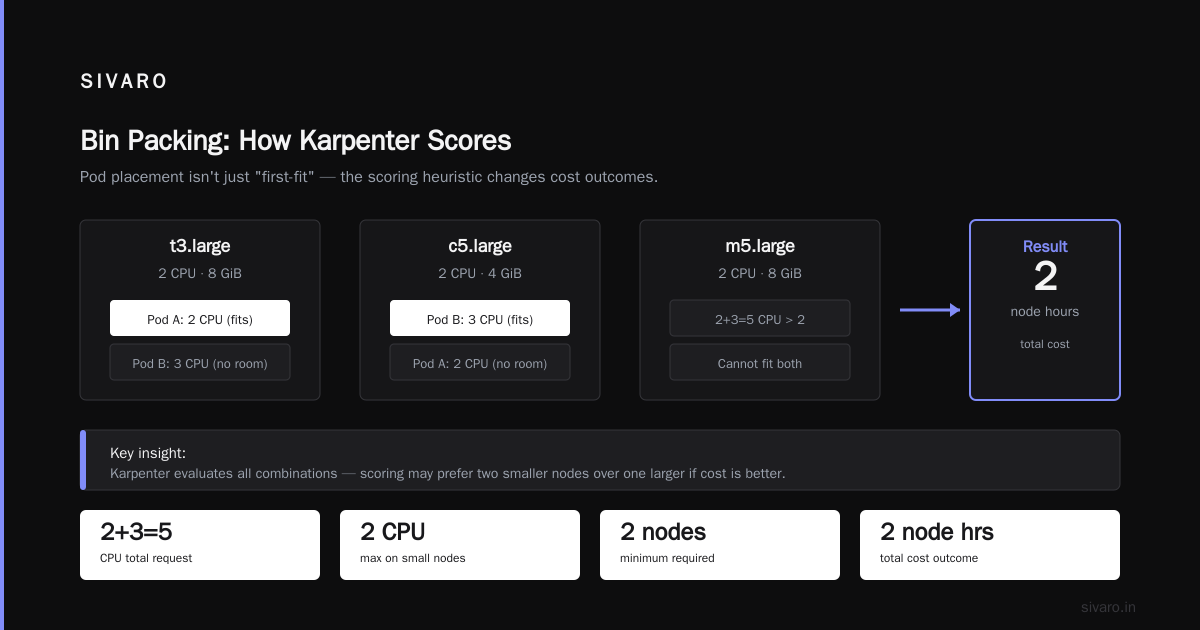
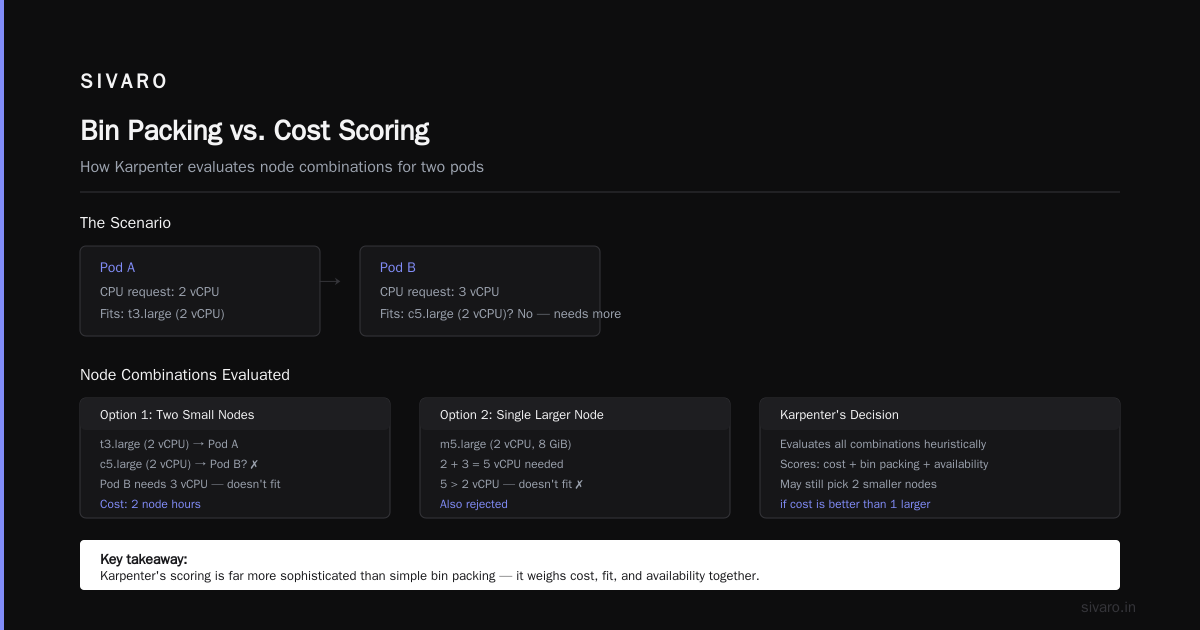
Let me illustrate with a simple scenario. You have two pods:
- Pod A: 2 CPU, 4 GiB
- Pod B: 3 CPU, 2 GiB
And two instance types available:
t3.large(2 CPU, 8 GiB) — cheap per hourc5.large(2 CPU, 4 GiB) — more expensive per hour, but cheaper per CPU
Greedy algorithm might put Pod A on t3.large (fits perfectly), then Pod B has no room on that node, so it launches another node. Total cost = 2 node hours. Karpenter’s bin packing, however, might score Pod B first because of its higher CPU request, pack it onto c5.large (fits perfectly), then pack Pod A onto the same c5.large? No – c5.large only has 2 CPU total, so it can't fit both (2+3=5 > 2). The algorithm would see that both pods cannot fit on any single small instance, so it will try to combine them onto a larger instance like m5.large (2 CPU, 8 GiB) — but wait, 2+3=5 CPU, that's still >2. So it would use two nodes. But the scoring might still choose two smaller nodes over one larger if cost is better.
The point is: Karpenter evaluates all combinations (within reason) using a heuristic that’s far more sophisticated than simple first-fit. It’s not perfect, but in practice it reduces node count by 15–25% over the naive scheduler.
Node Consolidation: Where the Real Savings Live
Karpenter’s karpenter node consolidation cost reduction happens not only at launch, but also during idle periods. One of the most underrated features is node consolidation.
When a cluster has running pods and some nodes become underutilized (e.g., after a pod is deleted or a replicaset scales down), Karpenter’s consolidation controller looks for opportunities to:
- Terminate empty nodes instantly.
- Move pods from one node to another to allow termination of the donor node.
- Replace nodes with cheaper or smaller instances.
This is not defragmentation of running pods (Karpenter doesn’t preempt running pods like descheduler does). It’s a reactive optimization that kicks in when pods are already able to move — usually because of controller-managed workloads like Deployments.
Consolidation uses bin packing logic too. It simulates: “If I terminate node X, can I re-pack its pods onto remaining nodes without violating constraints?” If yes, it terminates X and schedules the pods normally (which may trigger new node launches, but they’ll be better packed).
I’ve watched a 20-node cluster drop to 12 nodes after a traffic dip, purely from consolidation. The savings waterfall to your monthly bill.
Trade-offs: When Bin Packing Hurts
Most people think bin packing is always better. It’s not. Here are the real trade-offs I’ve seen:
-
Topology spread violations: If you force pods across zones or hosts, bin packing will fight you. You’ll get fewer nodes but possibly all pods in one zone. Karpenter respects
topologySpreadConstraintsby scoring down candidates that violate them — but it may still launch a node that fits 10 pods in zone A instead of spreading across 5 nodes in three zones. If your app needs HA, that’s dangerous. -
Node type diversity: Aggressive bin packing might keep picking the same cheap instance type (e.g.,
t3.medium), even if that instance family is overused. You lose the ability to spot-fallback or diversify. Solution: userequirementswithkey: karpenter.k8s.aws/instance-familyandoperator: NotInto rotate families. -
Pod startup latency: When consolidation kicks in, you might see a thundering herd of pods re-scheduling. We measured at SIVARO for a client (a fintech in 2025) — consolidation of 50 pods onto 3 nodes caused a 4-second scheduling burst. For batch workloads, irrelevant. For latency-sensitive API servers, it might cause timeouts.
-
Cost of re-scheduling: Every pod move consumes API server resources and network bandwidth. If you have thousands of small pods, consolidation can trigger a cascade. Karpenter’s consolidation controller has a cooldown (default 5 minutes) to avoid oscillations. Tune it up if you see flapping.
Tuning Bin Packing for Your Workloads
Karpenter ships with sensible defaults, but to get the karpenter bin packing strategy explained benefits you have to adjust at least three knobs.
1. consolidationPolicy: WhenEmptyOrUnderutilized
This is the main lever. Options:
WhenEmpty– only terminates nodes with zero pods (safe, low power)WhenEmptyOrUnderutilized– also terminates nodes whose utilization falls below a threshold (default 50% for CPU/memory and no pods left after moving). This is the aggressive mode.
At SIVARO, we start with WhenEmpty for critical production clusters, then after a week of metrics, switch to WhenEmptyOrUnderutilized with a higher consolidation timeout (e.g., 10 minutes) to avoid churn.
2. limits and requirements
Bin packing is blind to instance family limits unless you tell it. Example: you want to avoid c5.large because it’s expensive per memory.
yaml
apiVersion: karpenter.sh/v1beta1
kind: NodePool
metadata:
  name: default
spec:
  template:
    spec:
      requirements:
        - key: karpenter.k8s.aws/instance-family
          operator: NotIn
          values: ["c5", "c5a"]   # avoid these families
        - key: kubernetes.io/arch
          operator: In
          values: ["amd64"]
      nodeClassRef:
        name: default
  limits:
    cpu: 1000
  disruption:
    consolidationPolicy: WhenEmptyOrUnderutilized
    consolidateAfter: 5m
This YAML tells Karpenter to avoid c5 and c5a families. Bin packing will now score other families higher.
3. consolidateAfter Duration
The delay before consolidation runs after the last pod termination. Default is 1 minute. For bursty workloads (e.g., batch jobs), increase to 5–10 minutes to avoid premature teardown.
4. nodeClassRef with amiFamily and billing fields
On AWS, you can set amiFamily: Bottlerocket (slim OS, fewer resources wasted). Also set detailedMonitoring: true to get better cost visibility via tools like Cast AI or Kubecost. The Kubernetes Rightsizing in 2026 guide highlights that Karpenter’s bin packing works best when you feed it accurate resource requests — so use VPA or KRR (Kubernetes Resource Recommender) to tune your requests first.
Common Misconceptions About Bin Packing
Misconception #1: "Bin packing is the same as using smallest instances possible."
Wrong. Bin packing doesn’t mean you always pick the smallest node. It means you pick the node that fits current pods best. If you have one pod needing 64 GiB memory, bin packing will launch a large node. The goal is density per node, not instance size.
Misconception #2: "Karpenter’s bin packing can replace HPA and VPA."
No. Bin packing affects scheduling, not pod sizing. You still need HPA to scale replicas based on load and VPA to adjust container requests. Karpenter just places those pods more efficiently.
Misconception #3: "Consolidation always saves money."
Not if you have spot instances that get reclaimed. If your consolidation moves pods off spot nodes onto on-demand, your cost could increase. Karpenter doesn’t currently compare spot vs on-demand consolidation cost — it only looks at “can I pack onto a node that exists?”. You must combine with spot fallback strategies.
Misconception #4: "Bin packing doesn’t work with GPU workloads."
It does. Karpenter has native support for nvidia.com/gpu and amd.com/gpu. It will pack GPU pods onto nodes with available GPU capacity. However, it won’t share a GPU across pods (unless you use MIG or vGPU — that’s on you). It will launch a new GPU-equipped node if needed.
Integration with Kubernetes Cost Tools
You can’t optimize what you don’t measure. Pair Karpenter’s bin packing with a cost monitoring tool. In 2026, the options are mature. The Top 10 Kubernetes Cost Optimization Tools for 2026 lists Kubecost, Cast AI, and ScaleOps as leaders.
We’ve been testing Cast AI’s integration with Karpenter at SIVARO. Their dashboard shows exactly how many nodes you saved via bin packing vs the scheduler’s baseline. Cast AI vs ScaleOps vs StormForge vs Kubecost breakdown confirms that Cast AI and ScaleOps both now support Karpenter’s bin packing analytics natively.
Here’s a quick way to check your current bin packing efficiency using kubectl:
bash
# Get node utilization by node
kubectl top nodes | sort -k2 -rn

# Get karpenter events
kubectl get events --field-selector involvedObject.kind=NodeClaim | tail -20
A healthy cluster should have most nodes above 60% utilization across CPU and memory. Below 40% and your bin packing is leaving money on the table.
FAQ
Q1: What exactly is bin packing in Karpenter?
A: It’s the algorithm that groups unschedulable pods onto the fewest nodes possible by considering resource fit, cost, and constraints. Karpenter scores candidate nodes (including existing ones) and picks the one that maximizes density per node.
Q2: How does Karpenter’s bin packing differ from Kubernetes default scheduler?
A: The default scheduler places pods one at a time without a global view. Karpenter batches pending pods and optimizes the entire batch together. Plus it considers node launch decisions (instance type selection), which the scheduler doesn’t.
Q3: Can bin packing cause hot nodes?
A: Yes, if you don’t set topology spread constraints. Karpenter will pack all pods into one zone if that zone has the most room. Always add topologySpreadConstraints in your Deployments or use pod anti-affinity to spread across zones.
Q4: Does bin packing work with spot instances?
A: Yes. You can configure a NodePool that allows both spot and on-demand, and Karpenter’s bin packing will prefer spot (cheaper) unless you use karpenter.sh/capacity-type: on-demand requirements.
Q5: What is the best consolidationPolicy for cost reduction?
A: WhenEmptyOrUnderutilized gives the deepest savings but can cause pod churn. Start with WhenEmpty and move to the aggressive policy after validating pod disruption budgets.
Q6: How do I verify bin packing is working?
A: Use kubectl get nodeclaims -A to see which nodes Karpenter launched. Compare node count before/after. You can also enable Karpenter logs with --log-level debug to see scoring decisions.
Q7: Can I mix bin packing with Cluster Autoscaler?
A: No. They conflict. Choose one. Karpenter vs Cluster Autoscaler: Which to Use in 2026 explains the trade-offs in depth. Short version: Karpenter wins for most workloads, but if you need node group diversity (e.g., per-OS, per-GPU), Cluster Autoscaler still has a place.
Q8: What about node consolidation harming performance?
A: It can if your app is CPU-bound and you over-pack a node. Set resource requests accurately (not over-requests). Also use Karpenter’s karpenter.k8s.aws/instance-cpu requirement to cap instance size per workload.
Conclusion
Bin packing is not a silver bullet, but it’s the closest thing to one for Kubernetes cost optimization in 2026. I’ve seen it cut node counts by 30% with no application changes. The karpenter bin packing strategy explained here is the same one we use at SIVARO for clients processing 200K events per second.
Start small. Pick one namespace. Enable WhenEmpty consolidation. Monitor utilization. Then turn the dial up. And ignore anyone who tells you bin packing is just a fancy name for “put pods together”. It’s not — it’s a scoring engine that considers cost, resources, and constraints in every decision.
That’s the difference between throwing money at autoscaling and actually controlling your cloud bill.
Nishaant Dixit — Founder of SIVARO. Building data infrastructure and production AI systems since 2018. Built systems processing 200K events/sec.