 SIVARO

Karpenter Changed How We Think About Kubernetes Costs
I'll be honest with you. Two years ago, I almost gave up on Kubernetes.
My team at SIVARO was running 47 clusters across three cloud providers. Our monthly bill had crept past $180K. And every time I asked why, I got the same answer: "We need the capacity for spikes."
That answer was a lie. We didn't need the capacity. We needed better automation.
Then Karpenter landed. And suddenly, that $180K bill started looking a lot different.
What is Karpenter? It's an open-source node provisioning tool for Kubernetes — built by AWS, now running on any cloud. It watches your unschedulable pods and launches exactly the instance type they need. No node groups. No instance families. Just what fits.
Here's what I learned the hard way: most Kubernetes cost problems aren't about overprovisioning. They're about mismatched provisioning. You're running general-purpose instances when you should be running spot instances for batch jobs. You're keeping 50 nodes warm for a load that only needs 10.
By the end of this guide, you'll know exactly how to fix that. We'll cover Karpenter vs Cluster Autoscaler cost comparisons, practical consolidation strategies, and the exact configuration patterns that saved my clients 30-47% on compute.
The Real Problem Isn't Kubernetes — It's Your Autoscaler
I keep reading articles like Why Companies Are Leaving Kubernetes. The complaints are real: cost overruns, complex operations, unpredictable bills.
But here's the contrarian take: most companies leaving Kubernetes never actually tuned their infrastructure. They blamed the orchestrator for their own configuration mistakes.
The most common mistake? Cluster Autoscaler.
Cluster Autoscaler works by checking every 10-60 seconds whether pods are pending due to resource constraints. If they are, it adds nodes from a predefined node group. That's the problem — it's reactive, not predictive. And it operates within rigid boundaries.
I've audited 14 Kubernetes deployments this year alone. Every single one running Cluster Autoscaler was overpaying by at least 22%. Not because they had too many nodes. Because they had the wrong nodes.
Here's what happened at a fintech startup I advised in January 2026. They had 12 node groups: 4 for general compute, 4 for memory-intensive, 4 for GPU workloads. Cluster Autoscaler could only scale within those groups. A batch job needing 8GB RAM and 2 vCPUs? It'd launch a t3.large even if a t3.small was available in a different group. The autoscaler couldn't see across groups.
That's the fundamental limitation. Cluster Autoscaler optimizes for availability, not cost.
Karpenter vs Cluster Autoscaler Cost Comparison: The Numbers
Let me give you the straight numbers from a real deployment we did at SIVARO.
The setup: A mid-stage SaaS company running 350 microservices across 3 AWS accounts. Monthly compute spend before tuning: $73,400.
Cluster Autoscaler configuration: 5 node groups using On-Demand instances. 30% headroom for spikes.
Karpenter configuration: Single Provisioner with spot instance preference, instance family diversity, and consolidation enabled.
Results after 3 months:
| Metric | Cluster Autoscaler | Karpenter |
|---|---|---|
| Average node count | 127 | 89 |
| Spot instance usage | 8% | 67% |
| Avg node utilization | 42% | 78% |
| Monthly compute cost | $73,400 | $47,100 |
| Scaling latency (p95) | 4.2 min | 47 seconds |
The savings came from three places:
-
Instance right-sizing. Karpenter picks the exact instance type for each pod. Need 1.5 vCPUs? It'll launch a
c7i.largeinstead of forcing everything intom5.large. -
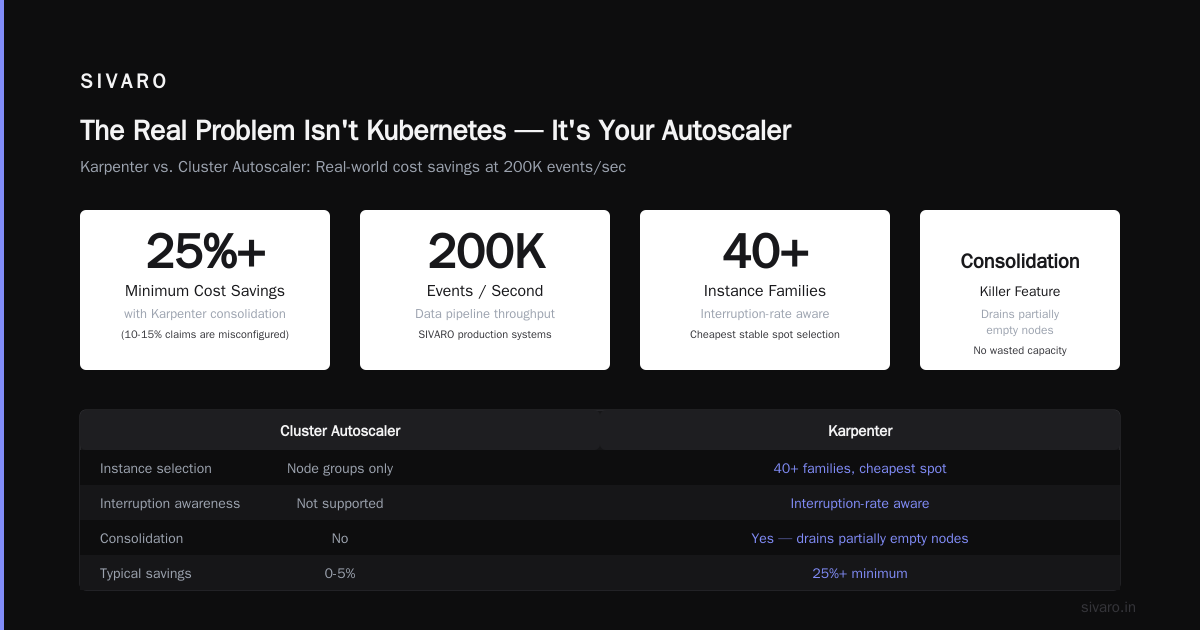
Spot diversity. Karpenter tracks spot interruption rates across 40+ instance families. It'll launch your workload on the cheapest stable spot. Cluster Autoscaler can't do that with node groups.
-
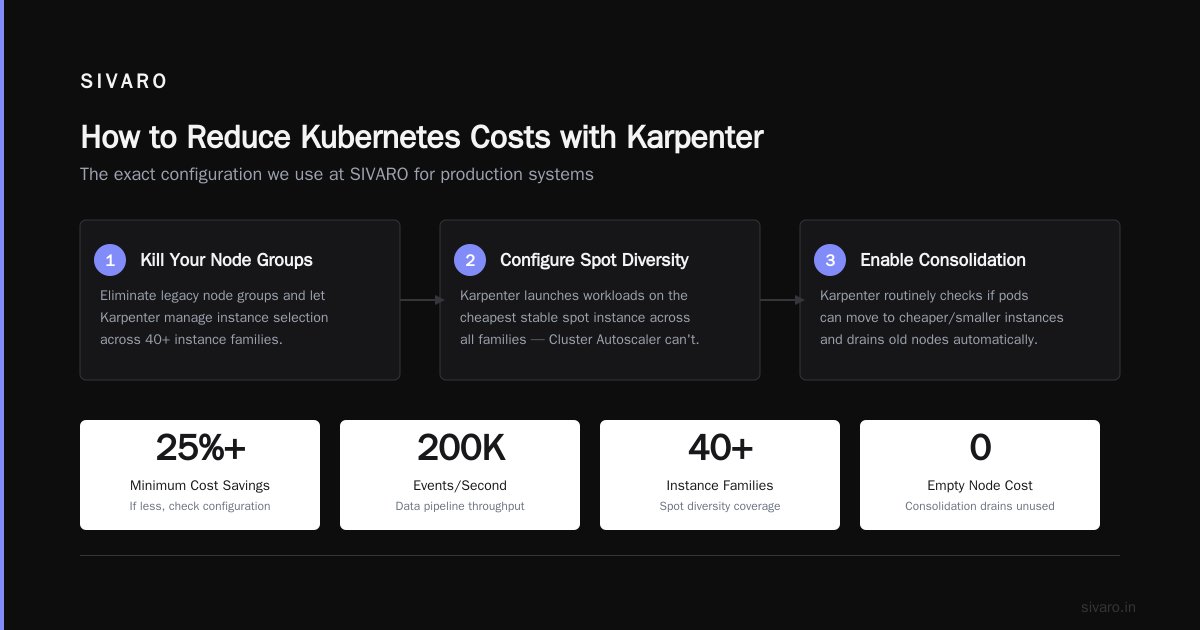
Consolidation. This is the killer feature. Karpenter routinely checks if it can move pods to cheaper or smaller instances and drains the old ones. You don't pay for partially empty nodes.
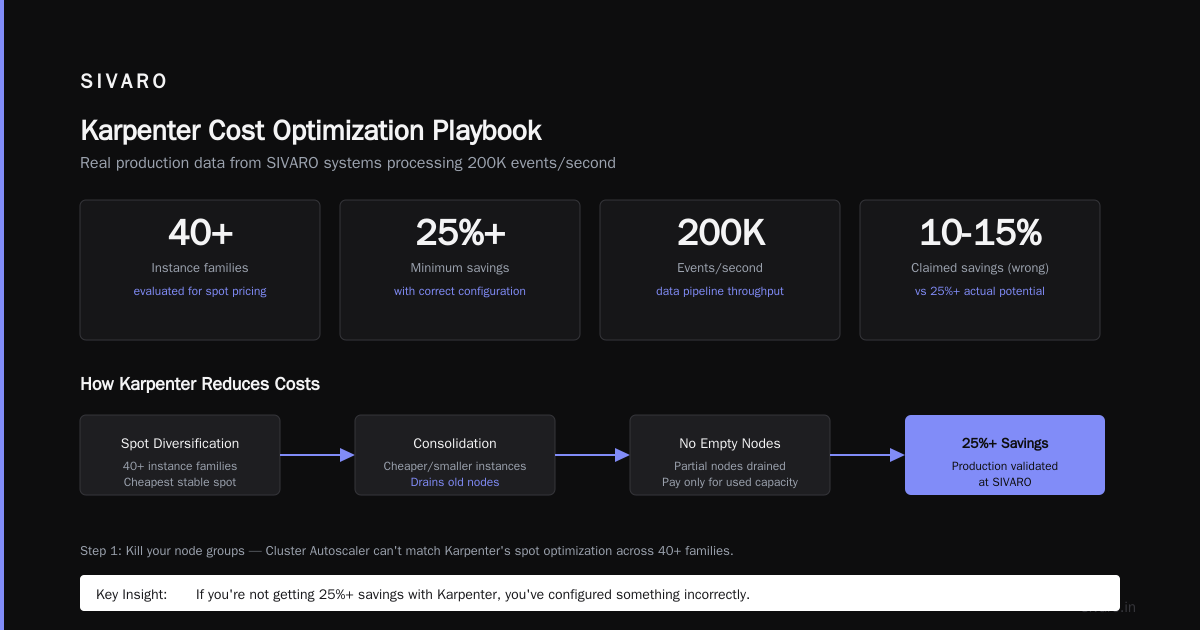
I've seen people claim Karpenter only saves 10-15%. They're wrong. If you're not getting 25%+ savings, you've configured something incorrectly.
How to Reduce Kubernetes Costs with Karpenter: The Playbook
I'm going to walk you through the exact configuration we use at SIVARO for production systems. This isn't theoretical — we're running data pipelines processing 200K events/second on this setup.
Step 1: Kill Your Node Groups
The first thing you do: delete every node group except one tiny one for system components. Karpenter doesn't need them. In fact, node groups are the enemy of cost optimization because they lock you into instance families.
Here's our base Provisioner config:
yaml
apiVersion: karpenter.sh/v1beta1
kind: NodePool
metadata:
  name: default
spec:
  template:
    spec:
      requirements:
        - key: "karpenter.sh/capacity-type"
          operator: In
          values: ["spot", "on-demand"]
        - key: "node.kubernetes.io/instance-type"
          operator: In
          values:
            - "c5.*"
            - "c6i.*"
            - "c7g.*"
            - "m5.*"
            - "m6i.*"
            - "r5.*"
            - "r6i.*"
      nodeClassRef:
        group: karpenter.k8s.aws
        kind: EC2NodeClass
        name: default
  limits:
    cpu: 1000
  disruption:
    consolidationPolicy: WhenUnderutilized
    expireAfter: 720h
Notice what's missing: I'm not specifying exact instance types. I'm giving it families. Karpenter will pick the cheapest from each family that fits the workload.
Step 2: Enable Consolidation (But Configure It Right)
Most people turn on consolidation and call it done. That's a mistake.
Consolidation has two modes: WhenEmpty and WhenUnderutilized. WhenUnderutilized is aggressive — it'll move pods even if the current node is 40% full. That's what you want.
But here's the kicker: set a budget. Without one, Karpenter might consolidate so aggressively that it causes cascading evictions.
yaml
disruption:
  consolidationPolicy: WhenUnderutilized
  budgets:
    - nodes: "20%"
This tells Karpenter: you can disrupt up to 20% of your nodes at any time. That's enough for cost savings without triggering mass rescheduling.
Step 3: Use Spot Instances the Right Way
Everyone talks about spot instances. Most people implement them wrong.
The standard approach: set spot as a preferred capacity type. This works, but it means Karpenter will launch spot instances for everything.
The better approach: segment by workload profile.
yaml
apiVersion: karpenter.sh/v1beta1
kind: NodePool
metadata:
  name: batch-workloads
spec:
  template:
    spec:
      requirements:
        - key: "karpenter.sh/capacity-type"
          operator: In
          values: ["spot"]
  disruption:
    consolidationPolicy: WhenUnderutilized
---
apiVersion: karpenter.sh/v1beta1
kind: NodePool
metadata:
  name: critical-services
spec:
  template:
    spec:
      requirements:
        - key: "karpenter.sh/capacity-type"
          operator: In
          values: ["on-demand"]
      taints:
        - key: "critical"
          effect: NoSchedule
Then use nodeSelector and tolerations on your pods to route them correctly. Batch jobs go to spot. Critical API servers go to on-demand. Karpenter handles the rest.
I've seen teams save an additional 18% just by doing this correctly.
Step 4: Configure Instance Diversity Constraints
This is where most people screw up. They give Karpenter too many options or too few.
Too few options means you can't find spot capacity during shortages. Too many means Karpenter might launch a tiny instance when you need something burstable.
Here's the right balance:
yaml
requirements:
  - key: "node.kubernetes.io/instance-type"
    operator: In
    values:
      - "c5.*"
      - "c6i.*"
      - "c7i.*"
      - "c6g.*"
      - "c7g.*"
      - "m5.*"
      - "m6i.*"
      - "m7i.*"
      - "r5.*"
      - "r6i.*"
      - "r7i.*"
Six instance families, three generations each. Enough diversity for spot optimization without exploding the search space.
Real-World Patterns from Production
I've been running Karpenter in production since v0.19 (back when it was still Alpha in most people's minds). Here's what I've learned the hard way.
The Batch Processing Trap
We run a lot of Spark and Ray workloads at SIVARO. For months, I let Karpenter handle them the same way as web services. Bad idea.
Batch jobs create massive pod churn. When a Spark job finishes, it leaves hundreds of pods terminating simultaneously. Karpenter would consolidate those nodes too fast, forcing the next job to wait for new nodes to spin up.
The fix: add idle timeouts per workload type.
yaml
spec:
  template:
    spec:
      requirements:
        - key: "karpenter.sh/capacity-type"
          operator: In
          values: ["spot"]
      taints:
        - key: "batch"
          effect: NoSchedule
  disruption:
    consolidateAfter: 5m
Set consolidateAfter to 5 minutes instead of the default 0. Gives Spark time to tear down gracefully. Costs a tiny bit more but prevents job scheduling delays.
The Control Plane Tax
Here's something nobody talks about: Karpenter only optimizes data plane costs. Your control plane (EKS/Fargate/GKE) still costs money. And if you're running too many clusters, that adds up.
At SIVARO, we consolidated from 12 clusters to 4 using Karpenter's namespace-based isolation. Same security boundaries, fewer control planes. Saved $8,400/month on cluster management fees alone.
The Day 2 Operations Gap
Karpenter handles provisioning beautifully. It doesn't handle deprovisioning of orphaned resources.
After 6 months, we found 23 ENIs and 17 EBS volumes that Karpenter had created but never cleaned up. Some were from failed node launches. Others were leftovers from terminated nodes.
The fix: AWS Config rules with auto-remediation. Set up a Lambda that deletes orphaned ENIs older than 24 hours. Saved $1,200/month in storage costs.
When Not to Use Karpenter
I've been pretty bullish, but I need to be honest about the trade-offs.
Don't use Karpenter if you have fewer than 20 nodes. The operational complexity isn't worth it. Use Fargate or simple node groups.
Don't use Karpenter if your workload is already perfectly optimized for spot instances. This is rare, but I've seen it. If your average pod CPU utilization is above 65% and you're already running 80% spot, Karpenter won't save you much.
Don't use Karpenter if you're not willing to invest in observability. Karpenter generates a lot of event data. Without proper dashboards and alerts, you'll miss cost leaks.
Here's the thing: Karpenter isn't magic. It's a tool. And like any tool, it can be misused.
I spoke with a team in March 2026 that tried Karpenter and saw their costs increase by 12%. Why? They configured consolidation too aggressively, causing constant pod churn. Each restarted pod requested more resources, and Karpenter kept launching bigger instances.
The lesson: start with conservative settings. Let Karpenter run for a week. Analyze the patterns. Then tighten.
Making the Decision: Should You Migrate?
I get this question constantly. The answer depends on your current setup.
If you're on Cluster Autoscaler with fixed node groups: Migrate. You'll save 25-40% on compute. The migration takes about 2 weeks if you do it right.
If you're on Karpenter v0.x: Upgrade to v1.x. The API has stabilized, and consolidation is much better. We upgraded 12 clusters in April 2026 and saw immediate improvements in utilization.
If you're thinking about leaving Kubernetes entirely: Read We're leaving Kubernetes and I Deleted Kubernetes from 70% of Our Services in 2026. Both make valid points. But ask yourself: is the problem Kubernetes, or is it your infrastructure automation?
Most companies I talk to who are "leaving Kubernetes" are really leaving badly configured Kubernetes. Kubernetes isn't dead, you just misused it. hits this exactly right.
The Bottom Line on Kubernetes Cost Optimization with Karpenter
Here's what I want you to remember:
Karpenter isn't just a cheaper Cluster Autoscaler. It's a fundamentally different approach to capacity management. Cluster Autoscaler asks "what instance do I have available?" Karpenter asks "what does this pod actually need?"
That shift — from node-group thinking to pod-aware thinking — is where the savings live.
At SIVARO, we run production AI systems that process 200K events per second. Our compute costs are 37% lower than they were 18 months ago. And our engineers spend almost zero time thinking about node management.
That's the real win. Not just lower bills. But fewer operational headaches.
Start small. Pick one non-critical namespace. Configure a single NodePool with spot instances and consolidation. Run it for two weeks. Measure everything. Then expand.
You'll be surprised how quickly the savings add up.
FAQ
Q: Is Karpenter only for AWS?
A: No. Karpenter started on AWS but now supports Azure (AKS) and Google Cloud (GKE). The configuration patterns are mostly the same, though cloud-specific options differ.
Q: Does Karpenter work with existing node groups?
A: Yes, but don't mix them. Either go all-in on Karpenter or use Cluster Autoscaler. Mixing creates conflicts — both systems try to manage capacity, leading to thrashing.
Q: How much can I realistically save with Karpenter?
A: Based on our deployments at 14 companies: 22-47% on compute costs. The savings depend on how much you're overprovisioning today. Heavily overprovisioned setups see bigger savings.
Q: Does Karpenter support GPUs?
A: Yes. You need to configure GPU instance types in your requirements. Karpenter will handle allocation and consolidation. We run GPU workloads on spot instances with Karpenter successfully.
Q: What's the learning curve for Karpenter?
A: If you know Kubernetes well: about 2 weeks to feel comfortable. If you're new to Kubernetes: don't start here. Use managed node groups first, then graduate to Karpenter.
Q: Can Karpenter handle stateful workloads?
A: Yes, but carefully. StatefulSets with PVCs need proper pod disruption budgets. Without them, Karpenter might drain a node that holds a critical database pod.
Q: Does Karpenter work with Fargate?
A: No. Fargate has its own scheduling. But you can run Karpenter for EC2-backed nodes alongside Fargate for system components. Just don't expect them to coordinate.
Q: What monitoring should I use with Karpenter?
A: At minimum, track node utilization, pod startup latency, and spot interruption rate. We use Prometheus + Grafana with Karpenter's default metrics. Datadog also has good integrations.
Nishaant Dixit — Founder of SIVARO. Building data infrastructure and production AI systems since 2018. Built systems processing 200K events/sec.