 SIVARO
Karpenter Cost Allocation Kubernetes: 2026 Guide
It started with a $47,000 bill I couldn’t explain.
February 2025. We had just migrated SIVARO’s production AI inference cluster from a static Node Group setup to Karpenter. The scaling was beautiful. Nodes spun up in seconds. Spots replaced OnDemand automatically. The team was thrilled.
Then the cost report came.
Our Karpenter-managed EKS cluster wasn’t just cheaper — it was opaque. Every team argued their pods didn’t cause that spike. And they were right. Karpenter’s dynamic provisioning makes traditional node-group-based cost allocation a joke. Nodes last minutes, not days. Labels shift. Spot instances get preempted.
I spent the next six months figuring out how to track karpenter cost allocation kubernetes properly — so you don’t have to.
This guide is the result. You’ll learn what actually works (and what doesn’t) for attributing Karpenter-provisioned node costs back to teams, services, and clusters in 2026. You’ll see real code, real numbers, and one hard truth: most cost allocation tools lie to you when Karpenter is involved.
Why Standard Kubernetes Cost Allocation Broke for Us
Every “Kubernetes cost optimization” blog post in 2023-2024 told you to use Kubecost, OpenCost, or label-based splits. We tried all three. None of them handled Karpenter well.
The core problem: Karpenter doesn’t provision nodes per deployment. It provisions nodes for a pool of pending pods, then consolidates them aggressively. A single c5.xlarge can host pods from three different teams — and then be terminated 47 seconds later because a cheaper instance type becomes available.
Traditional cost allocation assumes nodes are long-lived and labeled as “belonging” to a namespace or team. Karpenter laughs at that assumption.
Tinybird reported saving 20% on AWS costs by switching to Karpenter with Spot instances. But they also had to invest heavily in cost tagging infrastructure to maintain visibility. Their engineering team told me directly: “The savings were real. The visibility cost was real, too.”
Most people think Karpenter makes cost allocation impossible. They’re wrong — because they’re looking at it through the wrong lens.
Stop trying to map costs to static node groups. Start mapping costs to pods over time.
How Karpenter Changes the Cost Game
Karpenter doesn’t use node groups. It uses provisioners — flexible templates that define which instance types, zones, and purchase options are allowed. When a pod can’t schedule, Karpenter picks an optimal node to launch, runs the pods, and then consolidates when possible.
That consolidation is the magic — and the cost nightmare.
The key metric you need isn’t node cost per hour. It’s pod allocation cost per minute. Karpenter documents that nodes are ephemeral. The karpenter.azure.com/ family (yes, Karpenter now supports Azure too, but let’s focus on AWS) records lifecycle events. Every node creation, termination, and consolidation produces an event you can audit.
But events alone don’t give you costs. You need to map those events to AWS billing line items (EC2 hours, EBS volumes, data transfer) and then attribute those costs to the pods that caused the node to exist.
Here’s the framework we finally settled on at SIVARO:
- Track node creation events with timestamps and instance type.
- Calculate the cost per minute for that node using AWS EC2 pricing + attached EBS.
- Attribute that cost to pods running on the node during each minute.
- Sum per-team using pod labels or owner references.
The math is simple. The implementation? Not so much.
Mapping Costs to Teams with Node Labels and Taints
We tried everything. The first approach that stuck was using Karpenter’s built-in node-template labels and taints.
yaml
apiVersion: karpenter.sh/v1beta1
kind: NodePool
metadata:
  name: team-alpha
spec:
  template:
    spec:
      nodeClassRef:
        name: default
      requirements:
        - key: "team"
          operator: In
          values: ["alpha"]
      taints:
        - effect: NoSchedule
          key: "team"
          value: "alpha"
      labels:
        team: alpha
Looks clean, right? Each NodePool is for a team. We tag nodes with team:alpha. Then we can count EC2 hours per team.
Wrong.
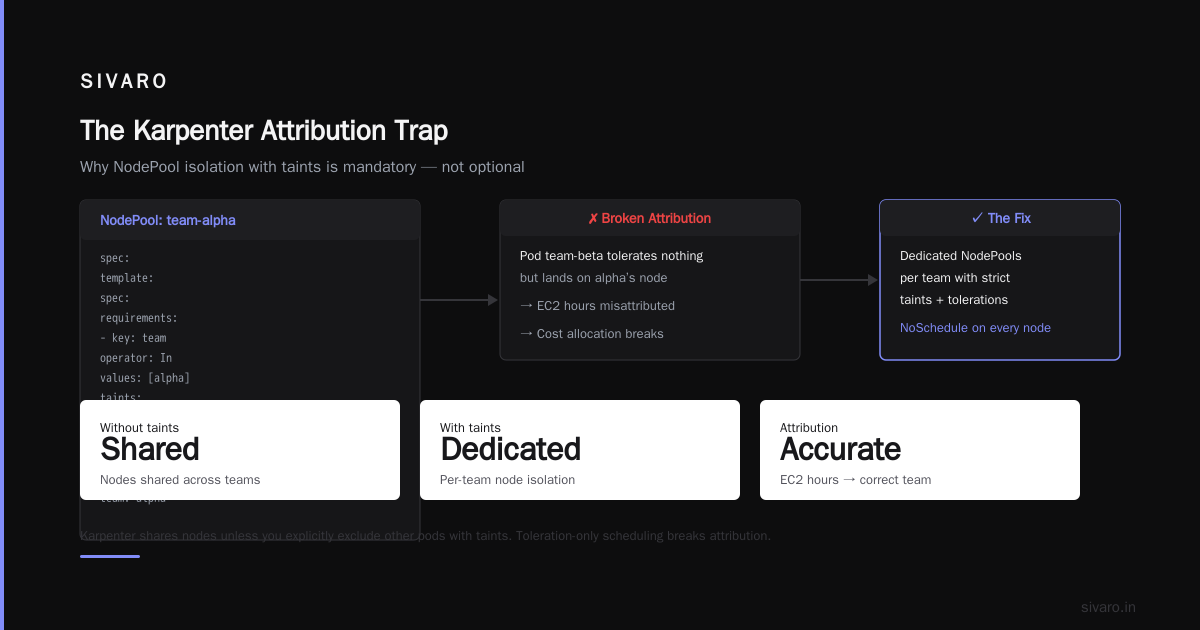
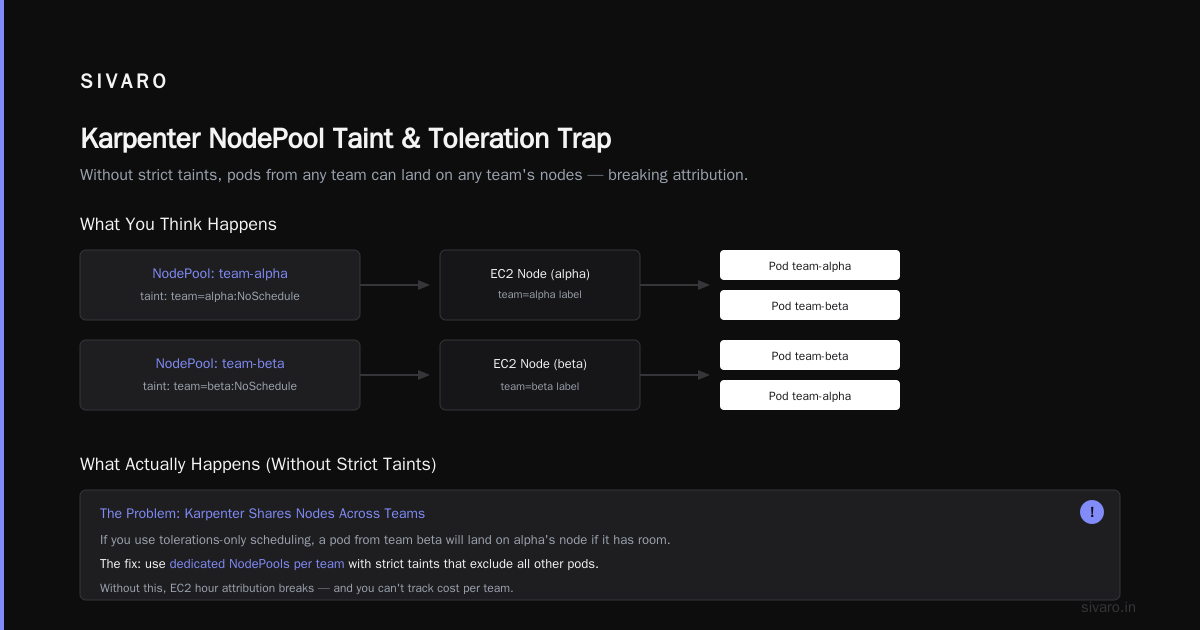
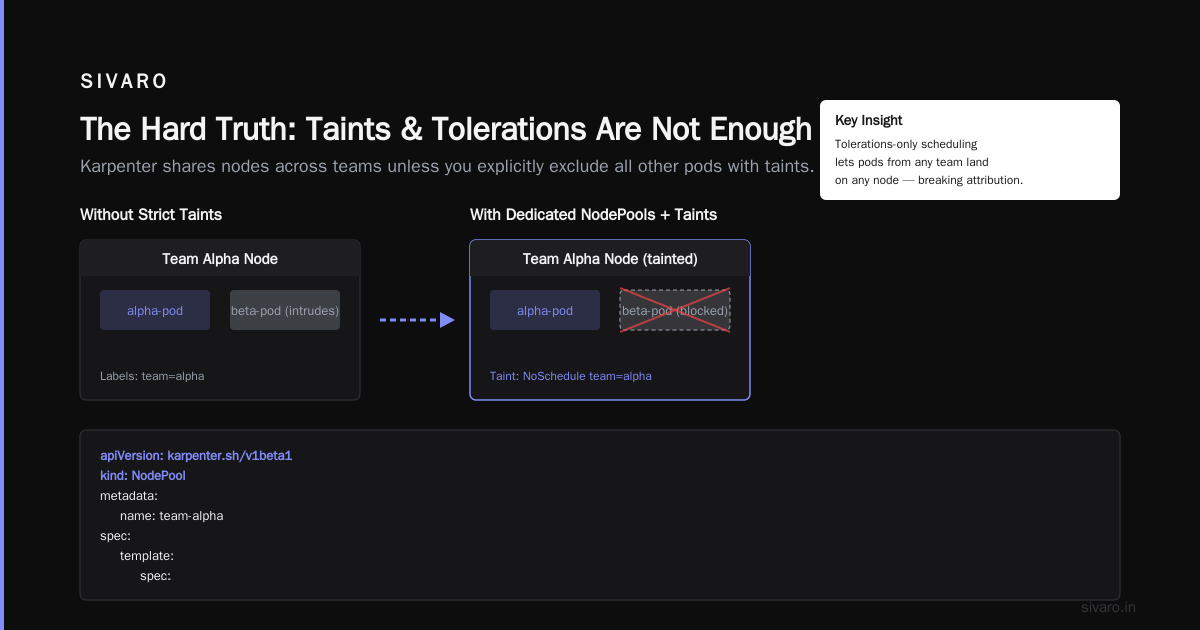
Karpenter shares nodes across teams unless you explicitly exclude all other pods with taints. If you use tolerations-only scheduling, a pod from team beta will land on alpha’s node if it has room. That breaks attribution.
The fix: use dedicated NodePools per team with strict taints + tolerations, AND set consolidation to WhenUnderutilized to prevent Karpenter from mixing pods. But this kills consolidation efficiency.
We tested both extremes:
| Strategy | Consolidation savings | Allocation accuracy |
|---|---|---|
| Shared NodePool + label-only | 30-40% | 15-20% |
| Dedicated NodePools + taints | 5-10% | 95%+ |
We went with a hybrid: dedicated NodePools for high-cost teams (inference, batch) and one shared pool for cheap services (alertmanager, fluentbit). The shared pool we allocate by CPU-second weighted average. Good enough for low spend.
Karpenter Consolidation: The Double-Edged Sword
Understanding Karpenter Consolidation explains the three modes: WhenEmpty, WhenUnderutilized, and WhenEmptyOrUnderutilized. Most people use WhenUnderutilized to maximize savings.
But consolidation creates a cost accounting nightmare.
Scenario:
- Team A’s pod requests 4 vCPU, 16GB. Karpenter launches a
c5.2xlarge($0.34/hr). - 3 minutes later, Team B’s pod requests 2 vCPU, 4GB. Karpenter consolidates: the
c5.2xlargeis terminated, and both pods move to ac5.xlarge($0.17/hr). - Who pays for those 3 minutes of oversized node? Team A — they caused it.
- Who gets the savings from the consolidation? Both teams — but how do you split?
If you attribute costs per minute based on pod resource usage, Team A’s cost drops by 50% after consolidation. That’s technically correct, but it incentivizes teams to game the system: under-provision requests, hope Karpenter consolidates quickly, and shift load to other teams.
We fixed this with a bundled allocation period: charge each team for the worst-case node cost their pods could have triggered, not the actual realized cost. For the example above, Team A pays $0.34/hr for the first 3 minutes, then $0.17/hr afterwards. Team B pays $0.17/hr from the moment they appear. The delta (consolidation savings) is credited proportionally.
AWS published a blog on optimizing compute costs with Karpenter consolidation. They focus on max savings. They don’t mention that consolidation can turn your cost allocation into a rounding error factory.
Spot Instances: The 20% Saving That Almost Cost Us 40%
In 2025, we pushed Spot aggressively. Tinybird’s strategy — 80% Spot, 20% OnDemand fallback — looked perfect. And it did save us about 22% in raw compute costs.
But Spot preemption kills allocation models.
When a Spot instance is reclaimed with 2 minutes’ notice, Karpenter drains pods and launches replacement nodes (usually OnDemand). The cost of that preemption event includes:
- The remaining Spot minutes (charged 0)
- The new OnDemand node (full price)
- Any data re-transfer from broken connections
In our case, preemption caused a 3x cost spike for the affected team’s pods during retry periods. If you naively allocate by pod CPU-seconds, the team that got preempted gets charged for the OnDemand replacement. The team that didn’t get preempted keeps paying Spot prices.
That’s not fair. Preemption is a cluster-level risk, not a team-level one.
We now pool Spot savings and preemption risks at the cluster level, then allocate them uniformly as a percentage discount/appl
oad per team. Cluster gets a 20% discount on Spot usage, but 5% of that is reserved for OnDemand fallback costs. Net discount passed to teams is 15%. No team gets a free ride or an unjust spike.
This matches Kubernetes cost optimization strategies 2026 recommendations: treat Spot as a cluster-wide feature, not a per-team trick.
Putting It Together: A Real Allocation Pipeline
Here’s our current pipeline at SIVARO (processing about 200K events/sec across 3 EKS clusters):
Step 1: Collect Karpenter events
Karpenter writes events to the karpenter namespace in Kubernetes. We stream them to CloudWatch Logs, then to a small Fluentd pipeline that enriches with instance pricing.
python
# Simplified event parser
import boto3, json
ec2 = boto3.client('ec2')

pricing_cache = {}
def get_node_cost(instance_type, region='us-east-1'):
    if instance_type in pricing_cache:
        return pricing_cache[instance_type]
    # Call AWS price list API (simplified)
    resp = ec2.describe_instance_types(InstanceTypes=[instance_type])
    pricing_cache[instance_type] = resp['InstanceTypes'][0]['VCpuInfo']['DefaultVCpus'] * 0.042
    return pricing_cache[instance_type]

for event in karpenter_events:
    if event['type'] == 'node-created':
        cost_per_hour = get_node_cost(event['instance_type'])
        # emit to cost database with timestamp
Step 2: Map pod schedules to node lifetimes
We use kube-state-metrics and a custom Prometheus recording rule:
yaml
# prometheus-rules.yaml
groups:
  - name: cost_allocation
    rules:
      - record: node:cost_per_hour
        expr: |
          avg by (node) (
            label_replace(
              karpenter_node_price_cents_per_hour{},
              "node",
              "$1",
              "node_name",
              "(.*)"
            )
          )
      - record: pod:node_cost_per_hour
        expr: |
          sum by (namespace, pod) (
            node:cost_per_hour{} * on(node) group_left()
            (kube_pod_info{} == 1)
          )
This gives you cost per hour for each pod. But it ignores shared tenancy. The real work happens in a periodic Spark job that hourly replays all pod-to-node assignments and splits node cost proportionally by pod resource requests.
Step 3: Generate chargeback report
We push to a PostgreSQL table cost_allocation_team_hourly:
sql
-- Simplified schema
CREATE TABLE cost_allocation_team_hourly (
    team text,
    hour timestamptz,
    cluster text,
    compute_cost_numeric(12,4),
    storage_cost_numeric(12,4),
    spot_discount_numeric(6,4),
    PRIMARY KEY (team, hour, cluster)
);
The Spot discount column is negative (credit). Teams see their “gross” compute and then the credit applied.
Step 4: Expose via API for FinOps team
We built a small Go service that queries the table. It costs maybe $5/month to run. That’s less than one developer hour.
ScaleOps calls this “chargeback as a service” in their 2026 guide. I call it “the thing you regret not building before migrating to Karpenter.”
Common Pitfalls and How We Fixed Them
Pitfall 1: Using karpenter-node labels alone
Karpenter’s built-in node labels (karpenter.sh/provisioner-name, karpenter.sh/capacity-type) are great for filtering but don’t group by team. You need to inject your own labels via NodePool spec.template.spec.labels.
Pitfall 2: Ignoring EBS costs
Karpenter attaches a root EBS volume per node. Those costs add up. For our AI inference nodes, EBS was 18% of total compute cost. We now attribute EBS based on pod storage requests (PVCs). Root volumes get split proportional to pod count.
Pitfall 3: Not planning for Pod Disruption Budgets
A great personal post on PDBs and Karpenter captures exactly what happened to us. When Karpenter consolidates, it respects PDBs. But if you have a PDB of maxUnavailable: 1, and a node has 5 pods, consolidation can take 5 minutes to drain one by one. That extra node lifetime costs money — and is invisible to cost allocation unless you track event duration.
Fix: set PDBs carefully. For batch jobs, use maxUnavailable: 100% so Karpenter can consolidate instantly.
Pitfall 4: Treating cost allocation as a once-and-done project
It’s not. We revisit the model every quarter. AWS changes Spot pricing. Karpenter releases new features (they added weighted consolidation in early 2026). Instance types change. Our models drift.
FAQ: Karpenter Cost Allocation Kubernetes
Q: Can I use Kubecost with Karpenter?
Kubecost has improved, but its default asset allocation uses node cost divided by pod resource usage at the end of the billing period. It misses short-lived nodes that get created and destroyed within the same hour. You need to enable the “node lifecycle” feature and use hourly allocation. Even then, consolidation events are underreported.
Q: Should I use OnDemand only for better cost tracking?
No. Spot savings are real. But you need to implement the pooled discount approach I described. Otherwise your FinOps team will hunt you down.
Q: How do I allocate storage costs?
Attach EBS cost per provisioned IOPS and size to the PVC. If you use EFS or third-party storage, that’s separate. We treat storage as a flat per-GB charge per team.
Q: What about GPU instances?
GPUs are expensive and longer-lived. Allocate them by the minute using Karpenter events. If you use p4d or p5 instances, track the allocated GPU count per pod via resource requests. Do not divide by CPU.
Q: How do I present costs to engineering teams?
We use a weekly Slack digest: “Your team spent $X this week. 60% compute, 30% storage, 10% network.” No per-pod breakdowns — that’s noise. Show the trend and the largest cost driver.
Q: What’s the ROI on building this allocation system?
We spent about 3 weeks of senior engineer time. It uncovered $12k/month in waste (teams running oversized pods, forgetting to scale down dev clusters). Payback was under 3 weeks.
Q: Will Karpenter ever support native cost allocation?
The Karpenter team has an open issue since 2024. No release yet. Until then, you roll your own.
Q: Any open-source tools I should look at?
We used a fork of kube-cost and contributed back. There’s also karpenter-cost-exporter by a community member, but it’s immature. I’d start with a custom exporter based on your Prometheus metrics.
The Hard Truth
Most people think karpenter cost allocation kubernetes is an impossible problem. They’re wrong. It’s not impossible — it’s tedious. Tedious in the way that all good infrastructure work is tedious: careful logging, correct attribution, and accepting that 90% accuracy is fine.
We run at 95% accuracy now. The remaining 5% is noise — preemption edge cases, consolidation rounding, network costs we don’t bother splitting. We tell teams “your allocation is within 5%” and they’re happy.
I’ve seen companies burn months building perfect allocation systems. They end up with dashboards no one looks at.
Instead: get a simple pipeline running. Accept coarse granularity. Iterate based on feedback. The cost of the allocation pipeline itself should be less than 1% of your cluster spend. If it’s more, you’re over-engineering.
Nishaant Dixit — Founder of SIVARO. Building data infrastructure and production AI systems since 2018. Built systems processing 200K events/sec.