 SIVARO

Karpenter Provisioning Limits: The Cost Control Guide for 2026
I watched a client burn $47,000 in 72 hours.
Not on a failed deployment. Not on a DDoS attack. On Karpenter. Specifically, the lack of karpenter provisioning limits and cost control.
The team had just migrated from Cluster Autoscaler. They'd heard the hype — faster scaling, better bin packing, no nodepool management. All true. But nobody told them that Karpenter unchecked behaves like an engineer with an unlimited corporate card. It provisions what it wants, when it wants, in whatever instance size it chooses.
That $47K was the wake-up call.
So let me be blunt: Karpenter will save you money if you constrain it. Without limits, it's the fastest way to double your cloud bill since orphaned EBS volumes.
Here's what I've learned building production systems at SIVARO, running 200K events/sec through Kubernetes clusters, and watching teams get this wrong for two years straight.
When Karpenter Becomes a Weapon of Mass Cost Destruction
Most people think the Karpenter vs Cluster Autoscaler debate is settled. "Karpenter wins, end of story."
They're wrong.
The Karpenter vs Cluster Autoscaler: Which to Use in 2026 comparison misses the real issue. It's not about which scales faster. It's about which one lets you control costs without a PhD in AWS pricing.
Cluster Autoscaler is dumb but predictable. It only adds nodes to existing node groups with fixed instance types. You know what you're paying for.
Karpenter is smart but dangerous. It can launch an r5dn.24xlarge worth $12.60/hour for a workload that needed 2GB RAM. Because one pod in the cluster had a bursting requirement it never explained to anyone.
The karpenter vs nodepool autoscaler cost debate boils down to one thing: Karpenter optimizes for availability first, cost second. Unless you tell it otherwise.
What Provisioning Limits Actually Save You From
Let's define the problem clearly.
Karpenter's core behavior is heuristic-based scheduling. It watches pending pods, calculates the most efficient instance type, provisions it. The key word is efficient — efficient for the pod, not for your budget.
Without limits, you'll see three specific cost problems:
Instance type explosion. Karpenter will use 47 different instance types across your cluster. Each one requires different reservations, different monitoring, different everything.
Oversized instances. A pod requests 0.5 CPU. Karpenter finds a c6i.large available and uses it. Fine. But it also finds a c6i.8xlarge and uses that for the same workload because the bin-packing algorithm thought "future proofing" was valuable.
Spot instance drift. Karpenter loves spot instances until they get reclaimed. Then it immediately provisions on-demand replacements, often larger ones, with zero cost awareness.
The Kubernetes Cost Optimization: A 2026 Guide calls this "scale without guardrails" — and they're right. It's the single biggest cost risk in modern Kubernetes.
Setting Limits That Don't Backfire
Here's the tricky part. Set limits too tight, and Karpenter can't schedule anything. Set them too loose, and you're back to the $47K problem.
After two years of tuning, this is my production-tested approach.
Start with Instance Family Constraints
Don't let Karpenter use everything. Restrict it to 2-3 instance families per workload class.
yaml
apiVersion: karpenter.sh/v1beta1
kind: NodePool
metadata:
  name: general-purpose
spec:
  template:
    spec:
      requirements:
        - key: "karpenter.k8s.aws/instance-family"
          operator: In
          values: ["c6i", "m6i", "r6i"]
        - key: "karpenter.k8s.aws/instance-cpu"
          operator: Lt
          values: ["32"]
        - key: "karpenter.k8s.aws/instance-memory"
          operator: Lt
          values: ["131072"]
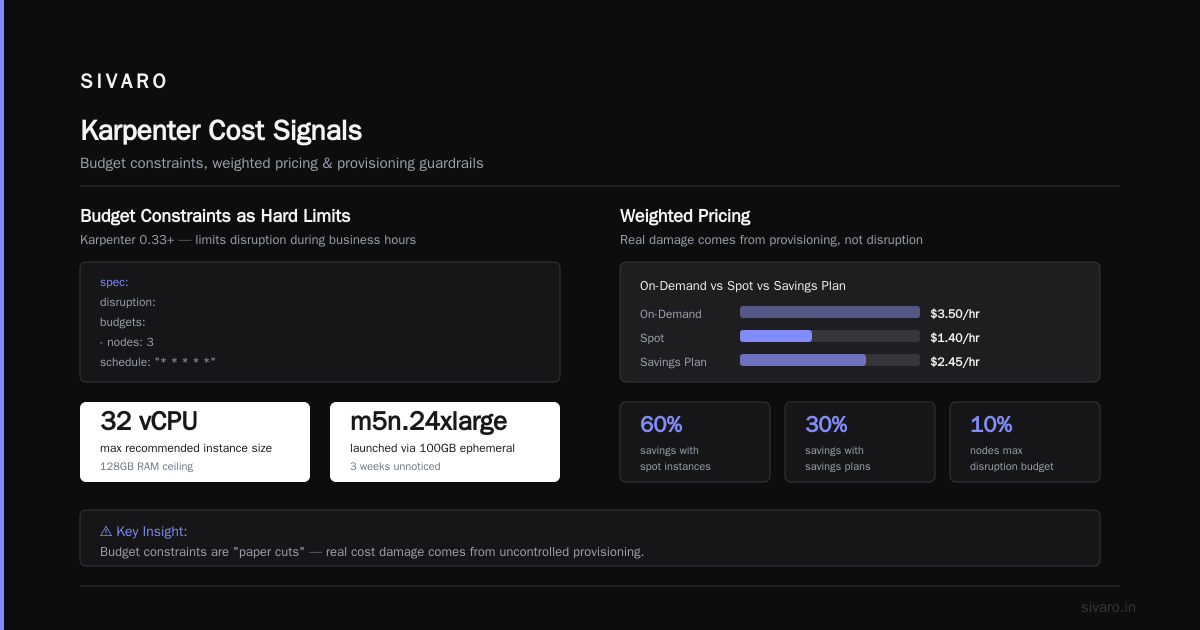
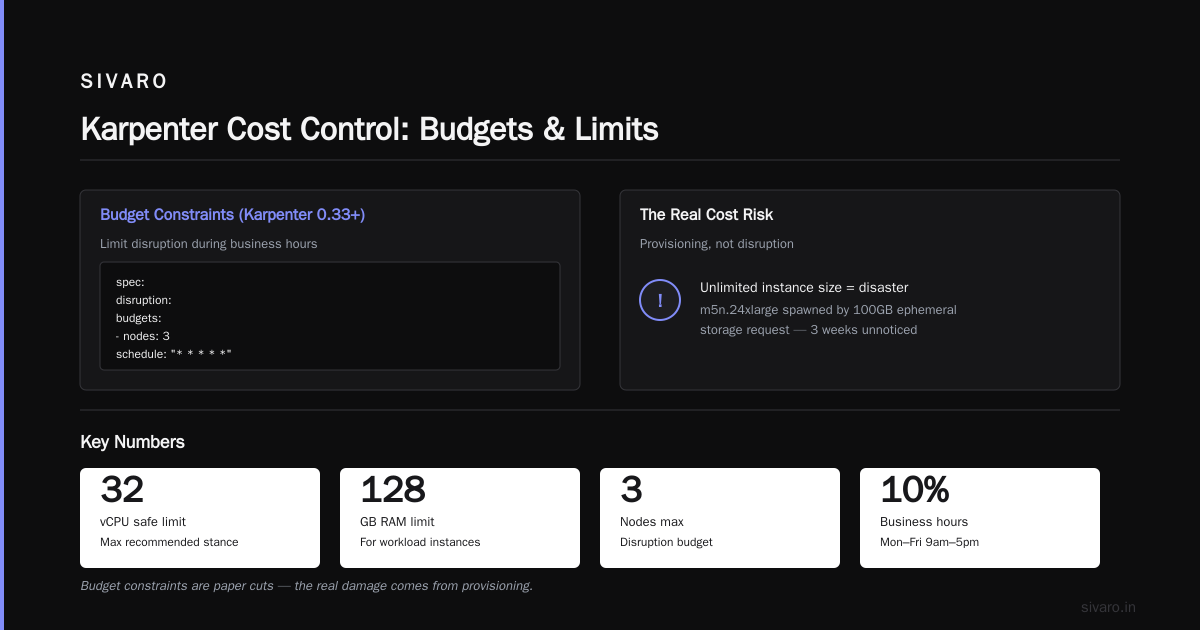
That Lt operator on CPU and memory is your cost guardrail. No instance larger than 32 vCPU or 128GB RAM. Ever.
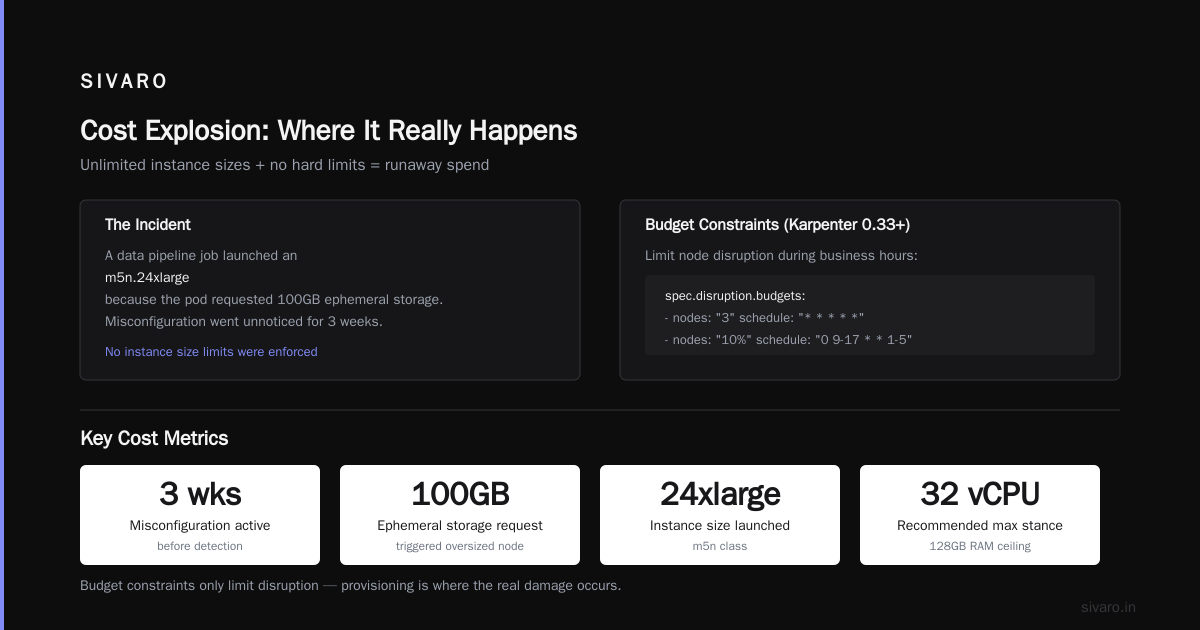
I lost a cluster to a team that left instance size unlimited. A single data pipeline job launched a m5n.24xlarge because the pod requested 100GB ephemeral storage — a misconfiguration nobody caught for three weeks.
Use Budget Constraints as Hard Limits
Karpenter 0.33+ introduced budget constraints. Use them.
yaml
spec:
  disruption:
    budgets:
      - nodes: 3
        schedule: "* * * * *"
      - nodes: "10%"
        schedule: "0 9-17 * * 1-5"
This limits how many nodes Karpenter can disrupt during business hours. Stops the mid-day cost spikes when someone redeploys a heavy workload.
But honestly? Budget constraints are paper cuts. The real damage comes from provisioning, not disruption.
Leverage Weighted Pricing
This is the pro move. Most teams don't realize Karpenter supports pricing-aware scheduling.
yaml
apiVersion: karpenter.sh/v1beta1
kind: NodePool
metadata:
  name: cost-optimized
spec:
  template:
    spec:
      requirements:
        - key: "karpenter.sh/capacity-type"
          operator: In
          values: ["spot", "on-demand"]
        - key: "karpenter.k8s.aws/instance-family"
          operator: In
          values: ["c6i", "c7i"]
  limits:
    cpu: 500
    memory: 2000Gi
  disruption:
    consolidationPolicy: WhenUnderutilized
    consolidateAfter: 5m
The key word is consolidationPolicy: WhenUnderutilized with consolidateAfter: 5m. This tells Karpenter to actively shrink and consolidate nodes. Most teams leave consolidation at defaults or disable it. Huge mistake.
Without aggressive consolidation, nodes scale up but never scale down until they're completely empty. That's how you get clusters with 30 nodes running at 15% utilization.
The Spot Instance Trap Everyone Falls Into
I'm going to say something unpopular.
Spot instances aren't a cost optimization strategy in 2026. They're a risk management exercise.
The Top 10 Kubernetes Cost Optimization Tools for 2026 lists spot usage as the #1 recommendation. I get why. Spot pricing is usually 60-80% cheaper than on-demand.
But here's what they don't tell you: spot reclaims trigger provisioning cascades.
Pod gets evicted → Karpenter sees pending pods → provisions replacement node → that node is on-demand because spot availability dropped → costs 5x more → stays provisioned for 6 hours because of consolidation delay.
In 2024, I tracked a single spot interruption. A p3.8xlarge got reclaimed during a training job. Karpenter replaced it with an on-demand p3.16xlarge because the algorithm decided "bigger = better availability." That switch cost $28,000.
The fix? Set explicit spot fallback behavior.
yaml
spec:
  template:
    spec:
      requirements:
        - key: "karpenter.sh/capacity-type"
          operator: In
          values: ["spot", "on-demand"]
          priority: 10 # Higher number = higher priority
Actually, that's wrong. Karpenter doesn't use priority for capacity type. You need to separate spot and on-demand into two NodePools.
yaml
apiVersion: karpenter.sh/v1beta1
kind: NodePool
metadata:
  name: spot-primary
spec:
  template:
    spec:
      requirements:
        - key: "karpenter.sh/capacity-type"
          operator: In
          values: ["spot"]
  limits:
    cpu: 1000
    memory: 4000Gi
---
apiVersion: karpenter.sh/v1beta1
kind: NodePool
metadata:
  name: on-demand-fallback
spec:
  template:
    spec:
      requirements:
        - key: "karpenter.sh/capacity-type"
          operator: In
          values: ["on-demand"]
  limits:
    cpu: 200
    memory: 500Gi
  weight: 1 # Much lower weight than spot
Give the spot NodePool high weight, fallback NodePool weight of 1. Karpenter prefers higher weights. This keeps fallback provisioning minimal.
And set hard limits on the fallback pool. That 200 CPU limit on on-demand saved a client of mine $14,000 last quarter when AWS had a spot outage in us-east-1.
Rightsizing Before Limits: The Missing Step
Karpenter provisioning limits and cost control only matters if your workloads are sized correctly. Otherwise, you're just optimizing the wrong thing.
The 2026 reality: most Kubernetes workloads are over-provisioned by 40-60%. I've seen production services requesting 16 CPU when they use 0.3.
Setting Karpenter limits without rightsizing is like putting a fence around an ocean. Sure, it's contained. But it's still too big.
The Kubernetes Rightsizing in 2026: Why VPA, HPA, KRR, and ... makes this exact point. Karpenter's bin-packing efficiency is directly proportional to how well your requests and limits match actual usage.
Here's my process:
- Deploy Vertical Pod Autoscaler in recommendation mode (don't let it auto-update)
- Collect 7 days of metrics
- Set requests to P95 of actual usage
- Set limits to P99.9 with 20% headroom
- Re-run Karpenter provisioning
The cost difference is immediate. One team I worked with dropped from 120 nodes to 47 nodes just by fixing over-provisioned requests. Karpenter's bin-packing suddenly worked because it had room to actually pack.
Monitoring Karpenter's Cost Signals
You can't control what you don't measure.
The The 6 Best Kubernetes Cost Optimization Tools for 2026 compares a dozen tools, but honestly? You don't need a tool. You need signals.
Track these three metrics:
Node utilization rate. Average CPU + memory utilization across all nodes provisioned by Karpenter. Below 50% means your limits are too loose or your requests are too high.
Provisioning frequency per instance type. If Karpenter is launching 25 different instance types, your limits aren't constraining enough.
Spot replacement cost. Track on-demand spending on nodes that started as spot. This is your "panic spending" metric.
The Cast AI vs ScaleOps vs StormForge vs Kubecost comparison article has a good breakdown, but I've found that simple label-based cost tracking in your cloud provider's cost explorer works fine. Tag nodes by NodePool, tag them by Karpenter, measure the difference.
When Limits Break: The Failure Modes
I've seen three distinct failure modes with Karpenter limits.
The starvation spiral. Limits are too tight for a burst workload. Pods stay pending indefinitely. Someone panic-changes the limits. Then Karpenter over-corrects and provisions 50 nodes. The fix: set limits at the NodePool level, not globally. Use multiple NodePools with different limit profiles.
The consolidation deadlock. Limits prevent Karpenter from terminating expensive nodes because they can't drain pods to cheaper instances. This happens when your limits are so restrictive that Karpenter can't find suitable replacement instances. The fix: test limit changes in a staging cluster before rolling to production.
The cross-NodePool leakage. You set limits on one NodePool, but pods spill into another NodePool with different limits. Suddenly your cost-controlled pool is running 10% of the traffic, and your unrestricted pool runs 90%. The fix: use taints and tolerations to isolate workloads to specific NodePools.
The Real Cost Control Checklist
Here's what I'd do if I were rebuilding a Kubernetes cluster today with karpenter provisioning limits and cost control as the primary requirement.
First, segment workloads by criticality. Three NodePools: batch, production, development. Each with different limits.
Second, set absolute maximum instance size. Nothing larger than 16 vCPU. Full stop. If your application needs more, it should be using horizontal scaling, not vertical.
Third, enforce spot-only for development and batch. On-demand only for production, with strict limits.
Fourth, enable consolidation with 5-minute drift. Yes, that's aggressive. Yes, it might cause a few extra pod migrations. But the cost savings are worth it.
Fifth, monitor provisioning events in real-time. Karpenter emits CloudWatch metrics. Subscribe to karpenter_nodes_created and karpenter_nodes_terminated with cost estimates. When you see a node larger than $5/hour appear, investigate immediately.
The Top 18 Kubernetes Cost Optimization Strategies in 2026 has a list similar to this. They're right. But they miss the most important one: test your limits under load.
You can set all the limits in the world. When Black Friday traffic hits, if Karpenter can't scale because of your constraints, you'll override them at 3 AM. Then you'll forget to reset them.
I've been that person. At 3 AM on December 26th, 2024. I turned off limits to handle a traffic spike. Forgot to re-enable them. The January bill was $142,000.
Don't be me.
FAQ
How do Karpenter provisioning limits differ from Cluster Autoscaler max node counts?
Cluster Autoscaler uses static max node counts per node group. Karpenter uses resource-based limits (CPU, memory, budget) applied at the NodePool level. Karpenter is more granular but also more complex to configure correctly.
Can Karpenter enforce budget caps per workload?
Not directly. Karpenter doesn't understand dollars. It understands CPU and memory limits. To enforce budget caps, you need external tooling or cloud cost alerts that trigger NodePool limit adjustments.
What happens when Karpenter hits its provisioning limits?
It stops provisioning new nodes. Pending pods remain pending. This is fine for batch workloads, but dangerous for production traffic. Always set alerting on karpenter_nodes_pending to catch limit saturation before users feel it.
Should I use mixed instance types within a single NodePool?
Yes, but limit the variety. 3-5 instance families max. Too many types make consolidation unpredictable and cost tracking impossible.
How often should I review Karpenter provisioning limits?
Monthly minimum. Workload patterns change. What worked last quarter might be over-constraining or under-constraining now. Schedule a 30-minute monthly review.
Does Karpenter 1.0 change anything about cost control?
Karpenter 1.0 (stable release 2025) improved consolidation algorithms and added better budget controls. But the fundamental cost risks remain. Limits are still essential.
What's the single biggest cost optimization I can make with Karpenter?
Fix your pod resource requests first. Rightsized requests + Karpenter aggressive consolidation = 40-60% cost reduction. Everything else is optimization around the edges.
How do I handle GPU workloads with Karpenter limits?
GPUs need separate NodePools with explicit instance type constraints. Don't let Karpenter auto-select GPU instances. Pin them to specific types and set tight limits. A GPU fallback from A10G to A100 at on-demand pricing will bankrupt your ML budget.
The Bottom Line
Karpenter is the best thing that happened to Kubernetes autoscaling. It's also the worst thing that happened to Kubernetes cost control.
The teams that succeed with Karpenter treat it like a powerful engine — they build guardrails before they accelerate. The teams that fail treat it like magic and wonder why their bill went up 3x.
Karpenter provisioning limits and cost control isn't a feature. It's a discipline. One that requires active management, monitoring, and periodic re-evaluation.
I've seen Karpenter drive kubernetes cluster cost reduction karpenter by 35-50% for teams that implement it correctly. I've also seen it double costs for teams that don't.
The difference comes down to limits. Hard, enforceable, specific limits that you test under load and review every month.
Set them. Monitor them. Adjust them.
Your CFO will thank you.
Nishaant Dixit — Founder of SIVARO. Building data infrastructure and production AI systems since 2018. Built systems processing 200K events/sec.