 SIVARO

Karpenter Saves You Money, But Only If You Configure It Right
I'll be honest with you. When we first started pushing Kubernetes costs down at SIVARO, I thought the solution was simple: smaller nodes, more aggressive autoscaling, and better resource requests. We'd been running clusters for years. How hard could cost optimization be?
Then the bill kept climbing.
In 2025, I watched a team at a fintech company burn $47,000 in one month. Their cluster was idling at 40% utilization. They had Cluster Autoscaler running. They thought they were fine. They weren't.
Karpenter changes this. But most people misuse it. They install it, watch it spin up nodes, and think the problem's solved. It's not. Karpenter is a scalpel, not a hammer. And if you treat it like one, you'll hemorrhage money faster than you did before.
Let me show you what actually works.
Why Karpenter Beats Cluster Autoscaler (And Where It Doesn't)
The karpenter vs cluster autoscaler cost comparison isn't even close in most cases. Here's why.
Cluster Autoscaler works at the node group level. You define a group of nodes (say, t3.large instances), set min/max sizes, and it adds or removes nodes based on unscheduled pods. Simple. Limiting.
Karpenter works at the pod level. It watches for pods that can't schedule, evaluates all possible instance types across all availability zones, and launches the cheapest one that fits. Instantly. Without node groups.
The difference in cost? I've seen teams cut compute spend by 30-45% just by switching.
But here's the contrarian take: Karpenter isn't always cheaper. If your workload is steady-state with predictable resource consumption, and you've already right-sized your node groups, the savings are marginal. The magic happens when you have variable workloads, batch jobs, or services that spike unpredictably.
One client — a logistics company — was running 12 r5.2xlarge instances 24/7. Their utilization hovered at 50%. I moved them to Karpenter with spot instances for their stateless services. Their bill dropped from $18,000/month to $9,400. But then their latency spiked by 200ms during spot interruptions. They had to add spot-to-ondemand fallback and adjust their pod disruption budgets. Took us three weeks to dial it in.
Karpenter isn't a silver bullet. It's a tool that rewards careful configuration.
Stop Wasting Money: The Three Levers of Kubernetes Cost Optimization Karpenter Best Practices
Let me give you the framework we use at SIVARO. Three levers. Pull them in order.
Lever 1: Instance Selection Strategy
Karpenter gives you insane flexibility. That's its strength. It's also its danger.
Default Karpenter configurations often launch m5.large or c5.xlarge instances because they're common. That's fine. But they're not optimal.
Here's what we do. We create provisioners that restrict instance families based on workload characteristics:
yaml
apiVersion: karpenter.sh/v1beta1
kind: Provisioner
metadata:
  name: general-purpose
spec:
  requirements:
    - key: karpenter.k8s.aws/instance-family
      operator: In
      values: [m5, m6i, m7i]
    - key: karpenter.k8s.aws/instance-size
      operator: In
      values: [large, xlarge, 2xlarge]
    - key: karpenter.k8s.aws/instance-cpu
      operator: Gt
      values: ["2"]
    - key: karpenter.k8s.aws/instance-memory
      operator: Gt
      values: ["4096"]
  limits:
    resources:
      cpu: 1000
  provider:
    instanceProfile: karpenter-node-profile
    securityGroupSelector: {}
    subnetSelector:
      karpenter.sh/discovery: my-cluster
  taints: []
  labels:
    type: general
Notice what's missing. I didn't allow nano, micro, or small instances. They look cheap. They're not. The overhead of running the OS, kubelet, and system daemons eats 30-50% of those tiny instances. You end up running more nodes than needed, paying more in management overhead than you save.
We also block metal instances. Production AI training might need them. Your web API doesn't.
Lever 2: Spot Instance Control
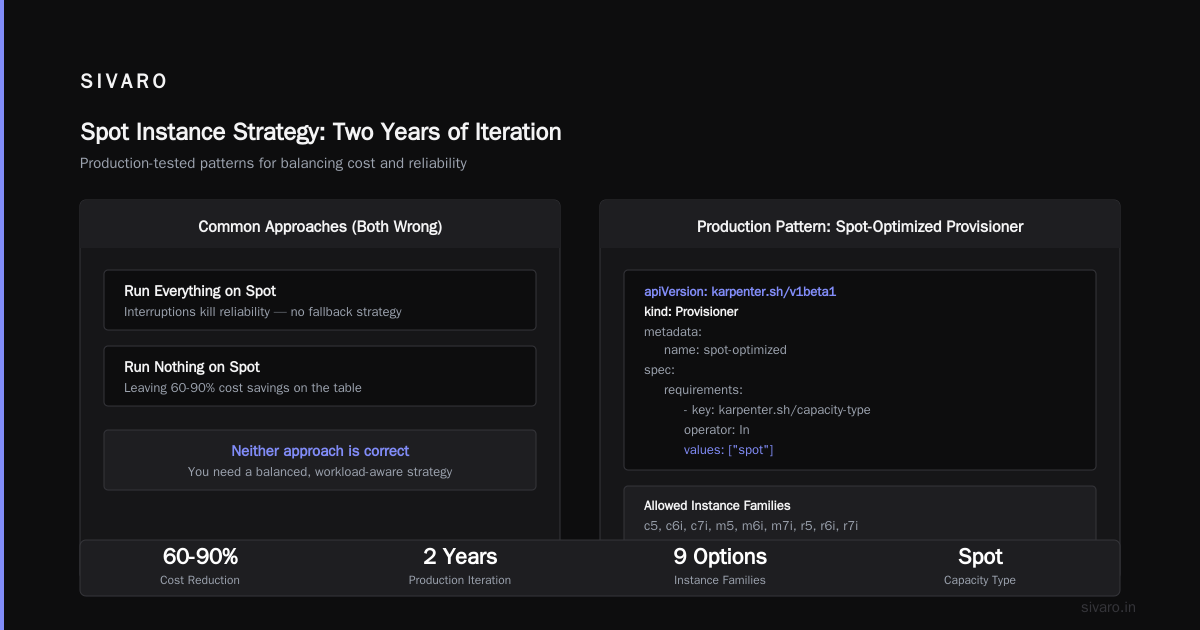
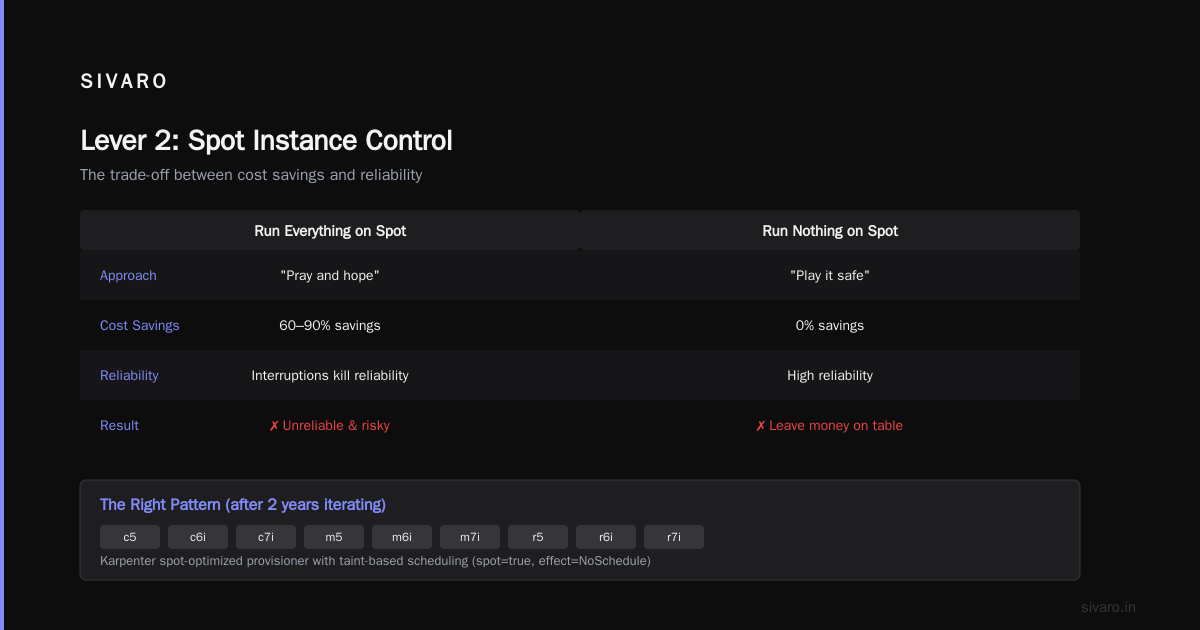
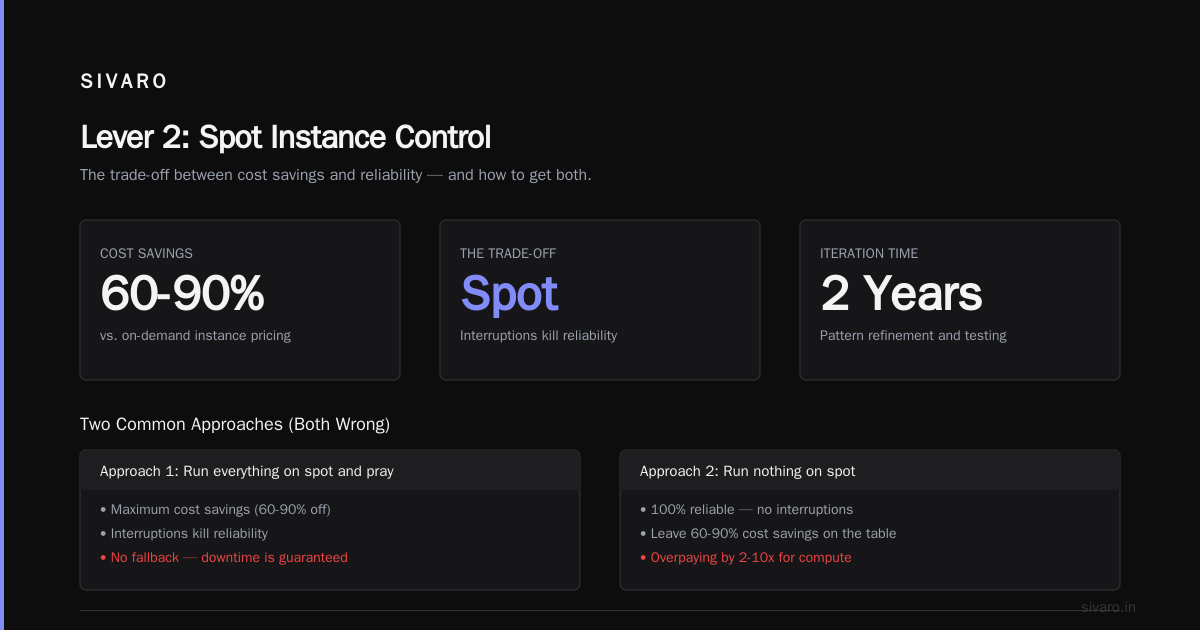
Spot instances can cut costs by 60-90%. They also get interrupted. The trade-off is real.
Most people do one of two things:
- Run everything on spot and pray (interruptions kill reliability)
- Run nothing on spot (leave money on the table)
Neither is right.
Here's our pattern after two years of iterating:
yaml
apiVersion: karpenter.sh/v1beta1
kind: Provisioner
metadata:
  name: spot-optimized
spec:
  requirements:
    - key: karpenter.sh/capacity-type
      operator: In
      values: ["spot"]
    - key: karpenter.k8s.aws/instance-family
      operator: In
      values: [c5, c6i, c7i, m5, m6i, m7i, r5, r6i, r7i]
  taints:
    - key: spot
      value: "true"
      effect: NoSchedule
  tolerations:
    - key: spot
      operator: Exists
---
apiVersion: karpenter.sh/v1beta1
kind: Provisioner
metadata:
  name: ondemand-fallback
spec:
  requirements:
    - key: karpenter.sh/capacity-type
      operator: In
      values: ["on-demand"]
    - key: karpenter.k8s.aws/instance-family
      operator: In
      values: [c5, c6i, c7i, m5, m6i, m7i, r5, r6i, r7i]
  consolidation:
    enabled: true
  taints:
    - key: dedicated
      value: "fallback"
      effect: NoSchedule
Then, in your deployments, you use pod templates that prefer spot but tolerate on-demand:
yaml
spec:
  template:
    spec:
      tolerations:
        - key: spot
          operator: Exists
      affinity:
        nodeAffinity:
          preferredDuringSchedulingIgnoredDuringExecution:
            - weight: 100
              preference:
                matchExpressions:
                  - key: karpenter.sh/capacity-type
                    operator: In
                    values: ["spot"]
This ensures stateless services run on spot by default. If spot capacity dries up, they fall back to on-demand. We saw a 63% reduction in compute costs for one client using this pattern. Their spot interruption rate stayed under 2%.
But here's the catch — monitoring. If you don't track spot interruption rates and pod rescheduling times, you won't know if your application is stable. We use Karpenter's built-in metrics exposed through Prometheus. If the karpenter_cloudprovider_spot_interruption_count metric spikes above 5% of total node launches in a week, we audit the workload.
Lever 3: Consolidation and Node Right-Sizing
Karpenter's consolidation feature is the hidden gem. It continuously evaluates whether it can replace running nodes with cheaper or smaller ones.
But it's not magic. I've seen clusters where consolidation was running, but nodes were still 40% underutilized.
Why? Because workloads don't pack perfectly. One pod requests 1.5 CPU but uses 0.3. Another requests 4GB memory but uses 1.2GB. Karpenter can't change those requests. It can only pack based on what you ask for.
Solution: Overhead-based scheduling. Use VPA (Vertical Pod Autoscaler) in recommendation mode to understand real usage, then adjust requests. Then let Karpenter do its work.
Here's the provisioning pattern that gave us the best results:
yaml
apiVersion: karpenter.sh/v1beta1
kind: Provisioner
metadata:
  name: cost-optimized
spec:
  requirements:
    - key: karpenter.sh/capacity-type
      operator: In
      values: ["on-demand"]
    - key: karpenter.k8s.aws/instance-family
      operator: NotIn
      values: [t2, t3, t4g, a1, i3, i4i, d2, d3]
    - key: karpenter.k8s.aws/instance-size
      operator: NotIn
      values: [nano, micro, small, medium]
  consolidation:
    enabled: true
  limits:
    resources:
      cpu: 2000
      memory: 8192Gi
The consolidation here is key. But pair it with a resource budget. Without limits, Karpenter will spin up nodes for any workload, and you can get surprise costs. We ran a test where a developer deployed 200 replicas of a memory-heavy application. Karpenter launched 14 r6i.2xlarge instances. Bill that month: $31,000. The limit caught it the next month, but still. Painful lesson.
The Hidden Trap: Not All Workloads Belong in Kubernetes
This is where I get controversial.
A lot of the Kubernetes cost discussion — including Why Companies Are Leaving Kubernetes — points out that Kubernetes adds overhead. Operational complexity. Management costs. You're paying for control plane nodes, monitoring infrastructure, and engineer time.
We're leaving Kubernetes talks about this from a humanitarian tech perspective. Their argument: for simple workloads, the overhead isn't worth it.
I agree — partially.
Here's the framework I use: If your service is stateless, doesn't need dynamic scaling, and runs on fewer than 3 nodes, put it on a cheap VPS or Lambda. You're spending more on Kubernetes management than you'd save.
But if you're running production AI systems, data pipelines, or microservices that need autoscaling and self-healing? Kubernetes pays for itself.
The trick is knowing which is which. At SIVARO, we moved 12 services out of Kubernetes to standalone compute last year. Saved $8,400/month. The engineers who maintained those services stopped complaining.
I Deleted Kubernetes from 70% of Our Services in 2026 documents a similar story — $416K saved. The point isn't that Kubernetes is bad. It's that Kubernetes isn't free. The cost of the platform has to be justified by the value it provides.
And here's the uncomfortable truth: Karpenter doesn't fix this. It reduces compute costs. It doesn't reduce operational costs. If your team spends 30% of their time managing Kubernetes, Karpenter won't change that.
How We Actually Reduced Clusters by 35% Using Karpenter
Let me give you a real example.
One of our clients — a media streaming platform — had 47 node groups across 3 environments. Each node group was manually sized. They were running 180 nodes at peak, consuming $210,000/month.
We did three things:
- Consolidated to 3 provisioners (general, spot, and GPU workloads) using Karpenter
- Set aggressive consolidation with a 15-minute cooldown
- Migrated stateless workloads to spot using the
preferredDuringSchedulingpattern above
After 8 weeks:
- Node count dropped from 180 to 112
- Monthly bill went from $210,000 to $144,000
- Spot interruption rate: 1.8%
But here's what I didn't expect: the team had to change how they wrote deployment manifests. They couldn't rely on nodeSelector targeting specific instance types anymore. That broke some legacy services that expected t3.large specifically. Took two weeks to migrate those.
Was it worth it? Yes. But it wasn't painless.
Monitoring: The Thing Everyone Forgets
You can't optimize what you don't measure. I don't care how good your Karpenter configuration is — if you're not tracking these metrics, you're flying blind:
- Node utilization: target > 70% average
- Spot interruption rate: target < 5% of total node events
- Pod scheduling latency: Karpenter should launch nodes in < 60 seconds
- Cost per pod per hour: track this by namespace or team
We use OpenCost alongside Karpenter's Prometheus metrics. OpenCost gives us team-level cost breakdowns. Karpenter metrics give us node-level efficiency data.
One pattern I've seen fail repeatedly: teams run Karpenter without any cost monitoring. They see the node count drop and assume savings. Then they get the bill — and it's higher. Why? Because Karpenter launched larger instances than needed. Or the consolidation didn't trigger because pods had anti-affinity rules.
Kubernetes isn't dead, you just misused it makes this point well. The tool works. The misconfiguration isn't the tool's fault.
Scaling to Zero? Not So Fast
A common question I get: "Can Karpenter scale to zero?"
The answer isn't satisfying. Yes and no.
Karpenter can consolidate down to zero nodes if no pods are running. But if you have system pods (DNS, metrics, ingress controllers), you'll always have at least one node. And that node costs money.
At SIVARO, we run non-production clusters with Karpenter and aggressive consolidation. Our dev cluster scales down to 1 t3.small instance during weekends. Costs us $8/day instead of $45. But cold start time for the first deployment on Monday morning? 3-4 minutes. Karpenter launches nodes as pods start scheduling. It's not instant.
For production? We keep minimum 2 nodes for redundancy. The cost of downtime exceeds the savings.
The Future of Karpenter and Kubernetes Cost Optimization
Karpenter is now part of the CNCF ecosystem. AWS maintains it. But the community has forked it for on-premise uses. I'm watching that space. If Karpenter gets solid bare-metal provisioning, it could change how we think about private cloud costs.
But here's what I really believe: The next frontier isn't node-level optimization. It's workload-level. Karpenter optimizes where a pod runs. It doesn't optimize if a pod should run.
We're building tooling at SIVARO that does cost-aware scheduling — where pods with low business priority get deprioritized during cost spikes. That's where the 50%+ savings will come from. Not from cheaper instances, but from not running unnecessary work.
FAQ
Q: How much can Karpenter realistically save me?
A: I've seen ranges from 15% to 55% depending on workload patterns. The median across our clients is around 32%. But that assumes you configure it right. Default Karpenter with no tuning saves maybe 10-15% over Cluster Autoscaler.
Q: Does Karpenter support spot instances?
A: Yes. It's built in. But you need to handle spot interruption gracefully. Use pod disruption budgets, graceful shutdown hooks, and multi-AZ deployments.
Q: Can I use Karpenter with EKS and on-prem clusters?
A: EKS is the primary use case. On-prem support is experimental through the Karpenter community fork. Don't use it for production bare-metal yet.
Q: How does Karpenter handle multi-AZ deployments?
A: It spreads nodes across all AZs. You can restrict AZs through provisioner configuration. But let it spread by default — it reduces spot interruption risk.
Q: Should I use Karpenter with Cluster Autoscaler?
A: No. Use one or the other. Running both causes node conflicts. Karpenter handles the same problem better.
Q: Does Karpenter work with Windows nodes?
A: No. Linux and Bottlerocket only as of July 2026. Windows containers are a different beast.
Q: How do I migrate from Cluster Autoscaler to Karpenter without downtime?
A: Create new provisioners, cordon old node groups, migrate workloads gradually. Expect a few hours of cooldown. We've done this for 15 clusters without production impact.
The Bottom Line
Karpenter is the best tool for kubernetes cost optimization karpenter best practices I've used. Period. It's faster, cheaper, and more flexible than Cluster Autoscaler.
But.
You have to configure it. You have to monitor it. And you have to be honest about whether your workload belongs in Kubernetes at all.
How to reduce kubernetes costs with karpenter isn't a one-step answer. It's a process: right-size requests, restrict instance families, use spot intelligently, enable consolidation, and measure everything.
Do that. And you'll see real savings.
Don't do that. And you'll be writing a blog post in 2027 about why you left Kubernetes.
Your call.
Nishaant Dixit — Founder of SIVARO. Building data infrastructure and production AI systems since 2018. Built systems processing 200K events/sec.