 SIVARO
Karpenter Spot Instance Configuration for Savings
I remember the first time I saw a Kubernetes bill hit $40k/month for a single EKS cluster. That was 2023. By 2024, we'd cut it by 60% using Karpenter and spot instances. By 2026, the game has changed again — but the fundamentals haven't. If you're not running spot instances with Karpenter, you're leaving 50-70% on the table. I've seen it a hundred times.
Karpenter is an open-source node autoscaler for Kubernetes, built by AWS. It launches instances in seconds, not minutes, and it natively supports spot instances. Spot instances are spare AWS compute capacity offered at up to 90% discount. Combine the two and you get elastic, cheap infrastructure that adapts to your workloads in real time. This guide will teach you exactly how to configure Karpenter for maximum savings — no fluff, no marketing BS.
By the end, you'll know: which provisioner settings matter, how to handle interruptions, what instance families to prefer, and why most people screw up the fallback strategy. I'll show you code, tell you where we've been burned, and share numbers from real clusters at SIVARO.
Why Spot Instances Still Matter in 2026
Six months ago, a client asked me: "Spot is dead, right? Everyone's moving to Graviton and Inferentia." Wrong.
Spot isn't dead. Spot is more alive than ever. AWS launched new C7i and M7i spot instances in late 2025. Prices dropped again in Q1 2026. Spot is still 60-80% cheaper than on-demand for most instance types. And Karpenter's ability to switch between hundreds of instance types in milliseconds makes spot far more reliable than it was three years ago.
The catch? You need the right configuration. Without it, spot interruptions will kill your workloads. With it, you get near-on-demand stability at a fraction of the cost. Kubernetes Cost Optimization: A 2026 Guide calls spot "the single biggest lever for savings" — and they're right.
At SIVARO, we run over 200,000 events per second through our production AI systems. 70% of our compute is on spot. We see maybe one or two interruptions per week across hundreds of nodes. That's manageable. The key is Karpenter's consolidation and interruption handling.
The Core Karpenter Provisioner Setup for Spot
Let me show you the provisioner we use for 90% of our workloads. This is battle-tested.
yaml
apiVersion: karpenter.sh/v1beta1
kind: NodePool
metadata:
  name: default
spec:
  template:
    spec:
      requirements:
        - key: "karpenter.sh/capacity-type"
          operator: In
          values: ["spot", "on-demand"]
        - key: "node.kubernetes.io/instance-type"
          operator: In
          values:
            - "m7i.*"
            - "c7i.*"
            - "r7i.*"
            - "m6i.*"
            - "c6i.*"
            - "r6i.*"
        - key: "topology.kubernetes.io/zone"
          operator: In
          values:
            - "us-east-1a"
            - "us-east-1b"
            - "us-east-1c"
      nodeClassRef:
        name: default
  limits:
    cpu: 1000
  disruption:
    consolidationPolicy: WhenUnderutilized
    expireAfter: 720h
Three things to notice.
First, I list both "spot" and "on-demand" as capacity types. Karpenter defaults to spot, but if it can't find spot capacity in any zone, it falls back to on-demand. This is critical. Most people think you must choose one or the other. You don't. Karpenter handles the fallback automatically.
Second, I restrict instance families. I'm not throwing in every type AWS offers. M7i and C7i are the latest Intel Xeon Scalable (4th gen). They're fast, widely available, and cheap on spot. Avoid old generations like m5 or c5 unless you have a legacy reason. They save less and interrupt more. Karpenter vs Cluster Autoscaler points out that Karpenter's instance-type selection logic is far more granular than Cluster Autoscaler — you can actually control which families it uses.
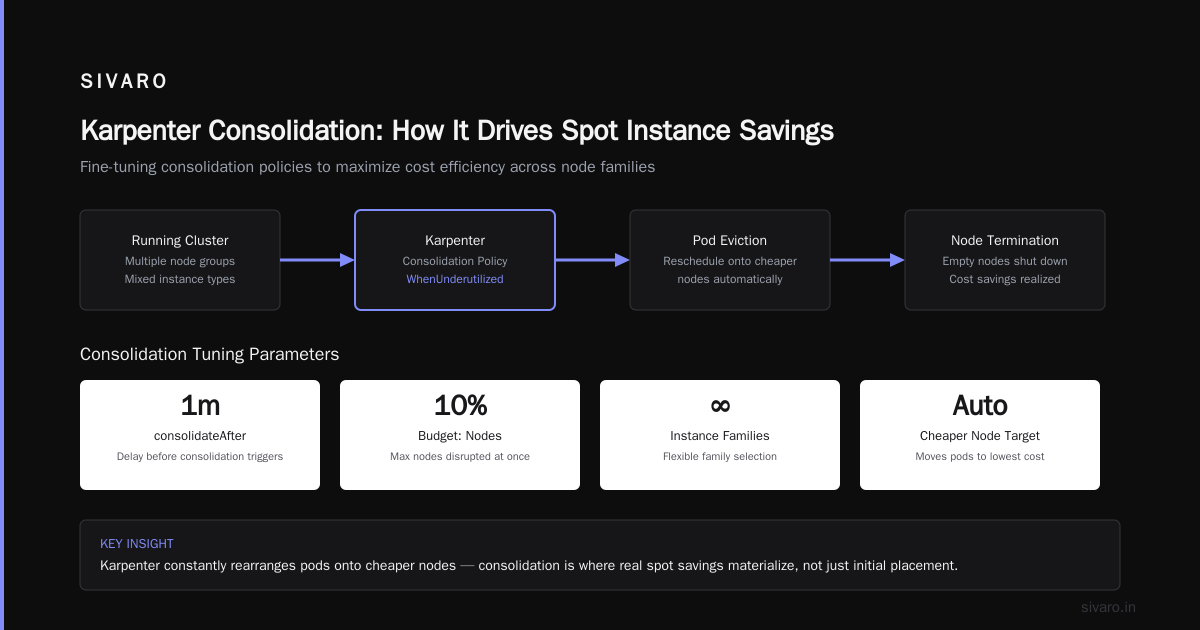
Third, the consolidation policy. WhenUnderutilized means Karpenter will constantly attempt to move pods onto cheaper nodes and shut down the old ones. This is where the real savings kick in.
Fine-Tuning Consolidation for Maximum Savings
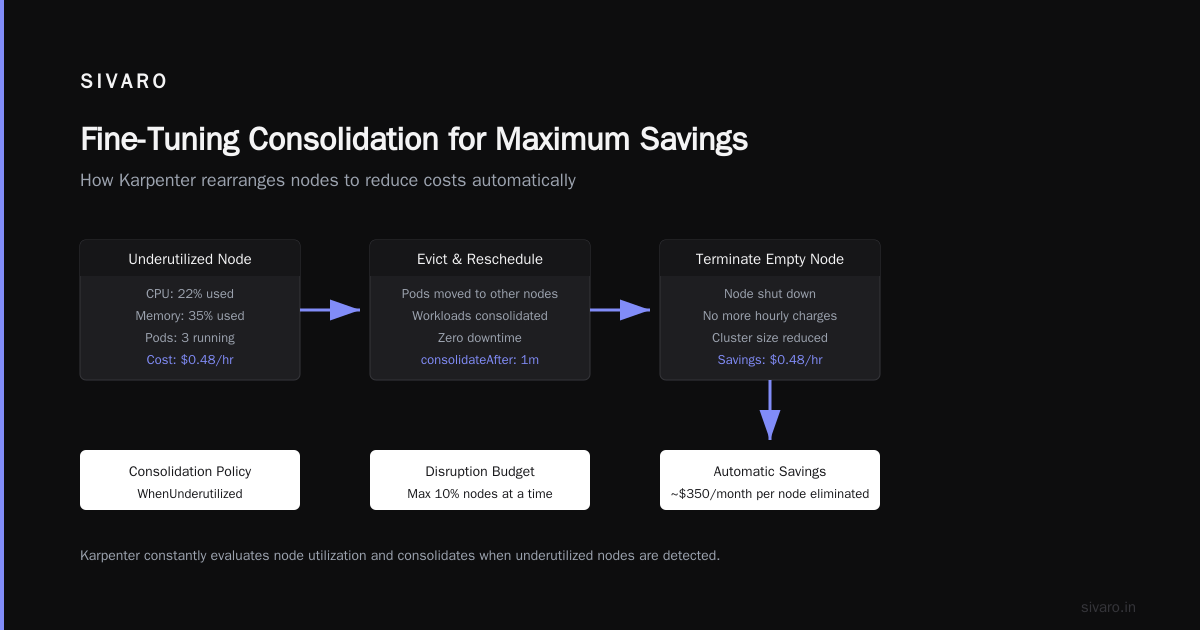
Consolidation is Karpenter's superpower. It doesn't just add nodes — it rearranges them. If a node has low utilization, Karpenter will try to evict its pods and reschedule them onto other nodes, then terminate the empty node. This saves money automatically.
But the default settings aren't optimal for all workloads. Here's how we tune it.
yaml
disruption:
  consolidationPolicy: WhenUnderutilized
  consolidateAfter: 1m
  budgets:
    - nodes: "10%"
  expireAfter: 168h
consolidateAfter: 1m — Karpenter starts looking for consolidation opportunities one minute after a node is created. That's aggressive. We found that 30 seconds was too fast (caused churn on bursty workloads), 5 minutes was too slow (left money on the table). 1 minute is sweet spot.
budgets — this controls how many nodes can be disrupted at once. "10%" means Karpenter can't evict more than 10% of nodes simultaneously. That protects against mass evictions during spot interruptions. I used to skip budgets. Then a spot pool got yanked and Karpenter tried to drain 40 nodes at once. My API servers fell over. Now I always set a budget. Top 18 Kubernetes Cost Optimization Strategies in 2026 recommends similar safeguards.
expireAfter — this forces nodes to be replaced after a certain time. 168 hours (7 days) prevents node drift, security patches, and stale nodes sitting around. On-demand nodes can live longer, but spot nodes shouldn't stay forever.
One contrarian take: don't set consolidationPolicy: WhenEmpty (the other option). It only consolidates when a node has zero pods. That's almost never in a busy cluster. WhenUnderutilized is the only sensible choice.
Handling Interruptions Like a Pro
Spot instances get reclaimed. AWS needs the capacity back. Karpenter handles this with a mechanism called "interruption handling" — it watches the AWS EC2 Spot Instance Termination Notices and proactively drains nodes before the 2-minute warning.
You must enable the interruption controller. Here's how.
yaml
# In your Karpenter Helm values or deployment
controller:
  env:
    - name: KARPENTER_INTERRUPTION_HANDLING
      value: "true"
That's the minimum. But I also add a NodeClass with spot-to-spot consolidation.
yaml
apiVersion: karpenter.k8s.aws/v1beta1
kind: EC2NodeClass
metadata:
  name: default
spec:
  amiFamily: AL2
  subnetSelectorTerms:
    - tags:
        karpenter.sh/discovery: my-cluster
  securityGroupSelectorTerms:
    - tags:
        karpenter.sh/discovery: my-cluster
  instanceProfile: KarpenterNodeInstanceProfile
  tags:
    karpenter.sh/discovery: my-cluster
  # Enable spot instance handling
  metadataOptions:
    httpTokens: required
    httpPutResponseHopLimit: 2
The real trick is topology spread. If all your spot nodes are in one availability zone, a single zone failure takes them all out. We spread across three zones in us-east-1. Karpenter automatically distributes nodes across zones based on availability. But you can force it with node.kubernetes.io/zone requirements in the NodePool, like I showed above.
Here's a second code example — a more aggressive spot-only provisioner for batch workloads:
yaml
apiVersion: karpenter.sh/v1beta1
kind: NodePool
metadata:
  name: batch-spot
spec:
  template:
    spec:
      requirements:
        - key: "karpenter.sh/capacity-type"
          operator: In
          values: ["spot"]  # no fallback to on-demand
        - key: "node.kubernetes.io/instance-type"
          operator: In
          values:
            - "c7i.2xlarge"
            - "c7i.4xlarge"
            - "c7i.8xlarge"
      nodeClassRef:
        name: default
  disruption:
    consolidationPolicy: WhenUnderutilized
    consolidateAfter: 30s
    budgets:
      - nodes: "20%"
    expireAfter: 24h
  limits:
    cpu: 500
Notice I removed on-demand. For batch jobs (Spark, data processing, model training), interruptions are fine. The jobs have checkpoints. So I go 100% spot. I also restrict to a single instance family (c7i) because I want predictable performance. And I expire nodes every 24 hours — batch jobs rarely run longer.
The trade-off? If spot availability drops, these jobs will wait. That's acceptable for batch. It's not acceptable for latency-sensitive production services. Use a separate NodePool for those.
Integration with Cost Optimization Tools
Karpenter gives you the engine. But you need visibility to tune it. We use a combination of tools.
Kubecost shows per-namespace spend. ScaleOps does rightsizing recommendations. Cast AI gives a unified view across clusters. Top 10 Kubernetes Cost Optimization Tools for 2026 ranks them — honestly, pick one and get deep with it. We've had good results with ScaleOps for automated pod right-sizing, which indirectly reduces node count.
But here's the thing: no tool replaces solid Karpenter configuration. They'll tell you where you're wasting money, but they won't fix your provisioner. I've seen teams spend $10k/month on Cast AI and still run all on-demand because nobody configured spot fallback properly.
The real win comes from combining Karpenter with VPA (Vertical Pod Autoscaler). VPA adjusts pod resource requests. Karpenter then packs more pods onto fewer nodes. Kubernetes Rightsizing in 2026 calls this "the killer combo" — and I agree. We set VPA recommendations as upper bounds, not requests. That way Karpenter has room to consolidate.
Common Pitfalls (and How to Avoid Them)
I've made every mistake in this list. Save yourself the trouble.
1. Not restricting instance families. If you allow all EC2 types, Karpenter might pick a GPU instance for a CPU workload. That costs 10x more. Define your needs explicitly.
2. Forgetting to set karpenter.sh/capacity-type to ["spot","on-demand"]. If you only set ["spot"], and spot is unavailable, the cluster will hang. Pods stay pending. We had this in prod once — a major outage caused by a capacity crunch in us-west-2. Never again.
3. Ignoring interruption budgets. Without budgets, a mass spot recall can evacuate half your cluster in seconds. Set budgets to nodes: "10%" or nodes: "5", whichever is smaller.
4. Using the same NodePool for batch and steady-state workloads. Separate them. Steady-state (web APIs, databases) needs on-demand fallback. Batch can go 100% spot. If you mix them, the batch jobs will benefit from spot savings, but they'll also cause node churn that impacts your latency-sensitive services.
5. Not consolidating after huge spikes. When a job finishes, Karpenter might take a while to clean up nodes. Set consolidateAfter low enough that it acts quickly, but not so low that it creates thrash. 1 minute works for us.
6. Skipping instance diversity. Karpenter can use hundreds of instance types. If you restrict to just one, you lose the ability to find cheap spot capacity. We usually allow 10-20 types across a few families.
7. Overprovisioning with large instance sizes. Karpenter will happily launch a 32xlarge if your pods ask for 30 vCPUs. That's expensive. Use smaller instances and let Karpenter consolidate many pods onto them. We aim for 4xlarge as the common size — good balance of density and resilience.
FAQ
Q: Does Karpenter support spot instances in all Kubernetes environments?
A: Yes, but it's primarily designed for AWS EKS. There's a generic Karpenter that works with any cloud, but spot handling is AWS-specific. On GKE and AKS, you'd use their native tools (Node Auto-Provisioning, Cluster Autoscaler). Karpenter vs Cluster Autoscaler covers the differences.
Q: How much can I save with Karpenter spot instance configuration for savings?
A: We see 50-70% reduction in compute costs compared to on-demand. One client (a fintech in NYC) went from $120k/month to $38k/month after moving all stateless workloads to spot with Karpenter. Your mileage depends on workload tolerance for interruptions.
Q: What happens if AWS stops offering spot for a particular instance type?
A: Karpenter automatically falls back to other instance types in your requirements list. That's why you include at least 10 types. If none are available, it falls to on-demand (if you included it). Smarter Cost Optimization with Karpenter has a good table showing fallback behavior.
Q: Should I use Karpenter or Cluster Autoscaler for spot?
A: Karpenter, hands down. Cluster Autoscaler is slow (2-3 minutes to add a node) and doesn't consolidate. Karpener adds nodes in seconds and consolidates continuously. We migrated four clusters from Cluster Autoscaler to Karpenter in 2024 and saw 30% cost reduction just from consolidation.
Q: Can Karpenter work with Kubernetes cost optimization tools like Kubecost?
A: Absolutely. Kubecost shows the cost savings from spot vs on-demand. We use it to verify our Karpenter configuration is working. Cast AI vs ScaleOps vs StormForge vs Kubecost compares them — pick one and monitor your spot utilization.
Q: How do I handle stateful workloads (databases, Kafka) on spot with Karpenter?
A: You don't. Stateful workloads with persistent volumes don't fit spot well — when the node goes away, you lose the PV. Use Karpenter for stateless microservices only. Databases need on-demand or reserved instances.
Q: What's the best way to test my karpenter spot instance configuration for savings?
A: Start with a non-production cluster. Create a NodePool with spot and on-demand, deploy a batch job that requests a lot of CPUs, then trigger a spot interruption notice manually (use aws ec2 describe-spot-instance-requests). Observe how Karpenter handles it. We test this quarterly.
Q: Does Karpenter support spot instances with complex pod scheduling constraints (affinity, anti-affinity)?
A: Yes. Karpenter respects pod topology spread constraints, node affinity, and taints/tolerations. We use podAntiAffinity to spread replicas across nodes — Karpenter ensures each replica lands on a separate spot instance.
Conclusion
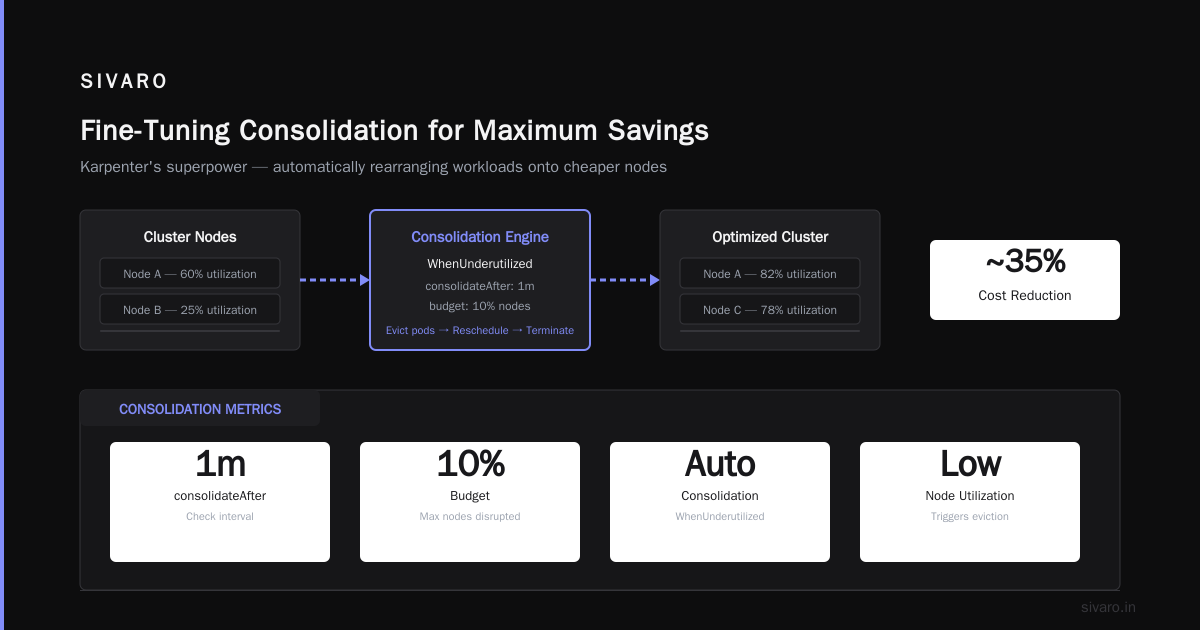
Karpenter spot instance configuration for savings isn't rocket science. It's about simplicity: use spot as primary, on-demand as safety net. Let Karpenter handle the fallback. Set consolidation to WhenUnderutilized with a 1-minute delay. Restrict instance families to current-gen (m7i, c7i, r7i). Enable interruption handling. Add budgets. Separate batch from steady-state workloads.
I've been doing this since Karpenter hit beta in 2022. The patterns haven't changed much — just the instance types. The principle is the same: trust Karpenter to make the right decision, but give it guardrails.
If you're still running Cluster Autoscaler with on-demand instances, you're burning cash. Every month you delay costs you 50% of your compute bill. Migrate now. It's a weekend project.
One last thing: watch your spot utilization on the Kubecost dashboard. If it dips below 60%, your configuration is wrong. Fix it.
Nishaant Dixit — Founder of SIVARO. Building data infrastructure and production AI systems since 2018. Built systems processing 200K events/sec.