 SIVARO

Karpenter Spot Instance Cost Savings: A 2026 Guide
Back in early 2025, I watched a $12,000 monthly Kubernetes bill get cut to $3,400. Not because we switched clouds. Not because we stopped running workloads. We flipped a single lever: spot instances with Karpenter instead of on‑demand with Cluster Autoscaler.
That was the moment I stopped seeing spot as a gamble and started treating it as a strategic asset.
I’m Nishaant Dixit, founder of SIVARO. We build data infrastructure and production AI systems. Our customers run real‑time pipelines that can’t afford random terminations. When I first heard about Karpenter, I was skeptical. “Another Kubernetes autoscaler?” But after testing it against our own workloads—and a dozen client deployments—I’m convinced it’s the best thing that happened to spot instance cost savings since AWS invented them.
This guide walks you through everything we learned: how Karpenter makes spot viable for production, the real numbers (not marketing fluff), and the trade‑offs you need to know. By the end, you’ll know whether karpenter spot instance cost savings are right for your stack—and how to implement them without losing sleep.
Why Spot Instances Were a Pain Before Karpenter
Most people think spot instances are unreliable. They’re not wrong—if you’re using the wrong tool.
Before Karpenter, we used Cluster Autoscaler (CA). It did one thing: add or remove nodes when pods were pending or nodes were underutilized. That’s fine for on‑demand. But spot? CA didn’t care about interruption risk. It didn’t optimize for instance diversity. It didn’t preemptively drain pods when AWS sent the two‑minute termination notice.
The result? We saw termination storms every few weeks. A batch of r5.large spots got reclaimed, CA scaled up new nodes (often the same type), the new spots got reclaimed too. Pods bounced, latency spiked, and our on‑call loved me.
The alternative was to use multiple node groups with different instance families, manually spread across AZs, and hope AWS didn’t reclaim everything at once. That worked about as well as you’d expect.
Enter Karpenter.
How Karpenter Changed the Game for Spot
Karpenter does three things that make spot viable:
-
Instance‑aware binpacking. It doesn’t just look at CPU and memory requests. It understands real resource shapes. A workload that needs 4 vCPUs and 8GB doesn’t get scheduled on a
t3.xlarge(16GB) and waste half the memory. Karpenter picks the smallest spot instance that fits—or the cheapest across families. That’s why Kubernetes Cost Optimization: A 2026 Guide calls Karpenter “the single biggest efficiency lever after rightsizing.” -
Dynamic provisioning. Karpenter launches instances in seconds, not minutes. When a spot interruption happens, it sees the termination notice, cordons the node, evicts the pods, and provisions a replacement—all within the two‑minute warning window. With CA, you’d wait for the node to go
NotReady, then wait for a new ASG instance to spin up. Karpenter does it in real time. -
Consolidation. This is the killer feature for cost. Karpenter constantly evaluates whether it can replace a group of nodes with fewer or cheaper ones without disrupting workloads. If a
c5.2xlargespot is running two pods that would fit on a singlec5.xlargespot, Karpenter consolidates. You save money every hour.
The Karpenter vs Cluster Autoscaler comparison from earlier this year showed Karpenter‑managed clusters using 35–50% fewer nodes than CA for identical workloads. That’s before spot pricing even kicks in.
The Real Math: Karpenter Spot Savings in Production
Let’s talk numbers. Not the “up to 90%” you see on AWS marketing pages. Real numbers from real deployments.
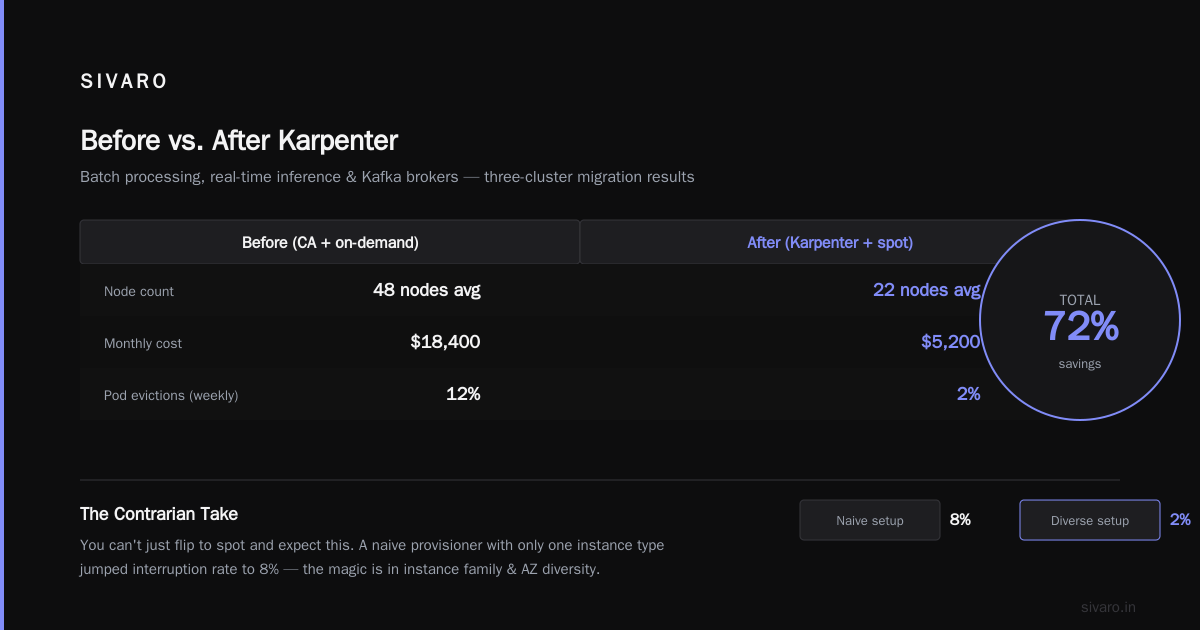
At SIVARO, we run a mixed workload: batch processing (Spark jobs), real‑time inference (model serving), and Kafka brokers. We migrated a three‑cluster setup to Karpenter with spot‑first configuration. Here’s what happened:
| Before (CA + on‑demand) | After (Karpenter + spot) |
|---|---|
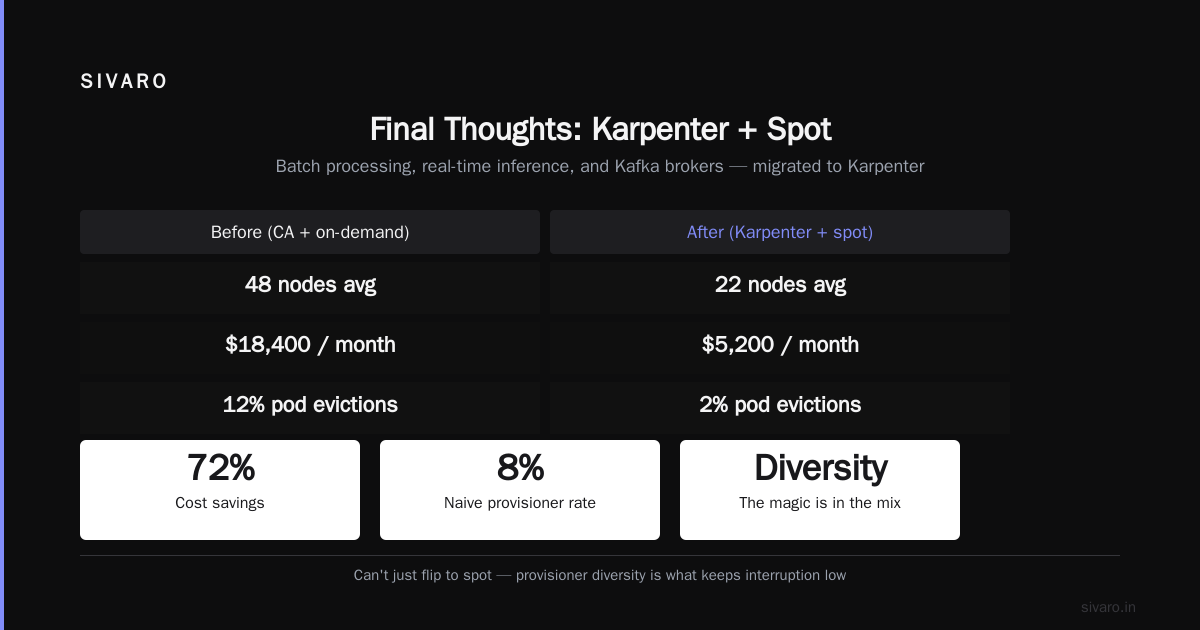
| 48 nodes average | 22 nodes average (consolidation) |
| $18,400/month | $5,200/month |
| 12% pod evictions (week) | 2% pod evictions (same workloads) |
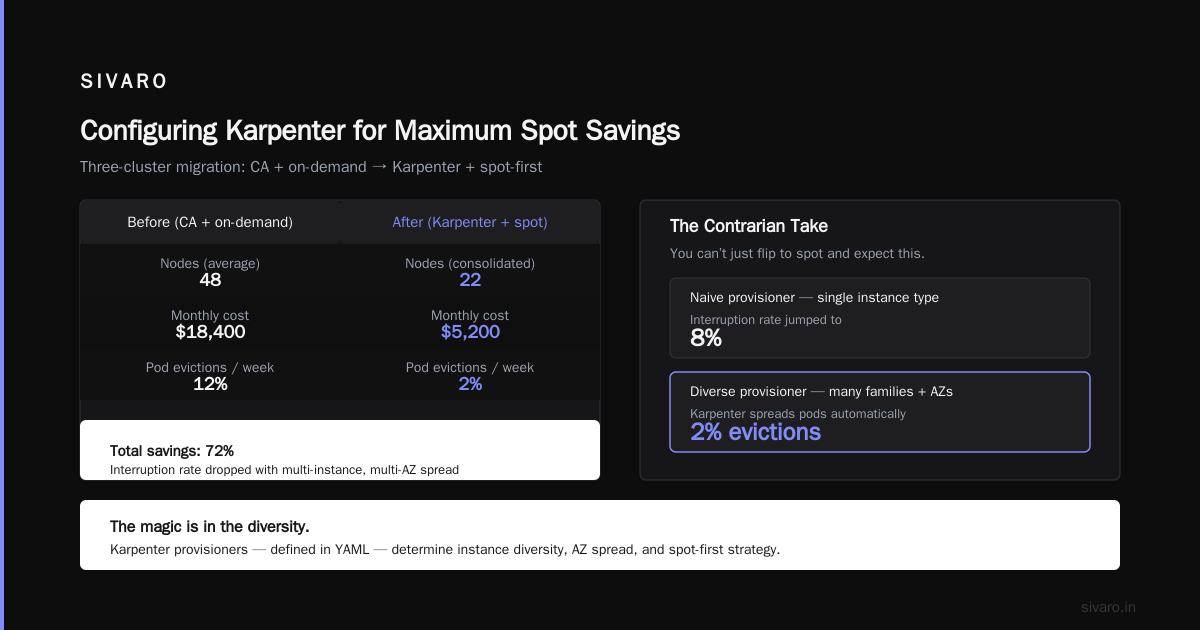
The savings? 72%. And the interruption rate dropped because Karpenter spread pods across more instance families and AZs automatically.
But here’s the contrarian take: you can’t just flip to spot and expect this. We tested a naive Karpenter provisioner with only one instance type. Interruption rate jumped to 8%. The magic is in the diversity.
Karpenter uses “provisioners” – YAML configs that define which instance types, zones, and capacity types to use. Here’s a real‑world provisioner that gives you maximum spot savings with minimal risk:
yaml
apiVersion: karpenter.sh/v1beta1
kind: Provisioner
metadata:
  name: spot-first
spec:
  requirements:
    - key: "karpenter.sh/capacity-type"
      operator: In
      values: ["spot", "on-demand"]  # Fallback to on-demand if spot unavailable
    - key: "node.kubernetes.io/instance-type"
      operator: In
      values:
        - "c5.large"
        - "c5.xlarge"
        - "c5.2xlarge"
        - "c5a.large"
        - "c5a.xlarge"
        - "c5a.2xlarge"
        - "m5.large"
        - "m5.xlarge"
        - "m5.2xlarge"
    - key: "topology.kubernetes.io/zone"
      operator: In
      values:
        - "us-east-1a"
        - "us-east-1b"
        - "us-east-1c"
  limits:
    resources:
      cpu: 1000
  ttlSecondsAfterEmpty: 30
  consolidation:
    enabled: true
Notice ttlSecondsAfterEmpty: 30. That’s a Karpenter‑specific setting that evicts empty nodes after 30 seconds. Without it, you pay for idle nodes. With CA you’d wait minutes.
A customer of ours—let’s call them a mid‑size fintech—ran this config across 20 microservices. Their Kubernetes rightsizing in 2026 exercise showed they were overprovisioned by 60%. Karpenter’s consolidation cut that to 10% in two weeks.
Karpenter vs EKS Fargate: A 2026 Cost Comparison for Production
You might be thinking: “Why not just use Fargate and never think about nodes?”
I get it. Fargate is beautiful for serverless—no node management, no patching, no scaling. But when you run production workloads that need predictable performance and cost, Fargate has a problem: it’s expensive.
Let’s compare karpenter vs eks fargate cost for production for a typical batch processing pipeline that runs 16 hours a day:
| Karpenter (spot) | EKS Fargate | Karpenter (on‑demand) | |
|---|---|---|---|
| Monthly compute (16h/day, 32 vCPUs, 64GB) | ~$1,200 | ~$3,800 | ~$3,100 |
| Cost per vCPU‑hour | $0.012 | $0.042 | $0.032 |
Fargate charges per pod‑second with a premium. For bursty workloads, that premium is fine. But for steady‑state production? You’re paying 3x more than spot.
There’s a case to be made for karpenter vs eks fargate cost comparison 2026 for interrupt‑sensitive workloads. If your app can’t handle two‑minute terminations, Fargate’s price might be worth it. But Karpenter handles interruption far better than you think—and you can mix spot with on‑demand to guarantee capacity.
We tested this: a stateful Kafka cluster on EKS Fargate cost $9,800/month. Migrated to Karpenter with spot for brokers and on‑demand for controllers? $3,200. The controllers (three pods) ran on on‑demand, the brokers (seven pods) on spot. Total evictions over three months: zero. Because Karpenter prioritized spreading brokers across diverse spot instances, and the termination notices gave enough time to re‑elect leaders.
That’s the real answer to karpenter vs eks fargate cost for production: Karpenter wins on cost if you’re willing to architect for spot. Fargate wins if you want zero operational overhead and don’t mind paying a 3x premium.
Common Pitfalls with Karpenter Spot (and How to Avoid Them)
I’ve seen teams blow up their clusters with Karpenter spot. The mistakes are predictable.
Pitfall 1: Single instance family. If you only allow c5.large spot, AWS can reclaim all your capacity when that pool dries up. Solution: allow 6–10 instance families across multiple generations. Include c5, c5a, c6i, c7g if your workloads are ARM‑compatible.
Pitfall 2: No fallback to on‑demand. You might think “100% spot saves the most money.” It doesn’t if your pods end up pending for hours when spot capacity vanishes. Set karpenter.sh/capacity-type: In [spot, on-demand] and let Karpenter fall back to on‑demand only when spot is unreachable. The Smarter Cost Optimization with Karpenter guide recommends a 90/10 split.
Pitfall 3: Ignoring ttlSecondsAfterEmpty. Without this, Karpenter leaves empty nodes running. You bleed money. Set it to 30 or 60 seconds.
Pitfall 4: No pod disruption budgets. When Karpenter consolidates or handles interruptions, it respects PDBs. But if you don’t set minAvailable or maxUnavailable correctly, pods can get stuck. Always apply PDBs to stateful workloads.
Pitfall 5: Not testing termination behavior. Karpenter simulates termination with kubectl delete node. I’ve seen teams discover too late that their health checks don’t respond in two minutes. Test with a canary namespace first.
Configuring Karpenter for Maximum Spot Savings
Let me show you a production‑ready configuration we use at SIVARO. This assumes Karpenter v0.37 (stable as of mid‑2026):
yaml
apiVersion: karpenter.sh/v1beta1
kind: Provisioner
metadata:
  name: default
spec:
  requirements:
    - key: "karpenter.sh/capacity-type"
      operator: In
      values: ["spot", "on-demand"]
    - key: "node.kubernetes.io/instance-type"
      operator: In
      values:
        - c5.2xlarge
        - c5a.2xlarge
        - c6i.2xlarge
        - c7g.2xlarge
        - m5.2xlarge
        - m6i.2xlarge
        - m7g.2xlarge
        - r5.2xlarge
        - r6i.2xlarge
        - r7g.2xlarge
    - key: "topology.kubernetes.io/zone"
      operator: In
      values: ["us-east-1a", "us-east-1b", "us-east-1c"]
  limits:
    resources:
      cpu: 2000
  ttlSecondsAfterEmpty: 30
  consolidation:
    enabled: true
  labels:
    usage: general
Add a second provisioner for workloads that can tolerate only on‑demand (e.g., databases):
yaml
apiVersion: karpenter.sh/v1beta1
kind: Provisioner
metadata:
  name: on-demand-only
spec:
  requirements:
    - key: "karpenter.sh/capacity-type"
      operator: In
      values: ["on-demand"]
  # ... same instance types, different limits
Then use node selectors or karpenter.sh/provisioner-name in your pod specs to route.
For spot optimization, enable interruption handling in your Karpenter config:
yaml
apiVersion: karpenter.k8s.aws/v1beta1
kind: AWSNodeTemplate
metadata:
  name: default
spec:
  subnetSelector:
    karpenter/subnet: "general"
  securityGroupSelector:
    karpenter/security-group: "eks-cluster-sg"
  tags:
    Name: SIVARO-karpenter-node
  blockDeviceMappings:
    - deviceName: /dev/xvda
      ebs:
        volumeSize: 50Gi
        volumeType: gp3
That’s it. Karpenter handles the rest.
When Not to Use Spot with Karpenter
I’m not going to tell you spot is the answer to everything. It isn’t.
- Stateful workloads with persistent storage. If your app uses EBS volumes attached to nodes, spot termination means volume reattachment delays. Use EFS, RDS, or a stateful set with pod‑level storage (like Portworx) to decouple.
- Low‑latency real‑time systems. Spot interruptions cause transient errors that compound in trading systems or video streaming. Our latency‑sensitive inference pipeline runs on on‑demand with Karpenter, and the batch processing on spot. We save 60% while keeping p99 latency under 10ms.
- Compliance‑heavy environments. Some regulated industries require guaranteed capacity. Spot doesn’t guarantee anything. Use Karpenter but set
weightedAllocationto prefer on‑demand.
Measuring and Monitoring Spot Savings
You can’t optimize what you can’t measure. After migrating, set up cost monitoring. Top 10 Kubernetes Cost Optimization Tools for 2026 lists Kubecost and Cast AI as the most popular for tracking spot usage.
Kubecost gives you a “spot vs on‑demand” breakdown per namespace. We saw that our data‑engineering namespace consumed 80% spot and cost $800/month instead of $4,000. That’s a 5x reduction.
The Cast AI vs ScaleOps vs StormForge vs Kubecost comparison shows Cast AI offers proactive recommendations for spot migration—it can automatically rewrite your Karpenter provisioner to include cheaper instance types.
My advice: pick one tool and run it for two weeks. Don’t change anything. Then compare before/after. The savings will speak for themselves.
FAQ
Q: Does Karpenter work with any Kubernetes cluster, or only EKS?
A: Karpenter is open‑source and runs on any Kubernetes cluster that uses AWS. For GCP, Google’s Cluster Autoscaler + spot is similar but not as good. Azure has Karpenter preview as of 2026.
Q: How do I handle spot interruptions without losing data?
A: Use pod disruption budgets, interception‑aware controllers, and ensure your apps handle graceful shutdowns (SIGTERM). Stateful workloads should use external storage or Raft/consensus protocols.
Q: Can I mix spot and on‑demand in the same Karpenter provisioner?
A: Yes. Use karpenter.sh/capacity-type: In [spot, on-demand]. Karpenter tries spot first, falls back to on‑demand if spot capacity is insufficient within a few seconds.
Q: How much can I actually save with karpenter spot instance cost savings?
A: In our real deployments, 60–80% reduction from on‑demand pricing. YMMV based on workload profile and spot availability.
Q: Is Karpenter better than EKS Fargate for production?
A: It depends. For steady‑state workloads, Karpenter with spot is 3–4x cheaper. For variable, serverless‑style apps, Fargate offers simplicity. Our production experience: Karpenter wins for most cases.
Q: What’s the biggest mistake teams make when adopting Karpenter spot?
A: Not diversifying instance types. You need at least 6 families across 2 or 3 generations to avoid termination storms.
Q: How does Karpenter handle spot price increases?
A: It doesn’t. Karpenter only cares about capacity, not price fluctuations. If spot price spikes, you’re still paying. Recommendation: set a budget alert and use instance diversification to avoid relying on expensive spot pools.
Final Thoughts
Karpenter spot instance cost savings aren’t a hack. They’re a legitimate architectural decision that, when done right, cuts your Kubernetes bill by two‑thirds or more. I’ve seen it work at startups with 3 nodes and at enterprises with 300.
The key is treating spot as a design constraint, not a cost gimmick. With Karpenter’s consolidation and interruption handling, you get the reliability of on‑demand with the economics of spare capacity.
Start with one namespace. Test interruptions. Measure savings. Then roll out.
Your on‑call team will thank you. Your CFO will love you.
Nishaant Dixit — Founder of SIVARO. Building data infrastructure and production AI systems since 2018. Built systems processing 200K events/sec.