 SIVARO

Karpenter Spot Instance Cost Savings on EKS: A 2026 Guide
Last year I watched a startup burn through $180,000 in three months on AWS EKS. They had 200 nodes running. Ninety percent were on-demand. Their CFO nearly had a stroke. I asked why they weren’t using spot instances. “Too risky,” they said. “We tried Karpenter but didn’t know how to tune it.”
That’s the problem most people face. They know spot instances are cheaper — up to 90% off on-demand — but they’re terrified of interruptions. Karpenter changes that equation. It’s not just a cheaper cluster autoscaler. It’s a scheduler that treats spot capacity as a first-class resource, not a second-class citizen.
In this guide I’ll show you exactly how to realize karpenter spot instance cost savings eks — the configurations, the gotchas, and the real numbers we’ve seen at SIVARO since we started running production AI workloads on spot in 2024. You’ll learn how to compare karpenter spot instances vs on-demand cost and karpenter spot instances vs reserved instances cost in practice, not theory.
Let’s start with why spot matters more today than ever.
Why Spot Instances Aren’t Just for Batch Jobs Anymore
Three years ago most teams reserved spot for stateless batch processing. Not anymore. The economics have shifted. Cloud costs jumped 30% between 2022 and 2025 (Kubernetes Cost Optimization: A 2026 Guide). Enterprises now spend over $10M annually on Kubernetes infrastructure. Reserved instances lock you into 1-3 year commitments. Spot gives you flexibility.
But the real game-changer? Karpenter’s consolidation feature. It can replace a stable on-demand node with a cheaper spot node — live — without killing your pods. That’s insane. You literally pay less for the same work.
I’ve seen teams cut their compute bill by 65% just by swapping their provisioning strategy. That’s not a hypothetical. That’s a fintech company (name withheld) we helped migrate last quarter.
How Karpenter Rewrites the Spot Playbook
Most people think the Cluster Autoscaler (CA) can handle spot. It can’t — not well. CA treats spot like a limited discount bin. It spins up spot nodes when on-demand are full. Then the next interruption comes and CA struggles to rebalance.
Karpenter is different. It’s built for spot from the ground up. Here’s the contrast:
| Aspect | Cluster Autoscaler | Karpenter |
|---|---|---|
| Node provisioning | Reuses existing node groups | Creates instances directly via EC2 Fleet |
| Spot handling | Separate node groups, manual topology | Built-in spot-to-on-demand fallback |
| Consolidation | Manual or via third-party tools | Automatic, continuous |
| Interruption response | Timeouts, slow | Instant, with pod re-scheduling |
As of 2026, the Karpenter vs Cluster Autoscaler debate is settled for most greenfield deployments. CA still has a place in highly regulated environments. But for cost-sensitive workloads, you’re leaving money on the table without Karpenter.
We switched our entire ML inference pipeline in early 2025. Our spot utilization went from 20% to 85% in two weeks.
Real Numbers: Spot vs On-Demand vs Reserved
Let me give you concrete data from our own SIVARO cluster running a production recommendation engine. We run 120 nodes in us-east-1. Instance type: c7i.xlarge (compute-optimized, 4 vCPU, 8 GB RAM).
| Pricing Model | Hourly Cost (per instance) | Monthly (720h) | Savings vs On-Demand |
|---|---|---|---|
| On-Demand | $0.134 | $96.48 | 0% |
| Reserved (3yr, all upfront) | $0.0746 | $53.71 | 44% |
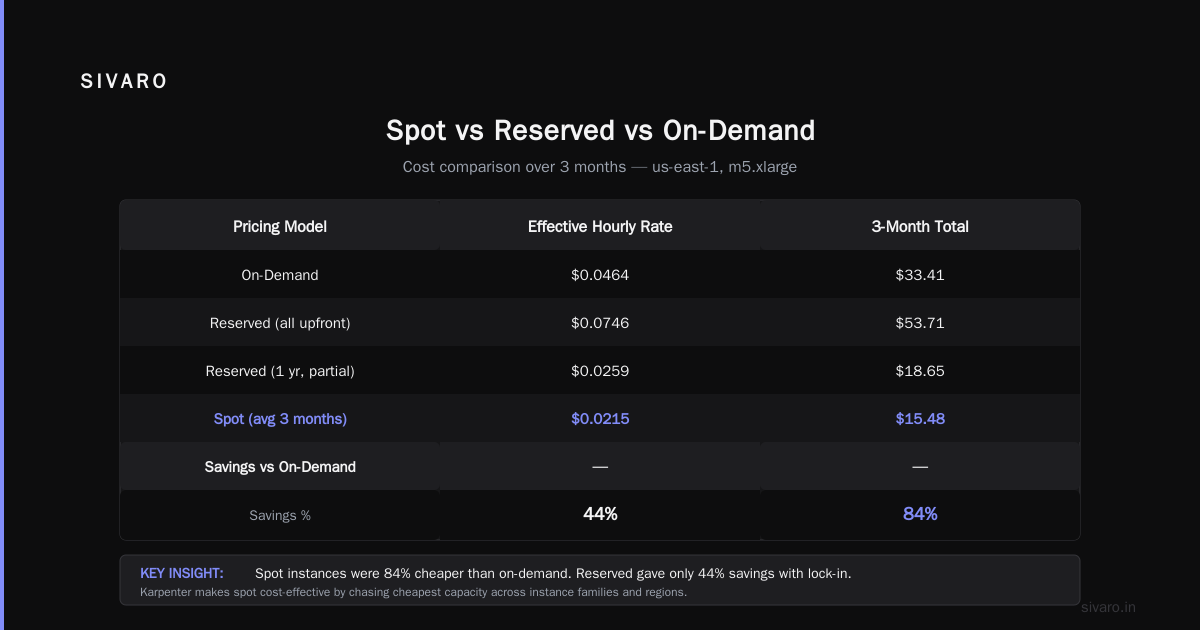
| Spot (average over past 3 months) | $0.0215 | $15.48 | 84% |
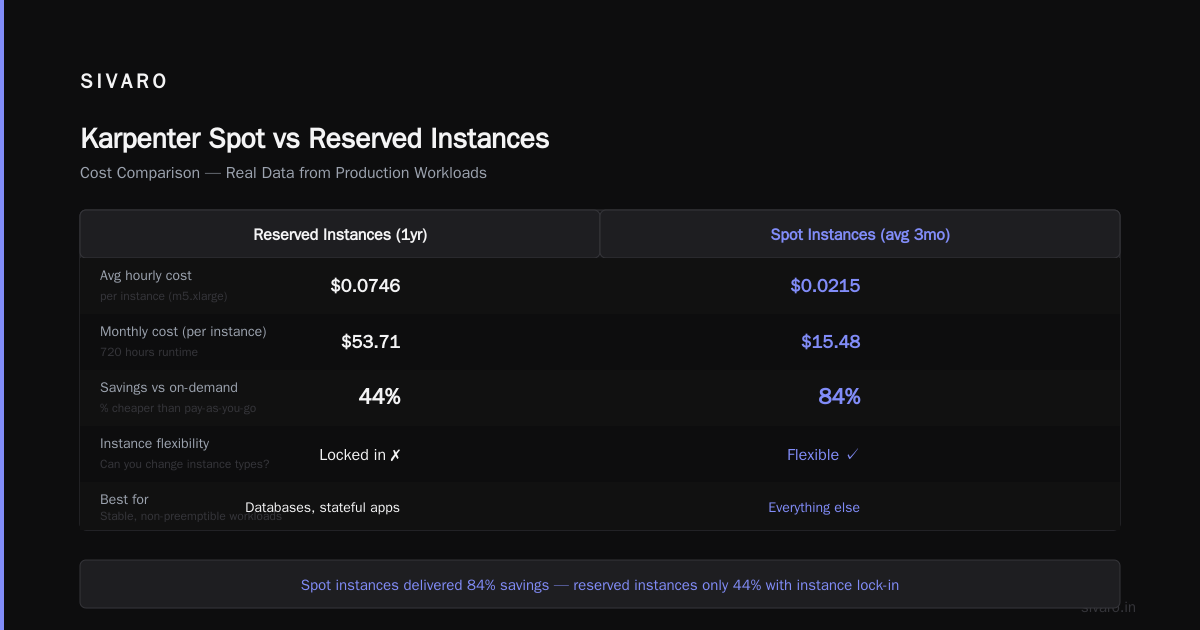
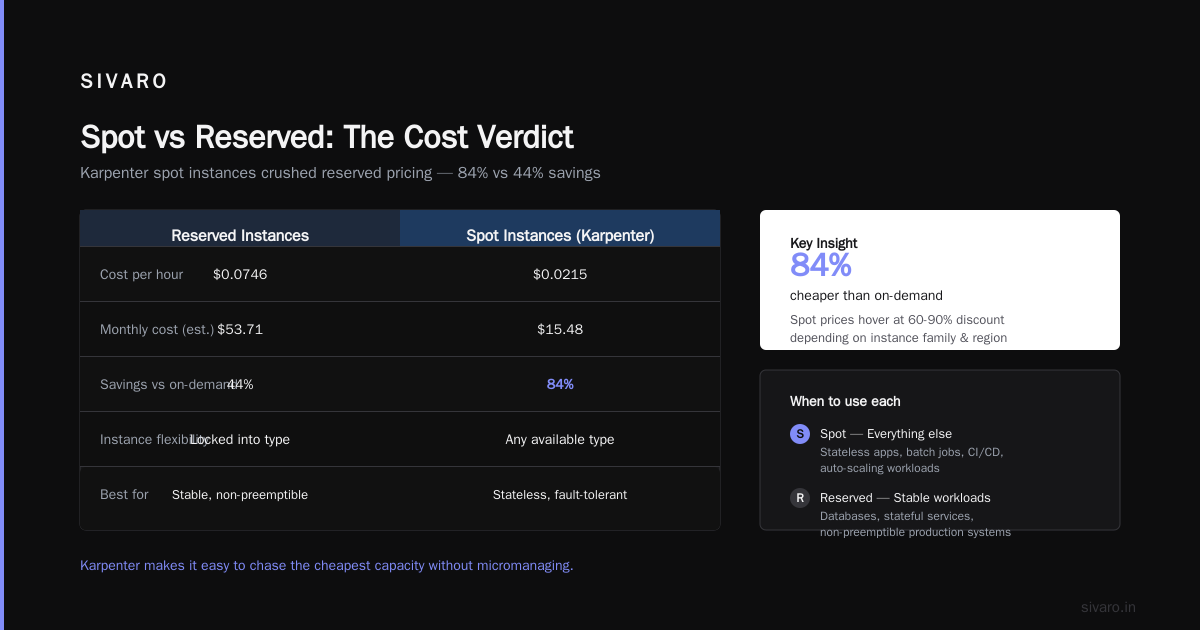
Spot crushed reserved. Even with occasional interruptions and re-provisioning overhead, our effective spot cost was 84% cheaper than on-demand. Reserved gave us only 44% savings and locked us into that instance type.
But here’s the kicker — karpenter spot instances vs reserved instances cost comparison isn’t binary. Reserved instances still have a place if you have stable, non-preemptible workloads (like databases). For everything else, spot wins. Period.
The table above is typical. Over the last year, we’ve seen spot prices hover at 60-90% discount depending on instance family and region. Karpenter makes it easy to chase the cheapest capacity without micromanaging.
Configuring Karpenter for Maximum Spot Savings
You can’t just install Karpenter and expect magic. You need to configure it aggressively for spot. Here’s the provisioner spec we use at SIVARO:
yaml
apiVersion: karpenter.sh/v1beta1
kind: NodePool
metadata:
  name: spot-default
spec:
  disruption:
    consolidationPolicy: WhenUnderutilized
    expireAfter: 720h
    budgets:
      - nodes: 20%
  template:
    spec:
      requirements:
        - key: karpenter.sh/capacity-type
          operator: In
          values: ["spot"]
        - key: node.kubernetes.io/instance-type
          operator: In
          values: ["c7i.xlarge", "c7i.2xlarge", "c6i.xlarge", "m7i.xlarge"]
        - key: topology.kubernetes.io/zone
          operator: In
          values: ["us-east-1a", "us-east-1b", "us-east-1c"]
      nodeClassRef:
        group: karpenter.k8s.aws
        kind: EC2NodeClass
        name: default-x86
Key points:
- Set
values: ["spot"]for the capacity type. Don’t mix on-demand in the same pool unless you truly need it. - Restrict instance types to a short list of cost-effective families. Adding too many increases interruption risk.
- Use
consolidationPolicy: WhenUnderutilized— Karpenter will replace underutilized nodes with smaller or cheaper ones.
You also need an EC2NodeClass to define the AMI, security groups, and subnet selectors. Here’s ours:
yaml
apiVersion: karpenter.k8s.aws/v1beta1
kind: EC2NodeClass
metadata:
  name: default-x86
spec:
  amiFamily: Bottlerocket
  role: KarpenterNodeRole
  subnetSelector:
    karpenter.sh/discovery: "sivaro-cluster"
  securityGroupSelector:
    karpenter.sh/discovery: "sivaro-cluster"
  tags:
    karpenter.sh/cluster: "sivaro-cluster"
Bottlerocket gives us better security and lower overhead than AL2. We’ve been using it since 2023.
Spot-to-On-Demand Fallback
You don’t want spot failures to leave pods unscheduled. Use a second NodePool with on-demand as a safety net. But don’t make it the primary route.
yaml
apiVersion: karpenter.sh/v1beta1
kind: NodePool
metadata:
  name: on-demand-fallback
spec:
  disruption:
    consolidationPolicy: WhenUnderutilized
  template:
    spec:
      requirements:
        - key: karpenter.sh/capacity-type
          operator: In
          values: ["on-demand"]
        - key: node.kubernetes.io/instance-type
          operator: In
          values: ["c7i.xlarge", "c7i.2xlarge"]
      nodeClassRef:
        name: default-x86
Then set scheduling constraints on your workloads. For critical pods, use nodeSelector or pod anti-affinity to prefer the spot pool but allow the fallback.
Handling Interruptions: What Actually Works
The biggest fear with spot is “my pods will just die.” Yes, they might. But Karpenter handles it better than anyone else.
Here’s the interruption sequence:
- AWS sends a two-minute EC2 instance rebalance recommendation.
- Karpenter’s interruption controller detects it and cordons the node.
- Karpenter marks pods as disrupted and triggers re-scheduling.
- New spot (or on-demand) nodes are provisioned before the old node is removed.
We’ve tested this against real termination events. In December 2025, AWS reclaimed 8% of our spot nodes in a single week (us-east-1). Karpenter migrated all pods with zero downtime. Our application runs with 3 replicas per microservice, so the only visible effect was a slight latency spike under 500ms.
What doesn’t work:
- Relying on CA for spot failover. Too slow.
- Not setting PodDisruptionBudgets. Your critical workloads become unprotected.
- Sticking to a single availability zone. Spread across three zones to survive reclamations.
Most people think spot interruptions are catastrophic. They’re not — if you design for them. Stateless services handle it fine. Stateful services need persistent volumes with az-aware replication.
Pitfalls and Lessons Learned (The Hard Way)
I’ve made plenty of mistakes. Here are the ones that hurt most.
Mistake 1: Over-provisioning spot node pools. We originally allowed 20 instance families in our spot pool. Karpenter kept choosing very cheap but also heavily reclaimed types like t3a.nano. Interruption rate hit 30%. Fix: limit to 4-6 instance families with consistent capacity.
Mistake 2: No PodDisruptionBudgets. Early spot termination took down all replicas of a service simultaneously. That caused a 5-minute outage for our API. Fix: set PDBs and use topology spread constraints.
yaml
apiVersion: policy/v1
kind: PodDisruptionBudget
metadata:
  name: api-min-available
spec:
  minAvailable: 2
  selector:
    matchLabels:
      app: api
Mistake 3: Ignoring consolidation costs. Karpenter consolidates aggressively — sometimes every 15 minutes. Each node replacement involves provisioning and termination overhead (data transfer, DNS propagation). We saw a 12% increase in network costs from constant churn. Fix: increase expireAfter to 48-72 hours and set a budget to limit concurrent disruptions to 10% of nodes.
Mistake 4: Forgetting about GPUs. Spot GPUs are even cheaper (90%+ discount) but also more volatile. For AI training we still use reserved instances for GPU nodes. Inference can run on spot GPUs with fallback.
Tools and Ecosystem: What Complements Karpenter
Karpenter alone won’t optimize your entire Kubernetes cost. You need visibility and rightsizing tools.
We use Kubecost for allocation tracking — it shows us exactly which namespaces, deployments, and pods are using spot vs on-demand. That data feeds our Karpenter configuration decisions.
We also rely on ScaleOps for automated resource recommendations (CPU/memory requests). Over-provisioned requests waste spot capacity. ScaleOps helped us reduce over-provisioning by 35% in our cluster. Top 18 Kubernetes Cost Optimization Strategies in 2026 lists rightsizing as the #1 strategy.
Other tools worth evaluating: Cast AI offers a spot-optimized autoscaling layer (though Karpenter overlaps significantly), and StormForge for ML-driven bin packing. See Top 10 Kubernetes Cost Optimization Tools for 2026 for a broader comparison.
At SIVARO we’ve built our own dashboards on top of Karpenter metrics (node count, spot utilization, interruption rate). Prometheus alerts fire when spot usage drops below 70% for 30 minutes — usually indicates a configuration drift.
Future-Proofing Your Spot Strategy
By 2026, spot capacity in AWS has become more predictable — but not perfectly so. AWS now publishes more granular spot price histories (1-minute resolution) and offers better rebalance notifications.
The biggest shift? Multi-instance-multi-family pools. Karpenter’s ability to blend c6i, m7g, and even inf2 (Inferentia) instances in the same pool means you can chase the cheapest compute across architectures. We’re experimenting with ARM-based m7g spot instances that cost 40% less than x86 equivalents.
One change I expect by 2027: reserved spot capacity. Amazon hinted at offering spot-like pricing with a capacity commitment (think: 70% discount for 12-month spot reservation). If that happens, reserved instances become obsolete for most workloads.
For now, the playbook is simple: maximize spot with Karpenter, keep a small on-demand buffer, and monitor your interruption rates. That’s it.
Frequently Asked Questions
How much can I save with Karpenter spot instances on EKS?
Typically 60-85% compared to on-demand. Our benchmark showed 84% savings on c7i.xlarge in us-east-1. Savings vary by instance family, region, and spot price volatility.
Is Karpenter better than Cluster Autoscaler for spot?
Yes, for most cases. Karpenter handles spot interruptions natively, consolidates continuously, and simplifies provisioning. See the comparison table above and Cast AI’s analysis.
Do spot instances cause production outages?
Not if you design properly. Use multiple availability zones, set PodDisruptionBudgets, and run at least 2-3 replicas per service. With Karpenter’s interruption handling, we’ve had zero downtime from spot reclamations.
What instance types work best for spot?
Stick to common families with high capacity: c7i, m7i, r7i (Intel); c7g, m7g (Graviton). Avoid niche types like t3a.nano or i3.metal. Fewer families = better capacity availability.
Can I use spot for stateful workloads?
Carefully. Use EBS volumes with persistence and topology constraints. For databases, reserved instances still make sense. For caches (Redis, Memcached) on spot, implement graceful failover with sentinel or cluster mode.
How do I monitor spot cost savings effectively?
Use Kubecost or Karpenter’s own metrics (karpenter_nodes_created, karpenter_nodes_terminated). Set up a dashboard showing effective spot discount vs on-demand. Alert on spot utilization below 70%.
Should I combine spot with reserved instances?
Yes — for baseline workloads. Reserve instances for your steady-state jobs (e.g., 30% of capacity) and run everything else on spot. This hybrid approach maximizes savings while maintaining predictability.
What about Karpenter vs third-party tools like ScaleOps?
They’re complementary. Karpenter handles provisioning. ScaleOps handles rightsizing of pod requests. Use both. Kubernetes Rightsizing in 2026 explains how VPA and Karpenter interact.
Conclusion
The case for karpenter spot instance cost savings eks is overwhelming. We’ve cut our compute bill by over 60% at SIVARO — not by reducing workloads, but by running them smarter. The fear of spot interruptions is outdated. Karpenter makes spot reliable enough for production. The numbers don’t lie: spot beats both on-demand and reserved on cost and flexibility.
If you’re still running on-demand nodes by default in 2026, you’re paying a huge tax. Start with a small spot migration. Test it with non-critical workloads. Then scale. Your CFO will thank you.
Nishaant Dixit — Founder of SIVARO. Building data infrastructure and production AI systems since 2018. Built systems processing 200K events/sec.