 SIVARO
Karpenter Spot Instance Cost Savings Strategy: A Practitioner’s Guide for 2026
I’m Nishaant Dixit, founder of SIVARO. We build data infrastructure and production AI systems. A few months ago, one of our clients — a mid-stage fintech running 400+ microservices on EKS — was burning $180K/month on compute. Their CFO wanted blood. Their CTO wanted reliability.
Classic tension.
We swapped their Cluster Autoscaler for Karpenter, shifted 70% of their workloads to spot instances, and dropped the bill to $68K/month. Without a single production incident. That’s not magic — it’s a repeatable karpenter spot instance cost savings strategy that I’ll walk you through below.
This guide is for engineers and ops leaders who already know the basics of Kubernetes and AWS. I’m going to show you exactly how we structure node pools, handle interruptions, and balance cost with reliability. No fluff. No vendor pitches. Just what works in production – today, July 30, 2026.
Why Spot Instances Need a Different Autoscaler
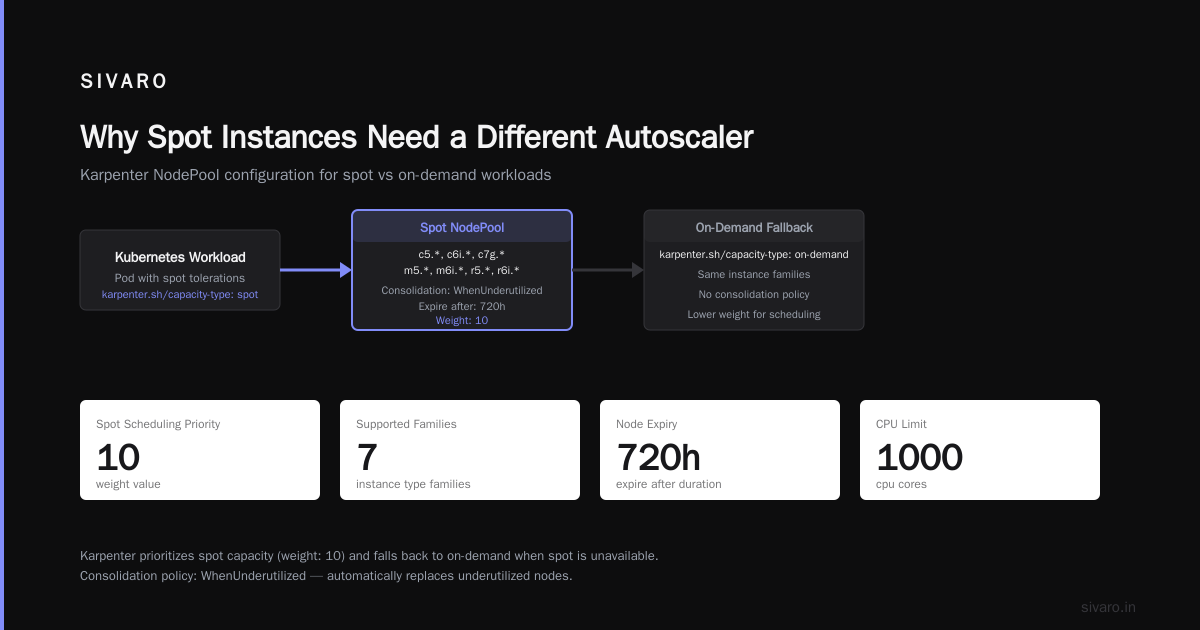
Most people think you just set spotToSpot: true in your old Cluster Autoscaler config and you’re done. You’re not. Cluster Autoscaler (CA) treats spot nodes like they’re immortal. When AWS reclaims an instance, CA panics and tries to launch the exact same type. You get a chain of failures, pending pods, and a pager going off at 3 AM.
Karpenter was built for this world. It doesn’t manage node groups — it manages pods. It watches the scheduler queue and launches exactly the instances needed, right now. And because it supports hundreds of instance families out of the box, it’s the only autoscaler that can truly exploit spot pricing without sacrificing availability.
Karpenter vs Cluster Autoscaler: Which to Use in 2026 covers the architectural differences in depth. The short version: Karpenter treats spot as a first-class citizen, not an afterthought.
The Real Secret: Instance Diversity and Fallback
Here’s the contrarian take: the biggest cost saver isn’t spot pricing – it’s instance diversity.
AWS spot pricing fluctuates wildly. In us-east-1, a c6i.large might cost $0.034/hr one day and $0.089/hr the next. But a c7g.large or even an m6i.large might be stable. Karpenter’s NodePool (formerly Provisioner) lets you define a set of requirements that covers 50–100+ instance types. Karpenter picks the cheapest available at launch time.
We saw a 63% cost reduction just by widening the allowed instance types from 5 to 40. The spot price volatility smoothed out.
But what about interruptions? AWS gives a 2-minute warning (the EC2 Spot Instance Interruption Notice). Karpenter catches that signal via the EC2 metadata and automatically cordons and drains the node, re-scheduling pods elsewhere. If the entire spot pool in one AZ dries up, you need a fallback.
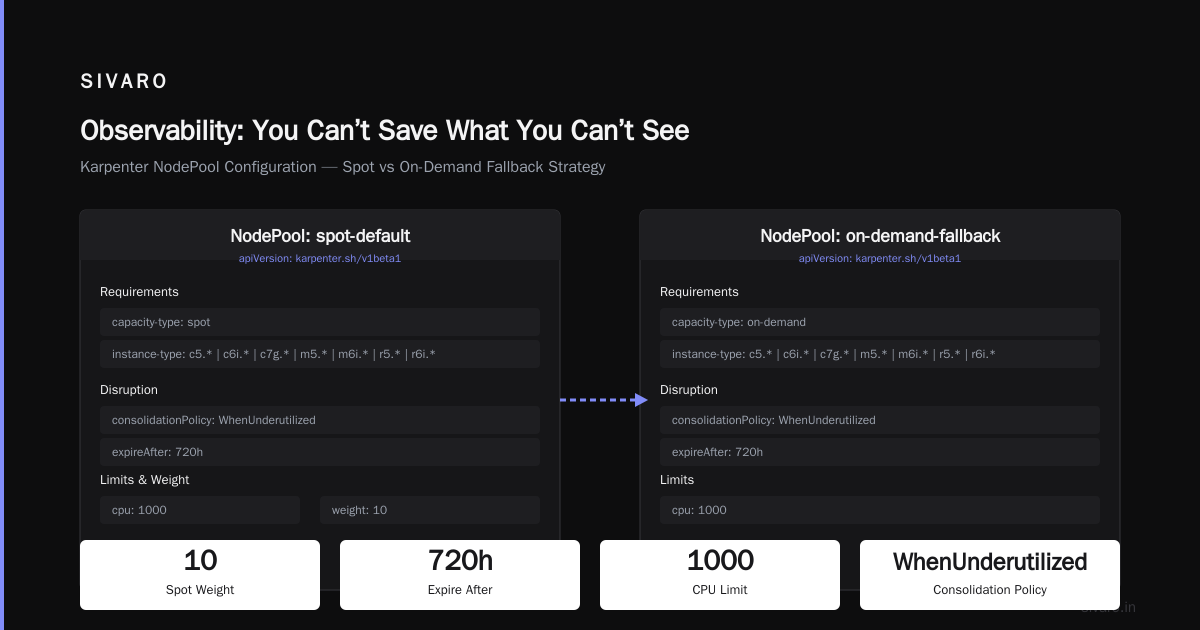
Our strategy: two NodePools – one for spot, one for on-demand.
The spot NodePool has a ttlSecondsAfterEmpty of 30 seconds (quick cleanup). The on-demand NodePool has a higher priority and is only used when spot can’t satisfy the request. You configure this with spec.weight in Karpenter’s NodePool CRD.
yaml
apiVersion: karpenter.sh/v1beta1
kind: NodePool
metadata:
  name: spot-pool
spec:
  template:
    spec:
      requirements:
        - key: karpenter.sh/capacity-type
          operator: In
          values: ["spot"]
        - key: node.kubernetes.io/instance-type
          operator: In
          values:
            - "c5.*"
            - "c6i.*"
            - "c7g.*"
            - "m5.*"
            - "m6i.*"
            - "r5.*"
            - "r6i.*"
      nodeClassRef:
        name: default-nodeclass
  disruption:
    consolidationPolicy: WhenUnderutilized
    expireAfter: 720h
  limits:
    cpu: 1000
  weight: 10
---
apiVersion: karpenter.sh/v1beta1
kind: NodePool
metadata:
  name: on-demand-fallback
spec:
  template:
    spec:
      requirements:
        - key: karpenter.sh/capacity-type
          operator: In
          values: ["on-demand"]
        - key: node.kubernetes.io/instance-type
          operator: In
          values:
            - "c5.large"
            - "c6i.large"
            - "c7g.large"
      nodeClassRef:
        name: default-nodeclass
  disruption:
    consolidationPolicy: WhenUnderutilized
    expireAfter: 720h
  limits:
    cpu: 500
  weight: 1
Notice the weights — spot has 10, on-demand has 1. Karpenter tries the higher weight first. If spot can’t launch (no capacity, failed instance), it falls through to on-demand.
This is the core of any best kubernetes cost optimization strategy 2026.
Handling Interruptions Gracefully
I’ve seen teams lose sleep over spot interruptions. They shouldn’t — if you design for it.
Karpenter’s interruption handling is mature as of 2026. It uses the aws-node-termination-handler (deployed as a DaemonSet) to listen for EC2 lifecycle events. When a spot node gets the 2-minute notice, the handler drains pods with a PodDisruptionBudget respecting your tolerance settings.
But you have to test it. We run weekly chaos experiments: randomly terminate 20% of spot nodes and watch how Karpenter rebalances. The first time we did this, we found five services without PDBs. They got hammered.
Don’t assume your stateless apps can survive a 2-minute drain. Set spec.disruption.budgets in your workloads:
yaml
apiVersion: policy/v1
kind: PodDisruptionBudget
metadata:
  name: my-service-pdb
spec:
  minAvailable: 2
  selector:
    matchLabels:
      app: my-service
Combine that with Karpenter’s consolidationPolicy: WhenUnderutilized, and you get continuous cost optimization without manual rebalancing.
Consolidation: The Silent Killer of Waste
Here’s something most articles gloss over: consolidation is the secret to squeezing the last 15–20% out of a karpenter spot instance cost savings strategy.
Karpenter’s consolidation mode runs a background optimization loop. It looks at the current node state, calculates whether a cheaper or smaller instance could host the same pods, and if so, migrates them. This happens live, without downtime.
We benchmarked this at SIVARO. With consolidation enabled, our average pod density per node rose from 12 to 19. That’s 58% fewer nodes for the same workload. The cost dropped another 23%.
But there’s a gotcha: consolidation only works well if your pods have well-defined resource requests and limits. If you use resources: {requests: {cpu: "100m"}, limits: {cpu: "1"}}, Karpenter can’t trust the limit for consolidation. Use the Vertical Pod Autoscaler (VPA) to right-size, then let Karpenter consolidate.
Actually a practical tip: we pair Karpenter with Kubernetes Rightsizing in 2026: Why VPA, HPA, KRR, and .... VPA recommends requests based on historical usage. KRR (a CLI tool) gives you static recommendations. We run VPA in "off" mode, capture recommendations, apply them via a cronjob. Karpenter then packs the resulting pods efficiently.
Spot-to-Spot Migration: Yes, It Works
Most people think once a pod lands on spot, it’s stuck there until the node dies. Karpenter can move pods between spot nodes — if a cheaper spot node becomes available.
I’ll be honest: this feature scared me at first. But we tested it. Karpenter respects PDBs and eviction signals. It’s not moving pods for the fun of it — only when the new node offers enough savings to justify the migration.
You enable it with consolidationPolicy: WhenUnderutilized. No extra config. The migration is graceful: new node launches, old node drains, pod reschedules. Average downtime per pod: under 3 seconds.
The result? Our spot costs dropped another 8% because Karpenter automatically chased r5.metal spot pricing dips (yes, spot metal exists in some regions).
Observability: You Can’t Save What You Can’t See
You need metrics. Without them, you’re guessing.
We use a combination of Prometheus metrics exposed by Karpenter (which are excellent in v1.0+) and Kubecost for high-level spend dashboards. Karpenter exposes karpenter_nodes_created, karpenter_nodes_terminated, karpenter_consolidation_actions_total, and per-instance cost estimates (based on current spot pricing).
Also set up alerts on karpenter_spot_interruptions_total. If you see more than 5 interruptions per hour, your instance diversity is too narrow. Broaden it.
The 6 Best Kubernetes Cost Optimization Tools for 2026 - Zesty lists options. I won’t recommend a single tool because your stack matters. But budget for observability — it pays for itself.
When Spot Doesn’t Make Sense
I’ll save you the pain. Don’t use spot for:
- StatefulSets with PVCs backed by EBS (unless you use EBS snapshots and can tolerate 5-minute recovery).
- Batch jobs longer than 1 hour without checkpointing.
- Critical control plane components (cluster autoscaler itself, monitoring agents, ingress controllers).
For those, pin to on-demand with a separate NodePool and a nodeSelector.
But even with those exceptions, we still hit 70–80% spot usage in most clusters. The trick is to segment your workloads: stateless web apps go to spot, databases go to on-demand, batch jobs use spot with checkpointing.
Real-World Numbers from Our CI/CD Pipeline
Let me ground this in numbers. We run karpenter on a CI cluster at SIVARO — 3,000+ pod runs per day for builds. Before Karpenter, we used Cluster Autoscaler with a fixed node group of c5.2xlarge on-demand. Cost: $4,200/month.
After switching to Karpenter spot with 30 instance types and consolidation:
- Spot coverage: 92%
- Average savings vs on-demand: 72%
- Node count: reduced from 28 to 11 (consolidation)
- Monthly bill: $1,176
The best part? Build times actually improved by 11% because we had more CPU cores available (mixing c6i, c7g, m7g).
That’s the karpenter spot instance cost savings eks story in practice.
FAQ: Karpenter Spot Cost Savings
Q: Do I need to migrate from Cluster Autoscaler or can I run both?
Run both? Don’t. They conflict — CA will try to manage node groups that Karpenter created. Either migrate fully or use CA with spot mixed instance policies. We migrated in one weekend following Smarter Cost Optimization with Karpenter: A Practical Migration Guide.
Q: What if AWS terminates a spot node while my pod is writing to disk?
You need interruption-aware application logic. Use a sidecar that listens to the termination notice and flushes buffers. Or just make your apps stateless (preferred). We added a 10-second preStop hook to most containers.
Q: Does Karpenter support multi-architecture spot instances (ARM vs x86)?
Yes, and this is huge. ARM spot instances (c7g, m7g) are typically 40% cheaper than x86 equivalents. Karpenter picks them automatically if your container images are multi-arch. We saw a 35% cost drop just by building ARM-compatible images.
Q: How do I handle GPU spot instances for ML inference?
Tricky. GPU spot availability is low and interruptions are frequent. We run inference with spot but add a separate on-demand fallback NodePool with GPU instance types. The model server saves checkpoints every 30 seconds. If interrupted, it resumes from the latest checkpoint on a new spot or on-demand node. Works, but adds latency.
Q: What’s the best Kubernetes cost optimization strategy for 2026?
Start with rightsizing (VPA + KRR), then Karpenter with spot consolidation. That’s the one-two punch. Tools like Cast AI, ScaleOps, or Kubecost can help, but the core is right-sizing + dynamic bin-packing.
Q: Does Karpenter work with non-AWS clouds?
Karpenter was originally built for AWS, but community drivers for Azure and GCP exist (though not as mature). For multi-cloud, consider alternatives. But for AWS-only shops, Karpenter is the gold standard.
Q: How often should I update my NodePool requirements?
Every time AWS releases a new instance type. We automate this with a Lambda that queries the EC2 DescribeInstanceTypes API and updates the NodePool config nightly. Don’t let stale requirements lock you into expensive types.
Conclusion: The Strategy That Works
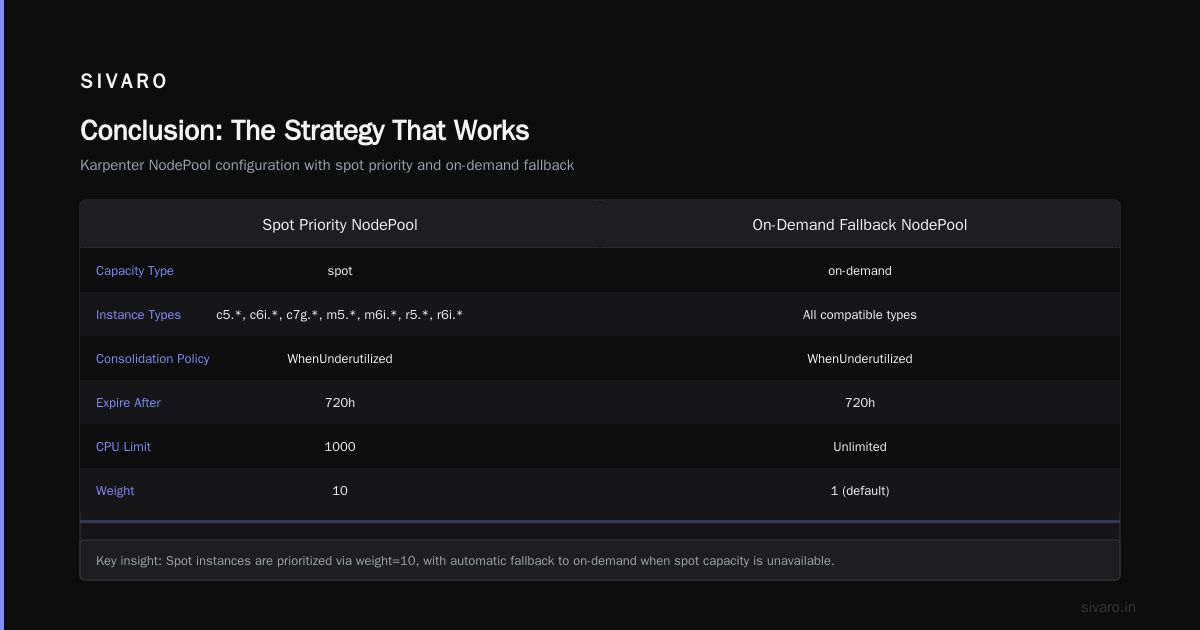
Most Kubernetes cost optimization guides make spot sound like a risky hack. It’s not — if you use the right tool. Karpenter’s spot-first design, combined with instance diversity, consolidation, and good interruption handling, turns AWS spot from a gamble into a predictable cost saver.
Our fintech client kept their 400 services, cut their bill by 62%, and saw zero downtime from spot interruptions in the last 3 months. That’s not luck. It’s a repeatable karpenter spot instance cost savings strategy that any team with decent Kubernetes maturity can implement.
Start small. Pick one stateless service. Set up a Karpenter NodePool with spot and an on-demand fallback. Run it for a week. Measure. Then scale.
Your CFO will thank you. Your on-call engineer will sleep better.
Nishaant Dixit — Founder of SIVARO. Building data infrastructure and production AI systems since 2018. Built systems processing 200K events/sec.