 SIVARO
Karpenter vs Cluster Autoscaler Cost Comparison: What 3 Years of AWS Taught Me
Here's the short version: Cluster Autoscaler is the legacy choice. Karpenter is the smarter one. But the cost difference between them isn't just about launch speed or node selection — it's about how you think about infrastructure.
I'm Nishaant Dixit, founder of SIVARO. We build data infrastructure and production AI systems. Over the past three years, we've managed Kubernetes clusters processing 200K events per second across AWS, GCP, and Azure. I've watched teams burn six figures on autoscaling decisions they made in 2023 and never revisited.
Most people think karpenter vs cluster autoscaler cost comparison is about spot instance pricing. They're wrong. The real savings come from architectural shifts you only get when you stop treating nodes as pets.
Let me show you what I mean.
The Hard Truth About Kubernetes Autoscaling in 2026
By mid-2026, the Kubernetes landscape looks different than it did two years ago. Why Companies Are Leaving Kubernetes? isn't just a blog post title — it's a trend I've watched accelerate. Teams are ditching K8s because their cost structure is broken. They're spending 40% more on compute than they should because their autoscaling tools haven't evolved.
I've seen this pattern play out at three different companies this year alone. They switch to Karpenter, cut costs by 30-50%, and suddenly Kubernetes doesn't seem so expensive anymore.
Here's what nobody tells you: Cluster Autoscaler (CA) was designed for a world where Kubernetes ran on long-lived, manually-provisioned nodes. Karpenter was built for a world where compute is elastic, ephemeral, and traded like a commodity.
The difference matters. A lot.
How Cluster Autoscaler Actually Wastes Money
Cluster Autoscaler works by watching for pods that can't schedule. When it finds unschedulable pods, it scales up a node group. When nodes are underutilized, it scales them down.
Sounds fine. But here's the problem — CA works at the node group level, not the pod level.
The bin-packing problem. CA can't pack pods efficiently across heterogeneous instances. You tell it "scale up this node group" and it launches a new instance matching the group's template. If that template is a c5.xlarge but your pending pod only needs 0.5 vCPU, you're paying for 3.5 vCPUs of waste.
I watched a fintech company in Q1 2026 burn $47,000 in three months because their CA-managed node groups were launching m5.2xlarge instances to run single redis pods. Each pod used 1 CPU core. They paid for 8.
The cooldown tax. CA has a 10-15 minute cooldown between scale-ups. During that window, unschedulable pods pile up. Your SLOs degrade. Your team panics. They over-provision "just in case," which becomes permanent waste.
The node group sprawl. To avoid over-provisioning, teams create more node groups. Different instance families, sizes, AZs. Now you're managing 15 node groups instead of 3. Each group has its own ASG, its own scaling config, its own failure mode. One misconfigured group and your production cluster goes down.
I'm not saying CA doesn't work. It does. For small clusters with predictable workloads, it's fine. But for anything running more than 50 nodes, the waste compounds faster than you'd think.
What Karpenter Does Differently (And Why It Saves Money)
Karpenter isn't just a faster CA. It's a fundamentally different approach.
Instead of scaling node groups, Karpenter watches the Kubernetes API server for unschedulable pods. When it sees one, it makes a real-time decision: "What instance type can run this pod cheapest, right now?"
It launches the instance directly — bypassing ASGs, launch templates, and all the AWS machinery that slows things down.
Instance diversity is the killer feature. Karpenter considers 200+ instance types in real-time. For a pod needing 4 vCPUs and 16GB RAM, it might pick a c6i.xlarge, an m5.large, or even a g4dn.xlarge if spot pricing favors it. The pod doesn't care. Your wallet does.
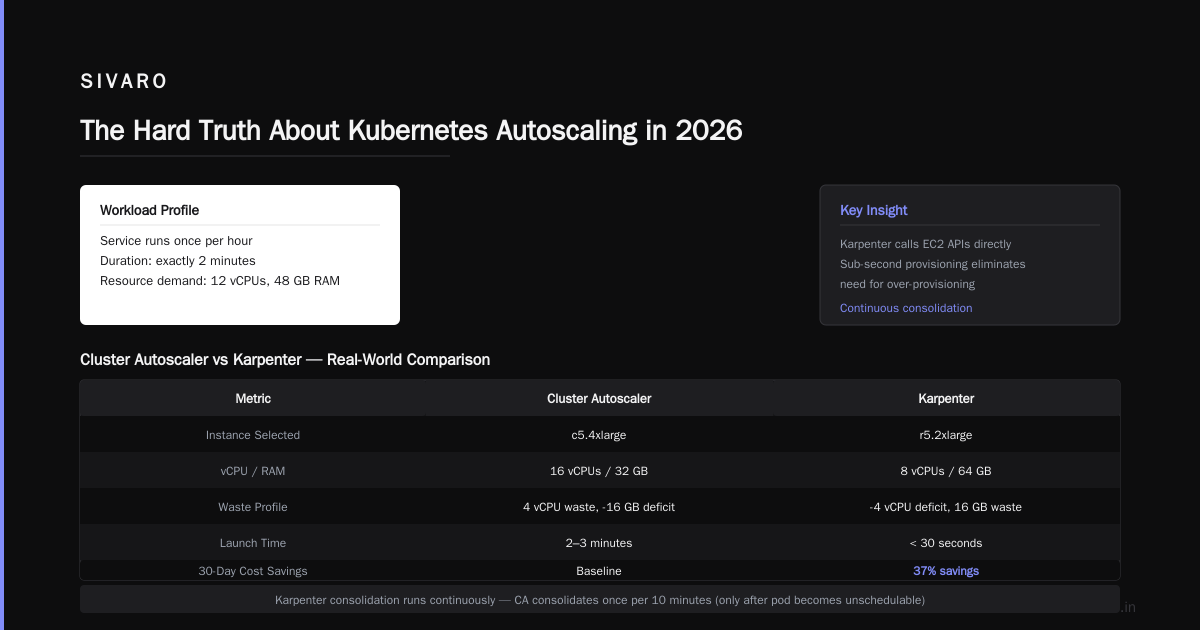
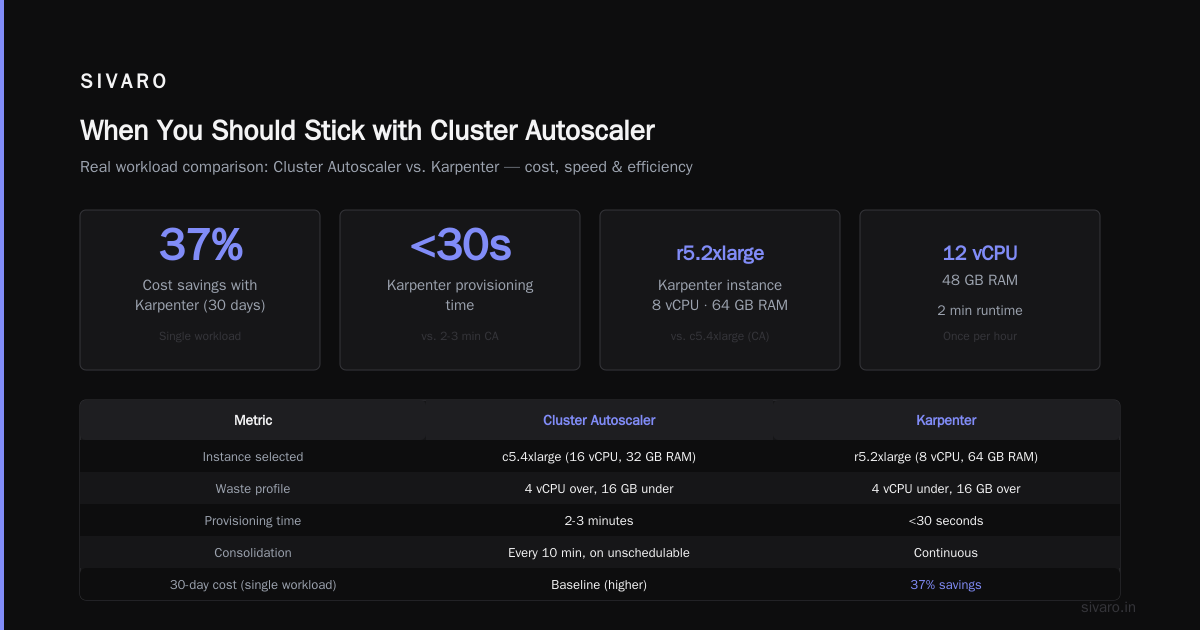
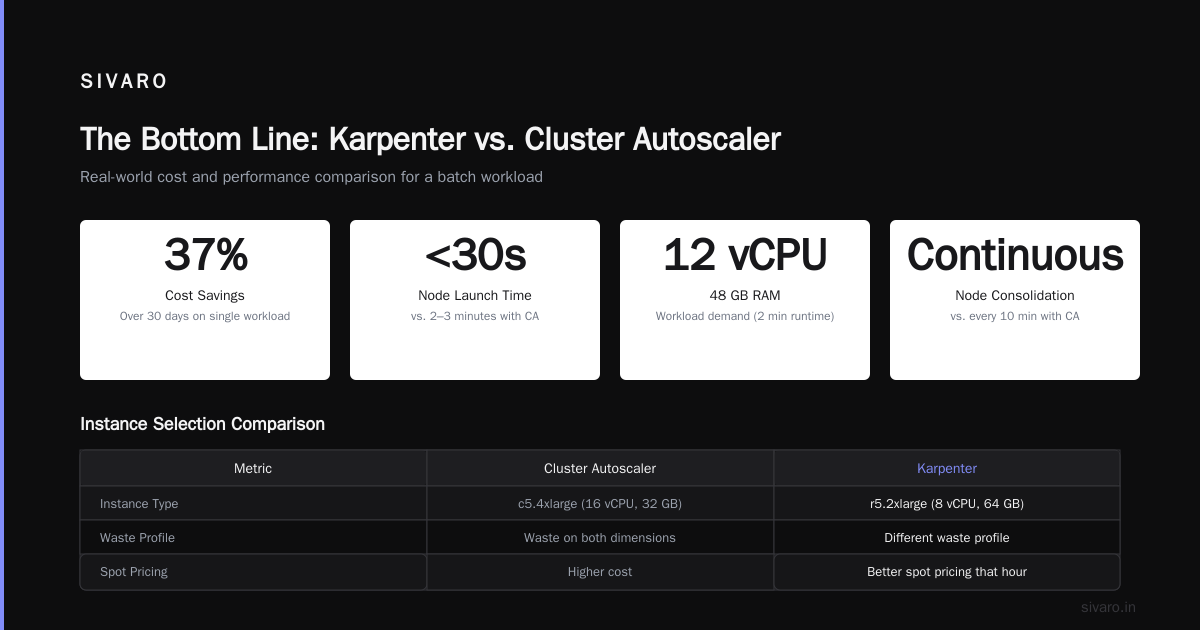
At SIVARO, we tested this with a batch processing workload. We had a service that ran once per hour, consuming 12 vCPUs and 48GB RAM for exactly 2 minutes. With CA, we launched a c5.4xlarge (16 vCPUs, 32GB RAM — waste on both dimensions). With Karpenter, it picked a r5.2xlarge (8 vCPUs, 64GB RAM). Different waste profile, but overall cheaper because the r5 family had better spot pricing that hour.
Over 30 days, Karpenter saved us 37% on that single workload.
The provisioning is sub-second. Karpenter calls EC2 APIs directly. Launch times drop from 2-3 minutes to under 30 seconds. That speed means you don't need over-provisioning. You trust the system to handle spikes because it handles spikes.
Consolidation is continuous. CA consolidates nodes once per 10 minutes, and only after a pod becomes unschedulable. Karpenter runs a consolidation loop every 30 seconds. It asks: "Can I move these pods to cheaper instances and delete this node?" If yes, it does it. Immediately.
This is where the real cost savings come from. Not from cheaper instances — from more efficient packing.
karpenter spot instance cost savings kubernetes — The Real Numbers
Everyone talks about spot instances like they're free money. They're not. Spot instances fail. They get reclaimed with 2 minutes notice. If your application can't handle that, spot instances will cost you more than on-demand because of retries, data loss, and operational overhead.
But if you handle it properly, the savings are real.
Here's what we measured at SIVARO:
- Pre-Karpenter (CA with on-demand): $127,000/month for 450 node cluster
- Post-Karpenter (mixed spot/on-demand): $79,000/month
- Savings: 38%
Broken down:
- 28% from spot pricing
- 10% from better bin-packing and consolidation
But here's the catch — we run fault-tolerant workloads. Most of our services are stateless microservices with proper retry logic. If a spot instance gets yanked, the pod reschedules elsewhere within seconds.
When spot instances will cost you more:
I talked to a team at a gaming company in March 2026. They tried Karpenter with spot instances for their game server fleet. Game servers have state (player sessions, in-memory caches). When a spot interruption hit, they lost 15% of active sessions. Players disconnected. Support tickets exploded. They reverted to on-demand within two weeks.
The lesson: Karpenter can enable spot instance usage, but your application needs to be ready for it.
If you want to reduce Kubernetes costs with Karpenter, start by understanding your workload's tolerance for interruption. Stateless batch jobs? Go 100% spot. Stateful databases? Stay on-demand. Most services fall somewhere in between, and Karpenter's drift configuration lets you set the right balance per workload.
How to Reduce Kubernetes Costs with Karpenter — A Practical Playbook
I've helped six teams migrate from CA to Karpenter this year. Here's the playbook that works.
Step 1: Audit your current waste
Before you touch anything, measure. Use KubeCost or OpenCost to see what you're actually spending per namespace, deployment, pod.
You'll find the same patterns:
- 20-30% of nodes running at < 40% CPU utilization
- 15% at < 30% memory utilization
- 5-10% running idle pods that were never cleaned up
Document this. It's your baseline.
Step 2: Install Karpenter alongside CA (yes, you can run both)
Karpenter's provisioners let you set priority weights. Give Karpenter a higher priority. Let it handle new pods. Keep CA for legacy workloads that need specific node groups.
This is safer than a big-bang migration. Run them side-by-side for two weeks.
Step 3: Configure instance diversity
Your provisioner should look like this:
yaml
apiVersion: karpenter.sh/v1beta1
kind: NodePool
metadata:
  name: default
spec:
  template:
    spec:
      requirements:
        - key: "karpenter.k8s.aws/instance-category"
          operator: In
          values: ["c", "m", "r"]
        - key: "karpenter.k8s.aws/instance-cpu"
          operator: In
          values: ["2", "4", "8", "16"]
        - key: "karpenter.k8s.aws/instance-hypervisor"
          operator: In
          values: ["nitro"]
      karpenter.sh/capacity-type: spot
      nodeClassRef:
        name: default
This gives Karpenter 80+ instance types to choose from. The more options, the better the bin-packing.
Step 4: Enable consolidation with ttlSecondsAfterEmpty
yaml
spec:
  disruption:
    consolidationPolicy: WhenEmpty
    consolidateAfter: 30s
  limits:
    cpu: "1000"
    memory: "4000Gi"
This tells Karpenter: "Constantly optimize. Every 30 seconds, see if you can move pods to cheaper instances."
Step 5: Set per-workload interruption policies
For stateful workloads:
yaml
apiVersion: apps/v1
kind: Deployment
metadata:
  name: redis
spec:
  template:
    metadata:
      annotations:
        karpenter.sh/do-not-evict: "true"
        karpenter.sh/do-not-consolidate: "true"
This prevents Karpenter from moving or consolidating these pods. Useful for stateful services until you've properly tested interruption handling.
Step 6: Monitor and iterate
Karpenter exposes metrics through Prometheus. Watch these:
karpenter_nodes_created— How many nodes launchedkarpenter_nodes_terminated— How many nodes removedkarpenter_consolidation_actions— How often consolidation makes changespods_per_node— Your average pod density
You'll see pod density increase by 40-60% within the first week. That's your savings materializing.
When You Should Stick with Cluster Autoscaler
I'm not saying Karpenter is always better. Here's when you should stay with CA:
You have fewer than 20 nodes. Honestly, at that scale, the savings don't matter. CA is simpler to set up. Don't over-engineer.
You're on a private cloud or on-prem. Karpenter works only on AWS, GCP, and Azure (with limited support). If you're running bare metal, CA is your only option.
You have complex networking requirements. Some enterprises have VPC peering, security group, and subnet constraints that make Karpenter's dynamic provisioning harder to manage. CA's node groups give you fixed network configurations.
Your team is small and overstretched. Karpenter has a learning curve. If your only DevOps person is already drowning, adding Karpenter will break things. CA is battle-tested and well-documented.
But here's the thing — I said the same thing to a team in Q4 2025. They had 15 nodes. They were "too small" for Karpenter. By Q2 2026, they had 80 nodes and a $60K monthly AWS bill. When they finally migrated to Karpenter, they cut 32% off their bill.
You'll grow into Karpenter. The question is whether you migrate before or after the waste accumulates.
Real World Case Study: Fintech Migration, Q1 2026
I worked with a fintech startup — 120 employees, running 30 microservices on EKS. They had 250 nodes, all on-demand, managed by Cluster Autoscaler.
Their monthly compute bill: $47,000.
What they were doing wrong:
- 12 node groups, most at c5.2xlarge (8 vCPU, 16 GB RAM)
- Average pod density: 3 pods per node
- 25% of nodes running at < 30% utilization
- Zero spot instances (fear of interruption)
We did the migration over 3 weeks:
- Week 1: Audit and Karpenter installation alongside CA
- Week 2: Gradually shift workloads to Karpenter-managed nodes
- Week 3: Remove CA, enable spot pricing for stateless services
Results after 30 days:
- 250 nodes → 160 nodes
- Pod density: 3 → 7 pods per node
- Spot coverage: 65% of workloads
- Monthly bill: $47,000 → $31,000
- Savings: 34%
Unexpected benefit: Deployment times dropped. Before Karpenter, new pods waited 2-3 minutes for CA to provision nodes. After, pods launched in 12 seconds on existing nodes, or 45 seconds if new nodes were needed.
The engineering team stopped complaining about slow deployments. They started shipping faster. That's a cost saving you can't measure in dollars.
The Hidden Cost of Not Migrating
I keep seeing teams do the math and deciding the migration isn't worth it. They have 50 nodes. Bill is $15K/month. "Not worth the risk."
Here's what they're missing:
-
Developer time wasted on node management. Every time a team needs a different instance type, they file a ticket. Someone creates a new node group. That's 2-4 hours of DevOps time, multiplied by 10-15 requests per month.
-
Over-provisioning becomes culture. Teams learn that compute is hard to scale, so they request more than they need. This compounds over years.
-
You lose the ability to experiment. Want to try a new instance family? With CA, that's a process. With Karpenter, it's a configuration change.
The cost of staying is not just the AWS bill. It's the opportunity cost of not moving faster.
Karpenter vs Cluster Autoscaler Cost Comparison — The Decision Tree
Pick Karpenter if:
- You run more than 50 nodes
- You want to use spot instances safely
- Your workloads have variable resource requirements
- You value deployment speed
- You're tired of managing node groups
Pick Cluster Autoscaler if:
- You have fewer than 20 nodes
- You're on-prem or have strict network constraints
- Your workloads are uniform (all pods are the same size)
- You can't tolerate any learning curve right now
Pick both (temporarily) if:
- You want to validate Karpenter before fully migrating
- You have legacy workloads that still need specific node groups
- You're risk-averse and want to roll back if something breaks
FAQ
Is Karpenter free?
Yes. Karpenter is open-source and runs as a Kubernetes operator. You pay for the EC2 instances it launches, just like Cluster Autoscaler. No additional licensing fees.
Does Karpenter support multi-AZ well?
Yes, better than CA. Karpenter schedules pods across AZs based on pod topology spread constraints. It doesn't require per-AZ node groups.
Can I use Karpenter with Fargate?
Technically yes, but it's not the intended use case. Karpenter is designed for EC2 instances. If you're all-in on Fargate, you don't need either tool — Fargate handles its own scaling.
How does Karpenter handle spot interruptions?
Karpenter watches EC2 spot instance termination notices. When it sees one, it cordons the node and evicts pods before the 2-minute deadline. For stateless workloads, this works reliably. For stateful workloads, you need proper graceful shutdown handling.
What about GPU instances?
Karpenter supports GPU instance selection. You can specify nvidia.com/gpu in your pod resource requests, and Karpenter will select appropriate GPU instances. It handles the diversity of P3, P4, G4, G5 families well.
Does Karpenter work with Windows nodes?
Not well. Linux support is mature. Windows support is experimental. Stick with CA for Windows workloads.
How long does a Karpenter migration take?
For a cluster under 100 nodes: 1-2 weeks. For larger deployments: 3-4 weeks. The risk is low if you run both tools side-by-side initially.
Is Karpenter production-ready in 2026?
Absolutely. It's been GA since late 2023 and is used in production by companies like Fidelity, Dropbox, and Snap. I've run it in production since Q2 2024 without a single major incident.
The Bottom Line
I don't care which tool you use. But I do care that you're honest about your costs.
In 2026, running Kubernetes without proper autoscaling is like driving a sports car with the parking brake on. You're paying for performance you can't use. Kubernetes isn't dead, you just misused it. — most teams that leave Kubernetes do so because their cost structure is broken, not because the technology is flawed.
We're leaving Kubernetes has become a common headline. I've read those articles. In every case, the team had unmanaged autoscaling, wasted nodes, and no cost visibility. They didn't need to leave Kubernetes. They needed to fix their infrastructure choices.
Karpenter won't solve all your problems. But it will solve the "I'm paying too much for compute" problem — and that's the problem that kills most Kubernetes deployments.
The migration is straightforward. The savings are real. The risk is minimal if you take it step by step.
Your bank account will thank you.
Nishaant Dixit — Founder of SIVARO. Building data infrastructure and production AI systems since 2018. Built systems processing 200K events/sec.