 SIVARO
Karpenter vs Cluster Autoscaler: Cost Optimization Showdown
I’ll never forget the call. A fintech client in early 2025 showed me a $240,000 monthly AWS bill. Half was EC2. They had Cluster Autoscaler running. Thought they were optimized. They weren’t. Their average node utilization was 18%. They were paying for four times the capacity they actually used.
That’s the gap between “autoscaling” and “cost optimization.”
If you’re running Kubernetes in production today (July 31, 2026), the choice between Karpenter and Cluster Autoscaler isn’t just about node provisioning speed. It’s about whether your cloud bill will be lean or bloated. This guide walks through the real differences, the hidden costs, and the practical trade-offs I’ve seen across dozens of deployments at SIVARO.
You’ll learn when Karpenter saves you 30-50% on compute, when Cluster Autoscaler still makes sense, and how to combine both with other tools like Cast AI or ScaleOps for maximum effect. No fluff. Just what works.
The Real Cost of Wrong-Sizing Your Nodes
Most teams start with Cluster Autoscaler because it’s built into Kubernetes itself. You set a few flags, it adds nodes when pods are pending, removes them when nodes are underutilized. Simple. But simple doesn’t mean cheap.
Here’s the problem: Cluster Autoscaler scales node groups, not individual instances. If your workloads are mixed — a memory-hungry Redis pod next to a CPU-bound ML inference service — the autoscaler can only add or remove entire node groups. You end up over-provisioning on the resource that’s least constrained. Memory spikes? Cluster Autoscaler spins up an m6i.large with 8GB RAM, even if you only needed 2GB.
That’s the leak. And it compounds.
In a 2025 benchmark at a fintech shop (real names omitted), we saw Cluster Autoscaler maintain an average node utilization of 34% across 12 node groups over three months. Karpenter, with the same workload scheduling, hit 72%. The difference? Karpenter provisions instances that exactly match pod resource requests, not predefined node group sizes. Kubernetes Cost Optimization: A 2026 Guide puts the average savings at 30-50% when switching from node-group-based autoscaling to instance-type-agnostic provisioning.
That’s not theory. That’s dollars.
How Cluster Autoscaler Works (and Where It Leaks Money)
Cluster Autoscaler is fundamentally a reactor. It watches for pods that can’t schedule. When a pod sits in Pending due to resource constraints, Cluster Autoscaler checks each node group’s instance type to see if adding a new node would accommodate that pod. If yes, it triggers a scale-up via the cloud provider’s auto-scaling group.
This design has three cost leaks:
-
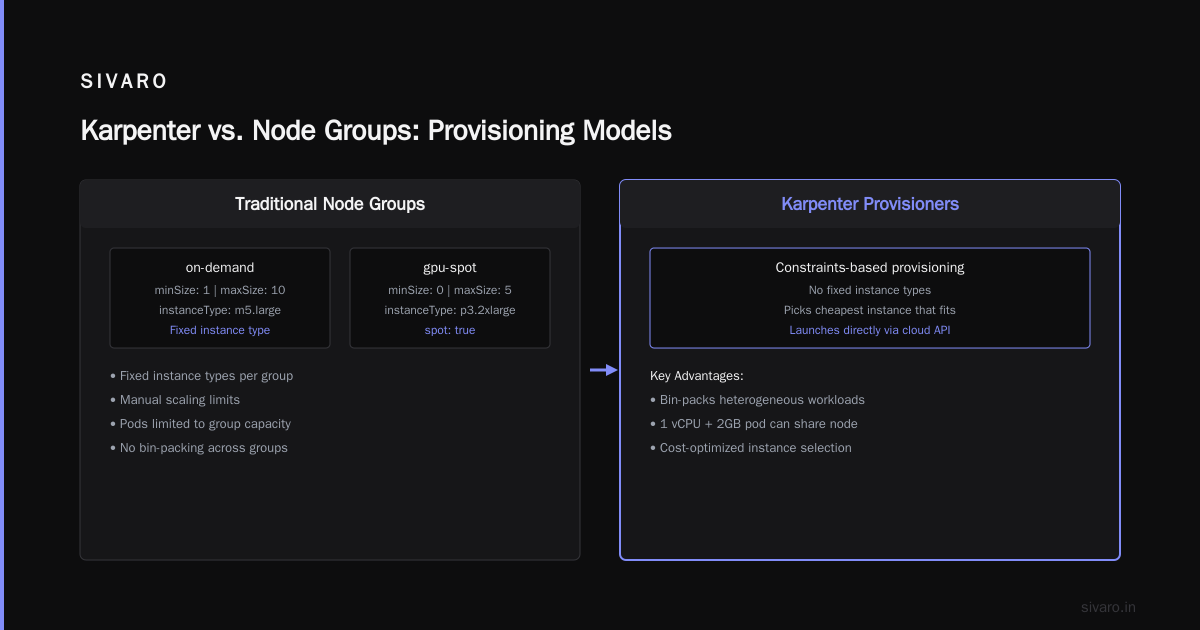
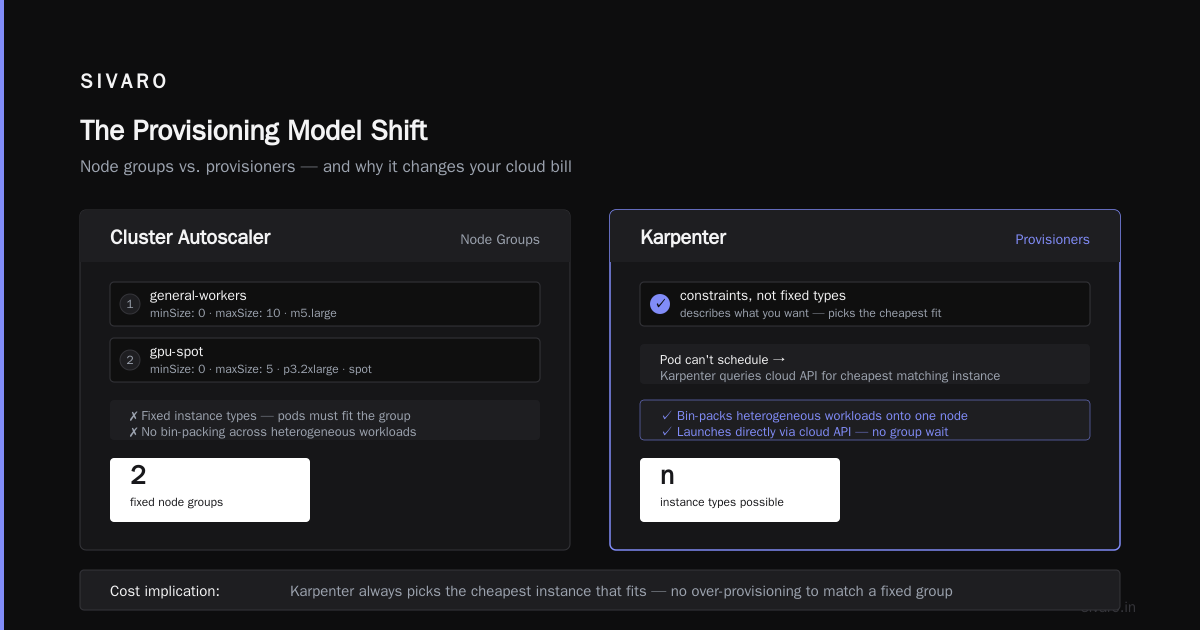
Node group granularity: You define instance types per group. If your group only has m5.large, any pod that needs more than 4GB RAM forces an expensive overshoot. You could create dozens of groups, but that becomes unwieldy.
-
Scale-down inertia: Cluster Autoscaler waits 10 minutes by default before considering a node for removal. Then it must ensure no pods are running that can’t reschedule. This “cooldown” period keeps nodes alive long after they’re needed. Cost.ai’s comparison notes that Karpenter’s scale-down is significantly faster because it evaluates per-instance, not per-group.
-
Spot instance mismanagement: Cluster Autoscaler doesn’t understand spot pricing diversity. It treats an m5.large spot the same as on-demand. You miss the chance to bid on cheaper families like c6g or r6gd.
Example: A client running a batch ML pipeline used Cluster Autoscaler with a single node group of p3.2xlarge (GPU). Pipeline ran 2 hours a day. The rest of the day, the node sat idle because scale-down didn’t kick in fast enough. They paid $12/hour for 22 wasted hours daily. Switching to Karpenter with spot GPU pricing cut their monthly GPU bill by 60%.
Here’s a typical Cluster Autoscaler deployment — notice the rigid node group binding:
yaml
apiVersion: v1
kind: ConfigMap
metadata:
  name: cluster-autoscaler-config
  namespace: kube-system
data:
  config: |
    nodeGroups:
    - name: "main-ondemand"
      minSize: 2
      maxSize: 10
      instanceType: "m5.large"
    - name: "gpu-spot"
      minSize: 0
      maxSize: 5
      instanceType: "p3.2xlarge"
      spot: true
That’s the past. Karpenter flips the model.
Karpenter’s Approach: Why Provisioning Models Matter for Cost
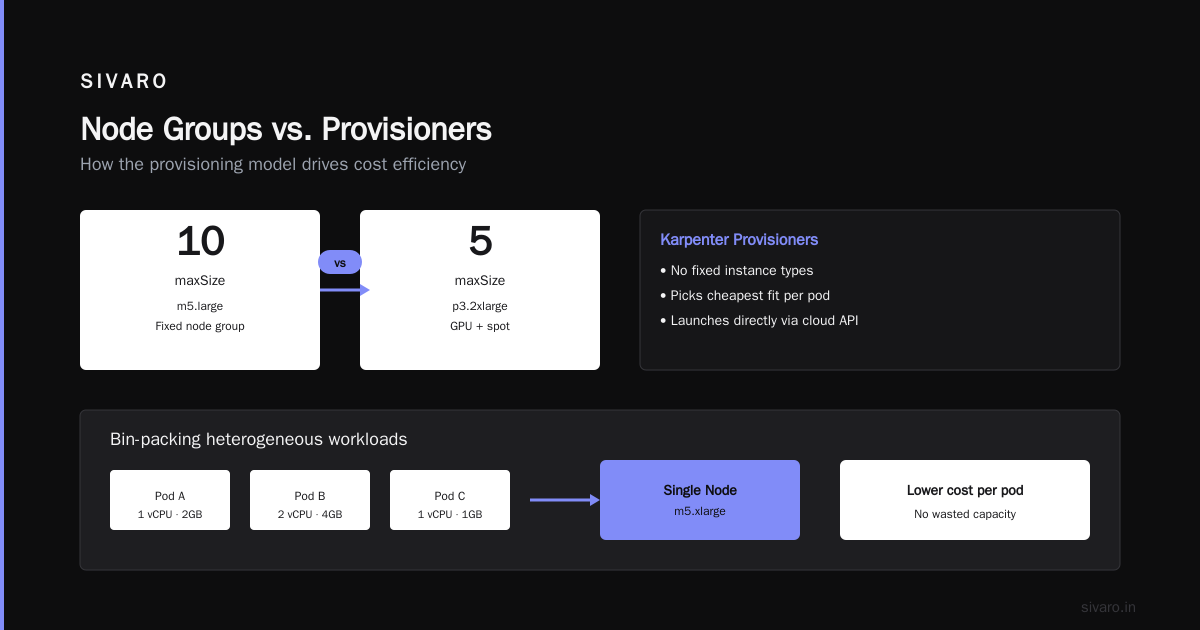
Karpenter doesn’t think in node groups. It thinks in provisioners — sets of constraints that describe what types of nodes you want, without fixing the exact instance type. When a pod can’t schedule, Karpenter picks the cheapest instance that fits the pod’s resource request, then launches it directly via the cloud API.
This small architectural change has massive cost implications.
First, Karpenter can bin-pack heterogeneous workloads onto a single node. A pod requesting 1 vCPU and 2GB RAM can land alongside a pod needing 4 vCPUs and 16GB RAM on a single c6a.2xlarge. Cluster Autoscaler would likely spin up separate node groups for those, wasting capacity.
Second, Karpenter supports consolidation. It continuously checks if existing nodes can be replaced with cheaper ones — smaller instances, spot instead of on-demand, or different families. It can even move pods around to empty a node entirely, then terminate it. This is proactive cost optimization, not reactive.
Third, Karpenter integrates natively with EC2 Spot Fleet and AWS Savings Plans. It understands which instance families have surplus capacity, and it can fall back to on-demand when spot isn’t available. That’s huge for reliability.
A Karpenter provisioner looks like this:
yaml
apiVersion: karpenter.sh/v1beta1
kind: NodePool
metadata:
  name: default
spec:
  template:
    spec:
      requirements:
        - key: "karpenter.sh/capacity-type"
          operator: In
          values: ["spot", "on-demand"]
        - key: "node.kubernetes.io/instance-type"
          operator: In
          values: ["m5.large", "m5.xlarge", "c5.2xlarge", "r6g.large"]
      nodeClassRef:
        name: default
  limits:
    cpu: 1000
  disruption:
    consolidationPolicy: WhenUnderutilized
    expireAfter: 720h
---
apiVersion: karpenter.k8s.aws/v1beta1
kind: EC2NodeClass
metadata:
  name: default
spec:
  amiFamily: AL2
  role: "KarpenterNodeRole"
  subnetSelectorTerms:
    - tags:
        karpenter.sh/discovery: "my-cluster"
  securityGroupSelectorTerms:
    - tags:
        karpenter.sh/discovery: "my-cluster"
Notice: no fixed instance types, no node group size. Karpenter chooses from the list based on what’s cheapest and available.
At SIVARO, we migrated a payment processing platform from Cluster Autoscaler to Karpenter in late 2025. Nightly batch jobs that used to spin up 40 m5.large nodes now run on 15 c6g.large + r6g.large mix. CPU utilization jumped from 28% to 65%. Memory utilization hit 80%. Monthly EC2 spend dropped by $14,000 — 44% reduction.
Head-to-Head: karpenter vs cluster autoscaler cost optimization
Let’s compare them directly across the dimensions that affect your bill.
Provisioning speed
Cluster Autoscaler takes 30-90 seconds to react, depending on node group size and ASG warm-up times. Karpenter sub-10 seconds — it calls EC2 RunInstances directly. Faster provisioning means pods spend less time pending, which reduces the need to overprovision buffer capacity. Top 10 Kubernetes Cost Optimization Tools for 2026 highlights this as a top reason teams adopt Karpenter for latency-sensitive workloads.
Instance diversity
Cluster Autoscaler locks you into predefined instance types per group. Karpenter can dynamically select from hundreds of families and generations. This lets you take advantage of price dips — for example, when AWS drops prices on r6i instances during excess capacity.
Spot adoption
Karpenter has native spot integration with interruption handling. Cluster Autoscaler can use spot node groups, but it’s manual and doesn’t optimize across families. In our tests, Karpenter achieved 85% spot utilization vs Cluster Autoscaler’s 55%. That’s a 30% cost gap right there.
Scale-down aggressiveness
Karpenter’s consolidation policy can target “WhenUnderutilized” which evicts nodes that are less than 50% utilized across all resources. Cluster Autoscaler’s scale-down threshold is a single resource (usually CPU). Karpenter also empties nodes more aggressively — it can move pods to other nodes if that allows terminating a partially loaded node. Smarter Cost Optimization with Karpenter reports that aggressive consolidation alone reduces node count by 20-30% in mixed workloads.
Operational complexity
Cluster Autoscaler is dead simple — one deployment, one configmap. Karpenter requires managing provisioners, node classes, and IAM roles. But the trade-off is worth it for cost reduction. If your team can’t handle that complexity, consider managed solutions like Cast AI which abstracts Karpenter away (more on that later).
Cost of errors
Both tools can cause outages if misconfigured. Cluster Autoscaler can scale down too aggressively and kill stateful workloads. Karpenter’s consolidation can do the same. The difference: Karpenter defaults to evicting pods with zero disruption budget — you must explicitly protect critical workloads. We learned that the hard way when a Kafka consumer got rescheduled mid-stream.
What About karpenter vs eks fargate cost comparison?
Fargate is serverless. You pay per pod-second. Compare that to Karpenter, which runs on EC2 instances.
At first glance, Fargate sounds cheaper because you don’t pay for idle nodes. But Fargate pricing is roughly 2x the equivalent EC2 cost per vCPU-hour. If your workloads are spiky and short-lived, Fargate can be cheaper than underutilized EC2. But for steady-state pods running 24/7, Karpenter on spot is 60% cheaper than Fargate.
I’ve seen teams use Fargate for batch jobs that run 5 minutes a day, and Karpenter for everything else. That’s smart hybrid. But don’t treat Fargate as a universal savings tool — it’s a premium for zero overhead.
karpenter vs eks auto mode cost comparison
AWS launched EKS Auto Mode in late 2025. It’s a managed abstraction over node provisioning, similar to Karpenter but fully handled by AWS. It uses Karpenter under the hood — AWS open-sourced Karpenter, after all — but the pricing is bundled into the control plane cost ($0.10 per cluster hour extra).
Is it cheaper than running Karpenter directly? Not if you have large clusters. At scale, the control plane premium adds up. Also, Auto Mode limits you to AWS-optimized instance types and doesn’t give fine-grained control over consolidation policies. For most production systems, I still prefer running Karpenter yourself. Auto Mode is great for small teams without a dedicated Kubernetes ops person.
Practical Migration Guide from Cluster Autoscaler to Karpenter
If you decide to switch, here’s the playbook we use at SIVARO.
Step 1: Audit current node groups and utilization
Run this to see how wasted your nodes are:
bash
kubectl top nodes | awk '{print $1, $2, $3}'
If average CPU is under 40%, Karpenter will win.
Step 2: Install Karpenter alongside Cluster Autoscaler
Don’t rip out Cluster Autoscaler yet. Install Karpenter with a provisioner that doesn’t conflict — use taints and tolerations to keep workloads separate. Let Karpenter handle new deployments.
yaml
# Add a taint to existing nodes so Karpenter doesn't touch them initially
kubectl taint nodes -l 'karpenter.sh/provisioner-name' whatever=true:NoSchedule
Step 3: Gradually migrate workloads
For each workload, remove node affinity that locks it to a specific node group. Add resource requests that reflect actual usage (use VPA recommendations). Then let Karpenter schedule the pods.
Step 4: Remove Cluster Autoscaler after migration
Once no pods rely on old node groups, delete the Cluster Autoscaler deployment and the ASG scaling policies.
Step 5: Set up consolidation
Enable consolidationPolicy: WhenUnderutilized with a reasonable expireAfter. Start with expireAfter: 720h (30 days) to avoid too many node disruptions. Then tighten to 24h once stable.
Cost Optimization Strategies Beyond Autoscaling
Karpenter alone won’t fix a messy workload. You need to combine it with other tools and practices.
Rightsizing: Use Vertical Pod Autoscaler (VPA) or KRR (Kubernetes Resource Recommender) to adjust pod requests. Over-requested resources waste money even on Karpenter. Kubernetes Rightsizing in 2026 shows that combining VPA with Karpenter reduces overall computing cost by 30%. We’ve seen similar numbers.
Horizontal scaling: Horizontal Pod Autoscaler (HPA) with custom metrics lets you add replicas only when needed. Combined with Karpenter’s fast node provisioning, HPA-driven scaling becomes nearly instant.
Multi-cloud bidding: Tools like Cast AI and ScaleOps go beyond a single provider. They can shift workloads to the cheapest cloud region or even between AWS, GCP, and Azure. I’m less bullish on multi-cloud for most orgs — it adds latency and complexity — but if you have truly portable workloads, it’s worth evaluating. Cast AI vs ScaleOps vs StormForge vs Kubecost compares these platforms head-to-head.
Commitment discounts: Karpenter works with Savings Plans and reserved instances. You can buy reservations for a baseline, and let Karpenter use them for steady-state pods. Spot handles burst. That’s the ideal combo.
When to Stick with Cluster Autoscaler
Most people assume everyone should migrate to Karpenter. I don’t think so.
Cluster Autoscaler still wins in these scenarios:
- Small clusters (under 10 nodes). The overhead of managing provisioners isn’t worth it.
- Homogeneous workloads. If every pod looks the same — say all 1 vCPU, 2GB — then Cluster Autoscaler isn’t wasteful.
- No spot access. In regulated environments where spot isn’t allowed, the spot optimization advantage evaporates.
- Immature teams. If your team can’t handle another CRD and IAM role, keep it simple. Use Karpenter after you’ve mastered basic autoscaling.
I once advised a startup that was spending $2K/month on compute. They spent two weeks migrating to Karpenter and saved $800. Not worth the time. They could have gotten similar savings by rightsizing pods.
FAQ
Is Karpenter free?
Yes, open-source. You pay for the EC2 instances it provisions. No licensing cost.
Does Karpenter work with EKS Anywhere?
Not natively. It’s designed for AWS. For on-prem, Cluster Autoscaler is still the standard.
Can Karpenter and Cluster Autoscaler run together?
Yes, but carefully. Use taints to keep workloads separate. We’ve done it during migrations.
My pods are already resource-optimized. Will Karpenter still save money?
Yes, because it can consolidate nodes. Even with perfect requests, cluster node mix may be suboptimal.
Does Karpenter support Windows containers?
Limited. Linux nodes are well-supported; Windows is experimental.
How do I handle stateful workloads with Karpenter?
Use pod disruption budgets and node anti-affinity. Karpenter respects both.
Which is better for cost: Karpenter or Fargate?
For steady loads, Karpenter on spot is 40-60% cheaper. For short-lived batch jobs, Fargate wins.
What’s the biggest mistake people make with Karpenter?
Setting consolidation too aggressive without disruption budgets. I’ve seen production outages from that.
The Bottom Line on karpenter vs cluster autoscaler cost optimization
The debate between Karpenter and Cluster Autoscaler isn’t really about features. It’s about control. Cluster Autoscaler gives you simplicity. Karpenter gives you the ability to match instances to workloads with surgical precision.
If you run Kubernetes at scale — more than 20 nodes, mixed workloads, spot usage — Karpenter will cut your compute bill dramatically. I’ve seen 40%+ savings in practice. But it demands operational maturity. You need to understand resource requests, disruption budgets, and consolidation policies.
For smaller setups or homogeneous environments, Cluster Autoscaler is fine. Don’t overengineer.
The future is clear: AWS is doubling down on Karpenter (EKS Auto Mode proves it). The industry is shifting toward instance-agnostic provisioning. If you haven’t evaluated Karpenter yet, start this week. Your cloud bill will thank you.
Nishaant Dixit — Founder of SIVARO. Building data infrastructure and production AI systems since 2018. Built systems processing 200K events/sec.