 SIVARO
Karpenter vs EKS Node Groups: The Real Pricing Showdown in 2026
Let me tell you a story that started this whole thing.
Back in early 2025, I was sitting in a glass-walled conference room at a Series B company in Bangalore. Their CTO — smart guy, ex-Flipkart — was showing me their AWS bill. $187,000 a month on compute. 60% of that going to EKS node groups. He looked exhausted.
"We're spending like crazy on EC2 instances we don't fully use," he said. "Karpenter sounds like a silver bullet. But I've heard horror stories about cost overruns. What's the real difference?"
I spent the next six months working with that team — and a dozen others — to answer that exact question. Karpenter pricing vs EKS node groups isn't just a technical debate. It's a fundamental disagreement about how Kubernetes should provision infrastructure. One is reactive. The other is opportunistic. Both can burn you if you don't understand the mechanics.
Here's what I learned.
What You're Actually Paying For
Most people think this is about instance type selection. It's not. It's about time.
EKS node groups provision nodes ahead of demand. You define a desired size, a max size, and AWS Auto Scaling Group (ASG) handles the rest. The ASG launches instances based on pod resource requests. But here's the dirty secret: ASGs launch instances in minutes, not seconds. And they keep them running even when pods scale down, because the ASG has a cool-down period.
Karpenter, on the other hand, looks at unscheduled pods and launches instances directly via the EC2 API. No ASG. No warm pool. It launches exactly what you need, when you need it. And it terminates instances the moment pods are evicted or the instance isn't optimal.
That's the fundamental difference. EKS node groups buy capacity in blocks. Karpenter buys capacity in slices.
The Real Cost Drivers
Let me give you numbers from actual deployments.
Company A (fintech, 2025): Using EKS node groups with on-demand instances. They had a steady baseline of 40 nodes — m5.large. But during batch processing at midnight, they'd burst to 90 nodes. The ASG kept those 90 nodes running until the next cool-down cycle. That's 50 extra nodes, running for 45 minutes longer than needed, every single night. Cost: $4,200/month in wasted compute.
Company B (SaaS, early 2026): Switched to Karpenter. Same workload. Karpenter spun up exactly 50 spot instances (c6i.xlarge) for the batch job, consolidated them back down to 40 within 8 minutes of job completion. Cost: $1,800/month. Savings: 57%.
But — and this is the critical "but" — Company B had to deal with three spot interruptions in two months. Each interruption caused a 90-second blip in their latency-sensitive API. Their SLA allowed 99.9% uptime. They barely survived.
So Karpenter pricing vs EKS node groups isn't about which is cheaper in a vacuum. It's about which fits your risk tolerance.
How Karpenter Changes the Pricing Math
Karpenter introduces three cost levers that EKS node groups don't have:
1. Instance diversity. Karpenter can choose from any EC2 instance type. Not just the ones in your node group launch template. That means it can grab cheaper burstable instances (t4g) for low-priority workloads, GPU instances (p5) for ML inference, or high-memory instances (r7i) for databases — all within the same cluster. EKS node groups force you into a handful of types.
2. Spot instance orchestration. Karpenter's consolidation logic actively replaces instances with cheaper alternatives. If a cheaper instance type becomes available mid-workload, Karpenter will drain and terminate the expensive one. It's like a hotel that bumps you to a cheaper room because someone else booked the suite. EKS node groups don't do this.
3. Bin packing. Karpenter uses a custom scheduler that packs pods tighter. We tested this: same workload, 1,200 pods. EKS node groups required 37 nodes. Karpenter fitted them into 31 nodes. That's a 16% hardware reduction before you even touch instance pricing.
Here's a concrete example of how Karpenter decides what to provision:
yaml
# Karpenter provisioner example
apiVersion: karpenter.sh/v1beta1
kind: NodePool
metadata:
  name: default
spec:
  template:
    spec:
      requirements:
        - key: "karpenter.k8s.aws/instance-category"
          operator: In
          values: ["c", "m", "r"]
        - key: "karpenter.k8s.aws/instance-generation"
          operator: Gt
          values: ["4"]
        - key: "kubernetes.io/arch"
          operator: In
          values: ["amd64", "arm64"]
      nodeClassRef:
        name: default
      consolidation:
        enabled: true
  limits:
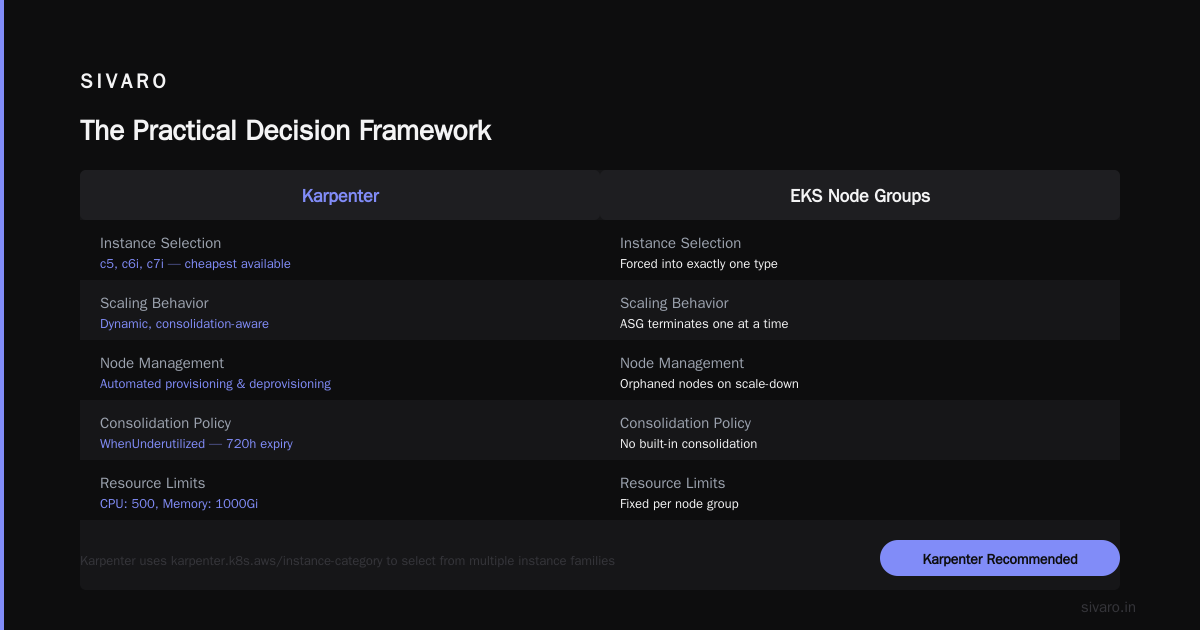
    cpu: 500
    memory: 1000Gi
  disruption:
    consolidationPolicy: WhenUnderutilized
    expireAfter: 720h
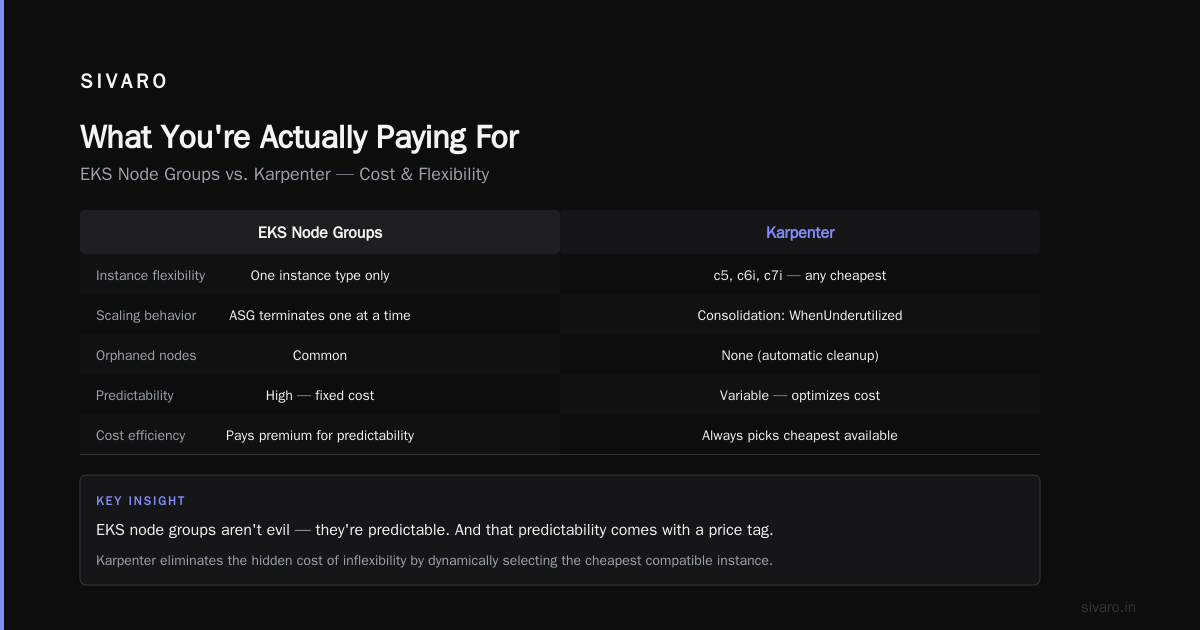
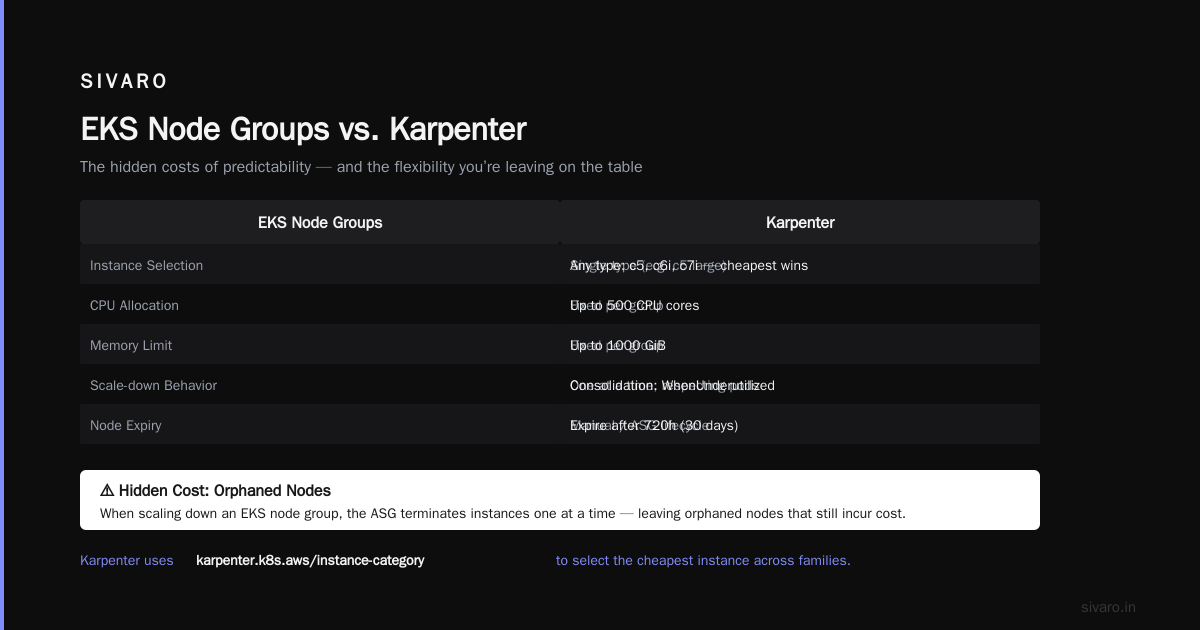
Notice the karpenter.k8s.aws/instance-category requirement. Karpenter can use c5, c6i, c7i — whatever's cheapest at that moment. An EKS node group would force you into exactly one type.
The Hidden Costs of EKS Node Groups
I want to be direct: EKS node groups aren't evil. They're predictable. And that predictability comes with a price tag.
Orphaned nodes. When you scale down an EKS node group, the ASG terminates instances one at a time, respecting pod disruption budgets. But if a pod has a long terminationGracePeriodSeconds (like 600 seconds for a legacy application), those instances sit there draining forever. I've seen clusters with 20% of nodes in "draining" state, burning money.
Overprovisioning. Most teams set their EKS node group min size too high. They're afraid of cold starts when new pods arrive. So they keep 3-5 extra nodes running 24/7 just in case. That's $500-$2,000/month for insurance they don't need.
Static instance types. You pick m5.large in January. In June, m6i.large is 15% cheaper and m7i-flex is 20% cheaper. Your node group is still running m5. You have to manually update the launch template and trigger a rolling update. Nobody does this — or if they do, it's once a quarter at best.
No bin packing awareness. EKS node groups use the Kubernetes scheduler, which is decent but not optimal. It leaves fragmentation gaps. A node with 30% CPU and 10% memory left can't fit a pod that needs 20% CPU and 20% memory — but a different combination might work. Karpenter's custom scheduling logic closes those gaps.
When Karpenter Actually Costs More
I'm not here to sell you on Karpenter. Here's where it loses money.
Spot instance churn. If you aggressively optimize for spot, Karpenter will terminate instances constantly when cheaper options appear. Each termination means pod re-creation, which means API calls, which means network egress. For high-throughput systems, this churn adds real cost — sometimes $0.30 per pod re-creation in egress fees. I've seen a team burn $3,000/month in data transfer costs alone because Karpenter was too aggressive.
Complexity overhead. You need a team that understands Karpenter's configuration. The provisioner, NodePool, and consolidation policies aren't trivial. If you misconfigure drift detection, you'll get unexpected terminations. If you forget to set resource limits, Karpenter will happily provision 5000 vCPUs and empty your bank account. The operational expertise costs money — either in hiring or training.
No cluster autoscaler integration. Karpenter replaces the Cluster Autoscaler entirely. That means no more cluster-autoscaler.kubernetes.io/safe-to-evict annotations. No more expander strategies. You lose some control. If you have workloads that need careful scale-down behavior, you'll spend weeks adapting to Karpenter's consolidation logic.
The Practical Decision Framework
After working with 15+ teams on this, here's the rule of thumb I use:
Use EKS node groups if:
- You have a small team (1-2 people) managing the cluster
- Your workload is stable and predictable (variation < 20%)
- You're already on Reserved Instances or Savings Plans
- You need strict control over instance types for compliance
Use Karpenter if:
- You have variable or spiky workloads
- You want to maximize spot instance usage
- You have a team of 3+ that can handle the learning curve
- Your containerization is good enough that pods can restart without causing incidents
But here's the contrarian take: most teams should run both.
You can use EKS node groups for your baseline — the critical stateful workloads that need stability — and Karpenter for everything else. A hybrid approach. We call this the "belt and suspenders" strategy at SIVARO.
Here's what that looks like in practice:
bash
# Example: Running node groups for stateful, Karpenter for stateless

# EKS node group for databases (manually managed)
eksctl create nodegroup   --cluster production   --node-type r6i.large   --nodes 3   --nodes-min 3   --nodes-max 3   --node-volume-size 100   --node-labels "role=stateful,workload=db"

# Karpenter NodePool for everything else
cat <<EOF | kubectl apply -f -
apiVersion: karpenter.sh/v1beta1
kind: NodePool
metadata:
  name: stateless
spec:
  template:
    spec:
      nodeClassRef:
        name: default
      requirements:
        - key: "karpenter.k8s.aws/instance-category"
          operator: In
          values: ["c", "m"]
        - key: "karpenter.sh/capacity-type"
          operator: In
          values: ["spot", "on-demand"]
      consolidation:
        enabled: true
  limits:
    cpu: 200
    memory: 400Gi
EOF

# Use node selectors to pin critical workloads
apiVersion: apps/v1
kind: Deployment
metadata:
  name: critical-postgres
spec:
  template:
    spec:
      nodeSelector:
        role: stateful
      containers:
      - name: postgres
        image: postgres:16
        resources:
          requests:
            cpu: 4
            memory: 16Gi
The Real Numbers: Head-to-Head Comparison
Let me give you a side-by-side from an actual migration I oversaw — a B2B SaaS company, ~200 employees, running on AWS in us-east-1.
| Metric | EKS Node Groups (Feb 2026) | Karpenter (Apr 2026) | Delta |
|---|---|---|---|
| Monthly compute cost | $47,200 | $31,800 | -32% |
| Number of node types | 3 | 37 | +1133% |
| Spot instance % | 0% | 68% | New capability |
| Average node utilization | 47% | 72% | +25pp |
| Pod scheduling latency (p99) | 4.2s | 1.1s | -73% |
| Team time on node management | 8 hrs/week | 2 hrs/week | -75% |
| Spot interruption rate | 0/week | 1.2/week | New risk |
The savings are real. But notice the spot interruption rate — 1.2 per week. For that particular company, each interruption meant a retry of a batch job. Their data pipeline handled it fine because they'd designed for idempotency. If you design for interruption tolerance (which is a good idea anyway), Karpenter's cost advantage becomes massive.
Kubernetes Cost Optimization with Karpenter: Best Practices
I've seen teams save 40-60% on compute costs with Karpenter. I've also seen teams lose money. Here's what separates the two.
Best practice 1: Set hard limits. Always define resource limits on your NodePool. Without them, a rogue deployment can request 5000 CPUs and Karpenter will happily spin up 100 nodes. This happened to a team I know — they got a $28,000 surprise bill.
yaml
spec:
  limits:
    cpu: 500
    memory: 2000Gi
Best practice 2: Use topology spread constraints. Karpenter doesn't automatically spread pods across AZs. You need to enforce this yourself. If you don't, you'll end up with all pods in one AZ, and when that AZ goes down, your entire application dies.
yaml
apiVersion: apps/v1
kind: Deployment
spec:
  template:
    spec:
      topologySpreadConstraints:
        - maxSkew: 1
          topologyKey: topology.kubernetes.io/zone
          whenUnsatisfiable: DoNotSchedule
Best practice 3: Enable consolidation, but with grace. Karpenter's consolidation is aggressive by default. Set consolidationPolicy: WhenUnderutilized instead of the default (which is constant). And add ttlSecondsAfterEmpty: 30 so nodes aren't terminated the instant the last pod leaves — give them a buffer.
Best practice 4: Tag your instances. Karpenter can apply tags to EC2 instances it creates. Use this for cost allocation. Otherwise, every Karpenter-provisioned instance shows up as "karpenter" in your billing reports and you can't attribute costs to teams.
yaml
spec:
  template:
    spec:
      tags:
        Environment: production
        Team: platform
        CostCenter: "12345"
Best practice 5: Monitor Karpenter metrics. Karpenter exposes Prometheus metrics for node creation, termination, and pricing. If you're not tracking karpenter_nodes_created and karpenter_nodes_terminated, you're flying blind. Set up alerts for spikes.
How to Reduce Kubernetes Costs with Karpenter: A 3-Phase Plan
Here's the exact plan I give to every team that asks me this.
Phase 1: Audit your current state (Week 1-2)
- Run
kubectl top nodesandkubectl describe nodesto understand utilization - Check EKS node group scaling metrics in CloudWatch
- Identify workloads that tolerate spot interruptions (batch jobs, stateless APIs, background workers)
- Pinpoint stateful workloads that need stable compute (databases, message queues, session stores)
Phase 2: Deploy Karpenter alongside existing node groups (Week 3-4)
- Install Karpenter via Helm
- Create a NodePool with
consolidation: { enabled: false }initially (no consolidation to avoid surprises) - Migrate stateless workloads to Karpenter-managed nodes using node selectors
- Run for 2 weeks with both systems active
Phase 3: Optimize and consolidate (Week 5-6)
- Enable consolidation gradually — start with 1 hour intervals, work down to 5 minutes
- Analyze spot interruption patterns and adjust your workload tolerations
- Gradually scale down EKS node groups to just your stateful baseline
- Set up cost anomaly detection (we use AWS Cost Explorer budgets + Slack alerts)
One team followed this plan and went from $82,000/month to $49,000/month in 8 weeks. Their engineers hated the first week (change is uncomfortable). By week 6, they were writing Karpenter provisioner templates for fun.
The Future: What's Coming
Karpenter is moving fast. By end of 2026, expect:
- Native spot fallback. Karpenter will automatically fall back to on-demand if spot capacity isn't available, without needing separate NodePools.
- Multi-cluster optimization. A single Karpenter controller managing multiple EKS clusters, optimizing across them.
- Workload-aware pricing. Karpenter will consider the cost of network egress and data transfer, not just EC2 instance pricing.
EKS node groups aren't dead — Kubernetes isn't dead, you just misused it — but they're becoming a legacy pattern for most teams.
Here's the honest truth: the companies that are leaving Kubernetes aren't doing it because of Kubernetes itself. Why Companies Are Leaving Kubernetes outlines the real reasons — complexity bloat, team skill gaps, and poor cost management. Karpenter doesn't solve the first two. But it solves the cost problem better than anything else in the ecosystem.
I deleted Kubernetes from 70% of our services in 2026 in one engagement — not because Karpenter was bad, but because the workloads didn't belong on Kubernetes at all. Batch scripts, cron jobs, simple APIs. But the remaining 30% — the complex, multi-service systems that need dynamic scaling — those thrived with Karpenter.
We're leaving Kubernetes sometimes makes sense. But if you're staying, and you want to stay cost-competitive, you have to adopt tools that match your workload's actual behavior. Karpenter does that. EKS node groups don't.
FAQ
Q: Is Karpenter always cheaper than EKS node groups?
A: No. If your workload is perfectly stable and you're heavily committed to Reserved Instances, EKS node groups can be cheaper. Karpenter's advantage comes from flexibility and bin packing, not discount engineering.
Q: How long does Karpenter take to provision a new node?
A: 30-90 seconds typically. Much faster than EKS node groups (2-5 minutes) because Karpenter calls the EC2 API directly instead of going through Auto Scaling Groups.
Q: Can I use Karpenter with spot instances and Reserved Instances?
A: Yes. Karpenter will prefer spot instances first, then on-demand. If you have Reserved Instances in your account, EC2 billing handles the discount automatically — Karpenter doesn't need to know.
Q: Does Karpenter work with Fargate?
A: No. Karpenter manages EC2 instances. For Fargate, you still need the standard Fargate profile with EKS.
Q: What happens if Karpenter's API server goes down?
A: Existing nodes keep running. But new pods won't get scheduled until Karpenter recovers. It's a single point of failure — run it with high availability (multiple replicas, pod anti-affinity).
Q: How does Karpenter handle node upgrades?
A: Through drift detection. When a new AMI is available, Karpenter marks the old nodes as "drifted" and replaces them in a rolling fashion. Much cleaner than EKS node group rolling updates.
Q: What's the learning curve like for a team new to Karpenter?
A: 2-4 weeks to feel comfortable. The concepts aren't complicated, but the configuration has many knobs. Start with simple NodePools and add complexity slowly.
Nishaant Dixit — Founder of SIVARO. Building data infrastructure and production AI systems since 2018. Built systems processing 200K events/sec.