This karpenter vs node pool autoscaling cost comparison is messier than one headline number, because Karpenter isn't a magic discount coupon — it's a different mental model for how Kubernetes decides what hardware to buy and when.
Here's what you'll get from this piece: a concrete cost breakdown of both approaches, the hidden line items nobody puts in the slide deck, a decision framework, and the failure modes that make teams regret switching too fast. If you're evaluating kubernetes cost optimization karpenter 2026 strategies for a cluster that's already bleeding money, read on.
The Real Cost Equation Nobody Shows You
Most comparison articles tally node-hour prices and call it a day. That's like comparing cars by sticker price and ignoring fuel, insurance, and resale value.
Your actual Kubernetes compute cost is:
Total Cost = Node Hours × Instance Price
           + Idle Capacity Waste
           + Consolidation Lag Cost
           + Operational Overhead (engineering hours)
           + Spot Interruption Handling Cost
Node pool autoscaling (Cluster Autoscaler + managed node groups) attacks the first term. Karpenter attacks terms two and three, and mostly ignores term one until you configure it well.
What Node Pool Autoscaling Actually Costs You
Cluster Autoscaler has been the default answer since Kubernetes 1.8. You define node groups of identical instances — say, m5.xlarge in three AZs — set min/max/desired, and CA scales the group up or down based on pending pods.
The gotcha is the word group. A node group is homogeneous. Every node has the same instance type, same capacity, same price. When a pod requests 500m CPU and 2Gi memory, CA finds a group whose nodes can fit it and adds a node. That node might be 16 vCPU. Your pod uses 2. The other 14 sit idle until the bin-packing gods smile on you.
Clusters running this pattern often have low average utilization. That gap is money.
Then there's consolidation. Cluster Autoscaler does not consolidate. If a scale-up event added three nodes for a 9 AM traffic spike and traffic drops at 11 AM, those nodes stay. CA only removes nodes when they're entirely empty of pods that can't be rescheduled elsewhere. Partial utilization is invisible to it.
And the operational overhead is real. Every new workload shape — a GPU job, an ARM-compatible service, a memory-optimized batch process — needs a new node group. New taints, new labels, new capacity planning. Node groups pile up until nobody knows which ones are still needed.
Enter Karpenter: Just-In-Time Nodes, Not Node Groups
Karpenter, which graduated from AWS to CNCF in 2024 and hit its mature 1.x line through 2025-2026, throws out the node group abstraction entirely. You give it constraints, not node groups.
The core primitive is the NodePool plus EC2NodeClass. You say "I want x86 or ARM, on-demand or spot, in these AZs, with these instance families, up to this price ceiling." Karpenter watches unschedulable pods and provisions exactly the instance type that fits — right now, for these pods, at the cheapest price that meets your constraints.
apiVersion: karpenter.sh/v1
kind: NodePool
metadata:
  name: general-workloads
spec:
  template:
    spec:
      requirements:
        - key: karpenter.sh/capacity-type
          operator: In
          values: ["spot", "on-demand"]
        - key: kubernetes.io/arch
          operator: In
          values: ["amd64", "arm64"]
        - key: karpenter.k8s.aws/instance-category
          operator: In
          values: ["c", "m", "r"]
        - key: karpenter.k8s.aws/instance-generation
          operator: Gt
          values: ["5"]
      disruption:
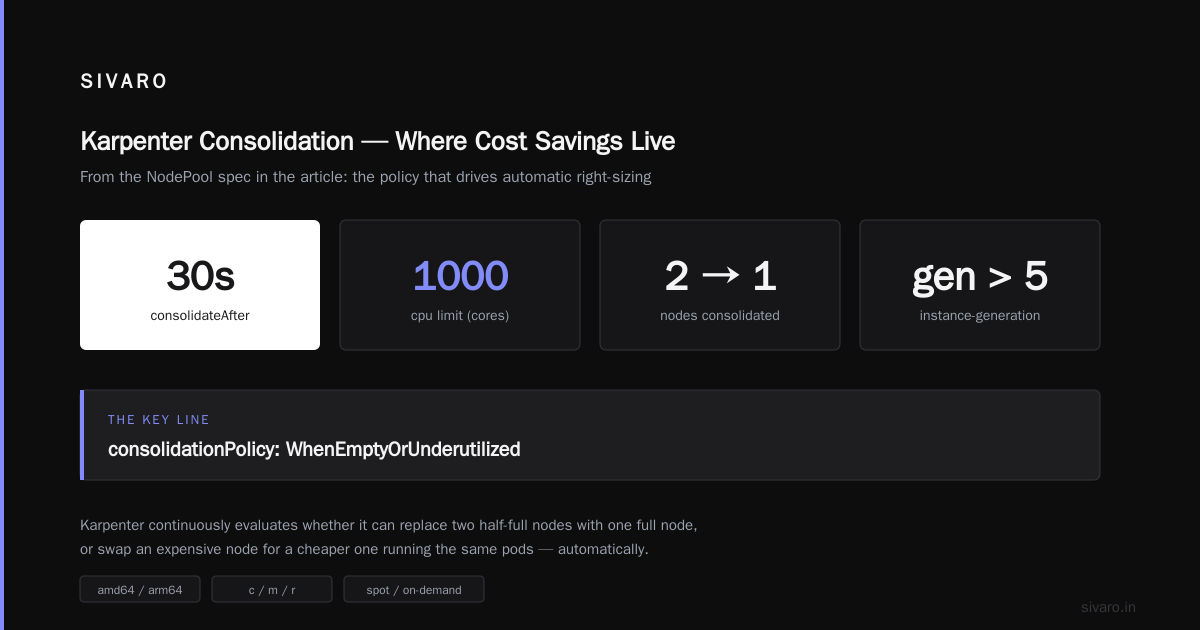
        consolidationPolicy: WhenEmptyOrUnderutilized
        consolidateAfter: 30s
  limits:
    cpu: 1000
That consolidationPolicy: WhenEmptyOrUnderutilized line is where the cost savings live. Karpenter continuously evaluates whether it can replace two half-full nodes with one full node, or replace an expensive node with a cheaper one running the same pods. It does this automatically, and on modern versions it's aggressive about it.
Head-to-Head Cost Comparison
Spot spend going up is the part nobody predicts. Karpenter is so effective at finding cheap spot capacity inside your constraints that it pushes more workloads onto spot by default. That's the win — but it comes with interruption risk you have to engineer around (more on that below).
The cross-AZ savings are a sneaky bonus. Because Karpenter packs pods based on actual remaining capacity, it tends to concentrate workloads on fewer nodes, which reduces inter-node chatter. On a chatty service mesh, that's real money.
Where Karpenter Wins Decisively
Consolidation. This is the headline. Karpenter's consolidation loop runs constantly. On node pools, you get scale-down only when nodes are fully empty. If your workload has any daily or weekly rhythm, this is where the savings come from.
Instance variety. Node pools force you to pick instance types in advance. Karpenter picks from hundreds of combinations at provisioning time. When m5.xlarge spot capacity dries up in us-east-1a, Karpenter grabs m6i.xlarge in us-east-1b without you doing anything. Node pools sit and wait.
ARM adoption. Graviton is roughly 20% cheaper than equivalent x86 on AWS, sometimes more. With node pools, migrating to ARM means building a parallel node group, tainting it, adding tolerations, and running dual-architecture builds forever. With Karpenter, you add arm64 to your requirements list and it just works — it'll provision ARM when your images support it and fall back to x86 when they don't.
Operational simplicity. A handful of NodePools can replace dozens of node groups. That's not a cost line item, but it gives engineer hours back.
Where Node Pools Still Make Sense
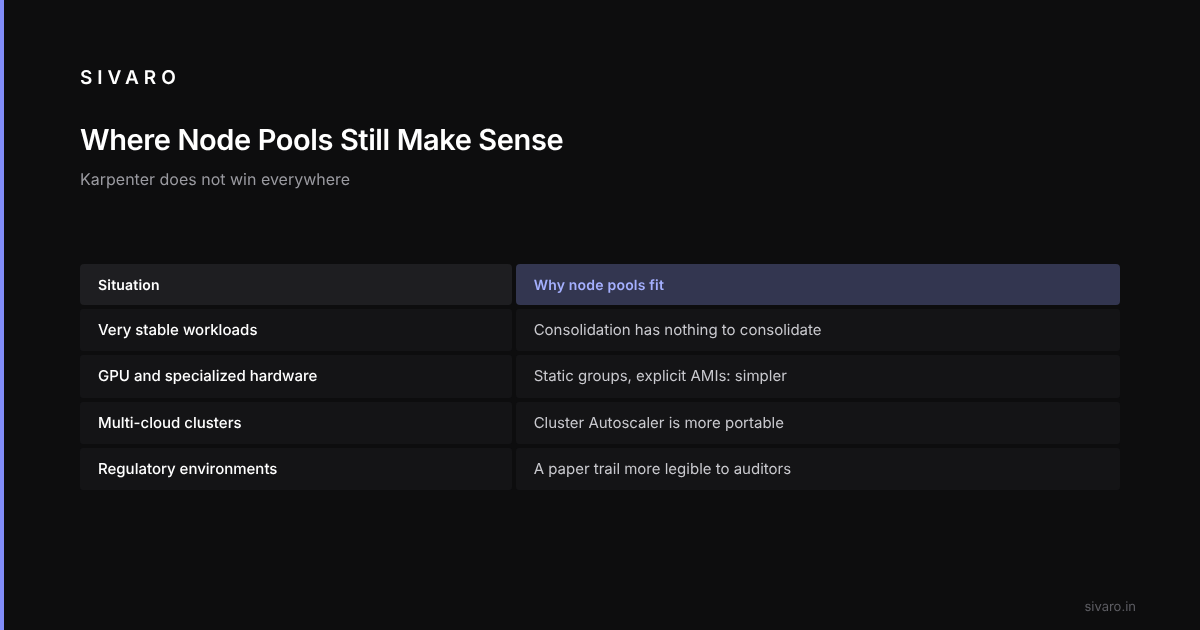
I'm not going to pretend Karpenter wins everywhere. It doesn't.
Very stable workloads. If you run a fixed set of services with flat traffic and you've already right-sized your node groups, Karpenter's consolidation has nothing to consolidate. You're paying the operational cost of learning a new tool for near-zero savings.
GPU and specialized hardware. Karpenter handles GPU nodes, but the constraint surface gets complicated fast. If you have strict instance-type requirements for ML workloads, static node groups with explicit AMIs and drivers are still simpler. Though — Karpenter's new NodeClass support for custom AMIs and launch templates in 2026 has closed much of this gap.
Multi-cloud. Karpenter is AWS-first. Azure support is maturing, and GCP support landed in preview, but if you're running the same cluster definition across three clouds, node pools plus Cluster Autoscaler is more portable. Less true every quarter, but still true today.
Regulatory environments. If your compliance team needs to prove exactly which instances ran which workloads, node pools give you a paper trail that's more legible to auditors. Karpenter's dynamic provisioning makes the audit story harder, not impossible, but harder.
The Hidden Costs of Switching to Karpenter
Every migration has friction. Here's what bites teams.
Spot interruption handling is now your problem. When Karpenter aggressively shifts workloads to spot, your applications need to handle the 2-minute termination notice gracefully. That means aws-node-termination-handler (or Karpenter's native interruption handling in 1.x), proper PodDisruptionBudgets, and preStop hooks that actually work.
apiVersion: policy/v1
kind: PodDisruptionBudget
metadata:
  name: api-pdb
spec:
  minAvailable: 75%
  selector:
    matchLabels:
      app: api-server
Skip this and you'll see periodic latency spikes that your SLO dashboard will cheerfully report as "user-facing errors."
Consolidation can be disruptive. Karpenter's default consolidation behavior evicts pods to pack them tighter. On a chatty stateful workload, that's a restart. Tune consolidateAfter and use karpenter.sh/do-not-disrupt annotations on pods that can't move.
Version churn. Karpenter moves fast. The v1beta1 to v1 migration in 2024 broke a lot of manifests. If you don't have capacity to track releases, stay a version behind and budget for quarterly upgrades.
The first-week bill might go up. Sounds wrong, but it happens. Karpenter provisions many small nodes instead of a few big ones when the workload shape is fragmented. After consolidation kicks in you drop, but the first 72 hours can look scary. Don't panic.
Practical Configuration for Cost Optimization
If you're going to run Karpenter, these settings do the most work:
# Weighted NodePools let you express preference ordering
apiVersion: karpenter.sh/v1
kind: NodePool
metadata:
  name: spot-first
spec:
  weight: 10
  template:
    spec:
      requirements:
        - key: karpenter.sh/capacity-type
          operator: In
          values: ["spot"]
      disruption:
        consolidationPolicy: WhenEmptyOrUnderutilized
        consolidateAfter: 15s
---
apiVersion: karpenter.sh/v1
kind: NodePool
metadata:
  name: on-demand-fallback
spec:
  weight: 1
  template:
    spec:
      requirements:
        - key: karpenter.sh/capacity-type
          operator: In
          values: ["on-demand"]
Run two NodePools. Higher weight = preferred. Karpenter tries spot first, falls back to on-demand when spot pricing or availability makes it the worse deal.
The other big lever: set spec.limits.cpu on your NodePools to a hard ceiling. That's your blast radius control. Karpenter will happily provision a $40/hour p4d.24xlarge GPU node if your constraints allow it and a pod asks for enough resources. Constraints are safer than trusting that you won't typo a resource request.
Migration Path That Doesn't Break Things
A clean migration, in order:
- Run Karpenter side-by-side. Install it, don't enable consolidation. Let it provision new capacity while existing node groups drain naturally. Two weeks of observation.
- Move one workload class. Pick the least critical, most bursty service. Move it to a Karpenter NodePool. Measure.
- Enable consolidation. After two weeks of stable Karpenter provisioning, turn on
WhenEmptyOrUnderutilized. Watch the disruption metrics. - Migrate the rest. Move workload classes one at a time. Keep node groups around as a fallback for 30 days.
- Delete the node groups. Last, not first.
Expect the whole migration to take weeks. It can be compressed, but the last thing you want is a Friday afternoon where both systems are behaving oddly.
A Word on 2026 Tooling
Third-party platforms have noticed this gap. Cast AI, nOps, and Kubecost now all have native Karpenter integrations, and AWS's own Compute Optimization Recommendations (which became generally available in 2025) generates NodePool suggestions based on your actual usage. If you're a smaller team without a dedicated platform engineer, those tools are worth the price — Cast AI in particular claims an average 50%+ reduction. Treat vendor claims with skepticism, but the underlying mechanics (spot orchestration + consolidation + rightsizing) are the same ones described above.
Open-source alternative: Kubecost plus Karpenter metrics gives you a decent dashboard for tracking per-node and per-workload costs. Not as turnkey, but free.
FAQ
Does Karpenter actually save money, or is it marketing?
It saves money if your workloads have variable utilization. If your workloads run at consistent 70%+ utilization on right-sized nodes, savings will be in the single digits.
Can I use Karpenter and Cluster Autoscaler at the same time?
Technically yes, practically no. They'll fight over the same nodes. During migration, run them on separate node sets — Karpenter owns new provisioners, CA owns legacy node groups. Don't let them manage the same nodes.
What's the minimum cluster size where Karpenter pays off?
Roughly 20 nodes or $15,000/month in compute. Below that, the operational complexity of running Karpenter — its controller, the CRDs, the spot interruption handling — outweighs the savings. Run node pools and revisit.
How does Karpenter handle stateful workloads?
Fine, with caveats. StatefulSet pods with local storage or strict affinity are harder to consolidate. Annotate them with karpenter.sh/do-not-disrupt: "true" and they'll be left alone. Karpenter will still provision nodes for them, just won't evict them.
Is Karpenter only for AWS?
AWS is first-class. Azure has community-supported providers. GCP support is in preview as of 2026. If you're multi-cloud, this is a real limitation and worth weighing.
What's the biggest mistake teams make with Karpenter?
Enabling aggressive consolidation on day one. You get evictions you didn't predict, on pods you didn't PDB, during hours you weren't watching. Stage it.
Do I need to change my application code for Karpenter?
No, but you need to change your operational posture. Handle SIGTERM properly, respect PodDisruptionBudgets, and don't assume your node is permanent. If you're already cloud-native, you're already there.
How do Kubernetes cost optimization best practices change with Karpenter?
Shift your attention from "right-sizing node groups" to "right-sizing resource requests." Karpenter can only bin-pack well if your pods accurately declare what they need. Overprovisioned resource requests are the #1 reason Karpenter underperforms expectations. Audit them first.
My Recommendation, Bluntly
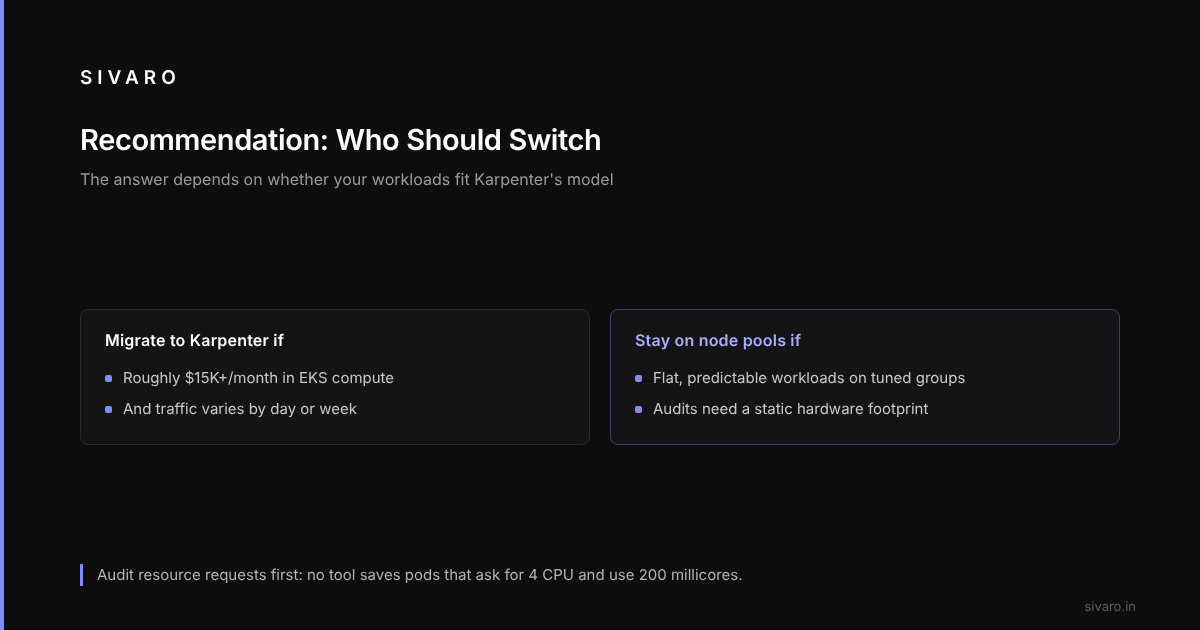
If you're running EKS at more than $15K/month in compute with any meaningful traffic variation, migrate to Karpenter. The karpenter vs node pool autoscaling cost comparison isn't close for that profile. You'll see 30-45% reductions, and you'll get engineer hours back.
If you're running flat, predictable workloads on well-tuned node groups, or you're subject to audit requirements that need a static hardware footprint, stay where you are. Karpenter will disappoint you.
The karpenter vs node pool autoscaling cost comparison in 2026 has a clear winner for most teams, but the losers aren't losing because Karpenter is bad — they're losing because their workloads don't fit the model. Know which one you are before you start the migration. The teams that get this wrong spend six months and $200K in engineer time to save 4%.
And whatever you do — audit your resource requests before you touch autoscaling. No tool saves you from pods that ask for 4 CPU and use 200 millicores.