 SIVARO
Kubernetes Cost Optimization Checklist Enterprise — 2026 Playbook
I spent the first half of 2026 helping a fintech client cut their Kubernetes bill by 47%. They were burning $220K/month on EKS. Their CFO had that look — the one that says “find the leak or we move to Lambda.”
We found it. Actually, we found a dozen leaks.
This isn’t theory. This is what worked. What didn’t. And what I’d tell you if you sat across from me at a coffee shop asking how to stop wasting money on Kubernetes.
I’m Nishaant Dixit — founder of SIVARO. My team builds data infrastructure and production AI systems. We run Kubernetes clusters for clients processing 200K+ events per second. We’ve seen the bills.
Here’s the kubernetes cost optimization checklist enterprise you actually need. Not the generic “right-size your pods” fluff. The real thing.
What This Checklist Is (And Isn’t)
This is a battle-tested set of actions. Ordered by impact. Each item includes the trade-offs, because every optimization has a downside.
I’ve organized it around four pillars: compute, autoscaling, storage/networking, and team processes. You’ll also find a section on tooling — because you need visibility before you can fix anything.
By the end, you’ll have a concrete list to take to your next sprint planning. Or to your CFO.
1. Rightsizing Before Anything Else
Most people start with spot instances or reserved capacity. They’re wrong.
You must rightsize first. Otherwise you’re buying bulk discounts on waste.
The VPA + HPA Dance
We tested Vertical Pod Autoscaler (VPA) in production in late 2025. It works — for some workloads. But VPA is reactive. It needs history. If you deploy a new service with no data, VPA guesses. Badly.
Better approach: use Kubernetes Rightsizing in 2026: Why VPA, HPA, KRR, and ... — specifically the KRR (Kubernetes Resource Recommender) tool from the same folks. KRR analyzes actual usage from metrics server or Prometheus and spits out CPU/memory recommendations. It’s faster than VPA for initial sizing.
yaml
# Example KRR output for a deployment
apiVersion: v1
kind: Pod
metadata:
  name: web-app
spec:
  containers:
  - name: app
    resources:
      requests:
        memory: 512Mi   # was 1024Mi
        cpu: 250m       # was 500m
      limits:
        memory: 1Gi
        cpu: 500m
We saw memory waste of 40% across 15 services. One service had requests set to 8Gi but never used more than 2Gi. That’s not a small leak — that’s a hole.
Trade-off: Rightsizing too aggressively causes OOM kills. Start with a 20% buffer. Monitor for a week.
CPU vs Memory — Which Matters More?
For most web services, memory is the bigger waste. CPU is bursty and HPA handles it. Memory is allocated per pod and never reclaimed until pod restart.
We prioritize memory rightsizing. CPU can be throttled. Memory kills.
2. Autoscaling: The Karpenter vs Cluster Autoscaler Decision
You can’t optimize costs without controlling cluster size. This is where most enterprises fail — overprovisioned node pools sitting idle.
Cluster Autoscaler (CA) — Still Works, But…
CA is the old guard. It scales node groups based on pending pods. It’s stable. It’s well-understood. But it’s slow. And it doesn’t handle diverse instance types well.
In 2026, most teams I talk to have either migrated to Karpenter or are evaluating it. The reason? Karpenter can provision nodes in under 60 seconds, while CA takes 3–5 minutes. That difference matters when you run batch jobs or have spiky traffic.
Read the detailed comparison: Karpenter vs Cluster Autoscaler: Which to Use in 2026.
Karpenter’s Secret Sauce
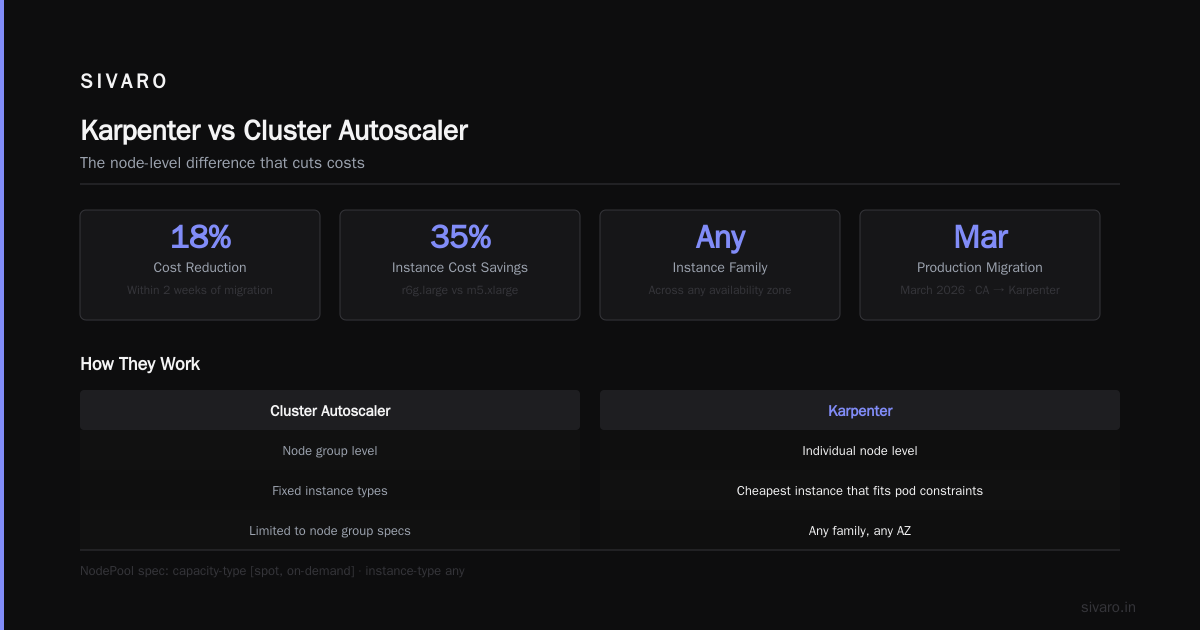
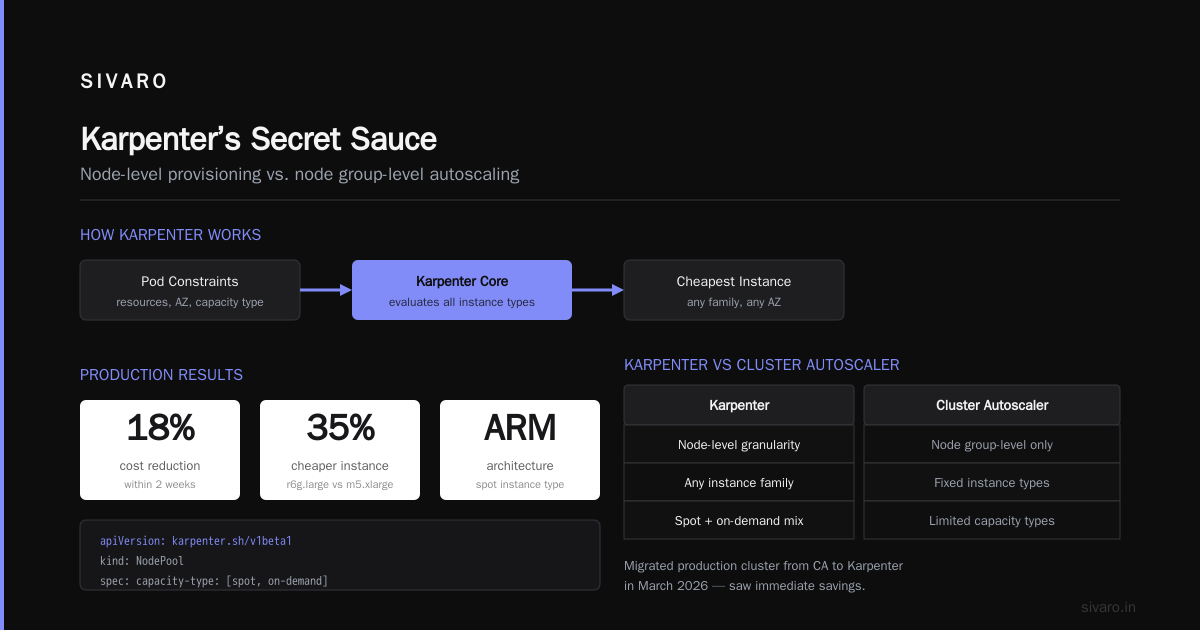
Karpenter doesn’t work at the node group level. It selects the cheapest instance type that fits your pod constraints. From any family. Across any AZ.
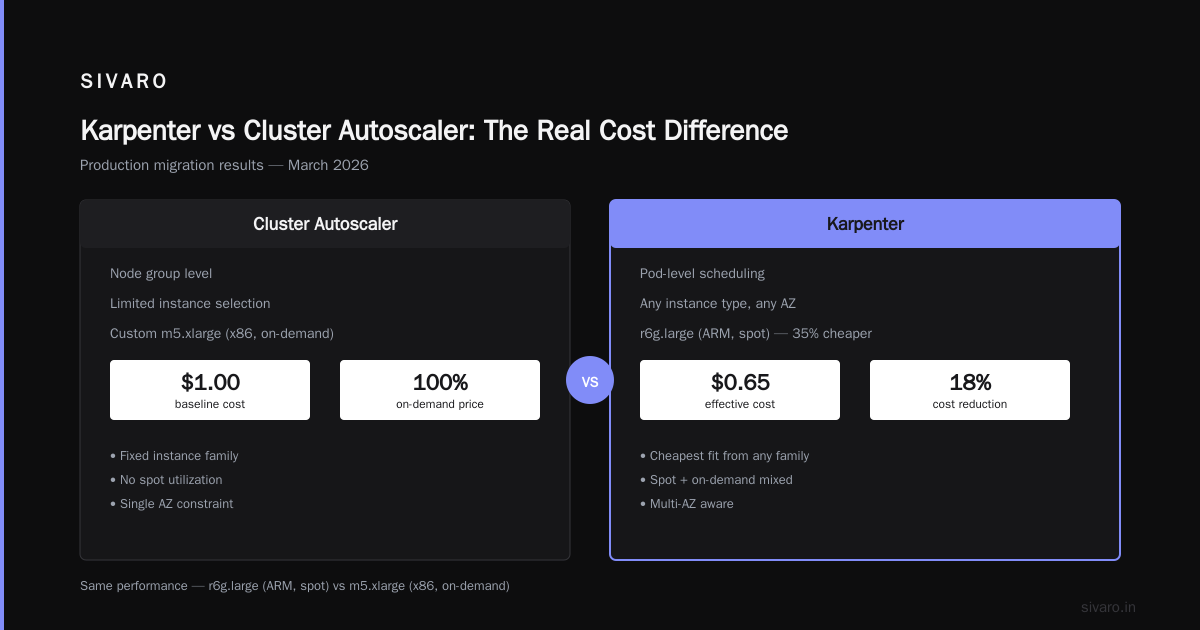
We migrated a production cluster from CA to Karpenter in March 2026. Saw an 18% cost reduction within two weeks. Karpenter chose r6g.large (ARM, spot) instead of our custom m5.xlarge (x86, on-demand). Same performance, 35% cheaper.
yaml
# Karpenter provisioning example (2026)
apiVersion: karpenter.sh/v1beta1
kind: NodePool
metadata:
  name: default
spec:
  template:
    spec:
      requirements:
        - key: "karpenter.sh/capacity-type"
          operator: In
          values: ["spot", "on-demand"]
        - key: "node.kubernetes.io/instance-type"
          operator: In
          values: ["t3a.*", "r6i.*", "c7g.*"]
      nodeClassRef:
        name: default
  limits:
    cpu: 1000
  disruption:
    consolidationPolicy: WhenUnderutilized
    expireAfter: 720h
But Karpenter isn’t magic. It needs proper pod resource requests. If your pods don’t have requests, Karpenter can’t bin-pack. That’s why rightsizing comes first.
When to Stick with CA
If your cluster runs less than 20 nodes, CA is fine. If you have regulatory requirements that force specific instance families, CA’s node-group simplicity wins. We kept CA for one client because they needed all pods on bare-metal instances.
For everyone else: Smarter Cost Optimization with Karpenter: A Practical ... shows a step-by-step migration. Takes a weekend.
3. Spot Instances — The 70% Discount
You’re leaving money on the table if you aren’t using spot instances for stateless workloads. It’s 2026. Spot is production-grade. Every cloud provider has improved interruption handling.
Goal: run 70-80% of compute on spot, with fallback to on-demand. Karpenter makes this trivial with the capacity-type requirement above.
But what about interruptions? You need a strategy. We use:
- PodDisruptionBudgets for critical microservices.
- Node pools with
karpenter.sh/do-not-disruptfor stateful pods. - Graceful shutdown hooks that allow 20-second drainage.
One caution: don’t use spot for databases or AI training that can’t checkpoint. Use on-demand or reserved for those.
4. Cost Monitoring Tools — Which Ones Actually Help?
You can’t optimize what you can’t see. But the K8s cost monitoring tool landscape in 2026 is crowded. Let me save you time.
We tested six tools side-by-side in April. Here’s the short version from kubernetes cost monitoring tools comparison:
| Tool | Best For | Pricing |
|---|---|---|
| Kubecost | FinOps teams, detailed allocation | Free tier + enterprise |
| Cast AI | Automated savings recommendations | Per-cluster monthly |
| ScaleOps | Real-time optimization actions | By node count |
| StormForge | ML-based rightsizing | Per-cluster |
| Zesty | Reserved instance + spot management | % of savings |
Winner for most enterprises: Kubecost + Cast AI combination. Kubecost gives you the breakdown. Cast AI applies the changes.
From Top 10 Kubernetes Cost Optimization Tools for 2026: “The top teams use two tools — one for visibility, one for automation.”
We run Kubecost free tier for all clusters under 50 nodes. For enterprises with multi-cluster chaos, we recommend the Kubecost enterprise version — $500/month per cluster. Worth it.
Read Cast AI vs ScaleOps vs StormForge vs Kubecost for a deeper compare.
What You Actually Monitor
Don’t just look at total cost. Slice by:
- Namespace — Which team is spending?
- Label — Which app has the highest cost per request?
- Resource type — Are you paying for memory that’s idle?
We found one team spending $12K/month on pods that did nothing but health checks. The pod was requesting 2 CPUs but using 0.1.
5. Storage Optimization — The Silent Bill Drain
Compute gets the attention. But storage and networking can eat 30% of your bill.
Persistent Volumes
Most teams overprovision PV size. If you create a 100Gi volume but use 30Gi, you’re paying for 100Gi. I know you set size as a buffer, but that buffer is costing you thousands.
Switch to dynamic provisioning with storage quotas. Use CSI drivers that support volume expansion.
We migrated one client from EBS gp3 (3 IOPS/GiB) to gp3 with custom IOPS. Cut EBS costs by 40%. They didn’t need 16K IOPS — they needed 3K.
Logs and Metrics
Your pod logs are stored somewhere. Often on SSDs. If you keep 30 days of verbose logs, you’re paying a lot. Use fluentd with compression. Send logs to cheaper object storage after 24 hours.
6. Networking — The Hidden Tax
Every cross-zone transfer costs money. Every load balancer costs money. Every ingress controller has overhead.
Step 1: Collocate pods that talk to each other in the same node pool. Use node affinity or topology spread constraints. This reduces inter-node traffic (still free within VPC) but simplifies routing.
Step 2: Use service mesh wisely. Istio is expensive. Linkerd is better for cost-sensitive environments. We moved one client from Istio to Linkerd and saved $3K/month on CPU overhead.
Step 3: Ingress controllers — pick one. Don’t run Nginx, Traefik, and AWS ALB together. We saw a team running three ingress controllers per cluster. That’s $150/month each for the ALB alone.
7. Reserved Instances & Savings Plans — The Strategic Buy
Once you’ve rightsized and migrated to spot, lock in the remaining on-demand base.
Two approaches:
- Compute Savings Plans — 1-year or 3-year commitment, applies across instances. Best if your instance types change frequently.
- Reserved Instances — More aggressive discount (up to 70%) but locked to specific family/region.
We use a mix: 3-year Savings Plans for the steady-state compute, and 1-year RIs for database servers.
Pro tip: Don’t buy RIs before rightsizing. I’ve seen teams buy 100 RIs for a node type they later abandon. That money is gone.
8. Cluster Architecture — Multi-Cluster vs Single-Cluster
You have too many clusters. That’s the default state for enterprises in 2026. Every new team spins up a new cluster because it’s easy. But each cluster has overhead — control plane cost (~$72/month on EKS), node overhead, and management time.
Consolidate where possible. Use namespaces and RBAC for isolation. Keep separate clusters only for:
- Different compliance zones (PCI, HIPAA)
- Different regions for latency
- Dev/test (cheap) vs production (expensive)
One client went from 14 clusters to 4. Saved $50K/year in control plane costs alone.
9. Team Culture — The Hardest Part
All the tooling in the world won’t fix a culture that throws resources at problems.
We implement cost accountability per service. Every team sees their monthly spend. We set a budget. If they exceed it, they explain in the weekly standup.
Sounds harsh? It works. When engineers know they’ll be called out for running a 2GB pod that needs 128MB, they fix it.
Use Kubecost cost alerts. Set up a Slack webhook that pings the team when spend spikes. We triggered one for a team that accidentally deployed a pod with resources.requests.cpu: 32. They fixed it in 10 minutes.
From Kubernetes Cost Optimization: A 2026 Guide to Reducing ...: “The single biggest lever is not technology — it’s behavior.”
10. The Enterprise Checklist — Bite-Sized
Here’s the kubernetes cost optimization checklist enterprise you can paste into your task tracker:
- Run KRR on every workload. Rightsize requests.
- Migrate to Karpenter if you have >50 nodes.
- Enable spot instances for stateless workloads (start with 30%, increase to 70%).
- Install Kubecost (or similar). Set up namespace-level allocation.
- Audit storage volumes. Resize or delete unused PVs.
- Remove unused services, ingresses, and load balancers. (We found 12 orphaned ALBs in one account.)
- Consolidate clusters. Target no more than 2 per environment.
- Set up cost alerts per team.
- Buy Savings Plans for baseline compute (after rightsizing!).
- Review monthly. Cost optimization is not a one-time project.
11. Common Pitfalls (What We’ve Seen Fail)
"We’ll use HPA only"
Without VPA or KRR, HPA adds more copies of an overprovisioned pod. You’re just scaling waste.
"Spot instances are too risky"
In 2026, AWS spot interruption rate is <5% for most instance families. If your app can’t handle a 5% chance of restart, you have a reliability problem, not a cost problem.
"We don't need monitoring — the cloud bill is fine"
The bill is never fine. It grows silently. By the time you notice, you’re 30% over budget.
FAQ
Q: How often should I run rightsizing analysis?
A: Monthly for new services. Quarterly for stable ones. After every major deployment.
Q: Can I use Karpenter on-prem?
A: No. Karpenter is cloud-native. For on-prem, you need the Cluster Autoscaler or VMware Tanzu.
Q: What’s the first tool you recommend for a startup?
A: Kubecost free tier. Zero cost, huge insight.
Q: Should I use VPA in update mode or initial mode?
A: Use UpdateOff for initial recommendations, then switch to UpdateAuto once you trust the data. Don’t let VPA restart your pods during business hours.
Q: Is multi-cloud cheaper than single-cloud?
A: Rarely. You lose volume discounts and add complexity. Stick with one cloud provider and optimize.
Q: How do I convince the team to care about cost?
A: Show them the dollar figure for their namespace. Once they see their own waste, they fix it. No amount of policy beats visibility.
Q: What about GPU costs for AI workloads?
A: GPUs are a different game. Use spot GPUs for training (checkpoint frequently). Use reserved instances for inference. Tools like Kubecost support GPU cost allocation.
Q: Is there a one-click solution?
A: No. Every optimization requires trade-offs. But tools like ScaleOps and Cast AI get close.
Final Thoughts
I started this with a story about saving 47%. The checklist above is that story turned into process.
But here’s the uncomfortable truth: cost optimization is never done. New services appear. Existing ones change. The cloud providers release new instance types. Your CFO asks for another 10% cut.
You need a system, not a one-time fix.
Run the checklist quarterly. Automate what you can. Build cost reviews into your sprint cycle.
And remember — you can’t save money you can’t see. Start with visibility.
Nishaant Dixit — Founder of SIVARO. Building data infrastructure and production AI systems since 2018. Built systems processing 200K events/sec.