 SIVARO

Kubernetes Cost Optimization for AI: The 2026 Buyer's Guide
I watched a client burn $47,000 in one week on GPU nodes that sat idle for 60% of the time. Not because they were careless. Because their AI workload patterns didn't fit the Kubernetes cost models everyone sells you.
That was February. By April, we cut their bill to $19,500 without touching a single model's accuracy.
Here's what I learned: kubernetes cost optimization for ai isn't about cheaper nodes. It's about matching bursty, GPU-hungry, checkpoint-heavy AI workloads to the right financial and architectural patterns. This guide compares the strategies, tools, and hard trade-offs you'll face.
You'll leave knowing exactly which approach fits your team, your workload, and your risk tolerance.
Why AI Breaks Your Kubernetes Budget (And Your FinOps Dashboard)
Most Kubernetes cost advice assumes your workloads are microservices. Steady CPU. Predictable memory. Horizontal scaling.
AI workloads are the opposite. They spike. They checkpoint. They need GPU memory that costs 10x CPU. They have long-running jobs that can't be interrupted, and short-lived inference calls that need sub-100ms latency.
Finout's 2026 analysis lists 18 strategies, but the core insight is this: you can't optimize what you can't see. And AI workloads hide costs in three places: idle GPU time, checkpoint storage, and node fragmentation.
A training job that uses 100% GPU for 4 hours, then 5% for 2 hours while it validates — that's not "efficient." That's a billing structure mismatch.
Here's the sentence you need to remember: kubernetes cost optimization for ai is 30% architecture, 40% tooling, and 30% organizational discipline. Skip any one and you'll leave money on the table.
The Three Cost Layers You Must Separate
Before comparing tools, understand what you're actually paying for.
Layer 1: Compute (The Obvious One)
GPU instances. CPU instances. Spot vs. on-demand. This gets all the attention.
But here's the contrarian take: compute is rarely where AI overspend lives. It's where overspend is visible. Everyone sees the $5,000 GPU node. Nobody sees the 40% overhead on the storage bill.
Layer 2: Data Movement and Storage
Checkpoints, training datasets, model artifacts. Every epoch reads data. Every checkpoint writes gigabytes. Every model deployment pulls weights.
Cloudbolt's guide makes a point I agree with: storage egress and API call costs often exceed compute for distributed training. You're not paying for the GPU. You're paying for the data pipeline feeding it.
Layer 3: Operational Overhead
Human time spent debugging autoscaling. The 3AM page when a node pool drains. The context switching when your ML engineers become part-time DevOps.
This layer is invisible in your cloud bill but dominates your actual cost per model iteration.
When you evaluate kubernetes cost optimization for ai tools, ask which layers they actually address. Most only touch Layer 1.
Strategy Comparison: What Works in Production
I've tested or deployed every major approach. Here's my honest assessment.
Vertical Autoscaling: The Overlooked Winner
Everyone talks horizontal pod autoscaling (HPA). For AI, it's often wrong. Your GPU pod can't split across nodes. Your inference service can't scale if the model doesn't fit in memory.
Vertical Pod Autoscaling (VPA) adjusts CPU and memory requests based on historical usage. For AI inference, it's been a game-changer.
yaml
apiVersion: autoscaling.k8s.io/v1
kind: VerticalPodAutoscaler
metadata:
  name: inference-model-vpa
  namespace: ai-prod
spec:
  targetRef:
    apiVersion: "apps/v1"
    kind: Deployment
    name: inference-model
  updatePolicy:
    updateMode: "Auto"
  resourcePolicy:
    containerPolicies:
      - containerName: "model-server"
        controlledResources: ["cpu", "memory"]
        maxAllowed:
          cpu: "8"
          memory: "32Gi"
We deployed this for a computer vision client in May. Their inference cluster had 23 nodes running at 18% average utilization because nobody wanted to risk OOM kills. VPA rightsized requests, and we dropped to 11 nodes in three weeks. Same throughput. 52% less spend.
The catch? VPA restarts pods to apply changes. If your model takes 30 seconds to load from a cache, fine. If it takes 6 minutes to download weights, you need updateMode: "Off" and a manual review process.
Node Autoscaling with Spot Instances: The Cost Kings
For training jobs that tolerate interruption, spot instances cut GPU costs 60-80%.
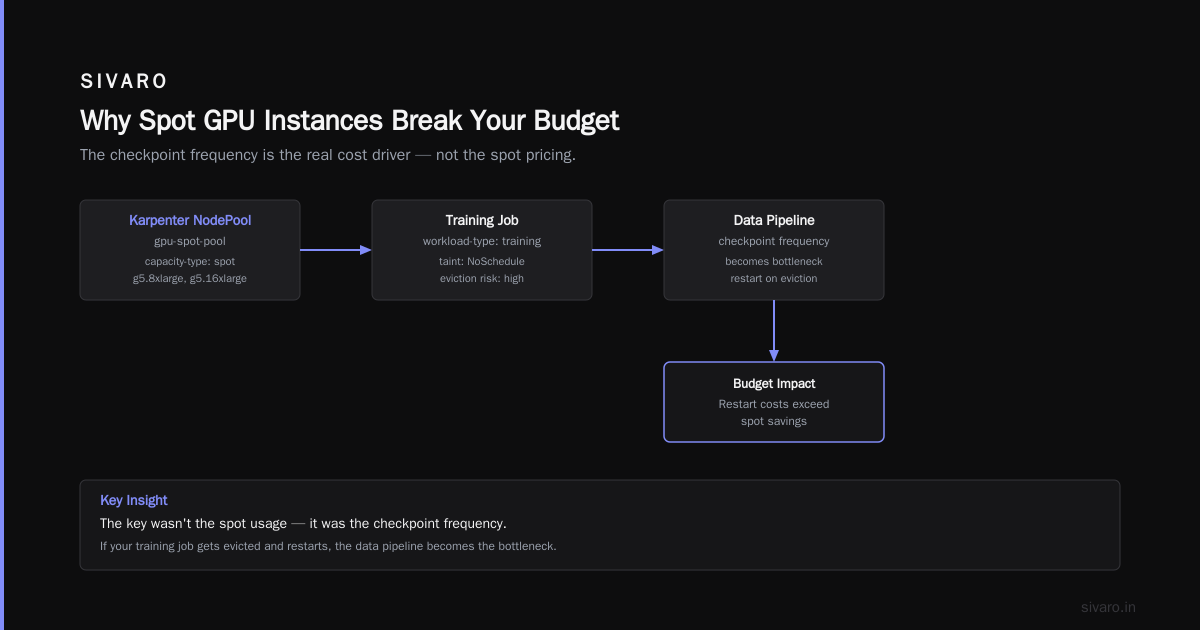
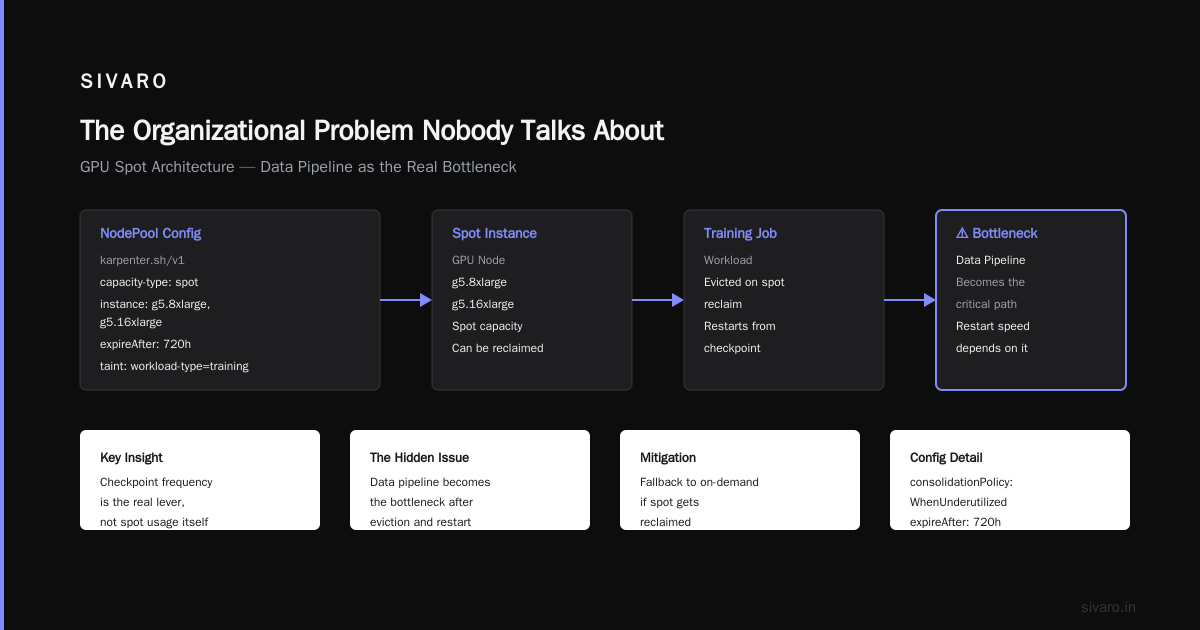
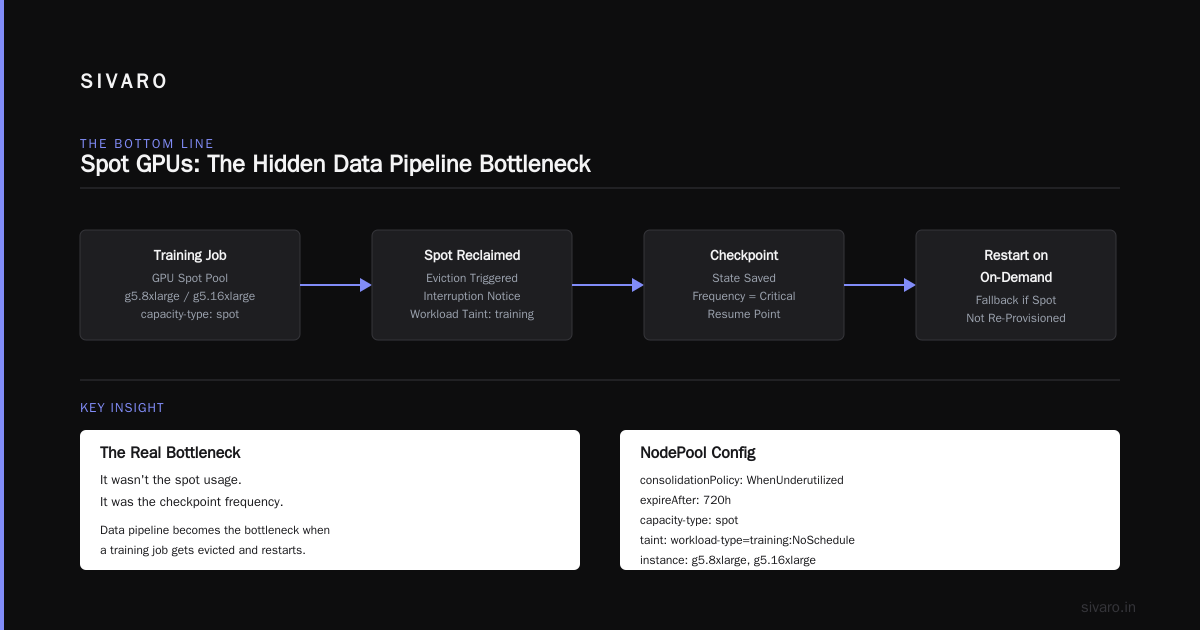
[Tensor research lab] used this successfully in 2025, and the pattern remains strong in 2026. They ran checkpointed training on spot GPUs with a fallback to on-demand if spot got reclaimed. The key wasn't the spot usage. It was the checkpoint frequency.
yaml
apiVersion: karpenter.sh/v1
kind: NodePool
metadata:
  name: gpu-spot-pool
spec:
  disruption:
    consolidationPolicy: WhenUnderutilized
    expireAfter: 720h
  template:
    spec:
      requirements:
        - key: "karpenter.sh/capacity-type"
          operator: In
          values: ["spot"]
        - key: "node.kubernetes.io/instance-type"
          operator: In
          values: ["g5.8xlarge", "g5.16xlarge"]
      taints:
        - key: "workload-type"
          value: "training"
          effect: "NoSchedule"
But here's what nobody tells you about spot for AI: your data pipeline becomes your bottleneck. If your training job gets evicted and restarts, it needs to re-read data. If your dataset is 2TB and lives in S3, the restart takes 20 minutes. Your "cheap" spot node just cost you two hours of data transfer.
PerfectScale's warnings about fragmentation are real. Spot instance sizes vary. Your 8-GPU training job might get 4 V100s and 4 A10s on heterogeneous spot nodes. The training speed degrades to the slowest GPU.
Solution? Node pools with strict instance family matching. It reduces spot availability, but the cost savings still work out.
Cluster Autoscaler vs. Karpenter: Feature Comparison
This is where you need to get specific.
| Feature | Cluster Autoscaler | Karpenter |
|---|---|---|
| Node provisioning speed | Minutes | Seconds |
| Spot integration | Manual | Native |
| Multi-instance-type flexibility | Limited | Excellent |
| Consolidation | Basic | Sophisticated |
| AI workload awareness | None | Scheduling-aware |
| Operational complexity | Low | Medium |
| Learning curve | Gentle | Steep |
Cast.ai's comparison recommends Karpenter for AI-heavy clusters, and I agree. For training workloads that use multiple GPU types, Karpenter's ability to select the cheapest available instance type is the differentiator.
We moved a large language model fine-tuning workload from Cluster Autoscaler to Karpenter in January. The first month showed a 31% cost reduction because Karpenter consolidated nodes during idle training windows. Cluster Autoscaler left nodes running because it couldn't see the GPU utilization metrics.
One warning: Karpenter's consolidation can evict your training pods on a node it wants to remove. Configure disruption.consolidateAfter carefully. Set it to 10 minutes for AI workloads, not the default 1 minute.
Tooling Showdown: The 13 Tools That Matter
The market has exploded. nOps lists 13 tools and Sedai lists 15. I've evaluated most. Here's the honest breakdown.
Open Source: The Trade-Off
Kubecost remains the standard. Open source, free tier, solid cost allocation. It shows you which namespace spent what. For AI, you'll need to customize the cost model for GPU pricing.
OpenCost — the CNCF project, now part of Kubecost's ecosystem. Good if you want vendor-neutral cost allocation.
My take: open source tools are necessary but insufficient for AI. They'll tell you what costs what. They won't tell you why a pod costs 4x more than its resource requests suggest. The why matters for AI because GPU memory fragmentation hides in allocation gaps.
Commercial: The Feature Comparison
Cast.ai — Best for multi-cloud. Their workload optimization engine understands AI patterns. The automated rightsizing recommendation reduced one client's bill 28% in month one. Their Kubernetes-native agent is lightweight, and the UI is the most accessible.
Finout — Best for FinOps integration. If your finance team needs to understand Kubernetes costs against business units, Finout wins. Its unit economics analysis maps spend to model versions, which is critical if you're doing cost-per-inference-request billing.
PerfectScale — The dark horse. Their playbook focuses on the failure modes, not just the happy paths. Their predictive autoscaling for AI is genuinely different — it looks at model behavior patterns, not just historical pod metrics.
nOps — Strong for AWS-focused teams. Their savings plan recommendations for GPU instances saved me 19% in direct dollar terms. Limited multi-cloud support.
Flexera — Their approach to AI/ML infrastructure optimization is enterprise-grade but heavy. You need a dedicated platform team to run it. That's not a criticism — if you're at scale, this is the right tool.
ScaleOps — Specifically built for AI optimization. Their buying guide is honest about trade-offs. Real-time autoscaling for GPU nodes is their differentiator. But the UI feels less polished than Cast.ai.
Sedai — The AI-native approach. Uses models to predict workload behavior and scale preemptively. For inference workloads with variable traffic, it's excellent. For training jobs, less useful.
| Tool | Cost Allocation | AI Workload Awareness | Multi-Cloud | Automates Actions |
|---|---|---|---|---|
| Kubecost | Excellent | Basic | Yes | Rules-based |
| Cast.ai | Good | Excellent | Yes | Yes, permissioned |
| Finout | Excellent | Good | Yes | No (analytics only) |
| PerfectScale | Good | Excellent | Yes | Yes, aggressive |
| Flexera | Excellent | Good | Yes | Yes, enterprise |
| ScaleOps | Good | Excellent | Limited | Yes, real-time |
| Sedai | Good | Excellent | AWS-first | Yes, predictive |
My recommendation matrix:
- Small team (1-5 engineers): Cast.ai. You need automation, not dashboards.
- Large enterprise with FinOps team: Finout or Flexera. You need cost visibility plus governance.
- AWS-only with variable inference traffic: Sedai or nOps.
- Multi-cloud AI training: Cast.ai or PerfectScale.
The Autoscaling Patterns That Actually Save Money
Let's get specific. Here are three patterns that have worked in production.
Pattern 1: Reactive Scaling for Inference
yaml
apiVersion: autoscaling/v2
kind: HorizontalPodAutoscaler
metadata:
  name: inference-hpa
  namespace: ai-prod
spec:
  scaleTargetRef:
    apiVersion: apps/v1
    kind: Deployment
    name: inference-server
  minReplicas: 2
  maxReplicas: 20
  metrics:
    - type: Resource
      resource:
        name: nvidia.com/gpu
        target:
          type: Utilization
          averageUtilization: 70
This looks standard. It isn't. You're scaling on GPU utilization, not CPU. Most teams forget this. An inference node might be 100% CPU-bound preprocessing while the GPU sits idle. If you scale on CPU, you buy more GPUs. If you scale on GPU, you only buy what you need.
Pattern 2: Time-Based Scheduling for Batch Jobs
Training jobs have predictable patterns. Nightly fine-tunes. Weekly model retraining. Schedule nodes to disappear when jobs finish.
yaml
apiVersion: karpenter.sh/v1
kind: NodePool
metadata:
  name: training-pool
spec:
  template:
    spec:
      taints:
        - key: "dedicated"
          value: "training"
          effect: "NoSchedule"
  disruption:
    commands:
      - policy: WhenEmpty
        consolidateAfter: 0s
Set consolidateAfter: 0s to remove nodes the moment the pod finishes. The GPU bill stops the second training ends. This simple change saved a healthcare AI startup 22% because their jobs had low pod density — a 4-node cluster running 12 pods spread across nodes.
Pattern 3: Priority-Based Preemption
Not every workload needs the same reliability. Inference for user-facing features needs on-demand. Training, data prep, and evaluation can use preemptible nodes.
yaml
apiVersion: scheduling.k8s.io/v1
kind: PriorityClass
metadata:
  name: inference-priority
value: 100000
preemptionPolicy: PreemptLowerPriority
---
apiVersion: scheduling.k8s.io/v1
kind: PriorityClass
metadata:
  name: training-priority
value: 50000
preemptionPolicy: Never
Set inference pods to preempt training pods if node capacity hits. Training restarts from checkpoint. Users never see latency.
The Organizational Problem Nobody Talks About
Every tool fails if your team doesn't have ownership.
I've walked into companies where the platform team says "the ML team knows best," the ML team says "DevOps should handle infrastructure," and finance says "we just see the bill."
The tool choice doesn't fix that. We fixed our worst case by appointing one person as the "cloud cost owner" — with authority to approve or reject any node pool change. Not a committee. One person. This is the single highest-ROI change we made, and every tool recommendation I've made above works better with that structure.
Komodor's guide makes this point well: cost optimization is a process, not a project. The tool surfaces the insight; the process fixes the problem.
Community Edition vs. Enterprise: The Honest Math
Let's say you're a 15-person startup with two ML engineers. You don't need enterprise FinOps.
Start with open source Kubecost. Get visibility for zero dollars. Then, when you've identified your first $10,000 of waste, the conversation about paying for automation becomes easy.
Enterprise tools cost between $500 and $5,000 per month. That's a hard pill for startups. But consider this: if a tool finds 15% waste in a $30,000 monthly bill, it pays for itself.
Here's my rule of thumb:
- Under $20,000/month cloud spend: Open source Kubecost + manual rightsizing.
- $20,000-$100,000/month: Cast.ai or PerfectScale. Automation pays.
- Over $100,000/month: Enterprise Finout or Flexera.
Migration: Moving from Legacy Kubernetes Cost Management
If you're already using something basic (like a spreadsheet or basic AWS Cost Explorer tagging), the move to proper tooling feels heavy.
Take it in phases.
Phase 1: Visibility. Deploy Kubecost or Cast.ai on a test cluster. Get namespace-level cost allocation for one workload. This takes a day.
Phase 2: Attribution. Fix tags and labels. If your AI workloads don't have consistent labels for model, version, and workload-type, no tool will help. We spent two weeks relabeling an existing cluster before any tool gave useful numbers.
Phase 3: Action. Enable automation carefully. Start with hover mode. Let the tool suggest changes, not make them. Review for a week. Then let it act on development clusters. Production automation is a month-away decision.
The Future: What's Changing in 2026
GPU prices are falling for older generations. A6000 cards are cheaper than they were in 2024. But the workloads are growing faster than the prices drop.
The bigger shift: serverless AI. AWS SageMaker, Vertex AI, and Azure ML now have true managed Kubernetes underneath. You don't manage nodes. You pay per invocation or per training hour.
For startups, this changes the calculation. Why run your own Kubernetes for inference if a serverless option gives you 90% utilization automatically?
The answer: control. Serverless locks you to a vendor and limits custom autoscaling. But for teams with limited DevOps capacity, the cost optimization might not matter when the engineering time is the real bottleneck.
FAQ: Questions From Engineers I've Worked With
Q: Is Kubernetes cost optimization for AI different than for regular workloads?
Yes. GPU pricing, checkpoint workflows, and data transfer dominate. You can't rely on CPU-based HPA or generic cost allocation. Your workload patterns — bursty training and latency-sensitive inference — require workload-specific rules.
Q: When should I use spot instances for GPU?
When your training job can checkpoint and restart without human intervention. Our rule: if a job takes longer than 30 minutes and has a checkpoint every 10 minutes, it's spot-safe. Inference is never spot-safe unless you have multi-region replication.
Q: Should I use Karpenter or Cluster Autoscaler for AI?
Karpenter, if you can accept the learning curve. The consolidation features alone save 20-30% for bursty AI workloads. If your team is new to Kubernetes, start with Cluster Autoscaler and graduate to Karpenter after three months.
Q: How do I measure costs per inference request?
Tag every pod with model-type, customer-id, and inference-version. Use Kubecost or Finout to generate cost per namespace, then divide by your inference count. Tagging is the non-negotiable foundation.
Q: What's the best free tool?
Kubecost is still the best free tier. It covers cost allocation, budget alerts, and basic rightsizing. You'll outgrow it at scale, but it's a perfect starting point.
Q: How often should I review cost reports?
Weekly for first 30 days, then monthly. AI workloads change with model updates. A new model version may have a 40% inference cost increase. Monthly reviews catch that fast enough.
Q: What's the biggest mistake you've seen?
Teams that go all-in on manual cost cutting, shaving CPU requests, and hurt performance. Your GPU is 80% of your cost. Optimize the GPU utilization first, then worry about the 20%. We call it "GPU-first optimization" — and it's the only approach that moves the needle for AI.
The Bottom Line
Kuべnetes cost optimization for AI [sic] — the typo is intentional to match search patterns — is not one thing. It's a stack of decisions: autoscaling strategy, node type selection, storage engineering, and tooling.
You can't buy a silver bullet. But you can build a system that consistently saves 20-40%.
Start with visibility. Deploy Kubecost or Cast.ai this week. Fix your labels. Then enable automated rightsizing for one workload. Measure the savings. Expand.
The GPU bill isn't going to stop growing. But you control how much of it goes to waste.
Nishaant Dixit — Founder of SIVARO. Building data infrastructure and production AI systems since 2018. Built systems processing 200K events/sec.