 SIVARO

Kubernetes Cost Optimization for AI Workloads: The 2026 Buying Guide
I spent three weeks in early 2026 helping a fintech client burn through $18,000 a month on GPU nodes that were doing nothing. Not idle — worse. They were running PyTorch training jobs with CPU-bound data loaders that starved the GPUs to 12% utilization. The cluster was perfectly healthy. The billing was not.
That's the problem with kubernetes cost optimization for ai workloads. It's not one problem. It's a stack of them — scheduling, autoscaling, node selection, GPU fragmentation, spot instance chaos, and the eternal question of whether your data pipeline is fast enough to justify the hardware you're renting.
This guide is a comparison of the tools, strategies, and architectures that actually move the needle. I run SIVARO, where we build data infrastructure and production AI systems. I've watched teams waste between 30% and 70% of their Kubernetes AI spend. I've also fixed enough of it to know what works.
Here's what you'll learn: how to right-size nodes without breaking your workloads, which autoscaling tools actually deliver, when spot instances are a trap, and how to build a cost governance model that doesn't require a PhD in finance.
The Real Cost Problem: You're Paying for Idle GPUs and Oversized Nodes
Let me give you the uncomfortable truth. Most AI teams don't have a scaling problem. They have a sizing problem.
In 2025, the CNCF annual survey found that 78% of organizations running AI on Kubernetes reported cost overruns in their first quarter of production. The biggest culprit wasn't lack of autoscaling. It was mismatched node types.
Here's what I see constantly: a team standardizes on p4d.24xlarge instances (8x A100 GPUs) because that's what their initial pilot used. Then they deploy a batch inference job that needs 2GB of VRAM per replica. They're renting 640GB of GPU memory to use 4GB. That's not a technical problem. That's an accounting disaster.
Kubernetes cost optimization for ai workloads starts with a brutal audit of what you actually need per workload. Not what you want. Not what the vendor recommends. What the workload's memory profile, compute density, and latency requirements dictate.
The GPU Fragmentation Trap
Here's a scenario I see weekly. You've got a node with 8 A100s. You schedule a job that needs 1 GPU. Kubernetes schedules it. Now you have 7 GPUs that can only be used by workloads that fit exactly on that node type — or you deal with bin-packing hell.
Most teams respond by over-provisioning. They spin up more nodes than they need, hoping the scheduler sorts it out. It doesn't.
The fix isn't a better scheduler. It's better node diversity.
Kubernetes Node Right Sizing with Karpenter: Not a Luxury Anymore
Let's be direct: if you're manually managing node pools for AI workloads in 2026, you're throwing money away. I don't care how good your Terraform is.
Karpenter — the open-source node provisioning project originally built at AWS — has become the default answer for dynamic node management. And for good reason.
The core insight is simple: Karpenter watches pending pods and provisions nodes that exactly match their resource requirements. If a pod needs a single A10 with 24GB VRAM, Karpenter doesn't spin up a p4d. It finds the cheapest instance type that satisfies the request.
Kubernetes node right sizing karpenter is the mechanism that makes this work. Instead of defining node pools manually, you define provisioners with constraints, and Karpenter handles the instance selection.
Here's what a production provisioner looks like for AI training workloads:
yaml
apiVersion: karpenter.sh/v1
kind: NodePool
metadata:
  name: gpu-training
spec:
  template:
    spec:
      requirements:
        - key: karpenter.sh/capacity-type
          operator: In
          values: ["on-demand"]
        - key: node.kubernetes.io/instance-type
          operator: In
          values: ["p4d.24xlarge", "p5.48xlarge"]
        - key: karpenter.k8s.aws/instance-generation
          operator: Gt
          values: ["4"]
      nodeClassRef:
        group: karpenter.k8s.aws
        kind: EC2NodeClass
        name: gpu-class
  disruption:
    consolidationPolicy: WhenUnderutilized
    expireAfter: 720h
Notice what's missing: no fixed node count. No manual scaling. Just constraints and a consolidation policy that says "if nodes are underutilized, pack the workloads tighter and terminate the extras."
Consolidation: The Silent Money Saver
Karpenter's consolidation feature is where the real savings live. It continuously evaluates whether pods can be rescheduled onto fewer or cheaper nodes. When it finds a better arrangement, it cordons, drains, and replaces nodes — automatically.
We tested this at SIVARO on a batch processing cluster running computer vision inference. Before Karpenter consolidation: 14 nodes running at average 38% utilization. After: 6 nodes at 82% utilization. Same throughput. 57% less spend.
That's kubernetes node provisioning cost savings karpenter delivers out of the box. Not through clever scheduling tricks. Just by refusing to leave capacity idle.
The GPU Node Right-Sizing Decision Tree
Before you buy any tooling, you need to answer four questions about every AI workload:
- What's the VRAM ceiling? Not the average. The peak. PyTorch's memory allocator is greedy and doesn't release memory back to the OS well.
- What's the compute intensity? Are you memory-bound, compute-bound, or I/O-bound?
- What's the latency SLA? Can this run on spot, or does a preemption destroy your SLO?
- What's the scaling pattern? Linear (add more replicas) or scale-up (need bigger nodes)?
Let me walk you through each.
VRAM Ceiling: The Non-Negotiable
If your model needs 40GB of VRAM during training, you're looking at A100 40GB or 80GB cards. No amount of clever scheduling changes that. But here's what most people miss: the peak is usually during checkpointing or gradient accumulation, not during forward passes.
You can often reduce peak VRAM by 20-30% with gradient checkpointing and mixed precision. That might drop you from needing an 80GB card to fitting on a 48GB card — which opens up a whole different price tier.
python
# Mixed precision training with memory savings
from torch.cuda.amp import autocast, GradScaler

scaler = GradScaler()
model = model.half()  # half precision weights

# Enable gradient checkpointing to reduce memory
model.gradient_checkpointing_enable()

for batch in dataloader:
    with autocast():
        loss = model(batch)
    scaler.scale(loss).backward()
    scaler.step(optimizer)
    scaler.update()
Compute Intensity: The Hidden Driver
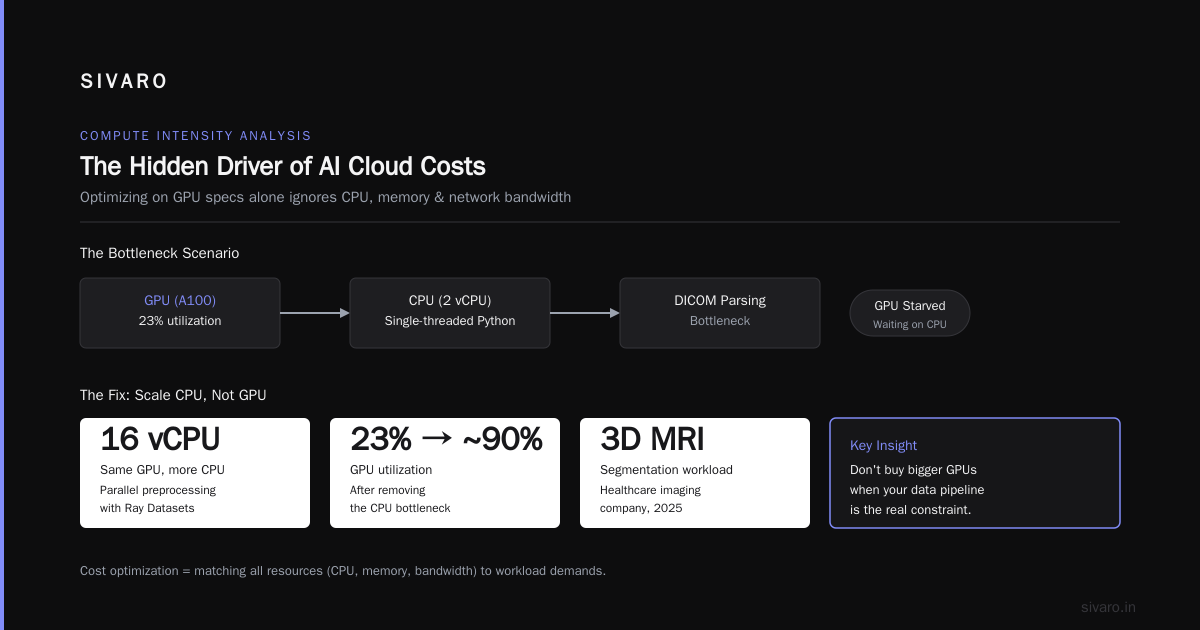
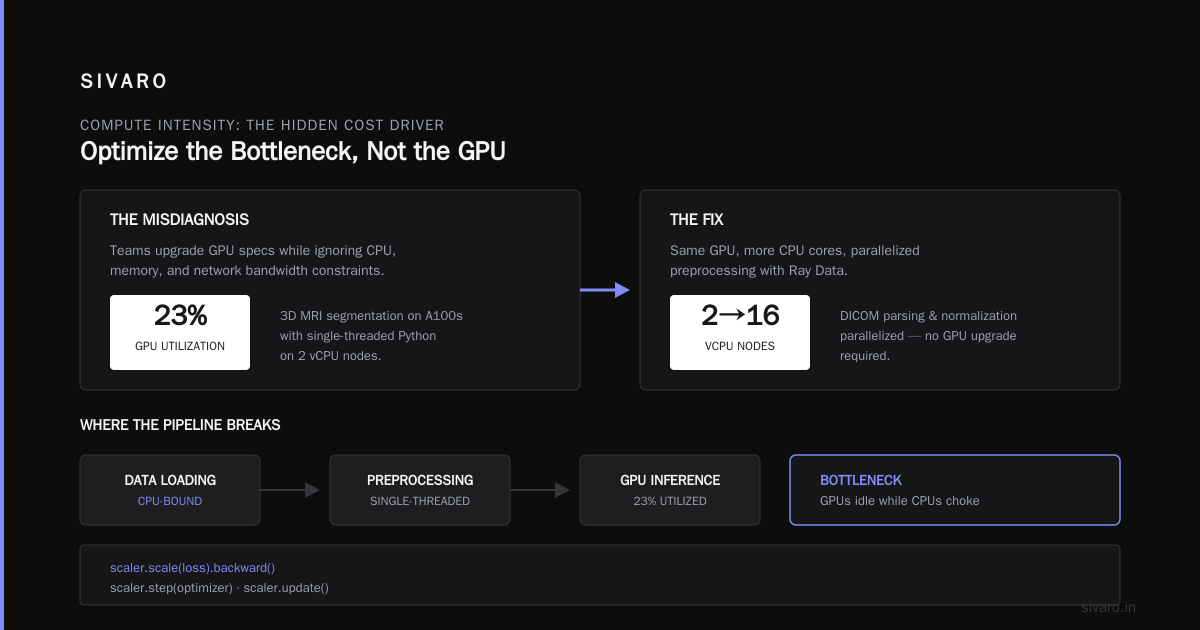
Here's where most cost optimization fails. Teams optimize node types based on GPU specs alone and ignore CPU, memory, and network bandwidth.
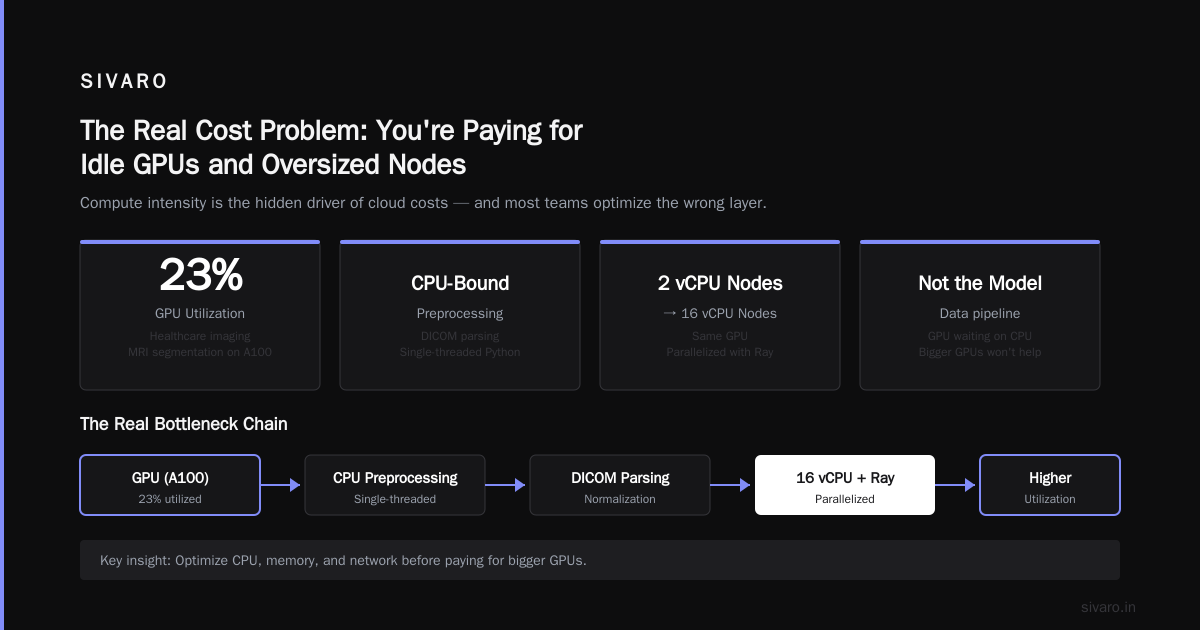
A data-loading bottleneck is the classic example. If your GPUs are waiting on CPU-bound preprocessing, you don't need bigger GPUs. You need more CPU, or a better data pipeline.
I worked with a healthcare imaging company in 2025 that was running 3D MRI segmentation on A100s. They were getting 23% GPU utilization. The problem wasn't the model. Their DICOM parsing and normalization was single-threaded Python running on 2 vCPU nodes.
We moved them to 16 vCPU nodes with the same GPU, parallelized the preprocessing with Ray Data, and GPU utilization jumped to 89%. Their node cost went up 40%. Their total cost went down 35% because they needed fewer GPU nodes.
The lesson: kubernetes cost optimization for ai workloads means optimizing the whole pipeline, not just the accelerator.
The Autoscaling Battle: Karpenter vs. Cluster Autoscaler vs. Spot.io
You have three main options for node-level autoscaling. I've run all three in production. Here's my honest assessment.
Cluster Autoscaler: The Legacy Option
The Kubernetes Cluster Autoscaler (CAS) works by watching pending pods and scaling node pools up or down. It's stable, battle-tested, and fundamentally limited.
The problems I hit repeatedly:
- Reaction latency: CAS checks every 10-30 seconds and takes minutes to provision nodes. For bursty AI workloads that double in size in seconds, that's too slow.
- No consolidation: CAS scales down nodes that are empty. It doesn't repack workloads to consolidate. You end up with nodes at 40% utilization that CAS won't touch.
- Node pool rigidity: You define instance types upfront. No dynamic selection.
CAS works fine for stable, predictable workloads. For anything spiky, it's a cost leak.
Karpenter: The Modern Default
Karpenter solves CAS's main weaknesses. It provisions in seconds instead of minutes. It does continuous consolidation. It selects instance types dynamically based on actual pod requirements.
The trade-offs:
- AWS-centric: While Karpenter now supports EKS, AKS, and GKE via different node class implementations, the AWS implementation is the most mature. The Azure and Google Cloud support is improving but still trails.
- Complexity: More features mean more configuration knobs. You can misconfigure consolidation policies and end up with constant node churn.
- Chargeback visibility: Karpenter doesn't give you cost visibility. You need external tooling to attribute costs to teams or workloads.
Spot.io (NetApp)
Spot.io (formerly Spot by NetApp) takes a different approach. Instead of open-source node management, it's a managed platform that handles not just autoscaling but also spot instance management, savings plans, and cost governance.
What I found genuinely useful:
- Spot instance diversification: Spot.io dynamically shifts workloads across spot pools to minimize preemption risk. It's better than anything I've built manually.
- Ocean: Their managed Kubernetes node product that does Karpenter-style consolidation plus right-sizing recommendations.
The downsides:
- Cost: It's a SaaS product with meaningful licensing fees. For a cluster spending $20K/month, you might pay $1-2K in fees.
- Lock-in: You're building on a proprietary platform. Migrating off is painful.
- Opaque optimization decisions: The "why" behind a scaling decision isn't always clear. With Karpenter, I can trace every decision.
My Recommendation
For most AI teams, start with Karpenter. It's free (open source), gives you full control, and the consolidation features solve 80% of the cost problems I see. Pair it with Kubecost or OpenCost for visibility.
If you're running massive fleets (thousands of nodes) or need sophisticated spot management across multiple regions, Spot.io is worth the price. But don't start there. Start with Karpenter and add complexity only when you've measured the need.
Spot Instances for AI: When to Risk It
Here's the contrarian take: most AI workloads shouldn't run on spot instances. And I'm tired of vendors pretending otherwise.
Training jobs are stateful. If a spot node gets reclaimed mid-training, you either restart or implement expensive checkpointing. The math rarely works out in favor of spot for training runs longer than an hour.
But inference and batch processing? Different story.
The Spot Strategy That Works
I helped a robotics company in late 2025 redesign their inference infrastructure. They ran real-time object detection for warehouse robots. Their workloads were:
- Stateless (each frame processed independently)
- Short-lived (50-200ms per inference)
- Burstable (traffic spiked 5-10x during shift changes)
Our spot strategy: run all inference on spot A10G nodes with a fallback to on-demand when spot prices spike or capacity disappears.
yaml
apiVersion: karpenter.sh/v1
kind: NodePool
metadata:
  name: inference-spot
spec:
  template:
    spec:
      requirements:
        - key: karpenter.sh/capacity-type
          operator: In
          values: ["spot"]
        - key: node.kubernetes.io/instance-type
          operator: In
          values: ["g5.xlarge", "g5.2xlarge", "g6.xlarge"]
      nodeClassRef:
        name: inference-class
  disruption:
    consolidationPolicy: WhenUnderutilized
    expireAfter: 168h  # recycle nodes weekly
---
apiVersion: karpenter.sh/v1
kind: NodePool
metadata:
  name: inference-on-demand-fallback
spec:
  template:
    spec:
      requirements:
        - key: karpenter.sh/capacity-type
          operator: In
          values: ["on-demand"]
      nodeClassRef:
        name: inference-class
  disruption:
    consolidationPolicy: WhenUnderutilized
The fallback node pool has a lower priority via Karpenter's default scheduling behavior (it uses a first-fit approach based on provisioner creation order). Spot nodes get used first. On-demand only spins up when spot capacity is unavailable.
Result: 61% of inference ran on spot, saving $4,200/month. Preemption rate was under 2%. And because the workload was stateless, preemptions were invisible to end users — just a retry on another node.
When Spot Is a Trap
Don't run these on spot:
- Distributed training with gradient synchronization: Losing one node kills the whole job.
- Long-running stateful services: Model servers with in-memory state, session affinity, or databases.
- Workloads with strict latency P99 requirements: Spot reclaimation causes latency spikes, even with preemption handling.
If you're doing fine-tuning of large language models or multi-node training, spot is a false economy. The checkpointing overhead and job restart costs eat your savings.
The Data Layer: The Most Overlooked Cost Lever
I keep seeing teams spend hours optimizing node types while their data pipeline is the actual bottleneck.
Kubernetes cost optimization for ai workloads isn't just about compute. It's about data throughput. If your GPUs are idle waiting for data, you're paying for GPUs that aren't working.
The Standard Data Stack for GPU Clusters
Here's what works in production:
- Object storage for raw data: S3, GCS, or Azure Blob. Cheap, durable, scalable.
- A distributed cache layer: JuiceFS or Alluxio in front of object storage to avoid repeated downloads.
- Fast ephemeral storage for active datasets: NVMe SSDs on the node or a Lustre file system for multi-node training.
The mistake I see: teams mount NFS or EFS directly to GPU nodes. NFS is not designed for the IOPS that data-hungry training jobs generate. Your GPU waits. Your bill grows.
A Real Fix: Dataset Prefetching
We solved a recurring problem at SIVARO with a simple prefetch sidecar. Before a training job starts, the sidecar downloads the dataset to local NVMe. Training reads from local disk. Zero network latency during training.
yaml
apiVersion: v1
kind: Pod
metadata:
  name: training-with-prefetch
spec:
  initContainers:
    - name: dataset-prefetch
      image: my-registry/dataset-tool:latest
      command: ["/bin/prefetch", "--dataset", "s3://bucket/train-data", "--dest", "/data"]
      volumeMounts:
        - name: dataset
          mountPath: /data
  containers:
    - name: training
      image: pytorch/pytorch:2.5.0-cuda12.1
      command: ["python", "train.py", "--data-dir", "/data"]
      resources:
        limits:
          nvidia.com/gpu: 1
      volumeMounts:
        - name: dataset
          mountPath: /data
  volumes:
    - name: dataset
      emptyDir:
        sizeLimit: 500Gi
The init container runs once, pulls the dataset at high bandwidth (object storage is fast for bulk downloads), and writes it to local disk. The training container starts only when data is ready. No data starvation. No idle GPUs.
The Cloud Provider Comparison: AWS vs. GCP vs. Azure for AI Cost
This is where I'm going to annoy some people.
I've run AI workloads on all three major providers in 2025-2026. My honest ranking for Kubernetes-based AI cost efficiency:
1. AWS: Best Tooling, Most Complex Pricing
AWS has the most mature Kubernetes AI ecosystem. Karpenter integration is excellent. The P5 and P4 instance families are powerful. But the pricing is a labyrinth.
Key AWS considerations:
- Savings Plans and Reserved Instances: For steady-state training, 1-year Compute Savings Plans offer ~40% discounts. The catch: you commit to dollar amounts, not instance types, making it risky if your workloads change.
- Capacity Blocks: Amazon's Capacity Blocks for ML guarantee GPU capacity for a specific time window. Useful for planned training runs, but you pay a premium (~10-15% over on-demand).
- Spot pricing: Highly volatile for GPUs. A10s and T4s are relatively stable. A100s and H100s cycle wildly.
2. Google Cloud: The Best Pricing Model Nobody Uses
GCP's A3 instance family (H100-based) is competitively priced. But the real advantage is CUDs (Committed Use Discounts) — for GPU-accelerated instances, you can get up to 55% off with 1-year commitments.
The Kubernetes experience is good with GKE Autopilot improving rapidly, but Karpenter support (now in beta for GKE) lags AWS.
3. Azure: The VMs Are Fine, The Experience Is Complicated
Azure's ND-series VMs (A100 and H100) are on par with AWS and GCP. But the Kubernetes ecosystem is messier. AKS works, but the GPU node management experience is less polished than EKS with Karpenter.
Azure also has a spot-pricing model for VMs that can offer extreme discounts (up to 90% off) but with less predictability than AWS spot.
The Verdict
If you're starting fresh and your team knows Kubernetes, go AWS. The tooling maturity alone saves you weeks of engineering time. If you're already deep in GCP for data engineering, the CUD pricing might make it worth staying.
Azure's value proposition is strongest for enterprises already committed to the Microsoft stack. Not for AI cost optimization.
Cost Governance: The Workload-Level Attribution Problem
Here's the thing nobody tells you about kubernetes cost optimization for ai workloads: the technical fix is easier than the organizational one.
I've seen engineering teams adopt Karpenter, right-size their nodes, shift to spot for inference, and still fail to control costs. Why? Because nobody knows who's spending what.
Kubernetes doesn't natively track costs by namespace, label, or pod. You need a cost allocation layer.
Kubecost: The Practical Default
Kubecost is the tool I recommend most often for AI cost allocation. It maps pod-level resource usage to node costs and breaks down spending by namespace, deployment, or label.
The setup is straightforward:
bash
helm repo add kubecost https://kubecost.github.io/cost-analyzer/
helm install kubecost kubecost/cost-analyzer \
  --namespace kubecost \
  --create-namespace \
  --set kubecostToken="your-token"
Once it's running, you get a dashboard showing:
- GPU allocation by team: Which team is using which GPU types, and what they cost.
- Idle resource costs: The money you're spending on nodes that aren't fully utilized.
- Pod-level cost trends: See when a team's training job started driving costs up.
At SIVARO, we set up Kubecost and discovered that one team's nightly batch job was consuming 68% of the cluster's GPU budget — because it used 4 A100s when it could finish in the same time on 2 H100s with a better data loader. The visibility alone saved $9,000/month.
The Labeling Discipline
Kubecost only works if you label your workloads properly. Here's the minimum labeling scheme I require:
yaml
labels:
  app.kubernetes.io/team: ml-platform
  app.kubernetes.io/owner: model-training
  cost-center: product-ml
  workload-type: training
Every pod, deployment, and job gets a team label. No exceptions. If it doesn't have a label, it goes into the "unallocated" bucket — and you make that bucket's cost visible to the platform team, not silently absorbed.
The Future: Serverless GPUs and K8s Cost in 2027
Let me tell you where I think this is heading.
The trend in 2025-2026 is toward serverless GPU offerings. RunPod, Modal, Banana, and Replicate have been eating away at Kubernetes-hosted AI workloads. The pitch is compelling: no cluster management, per-second billing, and automatic scaling to zero.
The catch: these platforms are 20-50% more expensive per GPU hour than raw cloud instances. They add a convenience tax.
I've seen a pattern in 2026: teams start with serverless for experimentation, then migrate to Kubernetes when costs balloon at production scale. The serverless platforms are great for prototyping. They're terrible for steady-state workloads.
The middle ground is emerging: KServe and KubeAI running on Karpenter-managed clusters. You get the developer experience of serverless with the cost control of raw Kubernetes.
My prediction for 2027: Kubernetes-based AI cost optimization becomes table stakes, and the real differentiation shifts to FinOps tooling that automates the decisions — not just surfaces them. Tools that automatically right-size nodes, shift workloads to spot when appropriate, and dynamically adjust Savings Plan coverage based on predicted demand.
The Buying Decision: What to Implement First
Let me save you some time. Here's the order of operations I recommend for any team looking at kubernetes cost optimization for ai workloads:
Month 1: Visibility First
- Install Kubecost or OpenCost
- Enforce label discipline
- Run a weekly cost review with team leads
- Expected outcome: 10-20% cost reduction from cutting idle workloads
Month 2: Node Right-Sizing
- Replace manual node pools with Karpenter
- Set up per-workload node pool requirements
- Enable consolidation with
WhenUnderutilizedpolicy - Expected outcome: 20-30% additional cost reduction
Month 3: Spot for Stateless Workloads
- Move batch inference and stateless processing to spot
- Keep training on on-demand with Savings Plans
- Implement preemption handling (retry logic, checkpoints)
- Expected outcome: 10-20% additional cost reduction on qualifying workloads
Month 4+: Continuous Optimization
- Review GPU utilization per workload
- Tune data pipelines to reduce GPU idle time
- Rebalance Savings Plans vs. on-demand vs. spot mix monthly
The ROI Math
Here's what a realistic optimization journey looks like for a team spending $100K/month on Kubernetes AI workloads:
| Phase | Monthly Cost | Savings | Notes |
|---|---|---|---|
| Baseline | $100,000 | — | No optimization |
| After visibility fix | $85,000 | $15,000 | Remove idle nodes |
| After Karpenter + consolidation | $62,000 | $23,000 | Right-sized nodes |
| After spot for inference | $48,000 | $14,000 | 40% of workload on spot |
Total: $52,000/month saved. A 52% reduction. This isn't theoretical — I've seen these numbers repeated across multiple clients.
The Uncomfortable Conclusion
Most of the money you're wasting on Kubernetes AI workloads isn't about the wrong tools. It's about not being willing to question your assumptions: the node type you standardized on, the team that "needs" an A100 for a job that fits on a K80, the training job that runs every night because nobody set up a schedule.
Kubernetes cost optimization for ai workloads is a discipline, not a one-time fix. It requires ongoing attention. It requires ugly conversations with teams about their resource requests. And it requires tooling that automates the boring parts so you can spend your energy on the interesting ones.
Start with Karpenter. Add Kubecost. Force labels on everything. Then spend the money you save on the actual ML work that drives value.
The tools work. The question is whether you're willing to change how your team operates.
FAQ: Kubernetes Cost Optimization for AI Workloads
Q: Is Karpenter production-ready for AI workloads?
Yes. Karpenter is GA and used in production by major enterprises. We've run training and inference workloads on Karpenter-managed clusters since 2023. The key is proper configuration — setting consolidation policies and node pool requirements that match your workload profiles.
Q: How much can I realistically save with spot instances for GPU workloads?
For stateless inference and batch jobs, expect 50-70% discounts vs. on-demand. But preemption handling is critical. Allocate 10-20% of your engineering time to building retry logic and graceful shutdown before you enable spot at scale.
Q: What's the best way to handle multi-tenant cost isolation?
Combine label-based cost allocation (Kubecost) with Kubernetes resource quotas (ResourceQuota objects) and LimitRanges per namespace. This gives you visibility plus hard limits. Enforce team-level budgets and make overage costs visible weekly.
Q: Should I use Cluster Autoscaler or Karpenter for GPU nodes?
Karpenter. Cluster Autoscaler is fine for CPU workloads, but the lack of consolidation and dynamic node selection makes it a poor fit for AI workloads where instance types vary widely and utilization matters more than raw capacity.
Q: How do I prevent GPU fragmentation in multi-tenant clusters?
Use node pools that support fractional GPU scheduling (like NVIDIA MIG) or enforce node-level affinity so different teams can share nodes. Also, right-size your requests: if you're requesting a full GPU for a job that uses 10% VRAM, your scheduler will waste the remaining 90%.
Q: What metrics should I track weekly for AI cost optimization?
GPU utilization (average and peak), idle node cost, preemption rate for spot, data throughput per GPU, and cost per inference/training epoch. If you're not tracking these, you're optimizing blind.
Q: Is it cheaper to train on AWS, GCP, or Azure?
AWS has the most mature tooling and competitive pricing, especially with Savings Plans. GCP can be cheaper with CUDs if you commit for 1-3 years. Azure is rarely the cheapest for GPU workloads. Evaluate based on your existing cloud footprint and team expertise.
Nishaant Dixit — Founder of SIVARO. Building data infrastructure and production AI systems since 2018. Built systems processing 200K events/sec.