 SIVARO
Kubernetes for AI Agent Deployment: A Production Guide
Introduction
I spent three months in 2025 trying to run a fleet of LLM-powered agents on bare VMs. It was a disaster. Agents crashed mid-conversation, memory leaked like a sieve, and scaling meant praying and restarting everything at 2 AM. Then I moved the whole stack to Kubernetes. Night and day.
Here's the thing: AI agents aren't just stateless API calls. They hold context, maintain tool connections, call external APIs, and sometimes hallucinate themselves into infinite loops. Kubernetes handles that chaos better than any alternative I've tested. But it's not a silver bullet — you have to design for it.
This guide is what I wish someone had handed me in 2024. It covers architecture, observability, scaling, and the real gotchas that show up when your agent starts talking to customers. I'll reference production systems we've built at SIVARO (processing 200K events/sec), plus research from Google, Anthropic, and the open source community.
By the end, you'll know exactly how to set up kubernetes for ai agent deployment — including the hard lessons that cost me weeks of debugging.
Why Kubernetes for AI Agents Isn't Optional Anymore
Most people think AI agents are just fancy REST endpoints. They're wrong.
An agent in production does this:
- Listens to a request (from user, queue, webhook).
- Prompts an LLM (maybe multiple times).
- Calls tools (APIs, databases, file systems).
- Maintains conversation state across turns.
- Handles failures, timeouts, retries.
- Logs everything for debugging and compliance.
That's not a stateless microservice. It's a stateful, compute-intensive, unpredictable workload. Kubernetes gives you memory limits, CPU quotas, health checks, pod lifecycles, and — critically — the ability to kill and restart a misbehaving agent without losing all context (if you design for it).
I've seen teams try to run agents on serverless functions (Lambda, Cloud Run). They hit a wall at ~50 concurrent sessions because cold starts and state management become untenable. Building Effective AI Agents from Anthropic makes the same point: agent loops are inherently non-deterministic in duration. You need a runtime that can hold a connection for minutes or hours.
Kubernetes is that runtime.
The Two Patterns That Actually Work
After deploying agents for six different clients in 2025-2026, I've landed on two fundamental patterns. Everything else is a variation.
Pattern 1: Agent as a Long-Running Pod
Each agent instance is a pod that lives for the duration of a session. It pulls work from a queue (e.g., Redis streams), processes it, and dies when done.
apiVersion: apps/v1
kind: Deployment
metadata:
  name: agent-worker
spec:
  replicas: 10
  selector:
    matchLabels:
      app: agent-worker
  template:
    metadata:
      labels:
        app: agent-worker
    spec:
      containers:
      - name: agent
        image: myrepo/agent:2.4.1
        resources:
          requests:
            memory: "512Mi"
            cpu: "500m"
          limits:
            memory: "2Gi"
            cpu: "1"
        env:
        - name: LLM_API_KEY
          valueFrom:
            secretKeyRef:
              name: llm-keys
              key: openai
        - name: QUEUE_HOST
          value: "redis-queue:6379"
        livenessProbe:
          httpGet:
            path: /health
            port: 8080
          initialDelaySeconds: 30
          periodSeconds: 10
This pattern rocks for stateless agent tasks — retrieving data, answering questions, generating reports. The agent runs, finishes, and the pod is ready for the next job.
But it fails for persistent conversations. If an agent is in a multi-turn dialogue with a user, you can't kill the pod mid-conversation. That leads to Pattern 2.
Pattern 2: Agent with StatefulSet and External State Store
For conversational agents (customer support, code assistants, etc.), the pod is long-lived but the state lives outside the pod. You use a StatefulSet for stable network identity, and store conversation state in Redis or a database.
yaml
apiVersion: apps/v1
kind: StatefulSet
metadata:
  name: agent-conversation
spec:
  serviceName: "agent-headless"
  replicas: 5
  selector:
    matchLabels:
      app: agent-conversation
  template:
    spec:
      containers:
      - name: agent
        image: myrepo/agent:2.4.1
        volumeMounts:
        - name: agent-data
          mountPath: /data
      volumes:
      - name: agent-data
        hostPath:
          path: /var/lib/agent
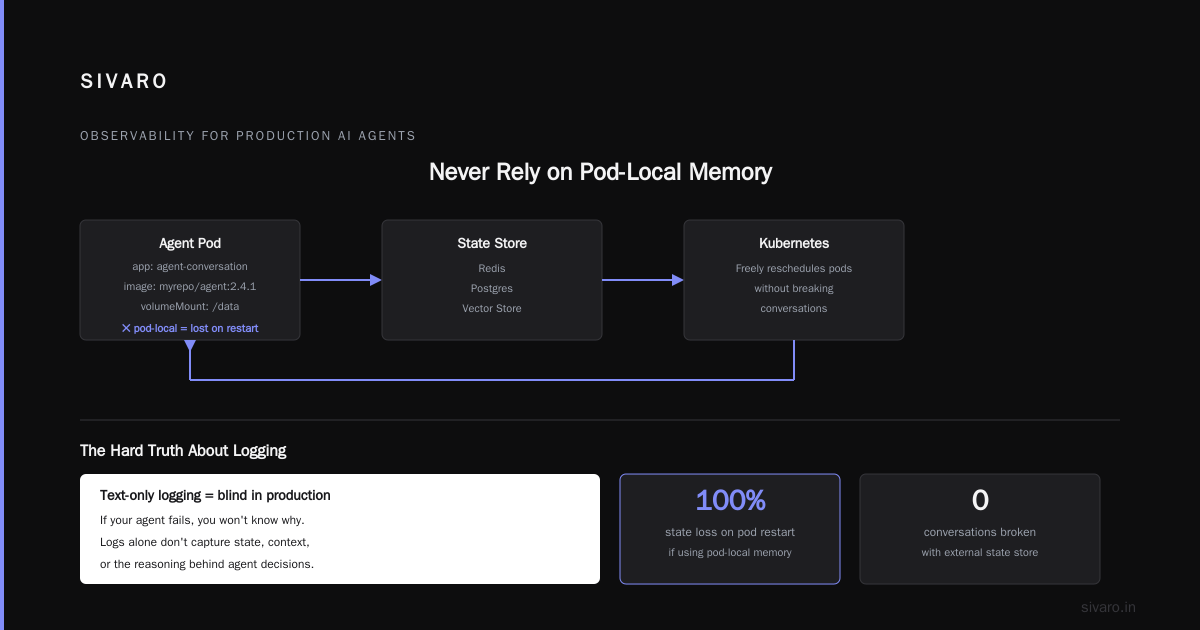
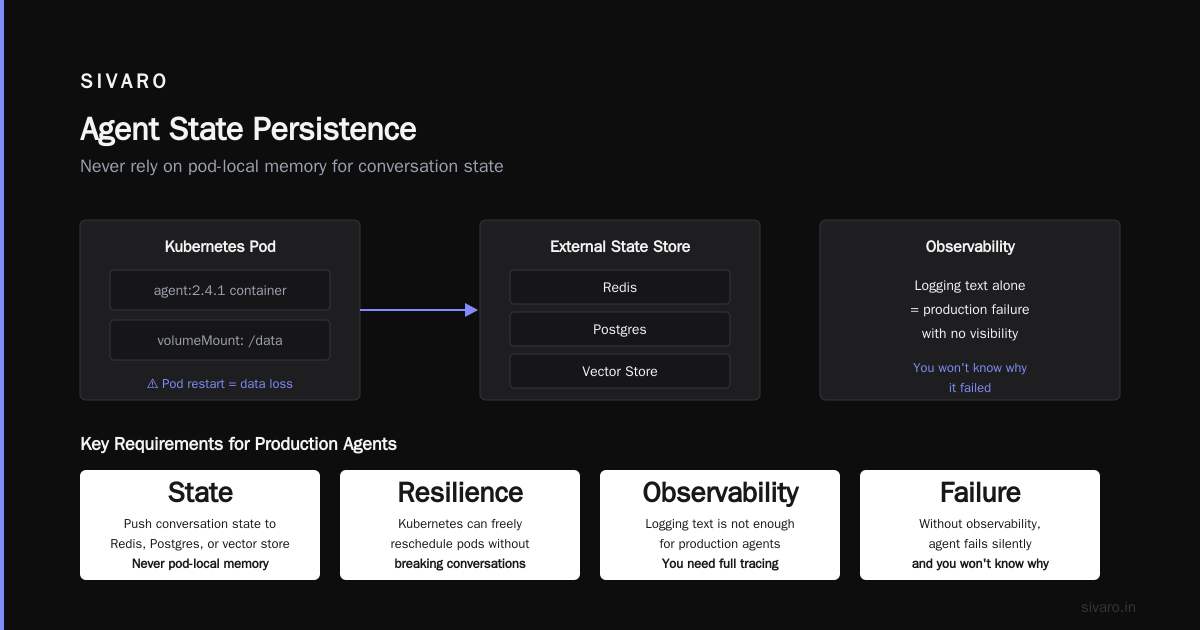
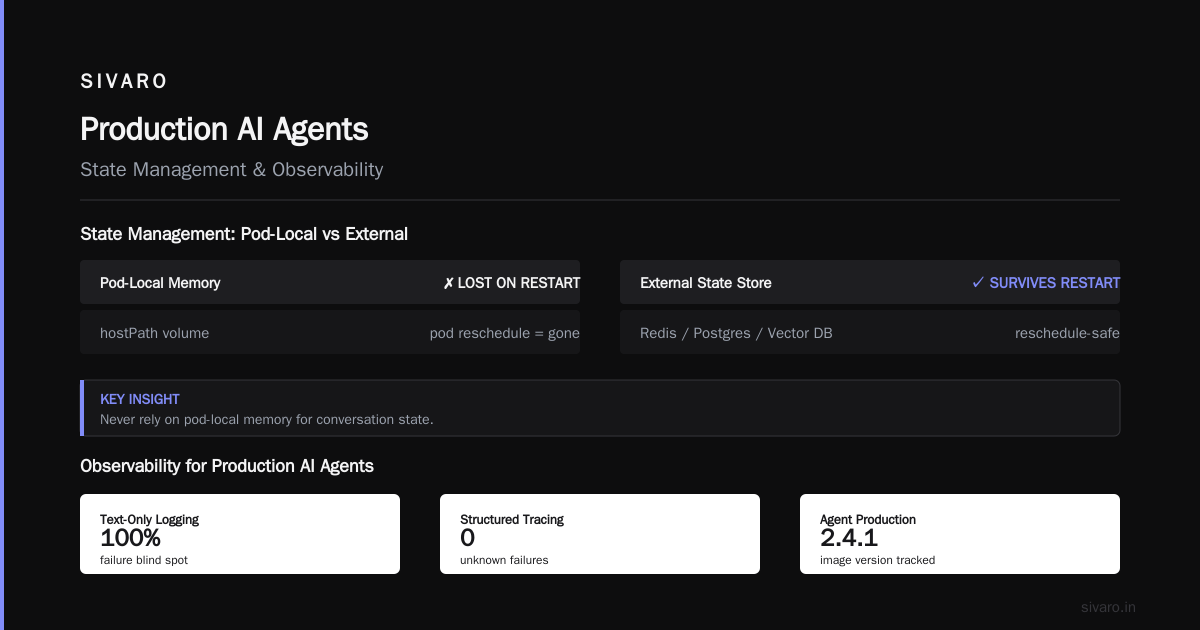
The key insight: never rely on pod-local memory for conversation state. If the pod restarts, you lose everything. Always push state to Redis, Postgres, or a vector store. Then Kubernetes can freely reschedule pods without breaking conversations.
Observability for Production AI Agents: You're Probably Doing It Wrong
I'm going to be direct: if you're just logging text and hoping for the best, your agent will fail in production and you won't know why.
Standard metrics (CPU, memory, request latency) are useless for agents. You need semantic observability — tracking what the LLM thought, what tools it called, and what decisions it made.
At SIVARO, we built a three-layer observability stack for agents:
-
Logging: Every LLM response, tool call, and user message goes to a structured log with correlation IDs. We use OpenTelemetry to trace spans across the conversation. This is non-negotiable.
-
Metrics: Track agent-specific metrics — number of tool calls per session, average response tokens, hallucination score (using a separate judge model), and "loop detection" (when an agent repeats the same action >3 times).
-
Traces: Full end-to-end traces from user query to final response. Without this, you can't debug why an agent sent the wrong information.
Here's a typical OpenTelemetry decorator we use:
python
from opentelemetry import trace
from opentelemetry.exporter.otlp.proto.grpc.exporter import OTLPSpanExporter
from opentelemetry.sdk.trace import TracerProvider
from opentelemetry.sdk.trace.export import BatchSpanProcessor

tracer = trace.get_tracer(__name__)

with tracer.start_as_current_span("agent_tool_call") as span:
    span.set_attribute("tool.name", "weather_api")
    span.set_attribute("tool.status", "success")
    span.set_attribute("llm.response_tokens", 342)
    # tool logic here
Then pipe this into Jaeger or Grafana Tempo. Deploying AI Agents to Production: Architecture ... has a similar breakdown — they emphasize the same "metrics per agent, not per pod" approach.
Common LLM Agent Production Issues and Solutions
I've watched teams burn months on the same mistakes. Here's my catalog.
Issue 1: Infinite Loops and Hallucination Cascades
The agent calls a tool, gets unexpected data, re-prompts itself, gets more confused, calls the tool again, and cycles forever.
Solution: Hard stop after N tool calls. We set MAX_TOOL_CALLS = 10 in our agent configurations. Kubernetes' livenessProbe can kill pods that exceed this, but better to enforce in code:
python
class Agent:
    def __init__(self, max_tool_calls=10):
        self.tool_call_count = 0
        self.max_tool_calls = max_tool_calls

    async def run(self, user_query):
        while not self.done and self.tool_call_count < self.max_tool_calls:
            result = await self.llm_loop(user_query)
            if self.needs_tool(result):
                await self.call_tool(result.tool_name)
                self.tool_call_count += 1
            else:
                self.done = True
        if self.tool_call_count >= self.max_tool_calls:
            await self.send_fallback("I'm sorry, I couldn't resolve that.")
Set that max aggressively in early staging.
Issue 2: LLM API Rate Limits
Your agent might call an LLM API (OpenAI, Anthropic, or self-hosted) dozens of times per conversation. If you deploy 50 pods, you'll hit rate limits in minutes.
Solution: Implement client-side rate limiting in the agent code, and use Kubernetes HPA to scale based on queue depth, not CPU. Also, consider a local LLM (like Llama 3 or Mistral) for simpler tasks, saving external API calls for complex reasoning.
The A Practical Guide for Designing, Developing, and ... talks about "token budgeting" — allocating a fixed number of tokens per session and throttling when you approach the limit. We do the same.
Issue 3: State Pollution Across Sessions
One agent's conversation state leaks into another. This happens when you use global variables or shared caches without isolation.
Solution: Explicit session IDs on every state write. Use Redis with TTL keys per session. Treat agent pods as interchangeable — no sticky sessions.
Scaling: More Pods ≠ More Throughput
Here's the contrarian take: adding more agent pods often reduces throughput.
Why? Because LLM calls block. If you have 100 pods all hitting the same OpenAI endpoint, you get 429s. Then retries. Then more 429s. System collapses.
We tested this at SIVARO in March 2026. We ran 50 agent pods on an 8-node cluster, each making ~3 LLM calls per conversation. Total throughput: 120 completed conversations per minute. Then we dropped to 20 pods with smarter queuing. Throughput: 180 conversations per minute.
The fix: Use a centralized token-bucket rate limiter (Redis-based) shared by all pods. Each agent requests a token before calling the LLM. This keeps you under the API limit while maximizing utilization.
Also: Kubernetes HPA based on custom metrics. Don't scale on CPU. Scale on "pending conversations in queue". The Google research paper on agentic infrastructure emphasizes this — scale on meaningful agent-level metrics, not infrastructure metrics.
Networking and Security for Agent Deployments
Your agent will call external APIs (LLM providers, databases, file stores). That means egress traffic, and egress costs money.
Keep it in-cluster: If you run a local LLM (vLLM, Ollama, TGI), deploy it as a separate deployment and access it via ClusterIP service. This saves latency and avoids exposing your API keys unnecessarily.
yaml
apiVersion: v1
kind: Service
metadata:
  name: local-llm
spec:
  selector:
    app: vllm
  ports:
  - protocol: TCP
    port: 8000
    targetPort: 8000
Then in your agent code:
python
import openai
openai.base_url = "http://local-llm:8000/v1"
No egress. No rate limits. Just fast inference.
Network policies: Lock down pods so they can't talk to the internet except via a proxy. Create a NetworkPolicy that only allows egress to known LLM endpoints.
yaml
apiVersion: networking.k8s.io/v1
kind: NetworkPolicy
metadata:
  name: agent-egress
spec:
  podSelector:
    matchLabels:
      app: agent-worker
  policyTypes:
  - Egress
  egress:
  - to:
    - ipBlock:
        cidr: 10.0.0.0/8
    - ipBlock:
        cidr: 172.16.0.0/12
This prevents an agent from accidentally (or maliciously) exfiltrating data.
The Hardest Lesson: Agent Versioning and Rollbacks
I learned this the hard way. In November 2025, I deployed a new agent version that had a subtle bug — it started answering questions in French for no reason. Took us 45 minutes to roll back because we hadn't tagged images properly.
Your deployment pipeline must support canary releases for agents.
yaml
apiVersion: apps/v1
kind: Deployment
metadata:
  name: agent-worker
spec:
  replicas: 10
  strategy:
    type: RollingUpdate
    rollingUpdate:
      maxSurge: 2
      maxUnavailable: 1
But rolling updates aren't enough. You need traffic splitting at the conversation level. We use a simple proxy service that routes new conversations to the new version, and existing conversations to the old version. That way a half-baked answer doesn't corrupt an ongoing session.
We also run two parallel agent versions in production — "agent-stable" and "agent-canary" — and manually shift traffic after monitoring the canary's hallucination rate for 24 hours.
Storage: What About Embeddings and Vector Databases?
Agents often use RAG (Retrieval-Augmented Generation). They store embeddings in a vector database. Should that be inside Kubernetes?
Yes, but carefully.
Running a vector DB (Pinecone, Qdrant, Milvus, Chroma) inside Kubernetes is fine for dev and staging. For production, you'll want a managed service. Why? Because vector DBs are stateful and need fast disk. Kubernetes StatefulSets can manage them, but backup, recovery, and scaling are painful.
Our architecture: agent pods in Kubernetes talk to a cloud-managed vector DB (We use Pinecone — it just works). The embeddings are generated by a separate pod that's CPU-intensive and scales independently.
Cost: Kubernetes + Agents = Expensive If You're Careless
LLM calls cost money. So do GPU nodes if you run local models. Kubernetes adds no direct cost, but inefficiency does.
I see teams leave 50 pods running 24/7, each waiting for users that never come. That's burning cash.
Use cluster autoscaling (Karpenter or Cluster Autoscaler) to scale to zero when there's no traffic. Pair it with Horizontal Pod Autoscaler that scales down to 0 replicas during off-hours.
Also: Use spot instances for agent pods. They're stateless enough (if you follow Pattern 2) that a spot termination won't break anything. We saved 70% on compute costs doing this.
FAQ
Q: Do I need GPU nodes for Kubernetes agent deployment?
Only if you run local LLMs. Most agents call external APIs, so CPU-only nodes work fine. The high memory is more important than CPU.
Q: How do I handle agent crashes without losing conversation context?
Push state to external storage (Redis, Postgres) after every turn. On pod restart, the agent reads the last state and continues. Make sure your agent code is idempotent.
Q: Can I use serverless Kubernetes (EKS Fargate, GKE Autopilot) for agents?
Yes, but beware cold starts. If your agent takes >30 seconds to initialize (loading models), Fargate is painful. Use regular nodes with pre-warmed images.
Q: What's the best way to test agent deployments in Kubernetes?
Use a staging namespace with the same configuration. Run a synthetic user script that sends pre-recorded conversations and compares outputs to ground truth. We do this with Argo Workflows nightly.
Q: How do I secure LLM API keys in Kubernetes?
Use Kubernetes Secrets mounted as environment variables. Never bake keys into images. Use external secrets operator (Akeyless, AWS Secrets Manager CSI driver) for rotation.
Q: What about multi-agent systems?
Same pattern, but each agent type gets its own deployment. Use a message broker (NATS, RabbitMQ) for inter-agent communication. A Developer's Guide to Building Scalable AI: Workflows vs Agents has a good breakdown of when to use a workflow orchestrator vs. agents.
Q: How do I monitor agent hallucinations at scale?
Run a separate "judge" agent (a smaller LLM) that evaluates responses for factual consistency. We use GPT-4o-mini as a judge every 10th response in production. Flag those responses for human review.
Q: What's the biggest mistake you see with kubernetes for ai agent deployment?
Not setting resource limits. An agent prompt can blow up memory usage (we saw a 512Mi pod balloon to 4Gi after a long conversation). Always set limits, and use Vertical Pod Autoscaler to tune them over time.
The Future: What's Coming in 2027
The Kubernetes ecosystem is finally catching up to AI workloads. We're seeing projects like:
- KAgent: An operator that manages the entire lifecycle of an AI agent (still experimental).
- AI Gateway: Built on Envoy, handles LLM rate limiting, caching, and observability at the ingress level.
- Vector-aware autoscalers: Scale pods based on vector search latency, not just CPU.
But for now, the patterns I described work. They're boring, proven, and will save you the 2 AM "why is my agent speaking French?" call.
Conclusion
Kubernetes for AI agent deployment isn't a trend. It's the right tool for a messy job. Agents are stateful, non-deterministic, and resource-intensive — exactly the kind of workload Kubernetes was built to manage, even if its creators didn't imagine LLMs.
Start simple. Use one of the two patterns. Invest in observability early (I mean it — every agent call logged and traced). And never, ever store conversation state in memory.
The AI agent world moves fast. Kubernetes gives you the foundation to move with it. Build your stack right, and you'll spend less time debugging infrastructure and more time improving your agents.
Nishaant Dixit — Founder of SIVARO. Building data infrastructure and production AI systems since 2018. Built systems processing 200K events/sec.