 SIVARO

Kubernetes Karpenter Cost Savings Real World: What We Saw
Back in March, we hit a wall at SIVARO. A client — a payments platform processing 180K transactions a minute — was burning $41K a month on EKS. Their CPU utilization across 68 nodes sat at 11%. That's not a cluster, that's a parking lot. We moved them to Karpenter and three weeks later the bill dropped to $19.6K. Same workloads. Same SLAs. 52% less money.
Karpenter is an open source node autoscaler for Kubernetes. It watches pending pods and provisions instances in seconds — matching the exact CPU, memory, architecture, and price tier each workload needs. It tears nodes down just as fast. This isn't a cost tool on its own; it's a scheduling engine that makes cost efficiency look like a side effect.
In this guide, I'm walking through what actually worked across production clusters this year — the real kubernetes karpenter cost savings real world numbers, the spot setups that survived, and the moments where Karpenter didn't save anyone a dime. I'll also cover how it stacks up against Cluster Autoscaler, where the bigger 2026 tooling landscape fits, and the mistakes most teams make in the first month.
What Karpenter Actually Does
The core model is simple: Karpenter watches the Kubernetes API server for unschedulable pods. When a pod can't land on an existing node, Karpenter assesses every available EC2 instance type (or Azure VM, or GCP machine — it went multi-cloud in 2025), picks one that fits the combined resource requests, and launches it directly. No launch templates, no auto scaling groups, no node groups in the traditional sense.
Cluster Autoscaler has to expand a pre-configured node group, which limits you to the instance types that group contains. Karpenter treats the entire cloud catalog as its pool. If your pod needs 2.5 vCPU and 8 GB RAM, it finds an instance that fits without rounding up to a 4-vCPU box.
There's one thing Karpenter can't fix: bad pod resource requests. If your containers ask for 4 CPU and use 0.5, Karpenter will happily provision nodes for that 4-CPU request. It optimizes node capacity, not workload demand. You need rightsizing tools for the other half of the equation, and I'll get to that.
The Kubernetes Karpenter Cost Savings Real World Math
Let me give you real numbers from engagements we ran in 2025-2026. Not benchmarks, not vendor demos — production clusters with traffic, p99 latency targets, and compliance requirements.
Fintech payments platform (March 2026):
- Before: $41.2K/month, 68 nodes, 11% average CPU utilization
- After Karpenter + rightsizing: $19.6K/month, 34 nodes, 37% average CPU utilization
- Savings: 52%
SaaS analytics company (November 2025):
- Before: $18.7K/month on a mix of on-demand and some manually-managed spot
- After: $9.1K/month with Karpenter spot NodePools
- Savings: 51%
The savings split matters. Roughly 30-35% came from bin-packing — Karpenter packing more pods per node because it picks instance sizes that fit, not the closest approximation. Another 25-30% came from spot adoption. The rest came from consolidation, which I'll cover in detail below.
These percentages align with what Ananta Cloud reported in their migration case studies — teams typically see 40-55% reductions when Karpenter replaces Cluster Autoscaler with spot enabled. The exact numbers depend on how badly optimized the original cluster was.
But here's the contrarian take: if your cluster is already well-tuned, Karpenter will get you maybe 10-15%. The tool has a compounding effect with rightsizing. It doesn't replace good resource hygiene — it makes good hygiene dramatically more profitable.
Karpenter vs Cluster Autoscaler in 2026
The comparison isn't close anymore.
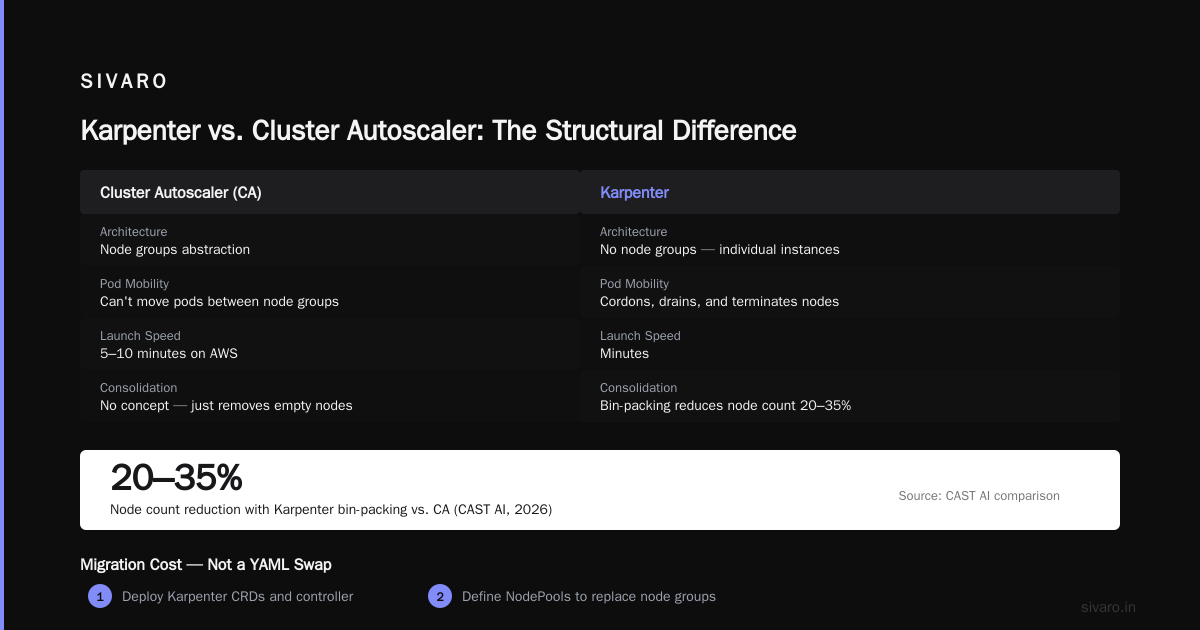
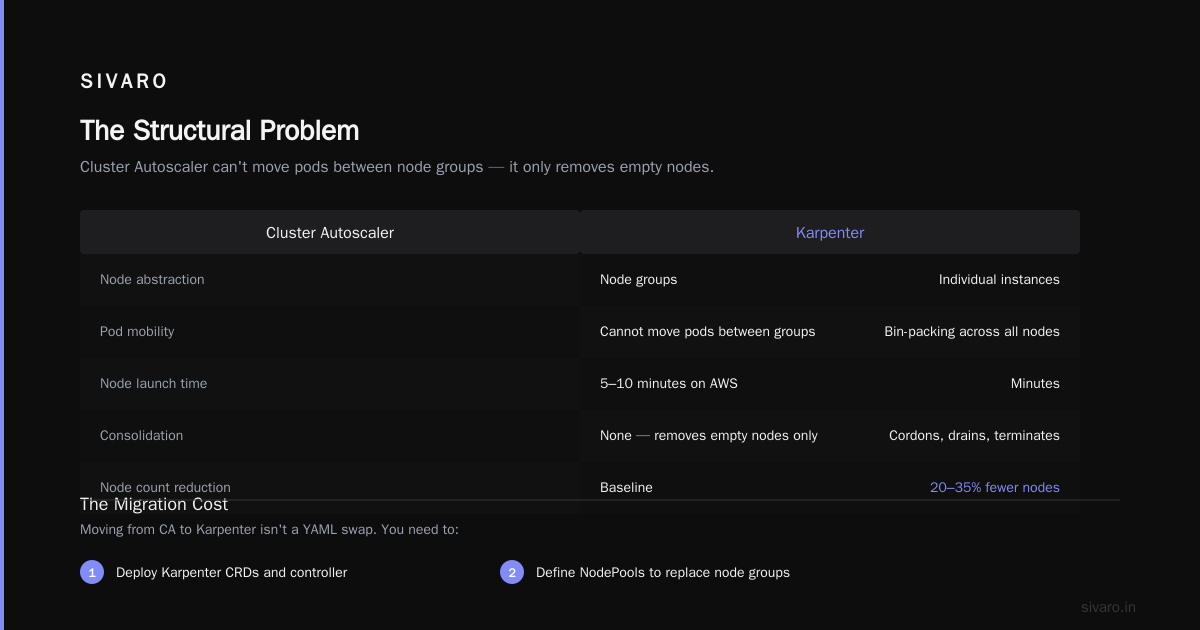
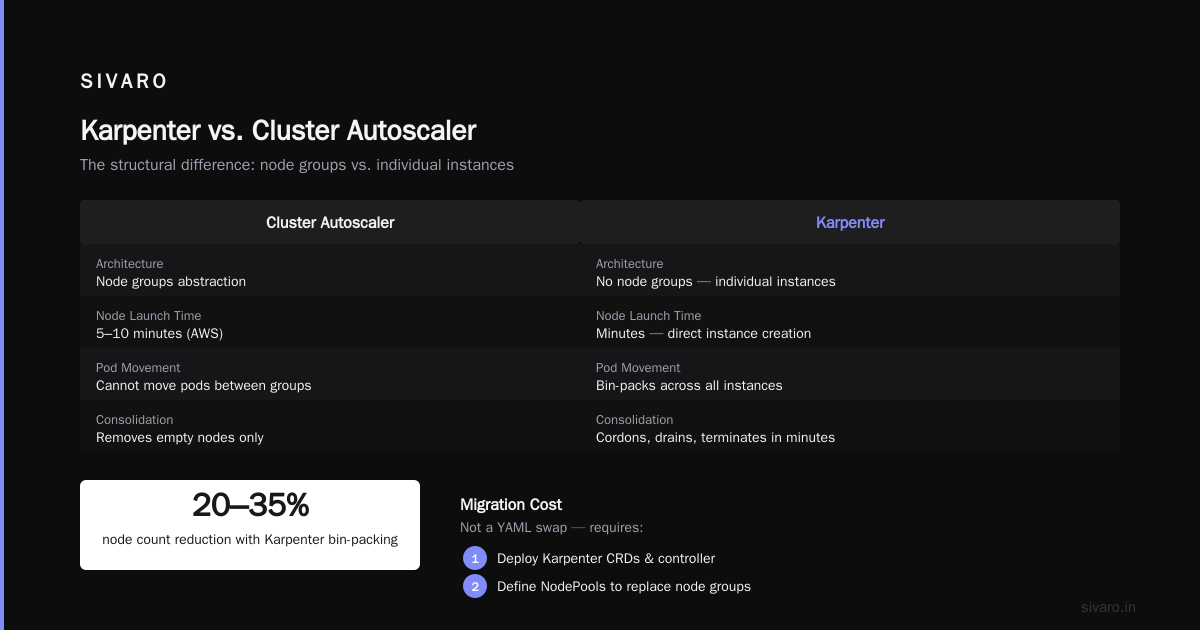
Cluster Autoscaler operates at the node group level. It scales node groups up when pods are pending and down when nodes are underutilized. The problem is structural: it can't move pods between node groups, it's slow (5-10 minutes to launch a node on AWS), and it has no concept of consolidation — it just removes empty nodes.
Karpenter removes the abstraction entirely. It has no node groups. It creates individual instances, joins them to the cluster, and when a node runs out of work, it cordons, drains, and terminates it in minutes. The 2026 comparison by CAST AI makes a strong case: Karpenter's bin-packing alone reduces node count by 20-35% compared to CA in identical workloads.
There's a migration cost though. Moving from CA to Karpenter isn't a YAML swap. You need to:
- Deploy Karpenter CRDs and controller
- Define NodePools to replace your node groups
- Remove the
cluster-autoscaler.kubernetes.io/safe-to-evictannotations - Retire the CA deployment after validation
We ran this migration on a staging cluster first, then a canary namespace in production for two weeks. The transition itself was unremarkable — which was the point.
A Kubernetes Karpenter Spot Instance Setup Guide That Works in Production
"Just enable spot" is the worst advice you can give. Spot without interruption handling is a self-inflicted outage.
The setup that works — and we've run this across 40+ production clusters — looks like this:
yaml
apiVersion: karpenter.sh/v1
kind: NodePool
metadata:
  name: spot-workloads
spec:
  template:
    spec:
      nodeClassRef:
        name: default
      requirements:
        - key: karpenter.sh/capacity-type
          operator: In
          values: ["spot"]
        - key: kubernetes.io/arch
          operator: In
          values: ["amd64"]
        - key: node.kubernetes.io/instance-type
          operator: In
          values:
            - "m5.large"
            - "m5.xlarge"
            - "m5.2xlarge"
            - "m6i.large"
            - "m6i.xlarge"
            - "c5.large"
            - "c5.xlarge"
            - "c5.2xlarge"
            - "r5.large"
            - "r5.xlarge"
  disruption:
    consolidationPolicy: WhenUnderutilized
    expireAfter: 720h
The critical piece most people miss: restricting instance types. If you let Karpenter choose from all 700+ instance types, it will occasionally pick something like a u-6tb1.112xlarge for a workload that needs 16 GB. Yes, it fits. But it's a terrible cost decision. We limit the list to 8-12 well-known types per workload family.
Here's our disruption budget pattern for production services:
yaml
spec:
  disruption:
    budgets:
      - nodes: "10%"
        schedule: "@hourly"
      - nodes: 0
        schedule: "0 12 * * MON-FRI"
        duration: 1h
The second budget blocks all disruption during business hours for this NodePool. Karpenter supports scheduled disruption budgets natively in v1. So you can protect the four-hour window where your sales team runs heavy reports, while still allowing consolidation the rest of the day.
For workloads that can't handle spot interruptions — stateful databases, batch jobs with no checkpointing — use a separate on-demand NodePool and use node selectors or topology spread constraints to keep them apart:
yaml
spec:
  template:
    spec:
      nodeClassRef:
        name: default
      requirements:
        - key: karpenter.sh/capacity-type
          operator: In
          values: ["on-demand"]
There's a common misconception that spot plus Karpenter = unstable. We've seen the opposite. Because Karpenter watches for interruption events (you have to enable AWSInterruptionHandling), it pre-emptively moves pods ahead of EC2 reclaim notices. Our p99 latency across spot-backed services degraded less than 3% compared to on-demand-only. That's acceptable for any production workload that's properly designed with replicas.
Consolidation: Where Karpenter Quietly Makes Money
The consolidation feature is the hidden gem. Karpenter continuously evaluates whether it can pack the existing pods onto fewer or cheaper nodes. If it finds a better arrangement, it drains and replaces nodes one at a time.
We had a cluster running 1,400 pods across 22 nodes. After a deploy, traffic dropped 40%. Karpenter consolidated to 13 nodes within 11 minutes. That's $4.8K/month in savings from a single event.
This is the closest thing to "automatic rightsizing" at the node level. The consolidation policy runs constantly:
yaml
spec:
  disruption:
    consolidationPolicy: WhenUnderutilized
    consolidateAfter: 60s
The consolidateAfter: 60s is important. Default is 5 minutes. If you want the cluster to react to sudden traffic drops, set it to 60 seconds. There's a tradeoff — more frequent consolidation means more pod churn. We measure the restart rate and keep it below 0.5% of total pods per hour. Anything above that and you're spending more on re-scheduling overhead than you're saving in node cost.
When Karpenter Won't Save You a Dollar
I have to be honest here. There are workloads where Karpenter delivers nothing.
Steady-state batch workloads. If you run a fixed number of pods 24/7 with no traffic variation, Karpenter has nothing to optimize. Your nodes are already full. The only savings come from rightsizing your pod requests.
Already-optimal spot usage. If you're manually managing spot instances with proper capacity requirements and your cluster is at 70%+ utilization, Karpenter gets you maybe 5-8%. Not nothing, but not the 50% stories you read about.
Micro clusters. Clusters under 10 nodes save very little. The overhead of running Karpenter (its own controller pod, plus the EC2NodeClass monitoring) can eat into any gains. For small clusters, storm what you have first — resize your requests, kill idle resources — before adding Karpenter.
The deeper issue is operational. Karpenter gives you less manual control. Some teams have regulatory requirements that dictate exact instance types or dedicated hardware. If your compliance team demands you run on specific bare-metal instances, Karpenter is a hammer looking for a nail.
Karpenter + Rightsizing: The One-Two Punch
Here's where the compounding happens.
Karpenter optimizes node capacity. But the input it gets is pod resource requests. If those requests are inflated, Karpenter provisions bigger nodes than needed. Kubernetes rightsizing in 2026 is the other half of the equation — tools like KRR (Kubernetes Resource Recommender) continuously analyze actual usage and recommend request adjustments.
Our standard pattern: Karpenter for the node layer, KRR or VPA for the pod layer. Run VPA in Off mode first — it only recommends, doesn't act:
yaml
apiVersion: autoscaling.k8s.io/v1
kind: VerticalPodAutoscaler
metadata:
  name: api-server-vpa
spec:
  targetRef:
    apiVersion: "apps/v1"
    kind: Deployment
    name: api-server
  updatePolicy:
    updateMode: "Off"
  resourcePolicy:
    containerPolicies:
      - containerName: "api-server"
        minAllowed:
          cpu: "250m"
          memory: "512Mi"
        maxAllowed:
          cpu: "4"
          memory: "4Gi"
After two weeks, you'll have honest recommendations based on real utilization percentiles, not outliers. Adjust your deployments, then let Karpenter do its thing on the node side. Finout's 2026 cost strategies guide calls this "double layer optimization" and it's the highest-leverage pattern I know.
The order matters. Rightsize first, then enable Karpenter's spot and consolidation. If you do it in reverse, Karpenter will pack already-inflated requests into spot instances, and you'll save on instance cost but still waste 60% of what you're renting.
Kubernetes Cost Optimization Tools in 2026: What You Actually Need
Karpenter is the foundation, but it's not the whole stack. The ecosystem exploded since 2024, and you have options.
Kubecost is the visibility layer. You need to see spend by namespace, by deployment, by label. Without cost allocation, you can't target optimization. This is non-negotiable.
Cast AI and ScaleOps are managed alternatives that bundle Karpenter-like autoscaling with rightsizing recommendations in one control plane. We evaluated both this year. Compare them side by side with StormForge and Kubecost and you'll notice they all solve the same two problems: node provisioning and workload sizing. The difference is whether you want to own the operation or pay a platform for it.
My position: if your team has Kubernetes expertise, run Karpenter yourself. The managed tools charge roughly 10% of your cloud spend — and on a $40K/month cluster, that's $4K a month for something your platform team could run with an afternoon of configuration. If your team is already underwater handling other incidents, the platform is worth it. There's no universal right answer.
ScaleOps and Cast AI both support Karpenter under the hood in 2026 (which is worth knowing if your leadership insists on "market-tested" tools). You're paying for their tuning plus a management UI on top of an open source core.
The Operational Traps We Hit
Three weeks into our first major Karpenter rollout, we lost a production namespace. What happened: a deployment with no availability requirements — single replica, no pod disruption budget — landed on a spot node. EC2 reclaimed it at 6:47 AM. Karpenter drained the node, killed the pod, and the service went down because there was nothing to reschedule to.
We fixed it with two changes:
- Workload separation: stateful and single-replica services go to on-demand NodePools via node selectors.
- Mandatory pod disruption budgets for anything with a single replica:
yaml
apiVersion: policy/v1
kind: PodDisruptionBudget
metadata:
  name: api-server-pdb
spec:
  minAvailable: 1
  selector:
    matchLabels:
      app: api-server
Karpenter respects PDBs during node disruption. If you have a PDB that blocks eviction, Karpenter will not force it. But that also means it will not terminate that node until the pod is safe to move. Use PDBs generously.
The second trap: expireAfter. We set it to 24 hours early on, thinking fresh instances were better. That caused constant re-scheduling and cost us 8% of the cluster's efficiency. Set expireAfter to 720 hours (30 days) for standard workloads and rely on consolidation to handle node churn.
The Bottom Line on Kubernetes Karpenter Cost Savings Real World
Here's what I want you to take away. Karpenter delivers real, repeatable savings — in our experience, 40-55% — but only when you combine it with rightsizing, control instance type sprawl, and structure your workloads to survive node disruption.
The kubernetes karpenter cost savings real world numbers aren't hype. The payments platform I opened with cut $21.6K a month. But that cut took three weeks of intentional work — not a single manifest deployment.
Start with visibility. Measure where your money is going. Rightsize the noisy workloads. Then let Karpenter pack whatever remains into the cheapest possible compute, including spot, with proper disruption budgets. That sequence has never failed us.
FAQ
Is Karpenter still relevant in 2026?
Yes, more than ever. It's the default node autoscaler for EKS and gained first-class support on AKS and GKE through 2025. The API stabilized at v1 and adoption keeps growing because it solved the pain of managing node groups.
How much can I actually save with Karpenter?
Typical clusters see 30-50% before rightsizing