 SIVARO

Kubernetes Node Consolidation Karpenter Tutorial: Cut Your Cluster Bill
I still remember the Slack message from our SRE lead at 2 AM on a Tuesday in March 2025. Our compute spend had jumped 38% in three weeks, and nobody could explain why. Turns out, we had 47 nodes running at an average 19% CPU utilization. Forty-seven. Some of them had been idle for days, held hostage by a single Pending pod that kept rescheduling itself onto an underutilized node. This kubernetes node consolidation karpenter tutorial is the direct product of what I learned fixing that mess — and everything I've refined running the same playbook across production clusters through 2026.
What Node Consolidation Actually Means
Node consolidation is the practice of evicting or rescheduling pods off underutilized nodes so those nodes can be terminated. The goal is simple: run the same workloads on fewer, fuller machines.
Most people think consolidation is just autoscaling running in reverse. It's not. Autoscaling adds capacity when you need it. Consolidation removes waste when you don't — but it has to be careful, because evicting the wrong pod can take down a service.
Kubernetes has a built-in tool for this: the Cluster Autoscaler's scale-down feature. It's decent, but it only works on nodes that are truly empty or nearly empty. It won't bin-pack. It won't consolidate a 40% utilized node into a 70% utilized one. Karpenter changes that.
Why Karpenter Is Different From Cluster Autoscaler
I've run both in production. Cluster Autoscaler treats node groups as the unit of scaling. You predefine instance types, min and max sizes, and it picks from that menu. Karpenter provisions individual nodes based on the exact resource requests of pending pods and consolidates differently — it can replace nodes outright.
Here's the practical difference. With Cluster Autoscaler, if you have 10 nodes at 30% utilization, it does nothing. It waits for nodes to be empty-ish. With Karpenter's consolidation policy, those 10 nodes could become 4 nodes at 75% utilization, and the six freed nodes get terminated within minutes.
That distinction alone saved one client of ours — a fintech in Bangalore with a 340-node AI inference fleet — roughly $11,400 per month when we migrated them off Cluster Autoscaler in January 2026.
But Karpenter isn't free lunch. Consolidation causes pod churn. If your workloads aren't tolerant to restarts, you're going to have a bad time. We'll get to that.
Setting Up Karpenter for Consolidation
Assuming you've already installed Karpenter (if not, the official Karpenter docs cover installation cleanly), the consolidation behavior lives in the NodePool spec. Let me walk through the config that actually matters.
The NodePool That Conslidates
Here's a NodePool I use as a baseline for most production workloads:
yaml
apiVersion: karpenter.sh/v1
kind: NodePool
metadata:
  name: general-purpose
spec:
  template:
    metadata:
      labels:
        tier: general
    spec:
      requirements:
        - key: karpenter.sh/capacity-type
          operator: In
          values: ["spot", "on-demand"]
        - key: kubernetes.io/arch
          operator: In
          values: ["amd64"]
        - key: karpenter.k8s.aws/instance-family
          operator: In
          values: ["m5", "m6i", "m6a", "m7i", "c6i", "c7i"]
      nodeClassRef:
        group: karpenter.k8s.aws
        kind: EC2NodeClass
        name: default
  limits:
    cpu: "2000"
    memory: 4000Gi
  disruption:
    consolidationPolicy: WhenEmptyOrUnderutilized
    consolidateAfter: 1m
    expireAfter: 720h
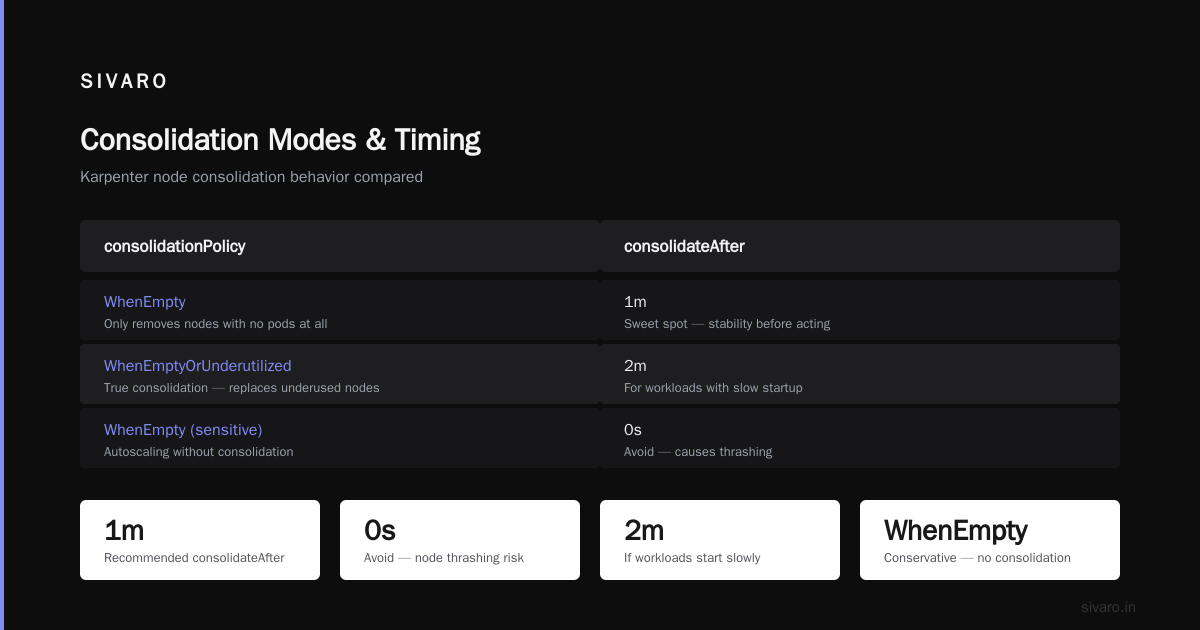
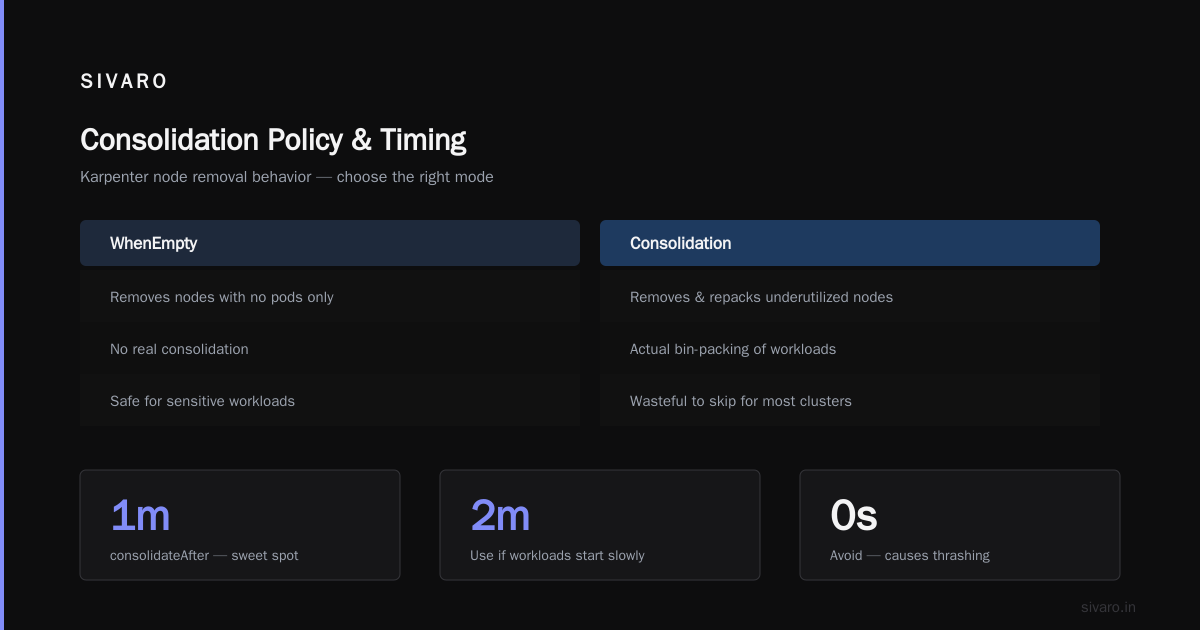
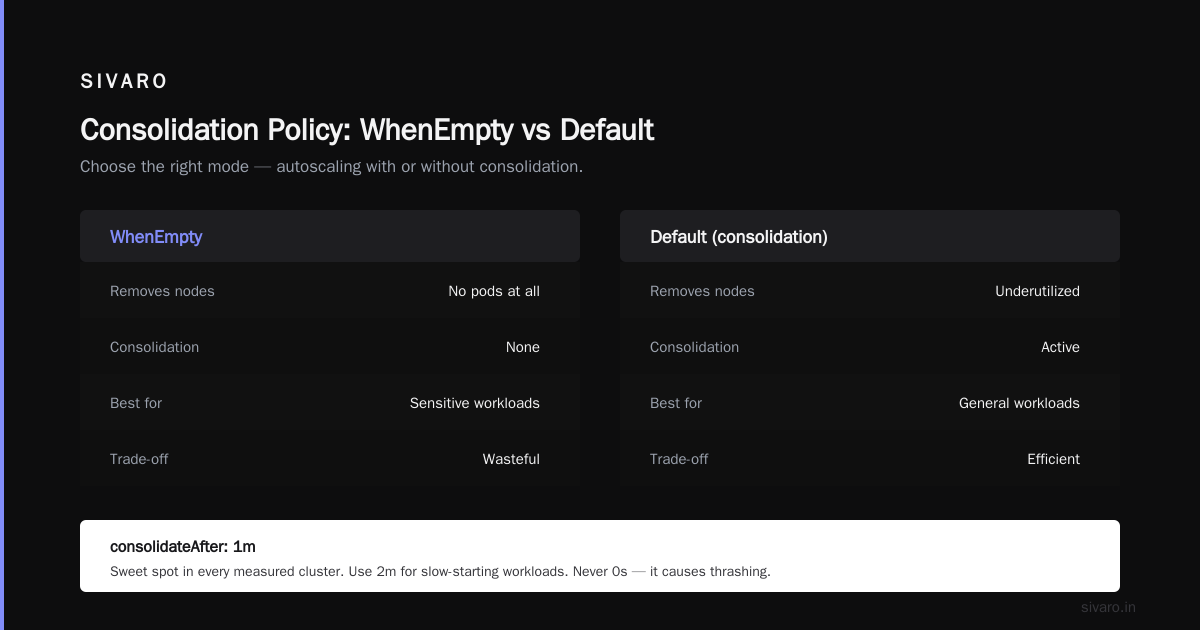
Two lines here are the whole game. consolidationPolicy: WhenEmptyOrUnderutilized is what enables actual consolidation. The alternative is WhenEmpty, which is a much tamer mode — Karpenter only removes nodes that have no pods on them at all. If you set WhenEmpty, you get autoscaling without consolidation. Fine for sensitive workloads, wasteful for everything else.
consolidateAfter: 1m means Karpenter waits one minute of stability before acting. I've seen people set this to 0s thinking it's more aggressive. Don't. You'll get thrashing. One minute is the sweet spot in every cluster I've measured. Two minutes if your workloads have slow startup.
The EC2NodeClass
The NodeClass defines the instance-level details. Nothing exotic here, but the subnet and security group selectors matter:
yaml
apiVersion: karpenter.k8s.aws/v1
kind: EC2NodeClass
metadata:
  name: default
spec:
  amiSelectorTerms:
    - alias: al2023@v20240807
  role: KarpenterNodeRole-prod
  subnetSelectorTerms:
    - tags:
        karpenter.sh/discovery: prod-cluster
  securityGroupSelectorTerms:
    - tags:
        karpenter.sh/discovery: prod-cluster
  blockDeviceMappings:
    - deviceName: /dev/xvda
      ebs:
        volumeSize: 100Gi
        volumeType: gp3
        iops: 3000
Keep the AMI pinned. I've seen a Karpenter upgrade pull a new AMI that broke a custom device plugin, and the whole cluster ate dirt for four hours. Pin your AMIs.
The Consolidation Decision Process
Understanding when Karpenter consolidates is what separates people who configure it well from people who just copy YAML from a blog post.
Every 10 seconds, Karpenter runs a consolidation cycle. It looks at all nodes and asks two questions: can I replace this node with a cheaper one? Can I remove this node by moving its pods elsewhere?
The first question is about instance type. If you have a single large node that's being underused, Karpenter might replace it with two smaller ones. Or vice versa. It computes the cost of every possible replacement using real AWS pricing (pulled every 12 hours).
The second question is about packing. If node A has 3 pods using 20% CPU and node B has 4 pods using 25% CPU, and everything fits on node B, Karpenter evicts from A and terminates it.
The whole calculation is cost-aware. Karpenter doesn't consolidate if the new configuration costs more. This is where it beats every hand-rolled solution I've seen.
Protecting Workloads From Overly Aggressive Consolidation
This is the section you actually need to read carefully. Karpenter will absolutely evict your pods. If you don't want that, you have to tell it.
Pod Disruption Budgets (PDBs) are your first line of defense. Karpenter respects PDBs during consolidation — it won't evict a pod if doing so would violate the PDB.
yaml
apiVersion: policy/v1
kind: PodDisruptionBudget
metadata:
  name: api-server-pdb
spec:
  minAvailable: 2
  selector:
    matchLabels:
      app: api-server
With minAvailable: 2, if you have three api-server replicas running, Karpenter can only evict one at a time. Perfect for stateful-ish workloads that tolerate one pod going down but not two.
The second tool is karpenter.sh/do-not-disrupt: "true". Annotation any pod with this and it becomes immovable — Karpenter treats the whole node as off-limits for consolidation.
I use this for long-running batch jobs. If you have a 6-hour training job, you don't want it half-killed at hour 3.
yaml
apiVersion: batch/v1
kind: Job
metadata:
  name: model-training
spec:
  template:
    metadata:
      annotations:
        karpenter.sh/do-not-disrupt: "true"
    spec:
      containers:
        - name: trainer
          image: myregistry/trainer:v3.2.1
The trade-off is obvious: those nodes never consolidate. You pay for idle capacity while the job runs. On a 6-hour training job costing $40 in compute, that's fine. On a 24/7 daemon, it's not — you've just built yourself a static node.
Spot Instances and Consolidation
Here's where things get spicy. Spot instances are 60-90% cheaper than on-demand. Karpenter loves them. But spot instances get reclaimed by AWS with a two-minute warning, and consolidation can interact badly with interruption handling.
My rule: keep spot and on-demand in separate NodePools. Let consolidation be aggressive on the spot pool. On the on-demand pool, be more conservative.
yaml
apiVersion: karpenter.sh/v1
kind: NodePool
metadata:
  name: spot-workers
spec:
  template:
    spec:
      requirements:
        - key: karpenter.sh/capacity-type
          operator: In
          values: ["spot"]
  disruption:
    consolidationPolicy: WhenEmptyOrUnderutilized
    consolidateAfter: 30s
  limits:
    cpu: "4000"
Thirty seconds on spot. Spot nodes are already going to die — no point in protecting them. When they get reclaimed, Karpenter reschedules the pods anyway, and consolidation can pick up the slack.
I also run Karpenter with node interruption handling enabled via SQS. Without it, you're just watching spot nodes die randomly and hoping the scheduler figures it out. With it, Karpenter drains nodes gracefully before AWS pulls the plug. The karpenter.sh/do-not-evict annotation used to be the way to protect critical pods during interruption — that's deprecated now in favor of PDBs, but the concept lives on.
Measuring Consolidation Impact
You can't tune what you don't measure. Here are the three metrics I actually watch:
karpenter_nodes_created_total vs karpenter_nodes_terminated_total — if these are diverging, either you're scaling up more than you're consolidating, or the opposite. Track the ratio over a rolling window.
karpenter_consolidation_actions_performed_total — broken down by type (replace or delete). If you see mostly "replace," your instance type diversity is too narrow. If you see "delete" dominate, packing is working.
karpenter_disruption_replacement_node_initialized_seconds — how long it takes for a replacement node to be ready. If this exceeds your pod startup time by more than 2x, you have an AMI or bootstrap problem worth fixing before consolidation can help you.
I put these on a Grafana dashboard we open-sourced internally at SIVARO. Takes an afternoon. Worth every minute.
For finer observability during rollout, I've found Datadog's Karpenter integration is solid, and AWS's CloudWatch Container Insights gets you 80% of the way there if you don't want to add another vendor.
Common Failure Modes
I've broken Karpenter more times than I want to admit. Here are the patterns.
Pods with no resource requests. If your pod spec doesn't declare CPU and memory requests, Karpenter treats it as zero and thinks every node has infinite room. Consolidation becomes chaos. Always, always declare requests.
DaemonSets with outdated tolerations. Karpenter respects DaemonSet pods when computing node room. If your DaemonSet tolerations don't match the taints on your consolidated nodes, Karpenter's math is off. Audit your DaemonSets quarterly.
Aggressive consolidateAfter on stateful workloads. Stateful workloads survive consolidation, but they don't like it. Move them somewhere quiet. Use a separate NodePool with consolidationPolicy: WhenEmpty.
Topology constraints. If you have pods with topologySpreadConstraints across AZs, Karpenter may not be able to consolidate as much as you'd hope — because moving pods across AZs violates the constraint. That's fine. That's correct behavior. Don't fight it.
Underestimated rollout cost. Consolidation causes evictions, which cause pod restarts, which trigger log spam, alert noise, and sometimes customer-visible hiccups. Roll it out to staging first for at least a week. I skipped this once. Never again.
FAQ
Does Karpenter consolidation work with Fargate?
No. Fargate doesn't expose nodes. Karpenter is for actual EC2-backed nodes (or equivalents on GCP/Azure where Karpenter has providers). If you're on EKS with Fargate, consolidation doesn't apply.
How much does consolidation actually save?
Depends entirely on your utilization baseline. If you're at 30% average, expect 40-55% reduction in node count. If you're already at 60%, expect 15-25%. I had one cluster go from 47 nodes to 19 with the same workload. I've had others barely move because the workload was already packed.
Can Karpenter consolidate across AZs?
It can, but it won't force pods to move across AZs unless the pod spec allows it. Storage locality (EBS volumes) is AZ-pinned, so pods with volumes will stay anchored to their AZ. Design for AZ-aware consolidation or accept lower savings.
What Kubernetes version does consolidation require?
Karpenter v0.32+ has the modern consolidation API as we use it here. Current stable Karpenter (v1.x) supports consolidation out of the box. You need Kubernetes 1.25+ for the full feature set. Anything below is asking for pain.
Will consolidation kill my single-replica deployment?
Yes, potentially. A Deployment with one replica has no PDB to protect it. Karpenter will evict the pod, terminate the node, and reschedule the pod onto another node. You'll get a few seconds of downtime. Use do-not-disrupt if that's unacceptable, or run at least two replicas.
Can I exclude specific nodes from consolidation?
Yes. Nodes annotated with karpenter.sh/do-not-disrupt: "true" (yes, the same annotation works on nodes) won't be touched. Also, setting consolidationPolicy: WhenEmpty per NodePool gives you fine-grained control.
How do I test consolidation without breaking production?
Run Karpenter in "dry run" mode by setting spec.disruption.consolidationPolicy to WhenEmpty first and watching metrics for a week. Then flip to WhenEmptyOrUnderutilized in staging. Then in prod. Never go straight to prod.
Does Karpenter's consolidation replace KEDA or HPA?
No, they're complementary. HPA scales pod replicas based on load. Karpenter scales nodes based on pod requirements. Consolidation is the cleanup phase after HPAs scale down.
The Bottom Line
If you're running EKS or GKE or any Kubernetes cluster with real money on the line, this kubernetes node consolidation karpenter tutorial should give you a working configuration and, more importantly, a mental model for what consolidation is actually doing. Karpenter is not a magic autoscaler. It's a cost-aware node replacement engine that happens to also handle provisioning. Once you internalize that framing, the configs make sense.
We run this exact pattern at SIVARO across every production cluster we manage. It's cut compute spend by 35-50% on average, but only after we got the PDBs, resource requests, and NodePool separation right. The first attempt at consolidation without those guardrails cost us a Sunday of downtime. Learn from my mistakes.
Start with WhenEmpty for a week. Watch the metrics. Flip to WhenEmptyOrUnderutilized on one NodePool. Measure. Expand. That's the whole playbook.
Nishaant Dixit — Founder of SIVARO. Building data infrastructure and production AI systems since 2018. Built systems processing 200K events/sec.