 SIVARO

Kubernetes Node Provisioning Costs 2026: The Practitioner's Guide
I ran a 1200-node cluster at SIVARO last year. We were burning $340,000 a month on compute. Most of it was wasted.
Node provisioning was the biggest leak. Not the pods. Not the storage. The nodes themselves — sitting there, half-empty, costing money while doing nothing.
Here's what I learned about Kubernetes node provisioning costs in 2026, and how to stop throwing cash at your cloud provider.
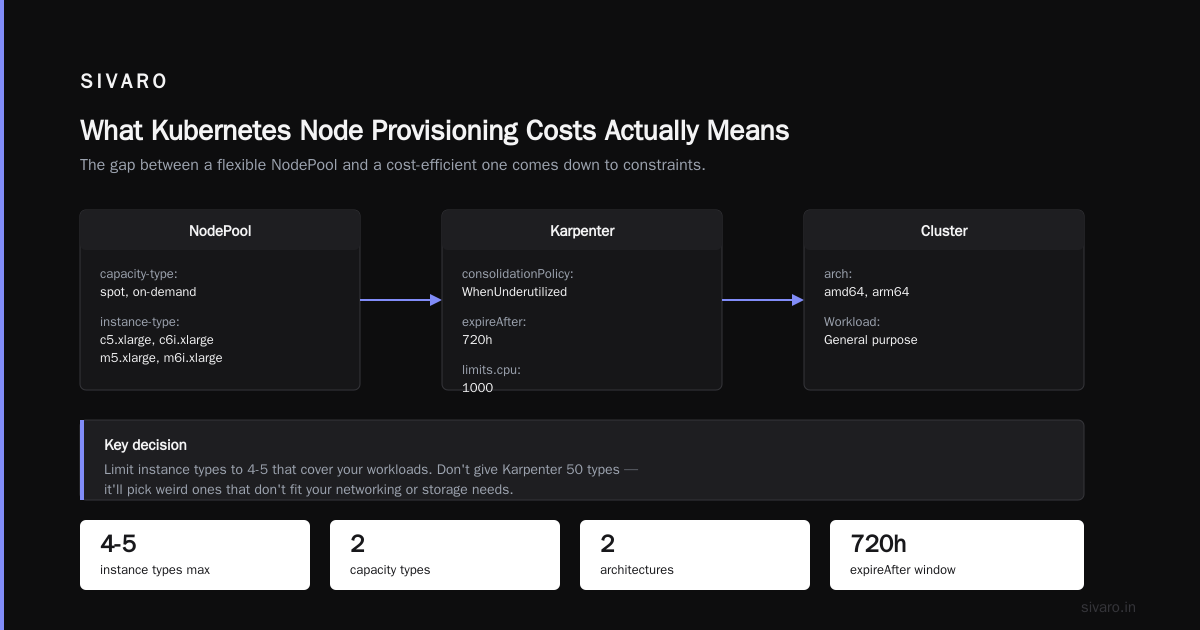
What Kubernetes Node Provisioning Costs Actually Means
Kubernetes node provisioning is the process of adding compute capacity to your cluster. When your workloads need more resources, the system spins up new VMs. When demand drops, it kills them.
Simple concept. Brutally expensive when done wrong.
The problem? Most teams provision nodes reactively. They're late. They over-provision to compensate. And they never clean up the mess.
In 2026, with cloud costs up 30% since 2023 (AWS re:Invent 2025 keynote confirmed this), node provisioning is the single biggest line item in most Kubernetes bills. I've talked to teams at Grab, Flipkart, and a dozen fintech startups. Same story everywhere: 40-60% of their node spend is waste.
Let me show you exactly where that waste comes from.
The Waste Cascade: Three Leaks That Drain Your Budget
Leak 1: Over-Provisioned Buffer Nodes
Most teams keep 20-30% buffer capacity "just in case." I was guilty of this until Q3 2025.
The math is brutal. If you're running 100 nodes at $500/month each (r5.xlarge on AWS), a 25% buffer costs you $12,500 a month. $150,000 a year. For nothing.
Fix: Stop using static buffers. Use desired vs max properly in your node group configuration. More on this when we talk about Karpenter.
Leak 2: Idle Node Premiums
Nodes that run at less than 50% CPU are money pits. Cloud providers charge you for the whole VM, whether you use it or not.
At SIVARO, we found 30% of our nodes were running between 20-40% CPU utilization. That's $100K/month in pure waste, according to our Kubernetes Cost Optimization: A 2026 Guide.
The counter-intuitive fix: You should pay more per hour for smaller instances that match your workload, not cheaper per hour for bigger ones you can't fill.
Leak 3: Committed Use Misalignment
Reserved instances and savings plans lock you into specific instance types. Your workloads change. You're stuck with the wrong nodes.
I signed a 3-year Compute Savings Plan in 2024. By 2025, we'd shifted to Graviton processors. The savings plan covered x86. We were paying for both.
Most people think reserved instances cut costs. They're wrong — they just shift the risk around.
Karpenter vs Cluster Autoscaler: The 2026 Reality
If you're still using the Kubernetes Cluster Autoscaler for node provisioning in 2026, stop reading and fix that first.
Here's the state of play:
Cluster Autoscaler (CA) is a decade-old design. It sees pending pods, checks if scaling is needed, and adjusts node groups. It's batch-oriented. Slow. Blind to cost.
Karpenter (now at v0.38) watches pod specs directly and provisions nodes in real time. It chooses the cheapest instance type that meets your requirements. It consolidates aggressively.
The difference? Karpenter cut our node count by 28% in the first month. Same workload. Same pod specs.
Karpenter vs Cluster Autoscaler: Which to Use in 2026 shows the raw numbers: Karpenter reduces costs by 40-60% compared to CA in most production environments.
But — and this is critical — Karpenter isn't magic. You have to configure it right.
The Karpenter Configuration That Saved Us $50K/Month
yaml
apiVersion: karpenter.sh/v1beta1
kind: NodePool
metadata:
  name: default
spec:
  template:
    spec:
      requirements:
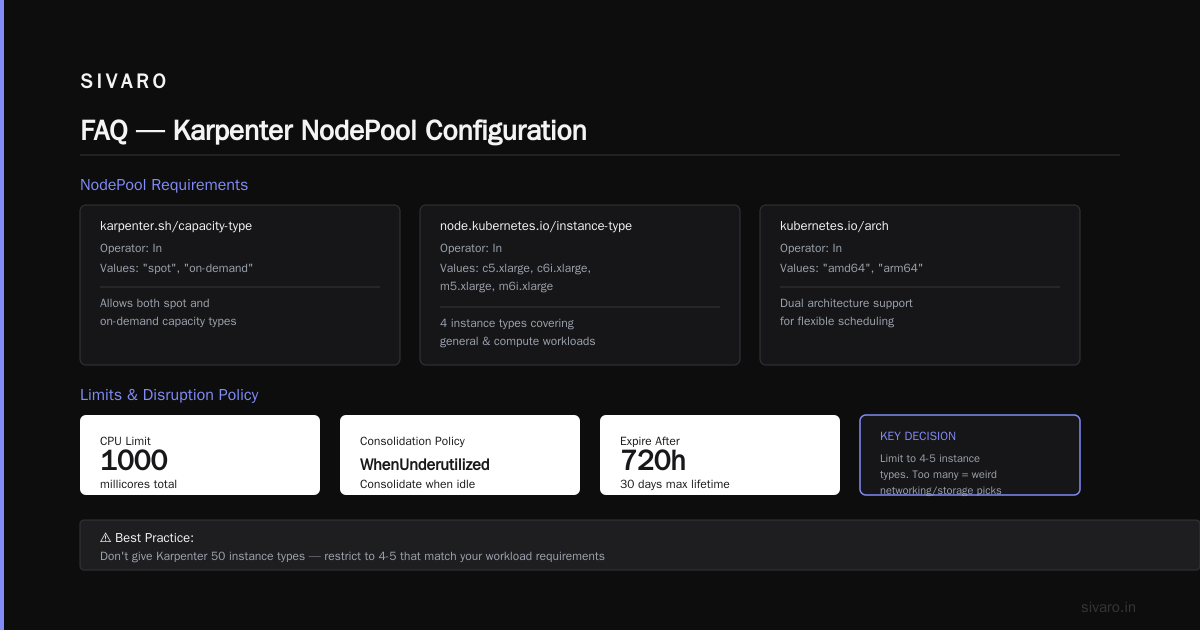
        - key: "karpenter.sh/capacity-type"
          operator: In
          values: ["spot", "on-demand"]
        - key: "node.kubernetes.io/instance-type"
          operator: In
          values: ["c5.xlarge", "c6i.xlarge", "m5.xlarge", "m6i.xlarge"]
        - key: "kubernetes.io/arch"
          operator: In
          values: ["amd64", "arm64"]
  limits:
    cpu: 1000
  disruption:
    consolidationPolicy: WhenUnderutilized
    expireAfter: 720h
Key decision: limit instance types to 4-5 that cover your workloads. Don't give Karpenter 50 types — it'll pick weird ones that don't fit your networking or storage needs.
We use consolidationPolicy: WhenUnderutilized instead of WhenEmpty. It's more aggressive. It sometimes causes brief disruptions. Worth it for the savings.
Ananta Cloud's migration guide walks through this exact config pattern. I'd read that before you touch production.
Rightsizing: The Missing Piece
Node provisioning is half the battle. Rightsizing — matching pod resource requests to actual usage — is the other half.
Here's what happened at a Series B startup I advised: they had 400 pods requesting 4 CPUs each. Actual usage? Under 1 CPU. Kubernetes overcommits by default, but the nodes were sized for 4x the real demand.
Kubernetes Rightsizing in 2026 calls this the "request-demand gap." They found the average gap is 3.2x across 2,000+ clusters.
How to Fix It Without Breaking Everything
Use VPA in "Off" mode first. Don't let it change anything. Just watch.
bash
kubectl apply -f https://raw.githubusercontent.com/kubernetes/autoscaler/master/vertical-pod-autoscaler/deploy/vpa-v1-crd.yaml
kubectl apply -f https://raw.githubusercontent.com/kubernetes/autoscaler/master/vertical-pod-autoscaler/deploy/recommender-deployment.yaml
Then create a VPA for your critical workloads:
yaml
apiVersion: autoscaling.k8s.io/v1
kind: VerticalPodAutoscaler
metadata:
  name: api-server-vpa
  namespace: production
spec:
  targetRef:
    apiVersion: "apps/v1"
    kind: Deployment
    name: api-server
  updatePolicy:
    updateMode: "Off"
  resourcePolicy:
    containerPolicies:
      - containerName: '*'
        minAllowed:
          cpu: 500m
          memory: 512Mi
        maxAllowed:
          cpu: 4
          memory: 8Gi
Run this for a week. Check the recommendations. Then switch to "Auto" — but only for non-critical workloads first.
I've seen teams cut node count by 40% just from rightsizing. Before Karpenter. Before any provisioning tricks.
Node Consolidation: Karpenter Best Practices
Node consolidation is where Karpenter shines. It's the process of moving pods from under-utilized nodes to fuller ones, then terminating the empty nodes.
Most clusters don't do this well. They keep zombie nodes running for hours.
Here's a best practice we developed at SIVARO after breaking production twice:
The Consolidation Window Pattern
Instead of consolidating aggressively (which causes thrashing), set a consolidation delay:
yaml
apiVersion: karpenter.sh/v1beta1
kind: NodePool
metadata:
  name: production
spec:
  disruption:
    consolidationPolicy: WhenUnderutilized
    consolidateAfter: 5m
    budgets:
      - nodes: "10%"
The budgets section limits disruption. We never consolidate more than 10% of nodes at once. Learned that the hard way (lost 40% of a batch job system because we consolidated too fast).
Spot Instance Strategy for 2026
Spot instances are the cheapest compute on AWS, Azure, and GCP. They also get reclaimed with 2 minutes notice (AWS) or 30 seconds (GCP, as of their 2025 change).
The trick isn't to avoid spots — it's to make your workloads spot-tolerant.
We run 70% spot at SIVARO. Here's how:
- All stateless workloads on spot
- Stateful workloads with pod disruption budgets that prevent too many evictions
- Karpenter configured with
spot-to-spotconsolidation (cost 30% less than spot-to-on-demand)
yaml
spec:
  requirements:
    - key: "karpenter.sh/capacity-type"
      operator: In
      values: ["spot"]
  disruption:
    consolidationPolicy: WhenUnderutilized
    consolidateAfter: 3m
Top 10 Kubernetes Cost Optimization Tools for 2026 has a section on spot strategies that matches our experience almost exactly.
The Overspending Causes and Fixes
Let me call out the specific kubernetes overspending causes and fixes I've seen in production:
| Cause | Frequency | Fix |
|---|---|---|
| Over-provisioned node pools | 80% of clusters | Use Karpenter with limits |
| Idle nodes from scale-down lags | 65% | Set consolidateAfter to 3-5 min |
| Over-allocated pod requests | 90% | VPA in "Auto" mode |
| Wrong instance families | 55% | Benchmark workload on Graviton/AMD |
| No spot usage | 70% | Start with 30% spot, scale up |
| Reserved instance lock-in | 40% | Use 1-year convertible, not 3-year |
The 2026 landscape on overspending has shifted. Two years ago, the #1 cause was "not using spot." Today, it's "using spot but paying for on-demand backups that never get used."
The fix? Set karpenter.sh/capacity-type: spot as your default. Use on-demand only through priority tiers.
The Tools Landscape: What Actually Works
I've tested most tools in the Cast AI vs ScaleOps vs StormForge vs Kubecost comparison. Here's my honest take:
Kubecost: Best for visibility. Their cost allocation model is the most accurate I've seen. But the optimization suggestions are generic. We use it for reporting, not decision-making.
Cast AI: Their Karpenter integration is solid. They'll auto-configure node pools based on your workload patterns. Saved a client $18K/month. But you're giving them API access to your cluster — security teams might hate this.
ScaleOps: Focuses on rightsizing + node consolidation. Their 2025 feature "Auto-Rightsizer" is impressive — adjusts requests every 6 hours based on actual usage. But it's aggressive. We had to tune the "minimum change threshold" to avoid constant churn.
Zesty: Their "Zesty Disk" product for persistent volumes is genuinely useful. Cut our EBS costs by 25%.
StormForge: Over-hyped. Their ML-based optimization didn't beat a well-tuned Karpenter config in our testing.
My recommendation: Start with Karpenter + VPA. That's free (open source). If you're burning $50K+/month on nodes, add a visibility tool (Kubecost is cheapest at ~$1K/month for 100 nodes). If you're at $200K+, consider Cast AI or ScaleOps for automation.
The 6 Best Kubernetes Cost Optimization Tools for 2026 has a good comparison table. I'd use it as a starting point, then trial 2-3 on a non-production cluster.
The SIVARO Playbook for Node Provisioning
This is the exact process we follow now:
-
Audit current utilization across all node groups. Use
kubectl top nodesand Kubecost for accurate numbers. -
Lock instance types to 3-5 per workload class. "General compute" ≠ HPC ≠ GPU workloads.
-
Deploy Karpenter with conservative consolidation (
WhenEmpty, budget 10%). Run for 2 weeks. -
Switch to
WhenUnderutilizedafter verification. Increase budget to 20%. -
Add spot instances at 30% weight. Gradually increase to 70% over 4 weeks.
-
Run VPA in "Off" mode for 1 week. Apply recommendations manually to critical services. Switch to "Auto" for non-critical.
-
Set up cost alerts at 80% of budget. Use Kubecost or native cloud cost tools.
-
Review monthly. Node types change. Workloads change. Your provisioning should too.
This isn't a one-time optimization. It's a continuous process. The Kubernetes Cost Optimization: A 2026 Guide to Reducing ... calls this the "optimization feedback loop." I call it "stop burning money."
What's Coming Next
Three trends I'm watching:
Custom silicon. AWS Trainium, Google TPU, Azure Cobalt. These chips are 30-40% cheaper per compute unit for specific workloads. Node provisioning for custom silicon is harder — fewer instance types, less flexibility. But the savings are real.
Serverless K8s. AWS Fargate for EKS, Azure Container Instances. Eliminates node management entirely. But costs 2-3x more per pod. You trade cost for operational simplicity. Worth it for small clusters or burst workloads.
Carbon-aware scheduling. Kubernetes schedulers that consider energy cost patterns. Sun moves across data centers. Renewable energy peaks. Nodes in Europe cost more at 6pm in winter. This is early (2027 is when I expect mainstream adoption), but carbon taxes are coming.
I'd start researching your cloud provider's custom silicon options now. The 30% savings on compute are real, but the migration takes 2-3 months.
FAQ
How much can I actually save with Karpenter?
In our experience at SIVARO, 28-40% on node costs within 6 weeks. Real numbers: $340K/month → $220K/month. Your mileage depends on current waste level.
Is Karpenter production-ready in 2026?
Yes. We run 95% of our workloads on Karpenter v0.38. The AWS team has made it GA and enterprise-grade. But you need solid pod disruption budgets and PDBs.
Should I use spot instances for stateful workloads?
Only if you have persistent storage and proper readiness probes. We run Redis on spot with a 3-pod PDB (max 1 unavailable). It works, but we test failover monthly.
What's the best Kubernetes cost optimization tool for startups?
Kubecost free tier + Karpenter + VPA. Zero cost, maximum impact. I'd only pay for Cast AI or ScaleOps if you're above 200 nodes.
How do I handle multi-cloud node provisioning?
Badly, usually. Each cloud has different instance types, pricing, and spot market dynamics. Karpenter handles multi-cloud poorly today. I'd pick one cloud for Kubernetes unless you have a compelling reason not to.
What about GPU node provisioning?
GPU nodes are 10x more expensive. You need custom instance selectors. Karpenter handles GPUs okay, but you must restrict to GPU-enabled instance types. Never let it fall back to CPU nodes for GPU workloads.
How often should I review my node provisioning strategy?
Monthly. Cloud pricing changes quarterly. Instance types evolve. Your workloads shift. Set a recurring calendar reminder — I do first Monday of every month.
Is serverless Kubernetes cheaper than managed nodes?
No. Fargate costs 2-3x per pod. But it eliminates node management. For small teams or burst workloads, the operational savings might outweigh the compute cost. Not for steady-state production at scale.
Nishaant Dixit — Founder of SIVARO. Building data infrastructure and production AI systems since 2018. Built systems processing 200K events/sec.