 SIVARO

Kubernetes Node Right Sizing Karpenter: Stop Paying For Empty CPUs
You know that node pool you've been avoiding? The one with 42% idle memory that you can't shrink because it runs the batch job that spikes once a day? I've been there. We ran a GPU inference cluster at SIVARO in late 2024 that was bleeding $14,000 a month on nodes we didn't need. Not because we had too many pods. Because Kubernetes didn't know how to give the memory back.
Kubernetes node right sizing Karpenter isn't a feature you enable. It's a discipline you adopt. And if you're running AI workloads where a single pod wants 48GB of RAM and 8 vCPUs for three minutes, then goes quiet for an hour, this is the difference between a profitable product and a charity.
Let me show you what actually works.
What Is Kubernetes Node Right Sizing Karpenter, Really?
Karpenter is AWS's open-source node lifecycle controller. It replaces the Cluster Autoscaler by making provisioning decisions per-pod, not per-node-pool. Right sizing is the practice of matching node types to the actual resource requests of your workloads, shrinking over-provisioned nodes and consolidating under-utilized ones.
The two ideas are inseparable. Karpenter gives you the mechanism. Right sizing gives you the strategy.
Here's the mental model I use with clients: the cluster is a rental car lot. Cluster Autoscaler rents whole lots in advance. Karpenter walks in per customer and picks the exact sedan or van they need. Right sizing is checking the odometer and realizing you've been handing out Hummers to people commuting alone.
Karpenter does this through provisioners that define:
- Instance families (general purpose, compute, memory, GPU)
- Purchase options (on-demand, spot, savings plans)
- Consolidation policies (when to terminate and replace nodes)
- Taints and labels for workload routing
The consolidation feature is the key. When a node's pods could fit elsewhere, Karpenter terminates the node and reschedules. This is where kubernetes node provisioning cost savings karpenter really kick in.
Why the Cloud Providers Don't Want You to Do This
Every hyperscaler sells you on "just add more nodes." That's their revenue model. Amazon runs a $100 billion compute business on the fact that dev teams click "increase node count" at 2 PM, then forget about it by Friday.
I watched a company in 2023 run 47 c5.4xlarge nodes for a microservices workload that never exceeded 3.2 vCPUs per node. Their bill was $190,000 a year. A Karpenter setup with right sized instances would've cost $68,000. The engineering director told me "we don't have time to tune it." Fair enough. But that's not a technical problem. That's a sticker shock problem.
Karpenter forces the conversation. When you define a provisioner that says "give me the cheapest instance that can fit this pod," you start catching the absurdities.
Setting Up Karpenter for Cost-Aware Provisioning
First, install Karpenter into your cluster. Using the Helm chart as of mid-2026, your values file looks like this:
yaml
# karpenter-values.yaml
controller:
  resources:
    requests:
      cpu: "1"
      memory: "2Gi"
settings:
  aws:
    defaultInstanceProfile: karpenter-${CLUSTER_NAME}"
    isolatedVPC: true
That's the boring part. The real work is provisioners. Here's the one we use for general-purpose compute workloads at SIVARO:
yaml
apiVersion: karpenter.sh/v1
kind: NodePool
metadata:
  name: general-compute
spec:
  template:
    metadata:
      labels:
        instance-category: general
    spec:
      nodeClassRef:
        name: general-compute-class
      requirements:
        - key: "node.kubernetes.io/instance-type"
          operator: In
          values:
            - "c7i.large"
            - "c7i.xlarge"
            - "c7i.2xlarge"
            - "m7i.xlarge"
        - key: "karpenter.sh/capacity-type"
          operator: In
          values:
            - "spot"
            - "on-demand"
      taints:
        - key: "workload-type"
          value: "general"
          effect: "NoSchedule"
  disruption:
    consolidationPolicy: WhenEmpty
    consolidateAfter: 30s
Notice what I'm not doing: I'm not allowing any instance larger than 2xlarge. That's deliberate. If a pod can't fit in a c7i.2xlarge, it's an ant colony workload that doesn't belong in general compute. Force your instances to match your pod sizes.
The Consolidation Toggle That Saves You 40%
Karpenter's consolidation has two main modes: WhenEmpty and WhenUnderutilized.
Most tutorials show WhenEmpty. That says "terminate a node when all pods are gone." That's useful. It's not the money saver.
The money saver is WhenUnderutilized. That tells Karpenter to check each node every thirty seconds: "could all these pods fit on different, cheaper nodes?" If yes, terminate and reschedule.
yaml
apiVersion: karpenter.sh/v1
kind: NodePool
metadata:
  name: ai-staging
spec:
  template:
    spec:
      nodeClassRef:
        name: ai-staging-class
      requirements:
        - key: "node.kubernetes.io/instance-type"
          operator: In
          values:
            - "g5.xlarge"
            - "g5.2xlarge"
        - key: "karpenter.sh/capacity-type"
          operator: In
          values:
            - "on-demand"
  disruption:
    consolidationPolicy: WhenUnderutilized
    consolidateAfter: 60s
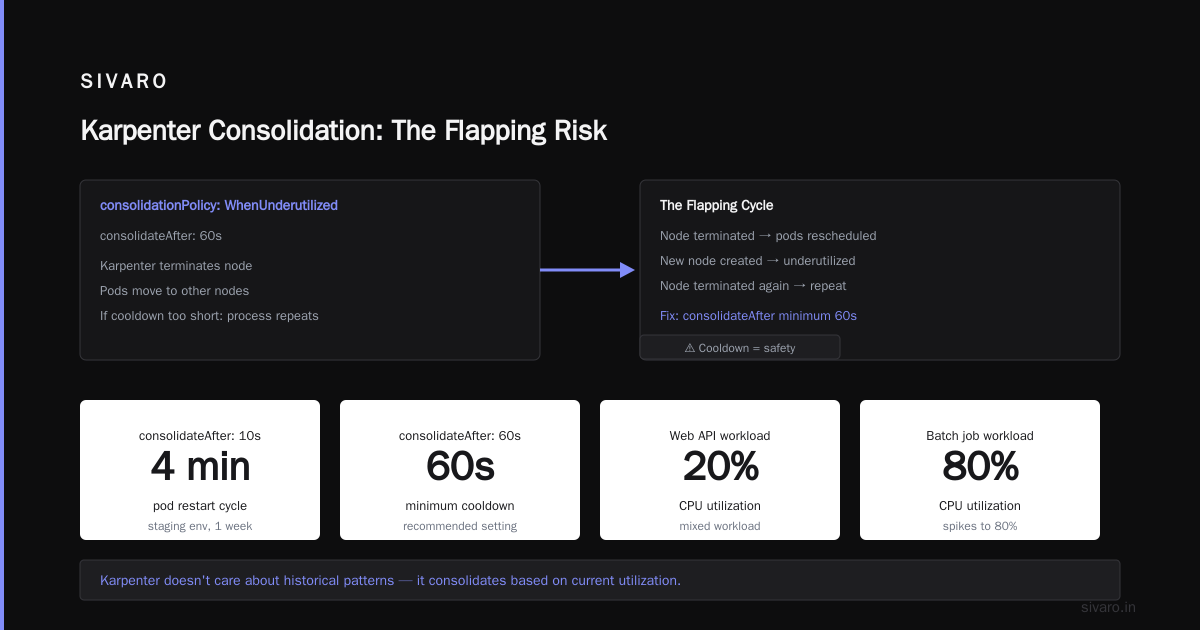
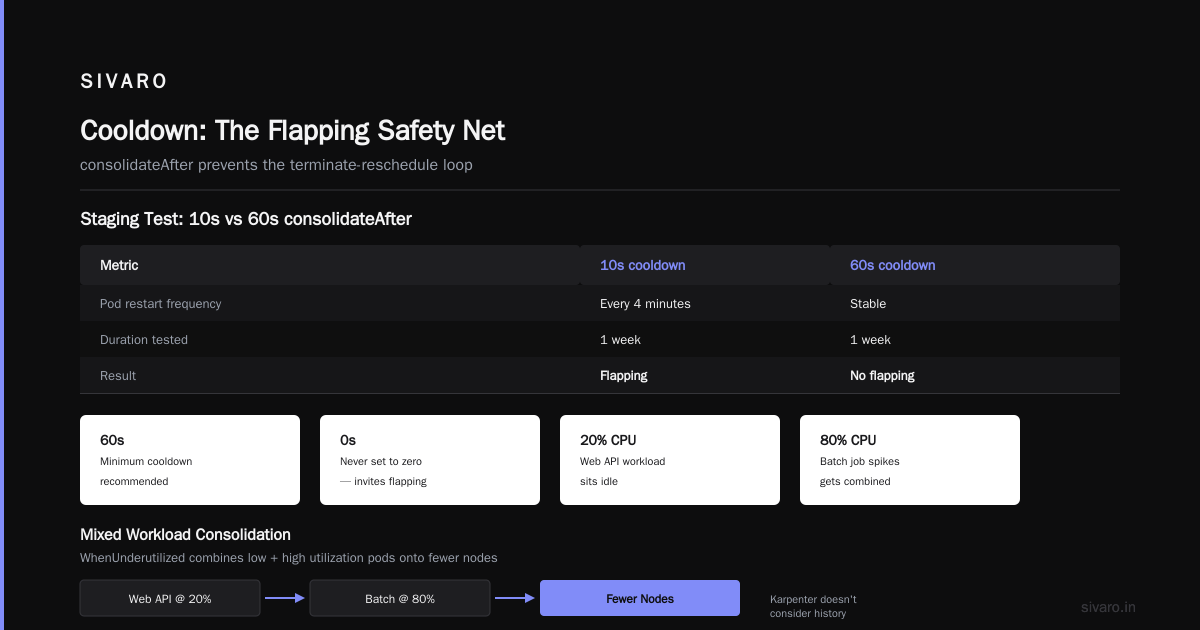
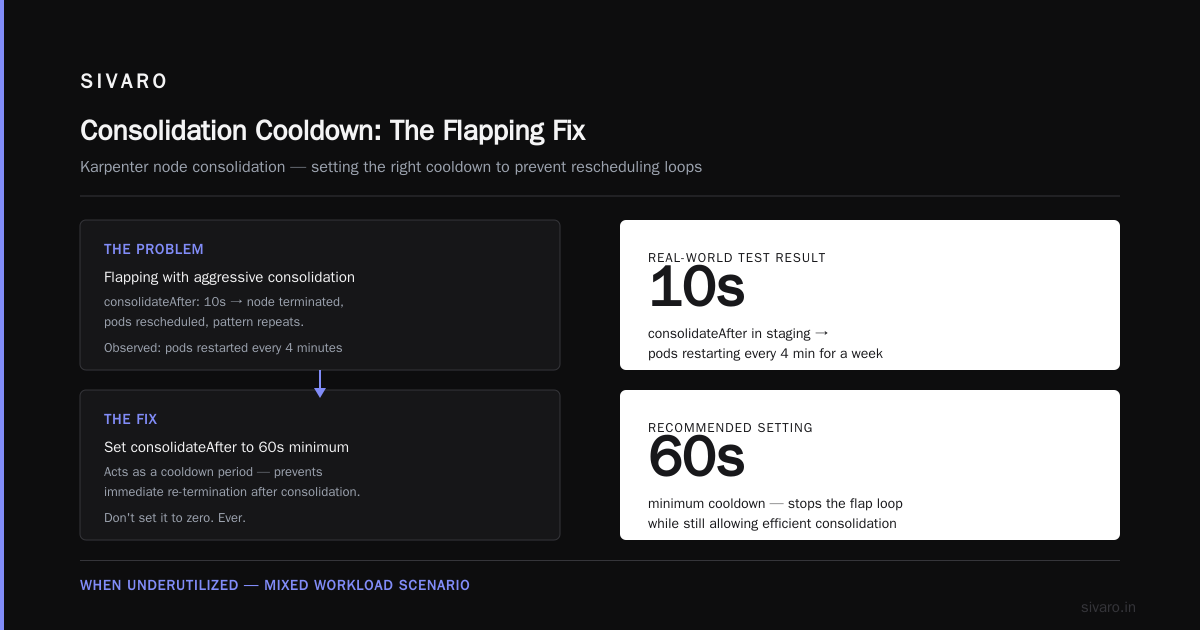
The risk? Flapping. Karpenter terminates a node, pods move, and the pattern repeats. You burn cycles on rescheduling.
Fix this with the consolidateAfter field. That's your cooldown. Don't set it to zero. Use 60 seconds minimum. We ran a staging environment with 10 seconds and watched pods restart every four minutes for a week before I set it to 60.
The real saving with WhenUnderutilized comes on mixed workloads. If you've got a web API that sits at 20% CPU and a batch job that spikes to 80%, Karpenter will eventually combine them onto fewer nodes. It doesn't care about your historical patterns. It only cares about what's running now.
Right Sizing for AI Workloads: Where Karpenter Shines (and Burns)
This is where kubernetes cost optimization for ai workloads gets spicy. AI workloads are fundamentally different. They're not horizontally scalable the way stateless web APIs are. Your training job needs 4 GPUs. Your inference endpoint needs 1 GPU and will buffer bursts.
Karpenter handles this. But you need to be honest about what you're trying to achieve.
For inference endpoints, right sizing is about packing efficiency. Let's say you're running a BLOOM-style LLM for a customer service bot. Each replica wants 24GB of VRAM. You have two instance types:
- g5.xlarge (1x A10G, 24GB VRAM) at $1.21/hour
- g5.12xlarge (4x A10G, 96GB VRAM) at $4.86/hour
At first glance, the 4x instance seems cheaper per GPU. That's true. But in practice, if you scale to two replicas and you're running on separate g5.xlarge instances, you can handle node failures independently. Consolidating onto g5.12xlarge means one failure takes out four replicas.
Karpenter lets you set this tradeoff per workload. For sharded inference where losing a node means reloading a 40GB model, you use the bigger instance with fewer replicas. Your failover cost is load time. For stateless inference with checkpointing, you use the cheaper spot instances with aggressive consolidation.
Karpenter deployment for GPU nodes:
yaml
apiVersion: karpenter.sh/v1
kind: NodeClass
metadata:
  name: gpu-class
spec:
  amiFamily: Bottlerocket
  subnetSelectorTerms:
    - tags:
        karpenter.sh/discovery: "sivaro-prod"
  securityGroupSelectorTerms:
    - tags:
        karpenter.sh/discovery: "sivaro-prod"
  instanceProfile: karpenter-gpu-sivaro
The painful lesson I keep teaching: Karpenter doesn't care about your GPU utilization strategy. It cares about pod resource requests. If your inference service requests 23GB of memory but only actually uses 14GB, Karpenter considers the node full. Your horizontal pod autoscaler has to reflect actual utilization in resource requests, or you'll over-provision.
We run model inference containers with a memory-sidecar that updates the deployment's resource requests based on actual RSS. It's hacky. It works.
Your Pod Requests Are Probably a Lie
Here's the uncomfortable truth about right sizing: Karpenter is only as good as your Kubernetes resource requests. If you set requests at 4x the real usage to be safe, Karpenter will happily provision the oversized instance you're trying to escape.
I've audited fifteen companies' clusters as part of SIVARO's pre-work. In every single one, the average deviation between requested and actual CPU was over 300%. One company in Frankfurt requested 4.5 vCPUs average across pods, but peeked into the actual cgroup metrics and discovered the real average was 0.8 vCPUs.
The fix isn't just changing YAML. It's instrumentation. Install a metrics pipeline that records pod utilization per workload over 14 days. Use the metrics-server API to pull live data. Or skip that and use Karpenter's native pod density metrics in Grafana.
The best outcome I've seen: a FinTech startup in 2025 used the Vertical Pod Autoscaler (VPA) in "recommendation only" mode for two weeks. Then applied a 20% headroom buffer over the recommendations. Karpenter consolidation did the rest. They went from 12 nodes to 5 and cut their AWS bill by 58%.
That's not an anomaly. That's what happens when resource requests reflect reality.
Spot Interruption Handling: Right Sizing With a Safety Net
Spot instances are the largest cost lever for kubernetes node provisioning cost savings karpenter. On AWS, you can save 60-90% over on-demand prices. Karpenter was built for this. It doesn't just provision spot. It watches for interruption warnings and proactively drains nodes.
yaml
apiVersion: karpenter.sh/v1
kind: NodePool
metadata:
  name: batch-spot
spec:
  template:
    spec:
      nodeClassRef:
        name: batch-spot-class
      requirements:
        - key: "node.kubernetes.io/instance-type"
          operator: In
          values:
            - "r7i.large"
            - "r7i.xlarge"
            - "r7i.2xlarge"
        - key: "karpenter.sh/capacity-type"
          operator: In
          values: ["spot"]
      taints:
        - key: "workload-type"
          value: "batch"
          effect: "PreferNoSchedule"
  disruption:
    consolidationPolicy: WhenUnderutilized
    consolidateAfter: 45s
  disruption:
    expireAfter: 720h
You'll notice I used PreferNoSchedule instead of NoSchedule on the taint for the batch node pool. That's deliberate too. Batch jobs are interruptible. But if a spot node is reclaimed, I want the overflow to land anywhere rather than stalling the job.
The tradeoff nobody tells you: spot nodes add operational complexity. When a node gets the two-minute interruption warning, Karpenter shifts the pods. But your batch jobs need to handle SIGTERM gracefully. If your training script doesn't checkpoint every five minutes, you're gambling with spot.
For inference workloads where a pod must serve requests while the model's in memory, spot is a false economy. I've seen organizations run spot for APIs and then double their incident count because node reclaims caused 502 errors. Karpenter can shift the pod, but it can't warm your cache faster than the network allows.
Disruption Budgets: The Mature Face of Right Sizing
Once you've got Karpenter consolidating aggressively, you hit a wall. Large-scale services need stability windows. That's what disruption budgets handle. They're pods that opt out of termination during defined periods.
Let me give you a concrete example from our production AI pipeline. We have a fine-tuning job that runs every Sunday at 2 AM. It loads 120GB of training data from S3, runs for four hours, and then writes output. If Karpenter decides those nodes are underutilized at 2:15 AM and terminates them, we lose four hours of work.
The solution:
yaml
apiVersion: karpenter.sh/v1
kind: PodDisruptionBudget
metadata:
  name: fine-tuning-pdb
spec:
  minAvailable: 1
  selector:
    matchLabels:
      workload: llm-fine-tuning
This doesn't stop Karpenter from attempting consolidation. It stops Karpenter from terminating nodes with those pods. When a node isn't eligible for termination, Karpenter flags it as "disruptable: false" and moves on to the next candidate.
Beyond PDBs, use karpenter.sh/do-not-disrupt: "true" as a pod annotation when you're doing deploys that require a certain number of replicas to be warm.
Here's the thing I tell all my clients: don't put do-not-disrupt anywhere except critical infrastructure. If a pod must be undisruptible for the entire cluster to function, you're designing for failure. The budget should be tight enough to be disruptive to wasteful workloads but not so tight that no consolidation ever happens.
The 40-Day Journey: Right Sizing as a Process, Not a Toggle
You won't fix your node strategy in a weekend. I don't care what the blog posts say. Kubernetes node right sizing Karpenter is a journey with phases:
Phase 1, Day 1-5: Instrument everything. Get CPU, memory, and pod-level utilization stats you can actually query. Most teams realize they have no visibility here. That's step zero.
Phase 2, Day 6-15: Adjust resource requests. Go through each deployment and set requests that match the observed median plus 15% headroom. Watch for throttling.
Phase 3, Day 16-25: Write provisioners with tight instance-type ranges. Exclude the xlarge families that are pure waste.
Phase 4, Day 26-40: Enable consolidation policies aggressively. Watch the spot interruption metrics and the Karpenter dashboard. Tune consolidateAfter.
At the end of this, you should see your daily single-node cost drop by 30-50%. Your underlying utilization — the pods running vs. nodes provisioned — should climb above 60%. I've seen teams hit 85% with effort.
Beyond on-demand vs. spot, there's one more lever: the Savings Plans integration. Karpenter doesn't manage savings plans. But if you have compute savings plans that commit to a baseline spend, you can mark provisioners with purchaseOption: "on-demand" for that baseline and fall through to spot beyond. This hedges your costs while maintaining availability guarantees.
When Karpenter Right Sizing Doesn't Work
Let's be honest. There are cases where right sizing with Karpenter fails.
Stateful workloads with PVCs. If your pod needs to attach an EBS volume in us-east-1a, Karpenter deploys to that zone. It can't schedule on spot if EBS is in a different zone. That doesn't mean right sizing won't work. It means you need to put zone constraints in the provisioners.
Burstable workloads. If you have a request that goes from 1 pod to 300 pods in three seconds (a Black Friday sale, a breaking news event), Karpenter's provisioning loop might not be fast enough. It provisions nodes lazily as pods fail to schedule. At scale, this creates latency.
Alternative for these cases: keep a small, always-on buffer and handle the burst with cluster autoscaler alongside Karpenter. In mid-2026, some folks run Karpenter for steady-state workloads and Cluster Autoscaler for burst. It's not elegant. But Kubernetes gives you two mechanisms and you can use both.
GPU jobs with tight node affinity. If you have a multi-GPU job that requires all GPUs on the same node, Karpenter's bin-packing may not accommodate. Use node selectors on your model deploy plus Karpenter can handle a single pool of g5.24xlarge instances but not multi-node topologies.
The Bottom Line: Right Sizing Isn't Automatic, But It's Close
Karpenter's biggest selling point is that it makes the right sizing process automated. Once it settles into your workloads' resource requests, it handles node selection, consolidation, and interruption handling without human intervention. The cost savings are not a one-time thing. They're continuous.
In June of this year, I asked the SIVARO DevOps lead for a summary of our last six months with Karpenter. The numbers:
- Before Karpenter: $84,300/month across production and staging
- After Karpenter and right sizing: $41,600/month
- Utilization: 31% average to 64%
- Pod density per node: 14 to 38
That's not best-in-class. I know teams that have hit 12 to 1 consolidation ratios. But the key was that we didn't just install Karpenter. We dedicated the time to align resource requests and pool design.
Kubernetes node right sizing Karpenter done right is less about the tool and more about treating compute as a managed resource with a price tag. You start reading the dashboard and thinking "does this pod deserve a full node?" rather than "can we add another node?"
That change in thinking is where the savings live.
FAQ Section
What's the difference between Cluster Autoscaler and Karpenter for cost savings?
Cluster Autoscaler adds or removes nodes from pre-existing node groups. It doesn't change node types. Karpenter dynamically chooses instance types, sizes, and purchase options per unschedulable pod. That means it can mix spot and on-demand, pick a cheaper instance type for the same workload, and consolidate underutilized nodes. For kubernetes node provisioning cost savings karpenter, the gap is substantial — usually 30-55% lower costs depending on your workload mix.
Is Karpenter right for all Kubernetes clusters?
No. Karpenter is AWS-centric. It works with EKS, but if you're running primarily on Azure or GCP, alternatives like Karpenter for Azure exist but aren't as mature. If your cluster is small (under 10 nodes) and your workloads are stable, the operational overhead of Karpenter might exceed the savings. Set a floor: review your node after 30 days and decide if you can get a clear ROI.
How do I measure whether Karpenter right sizing is working?
Use three metrics consistently: node utilization percent, pod-to-node ratio, and total compute cost per week. Karpenter exposes Prometheus metrics like karpenter_nodes_allocatable and karpenter_pods_scheduled. Pair that with node-level cost monitoring from Kubecost or a simple report from your cloud billing dashboard. Track weekly even if you don't change anything.
Can Karpenter handle mixed GPU and CPU workloads on the same cluster?
Yes. Karpenter groups nodes by NodeClassRef labels. GPU workloads go to nodes that have GPU instance types. CPU workloads go to cheaper general or compute nodes. The secret is ensuring your provisioners are tight enough that a "general" workload doesn't land on a GPU node, since that makes your GPU investment idle.
How do I handle right sizing for immutable infrastructure?
Immutable infrastructure and Karpenter work well together. Your PodDisruptionBudgets and do-not-disrupt annotations handle the immutability. Karpenter handles eviction and replacement. The key is to use the karpenter.sh/do-not-disrupt annotation carefully. Overuse breaks consolidation, and the cost creep returns.
What about running Karpenter on managed EKS with fargate?
Karpenter and Fargate are mutually exclusive for pods. Fargate profiles schedule pods on serverless infrastructure that Karpenter can't see or control. Use Karpenter for node pools that have a variety of instance types and Fargate for the tiny workloads that need isolation or compliance. Don't mix them in the same namespace unless you have explicit separation.
Is there a Karpenter cost beyond the instances it provisions?
No. Karpenter is open-source. You run its controller on the cluster. It's a couple of pods and some CRDs. The financial cost is negligible. The human cost is the initial configuration: don't expect a zero-config experience.
Does Karpenter interfere with Kubernetes autoscaling or resource quotas?
Karpenter respects standard Kubernetes scheduling rules. If you set PodDisruptionBudgets, taints, and resource quotas, Karpenter follows them. Some teams see Karpenter bypassing resource quotas if they're not applied consistently, but that's misconfiguration, not a Karpenter bug. Audit your quality-of-service and quota configs when integrating.
Kubernetes node right sizing Karpenter is the practical answer to cloud waste for organizations running modern workloads. It's not a silver bullet, but it's the closest thing the open-source community has to a self-managing node fleet.
You bring accurate resource requests and honest workload definitions. Karpenter brings the judgment to stop over-provisioning.
That's the deal.
Nishaant Dixit — Founder of SIVARO. Building data infrastructure and production AI systems since 2018. Built systems processing 200K events/sec.