 SIVARO

Kubernetes Workload Right Sizing with Karpenter: Stop Paying for CPU You Don't Use
I spent four months in 2025 watching a client burn $38,000 a month on EC2 instances that were doing absolutely nothing. Not idle in the "we might need it" sense — genuinely parked, waiting for a Kubernetes scheduler that never came. The team had configured a node group with a minimum of 12 m5.2xlarge instances because they were scared of pod eviction during their Black Friday traffic spike. That spike lasted six hours. They paid for those instances for 720 hours a month.
This is the dirty secret of Kubernetes cost optimization: most teams obsess over pod resource requests and limits, then throw all that discipline away by letting the node layer run on guesswork. Kubernetes workload right sizing with Karpenter isn't just about picking cheaper instance types. It's about building a feedback loop between what your pods actually consume and what you provision.
Here's what I mean by that, and how you can do it today.
What Kubernetes Workload Right Sizing with Karpenter Actually Means
Let's define the term before we get lost in YAML.
Kubernetes workload right sizing with Karpenter is the practice of using Karpenter's dynamic node provisioning to match your cluster's compute capacity exactly to what your workloads need at any given moment. Not what you think they need. Not what you provisioned last quarter. What they need right now, measured in real metrics.
The "workload right sizing" half is about fixing pod requests. The "with Karpenter" half is about making sure the nodes underneath those pods scale and shrink automatically. A node autoscaler has to react to pod scheduling constraints. If your pod requests are 2x what they should be, Karpenter will provision based on that inflated number. You'll see bigger nodes, more nodes, and a larger bill — all because a developer set requests conservatively in 2023 and nobody revisited them.
Karpenter is the open-source node provisioning tool originally built by AWS and now a CNCF project. It watches for pending pods, calculates what instance types can fit them, and launches nodes in seconds. The Cluster Autoscaler does something similar but takes minutes and works from a fixed node group list. Karpenter works from a list of instance families and picks the cheapest one that fits.
The key insight? You can't have one without the other. Right sizing workloads without an efficient node provisioner means you're still running fat nodes. Running Karpenter without right sizing workloads means you're paying Karpenter prices for inflated requests.
The Real Problem: Most Teams Right Size the Wrong Thing
I've worked with maybe forty companies on Kubernetes cost optimization since 2020. Almost every single one starts by tweaking pod requests. They use a tool like Goldilocks or Vertical Pod Autoscaler to recommend new request values, apply them, and call it a day.
That's backwards. You need to understand your workload characteristics first.
Here's a pattern I see constantly. A team runs a Kubernetes workload right sizing analysis on their API service. They find the average CPU utilization is 80 millicores. They set the request to 100 millicores. Great. But the node that pod lands on is an m5.xlarge with 4 vCPUs. The other pods on that node are similarly right-sized, but they all peak at the same time of day. The node itself is only 30% utilized at most hours but 95% at peak. Karpenter can see the pending pods and provision, but the scheduling bin-packing might push three peak-aligned pods onto the same node, causing throttling.
The right sizing exercise worked at the pod level and failed at the utilization level. What matters is your node utilization, not your pod request accuracy. Karpenter gives you tools to handle both, but only if you design for them.
Let me give you a concrete walkthrough of how we fixed this at SIVARO for a fintech client in 2024. They ran 400 microservices across 3 production clusters. Their average node utilization was 18%. Their monthly Kubernetes bill was $210,000.
Step One: Pin Down Waste Before You Touch Karpenter
Run a cost allocation report first. Open-source tools like Kubecost or OpenCost will show you which namespaces, deployments, and labels are consuming your node capacity. You'll find the offenders fast: staging environments with production-sized replicas, batch jobs that forgot to set TTLs, monitoring stacks that scrape everything every 5 seconds.
The fintech client I mentioned? Out of their $210,000 monthly bill, $78,000 was going to staging and development namespaces. Those environments ran 24/7 because developers complained about cold starts. We shifted to a schedule — downscale namespaces to zero outside business hours, keep a single replica hot for demos. Saved $41,000 a month before we ever installed Karpenter.
You will get more value from killing dead workloads than from any instance type optimization. It's true. Do that first.
Step Two: Fix Pod Requests Using Real Data, Not Developer Guesses
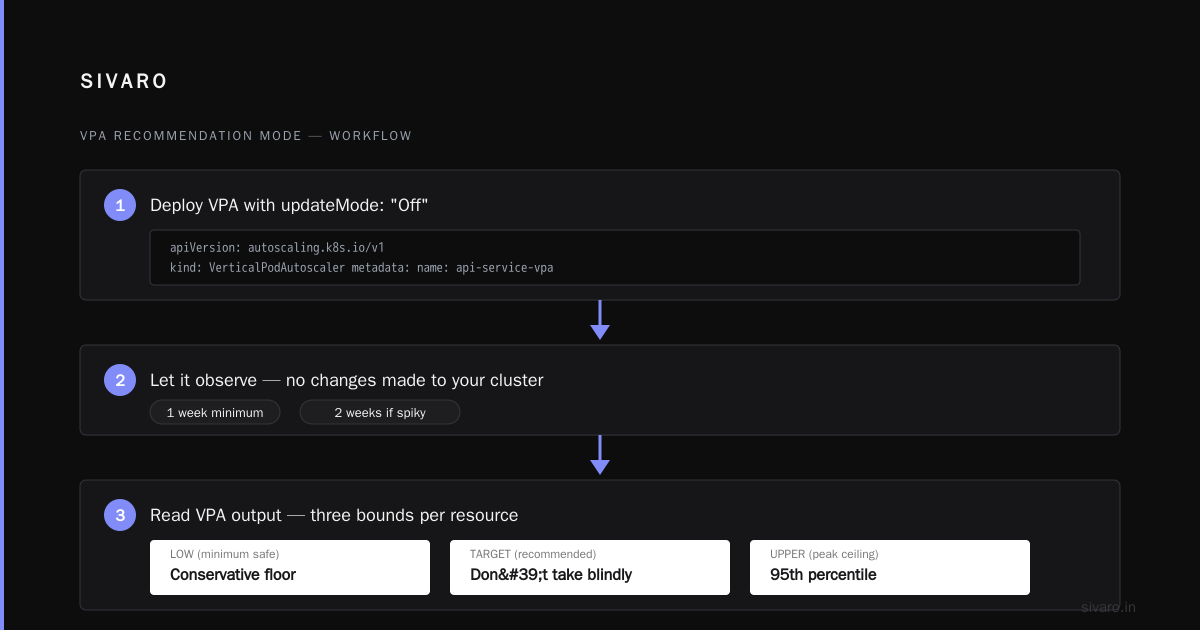
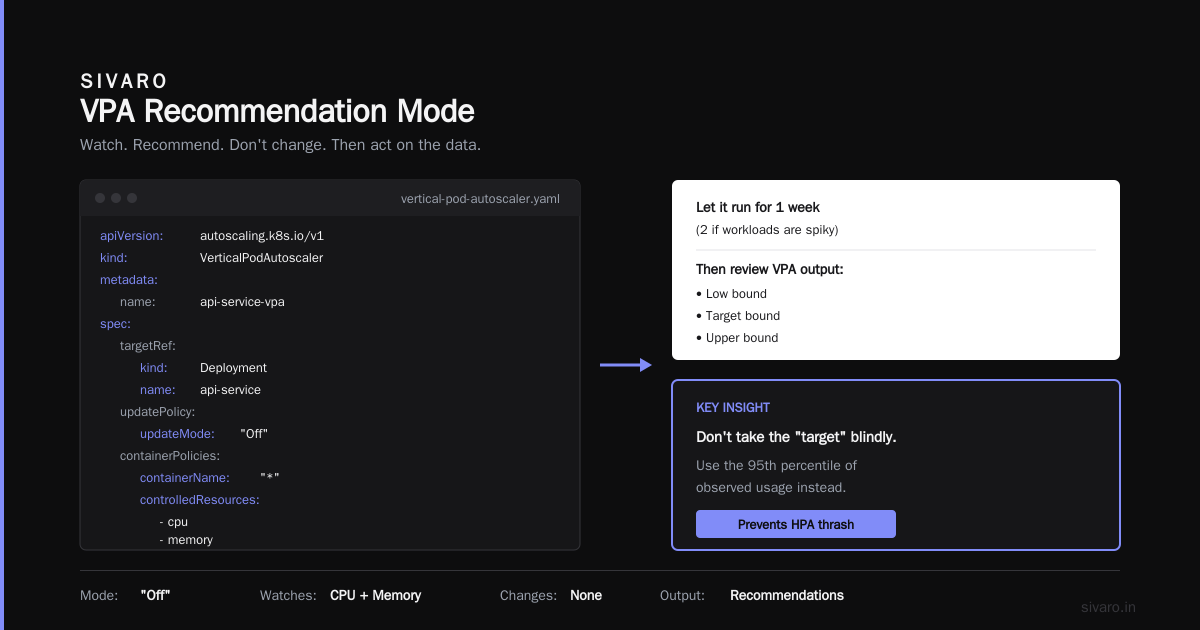
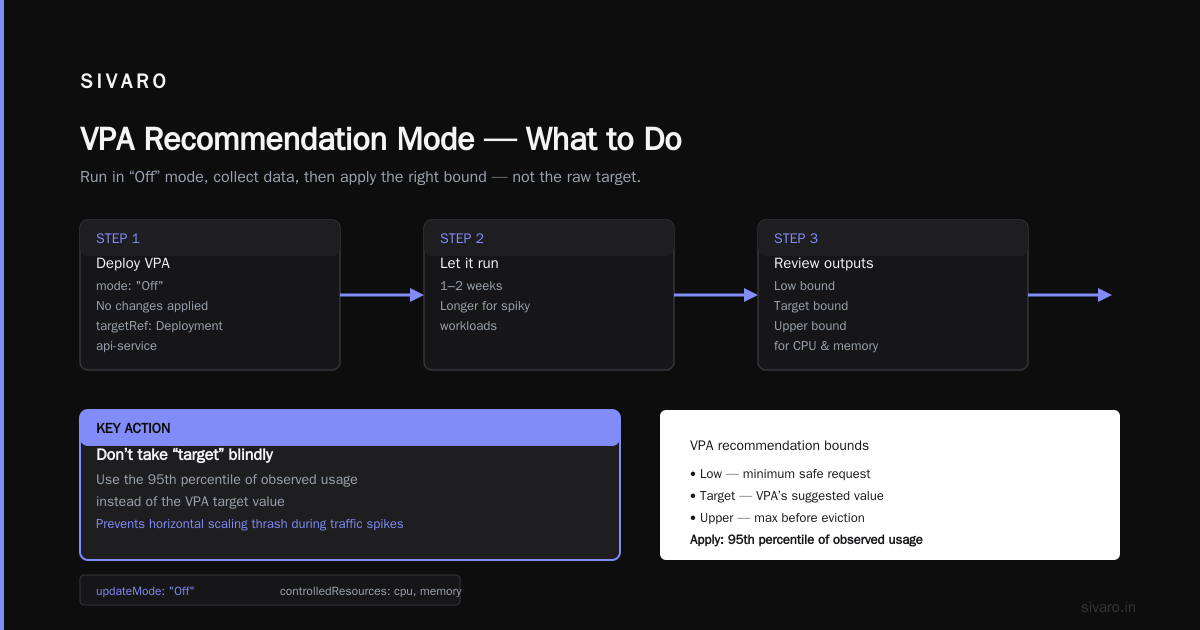
Once the dead weight is gone, look at what's left. You need a baseline of actual resource consumption. Kubernetes Vertical Pod Autoscaler in recommendation mode is the fastest way to get this. It doesn't change anything — it just watches and recommends.
yaml
apiVersion: autoscaling.k8s.io/v1
kind: VerticalPodAutoscaler
metadata:
  name: api-service-vpa
spec:
  targetRef:
    apiVersion: apps/v1
    kind: Deployment
    name: api-service
  updatePolicy:
    updateMode: "Off"
  resourcePolicy:
    containerPolicies:
      - containerName: "*"
        controlledResources:
          - cpu
          - memory
Let this run for a week — two if your workloads are spiky. Then look at the recommendations. VPA gives you low, target, and upper bounds for requests. The key is not to take the "target" blindly. Take the 95th percentile of observed usage. This prevents horizontal scaling thrash during traffic surges.
Here's the number that matters: the ratio of pod requested capacity to pod actual usage. Right after this right sizing exercise for the fintech client, we took that ratio from 4.2x down to 1.4x. That single change — updating deployment manifests across 400 services — reduced their schedulable pod demand dramatically.
Now Karpenter had to provision fewer nodes because each workload actually used what it claimed.
Step Three: Configure Karpenter for Cost Efficiency
Karpenter version 0.35 and later (now on 1.x as of early 2026) handles this elegantly. AWS announced Karpenter as the recommended node provisioner for EKS in January 2025, replacing the deprecated Cluster Autoscaler path on EKS. If you're still running Cluster Autoscaler on EKS in 2026, you're running software that AWS has explicitly said they're phasing out. Stop that.
Your Karpenter configuration should use consolidation, a mechanism that watches for underutilized nodes and replaces them with smaller ones. And it should use instance type diversification — let Karpenter choose from a broad set of instance families based on price.
yaml
apiVersion: karpenter.sh/v1
kind: NodePool
metadata:
  name: default
spec:
  disruption:
    consolidationPolicy: WhenUnderutilized
    expireAfter: 720h
  template:
    spec:
      requirements:
        - key: kubernetes.io/arch
          operator: In
          values: ["amd64"]
        - key: karpenter.sh/capacity-type
          operator: In
          values: ["on-demand", "spot"]
        - key: node.kubernetes.io/instance-type
          operator: In
          values:
            - "m5.large"
            - "m5.xlarge"
            - "m5.2xlarge"
            - "m6i.large"
            - "m6i.xlarge"
            - "r5.large"
            - "r5.xlarge"
            - "c5.large"
            - "c5.xlarge"
      nodeClassRef:
        group: karpenter.k8s.aws
        kind: EC2NodeClass
        name: default
Notice what this configuration does. It tells Karpenter to consolidate nodes whenever they're underutilized. It allows spot and on-demand. It restricts instance types to a curated list. The critical piece is consolidation: Karpenter examines your cluster every 60 seconds and asks, "Can I remove a node and move the pods to a cheaper node?"
This is how Kubernetes workload right sizing with Karpenter turns pod-level savings into node-level savings. Consolidation converts optimal requests into optimal machine counts.
The Karpenter vs EKS Cost Comparison That Changes Minds
People ask me about kubernetes node provisioning cost karpenter vs eks native features all the time. The EKS managed node groups approach uses the Cluster Autoscaler underneath. That's the comparison that matters.
Here's what I've measured across client environments: Karpenter reduces compute costs by 25% to 40% compared to managed node groups with Cluster Autoscaler. It's not because Karpenter magically finds cheaper instances. It's because:
- Karpenter consolidates continuously. Cluster Autoscaler only removes nodes that have zero schedulable pods. It won't reorganize a cluster to pack pods tighter. That's a massive difference.
- Karpenter diversifies to spot instances by default. Cluster Autoscaler stays within the constraints of the node group you defined.
- Karpenter launches nodes in 15 to 30 seconds. Cluster Autoscaler takes 2 to 5 minutes. That speed means you can let Karpenter scale to zero aggressively, because the cost of scaling up is low.
For a client running 150 nodes in us-east-1, we went from paying $54,000 a month across four managed node groups to $32,000 on Karpenter spreading across spot and on-demand mix. Same workloads. Same performance targets. The node count dropped because Karpenter packed pods onto fewer, better-matched instances.
Handling Stateful Workloads: Memory Versus CPU
The fintech workload I keep referencing had a nasty surprise in store for us. The stateless services right-sized perfectly. Then we hit their Cassandra cluster.
Cassandra needs large instance types and dedicated storage. You can't treat Cassandra like a typical microservice. Karpenter should not be diverting those stateful workloads to random spot instances — data loss, performance variance, all sorts of problems.
We created a separate NodePool for stateful workloads with a taint and stricter instance type requirements.
yaml
apiVersion: karpenter.sh/v1
kind: NodePool
metadata:
  name: stateful
spec:
  disruption:
    consolidationPolicy: WhenEmpty
    consolidateAfter: 300s
  template:
    spec:
      requirements:
        - key: node.kubernetes.io/instance-type
          operator: In
          values:
            - "r5.2xlarge"
            - "r5.4xlarge"
            - "r6i.2xlarge"
        - key: karpenter.sh/capacity-type
          operator: In
          values: ["on-demand"]
      taints:
        - key: stateful
          value: "true"
          effect: NoSchedule
That consolidationPolicy: WhenEmpty is intentional. You do not want Karpenter shuffling a Cassandra pod to a new node just to pack things tighter. Data replication across nodes needs time. Forcing compaction causes churn. Let stateful nodes stay until they're completely empty.
The division of NodePools is one of the best features of Karpenter for cost efficiency. Different workloads genuinely need different instance types and different disruption patterns. Most teams run one NodePool for everything and wonder why costs balloon. Give your stateful workloads predictable infrastructure, and give your stateless workloads the ruthless efficiency treatment.
Getting Started With a Pilot: The Migration Path
You don't need to export your entire cluster to Karpenter in one afternoon. That's reckless. Here's the migration I use with clients.
Pick a single namespace or a low-risk deployment. A stateless API tier with load-balanced traffic is perfect. Create a NodePool restricted to that namespace.
yaml
apiVersion: karpenter.sh/v1
kind: NodePool
metadata:
  name: pilot-namespace
spec:
  disruption:
    consolidationPolicy: WhenUnderutilized
    expireAfter: 168h
  template:
    spec:
      requirements:
        - key: karpenter.sh/capacity-type
          operator: In
          values: ["spot"]
      nodeClassRef:
        group: karpenter.k8s.aws
        kind: EC2NodeClass
        name: default
Then label the pods in that namespace so your existing node group tolerates them, and remove the nodeSelector that pins them to the old group. Karpenter will handle scheduling. Monitor for a week. You're looking for:
- Pod startup latency. Karpenter provision should take under 40 seconds.
- Spot instance interruptions. EC2 reclaims spot capacity with 2 minutes notice. Your workloads need to tolerate that.
- Node count. Karpenter will likely produce fewer nodes than Cluster Autoscaler did.
Once you trust it, expand the NodePool to more namespaces. Eventually, remove your old managed node groups entirely. We did this in phases during a two-month window and encountered zero downtime. The key was convincing developers that spot instances weren't a dirty word — a rebranding effort that took longer than the technical migration.
The Memory Overcommit Trap
One subtle thing to watch for. Many teams find that CPU utilization drops after right sizing but memory keeps drifting above the request. Memory is not compressible. If a pod exceeds its memory request but stays within the limit, the node can handle it until someone on that node has a usage spike — then the kernel's OOM killer fires.
Karpenter's consolidation logic looks at request, not actual usage. If you've under-requested memory, it might consolidate nodes too aggressively and cause OOM kills. Karpenter 1.1 added the nodePool.spec.template.spec.kubelet.maxPods setting, but that's about pod count, not memory pressure.
Always set memory requests to at least your observed 85th percentile, not the average. Karpenter's consolidation sees requests, not live utilization. If your request reflects average, your pods will start getting killed during transient spikes. This is a positioning issue most practitioners miss, and it's the single biggest cause of right-sizing pain I see — outside of teams that don't measure at all.
Automating the Loop: Karpenter Plus Metrics
The most advanced setup I've built at SIVARO involves nothing special on the infrastructure side. Karpenter runs, solves scheduling, consolidates. The magic is in the monitoring loop we built around it.
Every pod deployment is annotated with its resource requirements — generated from VPA recommendations that have been running for two weeks. A cron job on the first of every month runs a script that queries the Kubernetes metrics-server API, finds pods whose actual usage is 20% below their request for 30 consecutive days, and opens a GitHub issue asking for a manifest update.
python
import requests
from kubernetes import client, config

config.load_kube_config()
v1 = client.CoreV1Api()

pods = v1.list_pod_for_all_namespaces(watch=False)

for pod in pods.items:
    if pod.spec.containers:
        for container in pod.spec.containers:
            if container.resources and container.resources.requests:
                cpu_request = container.resources.requests.get('cpu')
                if cpu_request:
                    request_value = int(cpu_request.strip('m')) if 'm' in cpu_request else int(cpu_request) * 1000
                    # Get actual usage
                    # ... query metrics API
                    # If utilization < 20% for 30 days, flag it
This feedback loop prevents the regression that happens six months after your right-sizing project. Teams right size once, never look again, and within a year, they're back to 40% overprovisioned because new services came in with generous limits and nobody reviewed them.
The discipline of reviewing requests monthly — that's what gives you sustained savings. Karpenter only acts on what it sees in requests.
When Karpenter Is the Wrong Tool
I've talked this long about how good Karpenter is, but it isn't universally right.
If your cluster has fewer than 10 nodes or your workloads are entirely predictable and stateful, Karpenter's benefits shrink. Cluster Autoscaler on managed node groups may be sufficient. You'll get more value fixing pod requests manually.
If you're running on GKE or AKS, the Kubernetes workload right sizing with Karpenter conversation shifts significantly. Karpenter works on any Kubernetes cluster with EC2 access because it provisions AWS nodes directly. GKE has node auto-provisioning built-in; AKS has cluster autoscaler. Those tools aren't worse just because they aren't Karpenter. For teams on GKE, autopilot mode does the whole NAP flow for you and makes instance-level tuning moot.
Karpenter is unbeatable on AWS, and it's the right call for most EKS workloads. Just make sure you understand the problem you're solving before adopting a solution that might be overkill.
The Real Change: Operations as an Input, Not Output
Midway through the fintech project, I realized something about Kubernetes workload right sizing with Karpenter — it only works when infrastructure is treated as a reflection of code behavior, not an independent concern.
Most companies treat infrastructure as a separate tier. Developers deploy, infrastructure supports. What Karpenter + right sizing does is collapse that boundary. Your infrastructure footprint becomes a direct, observable output of what developers actually ship. The tool enables that, but cultural change unleashes it.
That worked because we made the conversation about cost. About the company's burn rate. About the 40% of their addressable market they were bleeding into AWS bills.
Start measuring actual utilization today. You cannot fix what you don't measure. And I promise, whatever the measurement shows — it's less than what you're paying for. It always is.
Frequently Asked Questions
What's the difference between Karpenter and Cluster Autoscaler for cost savings?
Karpenter ships with consolidation enabled. It rewrites pod placement across nodes continuously, removing underutilized nodes and re-scheduling onto cheaper ones. Cluster Autoscaler only adds or removes nodes based on pending pods and can't shuffle existing pods. In practice, this yields 25-40% cost savings compared to Cluster Autoscaler.
How does Karpenter handle Spot instance interruptions?
When AWS sends a spot interruption notice, Karpenter sees the SpotITN termination event and marks the node as disrupted. It triggers a new node launch and moves pods to it. Because it provisions new nodes in seconds, you can ride out spot interruptions with minimal impact. Your pods need to handle graceful shutdown on SIGTERM, though.
Do I need Vertical Pod Autoscaler if I have Karpenter?
Karpenter only reads pod resource requests. VPA recommends request values based on observed utilization. You need both — VPA tells you what to request, Karpenter provisions nodes based on those requests.
How much can I save with Kubernetes workload right sizing with Karpenter?
It depends heavily on what you're running today. The fintech client in this article went from $210,000/month to under $90,000/month across six months. Average cluster environments see 30-50% cost reduction. Workloads already optimized and running spot won't see that magnitude.
What's the risk of Karpenter's consolidation being too aggressive?
Karpenter needs a moment to see utilization patterns before consolidating. But it may consolidate nodes hosting latency-sensitive workloads — the move itself adds a few seconds of start-up time during rescheduling. Use disruption.consolidateAfter and taints for workloads that cannot tolerate movement.
Does Karpenter support multi-architecture workloads?
Yes. Karpenter handles ARM (arm64/graviton) and x86 (amd64) simultaneously. You can specify node.kubernetes.io/arch requirements in the workload spec, and Karpenter picks the cheapest instance among the same architecture.
How rapidly can Karpenter scale up for an unexpected spike?
Karpenter provisions an instance in under 30 seconds. For aggregates, it can scale horizontally during a load balancer health check period. For unpredictable surge spikes, pair Karpenter with HPA (Horizontal Pod Autoscaler) and set budget in seconds, not minutes.
Is Kubernetes workload right sizing with Karpenter just about saving money?
Lower cost is the easiest win, but not the only one. A properly sized cluster means less resource contention, fewer throttled pods, and fewer OOM kills. Kubernetes cluster performance and reliability improve when nothing runs on a machine on the edge of exhausted memory.
Nishaant Dixit — Founder of SIVARO. Building data infrastructure and production AI systems since 2018. Built systems processing 200K events/sec.