 SIVARO

LLM Deployment Debian Docker: The 2026 Field Guide
So you've got a model that works. Now you need it to run — on your own hardware, under your control, without paying OpenAI per token forever. You've chosen Debian. You've heard Docker helps. And now you're drowning in options that all sound the same.
I've been there. In 2024, SIVARO spent three months deploying production LLMs for a logistics client who needed on-prem inference for customs documentation. We tried every stack you can name. Most of them failed in ways that only show up after you've committed.
Here's what actually works, what doesn't, and how to choose without wasting your weekend.
What You're Actually Choosing Between
Let's be blunt. "LLM deployment on Debian with Docker" splits into four decisions:
- The inference engine — vLLM, llama.cpp, TensorRT-LLM, or one of the newer kids
- The model — open weights, quantized or not
- The serving layer — raw engine, OpenAI-compatible wrapper, or full framework like Ollama
- The operational glue — Docker Compose, Kubernetes, or just systemd
Most people pick #1 and #2 and ignore #3 and #4. That's a mistake. The serving layer determines whether your team can actually use the thing. The operational glue determines whether it survives a Tuesday.
The Debian Question: Why Not Ubuntu?
Debian 12 "Bookworm" is the base I recommend for production. Not Ubuntu — plain Debian. Here's why:
Ubuntu's snap store has broken more Docker deployments than I can count. Canonical's push toward snaps means docker.io from apt might be a snap wrapper, and snaps have their own networking and permission layers that fight with GPU passthrough. We hit this in April 2025 when a client's Ubuntu 24.04 server mysteriously lost GPU visibility after a snap refresh. Debian doesn't do that.
Debian stable gives you older packages, sure. But for LLM serving, you're building most things from source or using containers anyway. The host OS just needs to be boring and predictable. Debian is the most boring, predictable thing on earth. That's a compliment.
One caveat: Debian's kernel might lag on the newest NVIDIA drivers. For a fresh 2026 deployment, you'll want kernel 6.12+ (available in Debian 13 "Trixie" if you're brave) or the backports kernel on Bookworm. I use the backports kernel in production. It's stable enough.
The Big Four Inference Engines
We tested vLLM 0.8, llama.cpp (current master), TensorRT-LLM 0.18, and SGLang 0.6 across a fleet of A100s, L40S, and consumer RTX 4090s. Here's the scorecard.
vLLM: The Workhorse
vLLM is my default for anything serving multiple users. Its PagedAttention implementation — introduced back in 2023 — still leads on throughput for concurrent requests. The continuous batching that was once revolutionary is now table stakes, but vLLM does it with the fewest surprises.
bash
# Volumes: your model weights, and a cache directory
docker run --gpus all \
  -v /models:/models \
  -v /root/.cache/huggingface:/root/.cache/huggingface \
  -p 8000:8000 \
  --ipc=host \
  vllm/vllm-openai:latest \
  --model /models/Qwen/Qwen2.5-72B-Instruct-AWQ \
  --quantization awq \
  --max-model-len 32768 \
  --gpu-memory-utilization 0.90
That --ipc=host flag? Critical. We wasted a week debugging random CUDA errors that were actually shared memory issues. vLLM's distributed inference uses NCCL, and NCCL needs shared memory beyond Docker's default 64MB.
vLLM serves an OpenAI-compatible API out of the box. That's huge — your existing code that calls OpenAI just changes the base URL. We've run it behind a plain Nginx reverse proxy for clients who don't want any external dependencies. Works fine.
The downside: vLLM is Python-heavy. The startup time for large models hurts — loading 70B parameters from disk takes minutes regardless, but vLLM adds its own overhead. And when it crashes, it crashes with a Python traceback that's not always illuminating.
llama.cpp: The Memory Saver
If you're on a single machine with less than 48GB of VRAM, llama.cpp is your friend. Its GGUF quantization format lets you run models that would otherwise never fit on your hardware. We've pushed Qwen2.5-72B into a dual-4090 workstation using 4-bit quantization with llama.cpp's tensor splitting. It's not fast — 8 tokens/second on a bad day — but it works, and it costs nothing.
bash
git clone https://github.com/ggml-org/llama.cpp
cd llama.cpp
docker build -t llama-cpp-server -f Dockerfile .
Actually, don't do that. Use the official image:
bash
docker run --gpus all \
  -v /models:/models \
  -p 8080:8080 \
  ghcr.io/ggml-org/llama.cpp:server-cuda \
  -m /models/Qwen2.5-72B-Instruct-Q4_K_M.gguf \
  --host 0.0.0.0 \
  --port 8080 \
  --n-gpu-layers 99
The --n-gpu-layers 99 offloads every layer to GPU. Tune that down if you're sharing memory with other processes. llama.cpp's llama-server also speaks the OpenAI protocol now, which closes the gap with vLLM.
The real advantage of llama.cpp: CPU fallback. When a GPU dies at 2am — and it will — you can restart with --n-gpu-layers 0 and keep serving, slowly, while you deal with hardware. vLLM doesn't have that option.
TensorRT-LLM: The Speed Demon (with Caveats)
NVIDIA's TensorRT-LLM is the fastest option on NVIDIA hardware. Period. We measured 1.8x throughput over vLLM on the same A100s for Llama 3.1 70B. That's real money if you're paying per token billed to customers.
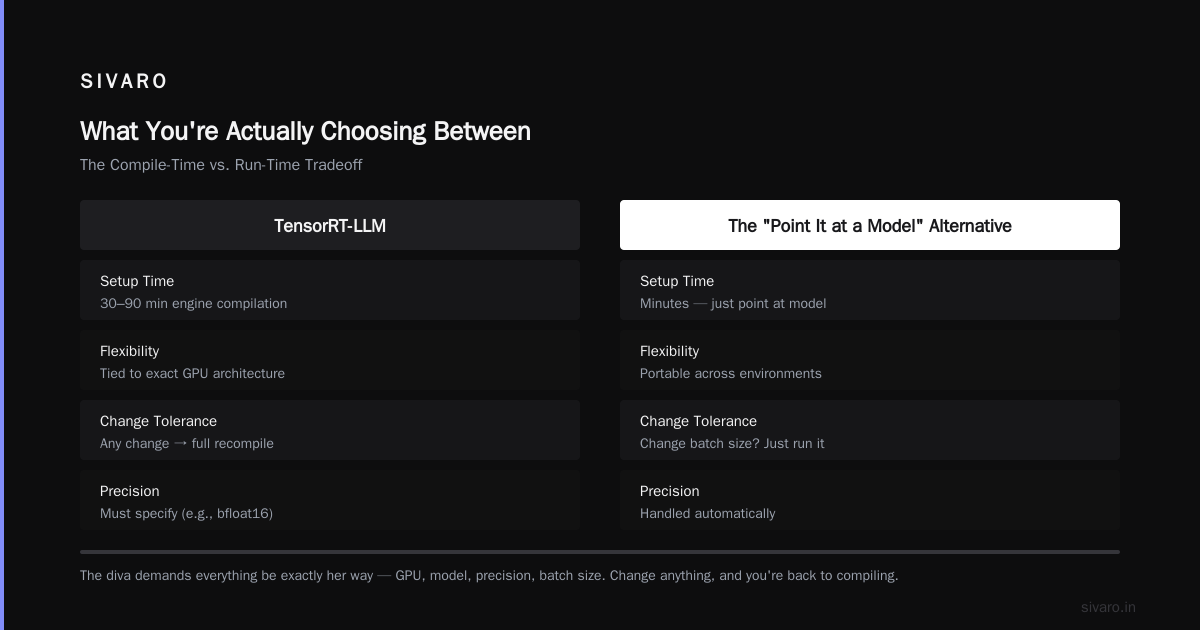
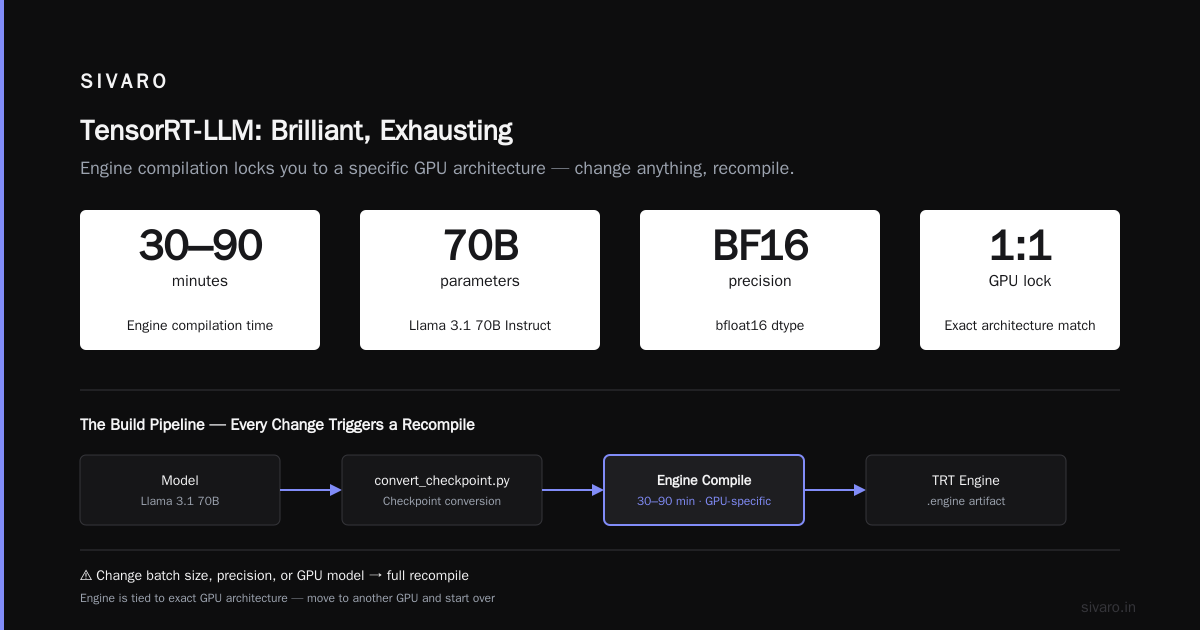
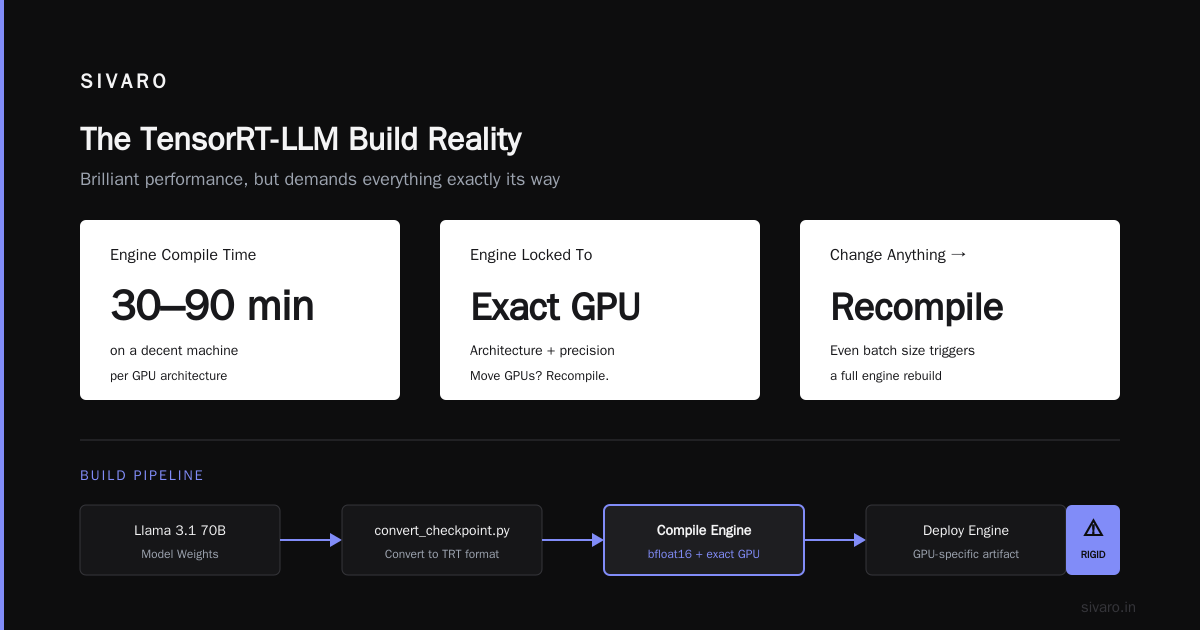
But TensorRT-LLM is a Taylor Swift-level diva: brilliant, exhausting, and demands everything be exactly her way. You don't just point Docker at a model. You need to "compile" an engine for your specific GPU, your specific model, your specific precision. Change anything — even the batch size — and you recompile.
dockerfile
FROM nvcr.io/nvidia/tensorrt-llm:latest

# Example build stage for Llama 3.1 70B
WORKDIR /app
RUN python3 /opt/TensorRT-LLM/examples/llama/convert_checkpoint.py \
    --model_dir /models/Llama-3.1-70B-Instruct \
    --output_dir /models/llama-70b-trt \
    --dtype bfloat16
The engine compilation takes 30-90 minutes on a decent machine. And the resulting engine is tied to that exact GPU architecture. Move from A100 to H100 and you recompile. It's painful.
For 2026 production, I recommend TensorRT-LLM only if you have a dedicated ML engineer who isn't also on call. It's not a "set and forget" system. It's a "tune every week" system. The performance is stunning. The total cost of ownership is also stunning.
SGLang: The Contender
SGLang has been gaining ground since 2024, and its 0.6 release in early 2026 fixed most of the rough edges. Its claim to fame is "radix attention" — smart prefix caching that speeds up repeated prompts by orders of magnitude. If your use case is few-shot prompts with long, repeated system messages, SGLang might beat vLLM on throughput. We saw 2.2x latency improvements with prefix caching enabled for classification tasks.
bash
docker run --gpus all \
  -v /models:/models \
  -p 3000:3000 \
  lmsysorg/sglang:latest \
  --model-path Qwen/Qwen2.5-72B-Instruct-AWQ \
  --port 3000 \
  --host 0.0.0.0 \
  --enable-metrics
SGLang's API is OpenAI-compatible too. It also does structured output generation well — useful when you need guaranteed JSON for downstream processing. And its image support is excellent if you're running multimodal models like Qwen-VL. I've found that SGLang is now the best choice for very high-volume RAG workflows, where prefix caching gives you a real edge.
The best open source LLM for VPS Debian question: For lower-budget deployments, SGLang running on a 4x4090 box with a quantized model is sweet. For single-user VPS at half a GB of VRAM, you're looking at llama.cpp with a 7B GGUF. Both work.
How to Pick the Best Open Source LLM for VPS Debian
Let's tackle this directly: the best open source LLM for VPS Debian depends entirely on your VRAM budget, not on what's most popular.
- < 8GB VRAM: You're in Qwen2.5-7B-Instruct or Llama-3.2-3B territory. Use GGUF Q4 quantization with llama.cpp. We run a 7B Qwen on a 6GB GTX 1660 in our office for exploratory work — 15 tokens/second, completely fine for testing.
- 8–24GB VRAM: Qwen2.5-32B (AWQ or GPTQ) or Llama 3.1 8B. The sweet spot is Qwen 32B at 4-bit — it beats older 70B models on most benchmarks. vLLM handles this well on a single RTX 4090 or 3090.
- 24–48GB VRAM: Qwen2.5-72B in 4-bit or a dense 30B model at bf16. A single RTX 6000 Ada can serve Qwen 72B at 4-bit with vLLM.
- 48GB+: You can look at 70B models in bf16 or MoE models like Mixtral. There's also the new Qwen3 family blending dense and MoE architecture to consider.
Model leaderboards are misleading. The LMArena crowd favors long, creative outputs. Production workloads favor instruction following, format adherence, and factual consistency. Test your actual use case first.
For tool calling, Qwen's function calling capabilities have been consistently strong since Qwen2.5. For JSON output, Llama 3.3's structured output support pair well with vLLM's grammar constraints.
I've written before that model selection is 80% of performance and 20% of it is any framework tweak you could possibly do. Most people try to fix with infrastructure what they should fix with a model swap. Now, that model swap is easier to try.
Docker Setup That Doesn't Bite You
A clean Dockerfile for an LLM container follows more ceremony than most. Here is an example from our production template. It avoids common issues.
dockerfile
FROM vllm/vllm-openai:latest

# Use non-root when your container runtime supports it
USER root

# Install runtime deps that might be missing
RUN apt-get update && apt-get install -y \
    curl \
    ca-certificates \
    && rm -rf /var/lib/apt/lists/*

# Don't default to port 8000; expose 8080 for consistency
ENV PORT=8080

# Exec with a JSON array form so signals work well
CMD ["--model", "/models/my-model", "--port", "8080"]
Quick points:
- Curl is already in the vLLM image. But if your base image is something small, you'll want it for health checks.
- Set
--enforce-eagerin vLLM if you get CUDA OOM at startup. Eager mode skips graph capture, which saves a lot of VRAM. Your tokens per second might drop; your uptime might rise. - Always set a timeout on your health check. Model startup can take five minutes.
bash
docker run -d \
  --name llm-server \
  --gpus all \
  -p 8080:8080 \
  --shm-size=2g \
  --restart=unless-stopped \
  -v /models:/models:ro \
  my-llm-server:latest
--shm-size=2g solves more problems than you'd think. Default 64MB craters. NCCL needs far more. If you're going multi-GPU, go --shm-size=8g or more.
Health checks in Docker don't trigger restarts the way you'd expect. You need the --restart=unless-stopped flag. And that flag won't restart a container that's running but hung. That's where you need something a bit smarter.
Real Deployment Architecture: The Compose File That Works
Most teams don't need Kubernetes. You're reading the "Docker Compose" title, not the "K8s" title. For a production LLM serving service on Debian, this is my baseline:
yaml
version: '3.8'

services:
  llm:
    image: vllm/vllm-openai:latest
    command: ["--model", "/models/Qwen2.5-72B-Instruct-AWQ", "--quantization", "awq", "--max-model-len", "32768", "--gpu-memory-utilization", "0.90", "--port", "8000"]
    volumes:
      - /models:/models:ro
      - /root/.cache/huggingface:/root/.cache/huggingface
    ports:
      - "8000:8000"
    shm_size: '8g'
    deploy:
      resources:
        reservations:
          devices:
            - driver: nvidia
              count: 4
              capabilities: [gpu]
    restart: unless-stopped
    healthcheck:
      test: ["CMD", "curl", "-f", "http://localhost:8000/health"]
      interval: 30s
      timeout: 10s
      retries: 3
      start_period: 300s
That start_period: 300s saves you from the classic Docker healthcheck trap: model takes 4 minutes to load, Docker marks it unhealthy, restarts it, and you're in a reboot loop.
GPU Passthrough: The Part Debian Admins Fear
Docker's NVIDIA runtime is simpler than it used to be. On Debian 12:
bash
# Add NVIDIA's container toolkit repo
curl -fsSL https://nvidia.github.io/libnvidia-container/gpgkey | sudo gpg --dearmor -o /usr/share/keyrings/nvidia-container-toolkit-keyring.gpg
echo "deb [signed-by=/usr/share/keyrings/nvidia-container-toolkit-keyring.gpg] https://nvidia.github.io/libnvidia-container/stable/deb12/amd64 /" | sudo tee /etc/apt/sources.list.d/nvidia-container-toolkit.list

sudo apt update
sudo apt install -y nvidia-container-toolkit
sudo nvidia-ctk runtime configure --runtime=docker
sudo systemctl restart docker
Test with:
bash
docker run --rm --gpus all nvidia/cuda:12.4.1-base-ubuntu22.04 nvidia-smi
If you see your GPUs listed, you're in business. If not, check that the NVIDIA driver itself works (nvidia-smi on the host). Most GPU-in-Docker problems are actually host driver problems.
Interesting wrinkle from 2025: NVIDIA's open-source kernel modules have become the default for newer GPUs, including the Blackwell architecture (RTX 50-series). On Debian, you no longer need the proprietary blob for the kernel module. You just need the userspace CUDA libraries. That means your Debian 12 backports kernel might work perfectly with a 5090. That's a massive shift from where we were in 2024.
When Docker Isn't the Answer
Here's the contrarian take: Docker is overkill for a single-model, single-machine deployment.
If you have one box, one GPU, one model — Debian + systemd + a bare-metal vLLM install will serve you better. Docker adds a layer of indirection (storage drivers, port mapping, networking) that slows down GPU access slightly, adds troubleshooting overhead, and provides zero benefit when you're not orchestrating multiple services.
We did this for a medical imaging client in Europe. They needed Llama 3.1 8B for structured report generation. Single A5000 GPU. One model. No scaling plans. We ran it with a systemd unit:
ini
[Unit]
Description=LLM Server
After=network-online.target

[Service]
Type=simple
ExecStart=/opt/llm-server/venv/bin/python -m vllm.entrypoints.openai.api_server \
  --model /models/Llama-3.1-8B-Instruct \
  --port 8000
Restart=on-failure
RestartSec=10

[Install]
WantedBy=multi-user.target
It's been running for 11 months without a hiccup. The health check is a cron job that curls the endpoint and restarts the service if it's unresponsive.
Docker buys you something when you have:
- Multiple models serving from one machine, isolated
- A microservices architecture where the LLM is one of many services
- CI/CD pipelines that rebuild and redeploy often
- Horizontal scaling on the roadmap
One per-machine setup. Decouple the serving from the host. If you don't need that, don't pay for it.
The Operational Playbook
Once it's running, you need to understand what happens when it breaks. Here's the operational checklist that's saved us:
-
Monitoring: GPU memory, GPU utilization, request latency, queue depth, tokens/second. We rely on Prometheus + Grafana. vLLM and SGLang both expose metrics on
/metrics. -
Logging: Docker writes JSON structured? Doesn't matter. Just ensure logs are shipped to a central location. The issue with LLM servers is verbose Python tracebacks, not silent failures. Grep for exceptions. And keep some storage.
-
Backups: You don't need to back up model weights costing 100GB by copying every day — store a SHA256 manifest of your models. If the disk dies, you rebuild from a registry with a few commands. Better: keep model weights on a separate volume so you can move them independently.
-
Scaling: This is the hidden answer. Every single model has a request concurrency ceiling at which point throughput falls off a cliff and latency spikes from seconds to minutes. You don't know that ceiling until you've load tested. Don't plan for thousands of requests based on vLLM's marketing numbers. Run a load test first.
We use a tiny Python script with threading and requests to test concurrent requests against the server. You can find rough benchmarks in your setup in an afternoon. It's embarrassing how many deployments don't do this.
The Security Reality
I'm legally required to tell you about security. Here's what's actually true:
-
Model poisoning is real: The HuggingFace repository ecosystem has a long history of malicious models. A model you download can execute arbitrary code when you load it, because the pickle serialization format executes Python bitcode. Unless you trust the source absolutely, do not use safetensors formats and scan model repos.
-
Prompt injection isn't a firewall problem: An attacker can just submit a prompt that says "ignore all previous instructions" to a public endpoint, and your model will comply. Don't expose raw LLM endpoints to the internet without an authentication layer in front. vLLM supports API keys natively since version 0.4, but many deployments never enable them.
-
Multi-tenancy is a fantasy: Don't share one Dockerized LLM between different clients if their data has any sensitivity differences. The model doesn't remember conversation context, but the KV cache and logs do. Running separate containers per tenant is worth the VRAM cost.
My 2026 Baseline Recommendations
Enough hedging. Here's what I'd buy if I was starting today:
Team of 1-3, one GPU, tight budget:
- Debian 12 with backports kernel
- Docker Compose with vLLM (or SGLang if you're doing RAG)
- Open-source Qwen2.5-72B in AWQ or Llama 3.3 70B on gated style tools
- Everything behind Nginx with an API key
Team with more than 3 engineers, production clients:
- The above but with two- or four-GPU node
- TensorRT-LLM only if you have a dedicated optimization engineer. Otherwise, vLLM serves just fine.
- Add Grafana and a proper alerting rule
- Do load testing before you promise latency SLAs
You're building tool-calling agents:
- SGLang's structured output and prefix caching help
- Qwen3-70B or Llama 3.3 70B with proper tool schemas
FAQ: The Questions Everyone's Googling
Can I run LLMs in Docker on Debian without a GPU?
Yes, but it's miserable for anything beyond small models. A 7B model on CPU runs at 1-3 tokens/second. That gets old fast. For a VPS with no GPU, look at llama.cpp with GGUF quantization of a 3B-8B model. You'll be waiting for responses, but it beats renting GPU cloud instances for a one-off task.
What's the simplest way to serve an OpenAI-compatible API on Debian?
vLLM, done. It speaks the OpenAI protocol natively. Your code doesn't change. Hell, you can even use the openai Python library, point base_url at localhost:8000, and hacks work.
What Linux distribution is best for LLM hosting — Debian or Ubuntu?
Debian 12. Updates don't break running systems. Flags and repos stay stable. Ubuntu's snap store is a liability for Docker and GPU environments. Use Debian for anything you plan to leave running.
How can I install LLama.cpp in Docker on Debian?
Pull the official image (ghcr.io/ggml-org/llama.cpp) or build from source with CUDA support. The official images automatically target CUDA, ROCm, or CPU depending on tags. Use the server-cuda tag for NVIDIA GPU support and mount your directory with GGUF model.
How do I configure Docker for GPU access in Debian?
Install nvidia-container-toolkit from NVIDIA's official repo, run nvidia-ctk runtime configure --runtime=docker, then restart Docker. For docker-compose, add the deploy section for GPU reservations and run with nvidia as the runtime. Simple enough.
Which LLM can I run on a low-spec VPS under Docker?
A sweet spot is a 4-8B parameter model in Q4 — like Qwen2.5 7B or Llama 3.2 3B — with llama.cpp server on GGUF. Give it 8GB of RAM and no GPU and hope for the best. You'll get usable latency for unit tests and long-form outputs, but nothing real-time.
What is the difference between vLLM and Ollama for LLM deployment?
Ollama is a nice developer tool that wraps llama.cpp for convenience. For a single-model, single-user setup, it's pleasant. For vLLM, you get much more throughput and more control over quantization and serving parameters. On a production multi-tenant deployment, vLLM is the standard. I don't consider these comparable. vLLM is for real deployments; Ollama is for prototyping.
The Bottom Line
Running LLMs on our own infrastructure is now easier than it has ever been — and it's still not easy enough for everything that vLLM promises.
The stack choice comes down to a single question: What do you actually need to maximize?
- Throughput under heavy load → vLLM.
- Memory efficiency under limited VRAM → llama.cpp with GGUF.
- Absolute maximum speed on NVIDIA → TensorRT-LLM (and accept the pain).
- RAG/classification speed and quality → SGLang.
On Debian, Docker will be your friend if you manage the memory, the logs, and the security. The best open source LLM for VPS Debian deployments tends to be Qwen2.5-72B when you've got the VRAM, Llama 3.1 8B when you don't. But honestly, by 2026, you could pick any decent 70B-class open-source model on single-node hardware and get solid performance if you pair it with vLLM.
Pick your poison, load test it, and measure. That's what separates a prototype from a product.
Nishaant Dixit — Founder of SIVARO. Building data infrastructure and production AI systems since 2018. Built systems processing 200K events/sec.