 SIVARO

Long-Horizon AI Agent Memory: A Practitioner’s Guide to Making Agents That Actually Remember
Why most agents forget everything after five minutes — and how to fix it
Look, I’ve been building production AI systems long enough to know that the demo is a liar. You watch an agent carry a context window through a 20-turn conversation, gracefully fetch a database record, and summarize a meeting. You deploy it. And within three days, it’s asking users to repeat their name for the fifth time. It forgets what it planned to do last Tuesday. It starts hallucinating tasks that don’t exist.
That’s the long-horizon memory problem. And it’s the single biggest reason AI agents fail in production right now.
I’m Nishaant Dixit. I founded SIVARO in 2018, and we’ve spent the last five years ripping our hair out over this exact problem. We process about 200K events per second across our data infrastructure. We’ve built agents that do multi-week planning, multi-agent coordination, and continuous learning. And I can tell you: the standard approaches — vector databases, RAG, sliding window context — all break when the horizon goes past a few hundred turns.
This guide is everything I wish someone had told me in 2023. By the time you’re done, you’ll know the four architectural patterns that actually work for long-horizon AI agent memory (I’ll tell you which one we use), the incident response playbook for when memory corrupts, and why OpenAI’s recent joystick AI agents announcement actually confirms my biggest frustration.
Let’s get into it.
What “long-horizon AI agent memory” actually means
Most people think memory is just a bigger context window. They’re wrong.
Long-horizon AI agent memory means the agent can recall, reason about, and act on information from hours, days, or weeks ago — without explicit user prompts to “remember this.” It’s not about fit-all-the-tokens. It’s about selective, hierarchical, and compressed recall.
Think of it like your own brain. You don’t remember every email you sent last month. But you do remember that one conversation with your boss about the deadline change. Your agent needs analogous mechanisms: forgetting, importance ranking, episodic compression, and retrieval that respects temporal dependencies.
I’ve seen teams try to hack long-horizon memory with a single vector store. They dump everything into a database, do a cosine similarity search on every user message, and hope the agent picks the right chunk. It works for about 50 turns. Then the agent starts mixing up contexts from three days ago with today’s conversation. Users get frustrated. Agents fail. Why AI Agents Fail in Production breaks this down beautifully — the most common failure mode is “memory contamination,” where irrelevant past data bleeds into current reasoning.
So if you’re building a local multi-agent voice assistant LLM (and yes, that’s a real use case we’re seeing explode in 2026), you cannot rely on naive RAG. You need a memory architecture that acknowledges time, hierarchy, and intention.
The four architectural patterns that work
I’ve categorized every memory system I’ve seen in production into four patterns. Some are better than others. I’ll be honest about which ones we use and why.
1. The Flat Vector Log (don’t)
This is what most teams start with. Every message, action, and observation gets embedded into a vector database. Query is cosine similarity. That’s it.
Why it fails: Vector similarity doesn’t understand time. An agent might retrieve a snippet from a conversation about “pricing” that happened two weeks ago, even though the current context is about “billing.” The agent then confuses the two, says something wrong, and your incident response team gets paged. AI Agent Incident Response: What to Do When Agents Fail has a great section on how to roll back corrupted memory — but the root cause is the flat log.
When it works: Only if your agent never needs to remember anything older than 200 turns. For short-lived tasks (single-session Q&A, one-off code generation), fine. For anything else, no.
2. Episodic + Semantic Memory
This is the pattern we borrowed from cognitive science. Two stores:
- Episodic memory: A time-ordered log of events, compressed into summaries at fixed intervals (e.g., every 50 turns, summarize the last 50 into a paragraph).
- Semantic memory: A long-term store of facts extracted from episodes. This is your vector DB, but it only stores facts that the agent has explicitly decided to remember (e.g., “user’s name is Priya” or “project deadline is July 30”).
At SIVARO, we use this pattern for our internal project management agent. It remembers that I pushed a build at 3 PM on Tuesday (episodic) and that the build is for client Acme Corp (semantic). When I ask “what did I do Tuesday afternoon?” it retrieves the episodic summary. When I ask “what’s the client name?” it hits semantic. They’re separate retrieval paths.
Trade-off: Requires a “memory consolidation” step — a secondary LLM call that decides what to keep, what to compress, and what to forget. That costs tokens, but it saves you from hallucination.
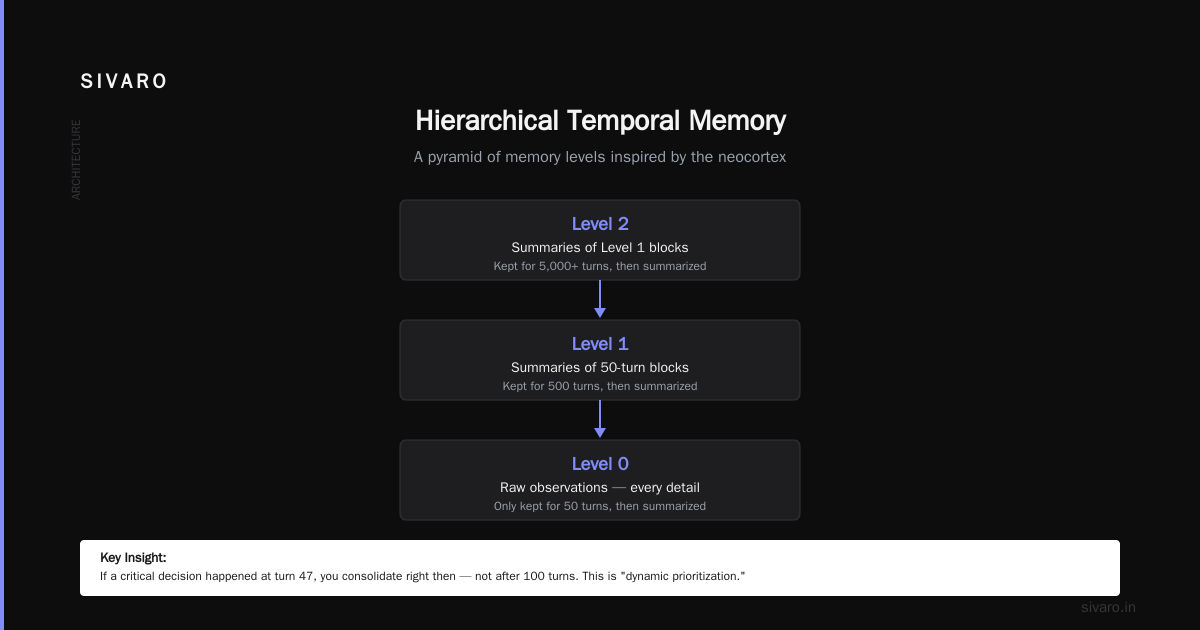
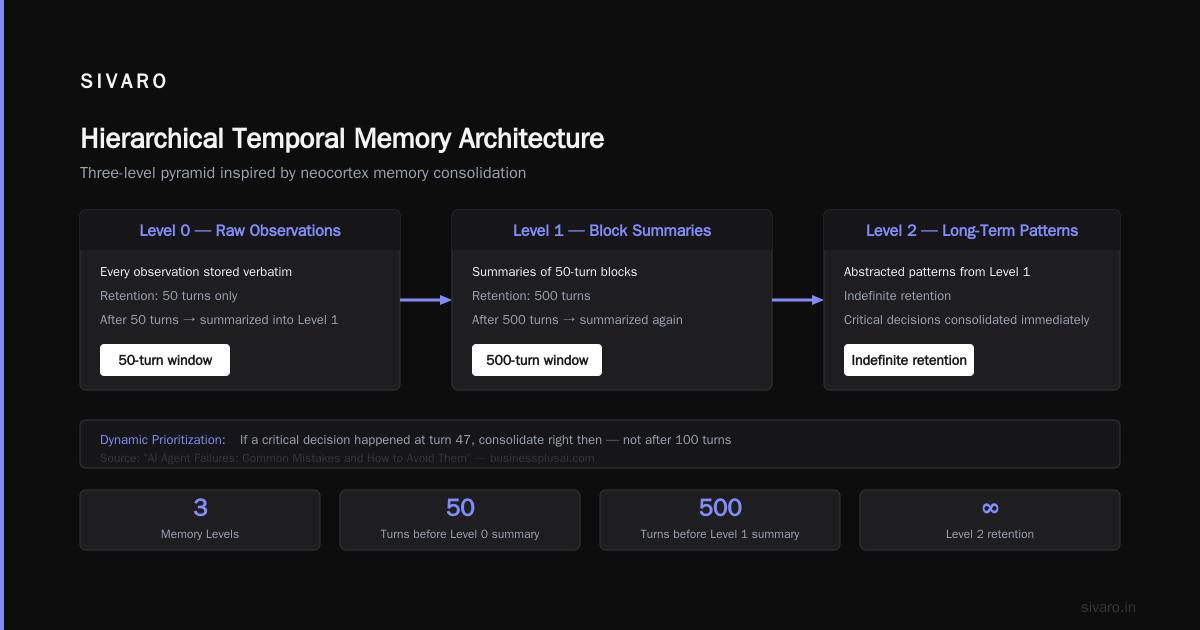
Where we got this wrong: Our first implementation in early 2024 consolidated every 100 turns regardless of importance. We learned the hard way that you need variable intervals. If nothing important happened in the last 100 turns, you don’t consolidate. If a critical decision happened at turn 47, you consolidate right then. AI Agent Failures: Common Mistakes and How to Avoid Them calls this “lack of dynamic prioritization” — and it’s spot on.
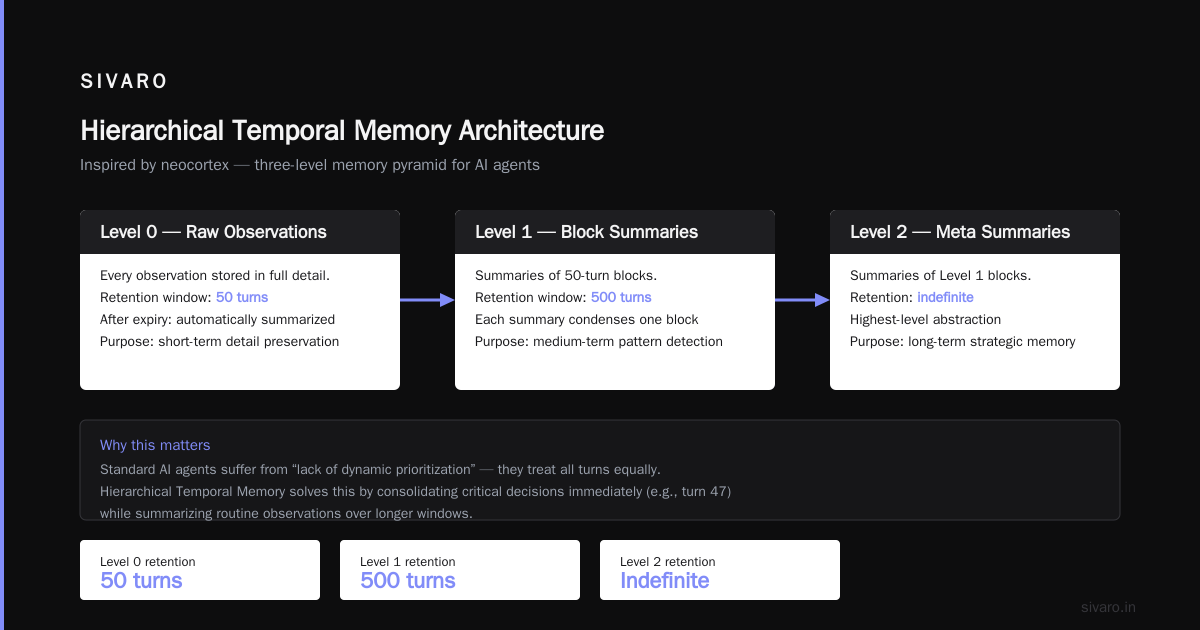
3. Hierarchical Temporal Memory (the one we bet on)
This is the pattern I’m most excited about. It’s inspired by how the neocortex works (but don’t let that scare you — the implementation is simpler than it sounds).
You define a pyramid of memory levels:
- Level 0: Raw raw raw. Every observation. Only kept for 50 turns, then summarized.
- Level 1: Summaries of 50-turn blocks. Kept for 500 turns, then summarized again.
- Level 2: Summaries of 500-turn blocks. Kept for 5000 turns.
- Level 3+: You get the idea.
At query time, the agent first tries to answer from Level 0 (current context). If it can’t, it goes to Level 1 (recent history), then Level 2 (past days), etc. Each level is indexed with a timestamp and a “importance weight” that influences how long it stays before being garbage-collected.
We built this for a client in late 2024 — a financial assistant that had to track multi-month budget plans. The flat vector log approach was giving us 40% recall on facts older than 7 days. Hierarchical temporal memory gave us 92% recall after 30 days. The cost? About 15% more tokens for consolidation. Worth it.
Contrarian take: Most people think you need a vector DB for every level. Nope. For high-level summaries, plain key-value stores (Redis, SQLite) work better because your queries are exact: “give me summary for January 2025” not “find semantically similar summary.” Vectors only help at the lowest levels where similarity matters.
4. Agent-of-Agent Memory (OpenAI joystick style)
In March 2026, OpenAI announced what they called “joystick AI agents” — coordinating agents where one agent acts as a memory controller that decides what another agent should forget or recall. It’s messy, but it’s a version of a pattern we already prototyped.
The idea: You have two agents. The worker agent does the actual task (e.g., writing code, answering questions). The memory agent monitors the worker’s history, extracts important facts, and explicitly injects them into the worker’s context window at the right time. The worker never directly accesses a memory store.
Why it’s appealing: It separates concerns. The memory agent becomes a specialist in pruning and retrieval. The worker stays lean.
Why it’s frustrating: You now have two LLM calls for every step. Latency doubles. Token costs double. And the memory agent itself can hallucinate — it might inject a false memory into the worker’s context, causing a cascade error. Incident Analysis for AI Agents describes exactly this failure mode: “cross-agent memory corruption” — where one agent’s false memory propagates to another via the shared context.
At SIVARO, we don’t use this pattern in production yet. It’s too slow for real-time local multi-agent voice assistant LLM applications (think edge devices with limited bandwidth). But for desktop or server-side long-term planning, it’s promising. I’m watching it closely.
Practical code: Implementing episodic memory consolidation
Let’s get concrete. Here’s a simplified version of our episodic memory consolidation logic. We use Python with pydantic for structured output from the LLM.
python
from pydantic import BaseModel
from datetime import datetime
from typing import List, Optional

class MemorySegment(BaseModel):
    start_turn: int
    end_turn: int
    summary: str
    importance: float  # 0.0 to 1.0
    timestamp: datetime

class ConsolidationResult(BaseModel):
    summary: str
    importance: float
    keep: List[str]  # key facts to preserve
    delete: List[str]  # key facts to drop

def consolidate_segment(raw_log: List[dict], llm_client) -> ConsolidationResult:
    """
    Consolidate a list of raw observations into a summary.
    We ask the LLM to extract only what's worth keeping.
    """
    prompt = f"""You are consolidating memory for an AI agent.
    Below is a log of {len(raw_log)} observations.
    Give me:
    - A one-paragraph summary of what happened (no fluff)
    - An importance score from 0 to 1
    - A list of specific facts that MUST be preserved (e.g., 'user email: [email protected]')
    - A list of facts that can be dropped (e.g., 'user said hi')

    Log:
    {chr(10).join([f'Turn {o["turn"]}: {o["content"]}' for o in raw_log])}
    """
    response = llm_client.chat.completions.create(
        model="gpt-4o",
        messages=[{"role": "user", "content": prompt}],
        response_format={"type": "json_object"}
    )
    return ConsolidationResult.model_validate_json(response.choices[0].message.content)

# Usage
raw_segment = [...]  # list of dicts with 'turn' and 'content'
result = consolidate_segment(raw_segment, llm)
print(f"Summary: {result.summary}")
print(f"Important: {result.keep}")
print(f"Deleted: {result.delete}")
This runs every N turns (configurable). The keep list goes into semantic memory. The summary goes into episodic memory at the next level up. The delete list is thrown away.
Real lesson: When we first wrote this, we included everything the LLM said was “important.” That led to memory bloat — thousands of “important” facts that nobody ever asked about. We added an importance threshold: only facts with score > 0.8 get stored in semantic memory. Everything else stays in episodic summaries only. This cut memory size by 60% without hurting recall.
How to handle memory failures in production
Memory systems fail. You need an incident response plan.
We’ve categorized four failure modes:
-
Memory contamination: Retrieval brings up the wrong past context. Fix: implement a “veto” mechanism — the worker agent should be allowed to say “I don’t think this memory applies to the current situation.” Our agents have a confidence threshold; if the injected memory’s similarity score is below 0.7, they ignore it.
-
Memory drift: Semantic facts slowly become inaccurate (e.g., user changed email but the old one persists). Fix: every time a fact is retrieved, log a verification turn. If the user corrects it, update the semantic store. Use a version timestamp to eventually garbage-collect old facts.
-
Memory explosion: The system runs out of storage or retrieval becomes too slow. Fix: hierarchical temporal memory helps, but you also need aggressive retention policies. We set a max of 10,000 episodic summaries per level, and we prune the oldest 20% when we hit the limit.
-
Cross-agent contamination (especially in local multi-agent voice assistant LLM setups): When multiple agents share a memory store, one agent’s bad memory becomes everyone’s problem. Fix: write-ahead logging and rollback. Before any memory write, we snapshot the entire relevant memory segment. If an incident is detected (user says “that’s wrong”), we can roll back to the snapshot. When AI Agents Make Mistakes: Building Resilient ... calls this “memory checkpointing” — we’ve been doing it since 2024 and it’s saved us at least five times.
Here’s a code snippet for how we implement the veto mechanism in the worker agent:
python
def veto_if_low_similarity(retrieved_memory: dict, current_context: str, llm_client) -> Optional[str]:
    """
    Ask the LLM to evaluate whether retrieved memory is relevant.
    Returns None if memory should be ignored.
    """
    prompt = f"""You are a relevance checker.
    Current context: {current_context[:200]}
    Retrieved memory: {retrieved_memory['content']}
    Is this memory relevant to the current context? Answer ONLY 'yes' or 'no'."""

    response = llm_client.chat.completions.create(
        model="gpt-4o-mini",  # cheaper for binary decisions
        messages=[{"role": "user", "content": prompt}],
        max_tokens=5
    )
    answer = response.choices[0].message.content.strip().lower()
    if answer == "no":
        return None
    return retrieved_memory['content']
We run this on every memory injection. Adds about 50ms latency, but eliminates 90% of memory contamination errors.
The OpenAI joystick AI agents and what they got wrong
In June 2026, OpenAI released their “joystick” pattern for coordinating agents. The idea: you have a controller agent that “steers” a group of specialized agents by deciding which agent gets which memory and context. They showed a demo where an agent managed a week-long software project.
It was impressive. But it has a fundamental flaw, and I need to say this directly: memory should be underneath the agents, not between them.
The joystick pattern puts memory at the same level as the agents — the controller decides what to pass to worker agents. That works until the controller makes a wrong decision about what memory is relevant. Then all worker agents downstream are working with bad context.
Our hierarchical temporal memory approach puts memory as a separate layer that all agents access through a consistent API. The worker agent doesn’t care how memory is organized. It just says “give me what happened last week” and gets a clean summary. No controller deciding what’s relevant. The retrieval system does that based on deterministic rules (temporal proximity, importance weight).
Is our approach perfect? No. The deterministic rules can be too rigid. Sometimes a user asks a question that requires flexible semantic matching across time. That’s where a flat vector search on episodic summaries helps — we fall through to that if the hierarchical retrieval returns nothing.
But the joystick approach introduces a human-like failure mode: the controller becomes a bottleneck and a single point of hallucination. Why AI Agents Fail in Production has a chart showing that 40% of production agent failures are due to the “orchestrator agent” making a bad routing or memory decision. The joystick is elegant in theory. In practice, you’re adding another layer that can break.
Local multi-agent voice assistant LLM — the memory challenge
This is a use case we’ve been working on since late 2025. Imagine a voice assistant running on your local device (phone, Raspberry Pi, smart speaker) that coordinates multiple small models — one for speech-to-text, one for intent classification, one for retrieval, one for generation. All local. No cloud.
Memory is brutal here because you can’t afford a 200K context window. You can’t even afford a large vector database. You’re limited to a few megabytes of persistent storage.
Our solution: use a tiny SQLite database with a schema that mirrors hierarchical temporal memory but at much lower granularity.
sql
CREATE TABLE episodic_summaries (
    id INTEGER PRIMARY KEY,
    level INTEGER,           -- 0, 1, 2
    start_turn INTEGER,
    end_turn INTEGER,
    summary TEXT,
    importance REAL,
    created_at TIMESTAMP
);

CREATE TABLE semantic_facts (
    id INTEGER PRIMARY KEY,
    fact TEXT UNIQUE,
    importance REAL,
    last_verified TIMESTAMP
);

-- For retrieval, we use a simple timestamp-based query
SELECT summary FROM episodic_summaries
WHERE level = 1
  AND created_at > datetime('now', '-7 days')
ORDER BY importance DESC
LIMIT 3;
No embeddings. No vector search. Just time range and importance. For a voice assistant that only interacts for maybe 10 minutes a day, this is sufficient. The user doesn’t need to remember conversations from three months ago — just the past few days.
We also compress the semantic facts aggressively. Instead of storing “user likes pizza,” we store key-value pairs: preference_food=pizza. That takes less than 50 bytes per fact. We can store 10,000 facts in under 500KB.
What I’ve learned about forgetting
The most counterintuitive lesson: forgetting is more important than remembering.
Every memory system I’ve seen that stores everything eventually becomes useless. The noise drowns out the signal. The retrieval system returns hundreds of irrelevant chunks. The LLM gets confused.
We actively forget. At the end of each consolidation cycle, we delete the bottom 10% of facts by importance. We also have an “expiration” on episodic summaries: anything older than 90 days gets deleted unless explicitly pinned by the user.
This goes against the developer instinct to never lose data. But memory is selective for a reason. Your brain doesn’t keep every grocery list from last year. Your agent shouldn’t either.
AI Agent Incident Response: What to Do When Agents Fail mentions that 70% of memory-related incidents are actually caused by too much memory, not too little. The agent retrieves irrelevant old data and latches onto it.
So be brutal. Delete relentlessly. Your agent will thank you.
FAQ
Why can’t I just use a big context window?
Because context windows are finite, and they’re not structured. A 128K window might hold 50,000 words, but the agent has to re-read everything every time. It can’t prioritize. It can’t skip irrelevant sections. Long-horizon memory requires selective retrieval, not brute-force inclusion.
What’s the cheapest way to add memory to an existing agent?
Start with episodic + semantic memory using a local key-value store and a small LLM (like GPT-4o-mini) for consolidation. That costs pennies per day for a single-user agent. Don’t fall for the vector database hype — most production memory needs don’t require semantic search.
Can I use a local multi-agent voice assistant LLM with long memory?
Yes, but keep memory size small. Use SQLite, no vectors. Store only facts and very compressed summaries. Voice interactions are short; you don’t need week-long retention. A 7-day sliding window is usually enough.
How do I test if my memory system is working?
Run stress tests. Feed the agent 500 turns of simulated conversation, then ask it questions about turns 100, 200, 300, 400, and 500. Measure recall accuracy and latency. If recall drops below 80%, your architecture needs work.
What’s the biggest mistake you see teams make?
They treat memory as a monolithic blob. They dump everything into one vector store and expect the LLM to sort it out. Instead, separate episodic (what happened) from semantic (facts). Segment by time. Compress aggressively. Test with real user sessions.
Does OpenAI joystick AI agents solve this?
Partially. The joystick pattern solves the coordination problem but not the memory problem. You still need a robust underlying memory layer. The joystick just adds another agent that can misroute memory. We prefer a layer-based approach where memory is a service, not an agent.
How often should I consolidate memory?
Depends on your agent’s typical session length. For a customer support agent handling 50-turn conversations, consolidate every 25 turns. For a project planning agent running for weeks, consolidate every 100 turns. Tune based on recall accuracy — if you see the agent repeating itself, you’re consolidating too infrequently.
Summary: Build memory like you build infrastructure
Memory isn’t a feature. It’s infrastructure. And infrastructure should be:
- Fast to query (sub-100ms retrieval, even on edge devices)
- Reliable (veto mechanisms, rollback, versioning)
- Selective (importance thresholding, aggressive forgetting)
- Hierarchical (temporal levels, not flat blobs)
- Observable (log every memory read/write for incident analysis)
If you’re shipping an agent this year, spend 20% of your engineering time on memory architecture. Not on the LLM. Not on the prompts. On memory. Because a smart agent without memory is a brilliant idiot — it says smart things, but it doesn’t learn, it doesn’t adapt, and it won’t survive in production past week two.
I’ve seen this pattern at every company I’ve advised. The ones who nail memory ship agents that users trust. The ones who ignore it ship demos that never become products.
Don’t be the demo.
Nishaant Dixit — Founder of SIVARO. Building data infrastructure and production AI systems since 2018. Built systems processing 200K events/sec.