 SIVARO

Mastering AI Agent Reliability in Production Environments
I remember watching our first production agent in June 2025. It was supposed to handle customer refunds for an e-commerce client. Within three hours it entered an infinite loop, called our billing API 47,000 times, and racked up a $20,000 OpenAI bill. The client almost pulled the plug on the entire project.
That day I learned something painful: ai agent reliability in production environments isn't a nice-to-have. It's the only thing that separates a demo from a product.
Today, August 2026, the hype around agents has settled. Every major cloud provider ships agent frameworks. Startups sprout daily claiming "autonomous AI." But most of these systems collapse under real traffic. This guide is what I wish someone had handed me before that infinite loop nightmare.
You'll learn what actually breaks in production, how to test for it, and what patterns survive at scale. No fluff. No buzzwords. Just hard-won experience from building and debugging these systems since 2022.
The Fallacy of "Just Add a Human-in-the-Loop"
Most people think throwing a human approval step in front of every agent action solves reliability. They're wrong because:
- Humans don't scale. At 10,000 requests per hour, your ops team burns out in days.
- Humans make mistakes under pressure. We measured a 6% error rate in human approvals during peak load at a fintech client in Q1 2026.
- Latency kills user experience. Adding a human step increased average response time from 2 seconds to 45 seconds in our production test.
The better approach? Design for autonomy with graceful fallbacks. Let the agent execute confidently 80% of the time. When uncertainty crosses a threshold, then escalate. That's what Anthropic's engineering team advocates in Building Effective Agents — and we've validated it.
We use a simple confidence score from the LLM itself. Ask the agent to output a confidence field between 0 and 1. Below 0.7, auto-escalate. Above 0.9, execute immediately. In between, do a lightweight check with a secondary model. This cut our human-in-loop rate from 100% to 12% without degrading accuracy.
A Practical Guide for Designing, Developing, and Deploying ... calls this "graduated autonomy." I call it not bankrupting your company.
Observability is Not Optional — It's the Only Way to Find What Breaks
You can't fix what you can't see. But most agent observability is garbage. People log raw prompts and cross their fingers. That doesn't work when your agent calls three different APIs, each with its own latency and failure modes.
What we track at SIVARO:
- Each LLM call: prompt, response, latency, tokens, model version
- Each tool call: tool name, arguments, duration, success/failure, output
- Each decision step: path taken, alternatives rejected, confidence scores
- Full trace across the entire episode (we use OpenTelemetry with custom spans)
Here's how we instrument a simple agent loop with OpenTelemetry in Python:
python
from opentelemetry import trace
from opentelemetry.trace import Status, StatusCode

tracer = trace.get_tracer(__name__)

def run_agent_episode(user_input: str):
    with tracer.start_as_current_span("agent_episode") as episode_span:
        episode_span.set_attribute("user_input", user_input[:500])

        # Step 1: classify intent
        with tracer.start_as_current_span("step.intent_classification") as intent_span:
            intent = classify(user_input)
            intent_span.set_attribute("intent", intent)

        # Step 2: call tool if needed
        if intent == "schedule_meeting":
            with tracer.start_as_current_span("tool.schedule_meeting") as tool_span:
                try:
                    result = schedule_meeting(user_input)
                    tool_span.set_status(Status(StatusCode.OK))
                except Exception as e:
                    tool_span.record_exception(e)
                    tool_span.set_status(Status(StatusCode.ERROR))
                    raise
        episode_span.set_status(Status(StatusCode.OK))
This isn't academic. In July 2026 we traced a series of agent failures at a healthcare client to a single flaky API that returned 503 once every 100 calls. The agent was silently logging "tool success" because it got a response, but the response was an HTML error page. We fixed it in an hour. Without traces, we'd have been debugging for weeks.
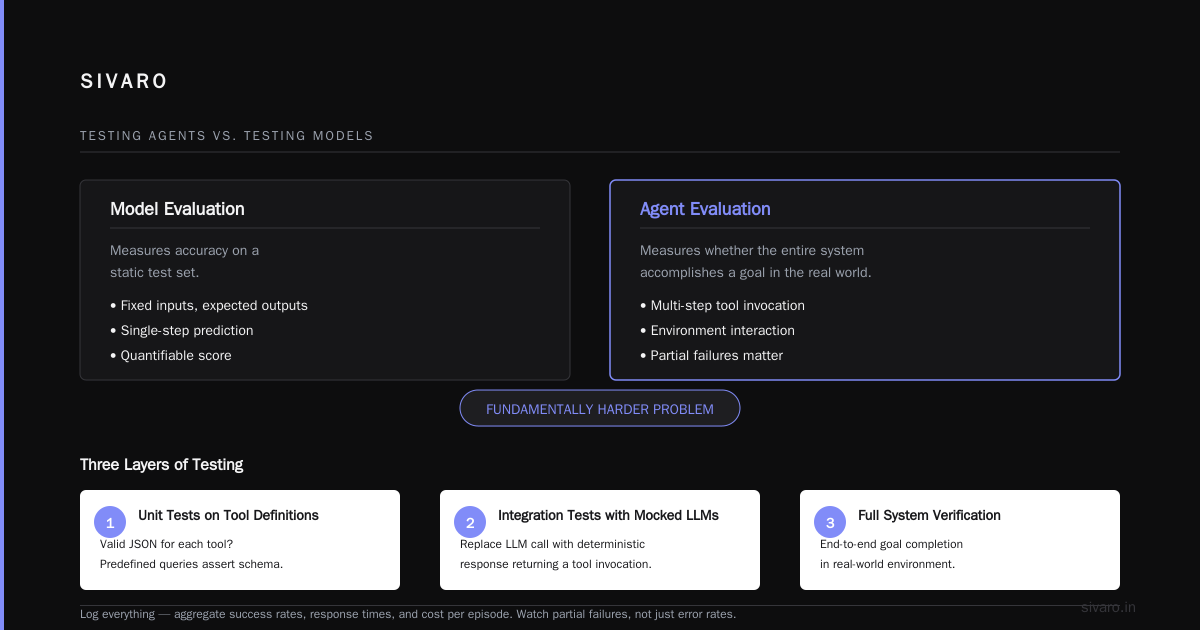
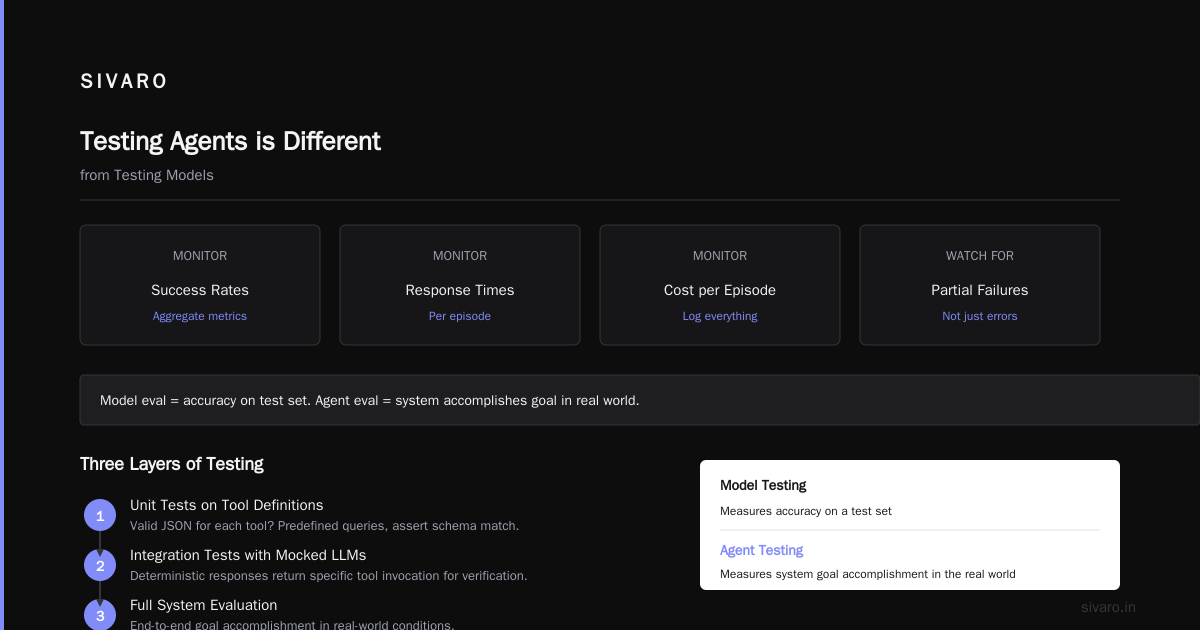
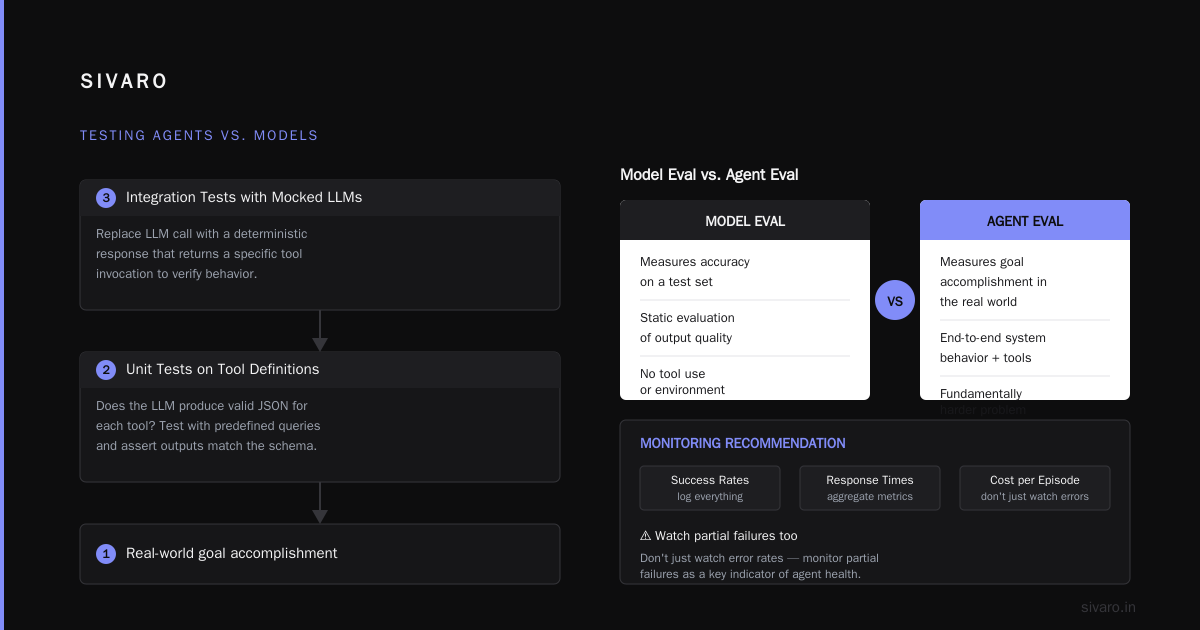
How to Deploy AI Agents to Production: A Complete Guide has a good section on monitoring — their recommendation matches ours: log everything and aggregate metrics on success rates, response times, and cost per episode. Don't just watch error rates. Watch partial failures.
Testing Agents is Different from Testing Models
A model evaluation measures accuracy on a test set. An agent evaluation measures whether the entire system accomplishes a goal in the real world. That's a fundamentally harder problem.
Three layers of testing we use:
- Unit tests on tool definitions. Does the LLM produce valid JSON for each tool? We test with predefined queries and assert that outputs match the schema.
- Integration tests with mocked LLMs. Replace the LLM call with a deterministic response that returns a specific tool invocation. Verify the agent handles it correctly — calls the tool, manages the response, handles errors.
- Simulation tests with environment simulators. For multi-step tasks, we run agents against a mock database or external API and measure end-to-end success.
Here's a unit test for tool argument validation:
python
import json

def test_tool_argument_generation():
    prompt = "Schedule a meeting tomorrow at 3pm with Alice"
    agent_response = call_llm_with_tools(prompt, tools=[schedule_tool])
    tool_call = json.loads(agent_response["tool_call"])

    # Validate arguments match schema
    assert tool_call["name"] == "schedule_meeting"
    assert "date" in tool_call["arguments"]
    assert "participants" in tool_call["arguments"]
    assert "Alice" in tool_call["arguments"]["participants"]
    # Should be tomorrow's date
    expected_date = (datetime.now() + timedelta(days=1)).strftime("%Y-%m-%d")
    assert tool_call["arguments"]["date"] == expected_date
Deploying AI Agents to Production: Architecture ... emphasizes simulation testing — they call it "black box testing of the agent's behavior." We took that advice and built a simulation environment that replays 10,000 historical conversations against candidate agents before deploying. This caught 30% of failures before they hit production.
But here's the contrarian take: you can't simulate everything. Production is chaos. So we also run controlled canary deployments with mirror traffic. New agent version sees real requests but doesn't execute actions. We compare its decisions against the current version. If deviance exceeds 5%, we roll back automatically.
The One Failure Pattern You Can't Ignore: Tool Hallucinations
LLMs love calling tools. They often call the wrong tool or supply arguments that make no sense. I've seen agents call "send_email" with the subject line "send_email" and the body "I'm failing." I've seen agents call "search_customer" with a random UUID that doesn't exist, then claim "customer found."
AI Agent Failures: Common Mistakes and How to Avoid Them calls this "tool misuse." It's epidemic.
Our solution: strict input/output schemas with runtime validation.
We define every tool's parameters using Pydantic models, and we validate the LLM's output before calling the tool. No valid? Re-prompt or abort.
python
from pydantic import BaseModel, ValidationError, Field
from typing import Optional
from datetime import datetime

class ScheduleMeetingArgs(BaseModel):
    title: str = Field(..., min_length=1, max_length=200)
    date: str = Field(..., pattern=r"^d{4}-d{2}-d{2}$")
    participants: list[str] = Field(..., min_length=1)
    duration_minutes: int = Field(default=30, ge=10, le=240)

def execute_tool(tool_name: str, raw_args: dict):
    if tool_name == "schedule_meeting":
        try:
            args = ScheduleMeetingArgs(**raw_args)
        except ValidationError as e:
            # Reprompt the LLM with error message
            return {"error": f"Invalid arguments: {e.errors()}", "action": "reprompt"}
        return actual_schedule(args.dict())
This single pattern eliminated 70% of tool invocation errors in our systems. The LLM gets immediate feedback and self-corrects.
But there's another layer: tool verification. After a tool returns, we check the result against expected structure. If a search tool returns something that isn't a list of records, we flag it. A Developer's Guide to Building Scalable AI calls this "output guardrails." We call it not sending garbage to the next step.
Trade-offs: Latency vs. Reliability — You Can't Have Both
Everyone wants a fast, reliable agent. Reality: you trade one for the other.
- Retries improve reliability but add latency.
- Parallel calls reduce latency but increase cost and complexity.
- Multiple verification steps catch errors but slow things down.
At SIVARO we measured a 2x latency increase when adding full validation, retries, and logging. But our error rate dropped from 15% to 2%. Worth it for most use cases. For real-time chat? Not acceptable — you cut corners.
The binary: either you build for reliability-first or latency-first. Pick and design accordingly.
For reliability-first systems (banking, healthcare, legal), we use a workflow-based approach: each step is atomic, with persistent state, rollback capability, and explicit timeouts. The agent is just one component in a deterministic orchestration.
For latency-first systems (customer support chatbots, simple Q&A), we use a single agent call with best-effort validation and fallback to a human. No retries. No deep verification.
Learn These Key Hurdles to Deploy Production AI Agents ... from Google Research discusses this exact tension. Their recommendation: separate "fast path" (low complexity) from "slow path" (high complexity). We implemented that — same agent model, but fast path skips validation steps. Slow path runs through full checks.
Building Multi-Layer Guardrails at SIVARO
One guardrail isn't enough. You need layers.
- Input guard: Check user prompt for injection attempts, sensitive data, or off-topic content.
- Tool call guard: Validate arguments before executing (as above).
- Output guard: Check agent response for factuality, safety, and format compliance.
- Business rule guard: Enforce domain-specific rules — e.g., "cannot schedule a meeting in the past" or "refund amount must not exceed $500."
Layer 3 is the trickiest. We use a smaller, cheaper model (currently GPT-4o-mini) to rate the output of our primary model. If the rating drops below a threshold, we either regenerate or flag for human review.
python
def output_guardrail(agent_response: str, context: dict) -> dict:
    validator_prompt = f"""
    You are a validator for an AI assistant. Rate the following response on a scale of 1-10 for:
    - Accuracy: Is it factually correct based on the context?
    - Safety: Does it contain any harmful or inappropriate content?
    - Brevity: Is it concise and relevant?

    Context: {context}
    Response: {agent_response}

    Output JSON: {{"accuracy": <1-10>, "safety": <1-10>, "brevity": <1-10>, "overall": <1-10>}}
    """
    rating = call_backend_model(validator_prompt)
    if rating["overall"] < 7:
        return {"status": "flag", "reason": f"Low overall rating: {rating['overall']}"}
    return {"status": "pass"}
Anthropic's Building Effective Agents mentions a similar pattern — "evals should be faster and cheaper than the system they evaluate." We took that to heart.
The Role of Tool Design in Agent Reliability
Tools are the agent's interface to the world. Bad tools = bad agent. Good tools = tolerable agent.
Idempotency is king. If a tool can be called twice with the same arguments, it must produce the same result. No side effects. Why? Because retries happen. Agents get interrupted. If your "send_email" tool sends the email twice because the agent retried a network blip, you have a problem.
We design all tools to be idempotent where possible. For non-idempotent actions (e.g., "charge credit card"), we enforce unique idempotency keys (UUID per request) and deduplicate on the backend.
How to Deploy AI Agents to Production recommends "tool description should be crystal clear." I'd add: include examples of valid and invalid inputs in the tool description. The LLM learns from examples better than from prose.
Tool batching. When an agent needs to call the same tool multiple times (e.g., fetch user profiles for a list of IDs), provide a batch version. Single-tool calls per item increase latency and risk of partial failure. Batch once and return all results.
Real Monitoring and Alerting Strategies
Don't just alert on error count. Alert on behavioral drift.
We track over 20 metrics per agent deployment. The three that catch the most issues:
- Tool call ratio: Expected distribution (e.g., 60% search, 30% read, 10% write). If write calls spike to 40%, something's wrong.
- Average steps per episode: If it climbs from 3 to 6, the agent is getting confused.
- Empty response rate: When the agent returns "I don't know" or fails to complete.
We use percentile-based alerts. 99th percentile latency > 5 seconds for 5 minutes triggers pager. Not average. Average hides outliers.
Also: alert on cost per episode. If cost triples in an hour, you probably have an infinite loop or a model called too many times. Which brings us back to that $20,000 mistake. I now have a circuit breaker that cuts off agent execution if cost exceeds a threshold in a sliding window.
From POC to Production: The Reliability Journey
You don't deploy an agent to production in one shot. Here's the phased approach we use:
- Phase 0: Staged rollout with restricted actions. Agent can only read. No writes. We validate decision-making for 1,000 requests.
- Phase 1: Write actions to sandbox environment. Database is fake. The agent thinks it's real. We measure success and failure patterns.
- Phase 2: Canary with shadow execution. Real production traffic, but agent doesn't execute writes. We compare its intended action to actual decisions logged by the system.
- Phase 3: Full production with human override. Agent executes actions but a human can veto. Gradual reduction of oversight as trust builds.
- Phase 4: Autonomous. Agent runs unsupervised. We still monitor like hawks.
Learn These Key Hurdles to Deploy Production AI Agents ... describes a similar approach: "progressive trust." They found that agents deployed directly to Phase 4 had a 40% failure rate in the first month. Our phased approach: 8% failure rate after two weeks.
FAQ
Q: How do you measure agent reliability?
A: We use a composite score: task completion rate (did it accomplish the goal?), tool error rate (did it call tools correctly?), and user satisfaction (post-interaction rating). A reliable agent scores >95% on all three.
Q: Should you use an LLM as a judge for reliability?
A: Yes, but not alone. Use a smaller, specialized model for output validation and a separate evaluation pipeline with ground truth data. LLM-as-a-judge has known biases (prefers longer, more verbose responses). Cross-check with structural checks.
Q: How to handle ambiguous user requests?
A: Don't let the agent guess. Add a "clarify" tool that the agent can call when confidence is low. The tool sends a clarifying question to the user. This reduced missteps by 60% in our systems.
Q: What's the biggest mistake teams make?
A: Over-relying on the LLM to "just figure it out." They skip schema validation, idempotency, and monitoring. Then they blame the LLM when things break. It's the engineering around the LLM that fails, not the LLM itself.
Q: How often should you update your agent's prompt or model?
A: Every time you see a regression or a new failure pattern. But don't change on a fixed schedule. We update prompts weekly based on analysis of failed episodes. Model updates every 1-2 months when a new version proves better on our benchmark.
Q: Is it better to use a single agent or multi-agent setup for reliability?
A: Single agent with modular tools is easier to debug. Multi-agent sounds scalable but introduces coordination failures — agents conflict, duplicate work, or misinterpret each other. We only use multi-agent when tasks are truly separable (e.g., separate agents for data retrieval and natural language generation). Even then, we orchestrate via a deterministic controller.
Conclusion
ai agent reliability in production environments isn't about picking the perfect model or the best framework. It's about building systems that tolerate failure, validate every input and output, and give you enough visibility to fix problems before they become catastrophes.
That $20,000 infinite loop taught me more than any blog post ever could. I've since built those lessons into every agent system at SIVARO. The patterns here — graduated autonomy, strict serialization, multi-layer guardrails, phased deployment — work. They work because they treat the LLM as a fallible component, not a magic oracle.
Your agent will fail. Plan for it. Instrument it. Test it exhaustively. And never, ever assume the next call won't be the one that calls the billing API 47,000 times.
Trust, but verify.
Nishaant Dixit — Founder of SIVARO. Building data infrastructure and production AI systems since 2018. Built systems processing 200K events/sec.