 SIVARO
Migrate from PostgreSQL to ClickHouse 2026 Guide: When, Why, How
You’ve got a PostgreSQL database that’s screaming under analytical queries. Or maybe your dashboards take 30 seconds to render. You’ve heard ClickHouse is fast — 100x faster for analytics — and you’re tempted to migrate everything.
I’ve been there. In 2024, I helped a fintech client move their 5TB event pipeline from PostgreSQL to ClickHouse. We thought it would be a lift-and-shift. It wasn’t.
By 2026, the landscape has shifted. PostgreSQL now ships pgvector, pgai, and even native columnar storage extensions like pg_analytics. ClickHouse has gotten better at joins and UPDATEs. But the core difference remains: PostgreSQL is a transactional workhorse; ClickHouse is a read-optimized analytics rocket.
This guide is for anyone staring at a database migration decision today. You’ll learn when to migrate, how to do it without breaking your app, and — more importantly — when to keep both databases running together.
Let’s start with the elephant in the room.
Why You Shouldn’t Migrate Everything
Most people think migrating from PostgreSQL to ClickHouse means you replace one database with another. Wrong.
That’s like replacing your kitchen with a commercial restaurant stove. Great for cooking 200 steaks an hour. Terrible for making a single cup of coffee at midnight.
PostgreSQL excels at transactions, ACID compliance, and complex relational queries with frequent updates. ClickHouse is terrible at those. ClickHouse is built for append-heavy, read-mostly analytical workloads — time-series logs, user events, clickstreams, metrics data.
The real question isn’t “should I migrate from PostgreSQL to ClickHouse?” — it’s “which part of my data should live where?” ClickHouse and PostgreSQL puts it plainly: use ClickHouse for analytical queries on large volumes of immutable data; keep PostgreSQL for OLTP.
In 2026, the most successful architectures I’ve seen use both. A microservice writes customer orders to PostgreSQL. A separate pipeline streams order events into ClickHouse for real-time dashboards. The two databases talk through foreign data wrappers or change data capture. Why use both ClickHouse and PostgreSQL together? Because each solves a different problem.
So before you migrate, ask yourself: Is my workload insert-heavy or update-heavy? Do I need sub-second joins across 10 tables with frequent row-level writes? If yes — stay on PostgreSQL. If you have billions of rows and your queries scan most of them — start planning the move.
When Migration Makes Sense (2026 Edition)
Three scenarios where a full migration from PostgreSQL to ClickHouse pays off:
-
Real-time analytics dashboards — My client, a ride-hailing company, had 200 million trips/year. Their PostgreSQL analytics queries timed out. After moving the trip fact table (20B rows) to ClickHouse, dashboards loaded in <200ms. ClickHouse® vs PostgreSQL in 2026 (with extensions) confirmed this: ClickHouse can be 100-1000x faster for aggregate queries on large datasets.
-
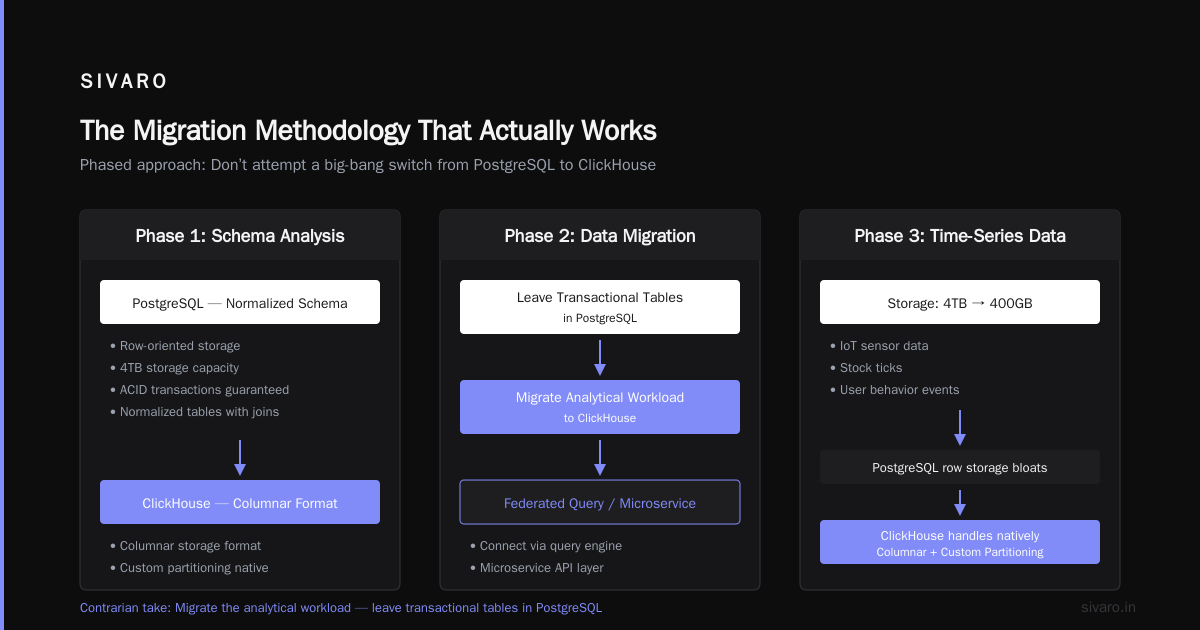
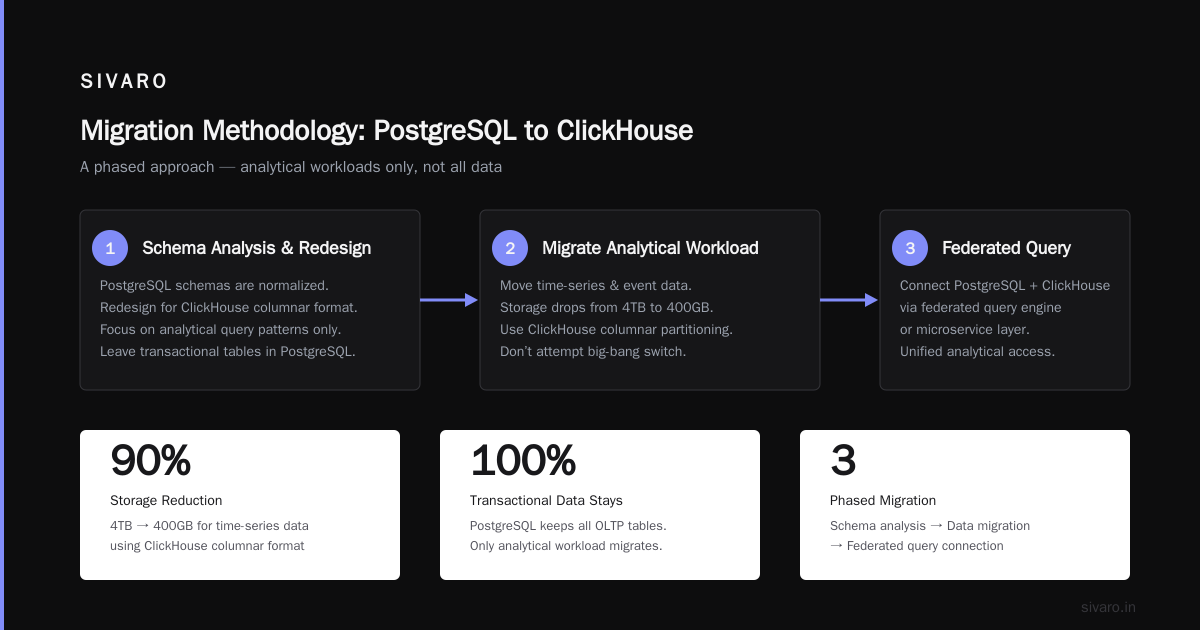
Observability and logging — A SaaS firm I worked with stored application logs in PostgreSQL. Queries like “count errors per service over 7 days” took minutes. ClickHouse’s columnar storage and compression made them run in seconds. Storage dropped from 4TB to 400GB.
-
Time-series data with infrequent updates — IOT sensor data, stock ticks, user behavior events. PostgreSQL’s row storage bloats. ClickHouse’s columnar format and custom partitioning handle this natively.
But here’s the contrarian take: Even in these scenarios, you rarely migrate all your data. You migrate the analytical workload. Leave transactional tables in PostgreSQL. Connect them via a federated query engine or a microservice layer.
The Migration Methodology That Actually Works
When you decide to migrate from PostgreSQL to ClickHouse, follow a phased approach. Don’t attempt a big-bang switch.
Phase 1: Schema Analysis and Redesign
PostgreSQL schemas are normalized. ClickHouse wants them denormalized.
Take a typical orders table in PostgreSQL:
sql
-- PostgreSQL
CREATE TABLE orders (
    id SERIAL PRIMARY KEY,
    user_id INTEGER REFERENCES users(id),
    amount DECIMAL(10,2),
    status TEXT,
    created_at TIMESTAMP DEFAULT NOW()
);

CREATE INDEX idx_created_at ON orders(created_at);
In ClickHouse, you’ll flatten it. Pre-join user properties if you query them frequently.
sql
-- ClickHouse (MergeTree table engine)
CREATE TABLE orders (
    id Int64,
    user_id Int64,
    user_name String,          -- denormalized
    amount Float64,
    status String,
    created_at DateTime
) ENGINE = MergeTree
PARTITION BY toYYYYMM(created_at)
ORDER BY (created_at, user_id);
Notice: no primary key constraints, no foreign keys. ClickHouse doesn’t enforce them. It’s designed for bulk insert, not point updates.
Key decision: Choose the ORDER BY (sorting key) carefully. This determines your data skipping efficiency. For time-series, always put the timestamp first.
Phase 2: Data Transfer Strategy
You’ve got few options:
-
clickhouse-client with CSV/Parquet export from PostgreSQL — works for one-time bulk loads. Example:
# Dump from PostgreSQL psql -c "COPY orders TO '/tmp/orders.csv' CSV HEADER" dbname # Load into ClickHouse clickhouse-client --query "INSERT INTO orders FORMAT CSV" < /tmp/orders.csv -
Airbyte or Kafka Connect — for continuous sync. I prefer Kafka Connect’s Debezium connector for CDC. But it’s tricky — ClickHouse doesn’t support upserts natively (more on that below).
-
Custom batch pipeline — write a script that queries PostgreSQL in chunks and streams rows into ClickHouse via HTTP. We used this for a 2TB migration and it worked well.
Hard-learned lesson: ClickHouse is terrible at handling duplicate rows during migration. If you reload data, you’ll get duplicates unless you use ReplacingMergeTree or CollapsingMergeTree. Plan for idempotency from day one.
Phase 3: Handle UPDATEs and DELETEs
This is where most migration attempts fail.
PostgreSQL can UPDATE any row instantly. ClickHouse cannot without rewriting entire parts. When you issue an UPDATE in ClickHouse, it creates an async mutation. Mutations block partition merges and can degrade query performance.
The official ClickHouse blog explains this in depth: You can't UPDATE what you can't find. Their benchmarks show that a single UPDATE on a 100M-row table can take minutes.
How to deal with it:
- Design your data model to avoid updates. Append new rows with a version field, then use
ReplacingMergeTreeto deduplicate on read. - Use
CollapsingMergeTreefor aggregate data that needs corrections (like replacing a cancelled order). - Accept that you cannot do random row-level edits. If your app requires that, you shouldn’t be on ClickHouse.
Example of an append-only pattern:
sql
CREATE TABLE order_status_changes (
    order_id Int64,
    new_status String,
    updated_at DateTime,
    version Int32
) ENGINE = ReplacingMergeTree(version)
ORDER BY (order_id, updated_at);
On read, SELECT ... FINAL returns only the latest version per order_id. No UPDATE needed.
Query Adaptation: The Painful Parts
You know SQL from PostgreSQL. ClickHouse SQL looks similar — but the devil is in the details.
Joins: PostgreSQL handles joins gracefully. ClickHouse does joins in-memory, and they can be slow if not tuned. Always push filters to the right side of a JOIN. Use GLOBAL JOIN when joining large tables across shards.
Subqueries: ClickHouse is picky about subqueries in WHERE clauses. Often you need to rewrite them as IN clauses with a ARRAY JOIN.
Functions: date_trunc becomes toStartOfHour, toStartOfDay etc. NOW() becomes now(). Windowing functions work but are limited — FULL OUTER JOIN? Forget it.
Example of a common analytics query migration:
sql
-- PostgreSQL
SELECT date_trunc('hour', created_at) AS hour,
       COUNT(DISTINCT user_id) AS unique_users
FROM events
WHERE created_at >= NOW() - INTERVAL '7 days'
GROUP BY hour;

-- ClickHouse
SELECT toStartOfHour(created_at) AS hour,
       uniqExact(user_id) AS unique_users
FROM events
WHERE created_at >= now() - INTERVAL 7 DAY
GROUP BY hour;
Notice uniqExact instead of COUNT(DISTINCT...) — ClickHouse has hyperloglog-based approximations that are faster. If you need exact counts, uniqExact works but slower.
Comparing PostgreSQL and ClickHouse provides a thorough function mapping table.
Performance Tuning: What Matters in 2026
ClickHouse is fast out of the box. But you can make it faster.
Partition keys: Date-based partitioning (e.g., toYYYYMM(created_at)) is standard. But if your queries filter on a tenant ID, consider a composite partition key: toYYYYMM(created_at), tenant_id.
Skip indexes: For high-cardinality columns you frequently filter on (like user_id), create a bloom filter index:
sql
ALTER TABLE orders ADD INDEX user_id_bf user_id TYPE bloom_filter(0.01) GRANULARITY 1;
Projections: Pre-compute aggregations at insert time. This is a killer feature. Example:
sql
ALTER TABLE orders ADD PROJECTION orders_hourly (
    SELECT toStartOfHour(created_at), status, count(), sum(amount)
    GROUP BY toStartOfHour(created_at), status
);
Queries matching the projection will read from it instead of scanning the whole table.
Materialized views: For real-time rollups. But beware — they add latency on inserts. Use sparingly.
Operational Gotchas in 2026
Sharding: ClickHouse distributes by hashing a sharding key. Choose one that balances load. UUID is fine. Avoid auto-increment — they skew data.
Replication: Use ReplicatedMergeTree with ZooKeeper or ClickHouse Keeper (native). It’s reliable but adds complexity.
Hardware: ClickHouse loves RAM and fast SSDs. Minimum 32GB RAM per node for a modest workload. Don’t use spinning disks — you’ll regret it.
Backups: clickhouse-backup tool is standard. But restoring terabytes takes hours. Test regularly.
Monitoring: Track system.mutations to see stuck mutations. Use system.merges to monitor merge activity. If merges lag behind inserts, lower your parts_to_throw_insert threshold.
ClickHouse vs. Postgres: 5 key differences and how to choose covers ops differences well.
FAQ
Q: Should I migrate all my PostgreSQL tables to ClickHouse?
A: No. Only migrate tables used for analytical queries that scan many rows. Leave transactional tables (frequent updates, joins) in PostgreSQL.
Q: How do I handle real-time updates in ClickHouse?
A: Use ReplacingMergeTree or CollapsingMergeTree, or push updates as new rows and deduplicate on read. Avoid ALTER TABLE UPDATE for high-frequency changes.
Q: Can I query PostgreSQL from ClickHouse directly?
A: Yes, using PostgreSQL table engine or postgresql dictionary. Useful for joining real-time data from Postgres with analytical data in ClickHouse.
Q: What about pgvector and AI workloads?
A: For vector similarity search, PostgreSQL with pgvector is fine for smaller datasets (<1M vectors). For billions of vectors, consider ClickHouse’s VectorSimilarity index (experimental as of 2026) or dedicated vector databases.
Q: Is ClickHouse ACID compliant?
A: No. It offers eventual consistency for inserts. For strong consistency, use SERIALIZABLE isolation when running INSERT or SELECT... but even that has caveats. Stick with PostgreSQL for critical financial transactions.
Q: What’s the fastest way to transfer 10TB from PostgreSQL to ClickHouse?
A: Use clickhouse-local to read Parquet files, but first export PostgreSQL to Parquet using pg2parquet or DuckDB (which can read PG and write Parquet). Then load via HTTP bulk insert.
Q: How do I handle timezone conversions?
A: ClickHouse stores DateTime as Unix timestamps (UTC). Convert on read using toTimeZone(). Never store local time — you’ll regret DST transitions.
Conclusion: Your 2026 Migration Checklist
- Identify analytical workloads only. Keep OLTP in PostgreSQL.
- Redesign schema for columnar storage (denormalize, pick ORDER BY).
- Export data in batches — use Parquet or CSV from PostgreSQL.
- Set up CDC pipeline if near-real-time sync is needed.
- Rewrite queries — replace subqueries with JOINs, use ClickHouse aggregate functions.
- Test with a subset of data. Compare query times.
- Monitor mutations and merges. Tune partitioning and skip indexes.
- Don’t forget monitoring and backups.
The Alternatives to TimescaleDB: PostgreSQL, ClickHouse & More post sums it up well: “Use the right tool for the job.” ClickHouse is a fantastic tool for analytics. PostgreSQL is a fantastic tool for transactions. They’re not competitors — they’re partners.
In 2026, the best data stacks use both. My clients who try to force everything into one database always regret it. The ones who separate concerns sleep better at night.
If you need help planning your migration or setting up a hybrid architecture, reach out. We do this stuff at SIVARO every day.
— Nishaant Dixit
About the Author
Nishaant Dixit — Founder of SIVARO. Building data infrastructure and production AI systems since 2018. Built systems processing 200K events/sec.