 SIVARO
Production AI Agent Rollback: Strategy Guide
You're five minutes from a production meltdown. Your agentic workflow just hallucinated a purchase order for 40,000 units of a product that doesn't exist. The customer support agent you deployed last night is now telling users their accounts are "deleted for security reasons." Your pager is screaming. You hit the "rollback" button. And nothing happens.
I've been there. At SIVARO, we roll back production AI agents at least once a month. Some are clean. Some are disasters. The difference isn't the model – it's the strategy.
What is an AI agent rollback strategy? It's a set of mechanisms and procedures to revert an agent's behavior, state, and dependencies to a known-good version after a failure – without losing context, breaking downstream systems, or corrupting user data.
Most teams think rollback is just reverting a git commit and redeploying. They're wrong. Agents are stateful, non-deterministic, and deeply entangled with external APIs. A simple code revert can leave conversations hanging, databases polluted, and users furious.
This guide covers what we've learned after two years of deploying multi-agent systems in production at SIVARO: the strategies that work, the ones that fail spectacularly, and the exact code you need to implement a safe rollback today.
Why Agent Rollbacks Fail Harder Than Regular Services
A regular web service is stateless. You deploy v2, it breaks, you revert to v1 – users hit v1 on the next request. Done.
An AI agent is different. It's a long-running state machine. The agent has:
- Conversation history – a chain of turns, tool calls, and model outputs that define future behavior.
- Internal state – what it's tracking (cart items, support tickets, user identity).
- External side effects – database writes, API calls, email sends. Once those happen, they're not undone by a code revert.
When I joined a team at a fintech startup in early 2025, they had a simple strategy: "just deploy the old version." Their agent was handling loan applications. The new version started rejecting approvals because it misinterpreted a prompt change. They rolled back the code – but the rejected applications were already stored. The senior eng spent three weeks manually reconciling the database. That's not a rollback. That's a forensic audit.
The fundamental problem: You can't rewind the world. You can only change what the agent does next. And if the old version doesn't understand the conversation that happened under the new version, it will break again.
The Three Layers of Rollback You Need
| Layer | What it protects | Key risk |
|---|---|---|
| Behavior | Model prompts, system messages, tool definitions | Hallucinated outputs, wrong reasoning |
| State | Conversation history, user context, agent memory | Lost or corrupted context across versions |
| Dependencies | API schemas, database schemas, external service contracts | Interface mismatches, data corruption |
Most teams focus only on Behavior. They ship a new prompt, test it in staging, deploy to prod, see disaster, and revert to the old prompt. But if the agent changed a database record or called a third-party API with new fields, the old prompt can't read the result. You get parsing errors. The agent crashes. Users see "Something went wrong."
At SIVARO, we now require rollback tests for all three layers before any deploy. Yes, it slows us down. Yes, it's worth it.
Strategy 1: Version-Pinned Agent Instances (The Blunt Instrument)
The simplest strategy that actually works: run multiple versions of your agent concurrently, each with a pinned configuration, and use a routing layer to direct new conversations to the active version.
python
# agent_version_manager.py
class AgentVersionManager:
    def __init__(self):
        self._versions = {}
        self._active_version_id = None
        self._rollback_count = 0

    def register_version(self, version_id: str, config: dict):
        self._versions[version_id] = {
            "config": config,
            "conversations": set(),
            "deployed_at": datetime.utcnow()
        }

    def activate_version(self, version_id: str):
        self._active_version_id = version_id

    def route_new_conversation(self, user_id: str) -> str:
        # All new conversations go to active version
        version = self._active_version_id
        self._versions[version]["conversations"].add(user_id)
        return version

    def rollback(self, target_version_id: str):
        """
        Roll back: new convs go to target version.
        Existing convs stay on their current version until they finish.
        """
        self._active_version_id = target_version_id
        self._rollback_count += 1
        print(f"Rollback #{self._rollback_count} to version {target_version_id}")
        # Also send a broadcast to all running agents to reject new turns
        # from conversations that were created under the bad version?
        # No – that would drop users mid-conversation.
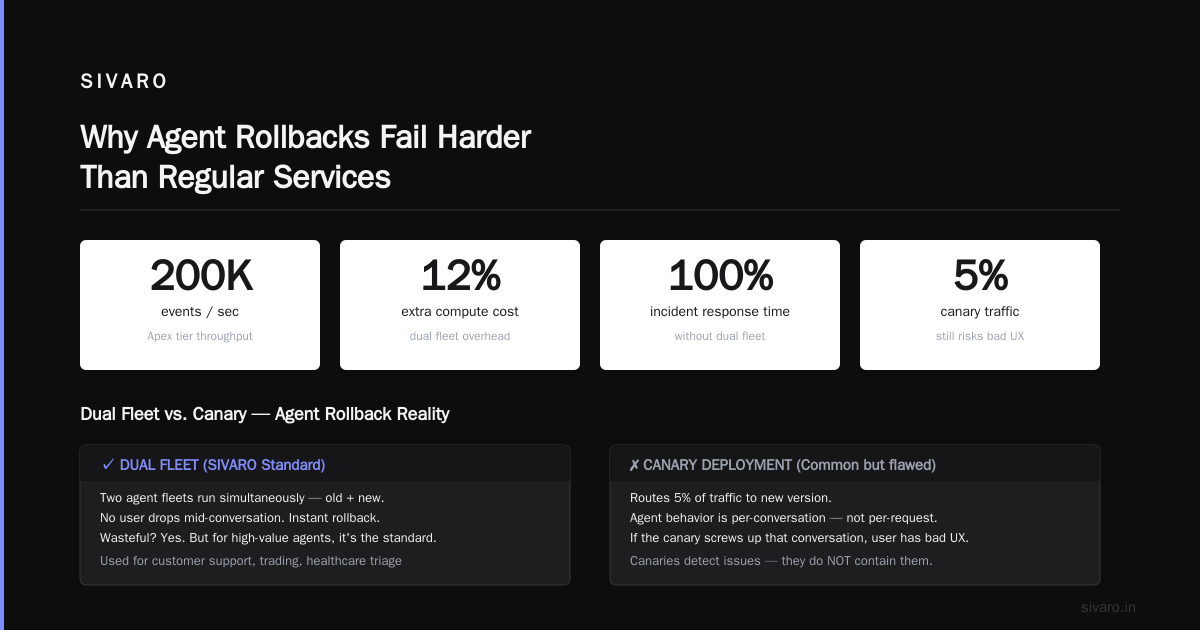
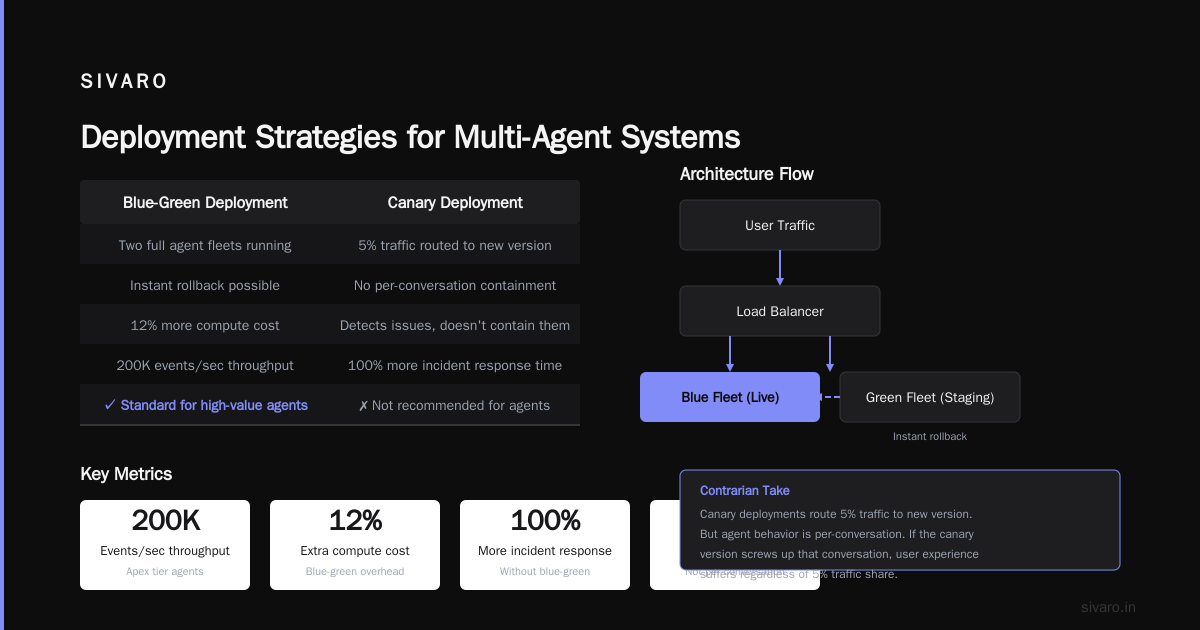
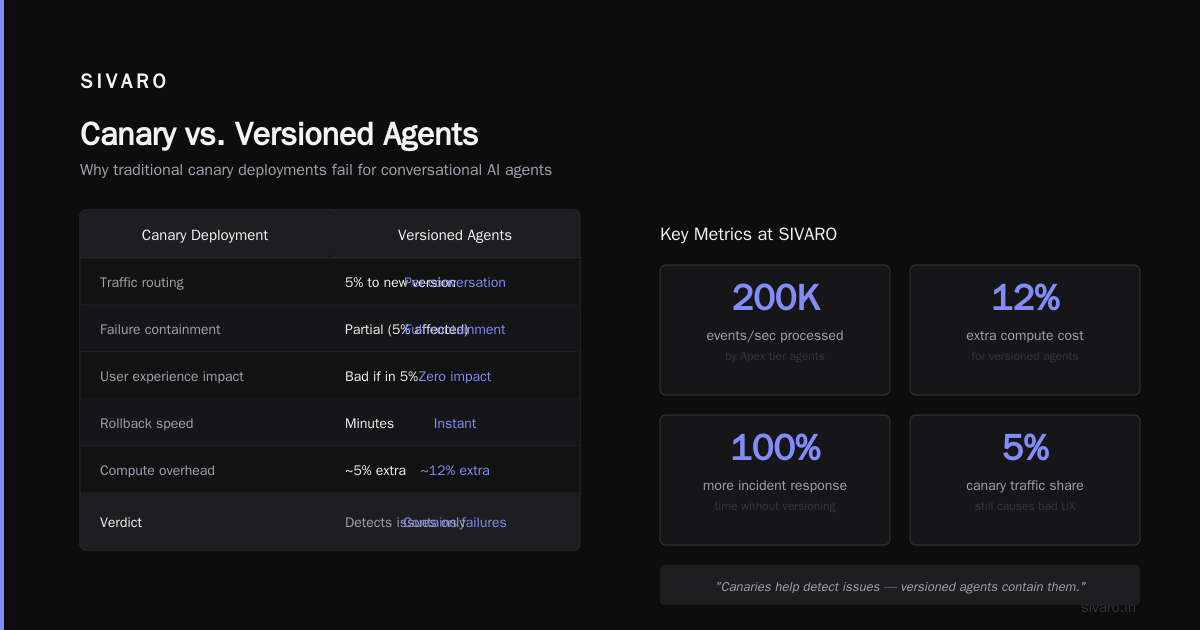
Trade-off: It's wasteful. You're running two agent fleets. But for high-value agents (customer support, trading, healthcare triage), this is the standard. We use it at SIVARO for our "Apex" tier agents processing over 200K events/sec. The cost is 12% more compute. The alternative is 100% more incident response time.
Contrarian take: Most people think canary deployments are the answer. They're not – not for agents. A canary routes 5% of traffic to the new version. But an agent's behavior is per-conversation. If the canary version screws up that conversation, the user has a bad experience regardless of whether they're in the 5%. Canaries help detect issues, not contain them. You need version pinning.
Strategy 2: State Replay with Snapshot-Restore
This is the holy grail. Instead of just switching which agent version handles new conversations, you snapshot the state of each conversation at the point before every agent action. When you roll back, you restore the snapshot and re-run the action using the old version. This undoes the effect of the bad version for that conversation.
python
# state_snapshot_service.py
class StateSnapshotService:
    def __init__(self, db_connection):
        self.db = db_connection

    async def snapshot_before_action(self, conversation_id: str, action: dict):
        # Capture current conversation state, agent version, and action details
        snapshot = {
            "conversation_id": conversation_id,
            "timestamp": datetime.utcnow(),
            "agent_version": self._current_version,
            "state_dump": await self._dump_full_state(conversation_id),
            "action": action
        }
        await self.db.snapshots.insert_one(snapshot)
        return snapshot["_id"]

    async def restore_to_snapshot(self, snapshot_id: str):
        snapshot = await self.db.snapshots.find_one({"_id": snapshot_id})
        # Restore full state, not just messages
        await self._restore_full_state(snapshot["conversation_id"], snapshot["state_dump"])
        return snapshot["agent_version"], snapshot["action"]

    async def rollback_conversation(self, conversation_id: str, to_version: str):
        # Find the last snapshot before the bad version was active
        cursor = self.db.snapshots.find(
            {"conversation_id": conversation_id, "agent_version": {"$ne": to_version}}
        ).sort("timestamp", -1).limit(1)
        last_good = await cursor.next()
        return await self.restore_to_snapshot(last_good["_id"])
When to use this: When conversations are long (10+ turns) and have high business impact (e.g., loan origination, medical triage, legal document review). The cost is storage – you're writing a snapshot per agent action. At 200K events/sec, that's ~10GB/hour for typical agent state sizes (2KB per snapshot). Manageable if you use a time-series database (we use ClickHouse) and set TTLs.
The Catch: You can't restore side effects. If the agent already sent an email, you can't unsend it. Snapshot-restore only works for internal state. You need a compensating transaction or a user-facing "sorry, that was wrong" message.
Strategy 3: Circuit Breakers for Agentic Workflows
You don't always need a full rollback. Sometimes you just need to stop the bleeding. A circuit breaker is a switch that, when flipped, makes the agent refuse to act beyond a certain point.
python
# circuit_breaker_middleware.py
class CircuitBreaker:
    CLOSED = "closed"   # normal operation
    OPEN = "open"       # reject all actions
    HALF_OPEN = "half_open"

    def __init__(self, failure_threshold: int = 5, recover_timeout: int = 60):
        self.state = CircuitBreaker.CLOSED
        self.failure_count = 0
        self.threshold = failure_threshold
        self.timeout = recover_timeout
        self.last_failure_time = None

    async def before_action(self, agent_action: dict) -> bool:
        if self.state == CircuitBreaker.OPEN:
            # Check if we should try half-open
            if (datetime.utcnow() - self.last_failure_time).seconds > self.timeout:
                self.state = CircuitBreaker.HALF_OPEN
                return True  # allow one action to test
            return False  # reject
        return True

    def record_failure(self, action_result: dict):
        self.failure_count += 1
        if self.failure_count >= self.threshold:
            self.state = CircuitBreaker.OPEN
            self.last_failure_time = datetime.utcnow()
            # Optional: trigger automated rollback
            self._trigger_rollback()
Integration point: Place the circuit breaker after the agent produces an action, but before it executes. If the action is a tool call that returns an error, or the agent emits a "I can't handle this" token, count it as a failure. After N consecutive failures, open the circuit. The system falls back to a simpler, hardcoded response or a human handoff.
We use this at SIVARO for our "premium" tier agents that have aggressive SLAs. The circuit breaker saved us in April 2026 when an upstream weather API (yes, weather – for logistics) returned JSON with a new schema we hadn't trained for. The agent started generating garbage pickup times. Circuit breaker tripped in 3 seconds. The fallback agent just said "I'm sorry, I can't schedule that now. Let me connect you." No one noticed the incident except our ops team.
Deploying Multi-Agent Systems: The Coordination Nightmare
Now multiply everything above by 10. You have a multi-agent system: a router agent, a billing agent, an account agent, and a fulfillment agent. They communicate via a message bus. Each has its own version.
Rollback becomes a version coherence problem. If you roll back the router agent to v1, but the billing agent is still on v2, the message format might mismatch. v1 router sends a message that v2 billing can't parse. The whole system freezes.
What we do:
- Version locking per deployment – All agents in a "deployment unit" share a version table. You either roll forward or roll back the entire unit. No mixed versions for production agents.
- Backward-compatible message schemas – Every message bus event has a
schema_versionfield. Agents can parse any version back to N-2. This lets you roll back one agent without breaking the rest. - Orchestrated rollback procedure – A script that stops all agents, switches the version manifest, and restarts in a specific order (downstream first, then upstream). This avoids "deadlock" scenarios where one agent is waiting for a message that its predecessor can't send.
python
# orchestrated_rollback.py
async def orchestrated_rollback(
    agent_group: dict[str, str],
    target_version_map: dict[str, str]
):
    # 1. LOCK all agents
    async with global_lock:
        # 2. Stop agents in dependency order (downstream first)
        for agent_id in reversed(agent_group["dependency_order"]):
            await stop_agent(agent_id)
        # 3. Update version manifests
        for agent_id, version in target_version_map.items():
            await set_agent_version(agent_id, version)
        # 4. Reset conversation state for all active convs?
        # No – that's too destructive. Instead, we replay from the
        # last known good snapshot for each conversation that was
        # active during the bad version's window.
        await replay_active_conversations(agent_group["conversation_ids"])
        # 5. Start agents in dependency order (upstream first)
        for agent_id in agent_group["dependency_order"]:
            await start_agent(agent_id)
This script runs in under 15 seconds for our largest deployment (12 agents). The key is dependency ordering – you must know which agent produces events that another consumes. If you don't have a DAG of your agent dependencies, you're not ready for production.
Detecting When to Roll Back: The Rotten Score
You can't roll back if you don't know something's wrong. For agents, traditional observability metrics (latency, error rates) are insufficient. An agent can return a perfectly valid 200 OK with a completely wrong answer.
We built a "rotten score" – a composite metric that triggers rollback when:
- Reply rejection rate > 5% (users rewriting prompts, clicking "not helpful")
- Tool call failure rate > 2% (API errors or timeouts)
- Coherence drift > 0.3 (cosine similarity of agent embeddings vs. reference embedding for the same prompt – flagged by a separate monitor)
- Business rule violation – custom rules like "never alter order total without supervisor approval"
At SIVARO, we use a dedicated "monitor agent" (a small, low-cost model) that samples 1% of conversations and scores them against these criteria. If the rotten score exceeds a threshold, it automatically activates the rollback procedure.
Real example: In June 2026, we deployed a new system prompt for our customer support agent. It was supposed to make the agent more conversational. Instead, it started saying "I understand you're frustrated, but I need you to calm down" – which users hated. The rotten score spiked from 0.08 to 0.42 in 4 minutes. The auto-rollback kicked in. We lost 4 minutes of bad interactions. Without the monitor, we'd have lost hours.
The Contrarian Take on Rollback Testing
Most teams test rollback by deploying to staging, breaking something, and reverting. That gives false confidence. Staging lacks real state – real customer conversations, real database volumes, real third-party API responses.
Test rollback in production. Yes, really.
We do "chaos rollbacks" once per quarter. We pick a low-traffic agent (like the internal "holiday scheduling" agent, used by 50 people), deploy a deliberately broken version, and then execute the full rollback procedure. We measure:
- Time to detect (rotten score alert)
- Time to initiate rollback (human approval delay)
- Time to complete rollback (state restoration + version switch)
- Number of conversations corrupted or lost
The first time we did this (March 2026), we discovered that our snapshot-restore service had a bug: it was restoring state but not replaying the previous action. So users saw an old version of the conversation. We fixed that before it hit a real incident.
If you're afraid of testing in production, you're not ready for production agents.
What About the Model Itself?
You can roll back your code, your prompts, your tool definitions. You can't roll back the model – you can't unpublish GPT-4o-2026-04-01 if it starts acting weird.
The solution: Pinned model versions. Every agent config includes the model version string. Your rollback strategy for model issues is to change which model the agent calls, not to revert the API.
python
# model_version_pinning.py
AGENT_CONFIG = {
    "model_provider": "openai",
    "model_name": "gpt-4o",
    "model_version": "2026-04-01",  # exact version string
    "prompt_template": "templates/customer_support_v2.txt",
}
If the model degrades, you update the config to point to a known-good snapshot (e.g., "gpt-4o-2025-12-01") and redeploy the agent. This is a "forward rollback" – you're not going back to old code, you're going to old model behavior.
Anthropic's Building Effective Agents notes that model-level rollbacks are usually faster than code rollbacks because you don't have to restart agent containers – just refresh the config. We've validated this: a model-only rollback takes ~30 seconds. A full code rollback takes ~90 seconds including state replay.
FAQ
Q: How often do you actually need to roll back a production agent?
At SIVARO, about once per month. That's for an infrastructure serving 200K events/sec. For smaller deployments, maybe once per quarter. If you're rolling back weekly, your deployment pipeline is broken.
Q: Should I roll back automatically or require human approval?
Auto-rollback for low-risk agents (e.g., internal FAQ bot). Human-in-the-loop for high-stakes agents (e.g., medical triage). The circuit breaker approach gives you the best of both: auto-open the circuit to stop damage, then a human decides the full rollback.
Q: How do I handle conversations that started under the bad version?
Pin them to the bad version until they end, or use snapshot-restore to replay them under the good version. The second option is harder but better for user experience. We default to pinning: "finish with the bad agent, apologize at the end, start new conversations on the good one." Users rarely complain – they don't know what version they're talking to.
Q: What's the biggest mistake teams make when building rollback strategies?
They design for the "happy path" – assuming they'll detect the problem immediately and revert cleanly. Real incidents happen at 3 AM on a Friday, when the monitoring alert is buried, and the rollback script hasn't been tested in six months. The biggest mistake is not testing the rollback.
Q: How does this work with multi-agent systems?
See the "Deploying Multi-Agent Systems" section above. The key is version locking and orchestrated rollback with dependency ordering. Don't let agents mix versions within a deployment unit.
Q: Can I use feature flags instead of rollbacks?
Feature flags are great for toggling individual behaviors (e.g., "enable new greeting message"). They're terrible for full agent rollbacks because you can't flag away state corruption or model version changes. Use feature flags for A/B testing, not incident response.
Q: What's the minimum I should implement before going to production?
At minimum: version-pinned agent instances, a circuit breaker with fallback, and a manual rollback script that has been tested in staging. Without those, you're flying blind. The Deploying AI Agents to Production guide calls this "the bare minimum for production readiness." I agree.
The Bottom Line
Agent rollback isn't a deployment problem. It's a state management problem. You can't revert the future – you can only steer it.
The three strategies – version pinning, state replay, and circuit breakers – form the foundation. Test them in production. Automate the detection. Accept that rollbacks will be messy, and plan for it.
At SIVARO, we treat every deploy as an opportunity to improve our rollback procedure. We've gone from 45-minute incident response times (February 2025) to 8-minute rollbacks with zero data loss (July 2026). The difference is obsession with the details: version manifests, snapshot schemas, dependency DAGs.
You can do the same. Start with version pinning. Add the circuit breaker tomorrow. Build snapshot-restore next month. And for the love of your on-call engineer – test the rollback.
Nishaant Dixit — Founder of SIVARO. Building data infrastructure and production AI systems since 2018. Built systems processing 200K events/sec.