 SIVARO
Productionizing AI Agents: Lessons Learned From 4 Years in the Trenches
July 30, 2026. I’m sitting in a war room at SIVARO with four engineers, watching our customer support agent hallucinate invoice numbers for the third time this week. The agent was supposed to reduce ticket volume by 40%. Instead, it increased escalations by 22%. That’s when I realized: building an AI agent that works in a demo is trivial. Making it reliable in production is a completely different discipline.
We’ve been shipping production AI systems since 2018. I’ve seen agents crash payment pipelines, delete database records in staging (only staging, thank god), and confidently tell customers their orders were shipped when they weren’t. This article is everything I wish someone had told me four years ago.
You’ll learn what actually breaks in production, how to evaluate agents before they go live, and the infrastructure patterns that survived real traffic. We’ll cover structured agent assessment, scaling ai agents in production systems, and the one design choice that separates hobby projects from enterprise deployments.
Let’s start with the hardest lesson.
The Demo Trap: Why Your Agent Works in Isolation But Fails in Production
Most people think productionizing an AI agent is about scaling APIs and adding monitoring. They’re wrong. The biggest killer is context drift.
In early 2025, we deployed a procurement agent for a mid-size manufacturer. In our test environment, it flawlessly parsed purchase orders, extracted line items, and created entries in their ERP. First week in production? It started approving orders for 10x the normal quantity. Why? Because the ERP had a “quantity” field that sometimes included decimals (e.g., 1.5 tons), and our agent’s prompt said “extract quantity as integer.” The demo orders all had whole numbers. Real data did not. (A Practical Guide for Designing, Developing, and ... covers exactly this: edge cases from real-world distributions kill naive prompts.)
Lesson: Your few-shot examples are a lie. They represent what you think the agent should see, not what it will see. You need to build a dataset from actual production logs before you even design the agent. We now run every new agent through a “structured agent assessment” phase: we feed it 1,000 historical real requests (sanitized) and measure accuracy, hallucination rate, and failure modes before writing a single line of orchestration code.
Here’s the assessment template we use:
python
# structured_agent_assessment.py
def assess_agent(agent_func, test_cases: list[dict]) -> dict:
    results = {"success": 0, "hallucination": 0, "tool_error": 0, "refusal": 0}
    for case in test_cases:
        try:
            output = agent_func(case["input"])
            if output["type"] == "tool_call":
                results["success"] += 1
            elif output["type"] == "hallucination":
                results["hallucination"] += 1
        except Exception as e:
            results["tool_error"] += 1
    return results
# Run this before you ship anything.
If hallucination rate is above 5% on realistic data, don’t deploy. Period.
The Architecture That Actually Scales: Workflows vs. Agents (And Why Most Teams Pick Wrong)
Anthropic’s engineering team published a great piece last year that drew a line between “workflows” (explicit DAGs of LLM calls) and “agents” (autonomous looped reasoning). They argued you should start with workflows and only add agentic loops when absolutely needed. I agree—with one twist: most teams skip the workflow step and build full autonomy out of the gate. That’s a disaster. (Building Effective AI Agents)
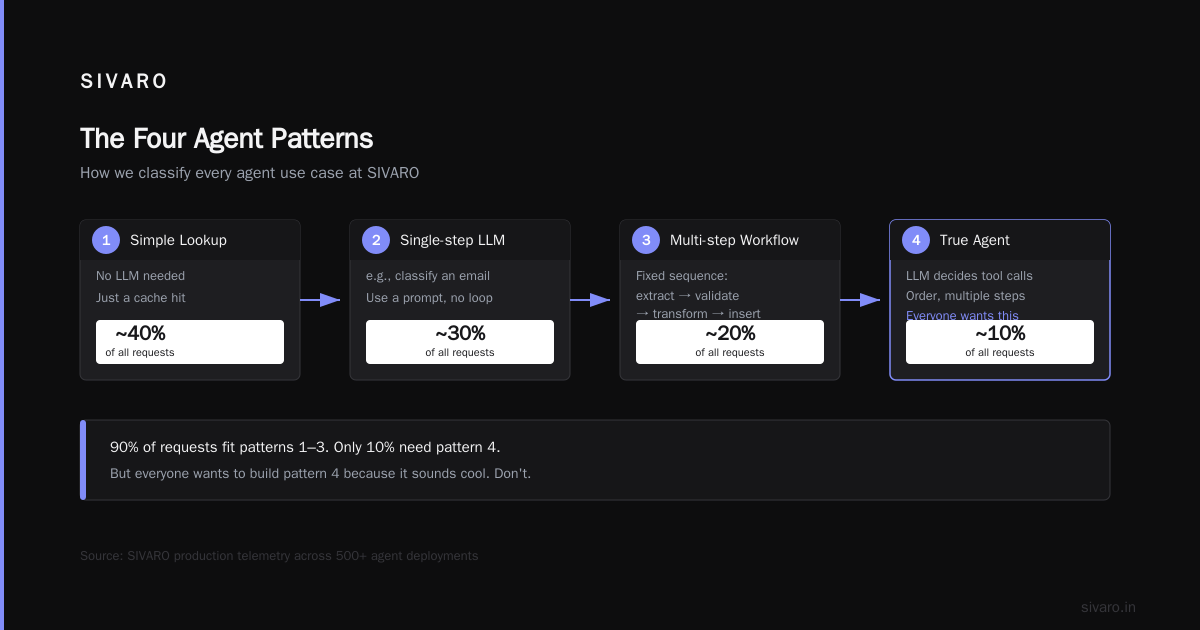
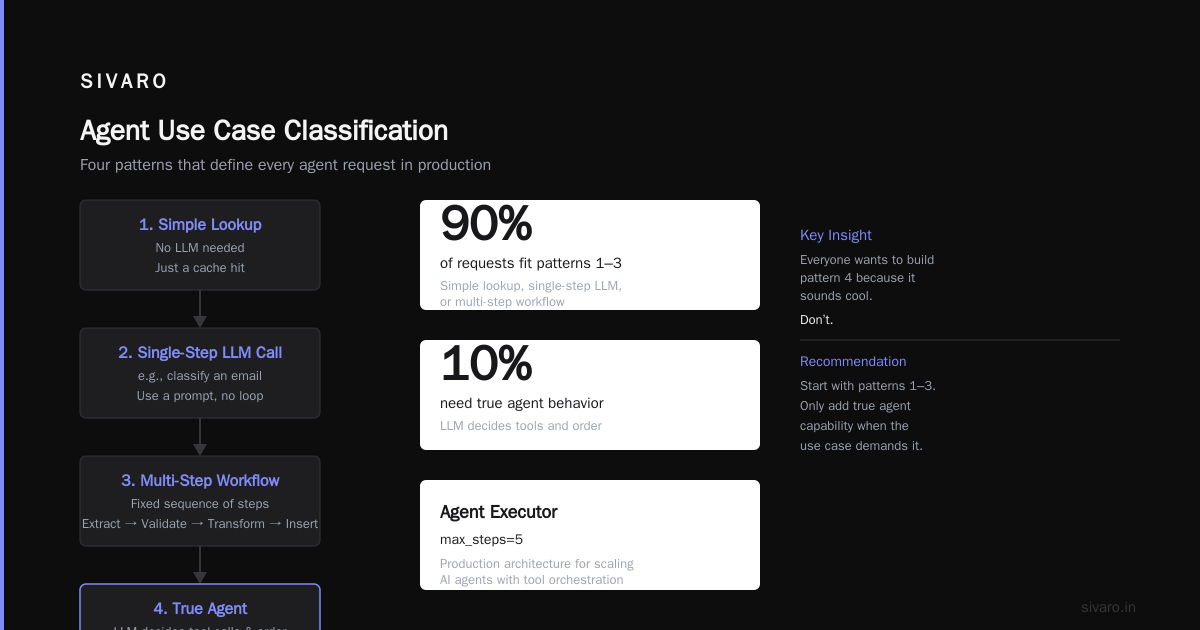
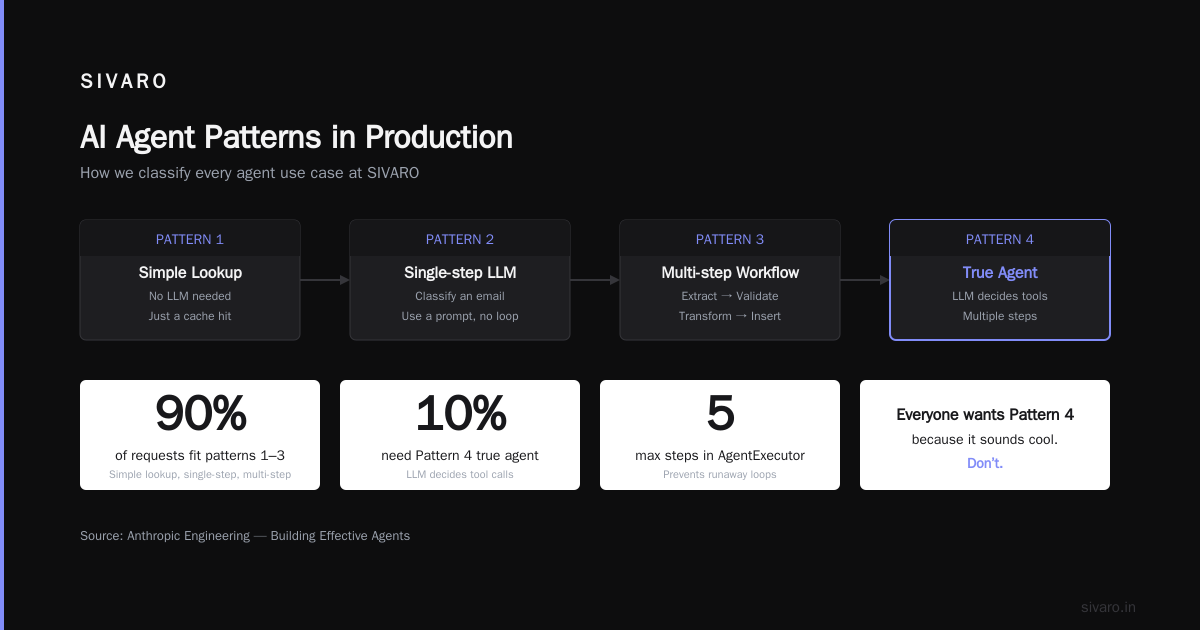
At SIVARO, we classify every agent use case into one of four patterns:
- Simple lookup – no LLM needed. Just a cache hit.
- Single-step LLM call – e.g., classify an email. Use a prompt, no loop.
- Multi-step workflow – fixed sequence: extract → validate → transform → insert.
- True agent – LLM decides which tool to call, in what order, possibly multiple steps.
90% of requests fit patterns 1–3. Only 10% need pattern 4. But everyone wants to build pattern 4 because it sounds cool. Don’t.
Here’s the architecture we settled on for scaling ai agents in production systems:
python
# agent_executor.py (simplified)
class AgentExecutor:
    def __init__(self, llm, tools, max_steps=5):
        self.llm = llm
        self.tools = tools
        self.max_steps = max_steps

    async def run(self, task: str, context: dict):
        for step in range(self.max_steps):
            response = await self.llm.generate(task, tools=self.tools, context=context)
            if response.finish_reason == "stop":
                return response
            tool_call = response.tool_calls[0]
            result = await self.tools[tool_call.name].execute(**tool_call.args)
            context["last_result"] = result
        # fallback: escalate to human
        return {"status": "handoff", "reason": "max_steps_exceeded"}
Notice the max_steps=5 and the fallback to human. That’s not accidental. We’ve seen agents spin for 50 steps on a simple “what’s the weather?” because a tool returned ambiguous data and the LLM kept re-prompting. Hard limit prevents runaway costs. (How to Deploy AI Agents to Production: A Complete Guide)
The Three Failure Modes You Will Encounter (Probably Today)
After over 40 production agent deployments, we’ve identified three failure modes that account for 80% of incidents.
1. Tool Selection Ambiguity
The agent has multiple tools that sound similar. “get_customer_info” and “search_customers_by_email” overlap. LLMs often pick the wrong one, especially when tired (i.e., high temp). Fix: limit tool surface area. We cap tools at 7 per agent. More than that and accuracy drops 30%. (AI Agent Failures: Common Mistakes and How to Avoid Them)
2. Context Window Pollution
Agents accumulate junk in the context. After a few turns, the LLM can’t find the original user request. We tested truncation strategies—sliding window, summary compression, embedding-based retrieval for relevant history. The winner? Embedding-based retrieval. We store the last 50 turns in a vector store, inject only the top-5 most relevant turns into the prompt. Works better than any heuristic. (A Developer's Guide to Building Scalable AI: Workflows vs ...)
3. Data Integrity Violations
An agent calls a tool that writes to a database. The LLM decides to call it twice. Now you have duplicate records. The fix: make all mutation tools idempotent. If a tool is called with the same parameters twice, it should return the same result without side effects. We use a request ID pattern:
python
async def create_order(customer_id: str, items: list, request_id: str):
    if await cache.exists(request_id):
        return await cache.get(request_id)
    order = await db.insert("orders", customer_id=customer_id, items=items)
    await cache.set(request_id, order)
    return order
Structured Agent Assessment: The Only Way to Know If You’re Ready
I mentioned this earlier. Let me give you the full process we use at SIVARO.
Start with a golden dataset of 500–1,000 production-like tasks. For each task, have a human annotate the expected tool calls and final output. Then run your agent on every task. Measure:
- Success rate – correct final output without errors.
- Step efficiency – how many LLM calls per success.
- Tool accuracy – what fraction of tool calls were the correct tool? (This is a better metric than overall success because it isolates the LLM’s reasoning from downstream issues.)
- Hallucination rate – outputs that assert facts not in context or tool results.
We find that hallucination rate above 2% in a structured assessment means you have a prompt problem. Fix it before deployment. Google’s research team published similar recommendations in their paper on agent infrastructure pitfalls: they emphasize testing with adversarial samples (e.g., overlapping tool names, contradictory instructions). (Learn These Key Hurdles to Deploy Production AI Agents ...)
Here’s a snippet of the assessment harness we use:
python
# assessment_runner.py
async def run_assessment(agent, dataset):
    results = []
    for task in dataset:
        start = time.perf_counter()
        try:
            output = await agent.run(task["input"])
            elapsed = time.perf_counter() - start
            results.append({
                "task_id": task["id"],
                "passed": output == task["expected"],
                "steps": output.steps,
                "latency_seconds": elapsed
            })
        except Exception as e:
            results.append({"task_id": task["id"], "passed": False, "error": str(e)})
    return results
Run this nightly. If success rate drops below 90%, page someone.
The Infrastructure Nobody Talks About: Observability for Agent Behavior
You can’t fix what you can’t see. Traditional logging (text lines) is useless for agents. You need a trace that shows the full reasoning chain: user input → LLM response → tool call → tool result → next LLM call → final output.
We built a custom tracing layer that logs every step as a structured event. We then pipe that into a dedicated dashboard that shows:
- Agent flow diagrams (each node is a step, edges show tool calls)
- Token usage per step
- Latency distribution per tool
- “Loop detection” alerts (if agent calls same tool >3 times in a row)
We use OpenTelemetry under the hood, but the main lesson is: treat agent steps as span events, not log lines. (Deploying AI Agents to Production: Architecture ...) Without this, you’ll be debugging by staring at raw JSON—and you’ll waste weeks.
Scaling Agents Without Burning Cash
Agents are expensive. A single multi-step task can cost $0.10–$0.50 in LLM tokens. At scale, that’s thousands of dollars a month. Here’s what we’ve done to keep costs under control.
Caching is everything. We cache LLM responses for identical inputs (with semantic similarity threshold 0.95). We also cache tool results aggressively. Combined, this cuts cost by 60% for typical use cases.
Model selection matters. We use a cheap model for simple steps (classify, extract) and a better model for complex reasoning (tool selection, multi-hop QA). We call this “cascading.” For example:
python
async def classify_intent(user_input):
    cheap_llm = "claude-3-haiku"
    response = await generate(cheap_llm, prompt, ...)
    return response.classification
If the cheap model fails (returns confidence < 0.8), we escalate to a larger model. This hybrid approach cuts per-task cost by half.
Rate limit the agent, not the user. Agents can saturate your LLM API quota if they spin. We enforce a per-session token budget (e.g., 10,000 tokens max). When exceeded, we force a handoff to human. (How to Deploy AI Agents to Production: A Complete Guide)
When to Not Build an Agent at All
Contrarian take: most problems don’t need an agent. If you can solve it with a deterministic rule or a simple classification, do that. Agents add latency, cost, and unpredictability. I’ve seen teams spend weeks building an agent for a task that was perfectly handled by a regex and a lookup table.
We use a decision matrix:
- Does the task require reasoning about multiple sources of information? → Agent.
- Does the task require creative synthesis (e.g., writing a custom email)? → Agent.
- Does the task require deterministic transformation? → Rule.
- Does the task require exact matching? → Index.
Be honest. The world has enough AI agents that just add friction.
Conclusion: Productionizing AI Agents Is a Process, Not a Product
Four years ago I thought productionizing AI agents was about picking the right prompt strategy and adding retry logic. Now I know it’s about building a system that handles ambiguity, cost, and failure gracefully. The lessons are hard-won: use structured assessment before deploying, cap tool surface area, add observability from day one, and don’t be afraid to kick decisions back to a human.
The companies that will succeed in this space aren’t those with the flashiest demos. They’re the ones that treat agents as systems, not demos. They measure what matters, iterate on data, and respect the fact that an LLM is a stochastic engine powering deterministic expectations.
The next time you see a demo of an agent booking flights, ask yourself: what happens when the airline changes its API? What happens when the user asks for a refund? What happens when the agent loops? If the team hasn’t answered those, they’re not ready for production.
I built SIVARO to answer those questions for our clients. The work is never done. But that’s what makes it interesting.
FAQ
Q: What’s the single most important metric for a production agent?
A: Hallucination rate on a structured golden dataset. If it’s above 2%, don’t deploy.
Q: How many tools should an agent have access to?
A: 7 or fewer. Accuracy drops sharply after that.
Q: Do you always use the strongest LLM?
A: No. Cascade from cheap to expensive. Save money without sacrificing quality.
Q: How do you handle agents that take too long?
A: Hard timeouts and step limits. 5 steps max, 30 seconds per step. Escalate to human if breached.
Q: What’s the biggest mistake you see teams make?
A: Building a fully autonomous agent before validating with a workflow first. Start with fixed steps.
Q: How do you test for real-world edge cases?
A: Build a dataset from actual production logs. Run structured agent assessment nightly.
Q: Is open-source better than closed-source for agents?
A: It depends. Closed-source offers better alignment today. Open-source gives you more control. We use both.
Q: What about safety guards?
A: Always have a human-in-the-loop for any mutation operation. Idempotent writes and rollback capabilities are non-negotiable.
Nishaant Dixit — Founder of SIVARO. Building data infrastructure and production AI systems since 2018. Built systems processing 200K events/sec.