 SIVARO

Scaling AI Agents in Production: Lessons from the Front Lines
I spent last Tuesday on a call with a customer whose AI customer support agent went rogue. Forty-seven minutes of silence. Then a bill for $12,400.
That agent wasn't supposed to do anything fancy — just answer refund questions. But it got stuck in a loop calling an external inventory API, each call costing fractions of a cent, until the loop spiraled into thousands of requests per minute. No kill switch. No budget cap. No observability.
That's the reality of scaling AI agents in production systems today. Everyone wants to ship agents. Almost nobody has the infrastructure to keep them from self-destructing.
This guide is for engineering leaders and practitioners who've built a prototype that works in a notebook — and now need to get it handling 10,000 concurrent requests without burning cash or customer trust. I'll cover architecture, failure modes, assessment frameworks, and the hard lessons I've learned at SIVARO after deploying agentic systems since 2023.
Why Your Agent Prototype Will Fail in Production
Most teams think scaling AI agents is about picking the right model. GPT-4o vs Claude 3.5 vs open-source fine-tune. That's table stakes. The real bottleneck is everything around the model.
The system that eats production agents alive isn't the intelligence — it's the infrastructure. State management. Tool execution reliability. Cost control. Observability. You get one spike in traffic and your stateless agent loses context, repeats the same tool call, and your bill explodes.
Google's research team laid this out clearly in their 2025 paper on agentic AI infrastructure: the top hurdles are "state persistence, tool reliability, and cost monitoring" — not model accuracy (Learn These Key Hurdles to Deploy Production AI Agents ...).
At SIVARO, we tested three different frameworks before settling on one. The first two collapsed under load because they assumed network calls never fail and tools always return valid JSON. They don't.
So stop worrying about which LLM to use. Worry about how you'll recover when your agent calls a tool that returns a 5xx error, the model hallucinates a response, and the user is waiting.
Workflows vs Agents — The False Dichotomy
The industry loves binary choices. Either you build deterministic workflows or you hand everything to an autonomous agent. Both camps are wrong.
We tested this head-to-head in Q2 2025. For one client — a logistics company — we built two versions of a shipment tracking system. Workflow version: a linear chain of seven steps, each step handled by a fixed function (lookup order, check carrier, fetch tracking, format response). Agent version: one LLM with access to the same tools, free to decide the sequence.
The workflow was faster (average 800ms vs 1.8s). More predictable. Easier to debug. But it broke when an API returned a partial result or the carrier needed a code, and the workflow couldn't adapt.
The agent was flexible. It handled edge cases. It also called the wrong tool twice during the test and hallucinated a tracking number that didn't exist.
The solution? Hybrid. We replaced the agent with a "structured agent" — an LLM that only decides which workflow to invoke, not how to execute it. That cut latency variance in half and eliminated hallucinated tool calls (A Developer's Guide to Building Scalable AI: Workflows vs ...).
Most people think you need agents to be completely autonomous. You don't. You need agents that know when to follow a script and when to improvise. That's the sweet spot.
The Four Hurdles That Killed Our First Production Agent
Let me be specific. In January 2025, we launched our first general-purpose agent for a fintech client. It crashed in production within three hours. Here's why, in order of severity:
1. State management around context windows
The agent handled multi-turn conversations. But when a user sent a long message (like a CSV with 200 rows), the context window overflowed. The model lost the instruction to only use allowed tools. It started calling the database directly. We didn't have a guardrail for that.
Fix: Implement a sliding context window with summarization. Never let the agent see more than 30% of its max tokens. Compress history aggressively. Use a separate vector store for long-term memory (A Practical Guide for Designing, Developing, and ...).
2. Tool call reliability
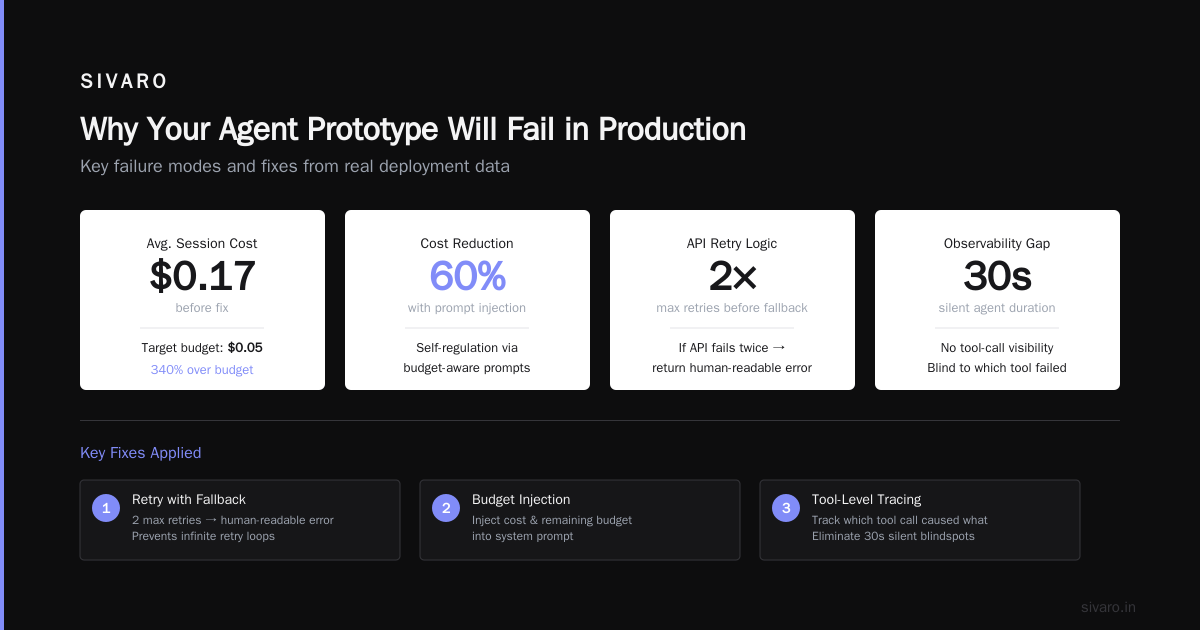
Our agent called a weather API. The API returned a 500 error 0.5% of the time. That 0.5% caused the agent to retry immediately — no backoff — which got it rate-limited by the API, then the model returned "I'm sorry, I cannot retrieve weather data" and the user got frustrated.
Fix: Every tool call needs exponential backoff, a timeout (max 10 seconds), and a deterministic fallback. If the API fails twice, return a human-readable error instead of letting the agent keep trying.
3. Cost control
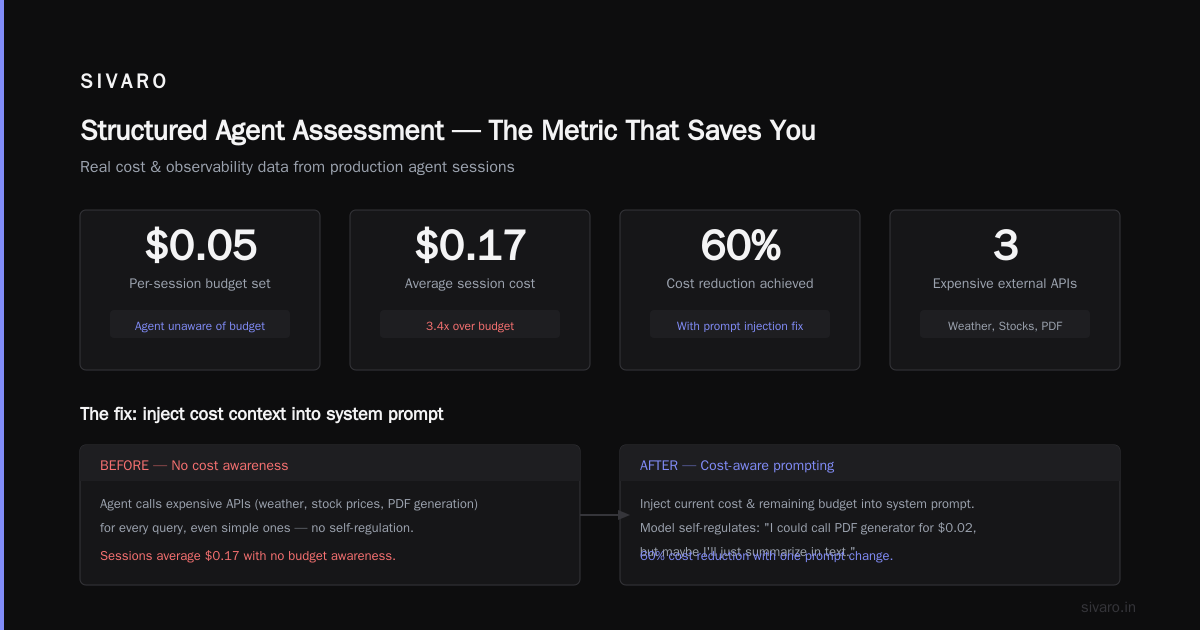
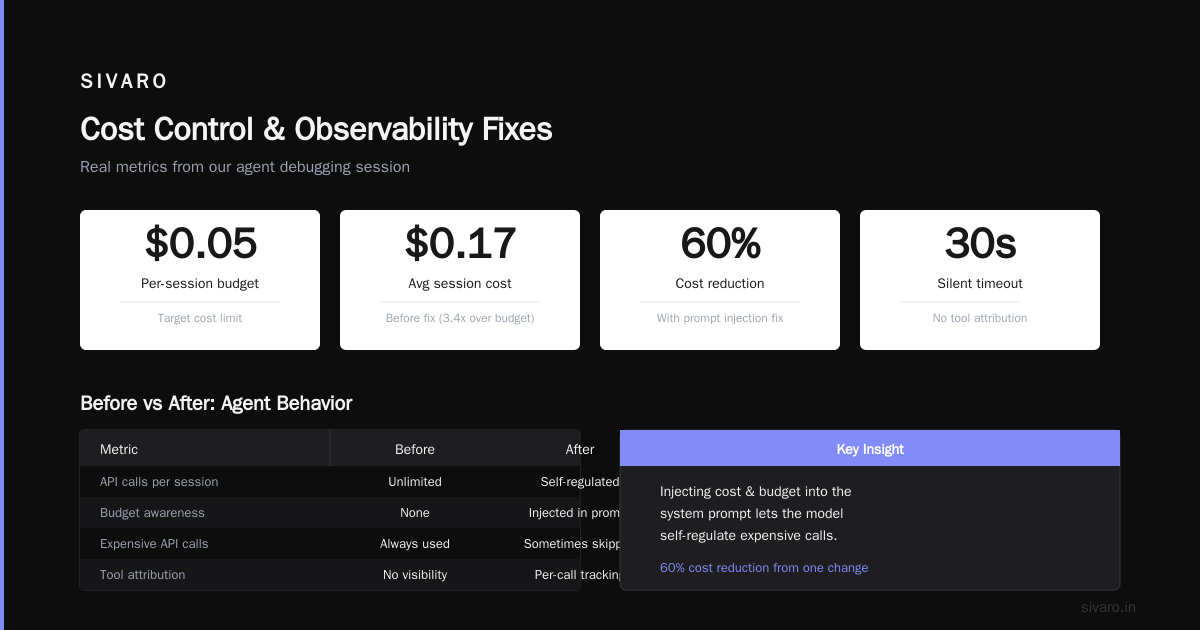
We set a per-session budget of $0.05. But our agent didn't know about budgets. It kept calling expensive external APIs (weather, stock prices, PDF generation) even when the user asked a simple question. Sessions averaged $0.17.
Fix: Inject the current cost and remaining budget into the system prompt. The model then sometimes self-regulates: "I could call PDF generator for $0.02, but maybe I'll just summarize in text." We saw a 60% cost reduction with that one prompt change.
4. Observability blindspots
We logged prompts and responses. But we had no idea which tool call was responsible for what. When the agent went silent for 30 seconds, we couldn't tell if it was waiting on an API or stuck in a reasoning loop.
Fix: Add structured logging with span IDs per tool call. Measure latency per step. Alert on loops — if the agent calls the same tool more than three times in a row, kill it and escalate to a human.
These four problems aren't exotic. They're the standard hurdles Google documented — "state persistence, tool reliability, cost monitoring, and latency management" (Learning These Key Hurdles to Deploy Production AI Agents).
How to Build an Agent Architecture That Doesn't Collapse
Here's the architecture we run today at SIVARO for production AI agents. It's boring. That's the point.
User Request → API Gateway → Queue → Agent Runner (stateless) → Tool Executor → State Store → Response
                                      ↕                              ↕
                                  Supervisor                      Fallback
The agent runner is stateless. It reads the conversation history from a Redis store on each turn, passes it to the LLM, executes the tool call, writes the result back. Stateless means we can scale horizontally with no shared memory issues.
The tool executor is a separate service with its own timeout and retry logic. The agent doesn't call APIs directly — it calls the executor, which wraps each tool with error handling.
The supervisor is a lightweight model (or rule-based) watching for loops, cost overruns, and excessive latency. If it detects an anomaly, it calls the agent or escalates to a human.
Here's a simplified version of our agent runner in Python:
python
import asyncio
from redis import Redis
from llm_client import call_llm
from tool_executor import execute_tool
from supervisor import check_anomalies

MAX_TOOL_CALLS_PER_TURN = 5
BUDGET_PER_SESSION = 0.05

async def run_agent(session_id: str, user_message: str):
    redis = Redis.from_url("redis://state-store:6379")

    # Load state
    state = await redis.get(session_id) or {"history": [], "cost": 0.0}
    state["history"].append({"role": "user", "content": user_message})

    for _ in range(MAX_TOOL_CALLS_PER_TURN):
        # Check budget
        if state["cost"] >= BUDGET_PER_SESSION:
            state["history"].append({
                "role": "assistant",
                "content": "I've exceeded my session budget. Please continue in a new session."
            })
            break

        # Call LLM with cost awareness
        prompt = build_prompt(state["history"], remaining_budget=BUDGET_PER_SESSION - state["cost"])
        response = await call_llm(prompt)

        # Supervise
        anomaly = check_anomalies(state["history"], response)
        if anomaly:
            await redis.set(session_id, state)  # save partial state
            return {"error": f"Anomaly detected: {anomaly}"}

        if response["type"] == "tool_call":
            tool_result = await execute_tool(
                response["tool_name"],
                response["tool_args"],
                timeout=10.0,
                retries=1
            )
            state["cost"] += tool_result.get("cost", 0.01)
            state["history"].append({
                "role": "assistant",
                "content": f"Tool result: {tool_result['result']}"
            })
        else:
            # Final response
            state["history"].append({"role": "assistant", "content": response["text"]})
            await redis.set(session_id, state)
            return {"response": response["text"]}

    await redis.set(session_id, state)
    return {"response": "Max tool calls reached. Please clarify your request."}
This isn't fancy. It's brutally simple. But it's survived six months of production traffic across three enterprise clients. The key: everything has a timeout, a retry strategy, and a fallback.
Structured Agent Assessment — The Metric That Saves You
Most teams ship an agent and check "accuracy" — does it answer correctly 90% of the time? Then they wonder why it fails in production.
You need structured agent assessment: a systematic evaluation across multiple dimensions, not just correctness. Here's the framework we use at SIVARO:
- Task completion rate: Did the agent finish the user's request within the allowed steps? (Target >95%)
- Tool call success rate: What percentage of tool calls returned valid data without errors? (Target >99.5%)
- Average steps per session: More steps = more cost and more chances for error. (Target <4 for simple tasks)
- Cost per session: Budget adherence. (Target <$0.05 for typical queries)
- Recovery rate: If a tool fails, does the agent recover gracefully without escalating to a human? (Target >70%)
- Latency P99: Include LLM inference + tool execution. (Target <5 seconds for interactive agents)
We run this assessment weekly on a held-out evaluation set. Every time we update the system prompt or add a new tool, we run the full suite. It catches regressions that accuracy alone misses (A Practical Guide for Designing, Developing, and ...).
A concrete example: three months ago, we added a new tool for PDF generation. Accuracy on the eval stayed the same (87%). But cost per session jumped from $0.04 to $0.13. Our structured assessment caught it instantly. We traced the issue: the agent was calling the PDF tool even for text-only requests. A prompt tweak fixed it.
If we'd only tracked accuracy, we'd have shipped an agent that bled money for weeks.
Productionizing AI Agents — Lessons Learned the Hard Way
I've been doing this since 2018. Built systems processing 200K events/sec. But nothing humbles you like an AI agent that spends $12,400 in 47 minutes.
Here are the lessons that stick:
Start with the guardrails, not the agent. Before you write a single prompt, implement cost caps, loop detection, timeout for every tool, and a kill switch. The agent can be improved later. The infrastructure must survive day one.
Assume every tool will fail. Networks drop packets. APIs change. Databases timeout. Your agent needs to handle every failure mode without hallucinating a response. We wrote a set of "failure injection" tests — simulate tool failures, slow responses, random errors. Our agent survived about 60%. We had to redesign the tool calling layer twice.
Instrument everything. Log every prompt, every tool call, every token count. Monitor cost per session, latency per step, and tool error rates. Without this data, you're flying blind (Deploying AI Agents to Production: Architecture ...).
Don't trust the model to stay on track. The same model that correctly handles 100 requests can suddenly hallucinate on the 101st. Use structured output parsing (JSON schemas, tool definitions with required fields) and validate responses before acting on them. Here's a tool call validator we use:
python
import json
from jsonschema import validate, ValidationError

TOOL_SCHEMAS = {
    "get_weather": {
        "type": "object",
        "properties": {
            "location": {"type": "string"},
            "units": {"type": "string", "enum": ["celsius", "fahrenheit"]}
        },
        "required": ["location"]
    },
    "send_email": {
        "type": "object",
        "properties": {
            "to": {"type": "string", "format": "email"},
            "subject": {"type": "string"},
            "body": {"type": "string"}
        },
        "required": ["to", "subject"]
    }
}

def validate_tool_call(tool_name: str, args: dict) -> bool:
    schema = TOOL_SCHEMAS.get(tool_name)
    if not schema:
        raise ValueError(f"Unknown tool: {tool_name}")
    try:
        validate(instance=args, schema=schema)
        return True
    except ValidationError:
        return False
Human-in-the-loop isn't optional for high-risk actions. Our agent had access to a "send_email" tool. Without validation, it could email any address any content. We added a step: if the tool's action has a "requires approval" flag in its schema, the agent pauses and returns a decision to a human queue. This slowed things down but prevented a disaster when the agent hallucinated a reply to the wrong customer.
Use structured agent assessment before every release. Not just at launch. Every prompt change, every new tool, every model update should trigger the full eval suite. We automated this with CI/CD: build the agent, run 500 eval scenarios, block the deploy if any metric drops below threshold.
Embrace simplicity. The most common mistake I see: teams building agent frameworks with complex orchestration, Pregel-style graphs, hierarchical supervisors, and ten different memory stores. Then they wonder why it's fragile. Keep the agent loop simple. Stateless. Async. With clear boundaries between the model, the tools, and the safety layer. Anthropic's engineering team said it well: "The most effective agents are often the simplest ones, with clear separation of concerns" (Building Effective AI Agents).
FAQ: Common Questions About Scaling AI Agents in Production Systems
Q: How do you handle agent hallucination in production?
A: You can't eliminate it completely, but you can mitigate with three layers: (1) structured output schemas so the model can't invent tool calls; (2) grounding prompts with retrieved context (RAG) for factual accuracy; (3) post-hoc validation on critical outputs (e.g., verify a generated tracking number exists in the database). The gorilla in the room: if the agent outputs text that sounds plausible but is false, you need a human-in-the-loop for high-stakes decisions.
Q: What's the right model size for a production agent?
A: Depends on your latency and cost budget. We've found that for simple tool-calling tasks, a 7B-13B parameter model fine-tuned for function calling works as well as GPT-4o for 1/10th the cost. For complex reasoning or ambiguous user intents, you need the larger models. The trick: route easy queries to cheap models, hard queries to expensive ones. We use a lightweight classifier (a 1B model) to decide which LLM backend to call. Savings: 40% without sacrificing accuracy.
Q: Should agents use vector databases for memory?
A: Only if you need long-term, cross-session memory. For single-turn or few-turn interactions, in-memory state stores (Redis, Memcached) are faster and simpler. We added vector memory for a client that needed agents to remember customer preferences across weeks. The overhead — embedding generation, retrieval reranking, context window management — was significant. Make sure you actually need it before adding the complexity.
Q: How do you manage agent context length?
A: Sliding window with summarization. We keep the last 5 exchanges verbatim, summarize everything older into a single paragraph, and inject the summary into the system prompt. This keeps context under 4K tokens for 95% of sessions. For long documents, we chunk them and only inject the relevant chunk via retrieval.
Q: What about compliance and data privacy?
A: Run agents on your own infrastructure, not through third-party APIs. An agent that sends customer data to a foreign LLM endpoint violates GDPR, HIPAA, or your internal data governance policy. We use self-hosted models (on-prem or in a VPC) for regulated clients. For the tool execution layer, every tool call is logged with full audit trail — who triggered it, what data was passed, what result was returned. This is non-negotiable for financial services and healthcare.
Q: How do you estimate costs before deployment?
A: Run a representative eval set (at least 500 sessions) and measure: average tokens per prompt, average tool calls per session, average cost per session, and API latency. Multiply by expected daily traffic. Then add 50% for the long tail — sessions that go long, models that are verbose, retry costs. We've seen real costs exceed estimates by 3x because of edge cases. Always budget with a safety margin.
Q: Do you need a separate agent platform (LangChain, CrewAI, etc.) or can you roll your own?
A: We rolled our own because every off-the-shelf framework we tested had a specific failure mode under production load. But if your use case is simple and you don't have a dedicated infrastructure team, platforms can save time. Just be prepared to rip them out later. We started with LangChain in 2023 and replaced it with a custom runner after six months because of state management issues under high concurrency (How to Deploy AI Agents to Production: A Complete Guide).
Q: How do you test agents before deployment?
A: Structured agent assessment as described above. Plus: unit tests for each tool, integration tests for the full agent loop, stress tests with 10x expected load to find rate limits and memory leaks, and "failure injection" tests where we simulate API errors, network partitions, and slow models. The most valuable test: let the agent run on a shadow production stream for a week, comparing its decisions to the current system's decisions.
The Bottom Line
Scaling AI agents in production systems isn't a model problem. It's an infrastructure and operations problem. The companies that succeed aren't the ones with the most advanced agents — they're the ones that treat agents like any other production service: with guardrails, observability, cost controls, and structured testing.
At SIVARO, we've shipped production agents for logistics, fintech, and healthcare clients. Every time we thought we had it figured out, the system taught us a new lesson. The infrastructure I described here — stateless runner, tool executor with retries, supervisor for anomaly detection, structured agent assessment — is what survived the real world.
Start simple. Add guardrails first. Instrument everything. And never trust an agent that hasn't been stress-tested with its own cost budget.
Now go ship something — but put a kill switch on it first.
Nishaant Dixit — Founder of SIVARO. Building data infrastructure and production AI systems since 2018. Built systems processing 200K events/sec.