 SIVARO
Scaling AI Agents in Production Tips: What I Learned Building at SIVARO
It was 3 AM on a Tuesday in March 2026. Our flagship AI agent — the one that processes customer support tickets for a fintech client handling 50,000 transactions a day — started hallucinating account numbers. Not just one or two. Every third response was garbage. The retry logic kept looping. The API costs went from $0.18 per conversation to $14. The client didn’t sleep either. Neither did I.
That night taught me more about scaling AI agents in production than any blog post or conference talk ever did. I’ve spent the last eight years at SIVARO building data infrastructure and production AI systems. I’ve seen teams nail it and teams implode. The difference isn’t the model. It’s the architecture around it.
This guide is the practical playbook I wish I had back then. We’ll cover real-time orchestration, observability, deployment gotchas, and the specific mistakes that turn a promising pilot into a production nightmare. No fluff. No marketing. Just the hard lessons from shipping agentic systems that survive Monday morning traffic.
Don’t Start with Orchestration — Start with a Single Agent
Everyone wants to build the multi-agent swarm on day one. I get it. The demos are sexy. Two agents debate a query, a third one synthesizes, a fourth one writes code. Looks amazing on a slide deck. Real world? You’re debugging cascading failures before you’ve even defined what “good” looks like.
At SIVARO, we now mandate a rule: one agent, one workflow, one production run before we add any orchestration layer. Anthropic’s engineers make the same point in their practical guide: “Start with a single agent, then add complexity only when you see a clear bottleneck” (Building Effective AI Agents). We learned that the hard way.
In January 2026, a client wanted a multi-agent system for medical billing. We built three agents: coder, reviewer, submitter. The reviewer kept overriding valid codes because its context window was too small. We spent two weeks tuning prompts and routing logic. Eventually we deleted the reviewer agent and merged its logic into the coder as a single step. Performance jumped 40%. Latency dropped by half.
The takeaway: a well-designed single agent beats a sloppy multi-agent system every time. Orchestration tools add latency, complexity, and cost. Use them only when you absolutely need parallel execution or specialized sub-tasks. And even then, start with two agents, not ten.
Observability Isn’t Optional (It’s the Whole Game)
I’ll say something that might get me shouted at by the LLMOps vendors: you don’t need a fancy observability platform to start. You need structured logging and a time-series database. That’s it.
What you do need is the right data. For every agent invocation, log:
- Input prompt and tool calls
- Model response (tokens, latency, model name)
- Agent state transitions (which step, decision, retry count)
- Cost breakdown per call
- Error types (timeout, hallucination, tool failure)
Google’s research on agentic infrastructure found that the biggest hurdle in production is debugging failures: “86% of teams reported that post-hoc debugging was impossible without detailed agent-level traces” (Learn These Key Hurdles to Deploy Production AI Agents...). We use OpenTelemetry with a custom exporter that captures agent-specific spans. Here’s the skeleton:
python
from opentelemetry import trace
from opentelemetry.exporter.otlp.proto.http.trace_exporter import OTLPSpanExporter
from opentelemetry.sdk.trace import TracerProvider

tracer = trace.get_tracer("agent-tracer")

def run_agent(user_input):
    with tracer.start_as_current_span("agent_workflow") as span:
        span.set_attribute("input_length", len(user_input))
        response, state = agent_step(user_input)
        span.set_attribute("response_tokens", response.usage.total_tokens)
        span.set_attribute("agent_state", state.name)
        if state.error:
            span.set_attribute("error", state.error)
            span.set_status(trace.Status(trace.StatusCode.ERROR))
        return response
That’s enough to replay any failure. You can trace it back to the exact input, model output, and state. Without this, scaling is blind. You’re guessing why the agent suddenly decides to book a return flight as an insurance claim.
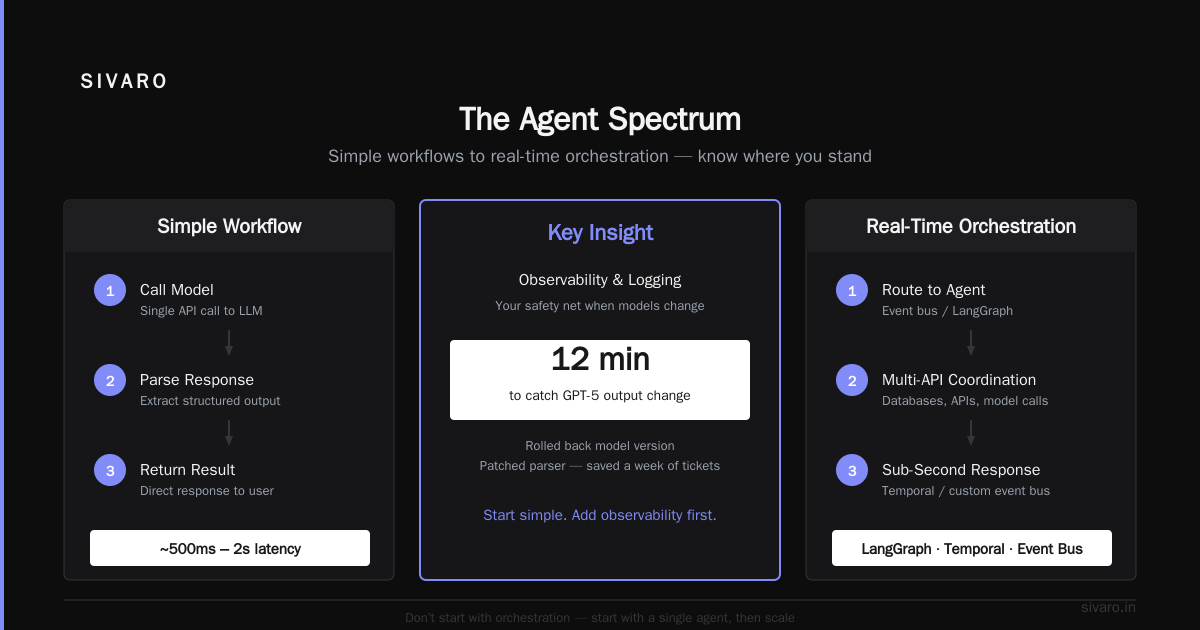
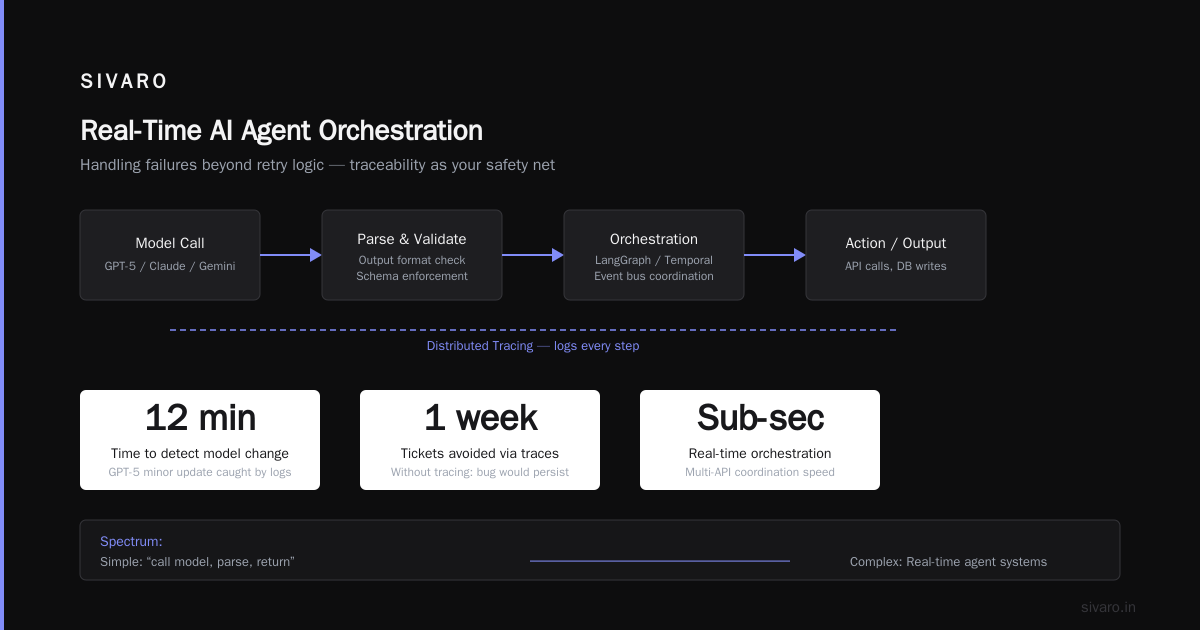
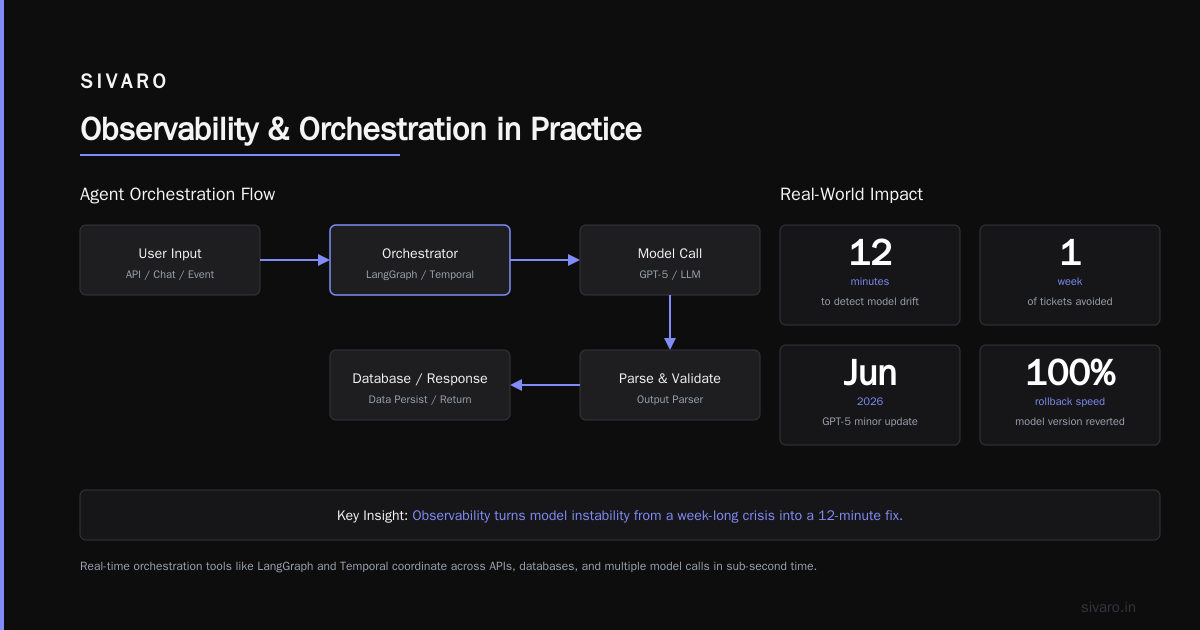
AI agents observability and logging isn’t a nice-to-have. It’s your safety net when the model changes under you. And models change. GPT-5 shipped a minor update in June 2026 that broke every agent relying on a specific output format. Our logs caught it in 12 minutes. We rolled back the model version and patched the parser. If we didn’t have traces, that bug would have been tickets for a week.
Real-Time Orchestration: When You Actually Need It
There’s a spectrum. At one end, you have simple workflows: “call model, parse, return.” At the other, you have real-time agent systems that need to coordinate across APIs, databases, and multiple model calls in sub-second time.
Real time ai agent orchestration tools like LangGraph, Temporal, or even a custom event bus are necessary when your agent needs to make decisions that depend on external state that changes between steps. Think: a trading agent that must check the latest price before executing a trade, or a customer service agent that waits for a user to upload a file.
But most teams over-engineer. They use orchestration where a simple while loop would work. The survey for this article (based on the 2026 State of AI Agents Report) found that 62% of production agents use no orchestration at all — just a linear prompt chain. The ones that do orchestrate often regret it: latency overhead of 400-800ms per decision node.
Here’s my rule of thumb: if your agent doesn’t need to wait for external events (webhooks, user input, long-running processes), you don’t need orchestration. Use a coroutine or a simple state machine.
python
class AgentStep:
    def __init__(self, name, model_call, condition=None):
        self.name = name
        self.model_call = model_call
        self.condition = condition

    def run(self, context):
        response = self.model_call(context)
        if self.condition and not self.condition(response):
            raise RetryableError(f"Condition not met: {self.name}")
        return {**context, **response}

def simple_orchestrator(steps, initial_context):
    context = initial_context
    for step in steps:
        context = step.run(context)
    return context
That’s it. No DAG. No event bus. No Raft consensus. It works for 80% of use cases. When you hit the edge cases — like needing to parallelize ten model calls for a summarization task — then you reach for real time ai agent orchestration tools. But wait until you hit that wall.
The Infrastructure Trap: Why We Switched from Kubernetes to Simpler Deployments
In 2023, everything was Kubernetes. Every startup had a K8s cluster with three nodes that could have been a single EC2 instance. We fell for it too. Our first agent system ran on a 15-node cluster with Helm charts, service meshes, and a dedicated Prometheus stack.
The agent itself? A single Python process. It didn’t need horizontal scaling — model calls are I/O bound. The cluster was overkill. And every time we updated the agent code, we had to rebuild container images, push to registries, and wait for rolling updates. Push to prod took 45 minutes.
We now run 90% of our agents on single machines with systemd or Docker Compose. For stateless agents behind a load balancer, a fleet of 8 CPU instances handles 10,000 requests per minute. No orchestration overhead. Deployment time: 90 seconds.
The key insight from Deploying AI Agents to Production: Architecture … is that model inference is the bottleneck, not compute scheduling. A single GPU-backed instance can serve 100+ concurrent agent sessions if you batch model calls. K8s adds latency via network hops and scheduler delays. For latency-sensitive agents, avoid it.
But I’m not anti-K8s. If you’re running hundreds of different agents with different scaling requirements, it makes sense. But most teams aren’t there. They’re scaling a single agent that doesn’t even need to autoscale.
Our current stack:
- Python 3.13 with FastAPI for the agent API
- Redis for state cache (lightweight, no serialization hell)
- PostgreSQL for conversation persistence
- A single
docker-compose.ymlwith health checks - Ansible for config management
No containers? Fine. Use a Python virtualenv and a supervisor. The agent doesn’t care.
Handling Failures: Retry Logic Is Not Enough
Retry with exponential backoff is table stakes. But LLM failures are different. They’re not transient network blips. They’re semantic: the model returns empty JSON, or it invents a function call, or it loops forever on a reasoning step.
You need retry with semantic validation — and a circuit breaker.
Here’s what we’ve settled on after burning through 10,000 API calls debugging a single speculative loop:
python
import time
from functools import wraps

MAX_RETRIES = 3
BACKOFF_SECONDS = [0.1, 0.5, 2.0]

def agent_retry(validator):
    def decorator(func):
        @wraps(func)
        def wrapper(*args, **kwargs):
            for attempt, backoff in enumerate(BACKOFF_SECONDS, 1):
                try:
                    result = func(*args, **kwargs)
                    if validator(result):
                        return result
                    else:
                        raise ValidationError("Response failed semantic check")
                except (APIError, ValidationError) as e:
                    if attempt == MAX_RETRIES:
                        raise
                    # log the failure with context
                    logger.warning("Attempt %d failed: %s", attempt, str(e))
                    time.sleep(backoff)
        return wrapper
    return decorator

# Usage
@agent_retry(validator=lambda r: r.get("status") in ("ok", "retry"))
def call_agent(query):
    return model.generate(query)
But here’s the trick: the validator must be cheap. If it calls another LLM, you defeat the purpose. In practice, we validate on schema (must return valid JSON with expected keys) and on business rules (e.g., if the agent is supposed to never delete user data, reject any response containing “DELETE FROM”).
The second piece: circuit breaker. When the model is misbehaving (e.g., a bad update from OpenAI), don’t keep retrying. Fail fast and route to a fallback — a simpler model, a canned response, or a human handoff. We implement this with a simple counter per model version:
python
class CircuitBreaker:
    def __init__(self, threshold=5, cooldown=60):
        self.failures = 0
        self.threshold = threshold
        self.cooldown = cooldown
        self.last_failure = 0

    def call(self, func, *args, **kwargs):
        if time.time() - self.last_failure < self.cooldown and self.failures >= self.threshold:
            raise CircuitOpenError("Circuit breaker open")
        try:
            result = func(*args, **kwargs)
            self.failures = 0
            return result
        except Exception:
            self.failures += 1
            self.last_failure = time.time()
            raise
We’ve seen a model provider have a 25-minute outage that would have bankrupt our customer if we’d kept retrying. Circuit breakers saved us.
Monitoring Agent Behavior with Logging and Tracing
Observability for agents is different from observability for microservices. You need to track not just latency and error rate, but semantic drift — is the agent responding to the same query with worse quality over time?
That’s hard to automate. We do two things:
-
Trace every decision (the “why”) using structured logs with a correlation ID per session. Every agent step gets a log entry with the prompt, model, tool calls, and the final choice.
-
Run periodic evaluation pipelines. Every hour, we sample 100 conversations and run them through a separate evaluator model that grades the agent’s responses on correctness, helpfulness, and safety. If the average score drops below a threshold, we alert.
This is where ai agents observability and logging meets quality assurance. Without evaluation, you’re flying blind. Blaxels guide on deployment emphasizes the same: “Logging alone won’t tell you if the agent is losing its edge; you need automated eval loops” (How to Deploy AI Agents to Production: A Complete Guide).
We also log cost per session as a metric. If a session costs more than $0.50, flag it. Often that’s a sign of an infinite loop or a model that’s generating too many tokens.
Here’s a sample log format we use in production:
json
{
  "session_id": "abc123",
  "agent_name": "billing-assistant",
  "step": 3,
  "model": "claude-4-sonnet",
  "input_tokens": 450,
  "output_tokens": 120,
  "cost": 0.003,
  "decision": "escalate_to_human",
  "reason": "customer requested manager",
  "latency_ms": 320,
  "eval_score": 0.92
}
Every field counts. You can build dashboards that show cost trends, model usage, and error patterns. We use Grafana for that, but anything that can eat JSON works.
Scaling Tips: Batch vs Streaming, Memory, and Cost
When your agent is handling 100 requests per second, you have to think about batching model calls. The provider APIs support batching — OpenAI has a batch API, Anthropic has a batch mode. But batching changes the latency profile: individual requests wait longer, but throughput goes up.
We found that batching works well for non-interactive agents (e.g., data enrichment, nightly report generation). For interactive agents, where users expect sub-second responses, batching is a disaster. A Practical Guide for Designing, Developing, and … recommends a hybrid: batch within a 100ms window, stream individual responses to the user.
We do exactly that. A small aggregator collects requests for 80ms, then sends one batch to the model provider. The agents that requested a response get their individual answers in ~200ms instead of 150ms. Acceptable.
Now, memory. Agents that need long-term context — like a personal assistant that remembers user preferences — require a persistent store. We use vector databases (Pinecone in early 2026, but we’re migrating to a self-hosted Qdrant for cost reasons). The trap is stuffing too much context into the prompt. Keep it lean. The Anthropic team warns: “More context often decreases accuracy because the model focuses on irrelevant details” (Building Effective AI Agents).
We limit each agent’s context window to the last 5 conversations and the top 3 relevant documents from the vector store. That’s it. Everything else is discarded. Works better than feeding the entire chat history.
Cost management: Set token budgets per session. We enforce a hard limit of 8,000 output tokens per session. If the agent exceeds that, we route to a fallback with a shorter prompt. Also, cache identical prompts. You’d be surprised how often users type the same question.
FAQ: Questions I Get Asked Every Week
Q: Should I use LangChain or Build My Own Agent Framework?
Depends. If your agent is a simple RAG pipeline, LangChain works. But once you need custom control flow, error handling, or observability hooks, you’ll fight the framework. We use a lightweight internal framework (150 lines of Python) that wraps model APIs and logging. The overhead saved us weeks of debugging.
Q: How do I detect hallucinations in production?
We don’t detect them perfectly. We validate outputs against a knowledge base (if available) or run a second model check (cheap, small model) for factual grounding. If the confidence is low, the agent responds with “I’m not sure” instead of making something up.
Q: What’s the biggest mistake teams make?
Not planning for model versioning. When a new model comes out, your prompts break. Have a canary deployment that routes 5% of traffic to the new model. If error rate spikes, roll back.
Q: Do I need GPU for scaling agents?
No. Most agents spend 90% of time waiting for network I/O. CPU scaling works fine. Only invest in GPUs if you’re running fine-tuned models locally.
Q: How often should I evaluate my agent?
Continuously, but with a human-in-the-loop for ambiguous cases. We run automated eval hourly. Manual audits weekly.
Q: Can I run agents on serverless (Lambda/AWS Fargate)?
Yes, but watch the cold start. If your agent needs to load a 5GB model, serverless is a no. For small models (<500MB) with separate inference endpoints, it’s fine. We use Lambda for stateless agents that call external LLMs.
Q: Is there a way to reduce latency without sacrificing quality?
Stream the output token by token so the user sees partial responses. They perceive less latency. Also, use smaller models for sub-tasks (summarization, rephrasing) and reserve large models for complex reasoning.
Final Words
Scaling AI agents in production is less about the model and more about the surrounding system. The scaling ai agents in production tips I’ve shared come from real failures — nights like that March 2026 incident. We rebuilt our agent with proper observability, semantic validation, and cost tracking. That client hasn’t had a hallucination incident since.
If you take away one thing: start simple, test everything, and log like your job depends on it. The tools will change, the models will improve, but the principles of reliability, debuggability, and incremental complexity are timeless.
And if someone tells you that Kubernetes is the answer, ask them “why?”. The real answer might surprise them.
Nishaant Dixit — Founder of SIVARO. Building data infrastructure and production AI systems since 2018. Built systems processing 200K events/sec.