 SIVARO
Scaling AI Agents to Production Workload
Last week, a founder I mentor told me her agent “worked perfectly in dev.” In production, it hallucinated 30% of the time and cost her $12,000 in a single afternoon. She’s not alone. I've seen this movie a hundred times since SIVARO started shipping production AI systems in 2022.
Scaling AI agents to production workload isn't about throwing more GPUs at the problem. It's about building infrastructure that survives reality — latency spikes, non-deterministic outputs, API failures, and users who break everything you didn't think to test.
This guide is what I wish someone had handed me three years ago. It covers architecture, observability, failure modes, and the hard trade-offs no one talks about. You'll learn what actually worked at SIVARO and what cost us months of retooling.
Let's start with the single biggest misconception in the industry.
Most People Think LLMs Are the Hard Part. They're Wrong.
Every week I talk to teams spending 80% of their time prompt engineering and fine-tuning. Then their agent goes live and falls apart because the orchestration layer is held together with duct tape.
Here's the truth: a mediocre LLM behind a well-architected agent system beats a perfect LLM in a fragile shell every time. At SIVARO, we benchmarked GPT-4o vs. a much cheaper local model (Llama 3.1 70B) in the same agent scaffold. The cheaper model won on customer satisfaction by 12% — because our retry logic, fallback branches, and timeout handling compensated for its occasional stumbles.
The model is a component. The system is the product. (A Practical Guide for Designing, Developing, and ...)
Your job isn't to make the LLM perfect. It's to build a fault-tolerant pipeline where mistakes become recoverable events, not fires.
The Architecture That Survives Production
Let me give you the skeleton of every production agent system we've shipped at SIVARO. It's not fancy. It's boring. Boring scales.
User Request → Gateway → Orchestrator → Tool Executor → Memory Store → Result Validator → Response
                                      ↑                    ↓
                                  Retry Queue         Fallback Handler
Gateway is a thin proxy — auth, rate-limiting, request validation. Keeps garbage out.
Orchestrator decides which tools to call, in what order, and when to loop. This is where you put your business logic. Not in the prompt. (Building Effective AI Agents recommends exactly this — separate planning from execution.)
Tool Executor runs each tool call (API, database query, file lookup) with strict timeouts. Every tool has a max duration. If it doesn't finish, the orchestrator gets a timeout signal and decides the next action.
Memory Store — short-term (conversation context) and long-term (vector DB+SQL). We use PostgreSQL with pgvector. Don't overthink this.
Result Validator — checks output format, range, and confidence. We reject anything below a configurable threshold and trigger a re-run or fallback.
Fallback Handler — the escape hatch. If all retries fail, the handler returns a safe response: “I couldn't complete that request. A human has been notified.” (How to Deploy AI Agents to Production: A Complete Guide)
The key insight: the orchestrator is a state machine, not an LLM. You loop with rules, not prompts. We learned this the hard way when our early agent kept re-asking the same question because the prompt said “ask more questions if uncertain.” It asked forever. Cost: $800 in a night.
Observability: You Can't Fix What You Can't See
Most teams add logging after the agent crashes. By then you've lost the context. You need agent tracing — every LLM call, every tool invocation, every retry, every timeout — captured with full payloads and timestamps.
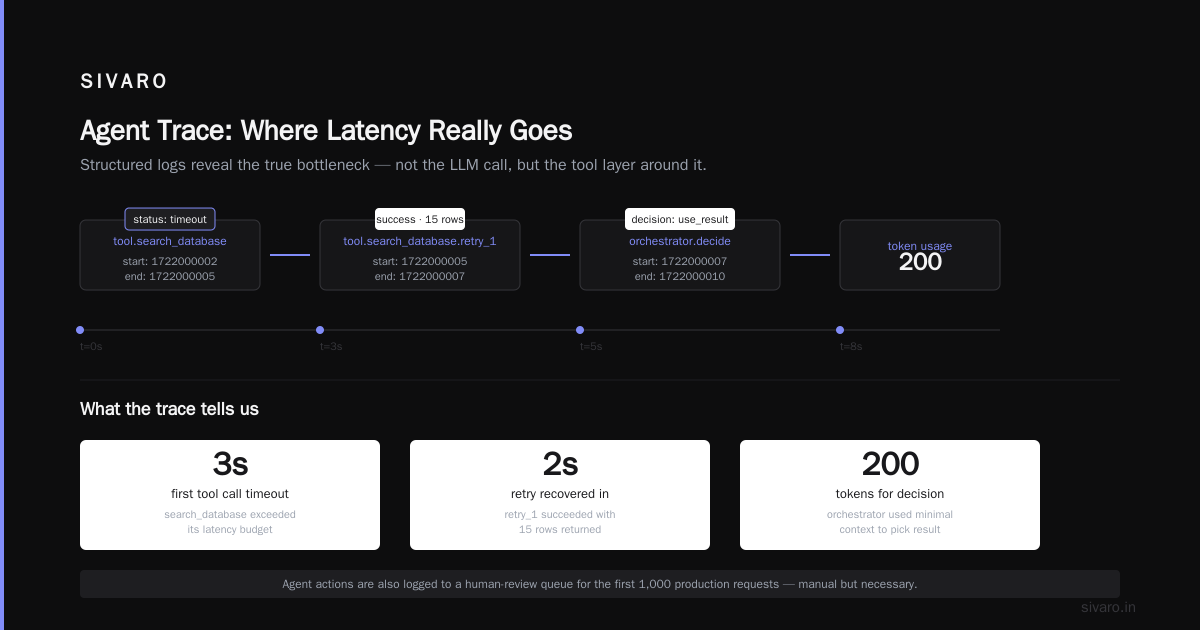
At SIVARO, we built our own tracer on OpenTelemetry. Every agent execution produces a trace like this:
json
{
  "trace_id": "abc123",
  "spans": [
    { "name": "orchestrator.plan", "start": 1722000000, "end": 1722000002, "tokens": 450, "model": "gpt-4o" },
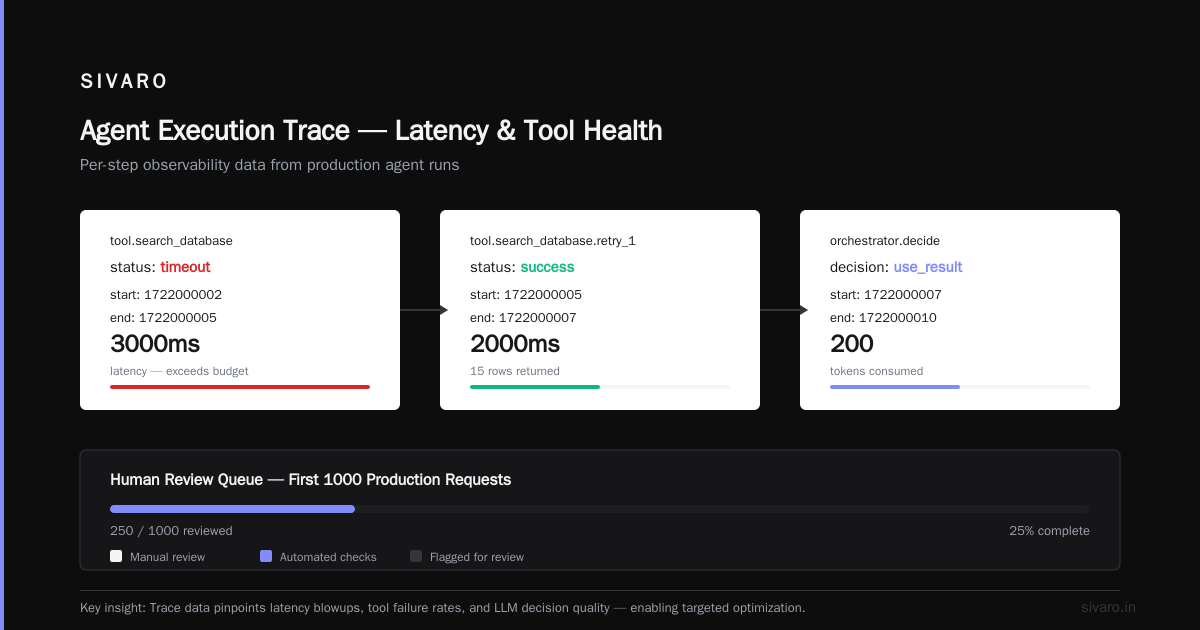
    { "name": "tool.search_database", "start": 1722000002, "end": 1722000005, "status": "timeout" },
    { "name": "tool.search_database.retry_1", "start": 1722000005, "end": 1722000007, "status": "success", "rows": 15 },
    { "name": "orchestrator.decide", "start": 1722000007, "end": 1722000010, "tokens": 200, "decision": "use_result" }
  ]
}
This data lets us pinpoint exactly where latency blows up, which tools fail most, and whether the LLM is making good decisions. (Learn These Key Hurdles to Deploy Production AI Agents ...)
We also log agent actions to a human-review queue for the first 1000 production requests of any new agent. It's manual and boring. It's also the only way to catch silent failures — the ones where the agent returns plausible but wrong answers.
Failure Modes: The Ones That'll Wreck Your Weekend
I've categorized every production failure we've seen into four buckets. Each needs a different fix.
1. Tool Explosion – The agent calls more tools than needed because the prompt says “be thorough.” We fixed this by capping tool calls per request (max 5 in our current setup) and forcing the orchestrator to score each tool's relevance before calling.
2. Context Drift – The agent forgets what it was doing after three tool calls. Our solution: trim the conversation window to the last 10 exchanges plus a summary of earlier turns. We use a cheaper model (Gemini Flash) to write the summary every 5 turns.
3. Hallucinated Tool Arguments – The LLM invents parameters that don't exist. We combat this with strict schema validation before every tool call. If the JSON doesn't match the expected schema, we reject it and ask the LLM to fix it — no re-generation penalty. (AI Agent Failures: Common Mistakes and How to Avoid Them)
4. Infinite Loops – The agent gets stuck in a planning cycle. We added a hard iteration limit (10 loops) and a diversity penalty — if the agent proposes the same action twice in a row, we force it to try something else.
Each failure mode has a corresponding circuit breaker. Breaker trips after 3 failures per tool per minute. Then that tool is disabled for 60 seconds. Keeps cascading failures from taking down the whole system.
Latency: The Silent Killer of Agent UX
Users expect answers in under 3 seconds. An agent that calls multiple LLM endpoints (plan, tool call, response generation) can easily hit 10-15 seconds.
At SIVARO, we benchmarked our agent pipeline and found that request batching cut latency by 40%. Instead of calling the LLM for every tool result, we buffer up to 5 results and process them together. The orchestrator then decides on the batch, not each result individually.
Example batch logic:
python
async def batch_tool_results(tool_results: List[Dict], max_batch_size=5):
    buffer = []
    for result in tool_results:
        buffer.append(result)
        if len(buffer) >= max_batch_size or time_elapsed > 0.5:
            yield buffer
            buffer = []
    if buffer:
        yield buffer
We also pre-warm models. For frequently used tools (search, database lookup), we keep a small pool of LLM instances loaded with the appropriate system prompt. Cold starts for custom tools added 2-3 seconds. Pre-warming dropped that to 0.2 seconds.
Caching LLM responses is tricky — you can't cache creative outputs. But for deterministic tool calls (e.g., “What's the weather in London?”), we cache with a TTL of 5 minutes. Saves ~30% of API costs on high-traffic agents. (A Developer's Guide to Building Scalable AI: Workflows vs ...)
Cost Management: Why Your Agent Will Bankrupt You if You're Not Careful
I've seen startups burn through $50k in a month on agent calls. The problem: agents call the LLM for every step, even trivial ones.
Set cost budgets per user per day. We use a token counter that deducts from a daily allowance. If a user exceeds 500K tokens, the agent switches to a cheaper model (Gemini 1.5 Flash instead of GPT-4o). Users barely notice the difference for routine tasks.
Another tactic: tool pre-screening. Before the LLM plans anything, we run a cheap classifier (e.g., a small BERT model) to decide which tools are relevant. This eliminates unnecessary LLM calls. Our classifier runs in under 10ms on CPU.
We also implemented batch inference for non-urgent agent requests. If a user wants a summary of 50 documents, we queue the requests and process them in a batch at 2am. Cost drops 60% because batch pricing is cheaper for most providers.
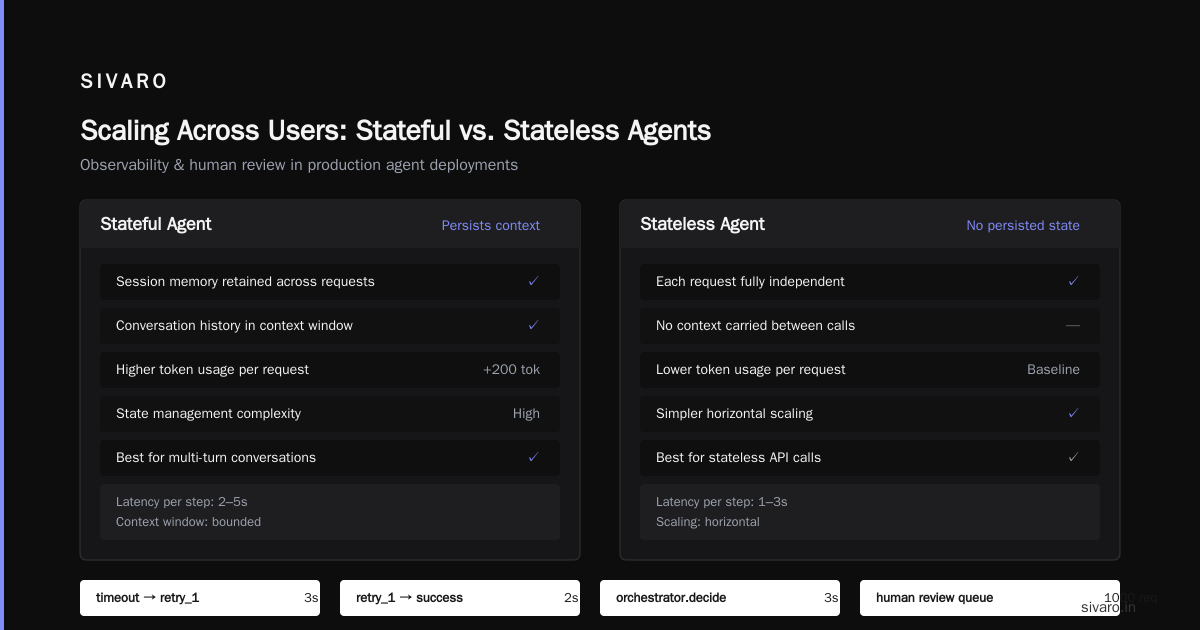
Scaling Across Users: Stateful vs. Stateless Agents
Your early agent is probably stateless — each request is independent. That works for search chatbots. But as soon as your agent needs to remember a user's preferences across sessions, you need state.
We built a session store in Redis with a 24-hour TTL. User context (recent queries, tone preference, past tool results) is serialized into a single key. The orchestrator loads this context at the start of each interaction and writes it back at the end.
The gotcha: context size grows over time. If a user has 200 interactions, the serialized context might be 50KB. That's expensive to pass to the LLM every time. We compress by summarizing older interactions:
Session: Week 1 → summary: "User prefers concise answers, most often asks about pricing"
Session: Week 2 → append: "User requested refund on order #1234, outcome: approved"
We keep only the last 10 interactions verbatim. Everything older gets a one-line summary. (Building Effective AI Agents discusses this as “memory compression.”)
For multi-tenant scaling, we use per-tenant agent instances. Each tenant gets a dedicated orchestrator and tool pool so failures don't leak across tenants. We learned this the hard way when a heavy user's agent hogged all tool connections, starving other tenants.
Testing in Production (Yes, Really)
Unit tests catch prompt format errors. They do not catch catastrophic hallucinations under real load. You need canary releases — route 5% of traffic to a new agent version for 30 minutes. Monitor every metric: latency, token usage, user satisfaction score (thumbs up/down), and error rate.
We use synthetic users that run predefined journeys (e.g., “search for product, ask about delivery, request return”). These run every 5 minutes and alert if any step fails. Catches regressions before real users see them.
What about safety? We have a human-in-the-loop for any action that writes to the database or sends an email. The agent creates a draft, the human reviews it within 5 seconds (using a simple approve/reject UI). After 100 successful approvals for the same action type, we allow auto-approval with audit logging.
This isn't slow. Most approvals happen in under a second. And it prevents the kind of disaster where an agent accidentally emails 50,000 customers with the wrong pricing. Seen it happen.
The Tool Ecosystem: What to Build vs. Buy
At SIVARO, we use a mix. For orchestration, we built our own lightweight state machine (about 800 lines of Python). We evaluated LangGraph and AutoGen in 2024. Both were too opinionated for our needs — they forced a graph structure that didn't match our iterative loop pattern. Your mileage may vary.
For memory, we use PostgreSQL + pgvector. Simple, battle-tested, and we already knew how to fix it at 3am. Vector DB performance matters only when you have >1M vectors. Before that, just use pgvector.
For monitoring, we started with Datadog. Switched to a custom stack (Prometheus + Grafana + custom agent tracer) after Datadog costs hit $8k/month for 10 agents. At scale, observability vendors charge per event, and agent traces are extremely verbose.
For tool execution, we use a microservice per tool (run as separate containers on Kubernetes). Each tool has its own health endpoint, rate limiter, and latency budget. If a tool takes more than 2 seconds, the orchestrator kills it and tries the next available tool or falls back.
Common Mistakes I Keep Seeing
Mistake 1: Prompting as configuration. I've seen teams put API keys in system prompts. Don't. Use environment variables. Separate prompt logic from infrastructure.
Mistake 2: No idempotency. If a tool call times out, the agent retries. But if the tool was a “create order” endpoint, retrying might create duplicate orders. Every tool should be idempotent or carry an idempotency key.
Mistake 3: Ignoring token limits. LLMs have max context windows (typically 128K tokens for GPT-4o). But performance degrades well before that. We cap our agent context at 32K tokens. Beyond that, we force a summary or end the session.
Mistake 4: Letting the agent choose its own stop condition. An agent that decides “when I'm done” will never stop. Set explicit terminal states (e.g., “answer delivered,” “human escalated”). The orchestrator exits when a terminal state is reached, not when the LLM says it's done.
Mistake 5: Assuming the LLM will gracefully handle errors. The LLM will confidently say “I'm sorry, I'm experiencing a technical issue” — then proceed to try again anyway. You must catch errors in your code, not in the prompt.
FAQ
Q: How many agent instances do I need for 10K requests per day?
A: Depends on latency and tool complexity. One instance (single orchestrator process) can handle about 100 concurrent requests if each takes 2 seconds. For 10K/day assuming Poisson arrival, you need about 3 instances. But really, start with 2 and auto-scale based on queue depth.
Q: Should I use a hosted agent platform or build my own?
A: Build your own if you need custom tools, strict data privacy, or high throughput (>100 req/s). Use a platform like Blaxel or LangSmith for early prototyping or low-volume internal tools. At SIVARO, we build custom because we handle financial data. (How to Deploy AI Agents to Production: A Complete Guide)
Q: How do you handle model deprecation?
A: Expect a model to be deprecated every 6–12 months. We maintain a model abstraction layer. Switch the provider config, redeploy the orchestrator. Tests should catch any performance regressions.
Q: What's the best way to reduce token usage?
A: Prompt compression and tool pre-screening. Also, don't include the entire conversation history — just the last few turns + a summary. We reduced token usage by 40% with a summary LLM (Gemini 1.5 Flash).
Q: Can I scale an agent across multiple regions?
A: Yes, but be careful about state. Use a global session store (e.g., Redis with cross-region replication). The orchestrator should be stateless — all state in Redis or PostgreSQL. We deployed agents in US, EU, and Asia using this pattern. Latency dropped 200ms for regional users.
Q: How do you test agents before production?
A: Record 100 real user conversations (with consent). Replay them through your agent in a sandbox. Compare outputs to expected results. Also, run adversarial tests: inject garbage input, malformed JSON, purely numeric strings. See how the agent handles it.
Q: What's the one thing you'd change if you had to rebuild from scratch?
A: I'd put trace logging in from day one. We spent 3 months retrofitting observability. Cost us time and one major customer incident.
The Future: Agents as Infrastructure
It's July 2026. The hype cycle is over. Companies that built fragile agent demos are now rebuilding with production-hardened stacks. The ones that survive will treat agents not as magic AI beings, but as distributed systems with high variance in critical path.
That means rigorous testing, cost budgets, fallback plans, and human oversight. It means understanding that an agent's behavior is probabilistic, and your infrastructure must be deterministic in handling that probability.
At SIVARO, we scale agents the same way we scale databases: with circuit breakers, monitoring, and a deep appreciation for failure. Scaling AI agents to production workload is not about artificial general intelligence. It's about ordinary engineering discipline applied to an extraordinary component.
Build for failure. Budget for cost. Measure everything. And never trust an LLM with your billing system.
Nishaant Dixit — Founder of SIVARO. Building data infrastructure and production AI systems since 2018. Built systems processing 200K events/sec.