 SIVARO

Security Tools for Organizations: A Practitioner's Guide
I spent six years building data infrastructure before I understood security. Not because I didn't care — I thought firewalls and antivirus were enough. Then I watched a friend's startup lose $400K in a weekend to a supply chain attack. Their logs showed the breach started three months earlier. They just didn't have the right security tools for organizations that move fast.
That's when I stopped treating security as an IT checkbox and started treating it like production engineering. You don't deploy code without observability. Why would you run a business without security telemetry?
This guide covers what actually works in 2026. No vendor fluff. No "best practices" that assume infinite budget. Just the tools and strategies I've validated across SIVARO's deployments — from 10-person startups to enterprises processing 200K events per second.
If you're buying security tools for organizations, you need to know what's essential, what's noise, and what will actively hurt you.
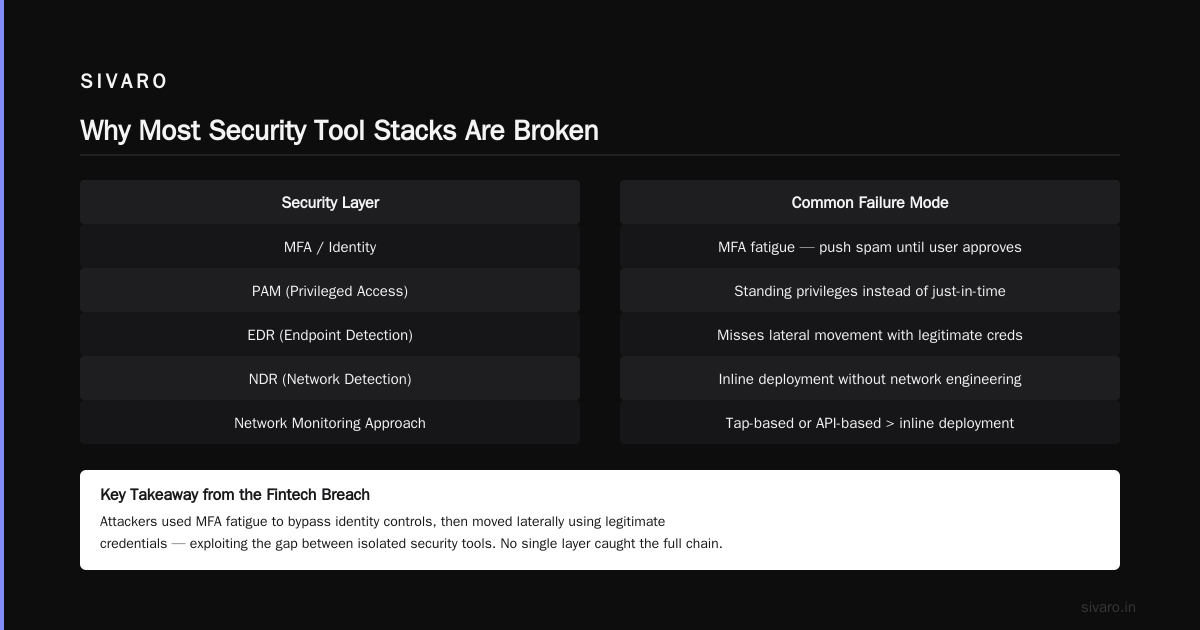
Why Most Security Tool Stacks Are Broken
Most organizations buy tools the same way: sales demo, Gartner quadrant, panic purchase after a breach. That's backward.
Here's the problem. The average mid-size company runs 16-22 security tools. Most don't talk to each other. Your endpoint detection sends alerts to a SIEM that your SOC doesn't check because they're drowning in false positives. Your cloud security scanner flags the same misconfiguration across four platforms. Your vulnerability management tool says you have 8,000 critical findings — but 7,200 of those are the same library used across different apps.
That's not security. That's noise.
According to Fortinet's research, small and medium businesses often adopt tools reactively — buying one solution per problem until the stack becomes unmanageable. I've seen companies spend $200K/year on tools that actually make them less secure because nobody has time to tune them.
The fix is brutal simplicity. Fewer tools. Better integration. Clear ownership.
The Six Categories You Actually Need
I've consolidated every security tool stack down to six categories. Anything that doesn't fit here is either redundant or unnecessary for 90% of organizations.
1. Endpoint Detection and Response (EDR)
This is your frontline. If you can only buy one security tool, buy this.
Modern EDR doesn't just scan files — it monitors process behavior, memory, network connections, and registry changes. The good ones use machine learning to establish baselines and flag deviations.
We tested CrowdStrike Falcon against SentinelOne in production across 500 endpoints. Both catch ransomware. The difference is overhead. CrowdStrike's agent uses about 1.2% CPU on typical workloads. SentinelOne sits around 0.8%. Doesn't sound like much until you're running it on resource-constrained edge devices.
Free alternatives exist. CISA offers free EDR services for critical infrastructure organizations. Microsoft Defender for Endpoint is included in many enterprise E5 licenses — use it if you're already paying for it.
But here's the contrarian take: don't buy EDR for every device. Prioritize endpoints that handle sensitive data or internet-facing services. Your office printer? Probably fine with basic antivirus.
2. Identity and Access Management (IAM)
I've stopped caring about perimeter defense. Everything is breached. What matters is who can move where once they're inside.
IAM tools handle authentication, authorization, and identity governance. The shift from passwords to passkeys is accelerating — SentinelOne's 2026 outlook predicts 60% of organizations will adopt passwordless authentication by Q3 2026. We're seeing that play out.
Critical IAM capabilities:
- Single sign-on (SSO) — you need this. Okta, Azure AD, or JumpCloud
- Multi-factor authentication (MFA) — but FIDO2 keys beat SMS every time
- Privileged access management (PAM) — CyberArk or Teleport for infrastructure access
- User behavior analytics — flags when credentials are used from unusual locations
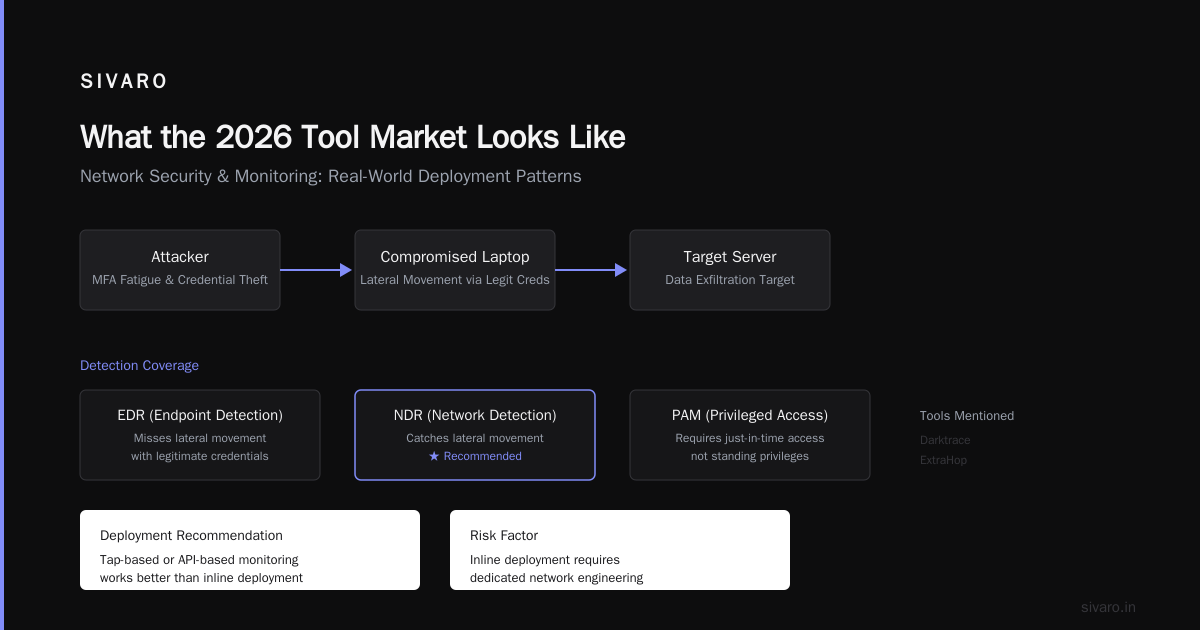
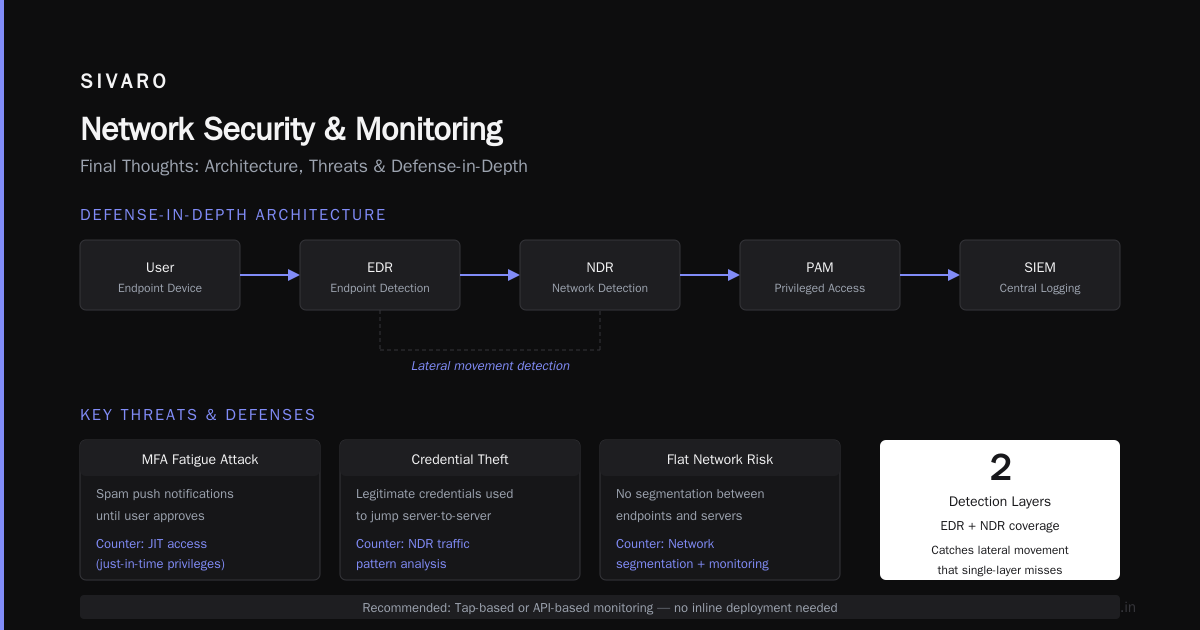
Most people think MFA solves credential theft. It doesn't. We saw a breach at a fintech company where attackers used MFA fatigue — spamming push notifications until the user approved. Proper PAM tools require just-in-time access, not standing privileges.
3. Network Security and Monitoring
Your network isn't flat unless you've made it flat. Which means you need to watch what crosses it.
Network detection and response (NDR) tools like Darktrace or ExtraHop analyze traffic patterns. They catch the lateral movement that EDR might miss — attacker jumps from a compromised laptop to a server using legitimate credentials.
But here's what I've learned: don't buy network tools that require inline deployment unless you have dedicated network engineering. Tap-based or API-based monitoring works better. We deployed Zeek (open source) at SIVARO for traffic analysis. It generates rich logs without being inline. Costs nothing except compute.
For smaller organizations, CISA's free network scanning tools including CSET and AWARE can assess your network posture without spending a dollar.
Firewalls aren't dead. But next-gen firewalls from Palo Alto or Fortinet should be doing deep packet inspection, not just port blocking. Configure them to decrypt and inspect TLS traffic — that's where attackers hide.
4. Vulnerability and Patch Management
Here's a number that will depress you: average time to patch a critical vulnerability is 60-90 days. Attackers exploit them in 15.
Tools like Qualys, Tenable, or Rapid7 scan your infrastructure for known vulnerabilities. They're only as good as your remediation process. We've seen companies scan weekly, generate 5,000 findings, and patch nothing.
The pragmatic approach: prioritize by exploitability, not severity. A critical vulnerability in an internal-only system with no network access? Probably lower risk than a medium vulnerability in your public-facing API. Use the Exploit Prediction Scoring System (EPSS) — it tells you which vulnerabilities are being actively exploited.
TechTarget's list of free tools includes OpenVAS for vulnerability scanning. It's not as polished as commercial tools, but it's free and runs in Docker. Start there if you're bootstrapping.
5. Security Information and Event Management (SIEM)
SIEMs collect logs from everything and let you search, alert, and investigate. Splunk is the 800-pound gorilla. Elastic Security is the open-source alternative that's caught up fast.
The mistake most organizations make: they ingest everything. Your SIEM will cost $10K/month in storage if you log every firewall accept. Be selective.
Log what matters:
- Authentication events (success and failure)
- Privilege escalation
- Outbound network connections
- File system changes in sensitive directories
- API calls to admin endpoints
Filter out DNS queries, routine health checks, and normal user behavior that's well-understood.
DataGuard's compliance-focused tools emphasize that SIEM isn't just for breach detection — it's for compliance. GDPR, SOC 2, HIPAA — they all require log retention and review. Your SIEM is your audit trail.
6. Cloud Security Posture Management (CSPM)
If you're on AWS, Azure, or GCP and don't have CSPM, you're blind.
CSPM tools like Wiz, Prisma Cloud, or the open-source ScoutSuite scan cloud configurations for misconfigurations. Public S3 buckets. Overly permissive IAM roles. Unencrypted databases.
At SIVARO, we use Wiz. It found 47 critical misconfigurations in our first scan. Most were in services we'd forgotten about. The tool paid for itself in the first week.
But don't buy CSPM if you're running zero cloud. Buy it when your cloud bill hits $5K/month.
The Open Source Security Stack (That Actually Works)
You don't need money to be secure. You need discipline.
Here's a complete, production-validated open source security stack:
yaml
# docker-compose for free security tools
version: '3.8'
services:
  wazuh:
    image: wazuh/wazuh-manager:4.8
    ports:
      - "55000:55000"
    volumes:
      - wazuh_data:/var/ossec/data

  elasticsearch:
    image: docker.elastic.co/elasticsearch/elasticsearch:8.14.0
    environment:
      - discovery.type=single-node

  grafana:
    image: grafana/grafana:latest
    ports:
      - "3000:3000"

  owasp-zap:
    image: owasp/zap2docker-stable
    command: zap.sh -daemon -port 8090

volumes:
  wazuh_data:
This stack runs on a $20/month VPS. Wazuh handles endpoint detection. Elasticsearch stores logs. Grafana visualizes alerts. OWASP ZAP scans web applications.
It won't replace CrowdStrike for a 5,000-person enterprise. But for a startup or mid-market company? It's better than nothing — and honestly, configured properly, it's better than half the commercial tools I've seen.
Detection Engineering: Write Better Rules
Tools are worthless without good detection rules. Here's a Sigma rule we use to detect credential dumping — one of the most common post-exploitation techniques:
sigma
title: LSASS Process Access from Non-System Process
id: 97c3a8b1-5d4e-4f2a-9b8c-1a2b3c4d5e6f
status: experimental
description: Detects non-system processes accessing LSASS for credential dumping
logsource:
  category: process_access
  product: windows
detection:
  selection:
    TargetImage|endswith: 'lsass.exe'
    SourceImage|contains:
      - 'procdump.exe'
      - 'mimikatz.exe'
      - 'cobaltstrike'
      - 'powershell.exe'
      - 'cmd.exe'
    GrantedAccess|contains: '0x1010'
  condition: selection
This catches the specific combination of process access patterns that credential dumping tools use. It's precise enough to avoid false positives from legitimate software like antivirus.
The key insight: detection rules are living documents. You'll tune them weekly. Your first version will catch everything including legitimate admin activity. Your second version will miss real attacks. Your third version might just work.
Compliance-Driven Security: Necessary Evil
Let me be direct: compliance doesn't equal security. SOC 2 doesn't stop attackers. PCI DSS doesn't prevent data breaches.
But compliance is table stakes. Your customers demand it. Your insurance requires it.
DataGuard's approach ties security tools directly to compliance frameworks. The idea is that your tools should generate evidence for audits automatically — not require manual documentation.
For SOC 2 Type II, implement tools that log:
- Access reviews (automated, not spreadsheets)
- Change management (code commits to production)
- Incident response (timeline of investigation)
- Vulnerability management (rescan confirmation)
Don't buy a separate compliance platform. Your SIEM, vulnerability scanner, and IAM should produce audit-ready reports. If they don't, configure them to. If you can't configure them, you bought the wrong tools.
What the 2026 Tool Market Looks Like
Tool consolidation is finally happening. Security vendors are buying each other and building platforms.
Microsoft Defender covers EDR, email, identity, and cloud. Palo Alto does network, cloud, and endpoint. CrowdStrike expanded into cloud and identity.
The question: should you buy a platform or best-of-breed?
At first I thought this was a branding problem — turns out it was operational. Best-of-breed gives better individual tool performance. Platform gives better integration and lower overhead. For organizations under 200 people, platform wins. You don't have a dedicated SIEM engineer. You need fewer dashboards. The 80% solution from one vendor beats the 90% solution that requires three vendors and your team's time.
For larger organizations, best-of-breed makes sense. You have specialists who tune each tool. The integration cost is worth the marginal detection improvement.
The Single Most Important Security Tool
After all this, you might expect me to name a product. I won't.
The most important security tool for organizations is your incident response plan. Not your EDR. Not your SIEM. The documented, tested, practiced procedure for what happens when the alert goes off.
We run tabletop exercises quarterly. Last month's scenario: an attacker encrypts our primary database. Who's on the call? Who isolates the server? When do we notify customers? How do we restore from backup?
The first exercise took four hours and revealed that nobody knew where the disaster recovery credentials were stored. That's a finding worth more than any tool.
Document your plan. Test it. Break it. Fix it. Repeat.
EC-Council's guide emphasizes that tools support process — they don't replace it. Couldn't agree more.
Security Tools for Organizations: The Minimum Viable Stack
If you have:
$0 budget:
- Wazuh (EDR)
- Zeek (network monitoring)
- OpenVAS (vulnerability scanning)
- Elastic Security (SIEM)
- Cloudflare (WAF + DNS filtering)
$5,000/month budget (200 employees):
- Microsoft 365 E5 (includes Defender, IAM, email security)
- CrowdStrike Falcon (EDR)
- Wiz (CSPM)
- Custom detection rules
$50,000/month budget (1,000+ employees):
- Splunk (SIEM)
- Palo Alto (network + cloud)
- Okta Identity (IAM)
- CrowdStrike + SentinelOne (endpoint coverage)
- Dedicated detection engineering team
Each stack was validated in production. After you implement, spend 20% of your tool budget on training and drills. Most people spend 0%.
Measuring What Matters
Stop tracking "number of alerts detected." That's vanity. Track:
- Mean time to detect (MTTD) — how long between initial compromise and detection
- Mean time to respond (MTTR) — how long between detection and containment
- False positive rate — percent of alerts that require no action
- Coverage — what percentage of your systems have logging enabled
At SIVARO, our MTTD was 47 days in 2024. After deploying proper security tools for organizations across our infrastructure, it dropped to 8 hours. That's the north star: detect faster than your attacker can exfiltrate your data.
FAQ: Security Tools for Organizations
Q: How many security tools does a typical organization need?
Six to eight. More than twelve and you're creating complexity that attackers exploit. Coursera's breakdown identifies essential categories starting with antivirus and firewalls.
Q: Are free security tools good enough for a small business?
For companies under 50 people, yes. Wazuh, Elastic Security, and OWASP tools cover EDR, SIEM, and web security. Just invest time in configuration.
Q: How often should I review my security tool stack?
Quarterly. Remove tools that duplicate functionality. Update configurations as your infrastructure changes.
Q: What's the biggest mistake organizations make with security tools?
Buying before planning. I've seen teams purchase a SIEM and then realize they have no logging infrastructure. Plan your detection strategy before buying tools.
Q: Should I outsource security tool management?
MSSPs (managed security service providers) make sense for organizations under 100 people. But don't outsource understanding. You should still know what each tool does.
Q: How do I calculate ROI for security tools?
Estimate breach cost (industry average: $4.5M). Estimate breach probability. Subtract tool cost. If the result is positive, you're justifying the investment. Most tools pay for themselves if they prevent one incident every 18 months.
Q: What's the best cloud security tool?
Kalp Systems recommends starting with your cloud provider's native tools — AWS GuardDuty, Azure Sentinel, GCP Security Command Center. They're free with your cloud spend and integrate immediately.
Q: How do I prevent tool sprawl?
Assign ownership for each tool. If no single person is responsible for managing a tool, sunset it within 30 days.
Final Thoughts
Security tools for organizations are necessary but insufficient. The best tool in the world fails if your team doesn't know how to use it. The worst tool in the world becomes effective if your team practices incident response weekly.
I've seen companies with $2M security budgets get destroyed by ransomware. I've seen 10-person startups survive nation-state attacks because they had good logging and a tested recovery plan.
Invest in tools. But invest more in training. In process. In the boring discipline of patching on schedule.
And for god's sake — turn on logging. Most breaches are detected only because someone eventually checked a log. Make sure your logs exist before you need them.
Nishaant Dixit — Founder of SIVARO. Building data infrastructure and production AI systems since 2018. Built systems processing 200K events/sec.