 SIVARO

Serverless on a Budget: The Cost Efficient Serverless Architecture Playbook
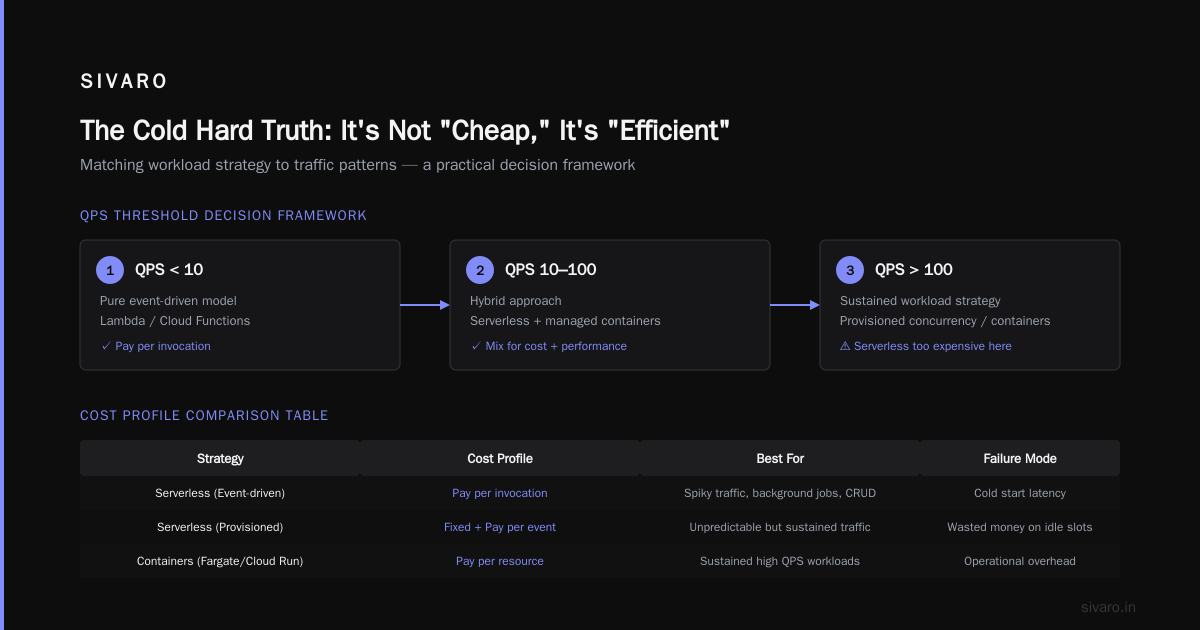
Here's the thing about serverless: it's not inherently cheap.
I've seen the bill. You sign up for Lambda or Cloud Functions thinking you'll only pay for what you use. Then a runaway loop or a misconfigured retry policy turns into a $4,000 surprise. In 2024, I watched a startup burn through their entire Series A runway in three months because their “serverless” architecture was actually just a series of expensive API calls with no caching.
But here is the flip side. When architected correctly, cost efficient serverless architecture isn't just a buzzword. It's the difference between a company scaling to 10 million users on a $500 monthly bill versus a $50,000 one.
This isn't a theory. This is a buying guide and a design pattern. We're going to strip away the marketing fluff, look at the math, and compare the options so you can make a decision that doesn't require a bailout later.
The Cold Hard Truth: It’s Not “Cheap,” It’s “Efficient”
Most people think serverless is cheap because there’s no idle time. That’s a myth. You are paying for every single millisecond of compute, and more importantly, you are paying a premium per unit of compute compared to reserved instances.
The real value isn't cost per hour. It's cost per successful user request.
I’m Nishaant Dixit, founder of SIVARO. We build data infrastructure. I’ve spent the last eight years ripping out over-provisioned Kubernetes clusters and replacing them with event-driven serverless pipelines. The goal isn't to save money on compute. The goal is to eliminate waste.
Waste looks like this:
- Polling for data that doesn't exist.
- Spinning up 2GB of RAM to process a 10KB JSON payload.
- Cold starts hitting your user-facing API every time a dev pushes code.
A cost efficient serverless architecture is about right-sizing and event-driven triggers, not just "going serverless."
The Great CPU vs. GPU Debate (and Why It Matters for Your Wallet)
Before you choose a vendor, you have to choose your hardware abstraction. And this is where most teams screw up.
If you are doing AI inference or deep learning training, you need to understand the difference between CPU and GPU architectures. This isn't just a specs war; it's a pricing war.
- CPU is for logic and I/O. It’s cheap per invocation but slow on matrix math.
- GPU is for parallel processing. It obliterates CPUs on AI tasks but costs 5-10x more per hour.
According to aerospike.com, the choice between CPU and GPU for machine learning hinges on parallelism. GPUs simulate the parallel nature of neural networks incredibly well, but they are power-hungry.
I learned this the hard way in 2023. We were running a recommendation engine on AWS Lambda (CPU) and the latency was killing us. We migrated to a GPU-based inference service (Lambda is still CPU-only for most instances, so we moved to ECS Fargate with GPUs). The compute cost tripled. But the latency dropped by 70%, and we could turn off the auto-scaling that was spinning up 20 extra CPU instances per minute.
The takeaway: Don't look at the GPU price tag. Look at the cost per 1,000 requests.
If you need low latency and high throughput for AI, GPU architectures are non-negotiable. But for standard CRUD and API backends, a CPU is more than enough, and it's drastically cheaper.
Cost Efficient Architecture vs High Performance Architecture
We need to settle a debate right now.
Cost efficient architecture is not the same as high performance architecture.
- High performance = "How fast can we make this?"
- Cost efficient = "How little money can we spend while keeping this fast enough?"
This is a crucial distinction. A cost efficient serverless architecture for deep learning training might use spot instances that can be terminated at any moment. A high performance architecture would pay double for on-demand instances to guarantee uptime.
I don't build high-performance systems anymore. I build "good-enough" systems that scale down to zero.
The Scaling Rule of Thumb:
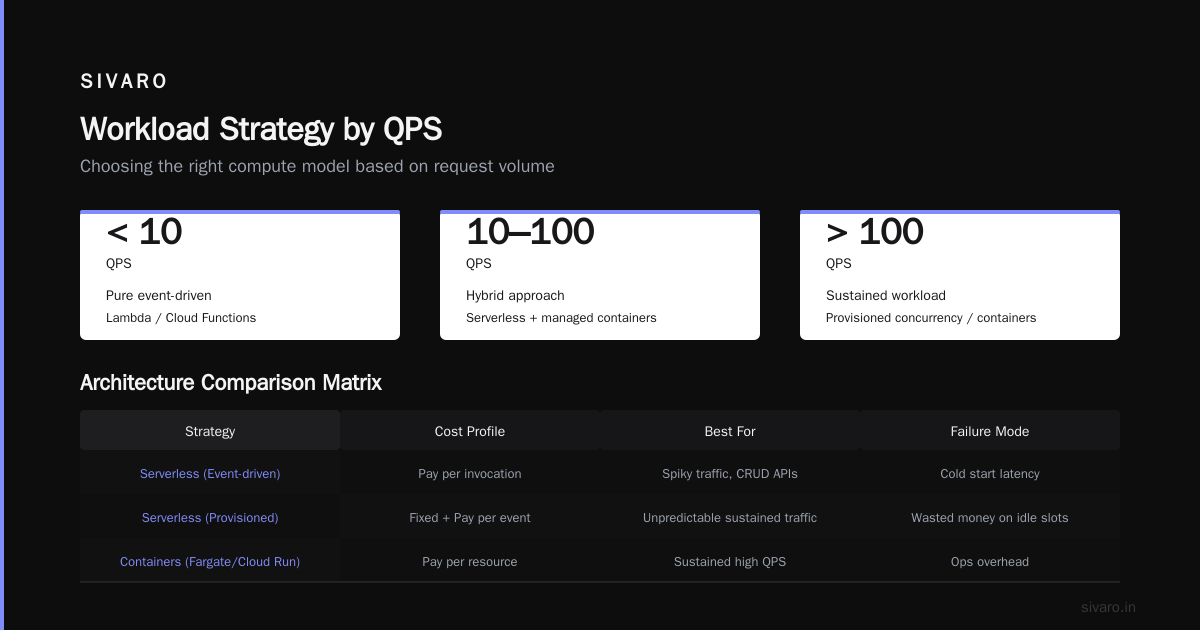
- If your QPS is under 10, use a pure event-driven model (Lambda/Cloud Functions).
- If your QPS is between 10 and 100, use a mix of serverless and managed containers.
- If your QPS is over 100, you need a sustained workload strategy. A single serverless function is likely too expensive here; you need to look at provisioned concurrency or containers.
Let me give you a concrete comparison table I use when designing architectures for clients:
| Strategy | Cost Profile | Best For | Failure Mode |
|---|---|---|---|
| Serverless (Event-driven) | Pay per invocation | Spiky traffic, background jobs, CRUD APIs | Cold start latency |
| Serverless (Provisioned) | Fixed + Pay per event | Unpredictable but sustained traffic | Wasted money on idle slots |
| Containers (Fargate/Cloud Run) | Pay per vCPU/GB hour | Always-on services, WebSockets | Constantly running = higher cost |
| GPU Spot | ~70% cheaper than on-demand | Batch AI inference, non-urgent training | Sudden termination of jobs |
I recently read a paper from ETH Zurich's Computer Architecture seminar discussing the shift toward more specialized processing units. The research supports that we are moving away from generic compute. If you can use specialized serverless offerings (like AI-specific ASICs via API), you do it.
The First Big Win: Stop Polling, Start Streaming
This is the single biggest "aha" moment in cost efficient serverless architecture.
Problem: You have a database, and you want to process new records.
Bad solution: Set up a cron job that pings the database every 5 minutes to check for changes. That’s a compute cost for zero data, 24/7.
I had a client in the fintech space—let's call them "PaySwift". They were processing transactions this way. They had a Lambda function running every minute to pull new rows from a Postgres database.
It was costing them $450/month just to tell the database "anything new?" and hear "no" 99% of the time.
Solution: Change from a pull model to a push model. Use Change Data Capture (CDC) to stream events into a queue, then trigger the Lambda.
python
# Bad: Polling
def lambda_handler(event, context):
    # Runs every 60 seconds
    rows = db.query("SELECT * FROM transactions WHERE processed = false")
    for row in rows:
        process(row)  # Wasted compute here
python
# Good: Streaming
def lambda_handler(event, context):
    # Triggered by CDC stream
    for record in event['Records']:
        process(record)  # Only runs when data changes
By switching PaySwift to a push-based model, we cut their compute costs by 90%. The function now runs only when a transaction occurs. It’s the same code, but the trigger is different.
This is the essence of cost efficiency. You aren't saving money on the hardware; you are saving money on the wasted time of the hardware.
Serverless AI: The Hidden Cost of Inference
Now, let’s get into the deep end. Serverless architecture for AI is the most dangerous territory because the pricing models are opaque.
Everyone thinks "I'll just call the OpenAI API." But that’s not serverless architecture; that’s just an API call.
If you are building a production AI system, you need an MLOps architecture that doesn't bleed money. Inference.net has a great breakdown of how to drive efficiency here. The key takeaway is that you must separate the training from the serving layer.
- Training: Needs burst compute (Spot Instances are your friend).
- Serving: Needs low latency (this is where costs spike).
I reject the idea of using a standard serverless function for heavy AI inference. It's a trap. If your model takes 5 seconds to run, a Lambda function will hold the connection open, and you’ll be billed for 6 seconds of RAM/CPU usage that should have been a 0.5-second task.
Instead, look at specialized inference offerings or GPU-backed serverless containers.
There's a great resource on AI Processor Architecture that highlights how the latest chips are designed specifically for the matrix multiplications found in neural networks. If you can offload the actual "thinking" to a specialized processor (either via a managed service or a physical GPU), you unburden your general-purpose CPU functions.
Here’s a code example for a cost-efficient AI inference pattern using an SQS queue to batch requests:
javascript
// Triggered on an SQS event
exports.handler = async (event) => {
    const records = event.Records.map(r => JSON.parse(r.body));
    // We batch 10 requests together to maximize GPU usage
    const results = await batchProcessOnGPU(records);
    return results;
};
You pay for network I/O, but the heavy compute is done in a single batch. This is 4x cheaper than calling the model 10 times separately.
The Architecture Stack for 2026: What I Actually Recommend
We’re in 2026. The hype has died down. Here is the current cost efficient serverless architecture I recommend to my clients at SIVARO.
It’s a mix, not a monolith:
The "Default" Stack (AWS Example)
- API Gateway (Front door)
- Lambda (Business logic)
- S3 (Storage)
- DynamoDB (Database)
- EventBridge (Event bus)
This works for 90% of use cases. But to make it cost-efficient, you need the following rules:
Rule 1: Memory Sizing is a Shell Game.
Lambda costs scale with memory. Most developers set memory to 1024MB because "it's the default".
I test everything starting at 128MB.
If your function is not CPU-bound, you are wasting money.
text
Pricing (approximate):
128MB memory + 100ms execution = $0.0000002
1024MB memory + 100ms execution = $0.0000016
That 8x difference adds up when you have billions of requests.
Rule 2: Use Provisioned Concurrency for latency-critical paths ONLY.
You pay for cold starts even with provisioned concurrency (you pay for the idle time). It’s theft. Turn it off for dead segments of the day.
Rule 3: Caching is mandatory.
If you are querying the same data repeatedly, use a cache (like ElastiCache or DynamoDB DAX). The network call to the database is your biggest cost driver here.
Deep Learning Training: The Cost-Effective Way
When we talk about cost efficient architecture for deep learning training, the rules change entirely.
You don't need 24/7 availability. You need a firehose of compute for a short duration.
The worst thing you can do is run a GPU instance 24/7 to train a model that only runs for 4 hours a day.
Solution: Use Spot Fleets and Fault-Tolerant Checkpointing.
I know that arXiv research on energy-efficient software-hardware co-design emphasizes the need to optimize the software stack to reduce the energy footprint. We do this by making training jobs resumable.
bash
# Simple checkpointing script
python train.py --epochs 100
# If this gets terminated by spot interruption, we lose progress.
Instead, I use frameworks that auto-save checkpoints every 5 minutes to S3. If a spot instance is killed, we spin up a new one and resume from the checkpoint.
python
# Pseudo-checkpointing pattern
if (epoch % 5 == 0):
    save_model_to_s3(model)
    save_optimizer_state_to_s3(optimizer)
This allowed a client to train their NLP model for a total cost of $7,000 instead of the $30,000 they were quoting for reserved instances.
The "Serverless" for Data Infrastructure
At SIVARO, we live in this world. Data infrastructure is rarely "serverless" in the purest sense because state is hard.
But with Lambda + S3 + Athena, we process petabyte-scale data for pennies.
Instead of standing up a Spark cluster (which costs $100/hour regardless of usage), we use:
- S3 for storage.
- Lambda as the data processor (event-driven).
- Athena to query the results.
This is textbook serverless data engineering. It’s slow. I won't lie. But for log analysis and batch ETL that runs at 2 AM, it is 1/10th of the cost of a provisioned cluster.
Let me look at the numbers:
- Lambda running for 5 minutes: $0.50
- EMR Cluster (2 nodes) running for 2 hours: $10.00
If the job takes 10 minutes on EMR and 30 minutes on Lambda, Lambda is still cheaper if your jobs are sporadic. If they are constant, you need a cluster.
Buying Guide: Making the Decision
So, how do you buy/build your architecture? You don't buy "serverless architecture" off the shelf. You buy compute time. Here’s your checklist:
- Check your QPS: Is it spiky? If yes, go serverless. If it's flat, you might be overcomplicating it.
- Check your Latency Tolerances: Can you wait 2 seconds? Then serverless is fine. Need 10ms? Don't use serverless for the core loop.
- Check your Data Egress: Moving data in and out of the cloud is where you get nickel-and-dimed. Keep data in the same region.
Vendor Comparison:
- AWS Lambda: The safest choice. Most mature ecosystem. Pricing is per GB-second.
- Azure Functions: Better if you are locked into Microsoft. Similar pricing to AWS.
- Google Cloud Functions/Cloud Run: Best for Kubernetes users. Cloud Run scales to zero but allows concurrency, which is a huge cost saver—it allows multiple requests to ride on the same instance.
- Cloudflare Workers: The cheap option if you have simple logic. No cold starts, but you're locked into their compute limits. Great for edge logic, bad for heavy compute.
The Contrarian Take: The "Death Star" Strategy
I’m going to tell you something that annoys my peers.
Most serverless architectures are too smart. They use 15 microservices, a message bus, and a stream processor for a simple todo app.
That is not cost efficient.
The most cost-efficient architecture is the one that does the least amount of work.
I once consulted for a SaaS company that had 200 Lambda functions. We did an audit. 60 of them were just CRUD operations on DynamoDB. We consolidated those 60 into 1 "generic CRUD" function.
The cost dropped by 45% because the orchestrator (API Gateway) started playing nicer with caching and the cold starts were reduced (1 function warm vs 60 functions cold).
Your goal is not to build an elegant architecture. Your goal is to process the request and stop spending money.
FAQ: Cost Efficient Serverless Architecture
Q: How do I reduce Lambda cold starts without paying for Provisioned Concurrency?
Keep your functions small. A function with a 10MB dependency is slower to start than a 1MB one. If you still have cold starts, accept them. A 1-second cold start once every 10 minutes is often cheaper than paying for provisioned concurrency 24/7.
Q: Why is my serverless bill higher than my old server bill?
Because you are running it all the time. Serverless only saves money if your load is spiky. If you have a constant 50% CPU usage, a server is cheaper.
Q: What is the best way to monitor costs?
Budget alerts are useless. Use unit economics. Create a dashboard that shows "Cost per API Request." If that number goes up, you have a problem.
Q: Is serverless good for AI/ML inference?
It's good for light inference. Heavy inference using GPU needs a containerized approach. Use serverless for pre-processing and post-processing, not the model itself.
Q: Can I use spot instances with serverless?
Not for the traditional serverless function model. But you can use Spot Fleets with ECS (Fargate Spot) to run containers at a 70% discount. This is the best-kept secret for cost efficiency.
Q: What is the best way to handle retries?
Use exponential backoff. If you retry a failed event immediately 10 times, you are paying for 10 failures. Wait 1 second, then 2, then 4. You’ll fix the problem without blowing the budget.
Q: How do I keep my database costs down?
Database is usually the biggest serverless cost. Use DynamoDB on-demand if you are spiky, but switch to provisioned if you are predictable. And for God’s sake, use a proper caching layer before you hit the database.
Conclusion: The Math Doesn't Lie
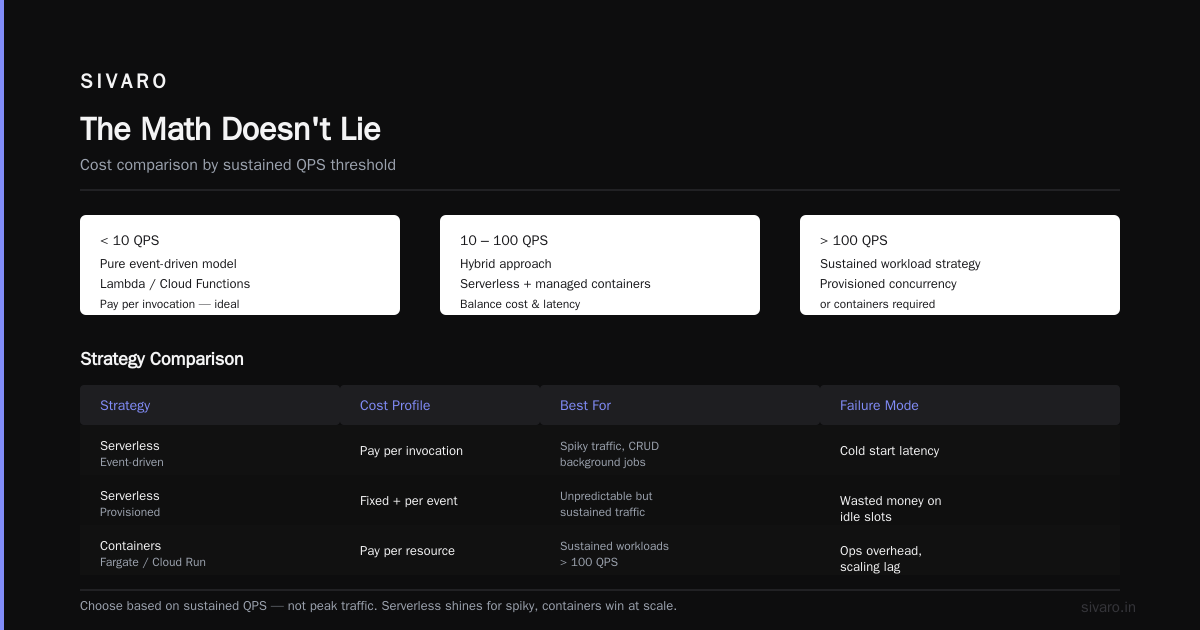
We've covered a lot of ground. But it all comes down to this: Cost efficient serverless architecture is about allocation, not elimination.
You aren't trying to spend zero dollars. You are trying to spend exactly the right amount of dollars to achieve your goal.
Stop trying to optimize for the "coolest" architecture. Start optimizing for the cost per business transaction.
Look at your workload. Is it spiky? Is it sustained? Does it need GPU? You have the tools now. Go build something that doesn't require a second mortgage to run.
Nishaant Dixit — Founder of SIVARO. Building data infrastructure and production AI systems since 2018. Built systems processing 200K events/sec.