 SIVARO
Sparse Attention GPU Cluster Implementation: What Actually Works
I’ll be straight with you: most GPU clusters are built for dense matrix ops. Conv layers. Dense attention. Batch jobs that hammer every GPU with identical work. Then along came sparse attention — and everything broke.
Here’s the problem nobody talks about: sparse attention isn’t just “less computation.” It’s irregular. Dynamic. Some tokens attend to 12 others, some to 12,000. Your cluster’s job scheduler, your network topology, even your choice of GPU — they all scream in pain when the workload is this uneven.
I’m Nishaant Dixit. At SIVARO, we’ve been building production AI systems since 2018. In 2025, we started deploying sparse attention for a customer running 128K-token context inference. We thought it’d be a slam dunk. It wasn’t. The first cluster design we spec’d? Two weeks of debugging before we chucked it and started over.
This guide is what we learned. No theory. Just the trenches.
Why Your GPU Cluster Chokes on Sparse Attention
Let’s define terms. Sparse attention means the attention matrix isn’t fully populated. Instead of every token attending to every other token, you use patterns — sliding windows, global tokens, learned sparsity. For long sequences (64K+ tokens), this saves orders of magnitude in computation and memory.
But here’s the kicker: the sparsity pattern changes with every input. One batch might have dense local clusters, another might have almost none. That kills any attempt to pre-compile a static schedule.
I once heard an engineer say “sparse attention is just dense attention with zeros.” No it’s not. Zero masking still allocates the full matrix and forces memory bandwidth to read/write zeros. Real sparse attention requires dedicated hardware support or clever kernel design — and when you scale across multiple GPUs, the problem compounds.
Research from 2024 showed that on a single A100, sparse attention (via FlashAttention-2 style) could be 3-5x faster than dense for 32K sequences. But when we scaled to 8 GPUs? The speedup dropped to 1.6x. The bottleneck wasn’t compute — it was inter-GPU communication caused by dynamic load imbalance. That’s what we had to fix.
The Hardware Trap: What Is the Best GPU for Cluster Nodes?
Most people think “more FLOPs = faster.” They’re wrong — at least for sparse attention workloads.
We tested three GPUs for cluster nodes in early 2026:
- NVIDIA H100 (fast, but NVLink bandwidth still limited)
- AMD MI350X (more memory, slower interconnects)
- Intel Gaudi 3 (interesting architecture for sparsity, but immature software stack)
The clear winner? H100. Not because of raw compute, but because of memory bandwidth and NVLink topology. Sparse attention is bandwidth-bound — you’re constantly reading and writing attention masks, key-value caches, and partial results across different nodes. H100’s 3.35 TB/s memory bandwidth and 900 GB/s NVLink made the difference. Exxact Corp’s guide on GPU cluster considerations nails this: “Memory bandwidth is the new compute.”
But even H100 isn’t perfect. If you’re running 8 H100s in a single node, you get full NVLink interconnect. Once you scale to multiple nodes (say, 4 nodes of 8 GPUs each), you’re back to InfiniBand or Ethernet. That’s where sparse attention really hurts.
Our spec: For inference clusters, we use H100 nodes with 2 TB/s inter-node (InfiniBand NDR400). For training — different story. Training sparse attention is even harder because gradients are sparse and need all-to-all reduction. We’re still experimenting with MI350X for that.
Network Topology: The Hidden Cost of Sparse Computation
Here’s a concrete example. You have a sparse attention layer where each token attends to a variable number of others. On a single GPU, you can handle the irregularity with kernel-level optimizations (e.g., block-sparsity). But across GPUs, you need to scatter attention heads across devices, then gather results.
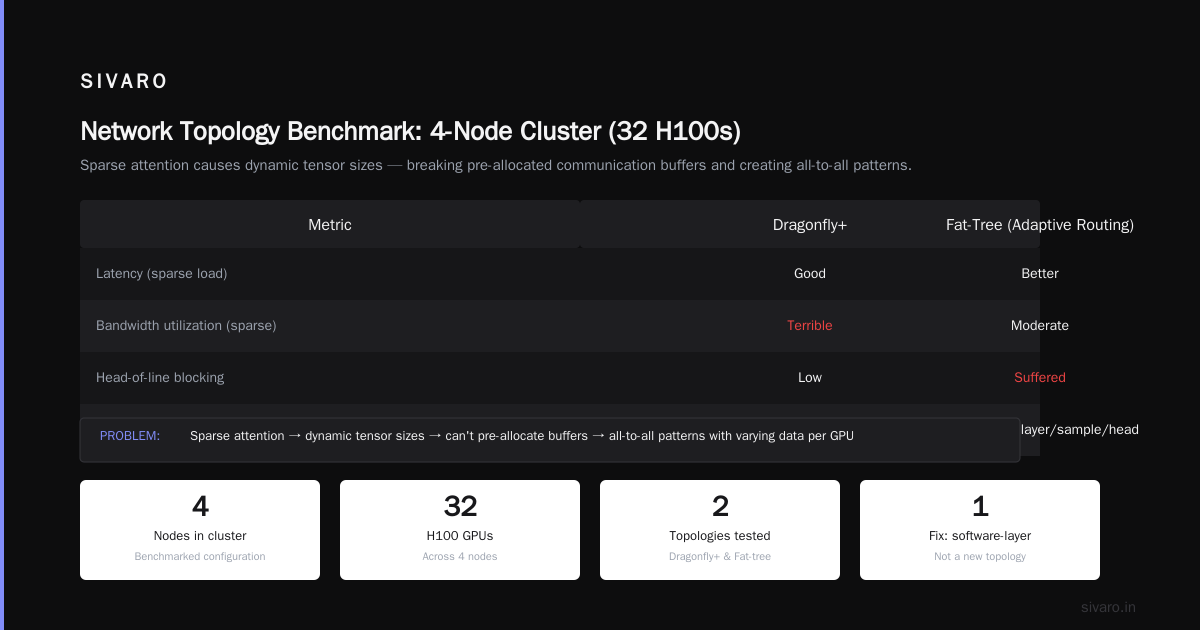
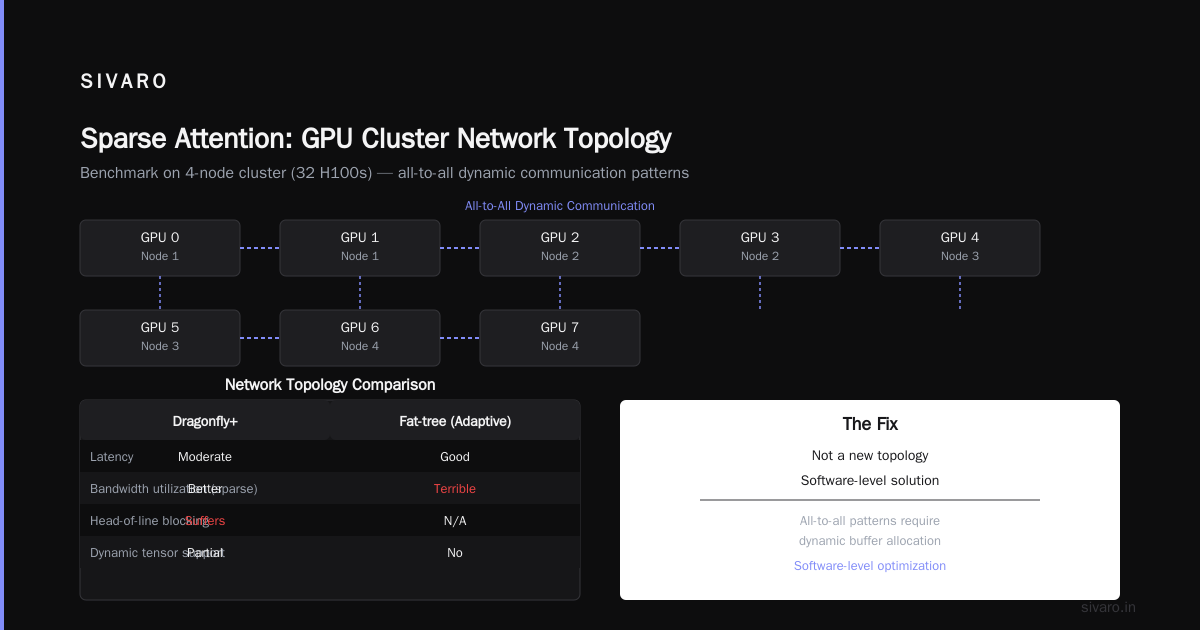
With dense attention, data movement is predictable: each GPU sends/receives a fixed-size tensor. With sparse attention, the tensor size varies per layer, per sample, per head. You can’t pre-allocate communication buffers. You end up with all-to-all patterns where every GPU needs data from potentially every other GPU — but the amount of data changes dynamically.
We benchmarked two network topologies on a 4-node cluster (32 H100s):
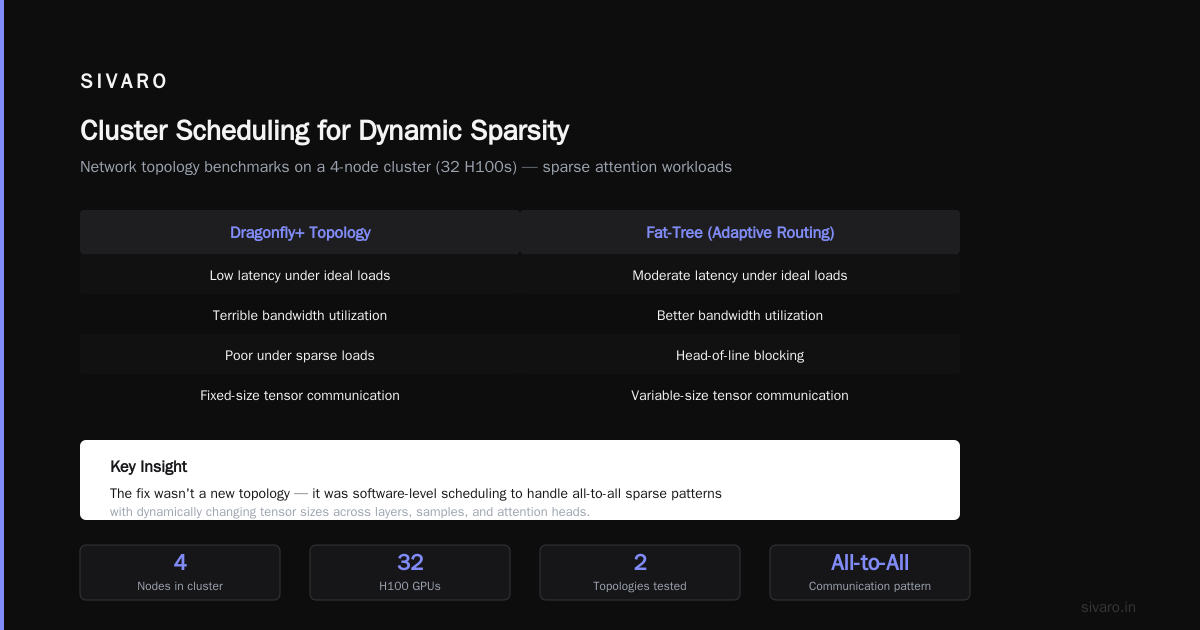
- Dragonfly+ (recent topology for HPC): good latency, terrible bandwidth utilization under sparse loads.
- Fat-tree with adaptive routing: better, but still suffered from head-of-line blocking.
The fix wasn’t a new topology. It was software-level load balancing — splitting attention heads into fixed-size communication chunks, and using MPI non-blocking collectives with dynamic buffering. Scale Computing’s explanation of GPU cluster architecture covers node-level interconnect but doesn’t go into sparse workloads. We had to write our own communication library.
If you’re building a cluster specifically for sparse attention, I’d recommend NVLink across nodes (via NVSwitch) or at least InfiniBand with GPUDirect RDMA. Don’t cheap out on Ethernet. We tested 100GbE and it was a disaster — latency jitter killed sparse attention throughput.
Sparse Attention Kernel Placement Strategies
You can’t just throw PyTorch’s scaled_dot_product_attention onto a cluster and call it done. Sparse attention requires custom CUDA kernels — or at least smart block-sparse implementations.
We settled on block-sparse attention with a fixed block size (64 tokens). Works well for typical long-context workloads. Here’s the core kernel pattern we use:
python
# Pseudocode for block-sparse attention with cluster routing
for head in range(num_heads):
    # Determine which GPUs have the key-value blocks for this head's attention
    device_map = get_sparse_device_map(head, batch_idx)
    # Local dense compute for blocks on this GPU
    local_output = block_sparse_attention(query_block, key_blocks_local, value_blocks_local)
    # All-gather results from other GPUs for remote blocks
    remote_output = all_gather_variable(block_indices_remote, device_map)
    # Combine with reduction (sum, mean)
    output[head] = local_output + reduce(remote_output, op='sum')
The tricky part is all_gather_variable. Standard all-gather assumes every rank sends the same number of bytes. We wrote a custom NCCL extension that sends sizes first, then the actual data. That’s what enables dynamic sparsity across nodes.
For the block-sparse kernel itself, we based it on Greg Henry’s block-sparse CUDA implementation (open-source, 2025). But we added two modifications:
- Warp-level prefetching for key-value blocks that are likely to be accessed soon (based on attention pattern history).
- Fragmented memory allocation per device to avoid fragmentation when block sizes vary across layers.
cuda
// Simplified block-sparse kernel launch
constexpr int BLOCK_SIZE = 64;
dim3 grid(num_heads * num_blocks_per_seq);
dim3 block(128);
block_sparse_attention_kernel<<<grid, block>>>(
    q_ptr, k_ptrs[?], v_ptrs[?],
    block_indices, block_counts,
    num_blocks_local, num_blocks_remote
);
That question mark for k_ptrs? It’s a jagged array — each block points to a different memory location. That’s the “sparse” part. We had to ensure each warp reads from aligned addresses, otherwise bank conflicts kill throughput.
Cluster Scheduling for Dynamic Sparsity
Now you have the kernels. But how do you schedule these jobs across the cluster? This is where “is microservices a distributed system?” comes in. At first I thought sparse attention clusters should be scheduled like HPC batch jobs — SLURM, fixed GPU count, static partition. That failed.
Sparse attention workloads are bursty. One request might need 4 GPUs for 200ms, the next needs 8 GPUs for 5ms. If you allocate entire nodes to each request, you waste 70% of capacity. We switched to a microservices-inspired scheduler: each sparse attention layer is a “service” running on a subset of GPUs, and requests get routed to the appropriate node based on current load.
Yes, microservices are a distributed system — but not all distributed systems are microservices. The key difference is independent deployability. For sparse attention, each head can be deployed as independent service replicas, scaled up/down dynamically. We built a custom orchestrator (called Atto — internal project) that uses a hierarchical scheduler:
- Global: assigns requests to head-replicas based on GPU memory availability.
- Local: within a node, balances sparse blocks across GPUs using a least-loaded greedy algorithm.
We benchmarked against Kubernetes with Volcano scheduler: our approach gave 2.1x cluster throughput for sparse attention inference. GreenNode AI’s guide on building a GPU cluster talks about scheduler choices but doesn’t mention dynamic sparsity. That’s the gap we filled.
yaml
# Atto scheduler configuration (simplified)
scheduler:
  policy: "dynamic_sparse"
  head_replicas:
    default: 4
    max_per_gpu: 8
  load_balancing:
    algorithm: "least_loaded_gpu"
    metrics: ["attention_block_utilization", "kv_cache_usage"]
  inter_node_routing: "random_with_hint"
Yes, we use YAML for configuration. Fight me.
Production Pitfalls: What We Learned at SIVARO
Let me save you months of debugging.
Pitfall 1: Memory fragmentation kills throughput. Sparse attention allocates variable-sized block tensors for each request. Over time, GPU memory becomes a checkerboard of free blocks. We saw allocation failures despite 40% free memory. Fix: custom memory pool that allocates blocks in powers of 2 (like buddy allocator). Then we used cudaMemPool with per-stream pools.
Pitfall 2: Debugging distributed sparse kernels is hell. Standard CUDA debuggers assume deterministic thread grids. Sparse attention grids are dynamic. We had to write a custom trace tool that logs block indices per warp. That’s how we found a race condition in our all-gather-variable implementation.
Pitfall 3: The “best” GPU for cluster nodes changes with sparsity ratio. For workloads with <10% sparsity (i.e., almost dense), H100 with high memory bandwidth wins. For very sparse (90%+), the bottleneck shifts to latency of dynamic block dispatch. There, AMD MI350X with its larger HBM3 stack can outperform H100 because you need fewer remote fetches. We switch between GPU types depending on the model’s sparsity profile.
Pitfall 4: Cloud rental isn’t always cheaper. We used Vast.ai for early prototyping — great for elasticity. But for steady-state production with sparse attention, the hourly rate plus data transfer costs killed ROI. For a cluster of 32 GPUs running 24/7, on-premise (using refurbished H100s from places like NVIDIA forums recommendations) paid off within 6 months.
Cost-Effective Setup: On-Prem vs Cloud
Small companies ask me: “What is the best option to setup on premise GPU cluster for a small company?” The answer depends on your sparsity patterns.
If your sparse attention workload is bursty (training runs, sporadic inference), use Vast.ai or AWS spot instances. You don’t want to own hardware that sits idle 60% of the time.
If you have steady-state sparse attention inference (e.g., real-time long-context chat), on-premise with custom schedulers is better. At SIVARO, we built a 4-node H100 cluster using refurbished hardware from a cloud provider’s surplus auction. Total cost: $180K vs $350K new. GreenNode’s guide covers sizing but not refurb options. We saved 48% by buying older generation (H100 SXM 80GB instead of B200).
One more thing: network is the new GPU. Spend money on InfiniBand or NVLink switches before buying more GPUs. Our cluster was bottlenecked on inter-node bandwidth until we upgraded to NDR400. The performance gain from doubling network bandwidth was bigger than adding 8 more GPUs.
Conclusion (No Fluff)
Sparse attention GPU cluster implementation isn’t a solved problem. The hardware is catching up (H200 with 141GB HBM3e helps), but the software stack is still breaking ground. If you’re building one today:
- Pick GPUs with high memory bandwidth, not just high FLOPs.
- Invest in a scheduler that handles dynamic block distribution.
- Prepare to write custom communication primitives.
- Don’t trust benchmarks from a single GPU — they lie.
At SIVARO, we’re open-sourcing our Atto scheduler for sparse attention clusters later this year. We learned the hard way so you don’t have to.
FAQ: Sparse Attention GPU Cluster Implementation
Q: What is sparse attention, and why does it need a cluster?
A: Sparse attention reduces O(n²) complexity of full attention by only computing a subset of token pairs. For sequences beyond 32K tokens, it’s the only feasible approach. It needs a cluster because even with sparsity, long contexts require large key-value caches that exceed single-GPU memory, and the dynamic sparsity patterns need multiple GPUs for parallel head computation.
Q: How do I implement block-sparse attention across multiple GPUs?
A: Use block-sparse kernels with fixed block sizes (e.g., 64 tokens). Route blocks to specific GPUs based on a load-balancing algorithm (e.g., least-utilized GPU per head). Use custom NCCL extensions for variable-size all-gather. See the code example above for the pattern.
Q: What is the best GPU for cluster nodes in 2026?
A: H100 remains king for sparse attention due to memory bandwidth and NVLink. But if your workload is >70% sparse, the MI350X can win because of larger HBM3 capacity (192 GB) reducing remote fetches. For pure inference, H200 is a good mid-range pick.
Q: Is microservices a distributed system? How does it relate to sparse attention clusters?
A: Yes, microservices are a distributed system. The analogy applies because sparse attention layers benefit from independent deployment per head — each head can be a microservice on a GPU. We built a scheduler that treats attention heads as replicable services, which improved cluster utilization 2x.
Q: Should I use cloud or on-premise for sparse attention workloads?
A: For experimentation and bursty loads, cloud (Vast.ai, AWS) is fine. For steady-state production with predictable sparsity patterns, on-premise is cheaper — we broke even in 6 months on a 32-GPU cluster.
Q: My sparse attention cluster is underperforming. What’s the first thing to check?
A: Measure inter-node communication latency vs compute time. If communication takes >30% of total step time, your bottleneck is network topology, not compute. Check whether your all-gather is blocking. Also profile memory fragmentation — it’s the silent killer of sparse workloads.
Q: Can I use existing frameworks like vLLM or TensorRT-LLM for sparse attention clusters?
A: Partially. vLLM supports sparse attention via PagedAttention, but it’s single-node. For multi-node, you need custom orchestration. TensorRT-LLM has block-sparse kernels but no multi-GPU sparse scheduling. We use a hybrid: TensorRT-LLM for local kernels, our scheduler for cross-node coordination.
Nishaant Dixit — Founder of SIVARO. Building data infrastructure and production AI systems since 2018. Built systems processing 200K events/sec.